User-based single sign-on (SSO) lets users from your corporate identity provider (IdP) log on to the Alibaba Cloud Management Console using their existing corporate credentials. Alibaba Cloud maps each external identity to a specific Resource Access Management (RAM) user in your account, and the logged-on user inherits that RAM user's permissions.
How user-based SSO works
SSO can be SP-initiated (started from the Alibaba Cloud Management Console) or IdP-initiated (started from your corporate application portal). The following diagram shows the SP-initiated flow.
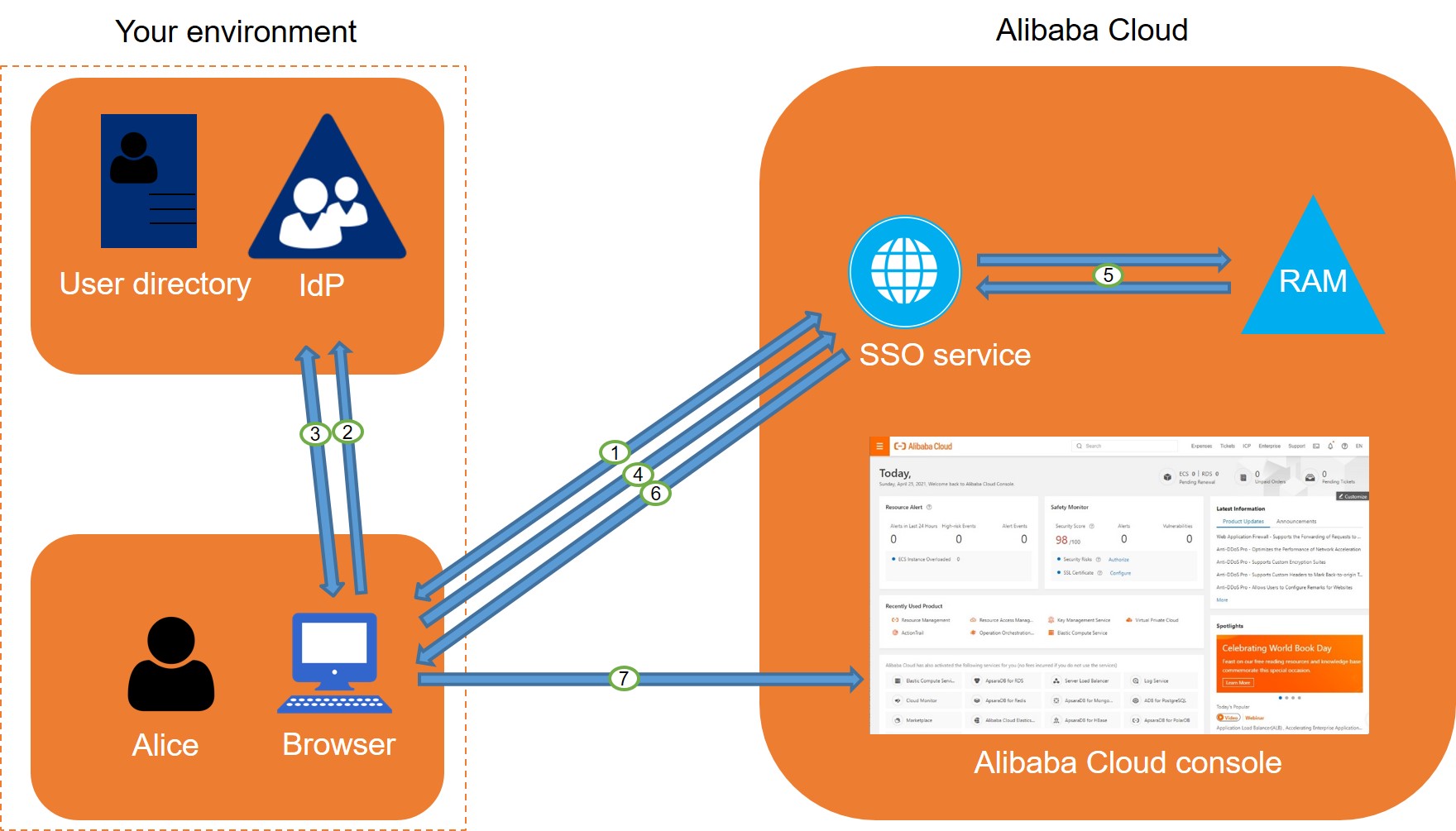
The user goes to the Alibaba Cloud Management Console and initiates SSO. Alibaba Cloud generates a SAML authentication request and redirects the browser to your corporate IdP.
The IdP authenticates the user, prompting for corporate credentials if the user is not already logged on.
After the user authenticates, the IdP generates a SAML response containing an assertion with the user's identity information and posts it to the browser.
The browser forwards the SAML response to the Alibaba Cloud SSO service endpoint.
The SSO service verifies the signature on the SAML response using the certificate from the IdP's metadata.
The SSO service uses the
NameIDattribute in the assertion to find the matching RAM user in your Alibaba Cloud account.-
The user logs on to the Alibaba Cloud Management Console with the permissions of the matched RAM user.
NoteIn an IdP-initiated flow, the user logs on to your corporate application portal and clicks a link to Alibaba Cloud. The IdP sends the SAML assertion directly to Alibaba Cloud without a prior authentication request.
Configuration overview
User-based SSO requires mutual trust between Alibaba Cloud and your IdP. Complete the following steps to establish that trust.
Configure SAML settings in Alibaba Cloud. Upload your IdP's metadata to Alibaba Cloud to establish trust between Alibaba Cloud and your IdP. For more information, see Configure SAML on Alibaba Cloud for user SSO.
Configure SAML settings in your IdP. Register Alibaba Cloud as a trusted SP in your IdP and define the SAML assertion attributes. For more information, see SAML configuration for user-based SSO.
Create RAM users. For each user who needs SSO access, create a RAM user in your Alibaba Cloud account. The RAM user's name must exactly match the
NameIDattribute that your IdP sends in the SAML assertion. For more information, see Create a RAM user.
Configuration tutorials
The following topics provide step-by-step instructions for configuring user-based SSO with common IdPs: