This topic describes how to use the SecurityManager.runQuery() method of MaxCompute SDK for Java to run security-related commands on the MaxCompute Studio.
Background information
You can run security-related commands by using one of the following methods:
Use the MaxCompute client. For more information, see Security parameters.
The commands that start with any of the following keywords are the security-related commands of MaxCompute:
GRANT/REVOKE ...
SHOW  GRANTS/ACL/PACKAGE/LABEL/ROLE/PRINCIPALS
SHOW  PRIV/PRIVILEGES
LIST/ADD/REOVE  USERS/ROLES/TRUSTEDPROJECTS
DROP/CREATE   ROLE
CLEAR EXPIRED  GRANTS
DESC/DESCRIBE   ROLE/PACKAGE
CREATE/DELETE/DROP  PACKAGE
ADD ... TO  PACKAGE
REMOVE ... FROM  PACKAGE
ALLOW/DISALLOW  PROJECT
INSTALL/UNINSTALL  PACKAGE
LIST/ADD/REMOVE   ACCOUNTPROVIDERS
SET  LABLE  ...
Use the
SecurityManager.runQuery()method of MaxCompute SDK for Java. For more information, see the MaxCompute SDK for Java documentation.NoteThe security-related commands of MaxCompute are not SQL statements. Therefore, you cannot run security-related commands by using SQLTask.
Prerequisites
The following prerequisites are met:
The IntelliJ IDEA development tool is installed. For more information, see Install IntelliJ IDEA.
The MaxCompute Studio is installed, and a MaxCompute project is connected to MaxCompute Studio. For more information, see Install MaxCompute Studio and Manage project connections.
Create a MaxCompute Java module, and project dependencies are added in MaxCompute Studio.
You must make sure that the following dependency is configured because the SecurityManager class is contained in the odps-sdk-core package:
<dependency>
  <groupId>com.aliyun.odps</groupId>
  <artifactId>odps-sdk-core</artifactId>
  <version>X.X.X-public</version>
</dependency>
You can obtain the latest version of the SDK by searching for odps-sdk-core at search.maven.org.
Procedure
Run the following command to create a test table named test_label:
CREATE TABLE IF NOT EXISTS test_label(
 key  STRING,
 value BIGINT
);
Create and develop a Java class in MaxCompute Java MoRdule.
import com.aliyun.odps.Column;
import com.aliyun.odps.Odps;
import com.aliyun.odps.OdpsException;
import com.aliyun.odps.OdpsType;
import com.aliyun.odps.TableSchema;
import com.aliyun.odps.account.Account;
import com.aliyun.odps.account.AliyunAccount;
import com.aliyun.odps.security.SecurityManager;
public class test {
  public static void main(String [] args) throws OdpsException {
    try {
      // init odps
      Account account = new AliyunAccount("<your_accessid>", "<your_accesskey>");
      Odps odps = new Odps(account);
      odps.setEndpoint("http://service-corp.odps.aliyun-inc.com/api");
      odps.setDefaultProject("<your_project>");
      // set label 2 to table columns
      SecurityManager securityManager = odps.projects().get().getSecurityManager();
      String res = securityManager.runQuery("SET LABEL 2 TO TABLE test_label(key, value);", false);
      System.out.println(res);
    } catch (OdpsException e) {
      e.printStackTrace();
    }
  }
}
Run the above code and view the result.

Verify the result.
After the Java code is run, run the
desc test_labelcommand on the MaxCompute client. In this example, the result in the following figure shows that the set label command has taken effect on the test_label table.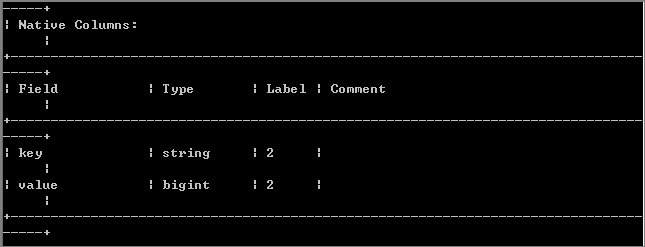 Note
NoteFor more information about security-related commands in MaxCompute, see MaxCompute permissions, Label-based access control, Security parameters, and Cross-project resource access based on packages.