Domain Name System Security Extensions (DNSSEC) adds a layer of security to your domain name by using digital signatures to validate DNS responses. This helps protect your users from DNS hijacking and man-in-the-middle attacks by ensuring they connect to the authentic website or service for your domain name.
How it works
DNSSEC does not change the DNS query process. Instead, it uses digital signatures and a chain of trust to ensure that the resolution results that users receive are not forged or tampered with.
The process has two phases:
Configuration phase (admin action)
Enable DNSSEC with your authoritative DNS provider, such as Alibaba Cloud DNS. The system generates a key, signs all records, and creates a Delegation Signer (DS) record. The DS record is a cryptographic fingerprint of the public key.
Submit the DS record to your domain registrar (such as Alibaba Cloud). The registrar then syncs it to the registry for the top-level domain (TLD), such as
.com.
Validation phase (automatic)
When a user accesses the domain name, a DNSSEC-aware resolver performs the following steps:
Retrieve the registered DS record (the official fingerprint) from the
.comTLD registry.Retrieve the current public key (DNSKEY) from the domain name's DNS provider.
Calculate a fingerprint from the DNSKEY and compare it with the DS record. If they match, the resolver trusts the response. Otherwise, it rejects the response.
Only validated DNS data is returned to the user. This effectively prevents DNS cache poisoning and man-in-the-middle attacks.
Procedure
Step 1: Get the DS record from your DNS provider
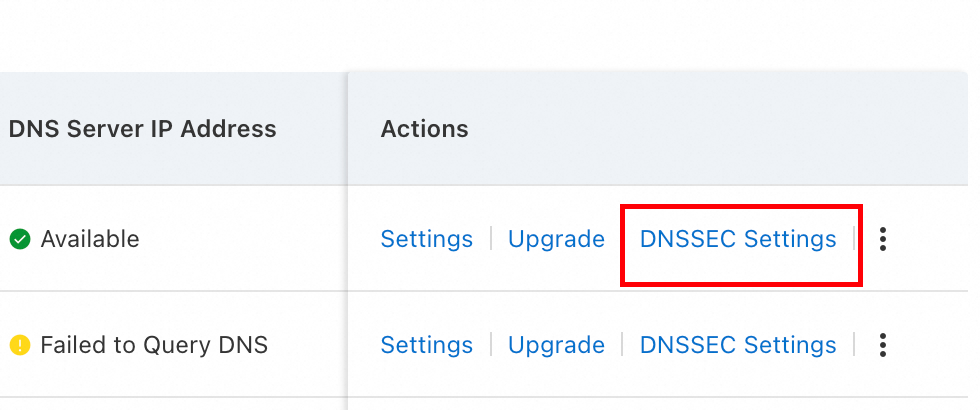
If your DNS service is hosted on Alibaba Cloud: On the Public Zone page of the Alibaba Cloud DNS console, find the target domain name and click DNSSEC Settings in the Actions column. After you enable the feature, obtain the required information from the configuration page.
If your DNS service is hosted outside Alibaba Cloud: Obtain the DS record from your DNS provider.
Step 2: Add the DS record in the Alibaba Cloud Domain Names console
Go to the Domain Names page, find the domain name you want to configure, and click Manage in the Actions column.
On the domain details page, in the left-side pane, click DNSSEC Configurations.
On the page that appears, click Add DS Record in the upper-right corner.
Enter the DS data that you obtained from your DNS provider. Then, click Submit and complete the verification.
You can add a maximum of eight DS records for each domain name.
Step 3: Verify the configuration
Recommended tool: DNSViz
How to verify: Enter your domain name in the tool and start the analysis. If the results show a DS record at each level of the DNS hierarchy and no red error boxes appear, it indicates that DNSSEC is enabled and working correctly.
Manage DNSSEC records
Synchronize DS records
If you transfer a domain name to Alibaba Cloud from another registrar and have already added DNSSEC records at the original registrar, you can click Synchronize DS Record on the DNSSEC Configurations page to sync the DNSSEC records to the Alibaba Cloud Management Console. You do not need to add the records manually.
Disable DNSSEC
In the Alibaba Cloud Domain Names console, go to the DNSSEC Configurations page for your domain name and delete the DS record.
In your DNS provider's console, disable DNSSEC.
Important considerations
To prevent DNS resolution failures, you must disable DNSSEC by deleting the DS record at your domain name registrar before you change your DNS provider or transfer your domain name. Failing to do so will break the DNSSEC chain of trust and cause your domain name to become unreachable.
When your paid DNS service is about to expire: If you plan to let your paid Alibaba Cloud DNS service expire without renewal, you must first delete the DS record at your domain registrar, and then disable DNSSEC in the Alibaba Cloud DNS console.
When transferring a domain name to a different Alibaba Cloud account: Before transferring your domain name, you must first delete the DS record at your domain registrar, and then disable DNSSEC in the Alibaba Cloud DNS console.
When transferring DNS records for a domain name to a different Alibaba Cloud account: Before transferring yourDNS records, you must first delete the DS record at your domain registrar, and then disable DNSSEC in the Alibaba Cloud DNS console.
FAQ
Why do I need to disable DNSSEC when I transfer a domain name?
To avoid resolution failures, disable DNSSEC before you transfer a domain name. DNSSEC relies on the DS record at the registrar to authenticate DNS responses. If you do not delete the DS record before the transfer, the chain of trust breaks. Recursive resolvers then reject the responses, which causes a service interruption. You can re-enable DNSSEC after the transfer is complete.
Why is there no DNSSEC Configurations option in the console for my domain name?
DNSSEC is not supported for all TLDs. Currently, supported TLDs include .com, .net, .cc, .tv, .name, .biz, .club, .cn, and .top. If you cannot find the DNSSEC Configurations option in the Domain Names console, this indicates that the TLD of your domain name does not support this feature.