Manual deployment
10
https://www.alibabacloud.com/solution/tech-solution/rapidly-deploy-dify-to-accelerate-ai-application-development
Overview
This solution offers e-commerce businesses a smarter and more informative AI customer service solution. It uses Dify and advanced retrieval-augmented generation (RAG) technology to generate natural language responses by retrieving relevant information from your knowledge base. This process ensures more accurate and context-aware customer responses for better efficiency and customer experience. This solution is suitable for e-commerce platforms of all sizes. It reduces customer service costs, increases customer satisfaction and loyalty, and upgrades customer service systems with intelligent features.
Prerequisites
This solution requires you to create an application on Dify. Ensure that Dify is deployed first.
Before you begin, ensure that Dify is deployed. Choose one of the following deployment methods:
-
Deploy Dify in a test environment: Quickly deploy Dify to a test environment, featuring rapid deployment, low resource consumption, and low cost.
-
Deploy Dify in a production environment: Deploy Dify in a production environment. It ensures high availability and stability and supports continuous operation under high loads.
Build the AI application
5
Create a RAG AI assistant for e-commerce customer service. After integrating your knowledge base into the application, the assistant can provide more accurate, context-aware, and reliable answers.
-
Create a knowledge base. It provides business-specific knowledge for the model to deliver more precise answers.
-
Open a browser and access the Dify platform page as described in the Prerequisites section.
-
At the top of Dify, click Knowledge and then Create Knowledge.
-
Set Data Source to Import from file, select a local file, and then click Next.
NoteAn example file is provided for a quick start. Download Bailian_Smartphone.docx and upload it.
-
Use the following settings, and then click Save & Process. For all other settings, use the default values.
Item
Description
Example value
Chunk Settings
Select the chunk settings.
General
Index Method
Select the index method.
High Quality
Embedding Model
Select the embedding model.
text-embedding-v4
Retrieval Setting
Select the retrieval type.
Hybrid Search
Note-
Billing: For billing details and free quota for the text-embedding-v4 model, see Free quota and pricing for models.
-
Monitoring and alerting: Monitor token consumption using Model monitoring. You can also configure usage alerts to receive notifications when usage becomes abnormal.
-
-
On the Execute & Finish page, click Go to document at the bottom. The process is complete when the document status changes to Active on the Documents page.
-
-
At the top of the page, click Studio, and then click Create from Blank.
-
In the Create from Blank panel, click MORE BASIC APP TYPES and select Chatbot, enter an App Name, and then click Create. The application Orchestrate page appears.
-
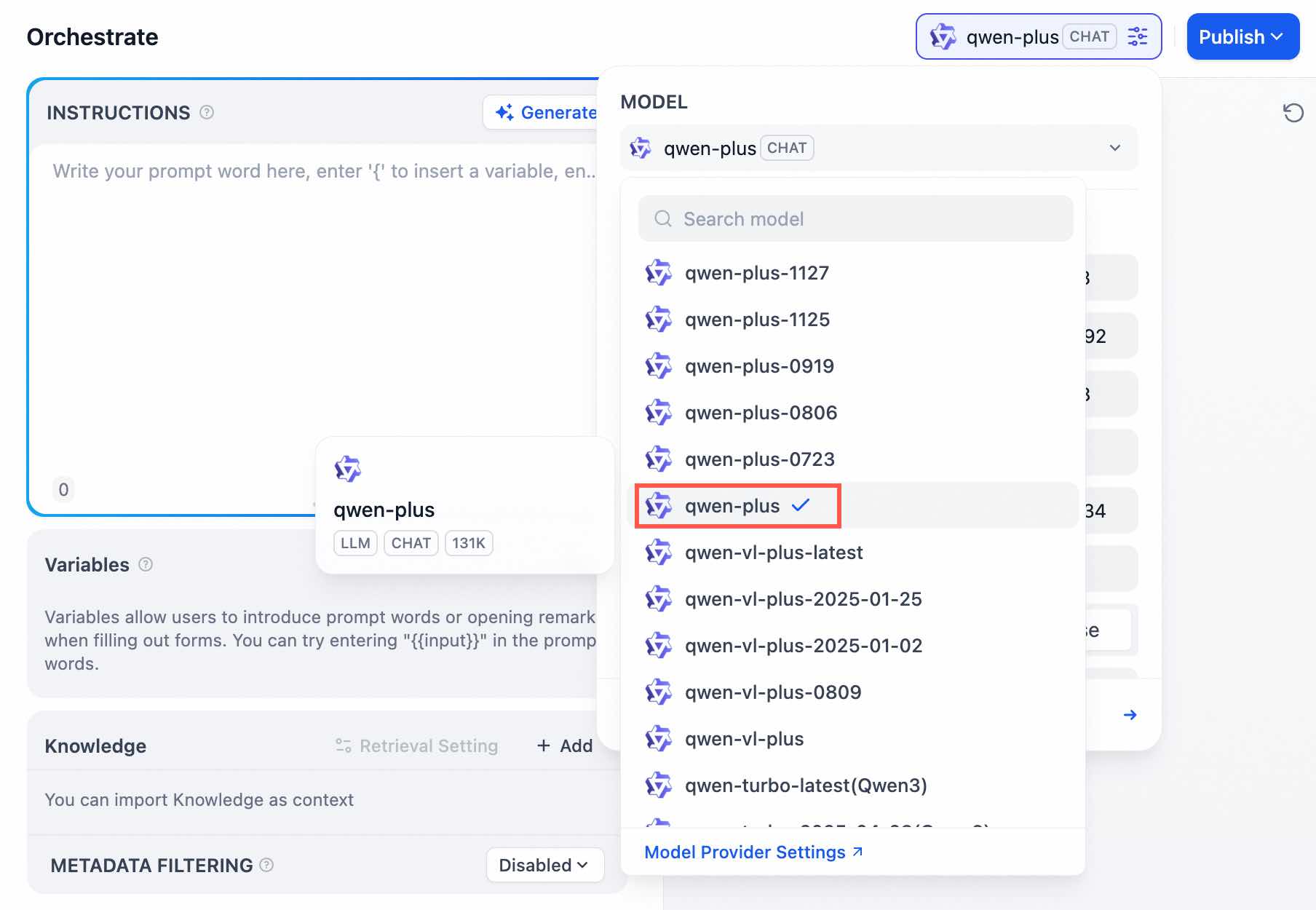
From the Model drop-down list on the right, select
qwen-plus. Keep the default model parameters or adjust them as needed.Note-
Billing: For information about the billing and free quota for the qwen-plus model, see the Model free quotas and pricing document.
-
Monitoring and alerting: Use Model Monitoring to monitor token consumption. You can also configure usage alerts to receive notifications when usage is abnormal.
-
-
Set the prompt. In the prompt input box, enter the following text.
You are a senior e-commerce customer service expert with over ten years of experience. Your task is to help users solve problems they encounter during shopping and provide satisfactory after-sales service through friendly and professional communication. When answering questions, follow these principles: 1. **Friendly, conversational tone**: Use natural and friendly language to make users feel welcome and valued. For example: - "Hello! Thank you for your inquiry. I'm happy to help." - "No problem, let me check the details for you." 2. **Accurate key data**: Be precise with key information such as amounts, times, and order numbers. For example: - "Your order number is 123456789, and the total amount is 588 CNY." - "The estimated delivery time is in 2 days. Please wait for your order." 3. **Guide users to provide details**: When encountering uncertain or complex issues, patiently guide the user to provide more information to better resolve the problem. For example: - "Could you please provide the order number so I can check the details?" - "Can you describe the issue in more detail? I will do my best to help you." 4. **Professionalism and patience**: Always remain professional and patient. Even with complex or repetitive questions, stay calm and make sure the user feels heard and valued. For example: - "I understand the issue. Let me explain it in detail for you." - "If you have any questions, feel free to ask at any time. We are here to help you until the problem is solved." 5. **Closing**: After resolving the issue, end the conversation with a friendly and appreciative tone to ensure a pleasant after-sales service experience. For example: - "I hope my answer was helpful. Happy shopping!" - "Thank you for your patience. Have a great day!" 6. **Compliance and privacy protection**: When answering questions, do not disclose the user's personal information. Adhere to the company's rules and policies. Please provide professional, friendly, and efficient customer support based on these principles! -
To the right of Knowledge, click + Add. Select the knowledge base that you created in the previous steps and click Add.
-
Debug the application. In the Debug & Preview dialog box on the right, enter a question and click
-
Publish the application. In the upper-right corner, click , and then click Run App. A new page opens with the URL for the published application.
-
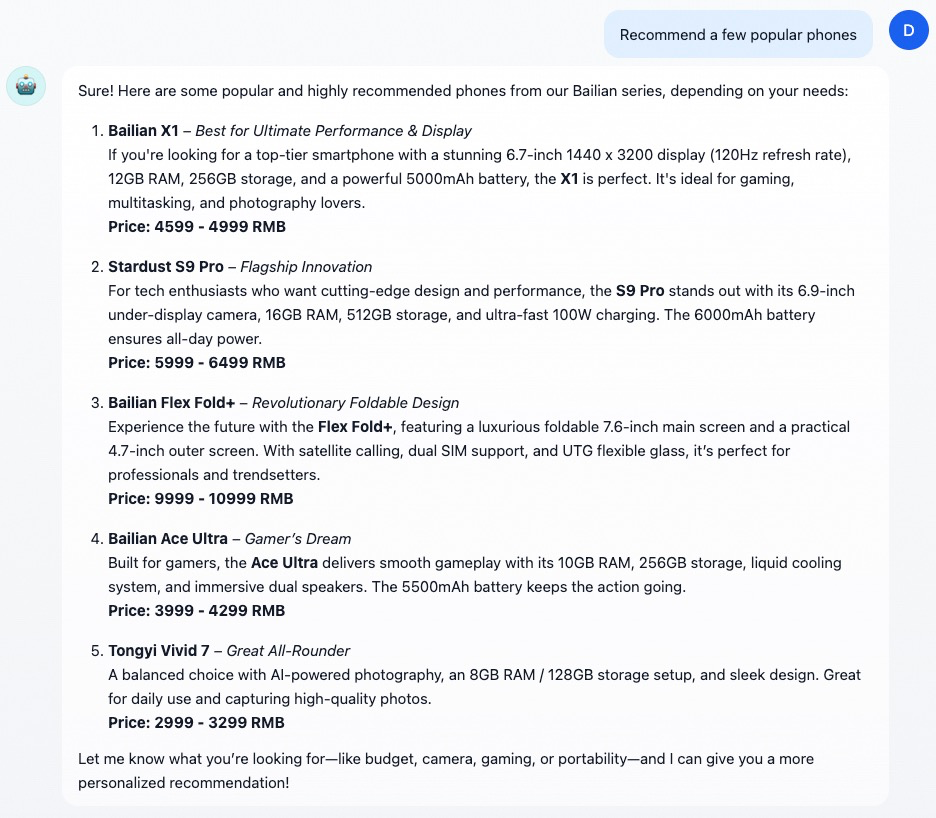
Test the application. Follow the on-screen prompts to start a conversation and experience the AI chat.
Integrate the AI application
5
You can integrate the Dify application into an existing e-commerce system using one of the following methods. Choose the method that best suits your needs. For more information, see the official documentation.
Web embedding
You can embed the code provided by Dify into the web pages of your e-commerce system for rapid integration. This method requires no additional development work. For more information, see Embedding in Websites.
-
At the top of the Dify platform page, click Studio. Click the target application to open its orchestrate page.
-
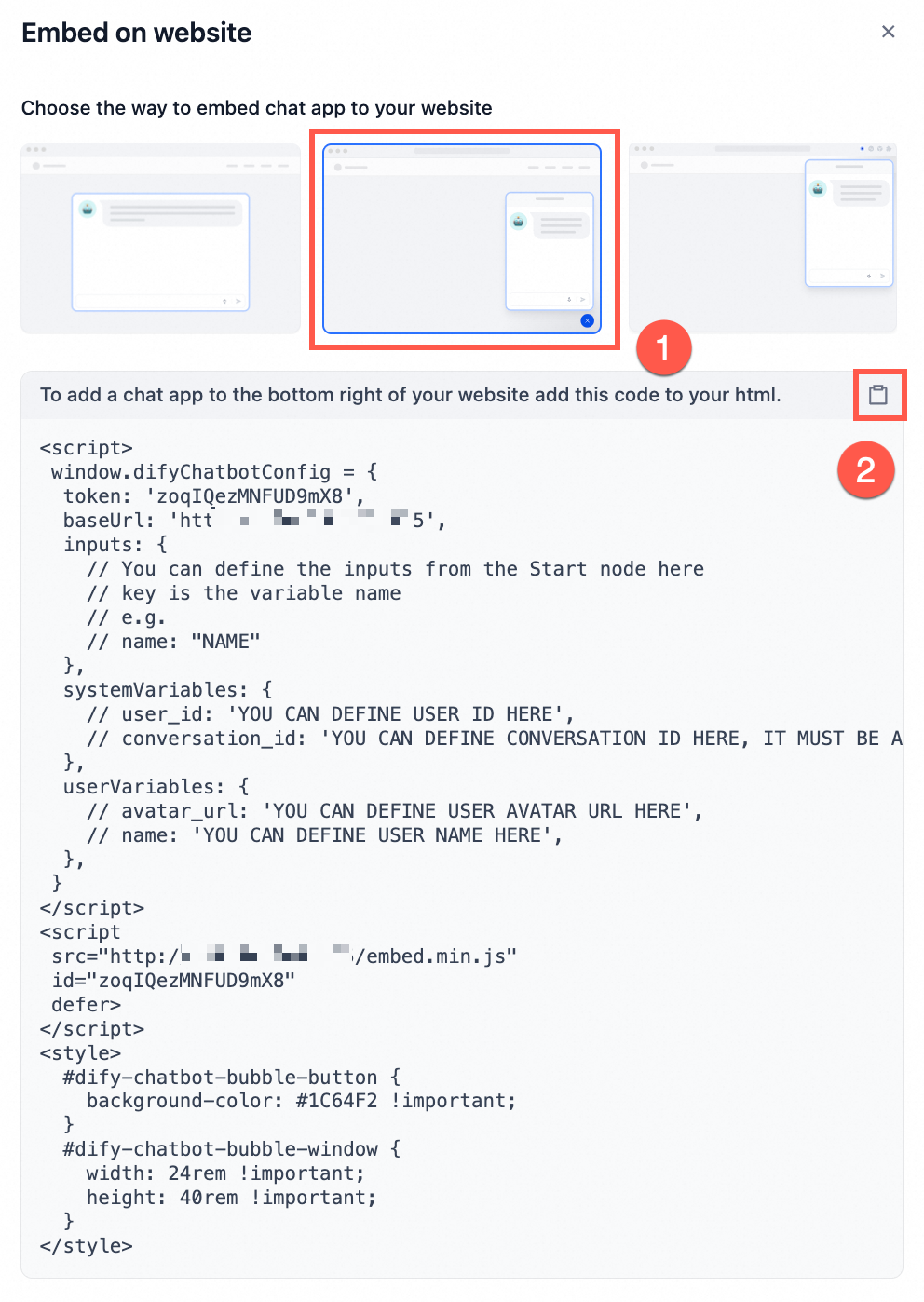
On the right, click . In the Embed on website panel, select the second method. Copy the entire iframe tag and insert it into the desired location on your web page.
API call
You can use Dify’s RESTful APIs to call the AI model directly, which allows for deep integration with your e-commerce system. This method is flexible and supports custom development. For more information, see Developing with APIs.
-
At the top of the Dify platform page, click Studio. Click the target application to open its orchestrate page.
-
In the left navigation pane, click API Access. The API details appear on the right.
-
In the upper-right corner of the page, click API Key. In the panel that appears, click Create new Secret key to generate a key for API calls.
Do not expose your API key in any way. Unauthorized use can lead to security risks or financial loss.
-
In your e-commerce system, call the relevant API and pass the key and necessary parameters to complete the integration.