written by Rizky Andriawan, Solution Architect Alibaba Cloud Indonesia
How I added a dispute-review agent to my cousin's online shop with Python and Qoder Agent SDK.
My cousin's online shop was doing well. Well enough that returns and refund requests had become a regular part of the day, but not enough work to justify hiring someone just to review them.
On most days, the reviews added up to less than an hour. The problem was that he could not choose which hour.
Each case had a response deadline. Between handling orders and running the business, he kept coming back to the queue: open a claim, check the order, look at the photos, read the policy, decide what to do. He could not leave everything until closing time.
It was less than an hour of work, spread across a whole day of interruptions.

The work was small enough to do alone. Its deadlines kept pulling him back to it.
I had already built him an application for this. DisputeDesk collected the order, claim, evidence, and return policy, tracked the deadline, and recorded the decision. Finding the information was solved. Reading and comparing it still fell to him.
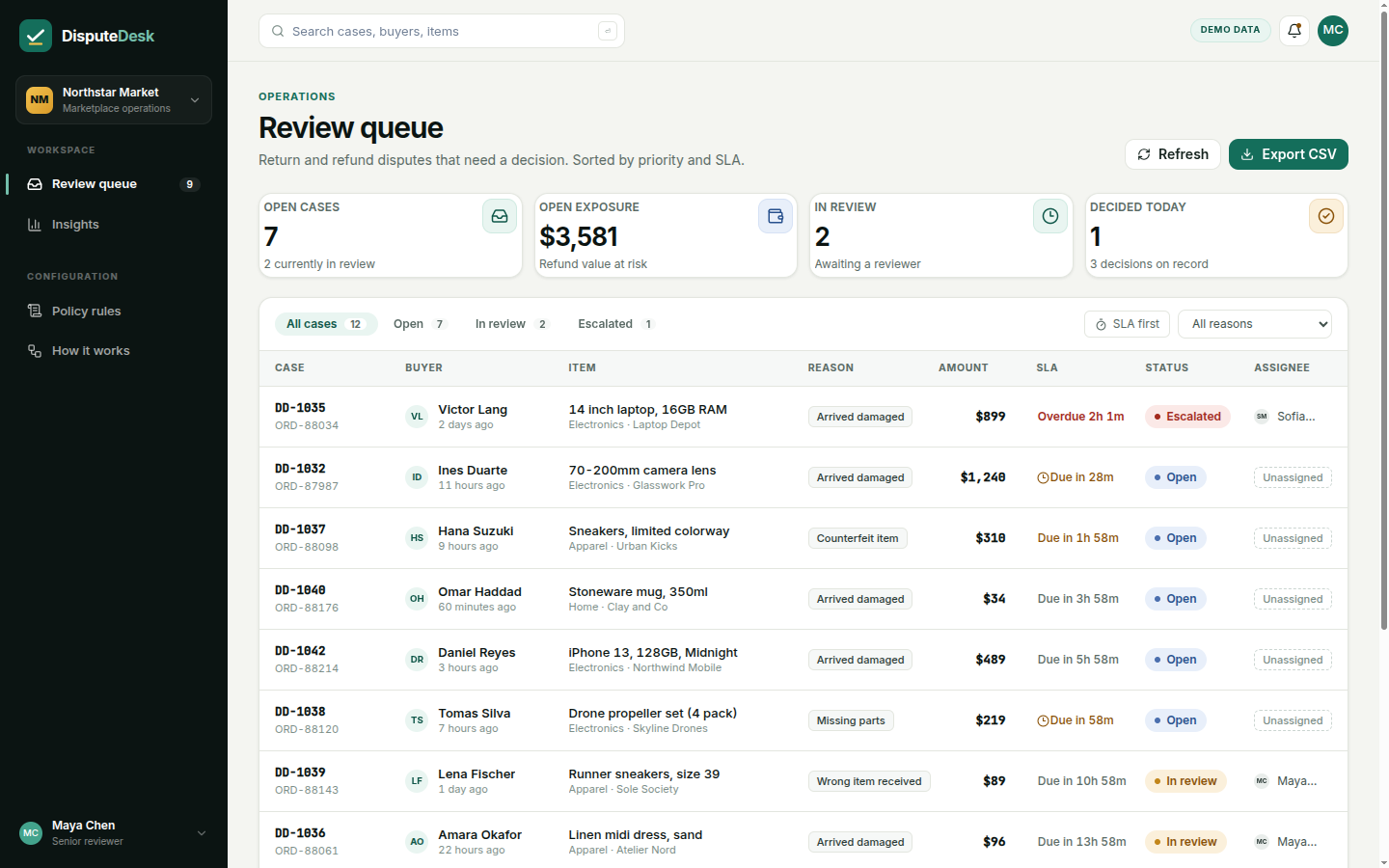
The queue made the deadlines visible. My cousin still had to work out what each case's evidence supported.
Could the application handle the clear cases and bring him only the ones that needed his judgment?
I used Qoder Agent SDK to add a small Python worker that reads the case, examines its photos, and applies the policy. For a clear case, it records an approval or rejection. For a judgment call, it saves a note without changing the case status, then the worker sends the note and case link to Telegram. Qoder supplied the agent runtime; I supplied the review procedure and the application's APIs.
DisputeDesk has a Spring Boot backend and a React console. In case DD-1041, a buyer ordered Midnight Black headphones but says a blue pair arrived. The reviewer needs to compare the order, photo, and return policy before deciding what to do about the $129 refund.
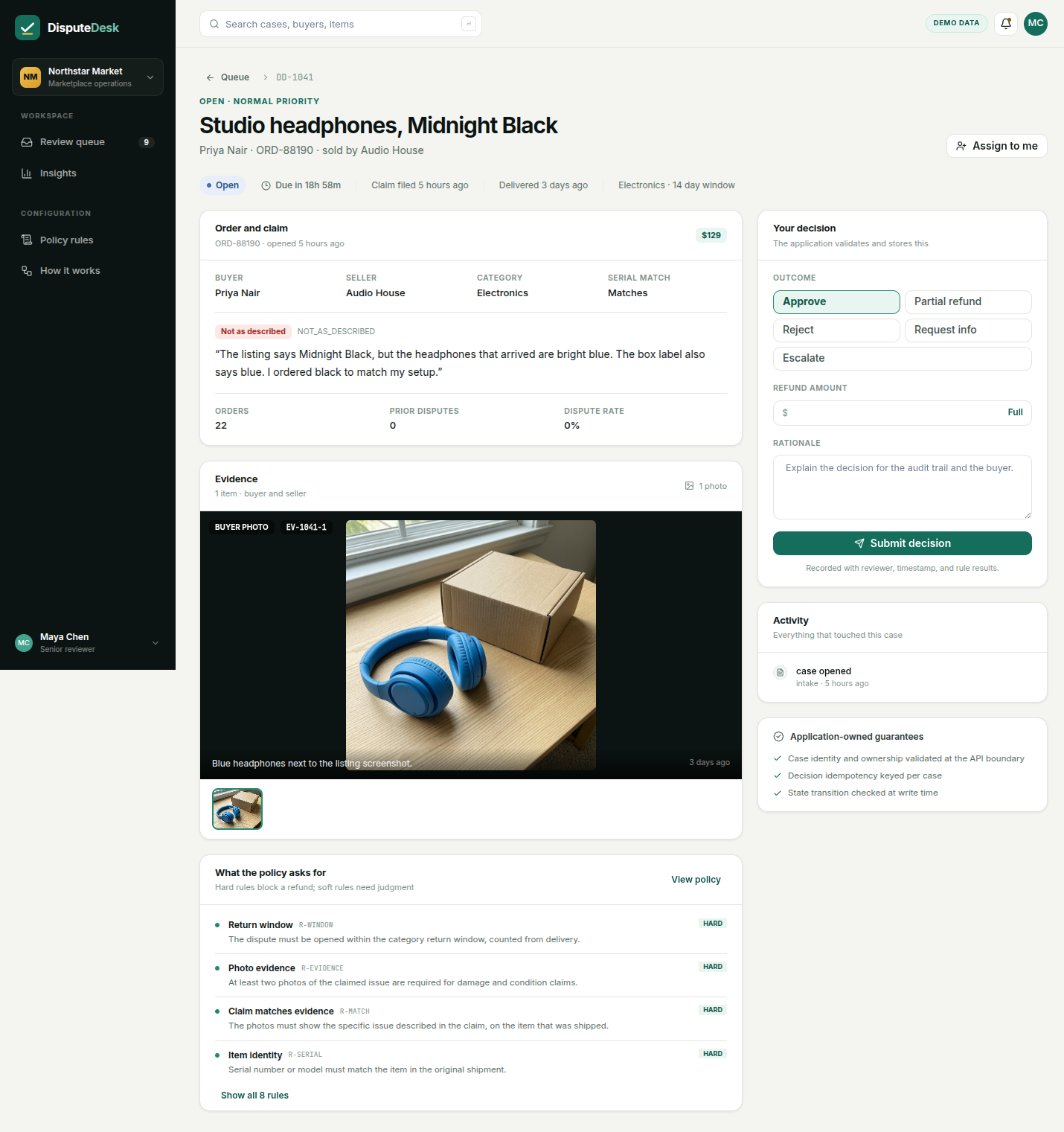
The case page already brings together the information needed for a review.
For my cousin, reviewing it means a series of clicks. For an agent, I can give the task directly: compare the claim with the evidence and policy, decide if the case is clear, and ask for human judgment if it is not. It can reason through that task and call the APIs behind the screen.

The interface guides the person. The task and tools guide the agent.
The case-detail endpoint already returns the context. Here is an excerpt from GET /api/cases/DD-1041, with other fields and policy entries omitted:
{
 "id": "DD-1041",
 "itemName": "Studio headphones, Midnight Black",
 "amount": 129.0,
 "version": 0,
 "reasonCode": "NOT_AS_DESCRIBED",
 "claimText": "The listing says Midnight Black, but the headphones that arrived are bright blue. The box label also says blue. I ordered black to match my setup.",
 "evidence": [
 {"kind": "PHOTO", "url": "/evidence/headphones-blue.png"}
 ],
 "policy": [
 {"code": "R-WINDOW", "severity": "HARD"},
 {"code": "R-MATCH", "severity": "HARD"}
 ]
}
The worker fetches that response and downloads the photos. It uses the existing POST /api/cases/{id}/decision endpoint for a clear decision. I added PATCH /api/cases/{id} for a review note. That update appends the note and an audit event without changing the case status, version, or updatedAt.
The backend checks an agent decision before committing it: matching case version, confidence of at least 0.9, a USD amount no higher than $250, and complete policy findings. Approvals also require a full refund, matching identity, enough photos, and no pending seller-response window. Automatic rejection is limited to a verified expired return window. Anything outside those bounds goes to a person; a high confidence number alone is not enough.
The worker starts a Qoder session for the assigned case. A local skill explains the review, and two scripts connect it to DisputeDesk:
With qoder-agent-sdk==1.0.15, the key session setup looks like this. The worker's per-case environment and permission configuration are omitted here:
options = QoderAgentOptions(
 auth=access_token_from_env(),
 cwd=workspace,
 setting_sources=["project"],
 skills=["dispute-review"],
 model="auto",
 max_buffer_size=16 * 1024 * 1024,
)

async for message in query(prompt=prompt, options=options):
 if isinstance(message, ResultMessage):
 result = message
The SDK handles the agent session, skill loading, and tool calls. I do not have to build a loop that interprets each model response and executes the next requested tool myself. The larger buffer accommodates the image messages from reading the evidence.
The skill contains the procedure my cousin was already following:
Fetch the case and inspect its photos. Compare what was ordered, what the buyer claims, and what the evidence actually shows. Approve or reject only within the automatic rules. Otherwise, save what is known, what is uncertain, and what the human needs to decide.
The important word is actually. An uploader's caption is not proof that a listing screenshot or box label is visible. Those distinctions belong in the instructions, where I can revise them without changing the worker.
The script takes one of three actions: APPROVE, REJECT, or HUMAN_REVIEW. If the backend blocks an automatic decision, it checks the current case and saves a note if the case is still open for review.
For a saved note, the worker calls Telegram after the session and records the confirmed message ID. The skill does not choose the recipient; the worker uses the configured chat. The note is also visible in the case page, where my cousin can make the decision.
There are two useful Qoder advantages here. SDK sessions can use the Credits included in a Qoder subscription, authenticated through the same account with a PAT. Runs draw on the account's available Credits, with usage reported by the SDK.
Qoder also supports dynamic model routing. An application can define a policy that selects a lighter model for routine cases and a stronger one for ambiguous evidence. This worker uses auto; case-specific routing is an extension the SDK supports, rather than a classifier I have already implemented.
Giving the agent work can be as simple as putting a case ID on RabbitMQ whenever a refund request is created.
I added the handoff at the end of DisputeDesk's transactional case-creation method:
enqueueReview(c.getId());That call saves a review task in the outbox alongside the new case and its evidence. The publisher sends committed tasks to RabbitMQ. The intake request does not wait while the agent reviews photos, and there is no separate button someone has to press.
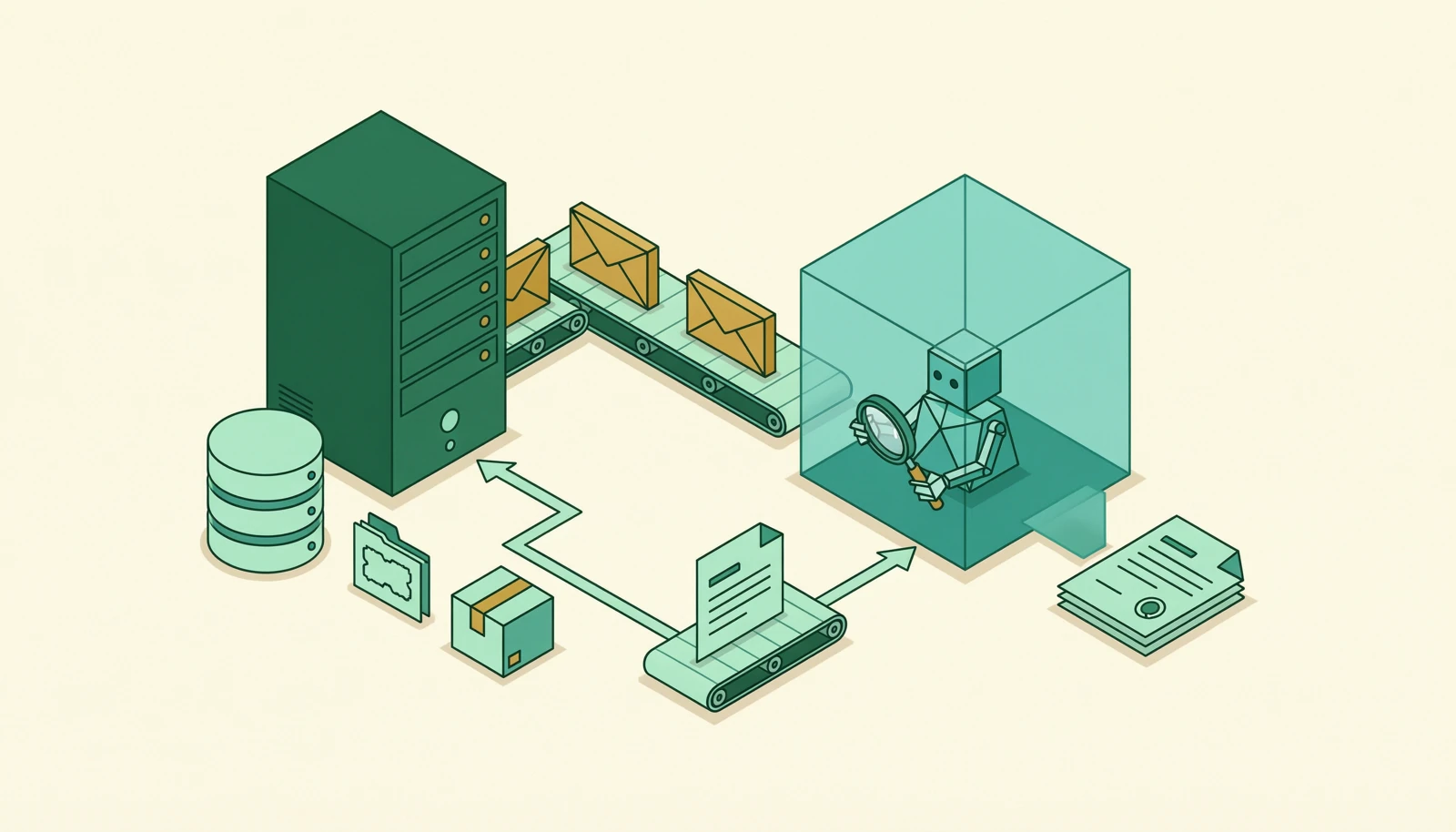
Creating the case starts the review. Decisions and notes stay in the existing application.
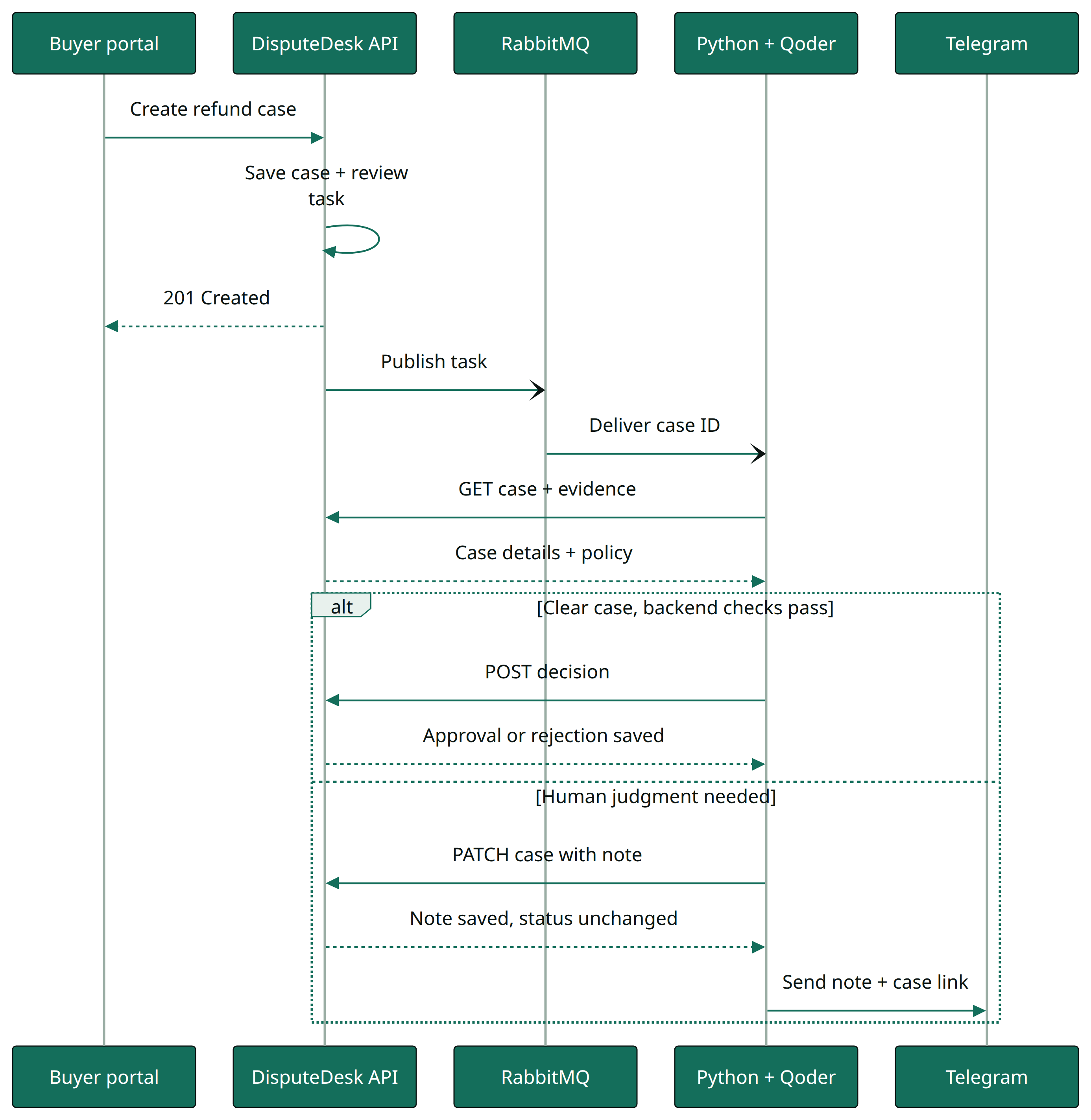
Case creation queues the review. Clear decisions and human handoffs use separate writes.
I verified the creation hook separately: a new case returned 201 Created, and one task carrying its ID reached RabbitMQ. A task's trace ID gives it a stable run ID for redelivery; decision writes use an idempotency key. Failed review tasks are logged without automatic requeueing. If Telegram delivery fails, the saved note remains available and the worker logs the failure.
I tested both paths with headphones cases. In one live SDK run, the case had a recorded seller response and an $89 claim. The agent compared the blue headphones with the Midnight Black order and committed an approval, with confidence 0.93. The API showed APPROVED, an agent-recorded decision, and no review note. No human had to click approve.

What was ordered, what arrived, and what remains unproven are different questions.
In the $129 case, the agent saw reasons to pause: the photo showed blue headphones, but it could not verify the advertised color from a listing screenshot, and the seller's 48-hour response window was still open. It saved what my cousin needed to check. The case stayed OPEN, with the same version and update timestamp, and no decision.
I also tried an approval with insufficient photos for a damage claim. The backend blocked it, and the script saved a human-review note instead. The limit held outside the prompt.
For Telegram, I verified the message and saved delivery receipt against a local test server. Delivery to my cousin's real chat still needs the bot token and chat ID configured. The notification code and case-page notes are implemented; a real message is not yet verified.
These runs establish that the decision and handoff paths work. They are not an accuracy score, and I have not measured a reduction in my cousin's interruptions yet.
The implementation comes down to six steps:
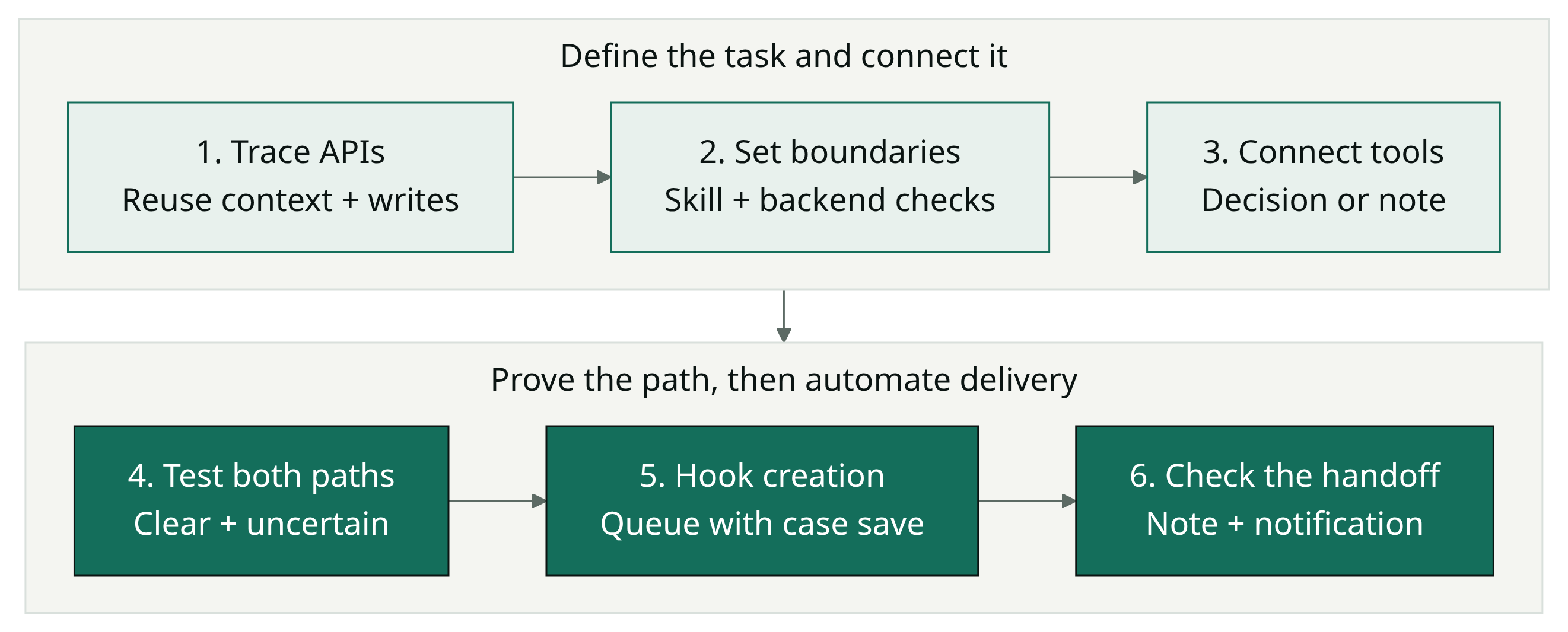
Reuse the application, define the decision boundary, and verify both outcomes.
A small addition for a persistent problem
DisputeDesk already had the context and decision workflow. Now a new case starts a background review: a clear case can be closed, and an uncertain one comes back with a note explaining what needs judgment.
Qoder Agent SDK made this easy to add to the application I already had.
A skill describes the work, two scripts connect the APIs, and Qoder runs the agent. Subscription Credits ease the start; model routing leaves room to grow.
Follow one repetitive task back to the API behind it. You may already have the inputs, rules, and somewhere to save the result. That is a place to start with Qoder.
A task does not have to fill a job to be worth automating. Sometimes it just keeps interrupting someone who already has one.
· SDK overview
· Python 1.0.15
· Skills
· Model routing
· Credits
Giving Your AI Agent a Disposable Workspace with Alibaba Cloud AgentRun

128 posts | 23 followers
FollowAlibaba Cloud Native Community - July 28, 2026
Alibaba Cloud Big Data and AI - July 17, 2026
Alibaba Cloud Community - February 20, 2024
Alibaba Cloud Native Community - October 26, 2026
dahara1 - July 22, 2026
Alibaba Cloud Native Community - November 24, 2025
128 posts | 23 followers
Follow Qoder
Qoder
From Assisted to Autonomous — Adapting to Every Programming Need
Learn More QwenWork
QwenWork is dedicated to helping employees strengthen their professional competitiveness in the AI era and to enabling enterprises to improve organizational effectiveness.
Learn More AgentCore
AgentCore unifies agent construction, governance, and execution capabilities so enterprises can deploy diverse agents with confidence.
Learn More Qwen
Qwen
Full-range, open-source, multimodal, and multi-functional
Learn MoreMore Posts by Alibaba Cloud Indonesia

