Establishing IPSec-VPN Connections from On-Premise to Cloud Enterprise Network (CEN)
1. Networking Between On-Premises and Cloud
Many enterprise customers are keen to link their on-premises networks with the cloud. The objective is to enable connectivity from the office network to the cloud environment, or to integrate resources in the data center with resources in the cloud environment, thereby establishing a network that allows communication between Virtual Private Clouds (VPCs). When deploying such an environment with security requirements, connections can be established using VPNs over the public internet or through dedicated lines.
Alibaba Cloud caters to these needs by providing an IPSec-VPN service and offering a pre-configured Cloud Enterprise Network dedicated line service across global regions to facilitate network acceleration between regions.
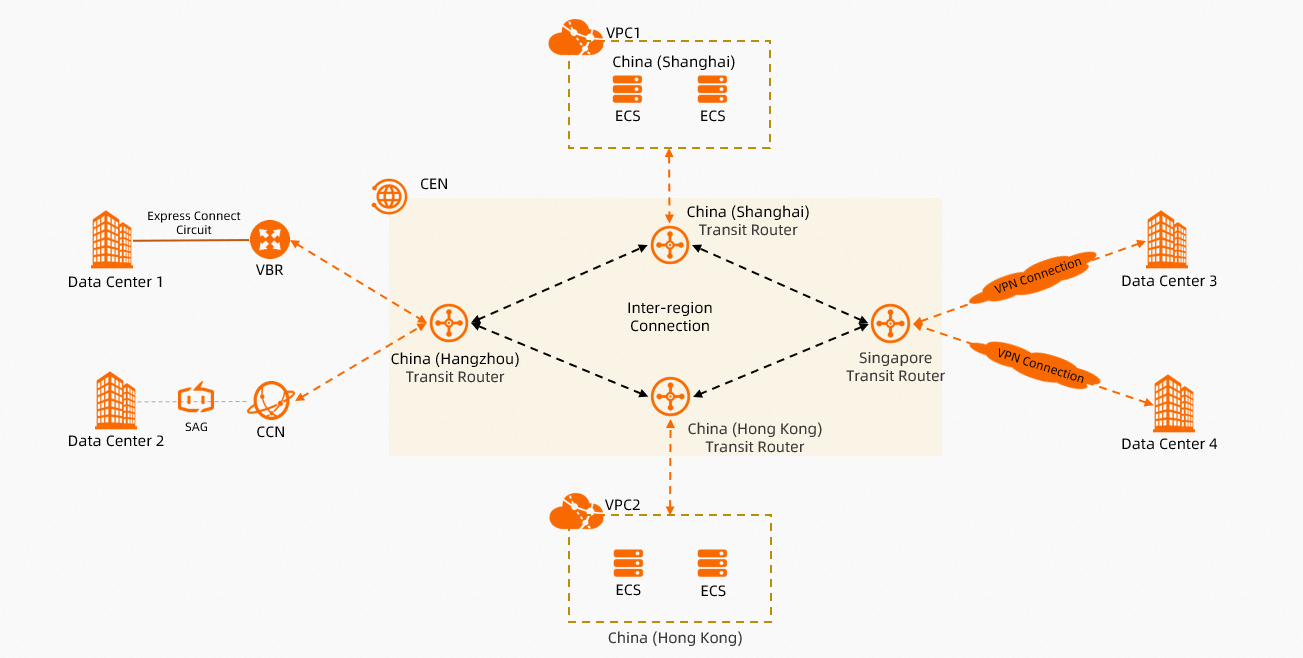
This blog aims to guide you through the process of linking an IPSec-VPN connection with CEN.
2. Options for IPSec-VPN Connection
When setting up an IPSec-VPN connection from a customer data center's VPN device to Alibaba Cloud, there are two options available:
- VPN Gateway: This involves deploying Alibaba Cloud's VPN Gateway within the data center's region. Once connected to the VPN Gateway from the data center's network, IPSec communication is established with resources deployed in the connected VPC.
- Transit Router: This connection is established via a Transit Router created on top of a CEN instance. It allows the creation of an IPSec-VPN connection without needing a separate VPC and VPN Gateway, simply by utilizing the Transit Router.
| Item | VPN Gateway | Transit Router |
|---|---|---|
| Connection Resource | Create VPN Gateway and establish IPSec connection | Create Transit Router and establish IPSec connection |
| Supported Encryption Algorithms | International standard encryption | International standard encryption |
| Tunnel Mode | Dual Tunnel / Single Tunnel | Single Tunnel |
| Maximum Bandwidth | 1000Mbit/s | 1Gbit/s |
| Supported Network Types | Public (Internet), Private (Express Connect) | Public (Internet), Private (Express Connect) |
| High Availability | Active / Standby | Equal-cost multi-path (ECMP) routing |
3. Using Transit Router for IPSec-VPN Connection
The following is an example of a Cross Region IPSec-VPN setup using a Transit Router.

- Establish an IPSec-VPN connection between the customer's data center in Seoul and Alibaba Cloud's Seoul Transit Router.
- Create a Transit Router in Alibaba Cloud's Shanghai region and establish Intra Region Connection with the VPC.
- Create a Transit Router in Alibaba Cloud's Malaysia region and establish Intra Region Connection with the VPC.
- Set up Cross Region Connections between regional Transit Routers.
4. Step-by-Step Acceleration of IPSec End-to-End from Seoul to Shanghai
- Note: The customer's data center environment is emulated using resources from Alibaba Cloud's Seoul region.
(You may also use environments such as AWS, Azure, etc., depending on your testing environment.)
4.1 Network Planning
| Item | Seoul Region (Seoul On-Prem VPC) | Seoul Region (Seoul Transit Router) | Shanghai Region (Shanghai Transit Router, VPC) |
|---|---|---|---|
| VPC | 172.29.0.0/24 | No creation required | 192.168.0.0/24 |
| VPN Gateway | 8.220.201.208 | Replaced by Transit Router | N/A |
| Transit Router | N/A | 10.10.0.0/24 | 10.10.1.0/24 |
4.2 Building On-Prem Resources in Seoul
1. Create VPC: 172.29.0.0/24
2. Create VM
3. In the VPC Console - Create VPN Gateway
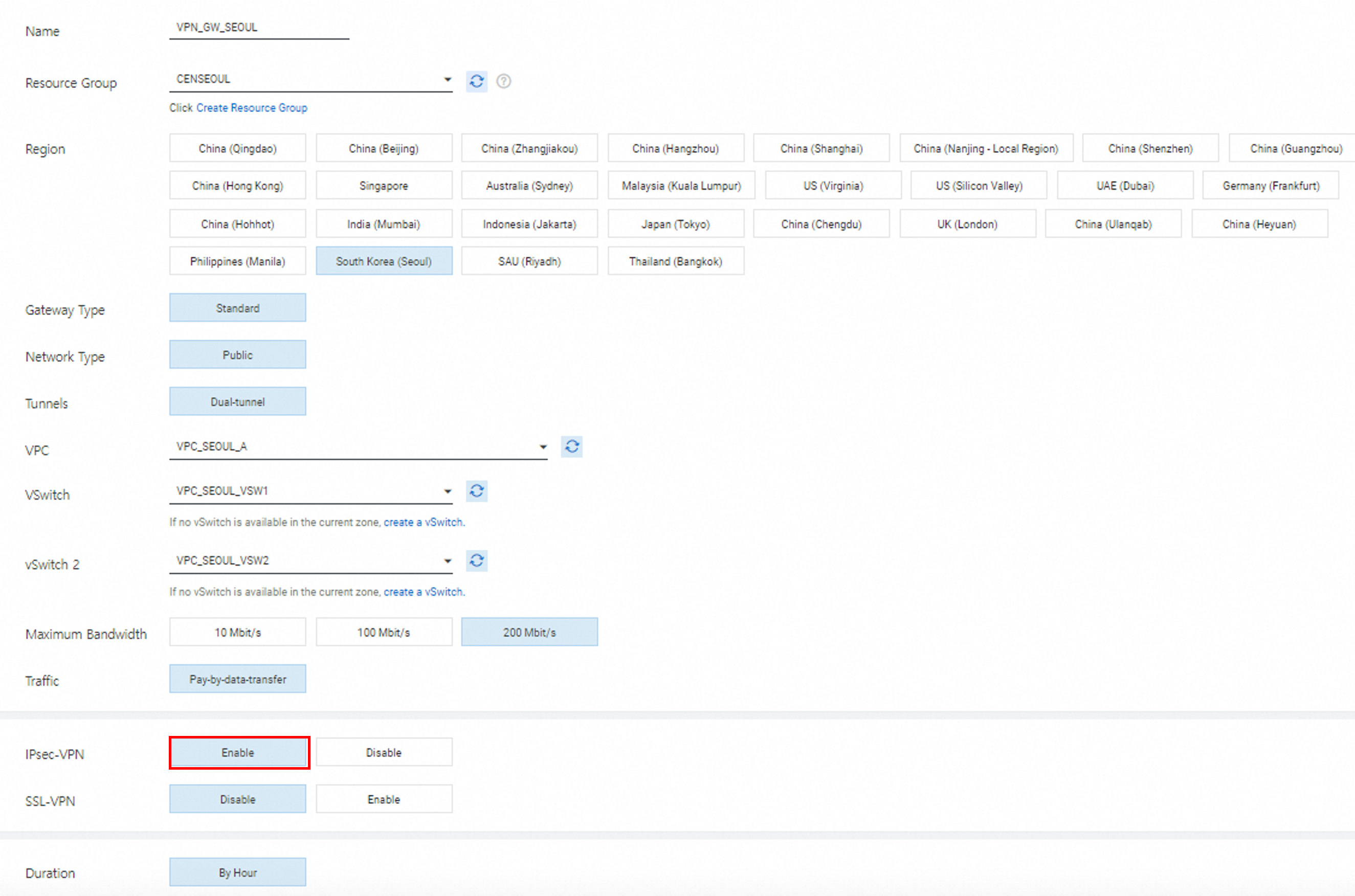
4. Verify VPN Gateway
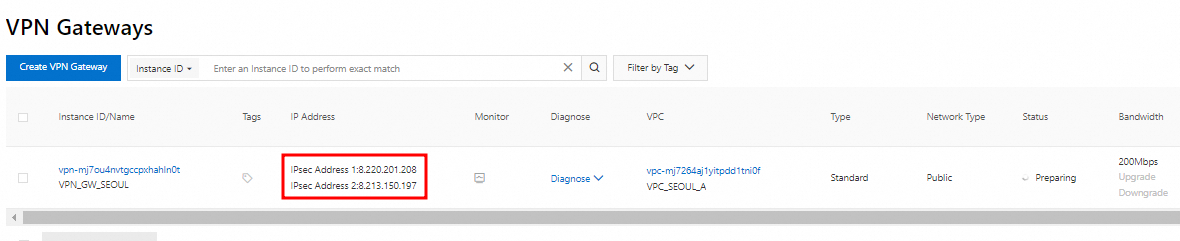
Check the IPSec Address of the VPN Gateway: This address will be used as the Customer Gateway IP for the on-premises setup.
5. Create Customer Gateway (On-Premises)
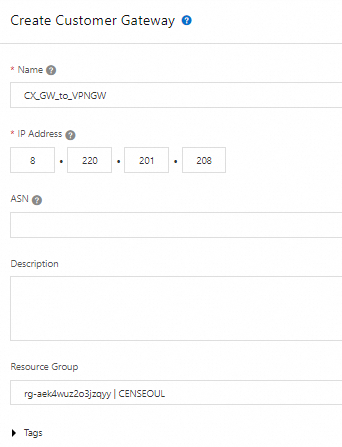
4.3 Creating Seoul Region Transit Router / VPN Connection
1. Create a CEN Instance via the CEN console.
2. Create a Transit Router: Enter CIDR.
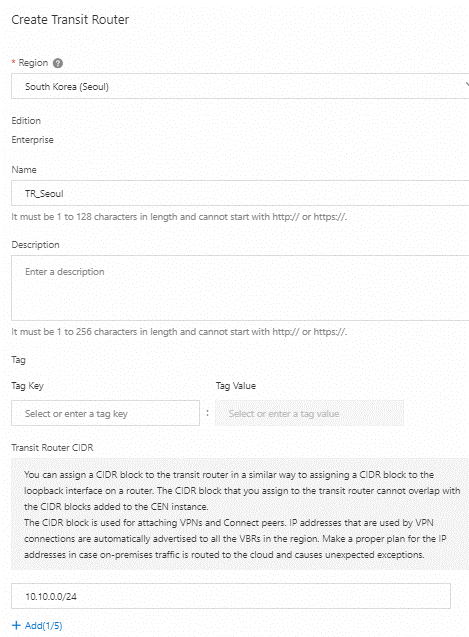
3. Create an IPSec-VPN Connection for the Transit Router
- From TR_Seoul, create a connection
- Network Type : VPN
- Region : Seoul
- Individual Resource : Create Resource
- Gateway Type : Public
- Customer Gateway : CX_GW_to_VPNGW
- Routing Mode : Destination Routing
- Apply Immediately : Yes
- Pre-shared Key : Enter a random string (e.g., 0c14vrp7lqnhfmna)
4. Verify the Transit Router IPSec VPN Connection
- In the VPC console, check the IPSec Connection Instance ID.
- Confirm the Gateway IP Address: This is the Gateway IP of the Transit Router that will be connected by IPSec Connection (no separate VPN Gateway required).

5. Create a Customer Gateway for the Transit Router
- Use the Gateway IP of the Transit Router to create it.
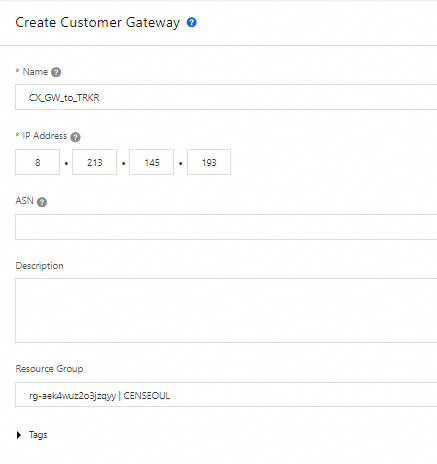
6. Create an IPSec VPN Connection from the on-premises VPN Gateway
- Create an IPSec connection that will connect to the Transit Router (Seoul).
- VPC Console - Region : Seoul
- IPSec Connection : Create new connection
- Associate Resource : VPN Gateway
- VPN Gateway : VPN_GW_Seoul
- Routing Mode : Destination Routing
- Apply Immediately : Yes
- Tunnel : Customer Gateway : CX_GW_to_TRKR
- Pre-shared Key : Enter a random string (e.g., 0c14vrp7lqnhfmna)
7. Verify the negotiation of the bi-directional IPSec connection.

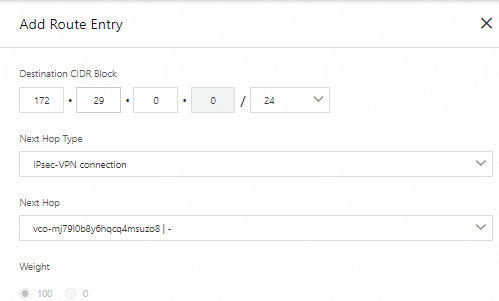
8. Add Route Entry for the Transit Router
- Click on the IPSec connection Instance ID of the Transit Router.
- Destination-based Route Table : Add Route Entry
- CIDR Block : 172.29.0.0./24 (Seoul On-Prem VPC)
- Next hop : IPSec connection (towards Seoul On-Prem IPSec Connection)
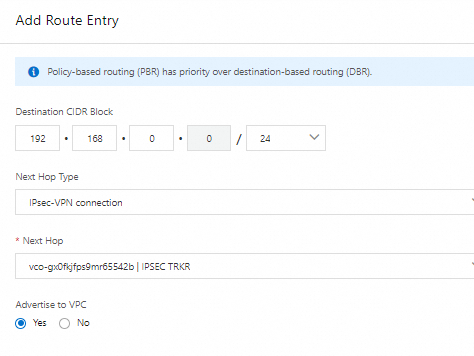
9. Add Route Entry for the VPN Gateway
- Click on the VPN Gateway ID.
- Destination-based Route Table : Add Route Entry
- CIDR Block: 192.168.0.0/24 (Shanghai VPC)
- Next hop : IPSec connection (towards Seoul Transit Router IPSec Connection)
4.4 Creating Resources in the Shanghai Region
1. Create VPC : 192.168.0.0/24
2. Create VM
3. Create a Transit Router Intra Region Connection:
- For Transit Router (Shanghai): Create Connection
- Network Type : VPC
- Region : Shanghai
- Network Instance : VPC_Shanghai
4. Create a Transit Router Inter Region Connection:
- Transit Router(Seoul) : Create Connection
- Network Type : Inter-region connection
- Region : Seoul
- Peer region : Shanghai
4.5 Communication Test
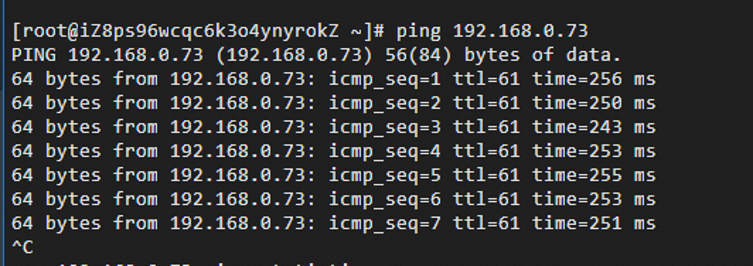
- Log into the Seoul VM
- From the Seoul VM, perform a ping to the Private IP Address of the Shanghai VM
7. Reference
- https://www.alibabacloud.com/help/en/cen/product-overview/what-is-cen
- https://www.alibabacloud.com/help/en/cen/use-cases/use-an-enterprise-edition-transit-router-to-enable-and-secure-network-communication
- https://www.softbank.jp/biz/blog/cloud-technology/articles/202209/cen-vpn/
- https://www.softbank.jp/biz/blog/cloud-technology/articles/202303/alibaba-azure-cen-vwan-ipsec/
Read previous post:
Read next post:

Comments
Related Products
-
 CEN
A global network for rapidly building a distributed business system and hybrid cloud to help users create a network with enterprise level-scalability and the communication capabilities of a cloud network
Learn More -
 Networking Overview
Connect your business globally with our stable network anytime anywhere.
Learn More -
 VPN Gateway
 is an Internet-based service that establishes a connection between a VPC and your on-premise data center.
Learn More -
 Edge Network Acceleration
Establish high-speed dedicated networks for enterprises quickly
Learn More
More Posts by James Lee
- 실시간 멀티모달 AI Agent 구축하기
- 클라우드 네트워크 디자인 시나리오 - VPC 네트워크 디자인
- Alibaba Cloud 의 Coding Assistant 로 쉽고 빠르게 코딩하기
- Alibaba Cloud Model Studio를 사용하여 나만의 Chatbot 시스템 빠르게 구축하기
- Alibaba Cloud CDN 소개 - 백서
- 온프레미스에서 Cloud Enterprise Network로 IPSec-VPN 연결 구축 가이드
- Alibaba Cloud Web3 서비스 소개 - 백서
- Alibaba Cloud Hyperledger Blockchain Node Service 구축하기