By Abhishek Gupta, Alibaba Cloud MVP
This hands-on blog demonstrates how to build a modular Code-Optimizing Agent using Alibaba's Qwen3.7-Max. It covers environment setup, API integration, a reusable Python agent runner for handling responses and reasoning traces, and a multi-turn workflow that analyzes, optimizes, and self-corrects code. The blog also highlights how preserving the model's reasoning across interactions improves context retention, accuracy, and overall agent performance.
Artificial Intelligence is transitioning from passive conversational chatbots to autonomous agents capable of independent planning, tool usage, and execution. At the absolute forefront of this shift is Alibaba's flagship model: Qwen3.7-Max.
Designed from the ground up for the agentic era, Qwen 3.7 Max introduces native Thinking Preservation (preserve_thinking), permitting complex reasoning traces to persist across multiple execution turns.
In this hands-on lab, we will bypass the theory and build a modular, step-by-step Thinking-Preserving Code Optimization Agent.
Before writing any code, let's look at the flow of our hands-on lab. The diagram below illustrates how your local runner script coordinates with the Qwen 3.7 Max API, managing the transition from planning to code generation and safety verification.
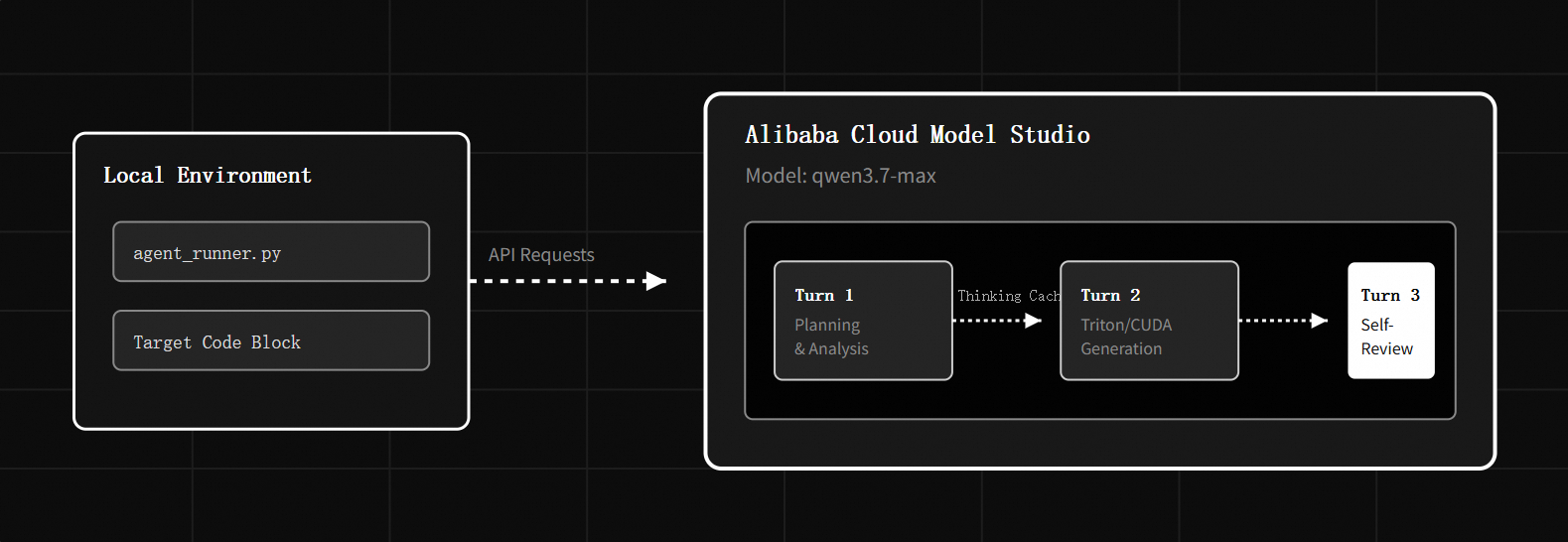
By completing this hands-on tutorial, you will:
In this step, we will configure your developer environment, install dependencies, and authenticate your local script with Alibaba Cloud Model Studio.
Open your terminal and install the official OpenAI SDK. Since Alibaba Cloud Model Studio utilizes an OpenAI-compatible API interface, the standard client works natively:
pip install openai# For macOS/Linux
export DASHSCOPE_API_KEY="your_actual_api_key_here"
# For Windows (PowerShell)
$env:DASHSCOPE_API_KEY="your_actual_api_key_here"Rather than maintaining a giant, complex program, we will write our script in bite-sized, logical components. Create a new file named agent_runner.py and implement the following sections step-by-step.
Add the required packages and configure the unified DashScope API gateway.
import os
import sys
from openai import OpenAI

# 1. Fetch API Key from environment
API_KEY = os.environ.get("DASHSCOPE_API_KEY")
if not API_KEY:
    print("[-] Error: DASHSCOPE_API_KEY environment variable is missing.")
    print("[*] Please run: export DASHSCOPE_API_KEY='your_key'")
    sys.exit(1)

# 2. Initialize the OpenAI-compatible client
client = OpenAI(
    api_key=API_KEY,
    base_url="https://dashscope.aliyuncs.com/compatible-mode/v1"
)Qwen 3.7 Max returns its logical reasoning trace inside reasoning_content chunks before returning the actual output. We need a clean helper function to extract both components while streaming.
def query_qwen_turn(messages, phase, preserve_thinking=True):
    """
    Queries Qwen 3.7 Max and streams back the thinking process
    and the final response.
    """

    print(f"\n==================================================")
    print(f" PHASE: {phase.upper()}")
    print(f"==================================================")

    # Call the API with special thinking body flags
    stream = client.chat.completions.create(
        model="qwen3.7-max",
        messages=messages,
        extra_body={
            "enable_thinking": True,
            "preserve_thinking": preserve_thinking
        },
        stream=True
    )

    thinking_accumulator = []
    content_accumulator = []
    has_started_content = False

    print("\n[Thinking Trace]")
    for chunk in stream:
        if not chunk.choices:
            continue

        delta = chunk.choices[0].delta

        if hasattr(delta, "reasoning_content") and delta.reasoning_content:
            print(delta.reasoning_content, end="", flush=True)
            thinking_accumulator.append(delta.reasoning_content)

        if hasattr(delta, "content") and delta.content:
            if not has_started_content:
                print("\n\n[Formulated Output]")
                has_started_content = True

            print(delta.content, end="", flush=True)
            content_accumulator.append(delta.content)

    print("\n" + "-"*50)

    response_msg = {
        "role": "assistant",
        "content": "".join(content_accumulator)
    }

    if preserve_thinking and thinking_accumulator:
        response_msg["reasoning_content"] = "".join(thinking_accumulator)

return response_msgNow, let's assemble the steps to run our multi-turn optimization workflow. We will feed a slow, unoptimized Python matrix operation to the agent and watch it plan, optimize, and perform a self-correction.
Add this orchestrator code at the bottom of your agent_runner.py file:
def run_lab():
    # The slow target code we want our agent to refactor
    unoptimized_code = """
def multiply_matrices(A, B):
    # Standard, naive O(N^3) triple-loop matrix multiplication
    n = len(A)
    C = [[0 for _ in range(n)] for _ in range(n)]
    for i in range(n):
        for j in range(n):
            for k in range(n):
                C[i][j] += A[i][k] * B[k][j]
    return C
"""

    # Establish the system persona
    messages = [
        {
            "role": "system",
            "content": "You are an expert high-performance system optimizer. Your goal is to optimize mathematical operations."
        }
    ]

    # --- TURN 1: Analyze and Plan ---
    messages.append({
        "role": "user",
        "content": f"Analyze this matrix multiplication code for bottlenecks. Map out an optimization plan:\n{unoptimized_code}"
    })

    turn_1_output = query_qwen_turn(messages, "Step 1: Analyze & Plan")
    messages.append(turn_1_output)

    # --- TURN 2: Generate Optimized Code ---
    messages.append({
        "role": "user",
        "content": "Using your analytical plan, write a high-performance alternative using cache-friendly layouts or NumPy vectorization."
    })

    turn_2_output = query_qwen_turn(messages, "Step 2: Implementation")
    messages.append(turn_2_output)

    # --- TURN 3: Self-Review & Verification ---
    messages.append({
        "role": "user",
        "content": "Review your implemented solution. Does it gracefully handle edge cases such as empty dimensions or non-matching matrices?"
    })

    # We set preserve_thinking to False on the final step as we are ending the conversation
    turn_3_output = query_qwen_turn(messages, "Step 3: Edge Case Review", preserve_thinking=False)

    print("\n[+] Lab Session Completed Successfully!")

if __name__ == "__main__":
run_lab()Now it's time to run your workspace script.
In your terminal, execute the script:
python agent_runner.pyWhen you review your terminal output, look closely for these behaviors that highlight Qwen 3.7 Max's native agentic design:
To understand why this method prevents the context drift common in standard LLM systems, observe how the conversational states are linked together in the context window:
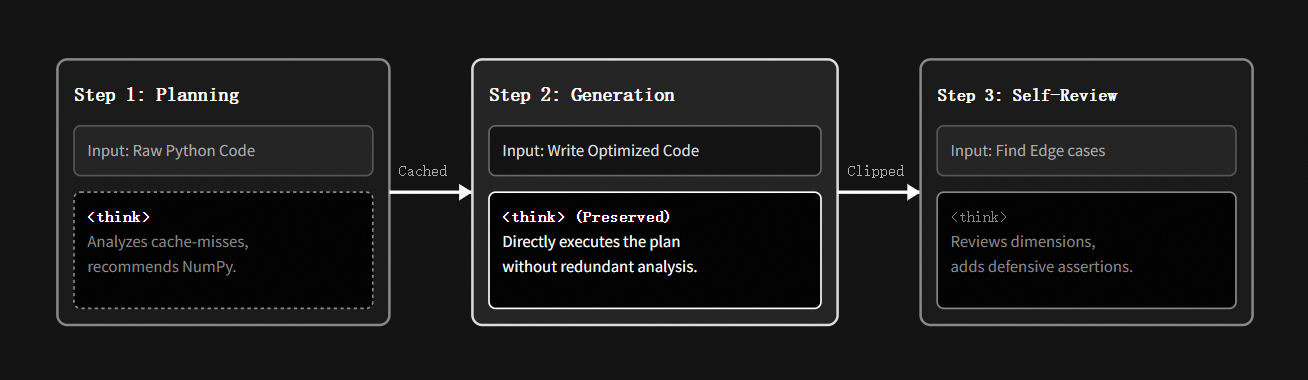
When translating this lab experience into production enterprise systems on Alibaba Cloud, keep these optimization guidelines in mind:
By mapping out tasks into modular labs, you can build production-ready software agents that leverage Qwen 3.7 Max's reasoning capabilities. Through native thinking preservation, your applications can transition from simple prompt-response interactions into self-improving, autonomous loops that write, debug, and secure complex operations independently verify highly efficient logic.
The Hermetic AI Sandbox: Deploying Sovereign Qwen Models in Fully Air-Gapped VPCs
Scaling GenAI Globally with Alibaba Cloud Platform for AI (PAI) & EAS

16 posts | 1 followers
FollowAlibaba Cloud Community - June 8, 2026
Alibaba Cloud Community - May 21, 2026
Alibaba Cloud Community - August 3, 2026
Alibaba Cloud Community - May 26, 2026
Alibaba Cloud Indonesia - July 16, 2025
Alibaba Cloud Community - August 4, 2026
16 posts | 1 followers
Follow QwenWork
QwenWork is dedicated to helping employees strengthen their professional competitiveness in the AI era and to enabling enterprises to improve organizational effectiveness.
Learn More Token Plan
Build more, spend less. One plan, every modality.
Learn More
Alibaba Cloud Model Studio
A one-stop generative AI platform to build intelligent applications that understand your business, based on Qwen model series such as Qwen-Max and other popular models
Learn More Qwen
Qwen
Full-range, open-source, multimodal, and multi-functional
Learn MoreMore Posts by Community Builder

