Getting More Done with Auto: Inside Qoder's Harness Optimizations
Learn More about Qoder
Explore Qoder – Agentic Coding For Enterprise
When completing a task, an agent sometimes reads the same file again and again, looks up information over several rounds that it could have fetched in one, or re-confirms work already done in a long task. Every extra step adds waiting time and Credits consumption.
Recently, Qoder made a series of optimizations to how Auto executes tasks, cutting these redundant and wasteful costs. Average Credits consumption per task dropped by about 41%. You don’t need to change any configuration or working habits — just use Auto and reap the benefits.
These gains come not only from the model, but also from the execution layer outside the model: the Harness. The following scenarios show how it lets the same quota support more work.
A Look at How an Agent Completes a Task
Take asking an agent to fix a failing unit test. It starts by searching the relevant code, reads the implementation file, works out where the problem lies, edits the code, and reruns the test to confirm. If the test still fails, it analyzes further and keeps editing. Each step has two halves: the model decides what to do, a tool executes it, and the result goes back to the model as the basis for the next decision.
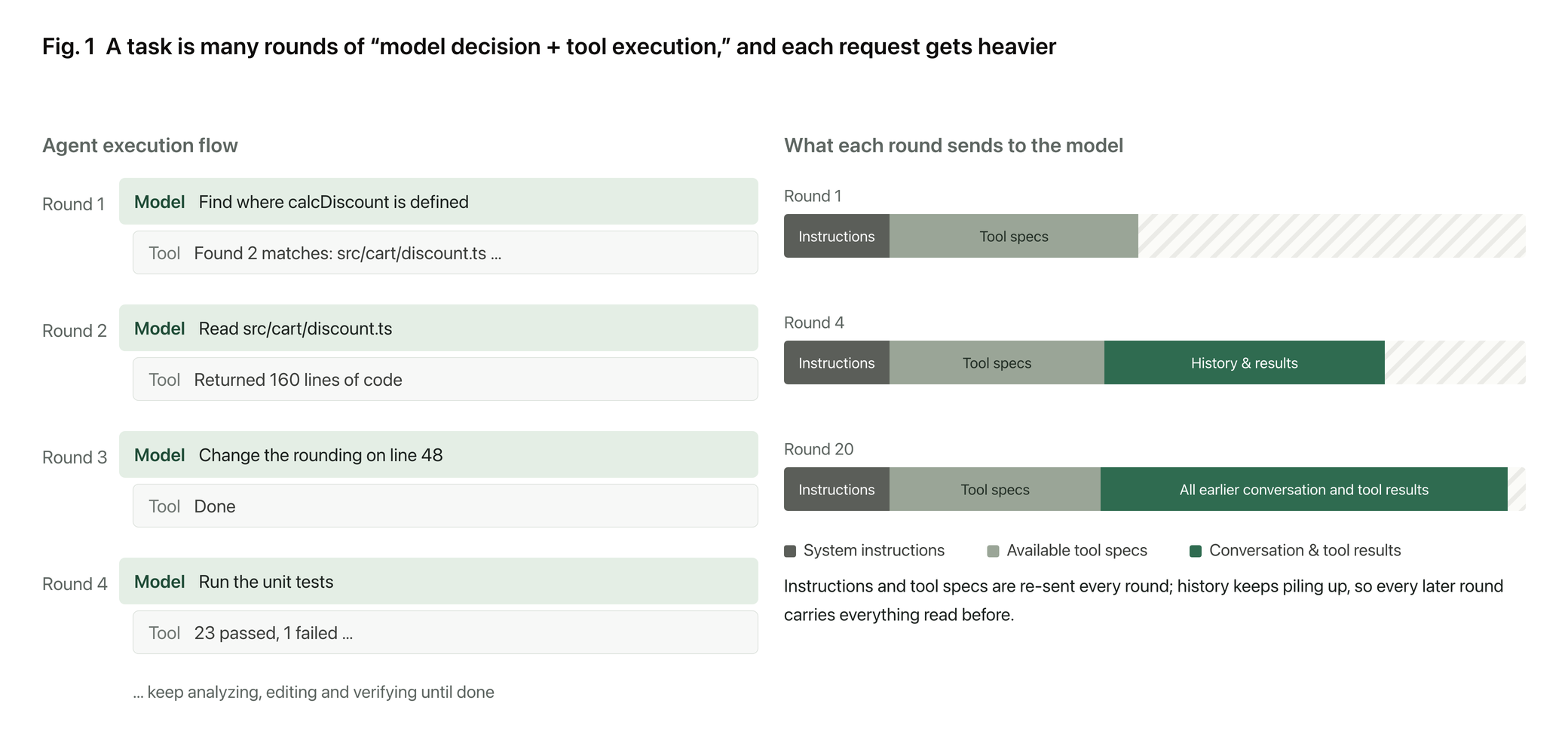
Every time the model makes a judgment, it sees one complete “context”: the system instructions, descriptions of all available tools, the earlier conversation, and every tool result so far. This context is sent to the model in full on every round and billed by token, with a lower rate for the cached portion. The further a task progresses, the longer the history and the heavier each round’s request. Any unneeded content in the context is paid for again in every later round.
Harness refers to the execution layer outside the model that handles all of this: what goes into the context, which tools are provided, how calls are executed, and how long tasks carry on. With the same model, the Harness design directly determines how many rounds a task runs and how much content each round carries.
Prompt Optimization: Fewer Needless Round Trips
Analyzing the execution traces of production tasks, we found that many rounds went to two kinds of work: independent operations broken into several rounds and issued one at a time, and conclusions already settled being re-derived, or checks already passed being run again.
For these two patterns, Qoder optimized the system prompt: guiding the model to issue independent calls in the same round so several tools run in parallel; to use facts already established in the conversation directly instead of re-deriving them; and to focus verification on the delivery goal, skipping checks that already passed when the related code hasn’t changed.
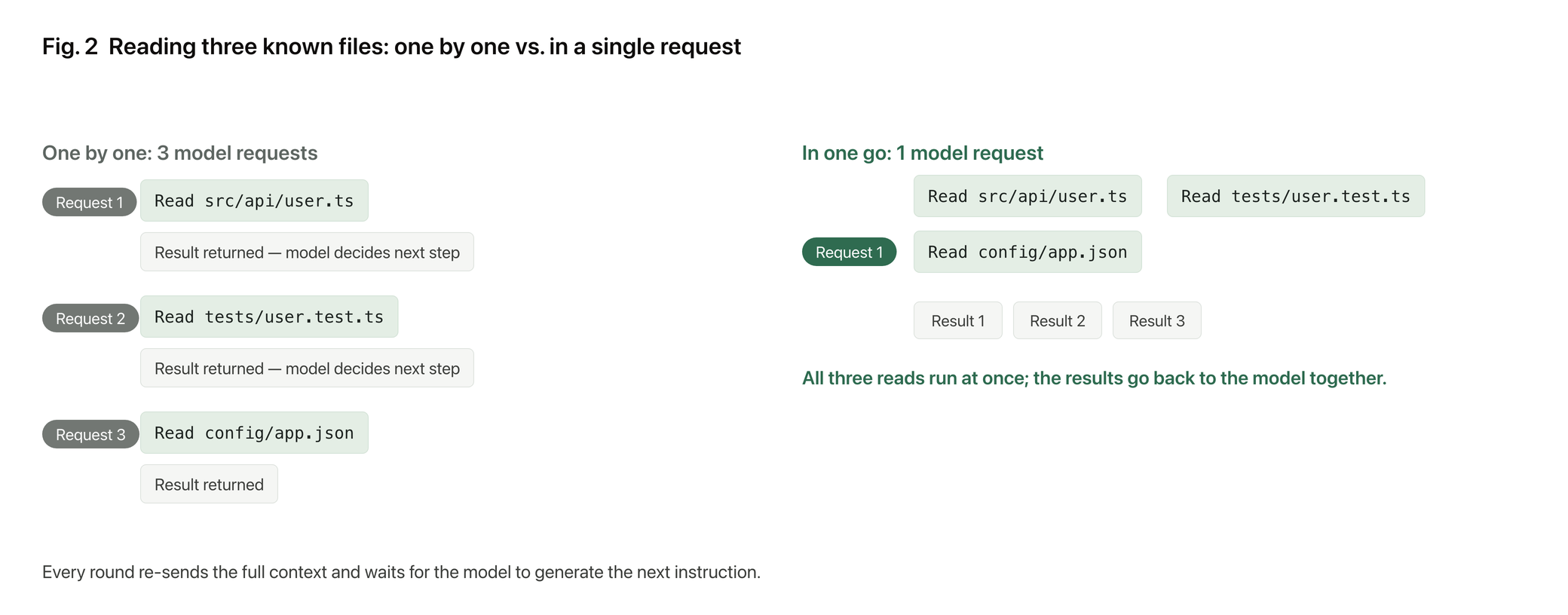
The parallel-call change is the most visible. The model often needs several pieces of information at once — an API’s implementation, its tests, and the project configuration, for example. All three file paths are known and none depends on another, yet the model often reads them one at a time: read the implementation, come back and think, read the tests, come back again, and finally read the configuration. Each additional round trip means one more full model request, with the entire context sent all over again.
Qoder is now explicitly instructed to batch independent tool calls into a single turn once they’ve been identified. The harness runs them concurrently and returns their results together. Reading the implementation, tests, and configuration can now be done in one turn instead of three separate requests.
On-Demand Loading for MCP Tools
MCP is the standard protocol through which agents connect to external services, and one MCP server usually exposes several tools. To call a tool correctly, the model must know what it is for, the name and type of every parameter, and which parameters are required — and each tool’s full description is a substantial block of text.
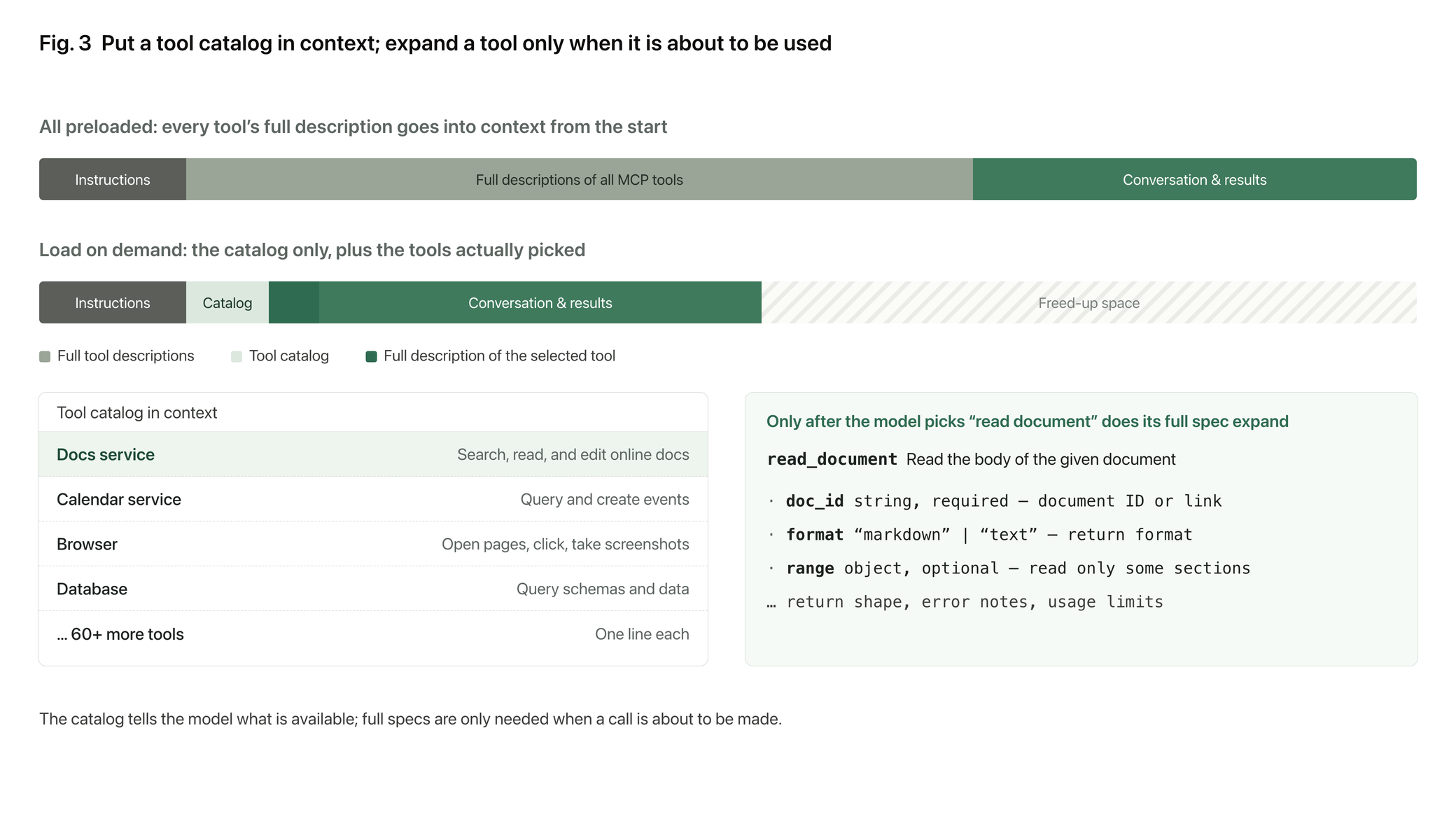
Once you connect a few services, the tool count easily reaches dozens or even a hundred. If every description is loaded into the context when a task begins, then even when the user only wants to look up a document, the model carries the full parameter list of every tool — calendar, browser, database, and more — on every round. Only one or two are actually used, while the rest are billed every round; and with so many options, the odds of the model picking the wrong tool also rise.
Qoder splits “knowing which tools exist” and “knowing how to call them” into two steps. The context carries only a brief catalog listing the services, the tools each one offers, and roughly what they do. From the task, the model finds the tool it needs in the catalog, retrieves the full description of just that tool, and then calls it. Descriptions of tools that go unused never enter the context.
After on-demand MCP tool loading rolled out gradually, Credits consumption per task dropped by about 19%. The more services you connect, the more you save, and users no longer have to install fewer tools just to keep costs down.
High-Frequency Tools: Less Duplicated Content
File reading and web fetching are both tools the agent calls very frequently. Once a tool result enters the context, it stays in every subsequent round, so any extra piece of content here has its cost multiplied many times over.
Reading Files: Unchanged Content Isn’t Sent Twice
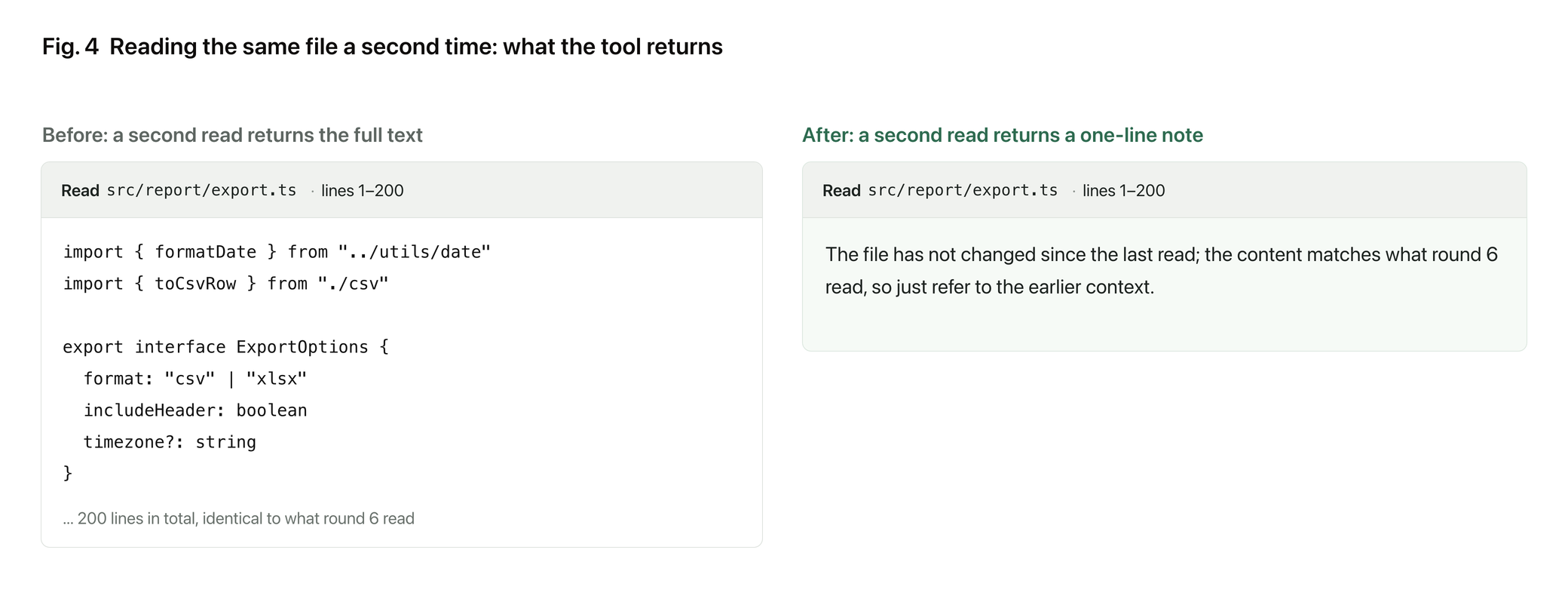
In long tasks, the agent often reads the same file repeatedly: once before making a change, and again a while later to confirm. Qoder’s read tool checks a few things first: whether the range being read this time matches the last read, whether the file has changed since then, and whether the previously read content is still in the context. If all conditions hold, the tool returns a one-line note saying the content is identical to last time, instead of sending the full text a second time. If the file has changed, or the old content has been dropped during compaction, it reads the latest content as usual.
The read tool also guides the model to read on demand: if the location is already known, read only the relevant lines; if not, search to locate it first, rather than pulling in an entire large file up front.
Fetching Web Pages: Fetch Once, Then Query the Source as Needed
A single web page converted to text often runs to tens of thousands of characters — an API reference or a release changelog, for example. Putting the whole page into the context is too expensive, so a fetch tool usually has a small model summarize it against the current question first and passes only the relevant parts to the agent.
The trouble comes afterwards. The summary answers only the question asked at fetch time; as the task moves on, the model often needs to verify other details: the exact name of a parameter, a snippet of sample code, the precise value of a limit. None of that is in the summary, and previously the only recourse was to fetch the same page again: download, convert, and summarize once more — and the new summary might still not contain what was needed.
Now, after fetching a page, Qoder first saves the converted full text to a local file, then builds the summary. The result returned to the model has two parts: a summary tailored to the current question, and a “table of contents” for the source text that lists the source URL, the local file path, the total line count, and the line range of each heading on the page.
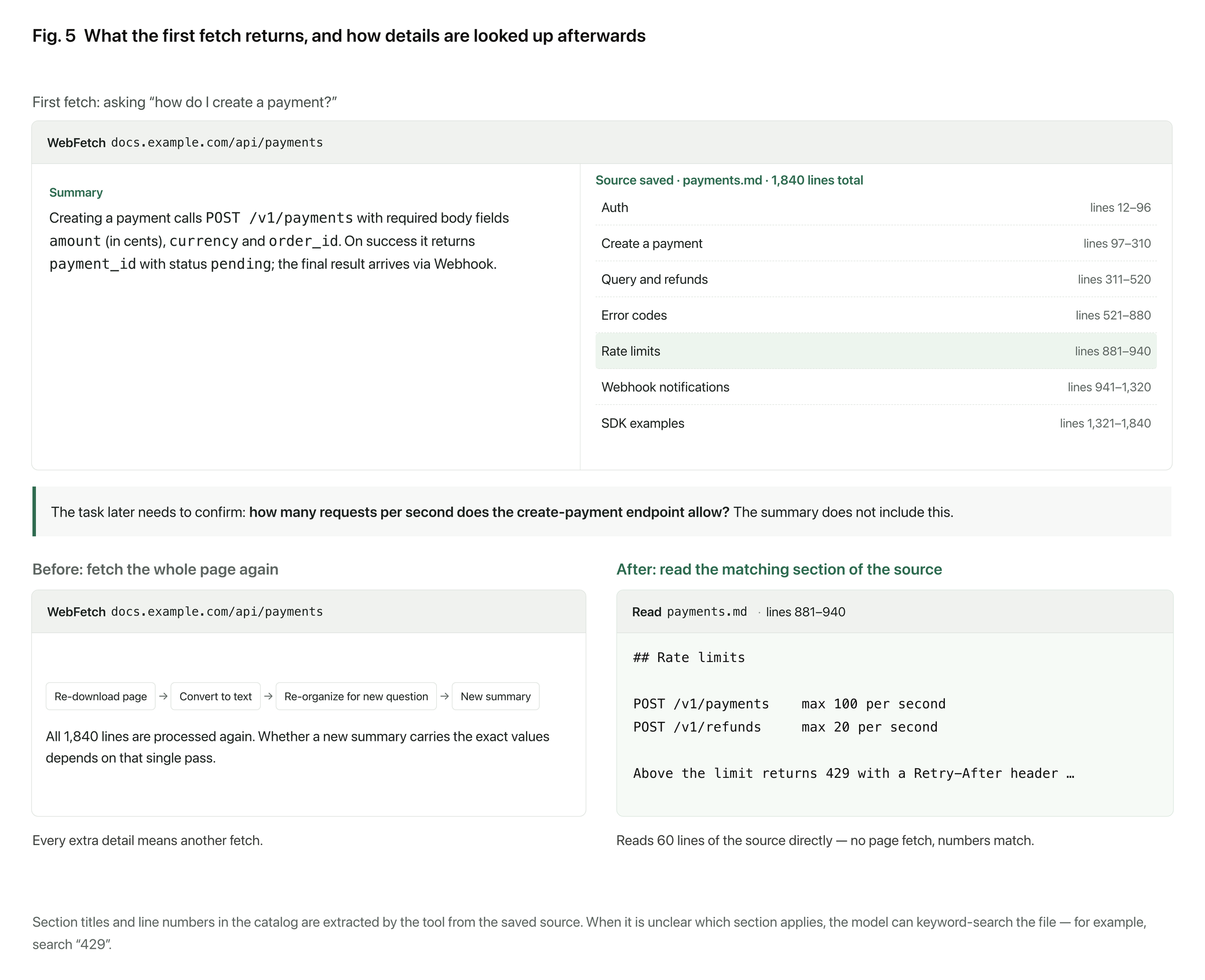
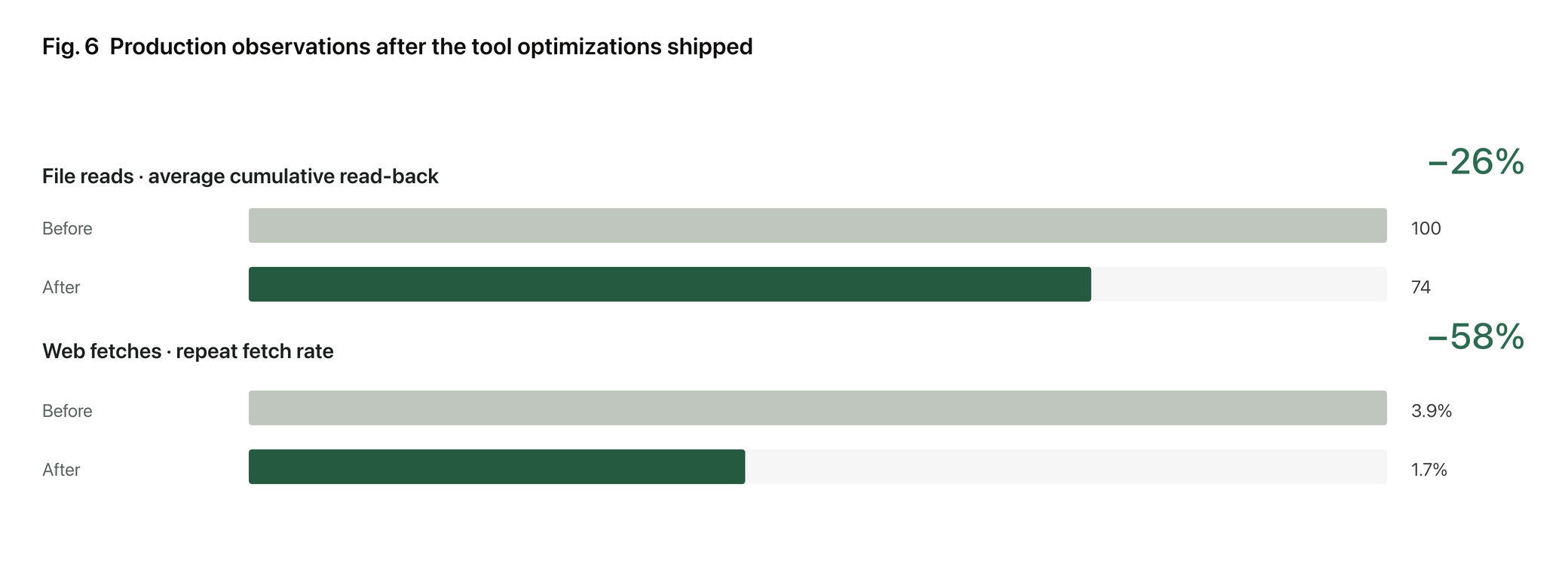
When details need checking later, the model reads this file. If the table of contents identifies the relevant section, the model reads only that section. Otherwise, it searches the local file by keyword. It re-fetches only when the very latest page content is truly required, or when the local file has expired and been cleaned up. After launch, the share of pages fetched more than once dropped by more than half.
CodeMode: Batch Tool Calls with Scripts
CodeMode is Qoder’s latest way to orchestrate tools. When the model invokes CodeMode, it submits not a tool’s arguments but a JavaScript script. The script runs in an isolated sandbox and can call the agent’s other tools, such as reading files or searching code, process their results inside the script, and finally hand back only the script’s output to the model.
It fits several kinds of situations: when a later call’s parameters depend on an earlier call’s result; when a large number of independent calls must be issued; and when tool output is large but only a small part of it is needed. Handled one tool call at a time, these cases either add many rounds of model requests or drag a mass of intermediate results into the context.
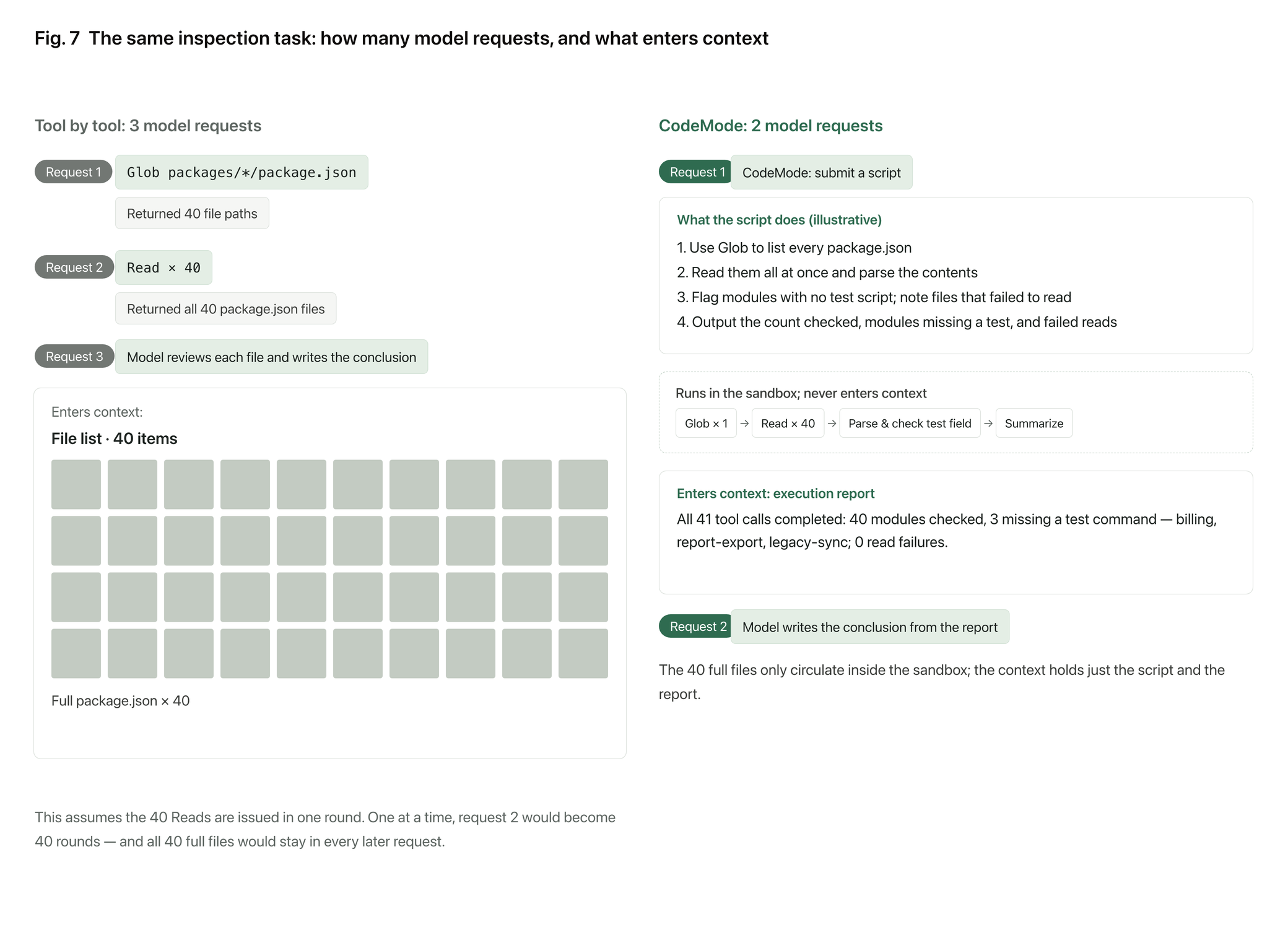
Take finding which modules in a repository have no test command configured. Calling tools one by one in a repository with 40 modules, the full text of all 40 package.json files enters the context as tool results and is carried in every later round. All the agent needs to check is whether each package.json defines scripts.test—a simple check the script can perform.
It works in three steps.
Step 1: The model writes the script. Inside a script, tools are called like functions, with the same parameters as calling them directly, and they return structured results such as file contents or lists of matching files. The model lays out the call order, loops, filter conditions, and what to output at the end.
Step 2: The sandbox runs the script. The sandbox itself has no access to files, the network, or processes; to read files or run commands, the script can only go through tools. Every tool call passes a separate permission check — allowing the script to run does not mean allowing every read and write inside it. Read-only calls may run concurrently; write operations run one at a time. Tool return values stay inside the script and never enter the model’s context.
Step 3: The results go back to the model. The model receives a brief execution report: first the execution status, stating how many tool calls were made, how many failed, and which files were changed; then the script’s output. That output is tagged as tool data, reminding the model that the text is not instructions.
Each script runs in a fresh sandbox; variables from the previous script are not retained, and data intended for later scripts must be saved explicitly. A longer-running script first returns a “running” status, and the model collects its output afterwards.
Work such as interpreting what code means and diagnosing failures still goes to the model. A script cannot ask the model questions midway, so where a judgment call is needed, it outputs the evidence and lets the model decide the next step.
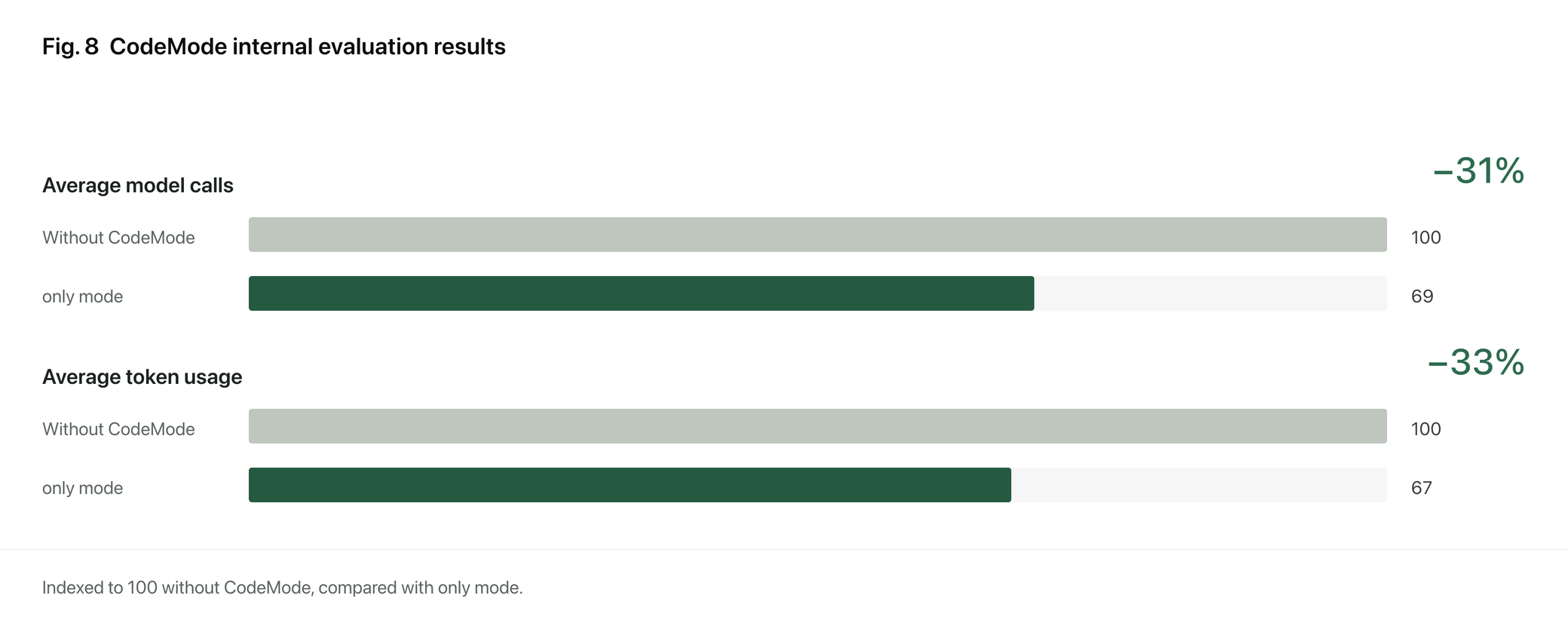
In Qoder’s internal evaluation, compared with not using CodeMode, CodeMode cut the average number of model calls per task by about 31% and token consumption by about 33%.
Preserving Working State During Context Compaction
The longer a task runs, the more conversation, code, and tool results pile up in the context, and sooner or later it nears the model’s context limit. Compaction is then required: condensing earlier history into a summary to free up room and keep working.
The trouble is that summaries tend to capture only the broad strokes. For example: “Upgrading the project’s logging library to v3; some files have been changed; currently fixing compile errors.” After compaction the model knows what the task is, but not which modules are done, or what the latest compile error said. It can only search again, re-read files, and recompile — redoing work that was already finished before compaction.
During context compaction, Qoder preserves the agent’s working state:
- Earlier history is condensed into a summary that records the user’s requirements, conclusions already confirmed, and items still outstanding.
- The model replies and tool results from the most recent rounds are kept verbatim. These are often exactly what the next step needs — a newly surfaced error, for instance — so they stay as they are, without paraphrase.
- Files being worked on are re-inserted into the context using their latest content on disk, so the model doesn’t keep editing based on a stale version.
- State such as task plans and to-dos is preserved as well.
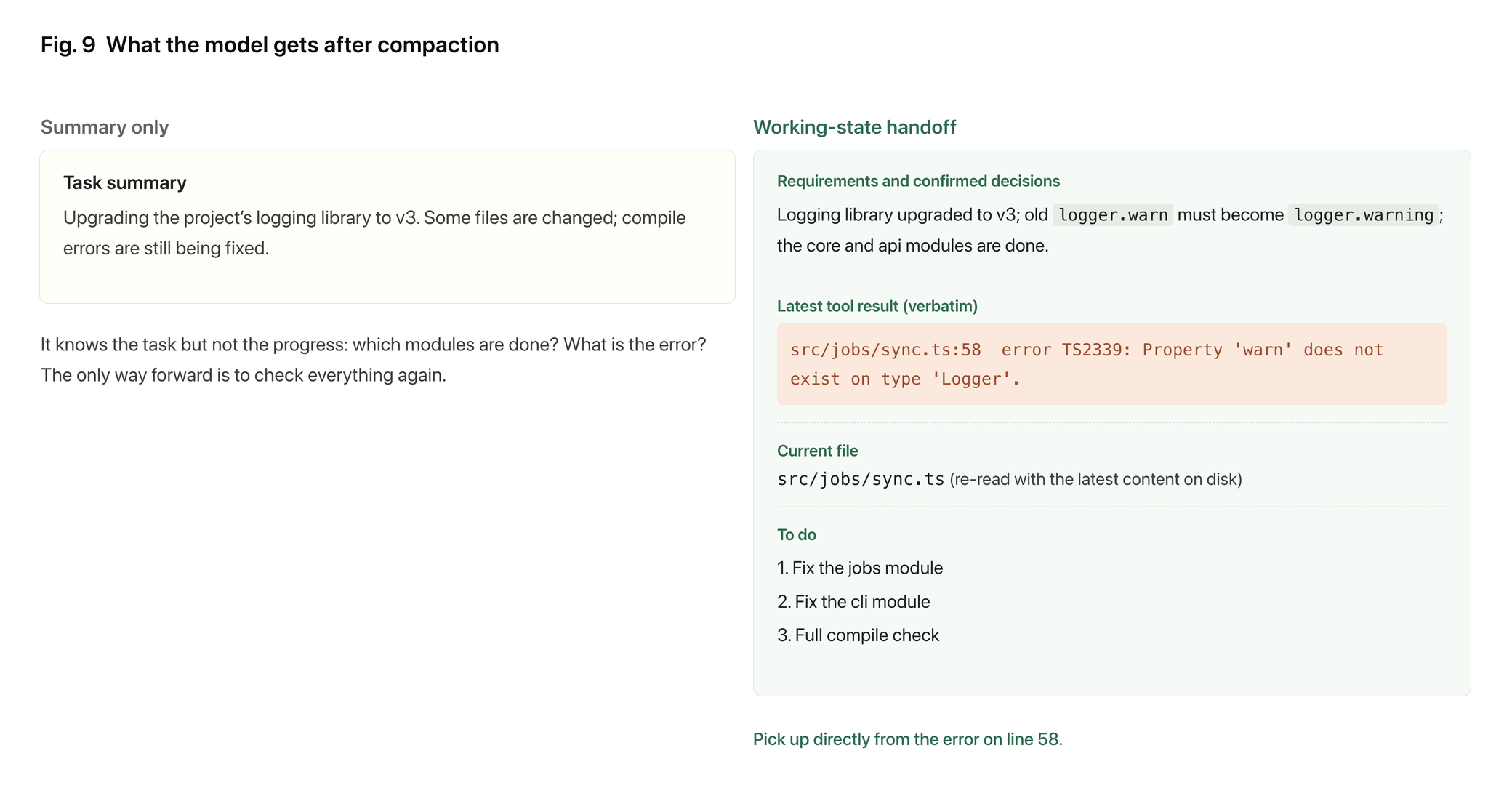
The handover content is somewhat longer than a plain summary, but after compaction the model can pick up exactly where it left off. In internal software-engineering task evaluations, this change cut task duration by about 22%, and task pass rates improved as well.
Summary
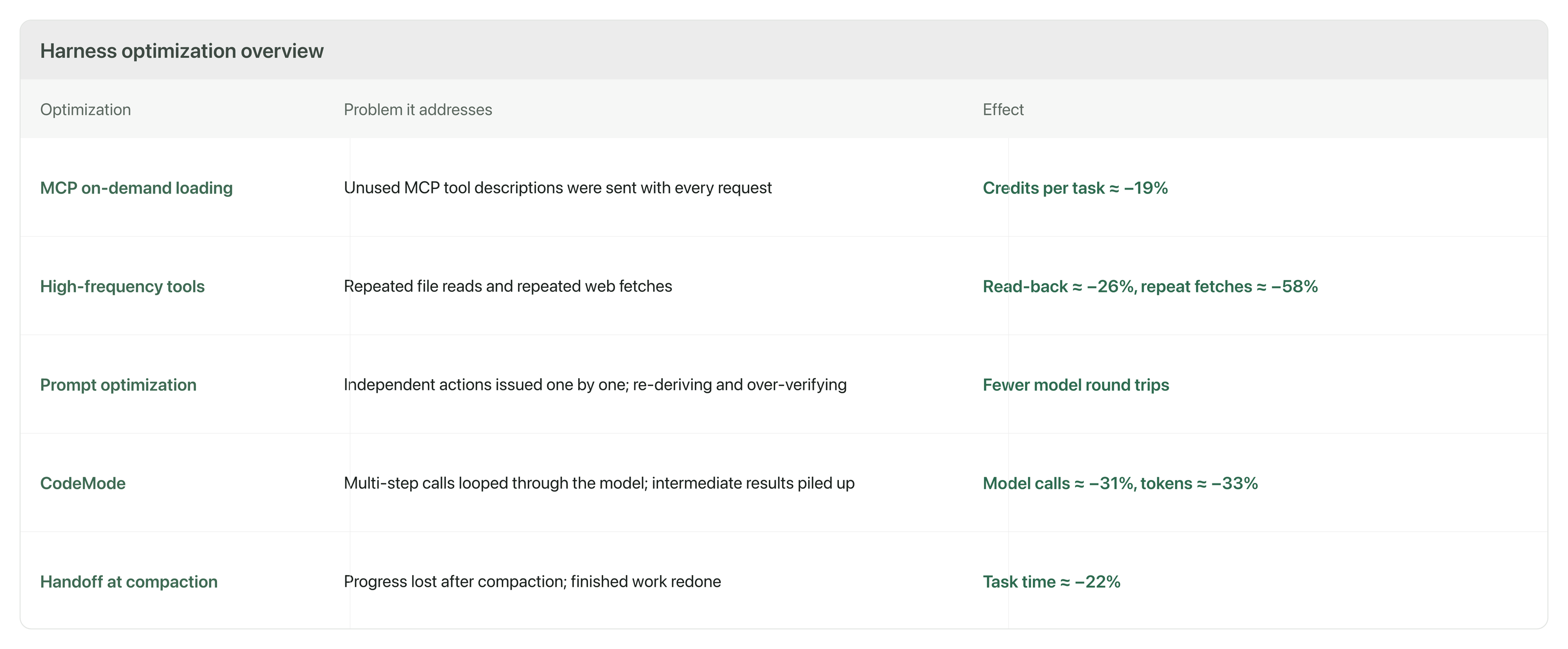
These optimizations don’t change how users work; users still describe tasks in natural language. The change happens inside the Harness: what the model sees each round is closer to what needs doing right now, multi-step tool calls can be delegated to scripts, and long tasks no longer start over because of compaction. Together, these optimizations have reduced Auto’s average Credits usage per task by about 41%, helping users get more done with the same Credits budget. The improvements apply automatically, with no changes to users’ settings or workflows. We’ll continue improving the harness to make everyday tasks more efficient.
Read previous post:
Same Credits, Nearly Double the Tasks: A Technical Breakdown of Qoder's Durability Optimization
-

-
Alibaba Cloud Community
1,611 posts | 526 followers
Follow
Comments
-
-
Alibaba Cloud Community
1,611 posts | 526 followers
Follow
Related Products
-
 Qoder
From Assisted to Autonomous — Adapting to Every Programming Need
Learn More -
 Token Plan
Build more, spend less. One plan, every modality.
Learn More -
 QwenWork
 is dedicated to helping employees strengthen their professional competitiveness in the AI era and to enabling enterprises to improve organizational effectiveness.
Learn More -
 DeepSeek
-V4.1-Flash is the lightweight flagship of DeepSeek's new architecture family, packing 552B total MoE parameters to deliver flagship-surpassing intelligence across key benchmarks.
Learn More
More Posts by Alibaba Cloud Community
- Same Credits, Nearly Double the Tasks: A Technical Breakdown of Qoder's Durability Optimization
- Your Credits Go Further: Qoder Auto Cuts Per-Task Usage by 41%
- Qwen4-Max: One Flagship for Complex Work, at a Price That Scales
- Qwen4-Max at Work: Six Real-World Scenarios for an Always-On AI Teammate
- Alibaba Cloud Named a Leader in Gartner® Magic Quadrant for Container Management for Fourth Consecutive Year
- The Easiest Way to Try the Latest Models in One Place: Token Plan Starting at $3 for the First Month
- 一個平台輕鬆試用最新 AI 模型:Token Plan 首月低至 $3
- Alibaba Cloud Advances AI Adoption in Malaysia with Nationwide Youth Contest and Industry Collaborations
- Alibaba Cloud Unveils New AI Initiatives at Hong Kong Summit to Advance the City’s AI Ecosystem