The gap between a working model in a notebook and a reliable inference endpoint in production is one of the most persistent friction points in machine learning engineering. A model that performs well in a development environment can fail to reach production at all, or reach it in a form that is fragile, unversioned, and difficult to update. The cause is rarely the model itself. It is the absence of the infrastructure layer that connects model development to model serving in a reproducible, auditable way.
Ad hoc notebook environments create two compounding problems. First, they accumulate implicit dependencies framework versions, data paths, environment variables that are invisible until a training job fails on different hardware. Second, manual deployment processes have no rollback mechanism: when a new model version underperforms in production, recovery requires re-running steps that were never formally recorded. At scale, this is operationally untenable.
Alibaba Cloud’s Platform for AI addresses both ends of this problem through two dedicated services: PAI-DSW (Data Science Workshop) for managed development environments, and PAI-EAS (Elastic Algorithm Service) for scalable model serving. Between them, PAI-DLC (Distributed Learning Cluster) handles the training compute layer. This article documents the configuration decisions and architectural patterns for assembling these services into a production-viable MLOps pipeline.
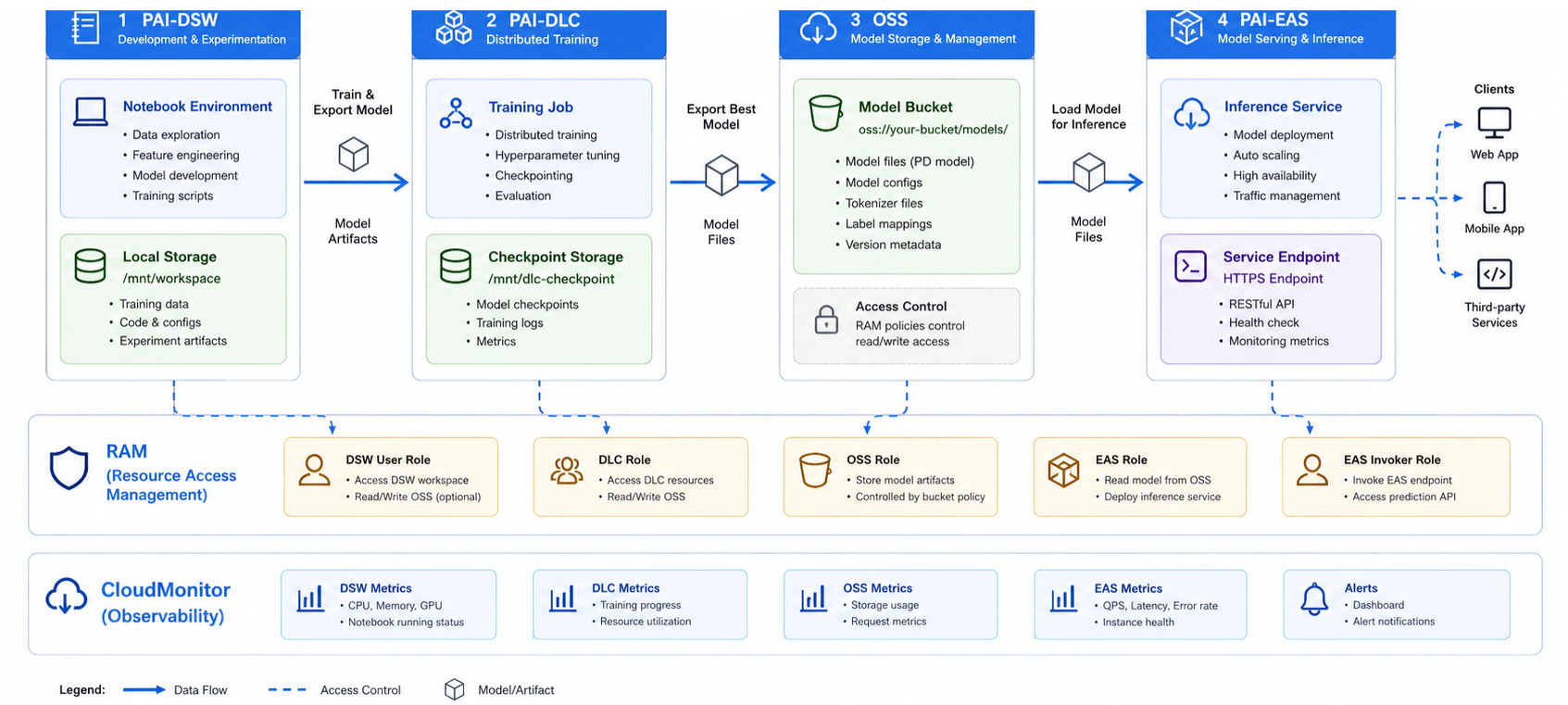
Figure 1: PAI MLOps pipeline — DSW → DLC → OSS → EAS
PAI-DSW runs JupyterLab workspaces tuned for machine learning workloads, and the most consequential setup decision is instance type selection.
For data pre-processing, feature engineering, and training models on tabular data, CPU instances handle the job well. GPU instances become necessary once you move into deep learning though which GPU makes sense depends on the specific model you're training.
Built-in kernels cover the major ML frameworks without environment setup: TensorFlow 2.x, PyTorch, XGBoost, and scikit-learn are available as pre-built environments. Custom kernels can be registered from container images where dependency requirements diverge from the defaults, which is common when pinning specific CUDA versions or integrating organisation-internal libraries.
Dataset access is handled via OSS mount rather than local storage. The DSW instance mounts an OSS bucket path directly into the file system, making training data accessible at standard file paths without transferring it to instance-local storage. This is material for large dataset workloads: a 500 GB image dataset accessed via OSS mount does not consume instance disk, and the same mount configuration works across instance types without re-uploading data. Mount configuration is set at instance creation and references an OSS bucket path and a RAM role that grants read access.
Git integration is configured at the instance level. Connecting a code repository to a DSW instance enables version-controlled experiment tracking: notebook checkpoints, training scripts, and configuration files are committed alongside model output metadata, providing an auditable record of which code version produced a given model artefact. Without this, reproducing a specific experiment requires reconstructing environment state from memory.
PAI-DLC manages distributed training jobs across configurable compute clusters. A training job definition specifies the worker count, GPU type, framework (TensorFlow, PyTorch, MXNet), entry script, and OSS paths for input data and output model artefacts. The cluster is provisioned at job start and released on completion, so compute cost is bounded to active training time.
Resource group selection determines whether training jobs run on dedicated or shared compute. Dedicated resource groups provide isolation and predictable scheduling latency, appropriate for time-sensitive training pipelines. Shared resource groups have variable scheduling latency but are suitable for non-time-critical batch training runs. Spot instances are available within resource groups and reduce training cost by 60–70 percent relative to on-demand pricing; the tradeoff is preemption risk on long-running jobs. Spot usage is most appropriate for jobs with checkpoint intervals short enough that preemption recovery loss is acceptable, typically 10–20 minutes between checkpoints.
Checkpoint saving to OSS should be configured at regular intervals for any training job exceeding 30 minutes. The checkpoint path is an OSS prefix; the training framework writes serialised model state to that path at each interval. On preemption or failure, DLC can resume from the last valid checkpoint rather than restarting from epoch zero. The checkpoint interval should be calibrated against job cost: frequent checkpointing reduces recovery loss but adds I/O overhead, which becomes significant for large model state sizes.
Training job monitoring is available via the PAI console metrics view. Three metrics matter most when monitoring production training jobs: GPU utilisation, training step throughput measured in steps per second, and loss curve trajectory. Sustained GPU utilisation below 60 percent on a GPU training job typically indicates a data loading bottleneck rather than a compute constraint; the corrective action is increasing the DataLoader worker count or prefetch buffer, not scaling to more GPUs.
PAI-EAS deploys trained models as REST inference endpoints backed by managed compute. A service definition specifies the model artefact location (OSS path), the serving processor (built-in processors cover TensorFlow SavedModel, PyTorch TorchScript, ONNX, and custom Docker containers), instance type, and initial instance count. The endpoint is assigned a dedicated URL on deployment and begins accepting inference requests immediately.
Resource group configuration at the EAS layer follows the same dedicated-vs-shared logic as DLC, with an additional consideration: inference latency variance. Shared resource groups introduce latency jitter under concurrent load from other services; for endpoints with P95 latency SLAs, dedicated resource groups with reserved compute provide the isolation required to meet them consistently.
Auto-scaling policy configuration is the most consequential operational decision at this layer. Development and staging endpoints should be configured with scale-to-zero enabled: the service scales down to zero instances when traffic is absent, eliminating idle compute cost during off-hours. Production endpoints require a minimum instance count of at least one to avoid cold-start latency on the first post-idle request; the minimum count should be set based on the expected minimum concurrent request rate, not defaulted to one. Scale-out thresholds are configured as QPS per instance; when aggregate QPS exceeds threshold × instance count, EAS provisions additional instances. Scale-in has a configurable cooldown period. A 300-second cooldown is appropriate for endpoints with irregular traffic patterns to prevent oscillation.
Blue-green deployment enables zero-downtime model version updates. When a new model version is ready for production, a new EAS service version is deployed alongside the current version. Traffic weight is shifted incrementally by 10 percent, then by 50 percent, then by 100 percent, with latency and error rate monitored at each step. If either metric degrades beyond the threshold, traffic weight is reverted to the prior version without taking the endpoint offline. This pattern requires that both service versions expose compatible request and response schemas; schema changes should be managed through versioned API contracts rather than in-place modifications to the serving interface.
Four operational factors determine whether the MLOps pipeline performs reliably under production conditions.
PAI-DSW and PAI-EAS establish the development and serving boundary of a production MLOps lifecycle on Alibaba Cloud. PAI-DSW provides managed, version-controlled development environments with OSS-backed dataset access that eliminates the implicit state accumulation problems of ad hoc notebook setups. PAI-EAS provides auto-scaling inference endpoints with blue-green deployment, token-based access control, and per-version rollback, the operational primitives required to maintain model serving reliability across version updates.
Engineers extending this architecture should evaluate two patterns based on their retraining cadence and traffic profile. PAI Pipeline provides a directed acyclic graph execution layer for automated retraining triggers: a pipeline definition connects a data preprocessing step, a DLC training job, an evaluation gate, and an EAS deployment step, executing end-to-end on a scheduled or event-driven trigger without manual handoffs between stages. For endpoints with variable traffic that includes GPU-intensive inference workloads, Elastic Inference allows GPU capacity to be attached to CPU-backed EAS instances dynamically, providing GPU acceleration at variable traffic levels without maintaining dedicated GPU instances during low-traffic periods.
Disclaimer: The views expressed herein are for reference only and don’t necessarily represent the official views of Alibaba Cloud.
ApsaraDB RDS: Relational Database Management on Alibaba Cloud

126 posts | 2 followers
FollowFarruh - October 1, 2023
Farruh - October 2, 2023
Regional Content Hub - March 8, 2024
PM - C2C_Yuan - March 18, 2024
PM - C2C_Yuan - June 24, 2026
Regional Content Hub - March 8, 2024
126 posts | 2 followers
Follow Platform For AI
A platform that provides enterprise-level data modeling services based on machine learning algorithms to quickly meet your needs for data-driven operations.
Learn More Epidemic Prediction Solution
This technology can be used to predict the spread of COVID-19 and help decision makers evaluate the impact of various prevention and control measures on the development of the epidemic.
Learn More Online Education Solution
This solution enables you to rapidly build cost-effective platforms to bring the best education to the world anytime and anywhere.
Learn More Accelerated Global Networking Solution for Distance Learning
Alibaba Cloud offers an accelerated global networking solution that makes distance learning just the same as in-class teaching.
Learn MoreMore Posts by PM - C2C_Yuan

