Nowadays, most of times we should considering PaaS or SaaS such as ACK, MA, PAI, RDS, Alibaba Cloud Mail, etc. on resource provisioning and deployment, but still having many chances to host in IaaS for some reason (Especially on lift‑and‑shift migration to Cloud), how to host in more cost effective would be a big topic as part of digital transformation.
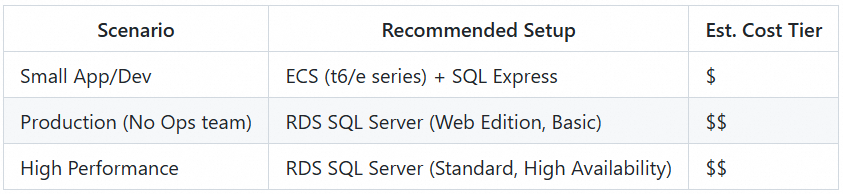
If your organization is technically comfortable managing your own server (RDP, patching, etc.), this is hands-down the cheapest route.
The Configuration:
• Instance Type: Use the Burstable Series (t6) or Economy Series (e).
ecs.t6-c1m2.large (2 vCPU, 4GB RAM). Windows Server really needs 4GB of RAM to breathe. The t6 series offers baseline performance with burst credits, perfect for internal apps or blogs that aren't hammered 24/7.• The Database: SQL Server Express Edition.
Total Cost Driver: You only pay for the ECS instance (hardware + Windows OS surcharge).
If your organization is looking for automated backups, monitoring, and no OS patching, RDS will become a better choice.
The Configuration:
• Service: ApsaraDB RDS for SQL Server.
• Edition: Select "Web Edition".
• Architecture: Select "Basic Edition" (Single Node).
Total Cost Driver: A small management fee + lower licensing cost.
Do you already have a Microsoft Enterprise Agreement with Software Assurance?
The Move:
Alibaba Cloud supports License Mobility. This means you can launch a "bare" ECS instance (or use a dedicated host) and apply your existing licenses to it. You stop paying the Alibaba Cloud hourly Windows/SQL surcharge and only pay for the raw compute resources.
Note: This only applies to ECS (Self-managed), not RDS.
To squeeze the last cent out of your architecture, apply these three rules:
Disclaimer: The views expressed herein are for reference only and don't necessarily represent the official views of Alibaba Cloud.
Alibaba Cloud Model Studio: Democratizing Generative AI Development
Alibaba Container Service - June 16, 2020
Rizwan Khan - May 23, 2023
Alibaba Developer - January 21, 2021
Nick Patrocky - August 5, 2022
Iain Ferguson - May 31, 2022
Nick Patrocky - March 8, 2024
 ApsaraDB RDS for SQL Server
An on-demand database hosting service for SQL Server with automated monitoring, backup and disaster recovery capabilities
Learn More ApsaraDB RDS for MySQL
An on-demand database hosting service for MySQL with automated monitoring, backup and disaster recovery capabilities
Learn More ApsaraDB RDS for PostgreSQL
An on-demand database hosting service for PostgreSQL with automated monitoring, backup and disaster recovery capabilities
Learn More ECS(Elastic Compute Service)
Elastic and secure virtual cloud servers to cater all your cloud hosting needs.
Learn MoreMore Posts by Kidd Ip


