This is a free feature on ESA !
https://www.alibabacloud.com/en/product/esa
As AI becomes increasingly widespread, developing AI-powered web scrapers or using AI to generate scraping code has become remarkably straightforward. Consequently, more and more websites are incorporating human‑verification mechanisms, such as Cloudflare’s CAPTCHA‑like pages designed to confirm that you’re a human.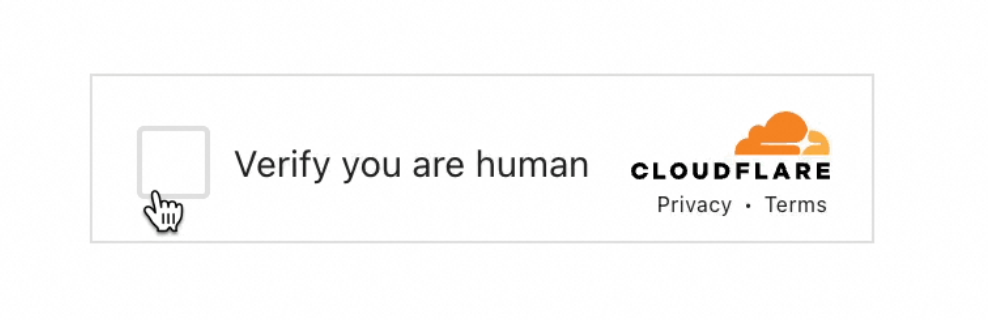
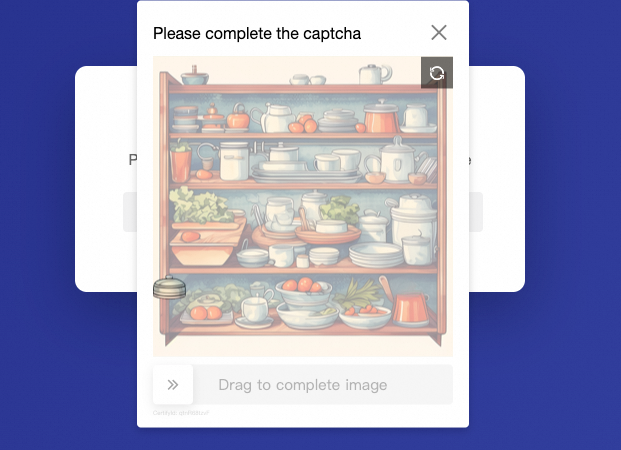
In response, ESA has also launched an AI-based CAPTCHA feature that safeguards various website APIs against bot access and malicious exploitation. Typically, to implement AI-based CAPTCHAs, we need to include JavaScript scripts provided by vendors such as Cloudflare or ESA on our front-end pages.Although it’s not very complicated, anyone with a penchant for cleanliness might still feel a bit reluctant. This article introduces a method that uses ESA and a separate CAPTCHA page to ensure that your page is only accessible after passing human verification.
The resource name used for the demonstration in this document is as follows (you can also rename it to index.html or any other name):
● Verification code on a separate page (the code is provided below):
captcha.html
● The page that requires authentication before access (replace with your own business page):
medici-capital.html
● Test URL:
https://medicicapital.top
The normal access procedure is as follows:
-> User accesses the test URL (the ESA conversion rule automatically redirects to the CAPTCHA page)
-> Display the human verification page (captcha.html)
-> Click to verify
-> Verification passed; in the captcha.html code, it automatically redirects to the actual page medici-capital.html while carrying the verification parameters.
-> AI captcha verification passed; loading the actual page.
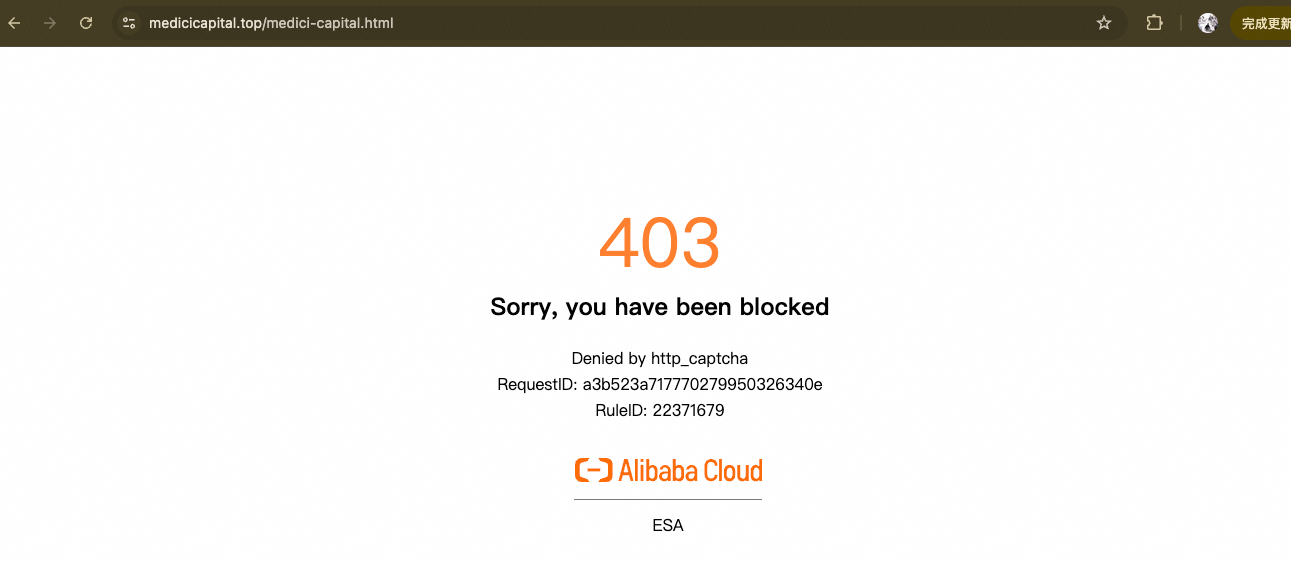
If you access the actual medici-capital.html directly without any parameters, the authentication will fail and a 403 error will be displayed.
In the AI CAPTCHA feature, configure a rule that maps the signature‑verification API to the actual access page or API endpoint. Simply fill in the rest as needed. For example, the page this document aims to protect is the website’s homepage, medici-capital.html.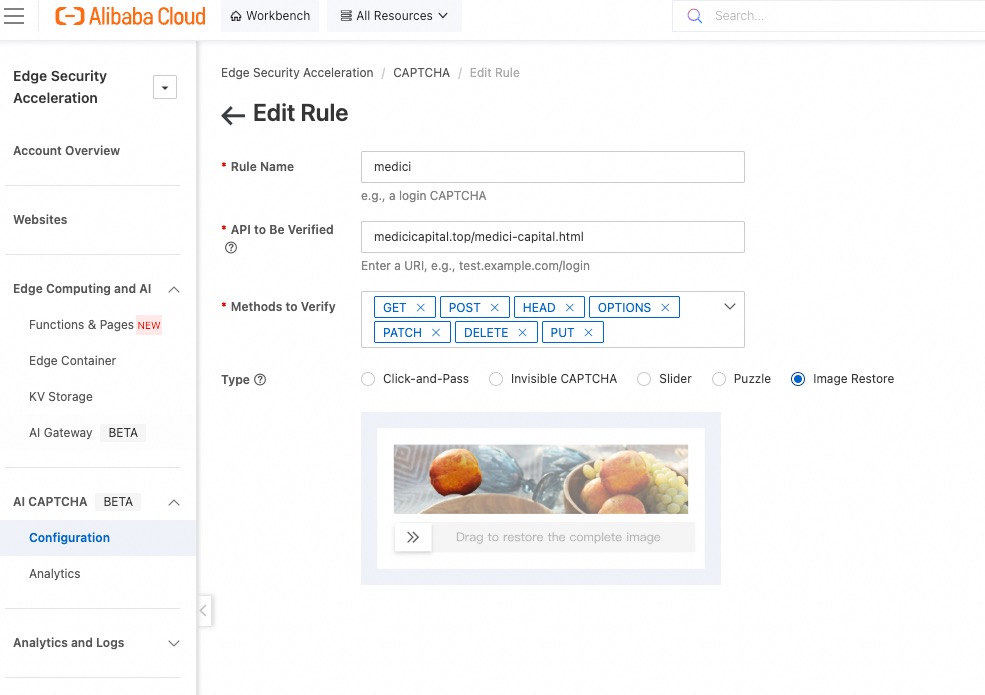
Copy the scene ID (SceneId) and the identity prefix, which correspond to the parameters in the subsequent code (with parameter names enclosed in parentheses).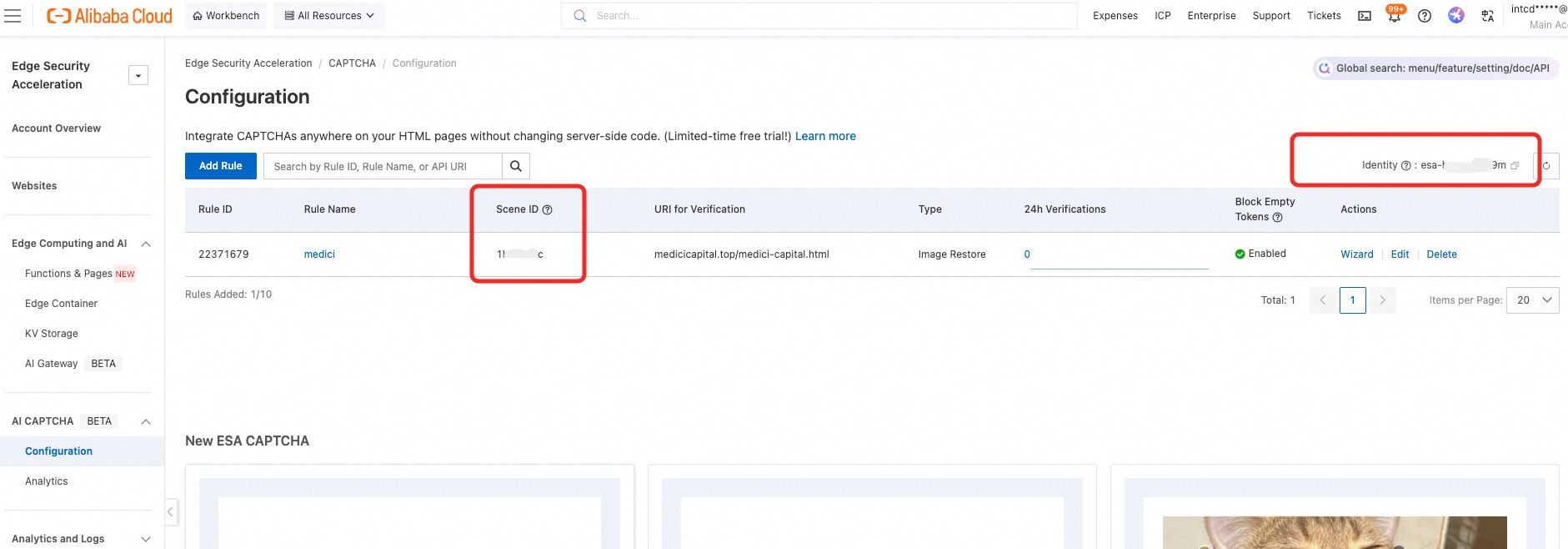
Enter the site and configure a rewrite rule: when the site is accessed without specifying an address or when index.html is requested, redirect to load the standalone captcha.html instead. Here, my website enforces HTTPS-only access; if it can also be accessed via HTTP, you can include that as well.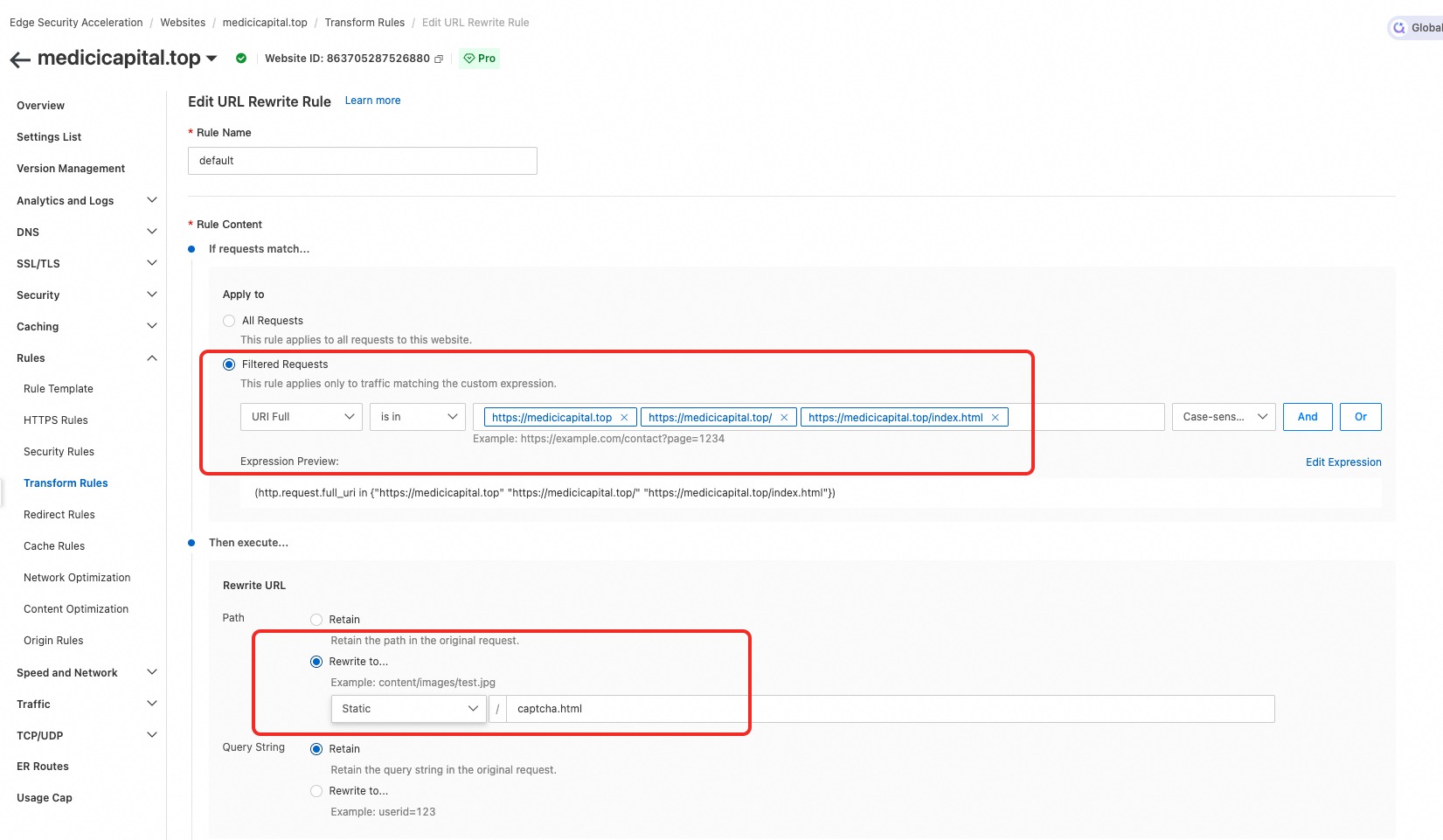
captcha.html
This page primarily references ESA’s documentation and loads the CAPTCHA code, which is also the only content that AI‑driven bots can scrape from your homepage without authentication.
You can simply copy it verbatim, just replacing the three placeholders with your own resource information. If you don’t like the current frontend design, you can also ask the AI to customize the styles for you.
Note that in the last comment, you only need to replace medici-capital.html with your homepage or the page you want to protect. The reason this allows for zero‑code injection is that the standalone CAPTCHA page is set as the default landing page, and after successful verification, users are automatically redirected to the URL specified within it.It also carries a signature that has passed verification.
<!DOCTYPE html>
<html lang="en">
<head>
    <meta charset="UTF-8">
    <meta name="viewport" content="width=device-width, initial-scale=1.0">
    <title>Security Verification</title>
    <script>
      window.AliyunCaptchaConfig = {
        region: "cn",
        //change to your own Identity copy from ESA Console
        prefix: "esa-boyupxxxxxx",
      };
    </script>
    <script
        type="text/javascript"
        src="https://o.alicdn.com/captcha-frontend/aliyunCaptcha/AliyunCaptcha.js"></script>
    <style>
        * { margin: 0; padding: 0; box-sizing: border-box; }
        body {
            font-family: 'Helvetica Neue', Arial, sans-serif;
            background: linear-gradient(135deg, #1a237e 0%, #3949ab 100%);
            min-height: 100vh;
            display: flex;
            align-items: center;
            justify-content: center;
        }
        .captcha-box {
            background: white;
            padding: 2.5rem 3rem;
            border-radius: 12px;
            text-align: center;
            box-shadow: 0 20px 60px rgba(0,0,0,0.3);
            max-width: 450px;
            width: 90%;
        }
        .captcha-box h2 { color: #1a237e; margin-bottom: 0.8rem; font-size: 1.6rem; }
        .captcha-box p { color: #666; margin-bottom: 1.5rem; font-size: 0.95rem; }
        #captcha-container { min-height: 60px; }
    </style>
</head>
<body>
    <div class="captcha-box">
        <h2>Security Verification</h2>
        <p>Please complete the verification to access this site</p>
        <div id="captcha-container"></div>
    </div>
    <script type="text/javascript">
        window.addEventListener('load', () => {
            setTimeout(() => {
                window.initAliyunCaptcha({
                  //Change to your own Scene ID which can copy from ESA Console
                    SceneId: "1bfnxxxx",
                    mode: "popup",
                    element: "#captcha-container",
                    button: "#captcha-trigger",
                    language: "en",
                    success: function (captchaVerifyParam) {
                        // change the file to your own('/medici-capital.html') before question mark, which is the main page after Captcha verification
                        window.location.href = '/medici-capital.html?captcha_verify_param=' + encodeURIComponent(captchaVerifyParam);
                    },
                    fail: function (result) {
                        console.error('Verification failed:', result);
                    },
                    getInstance: function (instance) {},
                    server: ['captcha-esa-open.aliyuncs.com', 'captcha-esa-open-b.aliyuncs.com'],
                    slideStyle: { width: 360, height: 40 },
                });
            }, 2000);
        });
    </script>
</body>
</html>
It should be noted that,
● when region parameter is 'cn',the Server below should be captcha-esa-open.aliyuncs.com and captcha-esa-open-b.aliyuncs.com;
● If you select the region sgp, the corresponding server domain names should be changed to the Singapore‑based ones: captcha-esa-open-southeast.aliyuncs.com and captcha-esa-open-southeast-b.aliyuncs.com。
In addition, make sure that the front-end pages you need to display are also placed in the corresponding directory. In this case, for simplicity, there are only two static pages, both hosted in the same OSS bucket, and the origin server for ESA’s domain is the same bucket.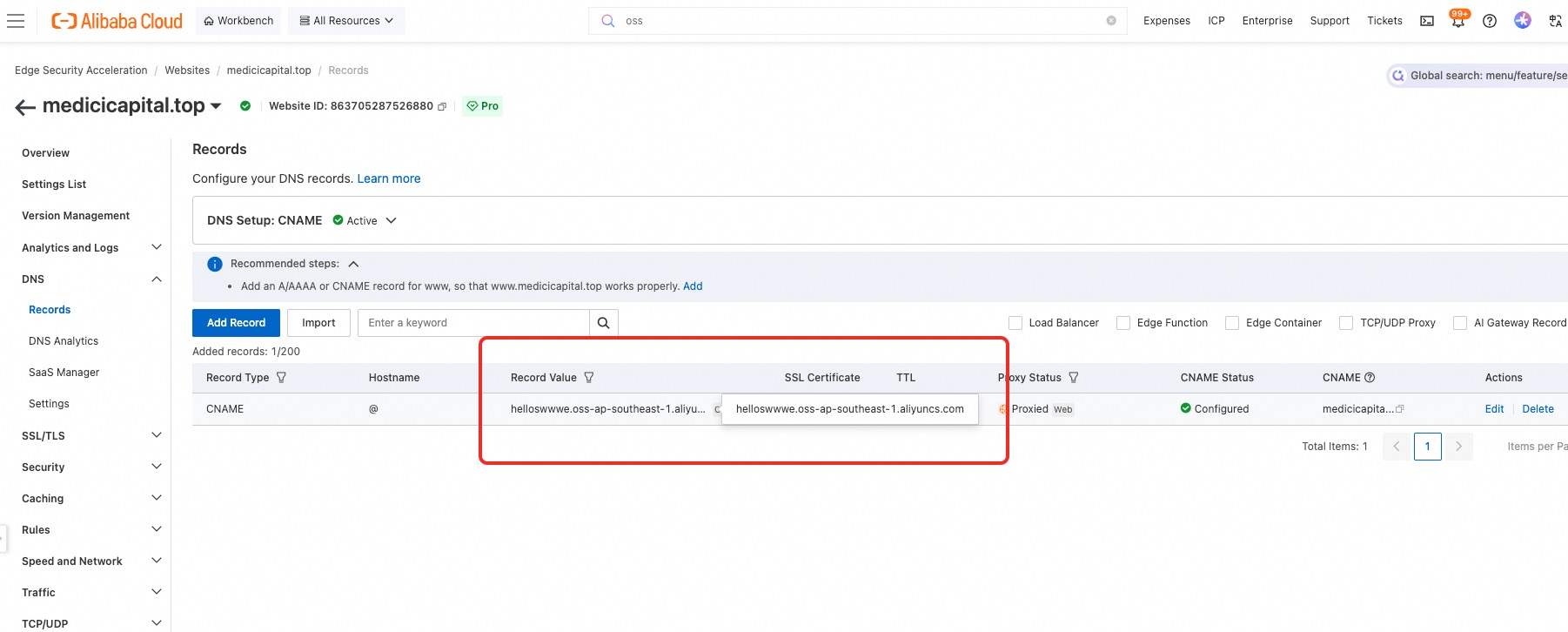
There are these two files in the bucket.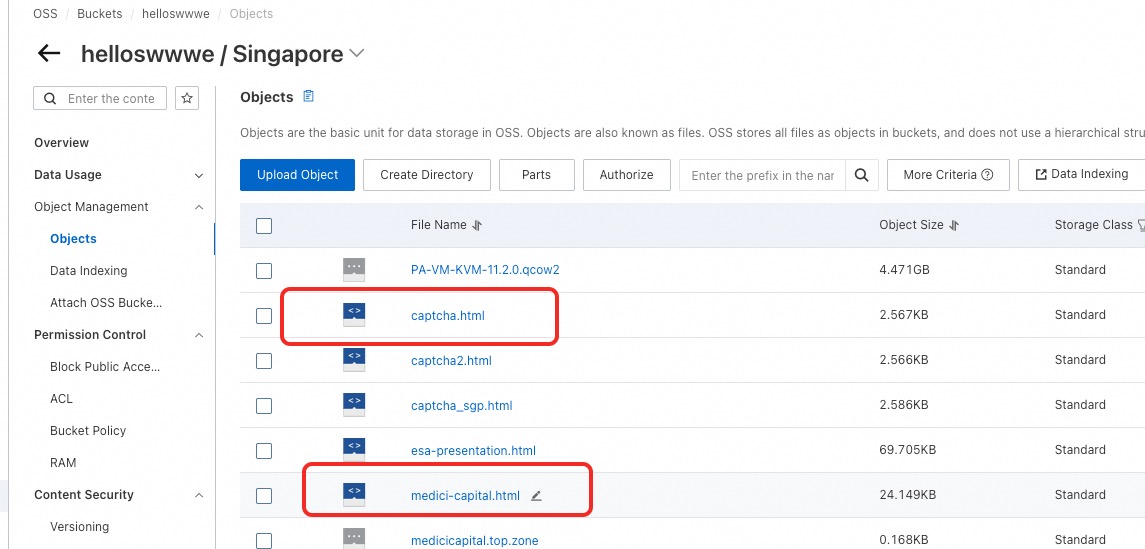
Of course, don’t forget to generate a free certificate for your site; we won’t go into further detail here.
You’re all set now. When you access this URL, it will automatically redirect and load captcha.html, displaying the CAPTCHA page. In the ESA console, you can choose your preferred AI‑based CAPTCHA type, such as a slider or an image‑based challenge.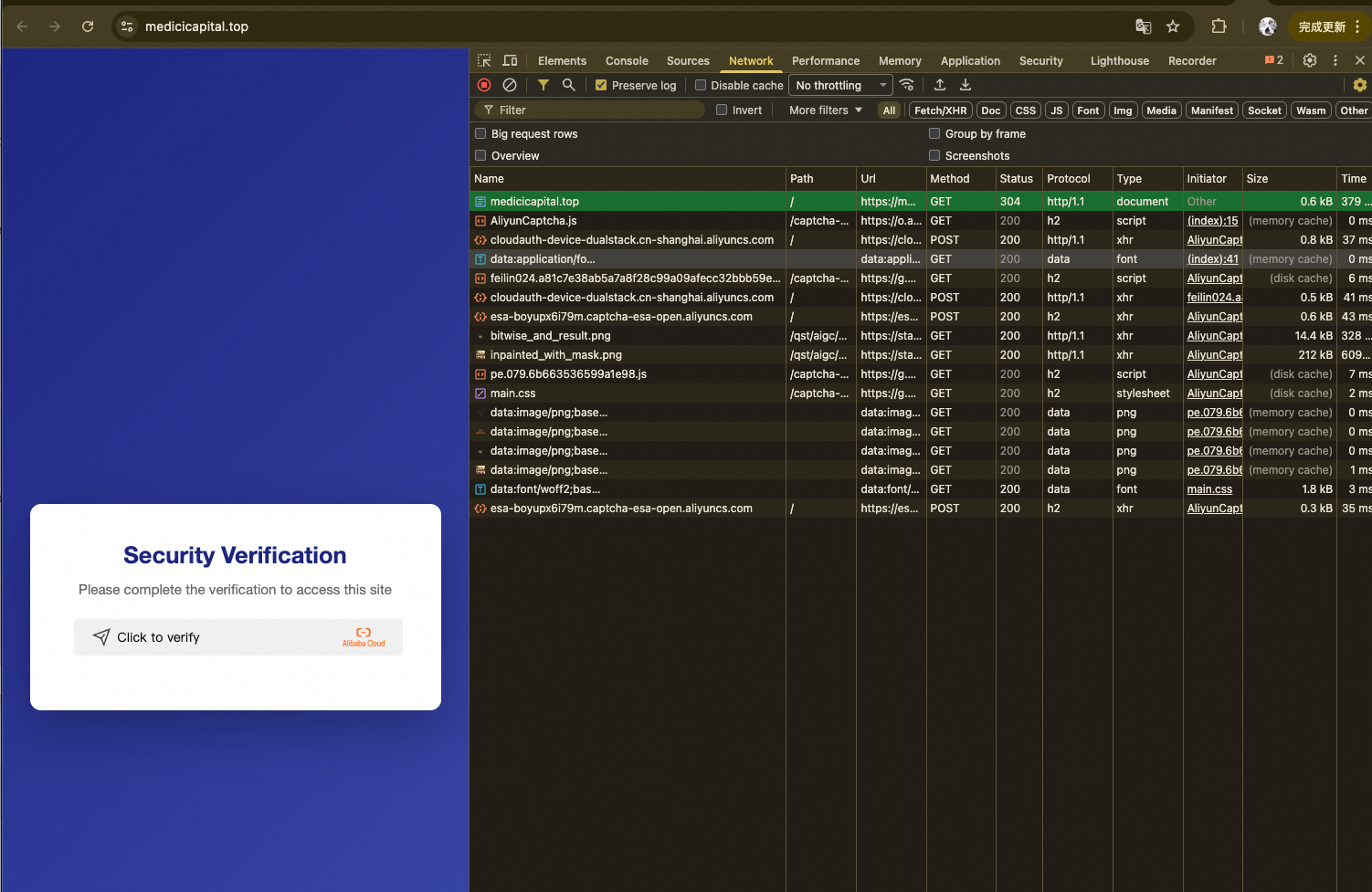
After successful verification, you will see that the access on the redirected homepage is signed with the AI CAPTCHA token; this endpoint is the one you configured in ESA as requiring signature validation.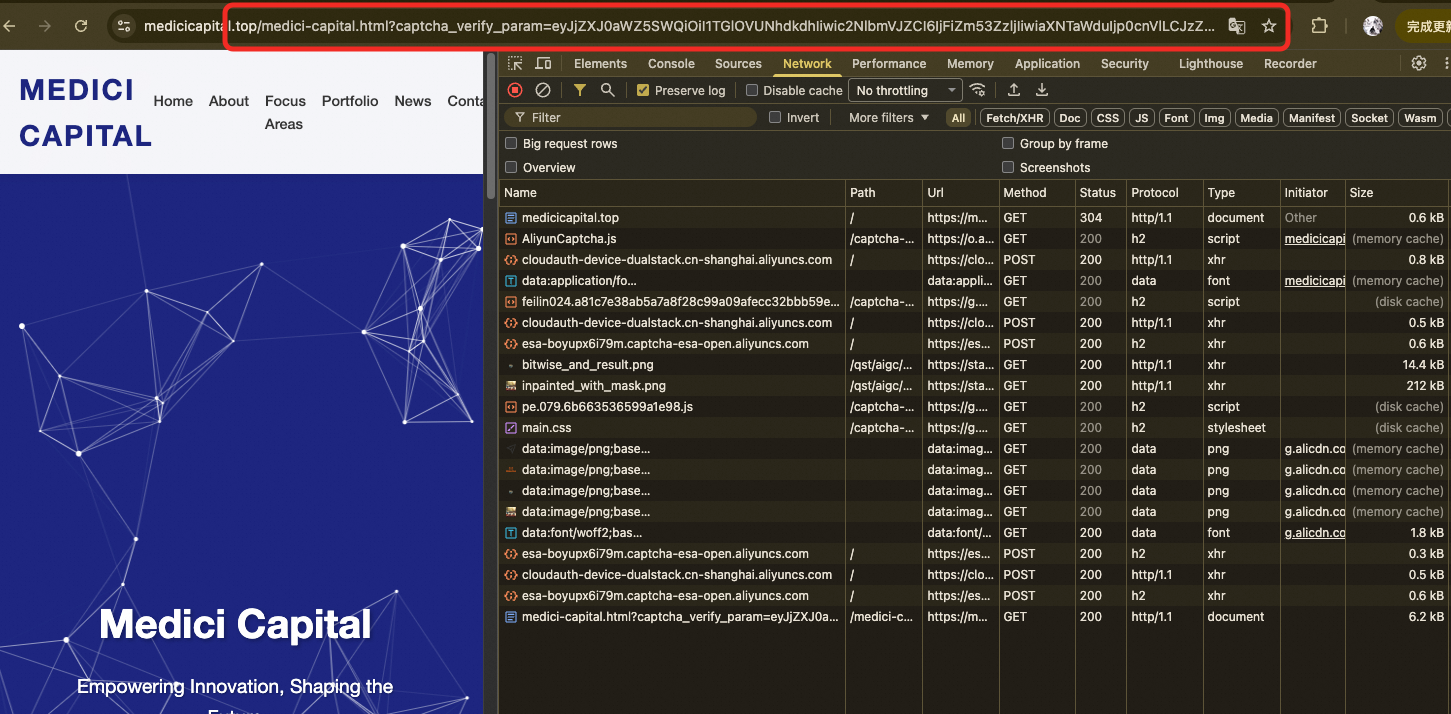
If you directly access the real html address, it will be blocked by AI verification code and display 403. Normal web crawlers can either only climb to the captcha page or only to this 403 page.
This document is intended solely for demonstrating ESA functionality and should not be regarded as a production‑ready configuration; it is provided for reference only.
In addition, this article focuses on protecting the homepage. AI‑based CAPTCHAs can be used to secure APIs and a variety of other scenarios; for more use cases, please refer to the official documentation below.
Reference document:
https://www.alibabacloud.com/help/en/edge-security-acceleration/esa/user-guide/get-started-with-ai-captchas
Why I Migrate My Domains From CDN to ESA Pro, The New Genenration CDN but Beyond CDN

6 posts | 1 followers
FollowESA Big Fan - June 16, 2026
ESA-bigfan-Fred - May 14, 2026
Bryan, Zhang - June 17, 2026
Bryan, Zhang - October 5, 2026
Bryan, Zhang - September 7, 2026
Bryan, Zhang - October 7, 2026
6 posts | 1 followers
Follow Edge Security Acceleration (Original DCDN)
Edge Security Acceleration (ESA) provides capabilities for edge acceleration, edge security, and edge computing. ESA adopts an easy-to-use interactive design and accelerates and protects websites, applications, and APIs to improve the performance and experience of access to web applications.
Learn More API Gateway
API Gateway provides you with high-performance and high-availability API hosting services to deploy and release your APIs on Alibaba Cloud products.
Learn More CDN(Alibaba Cloud CDN)
A scalable and high-performance content delivery service for accelerated distribution of content to users across the globe
Learn More Security Center
A unified security management system that identifies, analyzes, and notifies you of security threats in real time
Learn MoreMore Posts by ESA Big Fan

