Executive Summary
Alibaba Cloud’s Platform for Artificial Intelligence (PAI) is a comprehensive, enterprise-grade machine learning platform designed to streamline the entire AI lifecycle—from data preparation and model training to deployment and monitoring. At the core of PAI’s deployment capabilities is Elastic Algorithm Service (PAI-EAS), a fully managed, scalable inference service that enables organizations to rapidly deploy machine learning models as high-performance, production-ready APIs.
A key innovation that accelerates time-to-value is PAI Model Gallery, a curated repository of pre-optimized models from Alibaba’s internal research (e.g., Qwen series), Hugging Face, ModelScope, and the open-source community. Model Gallery integrates seamlessly with PAI-EAS to deliver one-click deployment for hundreds of models, eliminating the need for containerization, dependency management, or infrastructure configuration.
With PAI-EAS and Model Gallery, users can:
This integration dramatically lowers the barrier to AI adoption, enabling data scientists and developers to focus on innovation rather than infrastructure. For enterprises scaling generative AI, computer vision, or NLP applications, PAI-EAS with Model Gallery provides a secure, efficient, and user-friendly path from model to production - accelerating ROI and driving intelligent transformation across the organization.
Step-by-Step Guide: Deploying Qwen3 from PAI Model Gallery
This guide assumes your Alibaba Cloud PAI environment is already set up and that you have an active workspace. If you haven’t configured your environment yet, please refer to the official PAI setup guides before proceeding here.
Deploying a Large Language Model (LLM) for inference via the Model Gallery in PAI is fast, simple, and requires just a few steps.
PAI Workspace
To begin, access your workspace:

PAI Model Gallery
PAI Model Gallery is a curated repository of pre-trained models from Alibaba’s ModelScope, Hugging Face, and the open-source community - optimized for seamless deployment on Alibaba Cloud PAI. It enables one-click inference setup for hundreds of models, including large language models like Qwen3, without writing code or managing infrastructure.
To deploy a model:
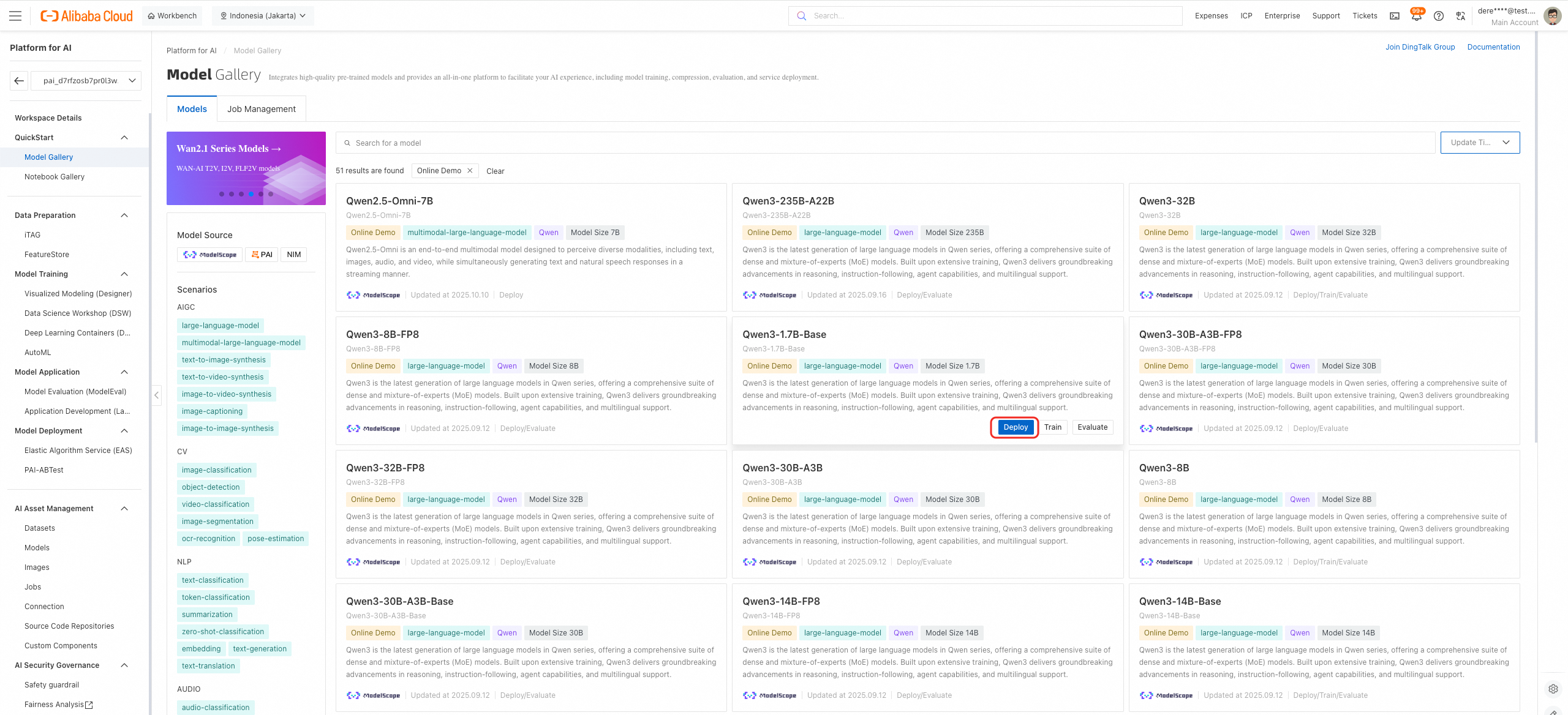
PAI-EAS Deployment
A deployment configuration window will appear. Complete the following steps:
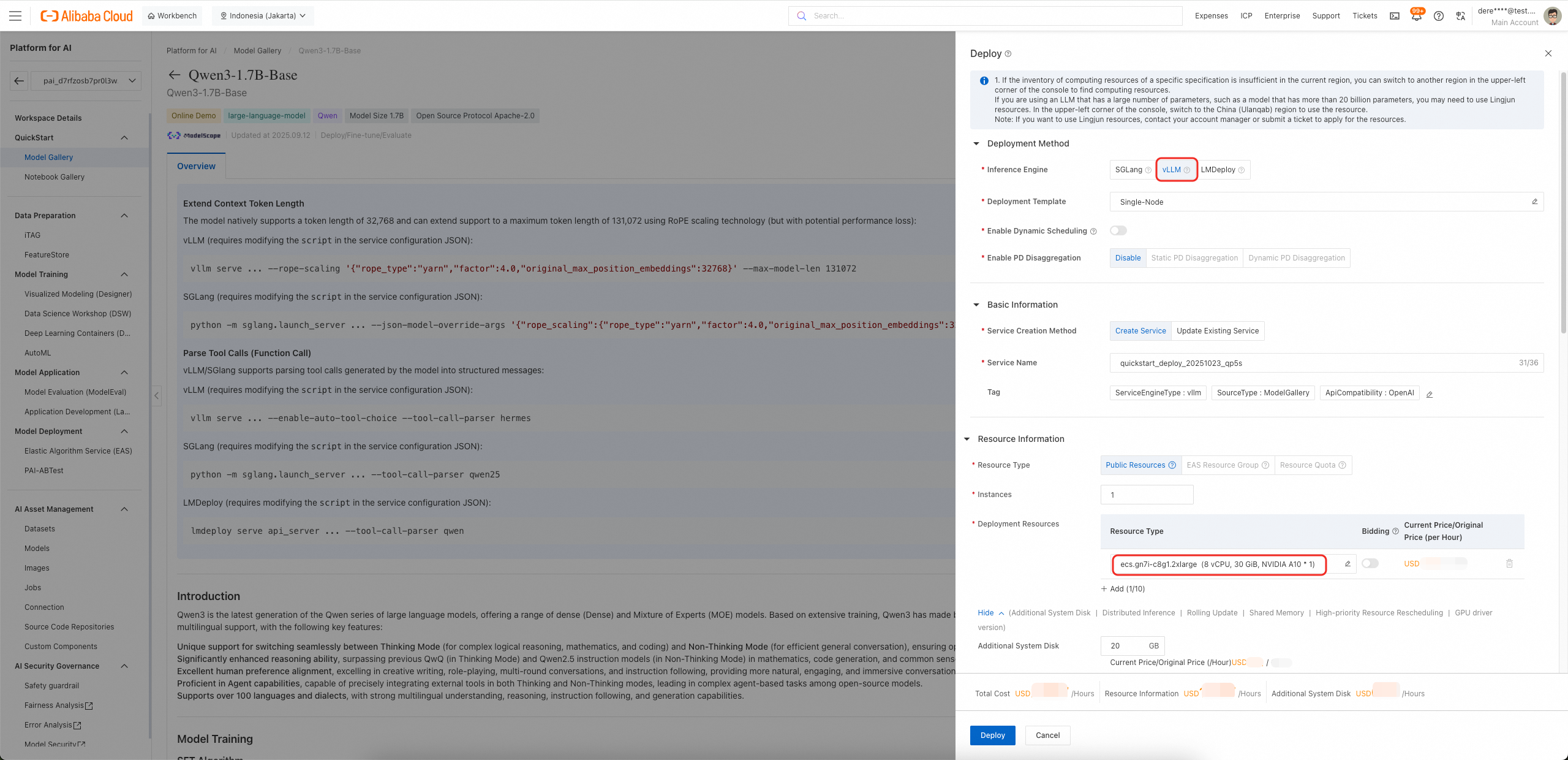
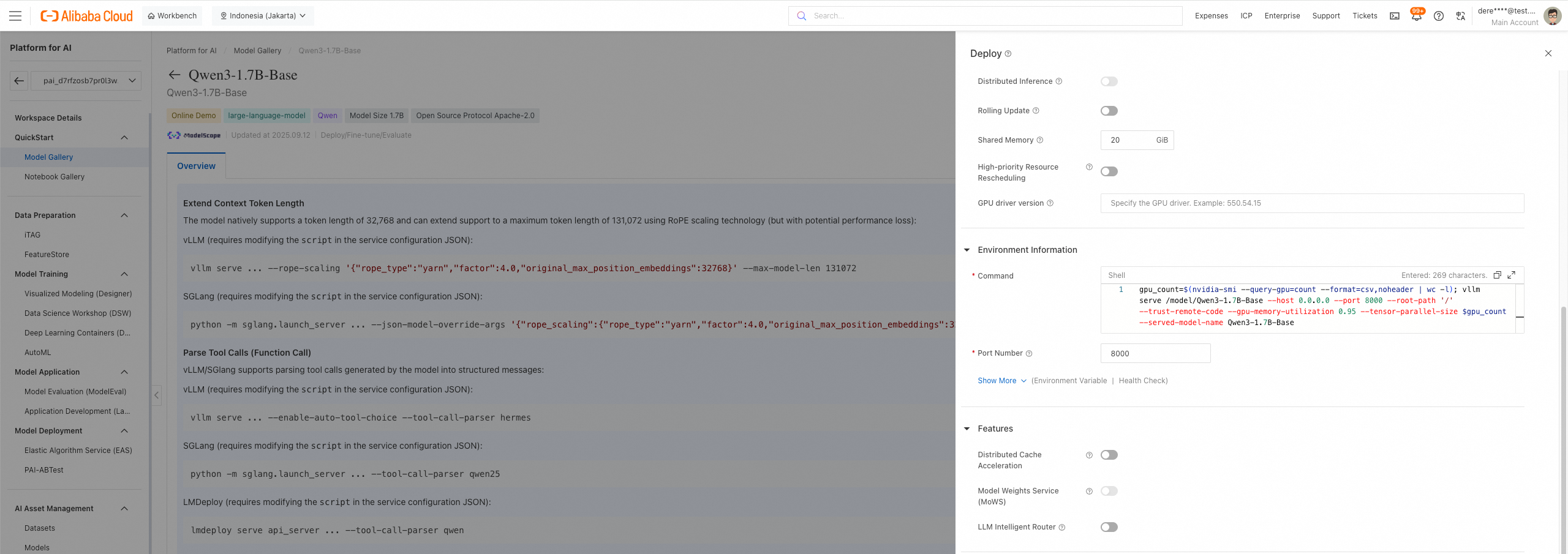
● Choose a VPC
● Choose a vSwitch
● Choose a Security Group
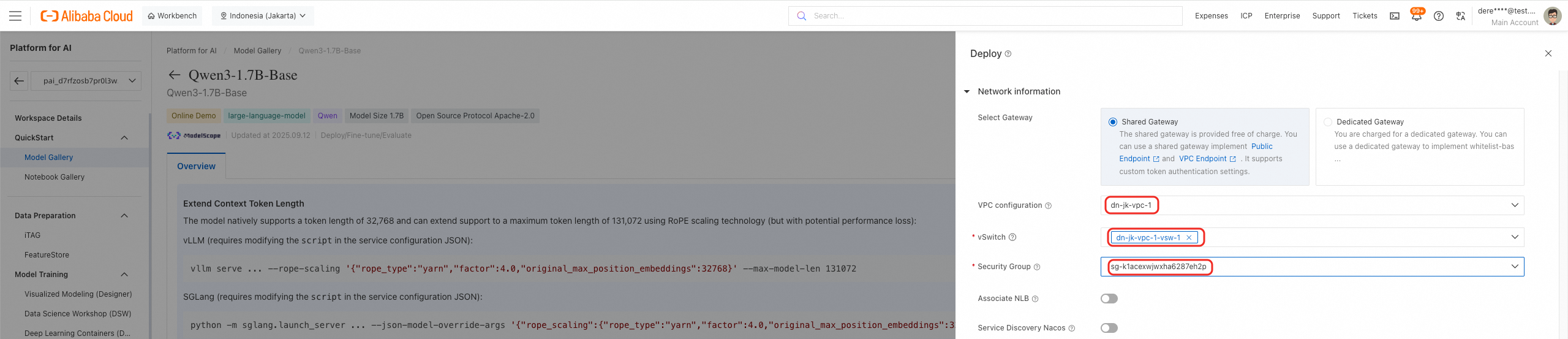
Once you click Deploy, PAI-EAS automatically orchestrates the entire inference setup process. It provisions the selected compute instances, pulls the optimized model container (pre-configured with the chosen inference engine such as vLLM), mounts the model artifacts, and initializes the serving runtime. This end-to-end automation typically completes within a few minutes, after which the model is ready to serve low-latency predictions via API - without requiring any manual infrastructure management or container configuration.
PAI-EAS Inference Service
PAI-EAS One-Click Stress Testing
PAI-EAS One-Click Stress Testing is a built-in feature in Alibaba Cloud’s Platform for AI – Elastic Algorithm Service (PAI-EAS) that allows users to quickly evaluate the performance, stability, and scalability of a deployed model service under simulated load - without writing any test scripts or setting up external tools.
With a single click in the PAI-EAS console, the system automatically:
Measures key metrics such as:
○ Latency (P50, P95, P99)
○ Requests Per Second (RPS/QPS)
○ Success/Error rates
○ GPU/CPU utilization PAI-EAS Stress Test Task
To initaite a stress test on deployed service
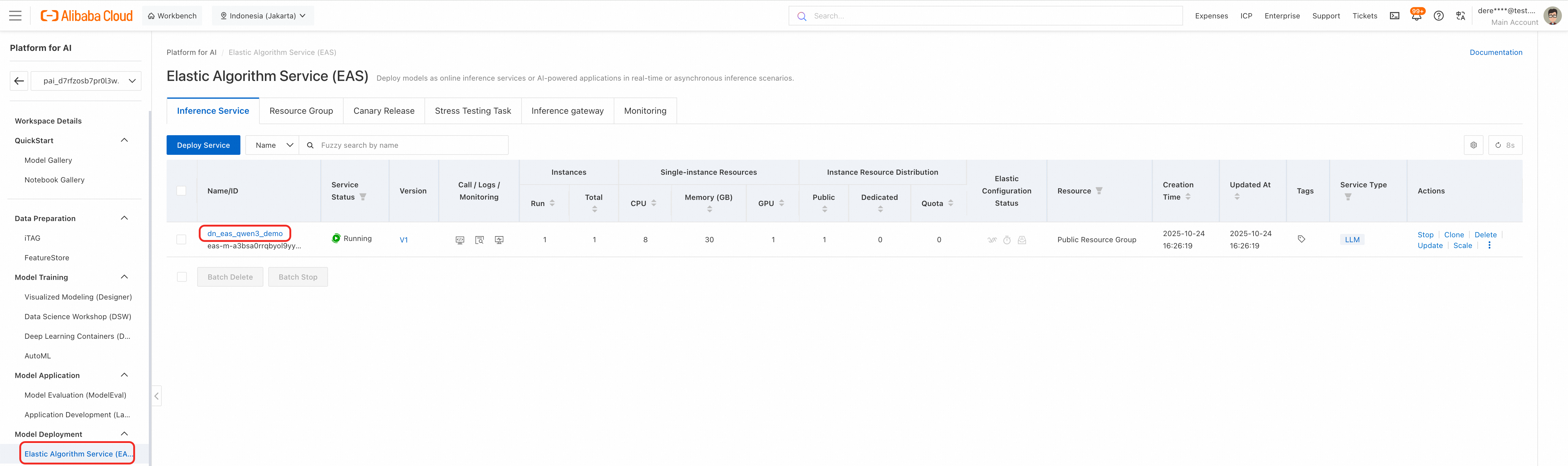
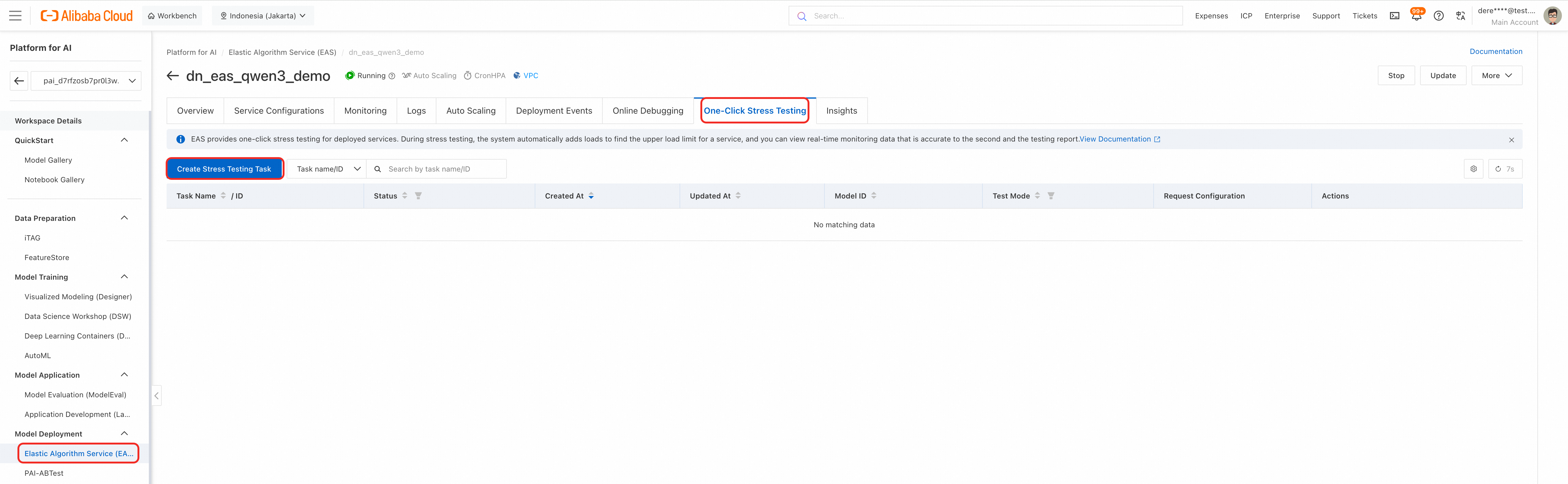
Configure test parameters as required
○ Enable LLM Service
○ Indicate Model ID
○ Enable Continuous Test
○ Specify Max Duration(s) in seconds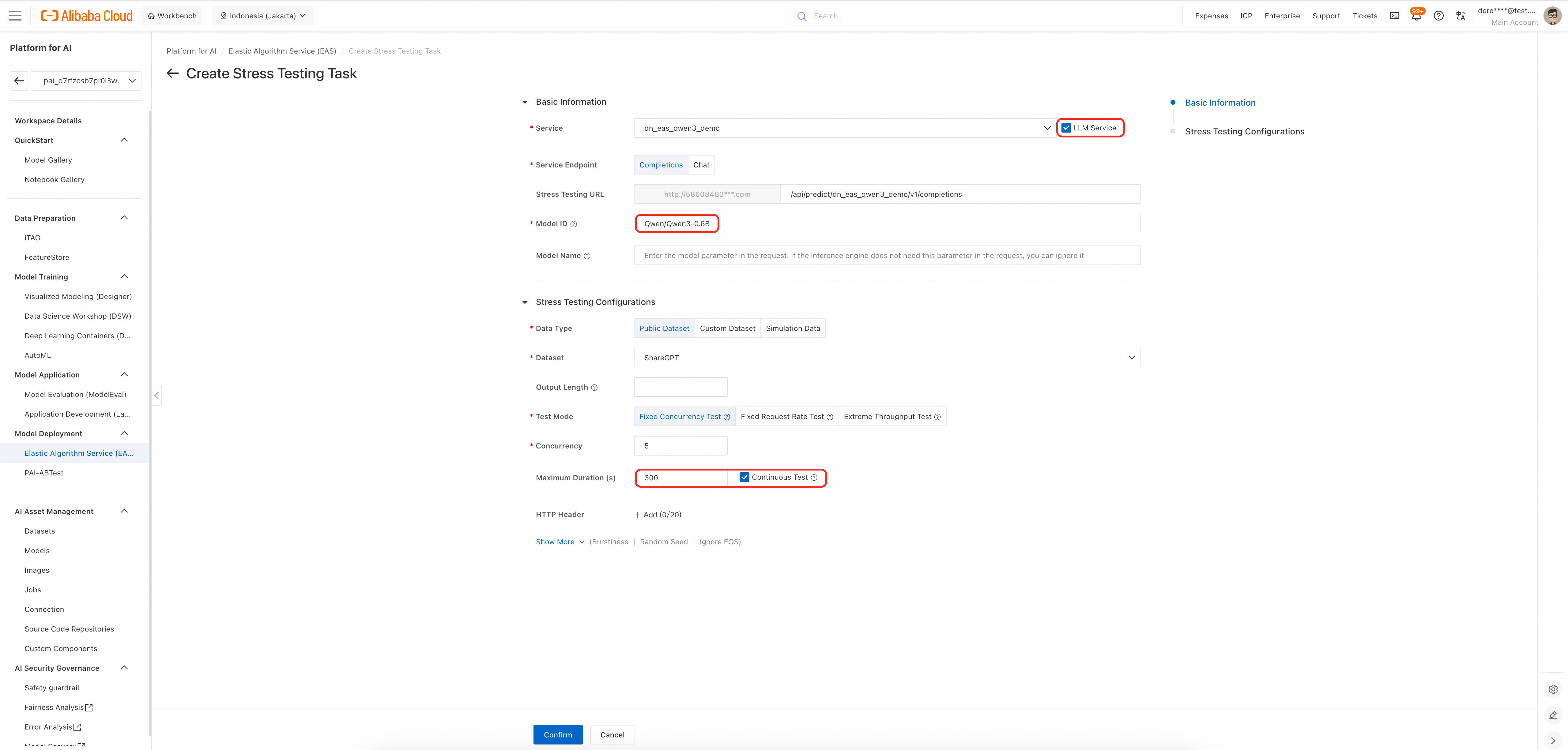
Once the task initialized, the stress test will commence. This automated testing process is designed to evaluate system performance under load, ensuring scalability, reliability, and optimal response times before production deployment.

The system provides comprehensive real-time visibility into performance indicators.
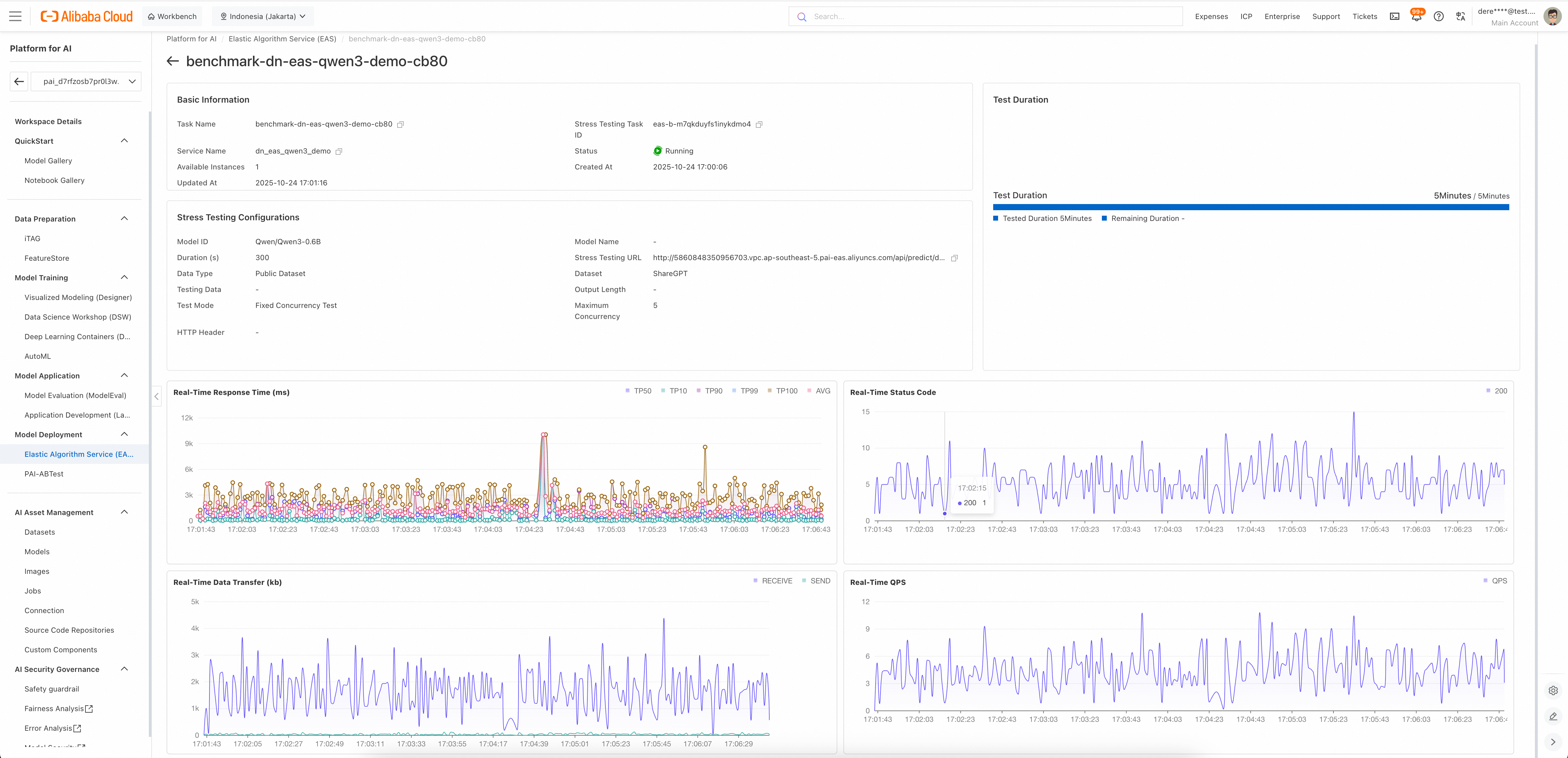
This stress test enables teams to:
PAI-EAS Real-time Monitoring
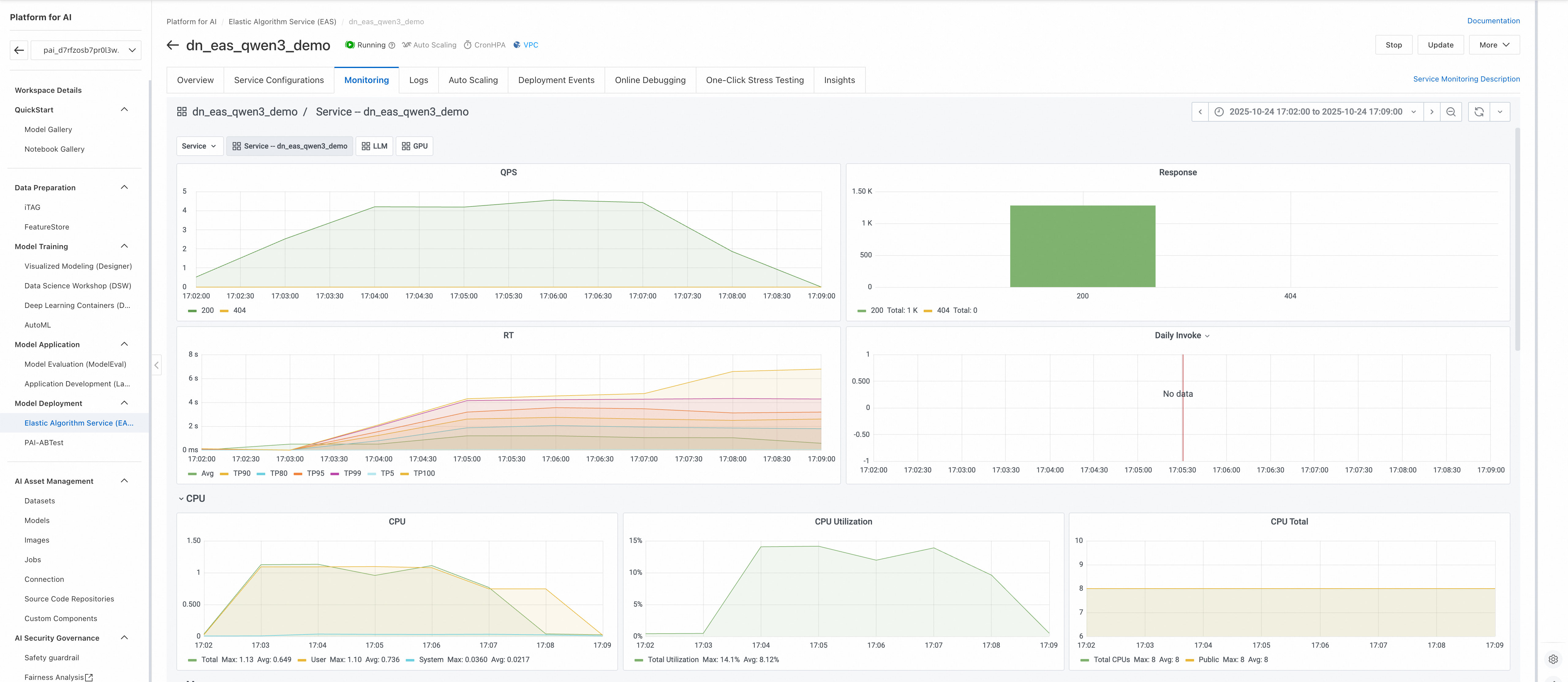
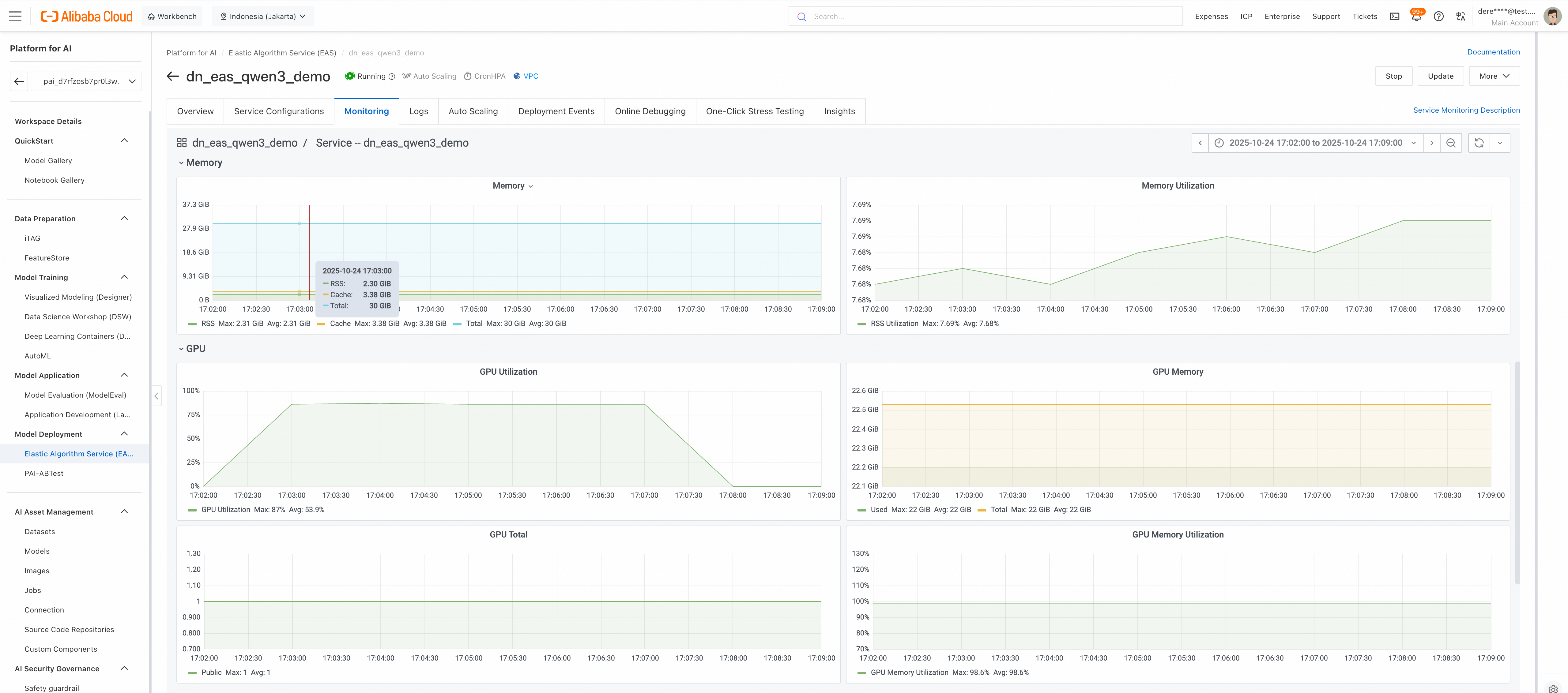
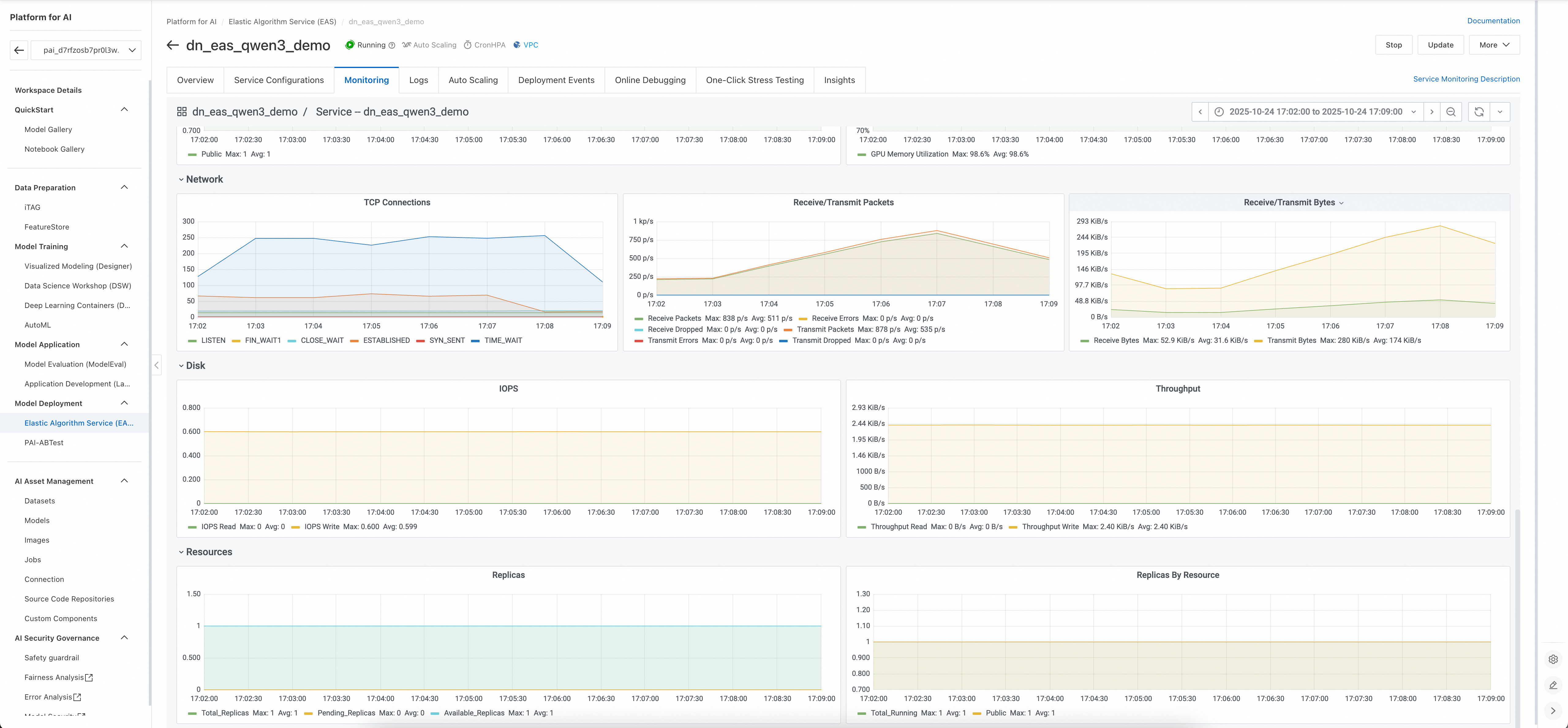
The monitoring metrics in Alibaba Cloud’s Elastic Algorithm Service (EAS) provide comprehensive real-time insights into the performance, efficiency, and scalability of a deployed LLM service. They enable teams to track key aspects such as request throughput, latency (including end-to-end, time to first token, and per-token generation), inference timing, and resource utilization across GPU and CPU. By analyzing these metrics you can identify bottlenecks, optimize model performance, ensure stable response times, and improve cost-efficiency. These insights are critical for maintaining high availability, debugging issues, and validating system behavior under load - ensuring reliable and scalable AI service delivery.
PAI-EAS Monitoring (LLM)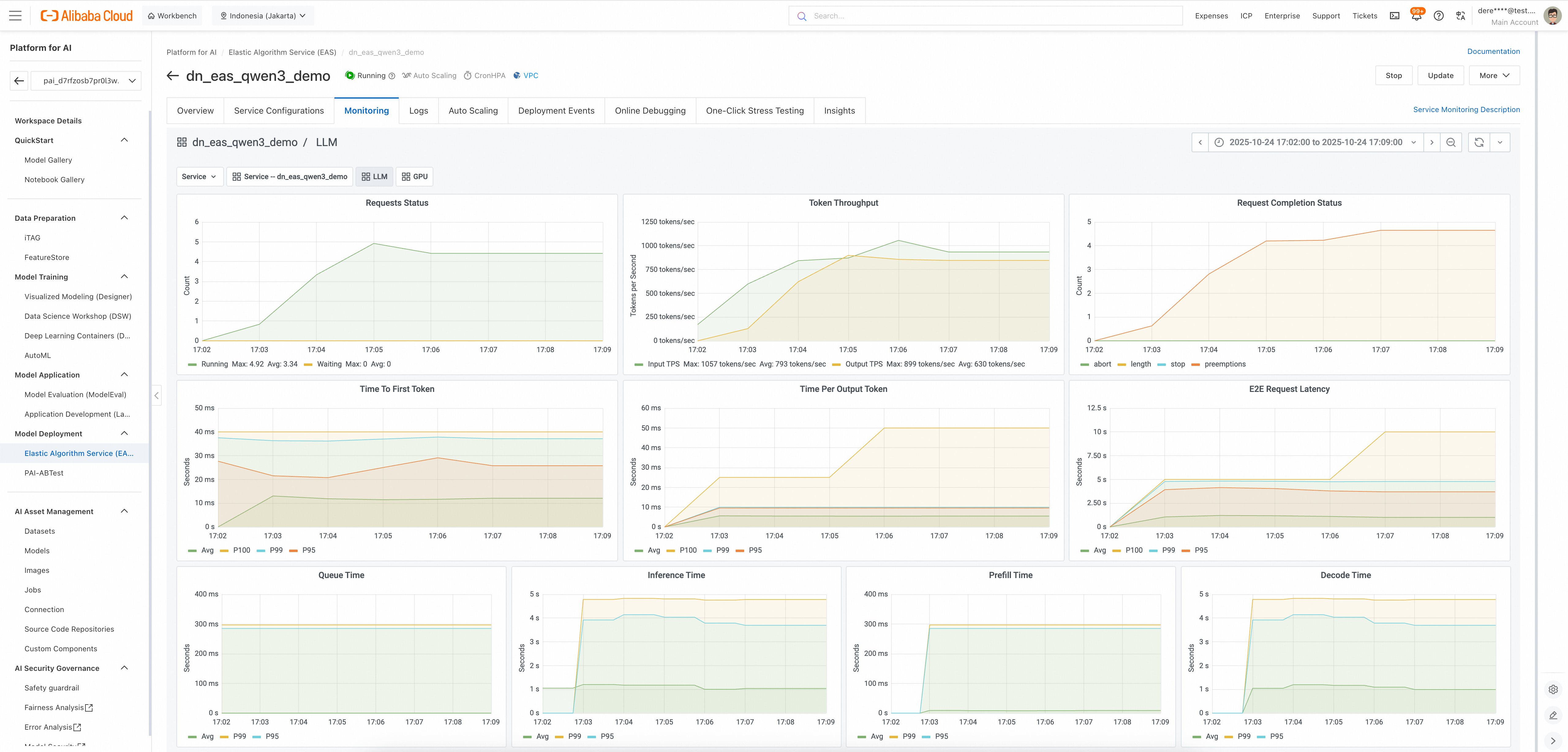
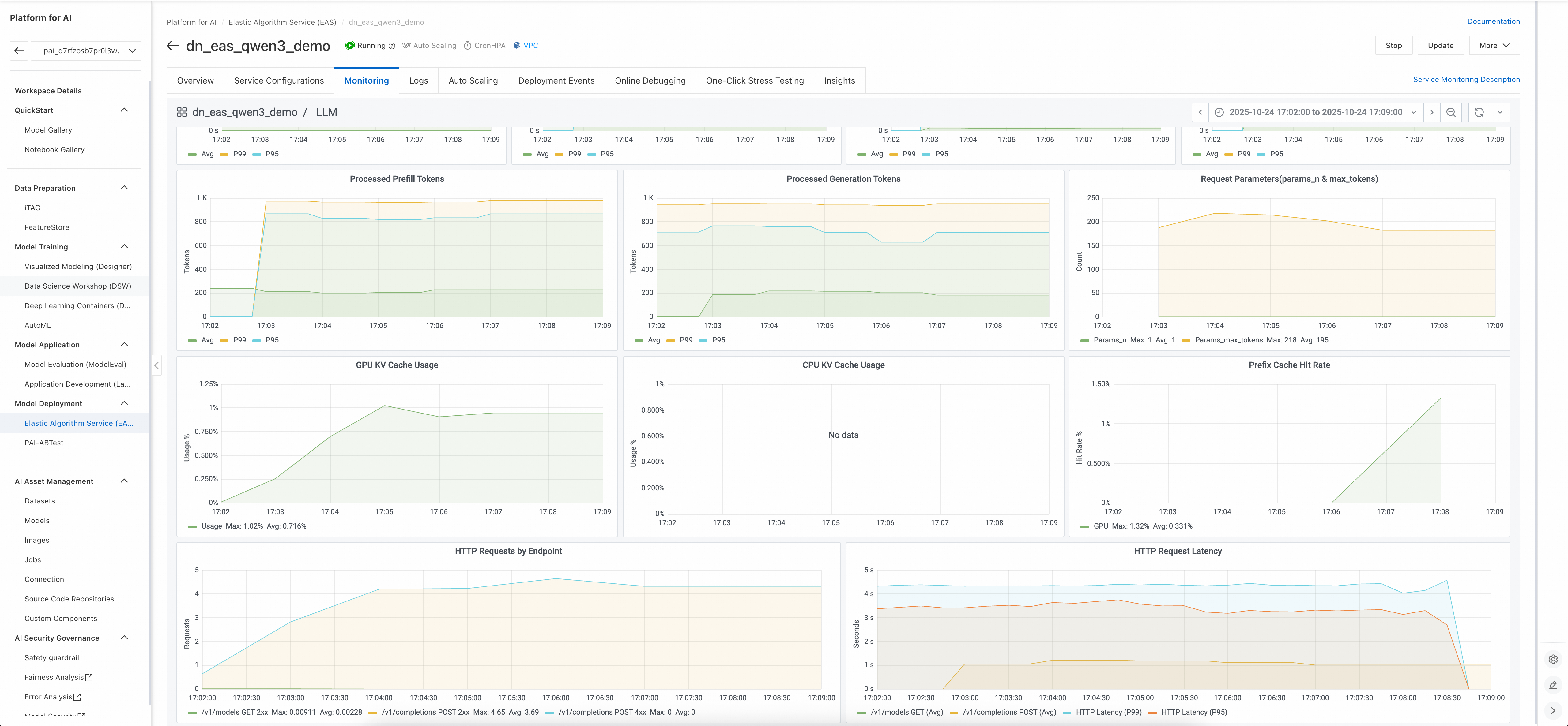
PAI-EAS Monitoring (Deployed Service)
Summary: Deploying AI with Alibaba Cloud PAI
Alibaba Cloud’s Platform for Artificial Intelligence (PAI) provides an enterprise‑grade environment to manage the full AI lifecycle—from data preparation and training to deployment and monitoring.
At the heart of deployment is PAI‑EAS (Elastic Algorithm Service), a fully managed inference service that allows organizations to turn models into production‑ready APIs within minutes.
A major accelerator is the PAI Model Gallery, a curated repository of pre‑optimized models (including Alibaba’s Qwen series, Hugging Face, ModelScope, and open‑source). With one‑click integration into PAI‑EAS, it eliminates the need for containerization, dependency management, or infrastructure setup.
Benefits
Enterprise Impact
PAI‑EAS with Model Gallery lowers barriers to AI adoption, accelerates ROI, and enables enterprises to scale generative AI, computer vision, and NLP applications securely and efficiently—turning AI deployment into a one‑click innovation engine.
Free, Unique, Essential: Alibaba Cloud BDRC for Enterprise Resilience

12 posts | 2 followers
FollowNeel_Shah - August 3, 2026
Alibaba Cloud Community - January 4, 2026
Farruh - November 23, 2023
Farruh - October 1, 2023
Farruh - June 23, 2025
Farruh - May 26, 2026
12 posts | 2 followers
Follow Platform For AI
A platform that provides enterprise-level data modeling services based on machine learning algorithms to quickly meet your needs for data-driven operations.
Learn More QwenWork
QwenWork is dedicated to helping employees strengthen their professional competitiveness in the AI era and to enabling enterprises to improve organizational effectiveness.
Learn More Token Plan
Build more, spend less. One plan, every modality.
Learn More
Alibaba Cloud Model Studio
A one-stop generative AI platform to build intelligent applications that understand your business, based on Qwen model series such as Qwen-Max and other popular models
Learn MoreMore Posts by Justin See

