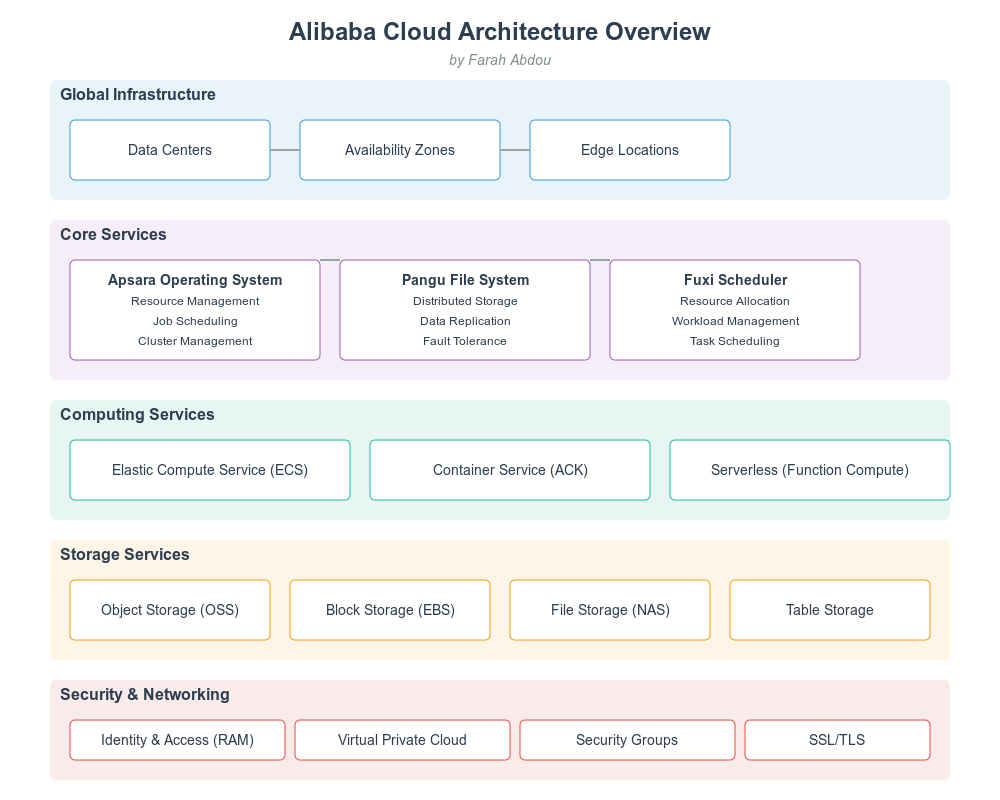
Alibaba Cloud (Aliyun) has established itself as a leading cloud provider, processing over 325 million active users and handling peak loads of 544,000 transactions per second during peak events like Singles' Day. This technical analysis delves into the specific architecture components, performance metrics, and implementation details that power this massive infrastructure.
● Architecture: Fully distributed platform operating system
● Scale: Manages clusters of 10,000+ servers
● Key Features:
● Storage Capacity: Exabyte-scale with single clusters exceeding 10EB
● Performance Metrics:
● Data Protection:
● Scheduling Capabilities:
Support for multiple scheduling policies:
Region Interconnection Topology:
[Asia Pacific] <--10Tbps--> [Europe] <--8Tbps--> [North America]
     ↑                         ↑                         ↑
  5Tbps                     6Tbps                    7Tbps
     ↓                         ↓                         ↓
[Middle East] <--4Tbps--> [Africa] <--3Tbps--> [South America]● VPC Performance:
● Security Features:
● Performance Specifications:
● Storage Classes:
| Class | Availability | Min Storage Time | Retrieval Time |
|---|---|---|---|
| Standard | 99.999% | None | Real-time |
| IA | 99.99% | 30 days | < 1 second |
| Archive | 99.9% | 60 days | < 1 minute |
| Cold Archive | 99.9% | 180 days | < 12 hours |
● Performance Tiers:
# High Availability Configuration Example
Resource:
  Type: 'ALIYUN::ECS::InstanceGroupClone'
  Properties:
    RegionId: cn-hangzhou
    ZoneId:
      - cn-hangzhou-b
      - cn-hangzhou-c
      - cn-hangzhou-d
    InstanceType: ecs.g6.xlarge
    SecurityGroupId: sg-bp1h7v8d****
    VSwitchId:
      - vsw-bp1hl0v4x****
      - vsw-bp1hl0v4y****
      - vsw-bp1hl0v4z****
    LoadBalancerWeight: 100
    MinAmount: 2
    MaxAmount: 10
    AutoScalingConfiguration:
      MinInstanceNumber: 2
      MaxInstanceNumber: 10
      ScalingPolicy:
        Target: CPU
TargetValue: 70{
"Version": "1",
"Statement": [
{
"Effect": "Allow",
"Action": [
"ecs:Describe*",
"ecs:Start*",
"ecs:Stop*"
],
"Resource": [
"acs:ecs:cn-hangzhou:*:instance/i-bp67acfmxazb4ph***"
],
"Condition": {
"IpAddress": {
"acs:SourceIp": ["192.168.0.0/16"]
},
"TimeLimit": {
"acs:CurrentTime": ["2023-01-01T12:00:00Z/2024-01-01T12:00:00Z"]
}
}
}
]
}Workload Type | Instance Family | vCPU:Memory Ratio | Network Performance
-------------|----------------|-------------------|-------------------
General Purpose | g6e | 1:4 | 32Gbps
Compute Optimized | c6e | 1:2 | 32Gbps
Memory Optimized | r6e | 1:8 | 32Gbps
Storage Optimized | i3 | 1:4 | 32Gbps
GPU Compute | gn7 | 1:4 | 32Gbps + RDMA# File System Optimization
# Update /etc/sysctl.conf
net.core.rmem_max = 16777216
net.core.wmem_max = 16777216
net.ipv4.tcp_rmem = 4096 87380 16777216
net.ipv4.tcp_wmem = 4096 65536 16777216
net.core.netdev_max_backlog = 30000
net.ipv4.tcp_max_syn_backlog = 8096
net.ipv4.tcp_max_tw_buckets = 5000● Scale:
● Networking:
● Storage:
● Training Infrastructure:
# Python example using Alibaba Cloud SDK
from aliyun.credentials import Credential
from alibabacloud_cms20190101.client import Client
from alibabacloud_cms20190101.models import PutCustomMetricRequest

def send_custom_metric():
    cred = Credential(
        access_key_id='your_access_key_id',
        access_key_secret='your_access_key_secret'
    )
    client = Client(cred)

    metric = PutCustomMetricRequest.MetricList(
        period=60,
        metric_name="CustomCPUUtilization",
        values="{\"value\":60}",
        time=str(int(time.time()*1000)),
        dimensions="{\"instanceId\":\"i-bp1j4i2jdf3owlhe****\"}"
    )

    request = PutCustomMetricRequest(
        namespace="acs/custom/application",
        metric_list=[metric]
    )

    response = client.put_custom_metric(request)
return response| Resource Type | Optimization Method | Potential Savings |
|---|---|---|
| ECS Instances | Reserved Instance | Up to 60% |
| Spot Instance | Up to 90% | |
| Storage | Storage Class | Up to 50% |
| Lifecycle Rules | Up to 40% | |
| Network | CEN Bandwidth | Up to 30% |
graph TD
    A[API Gateway] --> B[Service Mesh]
    B --> C[Microservice 1]
    B --> D[Microservice 2]
    B --> E[Microservice 3]
    C --> F[RDS]
    D --> G[Redis]
E --> H[OSS]{
"dashboard": {
"name": "Production-Overview",
"metrics": [
{
"name": "CPU_Usage",
"period": "60",
"statistics": ["Average", "Maximum"],
"unit": "Percent",
"dimensions": ["instanceId"]
},
{
"name": "Memory_Usage",
"period": "60",
"statistics": ["Average", "Maximum"],
"unit": "Percent",
"dimensions": ["instanceId"]
},
{
"name": "Network_In",
"period": "60",
"statistics": ["Sum"],
"unit": "Bytes",
"dimensions": ["instanceId"]
}
]
}
}Alibaba Cloud's architecture demonstrates enterprise-grade capabilities with specific performance metrics and implementation details that make it suitable for large-scale deployments. The platform's ability to handle massive workloads while maintaining high availability and security makes it a robust choice for organizations requiring scalable cloud infrastructure.
Disclaimer: The views expressed herein are for reference only and don't necessarily represent the official views of Alibaba Cloud.
Understanding Alibaba Cloud's Computer Vision and AI Services
From Code to Intelligence: Unleashing Machine Learning Potential with Alibaba Cloud

19 posts | 1 followers
FollowApache Flink Community - October 17, 2025
Apache Flink Community - March 20, 2025
Alibaba Cloud Community - April 2, 2026
Apache Flink Community - March 7, 2025
Kalpesh Parmar - November 2, 2025
Alibaba Cloud Native Community - November 24, 2025
19 posts | 1 followers
Follow Elastic High Performance Computing
A HPCaaS cloud platform providing an all-in-one high-performance public computing service
Learn More Architecture and Structure Design
Customized infrastructure to ensure high availability, scalability and high-performance
Learn More Remote Rendering Solution
Connect your on-premises render farm to the cloud with Alibaba Cloud Elastic High Performance Computing (E-HPC) power and continue business success in a post-pandemic world
Learn More Elastic High Performance Computing Solution
High Performance Computing (HPC) and AI technology helps scientific research institutions to perform viral gene sequencing, conduct new drug research and development, and shorten the research and development cycle.
Learn MoreMore Posts by Farah Abdou

