Auto Scaling Overview
Auto Scaling Definition
Auto Scaling is a management service that automatically adjusts the number of elastic computing resources based on your business demands and policies. When business loads increase, Auto Scaling automatically adds ECS instances to ensure sufficient computing capabilities. When business loads decrease, Auto Scaling automatically removes ECS instances to save costs. It is suitable for applications with fluctuating or stable business loads.
Scale-out
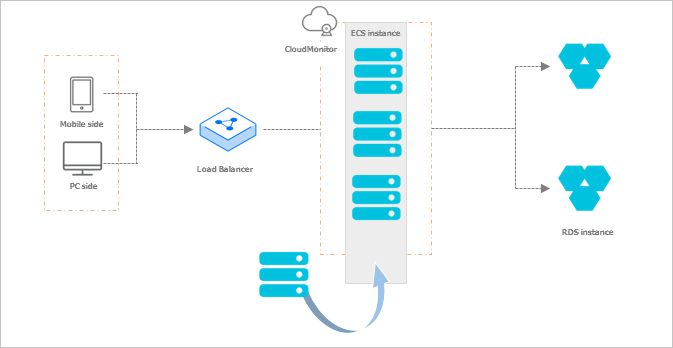
When business loads surge above normal loads, Auto Scaling automatically increases underlying resources. This helps maintain access speed and ensures that resources are not overloaded.
You can configure Cloud Monitor to monitor your ECS instance usage in real time. For example, when Cloud Monitor detects that the vCPU utilization of ECS instances in a scaling group exceeds 80%, Auto Scaling automatically scales out ECS resources based on the scaling rules that you configured. During the scale-out event, Auto Scaling automatically creates ECS instances and adds these ECS instances to the backend server groups of the associated SLB instances and the whitelists of the associated ApsaraDB RDS instances.
During scale-out events, ECS instances are automatically created based on the instance configuration information of the scaling group. The instance configuration information includes the instance type, operating system, and user data.
Scale-in
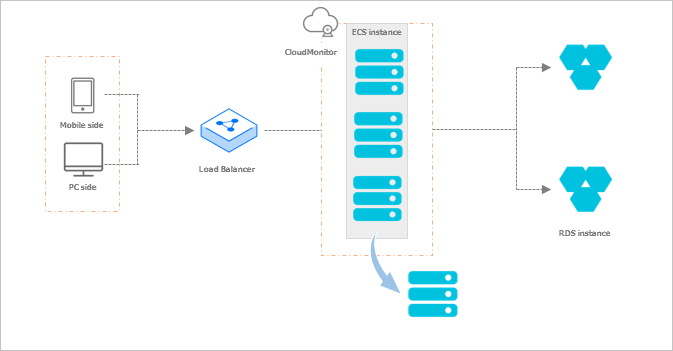
When business loads decrease, Auto Scaling automatically releases underlying resources to prevent resource wastage and reduce costs.
You can configure Cloud Monitor to monitor your ECS instance usage in real time. For example, when Cloud Monitor detects that the vCPU utilization of ECS instances in a scaling group is less than 30%, Auto Scaling automatically scales in ECS resources based on the scaling rules that you configured. During the scale-in event, Auto Scaling automatically releases ECS instances and removes these ECS instances from the backend server groups of the associated SLB instances and the whitelists of the associated ApsaraDB RDS instances.
Elastic recovery
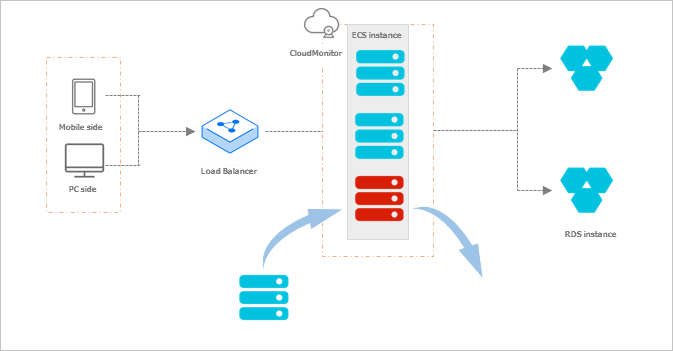
Auto Scaling provides the health check feature and automatically monitors the health status of ECS instances in a scaling group, so that the number of healthy ECS instances in the scaling group does not fall below the minimum value that is specified for the scaling group.
When Auto Scaling detects that an ECS instance is unhealthy, Auto Scaling automatically releases the unhealthy ECS instance, creates a new ECS instance, and then adds the new instance to the backend server groups of the associated SLB instances and the whitelists of the associated ApsaraDB RDS instances.
Scaling Group
Scaling groups are a key component of Auto Scaling. After you configure the instance configuration source for a scaling group and enable the scaling group, Auto Scaling automatically scales ECS instances in the scaling group based on a scaling rule.
Instance configuration sources
Instance configuration sources are classified into scaling configurations and launch templates. Auto Scaling uses the active configuration source in a scaling group to automatically create ECS instances.
Scaling rules
You can use one of the following methods to execute a scaling rule:
- Manually execute a scaling rule.
- Execute a scaling rule by using a scheduled task.
- Execute a scaling rule by using an event-triggered task.
Auto Scaling scales ECS instances in a scaling group based on a scaling rule and the maximum or minimum number of ECS instances specified for the scaling group. Assume that a scaling group can contain up to 45 ECS instances. If you configure a scaling rule to increase the number of ECS instances in the scaling group to 50, Auto Scaling increases the number of ECS instances to 45 at most.
Scaling activities
Scaling activities are triggered when you manually add or delete ECS instances or when a scaling rule is executed. Scaling activities have the following features:
- An ongoing scaling activity cannot be terminated. For example, if a scaling activity is being executed to create 20 ECS instances but only five have been created, you cannot forcibly terminate the scaling activity.
- If an ECS instance failed to be added or removed during a scaling activity, Auto Scaling considers that the scaling activity is completed without trying to recreate the failed instance. Auto Scaling rolls back the ECS instance that failed to be added or removed, but not the scaling activity. If Auto Scaling has created 20 ECS instances for a scaling group, 19 instances are added to SLB, only the one ECS instance that failed to be added is automatically released.
- Auto Scaling uses Resource Access Management (RAM) to call ECS API operations to create ECS instances. ECS instances that are rolled back still incur fees before the instances are released.
Scaling activities have cooldown periods. The cooldown period has the following features:
- During the cooldown period, Auto Scaling rejects all scaling activities triggered by event-triggered tasks. However, when you manually execute a scaling rule, or a scheduled task starts to be executed at the scheduled time, Auto Scaling can immediately execute a scaling activity without waiting for the cooldown period to expire.
- The cooldown period starts after the last ECS instance is added to or removed from the scaling group during a scaling activity.
Scaling modes
A scaling mode is used to specify when to add or remove a specific number of ECS instances for a scaling group.
- Scheduled Mode: Configure scheduled tasks, and add or remove ECS instances with a fixed time window. Can be combined with dynamic mode.
- Dynamic Mode: Dynamically add or remove ECS instance(s) based on CloudMonitor metrics (ie. CPU and memory ratio).
- Fixed Mode: The “minimal size” setting allows you to employ the minimal number of ECS instances required to support business-as-usual levels of activity.
- Auto-config Server Load Balancer and RDS: When adding or removing ECS instances, the service automatically attaches or detaches instances to the Server Load Balancer, and adds these servers to the whitelist of RDS instances.
Auto Scaling Benefits
- On demand: Auto Scaling scales resources on demand to respond to traffic spikes in real time without the need to predict demand changes.
- Automatic: Auto Scaling automatically creates and releases ECS instances without manual intervention. It also automatically configures SLB instances and whitelists of ApsaraDB for RDS instances.
- Flexible: Auto Scaling allows you to schedule, customize, and fix the minimum number of instances, as well as configure automatic replacement of unhealthy instances. It also provides API operations to allow you to monitor instances by using external monitoring systems.
- Intelligent: Auto Scaling intelligently schedules cloud computing resources to respond to various complex scenarios.
Auto Scaling Features
- Auto Scaling: Automatically increase or decrease ECS instances according to customers’ business needs.
- Support Server Load Balancer Configuration: When adding or releasing ECS instances, the service automatically attaches or detaches the instances to the Server Load Balancer.
- Support RDS Whitelist:When adding ECS instances, the service automatically adds instance IPs to the whitelist of RDS instances. Likewise, when releasing ECS instances the service automatically delists instance IPs from the whitelist.
Auto Scaling Scenarios
- Video streaming: Traffic loads surge during holidays and festivals. Cloud computing resources must be automatically scaled out to meet the increased demands.
- Live streaming and broadcast: Traffic loads are ever-changing and difficult to predict. Alibaba Cloud computing resources must be scaled based on CPU utilization, application load, and bandwidth usage.
- Gaming: Traffic loads increase at 12:00 and from 18:00 to 21:00. Cloud computing resources must be scaled out on a regular basis.
- E-commerce: Traffic loads surge during big promotions. A large number of ECS instances must be created and available within minutes.
Related Blog
Maintaining Availability With Auto Scaling
Recently, while attending a cloud conference, I came across use case scenarios from multiple startups and organizations on track for business expansion or organizations running at scale after business expansion. Intermittently, almost every organization had different prospects about Auto Scaling and its usefulness.
In today’s world, almost every other task is being handled online, not just as an alternative, but as a preferred and primary way of handling it. The days where transaction handling was a centralized process are gone. With a distributed network and distributed application and computing architecture, we are at a place in technology where geographical distances can be shortened by defining availability zones and implementing edge computing with different segments of technology, including content delivery networks, security, and global network acceleration.
Alibaba Cloud is great at assessing needs and dedicating resources to improve technological outreach and innovation. Alibaba Cloud Auto Scaling helps maintain a smooth user experience and availability for enterprises and organizations free of cost.
Related Product
Auto Scaling
Auto Scaling is a service to automatically adjust computing resources based on your volume of user requests. When the demand for computing resources increase, Auto Scaling automatically adds ECS instances to serve additional user requests or alternatively removes instances in the case of decreased user requests.
Read previous post:
A New Milestone for Alibaba Cloud's Container and Serverless Services
Read next post:
-

-
Alibaba Clouder
2,593 posts | 797 followers
Follow
-
-
Alibaba Clouder
2,593 posts | 797 followers
Follow
Related Products
-
 Auto Scaling
 automatically adjusts computing resources based on your business cycle
Learn More
More Posts by Alibaba Clouder
- MyBatis with a More Fluent Experience
- Alibaba Cloud Sustainability Report 2021
- Comparing CNI Models in Container Service for Kubernetes — Alibaba Cloud Series Part 1
- [Infographic] 5 Steps to Accelerate Your Digitalization in Asia
- Attackers Use the Vulnerability of ShowDoc to Spread Botnets
- Powerful: MyBatis and Three Streaming Query Methods
- What is the Difference between Spring Boot and Spring?
- What are the Differences and Functions of the Redo Log, Undo Log, and Binlog in MySQL?
- On the In-Depth Cluster Scheduling and Management
- Alibaba Technological Practices: Experiences in Cloud Resource Scheduling