Delta tables use a unified format that supports both batch workloads and near-real-time incremental processing. This format provides all the features of MaxCompute standard tables, plus ACID (atomicity, consistency, isolation, and durability) transactions, time travel queries, and UPSERT operations — making it suitable for architectures that continuously merge incremental writes with efficient full-data reads.
Key table properties
Delta tables require a primary key. To create a Delta table, include both primary key and tblproperties ("transactional"="true") in your CREATE TABLE statement.
`primary key`
Enables efficient data import in UPSERT mode. Records with the same primary key are merged into a single row after a snapshot query or compaction, retaining only the most recent state.
`tblproperties ("transactional"="true")`
Enables ACID transaction guarantees, including snapshot isolation and concurrent read/write control. A transactional metadata field (such as a timestamp) is added to each row written to the table. Time travel queries use this field to retrieve data at a specific version.
Two additional properties control write behavior and data retention:
| Property | Description |
|---|---|
write.bucket.num | Number of buckets for write parallelism. See Buckets for sizing guidance. |
acid.data.retain.hours | Specifies the effective query time range of historical data. |
For the full property list, see Parameters for Delta tables.
File formats
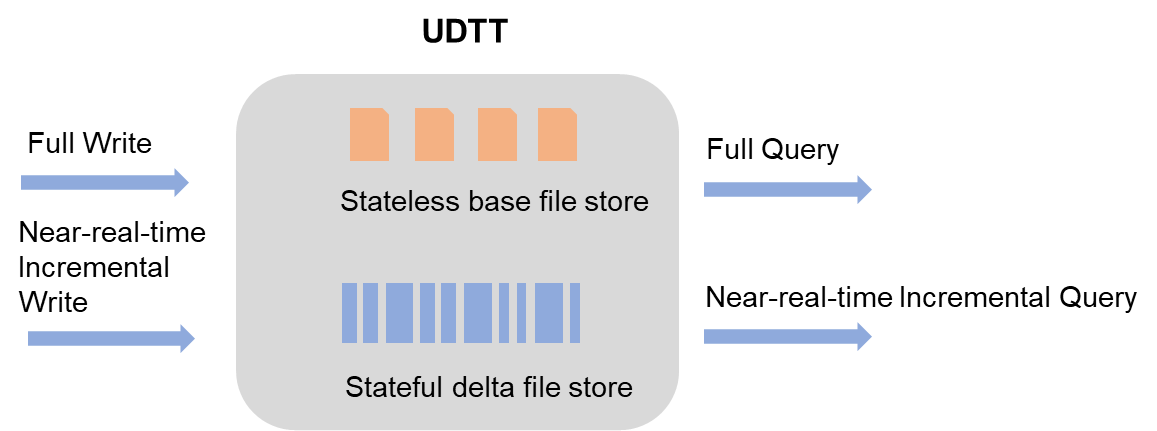
Delta tables use two file types that work together to handle both full and incremental data.
Delta files
A delta file is written each time a transaction commits data in UPDATE or DELETE mode, or when a clustering operation runs. Delta files preserve the intermediate history of each row, enabling near-real-time incremental reads. They use columnar storage with compression.
Base files
A base file is produced when compaction runs on delta files. Compaction collapses all delta records for the same primary key into a single row, discarding intermediate history. Base files use columnar storage with compression and are optimized for full-data queries.
How queries work
Delta tables use Merge On Read (MOR): each snapshot query locates the most recent base file, then merges all delta files written after that base file was generated.
All data files are sorted by primary key value, which improves merge efficiency and enables data skipping to reduce the data scanned per query. For more information, see Time travel queries and incremental queries.
Buckets
Delta tables split data into buckets by the bucket index column, which defaults to the primary key column. Records with the same primary key always land in the same bucket.
Buckets serve three purposes:
| Purpose | How it works |
|---|---|
| Write concurrency | Near-real-time incremental import scales horizontally by adding buckets. More buckets allow higher concurrent write throughput. |
| Query performance | If a filter targets the bucket index column, MaxCompute performs bucket pruning to skip irrelevant buckets. If a GROUP BY or JOIN key matches the bucket index column, operations run locally without shuffle. |
| Maintenance efficiency | Clustering and compaction run in parallel per bucket, reducing processing time. |
Sizing buckets
Set write.bucket.num based on your write traffic and total table size.
| Bucket count | Effect |
|---|---|
| Too many | Generates excessive small files, which degrades read/write performance and storage stability. |
| Too few | Creates a write bottleneck for high-throughput near-real-time ingestion. |
Record types
Delta tables accept two record types: UPSERT and DELETE.
UPSERT has two implicit behaviors:
If the record does not already exist, it is treated as INSERT.
If the record already exists, it is treated as UPDATE.