Delta tables in MaxCompute support minute-level, near-real-time data import. Under high write volume, this produces many small incremental files and accumulates redundant intermediate states from UPDATE and DELETE operations. MaxCompute runs three background services to address this automatically: Clustering, Compaction, and data reclamation.
How it works
Each service targets a different layer of the data organization problem:
| Service | What it resolves | Trigger |
|---|---|---|
| Clustering | Accumulation of small DeltaFiles that increase storage costs, I/O load, and metadata update frequency | Automatic, based on system status |
| Compaction | Redundant intermediate records from UPDATE and DELETE operations that inflate storage and slow full snapshot queries | Frequency determined by business needs and data characteristics |
| Data reclamation | Historical data versions that accumulate past their useful life | Automatic by retention policy; manual via PURGE |
The three services interact with the Meta Service, which enforces transactional safety across all operations: detecting conflicts, coordinating metadata updates, and reclaiming old files.
Clustering
Clustering is executed by the internal Storage Service of MaxCompute. It merges small DeltaFiles without modifying any historical intermediate states — no record's intermediate history is eliminated.
How Clustering works
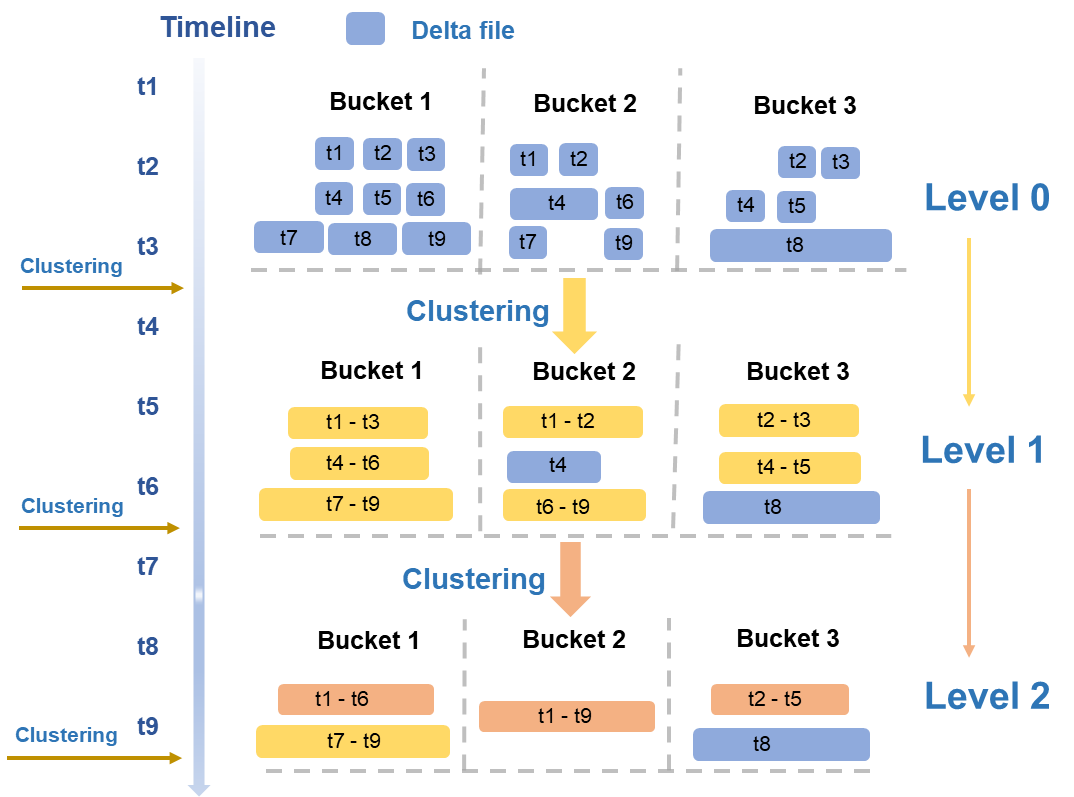
Clustering uses a hierarchical merging strategy based on typical read/write patterns. Files are evaluated periodically across multiple dimensions — size and quantity — and merged across levels:
Level 0 to Level 1: The smallest DeltaFiles from initial writes (blue in the figure) are merged into medium-sized DeltaFiles (yellow).
Level 1 to Level 2: When medium-sized DeltaFiles reach a sufficient scale, a higher-level merge is triggered to produce larger, optimized files (orange).
After merging, storage costs decrease, I/O load drops, and metadata update frequency is reduced — directly resolving the small-file accumulation problems that arise under high-volume incremental writes.
Read/write amplification controls
Each Clustering operation reads and writes data at least once, which consumes compute and I/O resources. Three mechanisms limit unnecessary amplification:
Large file isolation: Files exceeding a size threshold (such as the T8 file in Bucket3 in the figure) are excluded from merging.
Time span limit: Files with a large time span are not merged. This prevents Time Travel and incremental queries from reading large volumes of historical data outside the query range.
Automatic triggering: The MaxCompute engine evaluates system status and triggers Clustering automatically. No manual intervention is required.
Concurrency and transactional safety
Because data is partitioned and stored by BucketIndex, Clustering runs concurrently at the bucket level, which significantly reduces total runtime.
After each run, Clustering passes information about new and old data files to the Meta Service. The Meta Service detects transaction conflicts, coordinates the seamless metadata update for new and old files, and reclaims old data files.
Compaction
Delta tables support UPDATE and DELETE operations, but these do not modify records in place. Instead, each operation writes a new record that marks the previous state of the old record. Over time, this produces:
Data redundancy: Intermediate records accumulate, increasing storage and compute costs.
Lower query efficiency: Full snapshot queries must process more records to determine the current state.
Compaction merges selected BaseFiles and DeltaFiles, combines all records with the same primary key, and retains only the latest state. The result is a new BaseFile containing only INSERT data — all intermediate UPDATE and DELETE states are eliminated.
How Compaction works
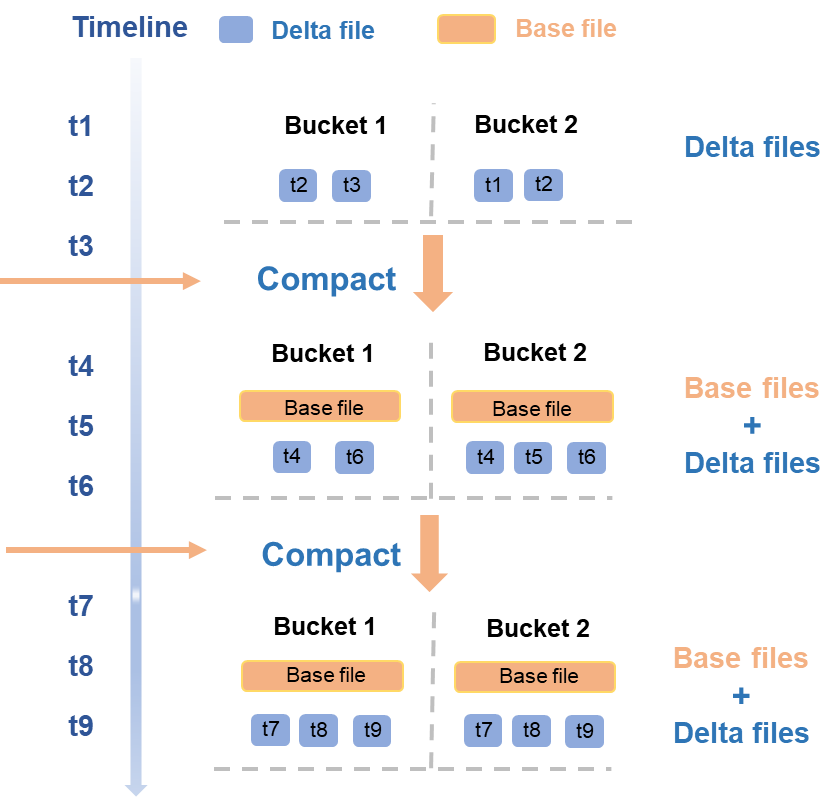
Compaction runs concurrently at the bucket level and follows a timeline of triggered operations:
From t1 to t3, a new batch of DeltaFiles is written. This triggers a Compaction that merges those DeltaFiles into a new BaseFile for each bucket.
At t4 and t6, another batch of DeltaFiles is written. The next Compaction merges the existing BaseFile with the new DeltaFiles to produce an updated BaseFile.
As with Clustering, Compaction interacts with the Meta Service after each run: the Meta Service detects transaction conflicts, atomically updates metadata for new and old files, and reclaims the old data files.
Choosing Compaction frequency
Compaction reduces storage and compute costs by eliminating intermediate record states, which directly speeds up full snapshot queries. However, running it frequently has costs:
Each run requires significant compute and I/O resources.
The new BaseFile requires additional storage.
Historical DeltaFiles needed for Time Travel cannot be deleted immediately, so they continue to incur storage costs until the retention period expires.
Set Compaction frequency based on how UPDATE- and DELETE-heavy your workload is:
| Workload pattern | Recommended approach |
|---|---|
| Frequent UPDATE/DELETE operations with high demand for full snapshot query speed | Increase Compaction frequency |
| Low UPDATE/DELETE rate or infrequent full snapshot queries | Run Compaction less frequently to reduce resource consumption |
Data reclamation
Delta tables retain historical data versions to support Time Travel and incremental queries. Data reclamation removes versions that are no longer needed.
Recommended: configure a retention policy
Set the data retention period using the acid.data.retain.hours table property. Historical data older than this value is automatically reclaimed. After reclamation, that version can no longer be queried via Time Travel. The reclaimed data consists mainly of operation logs and data files.
If a Delta table continuously receives new DeltaFiles, no DeltaFiles can be deleted — other DeltaFiles may have state dependencies on them. After a COMPACTION or InsertOverwrite operation, the subsequently generated files no longer depend on the previous DeltaFiles and can be reclaimed after the Time Travel query period expires.
Optional: force early cleanup
In special scenarios, use the PURGE command to manually trigger a forced cleanup of historical data.
Automatic safeguard
If Compaction is not run for an extended period, historical data can grow without bound, which eventually blocks reclamation. To prevent this, the MaxCompute engine periodically runs an automatic Compaction on BaseFiles or DeltaFiles that are older than the configured Time Travel retention period. This ensures the reclamation mechanism continues to function correctly.