Traditional MaxCompute batch workflows import incremental data over hours or days and require complex ETL merge jobs—resulting in high latency, high storage costs, and difficult maintenance. The integrated architecture for near real-time full and incremental data storage and processing solves this by introducing Delta tables: a unified table format that supports primary key upserts, time travel queries, and automated data governance within a single, fully managed system. You can reduce end-to-end data latency from hours or days to 5–10 minutes without running separate ETL pipelines.
Background
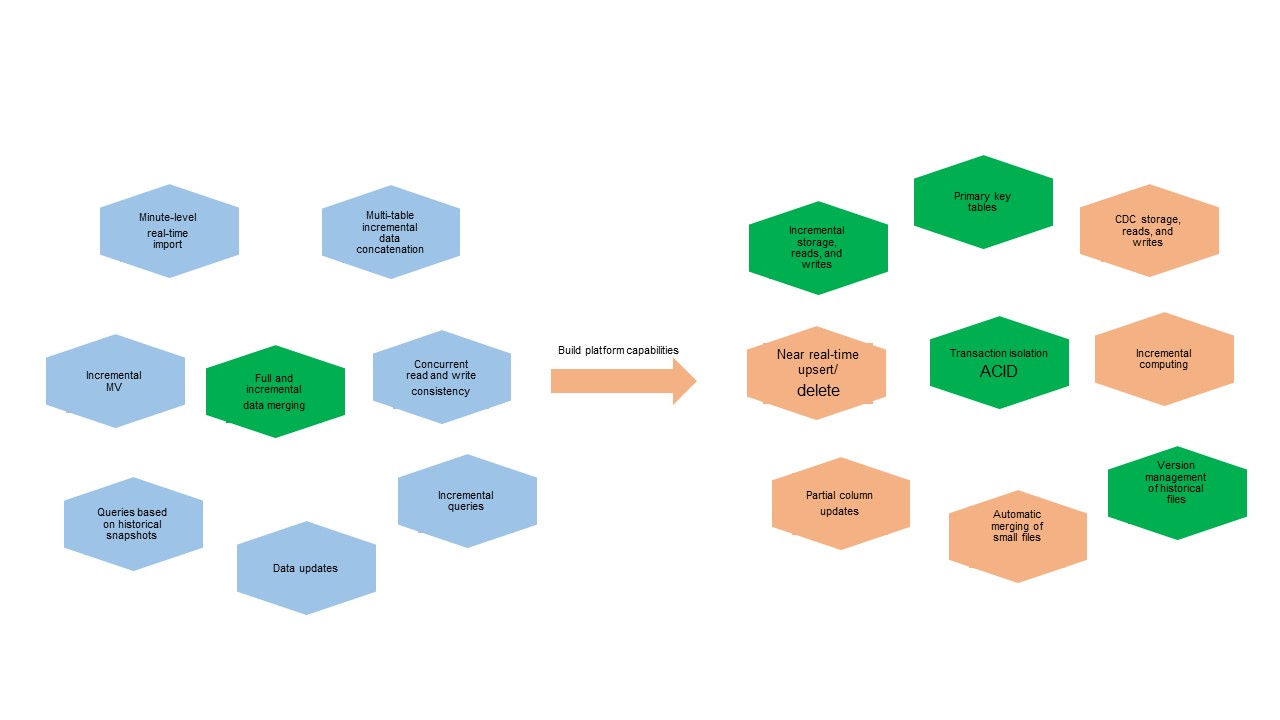
As data volumes grow and business scenarios become more demanding, near real-time data import requires platform engines with transaction isolation and automatic small-file merging. Full and incremental data merging requires the ability to store, read, and write incremental data using primary keys.
Before this integrated architecture, three earlier solutions addressed these needs, each with trade-offs in cost, ease of use, latency, and throughput:
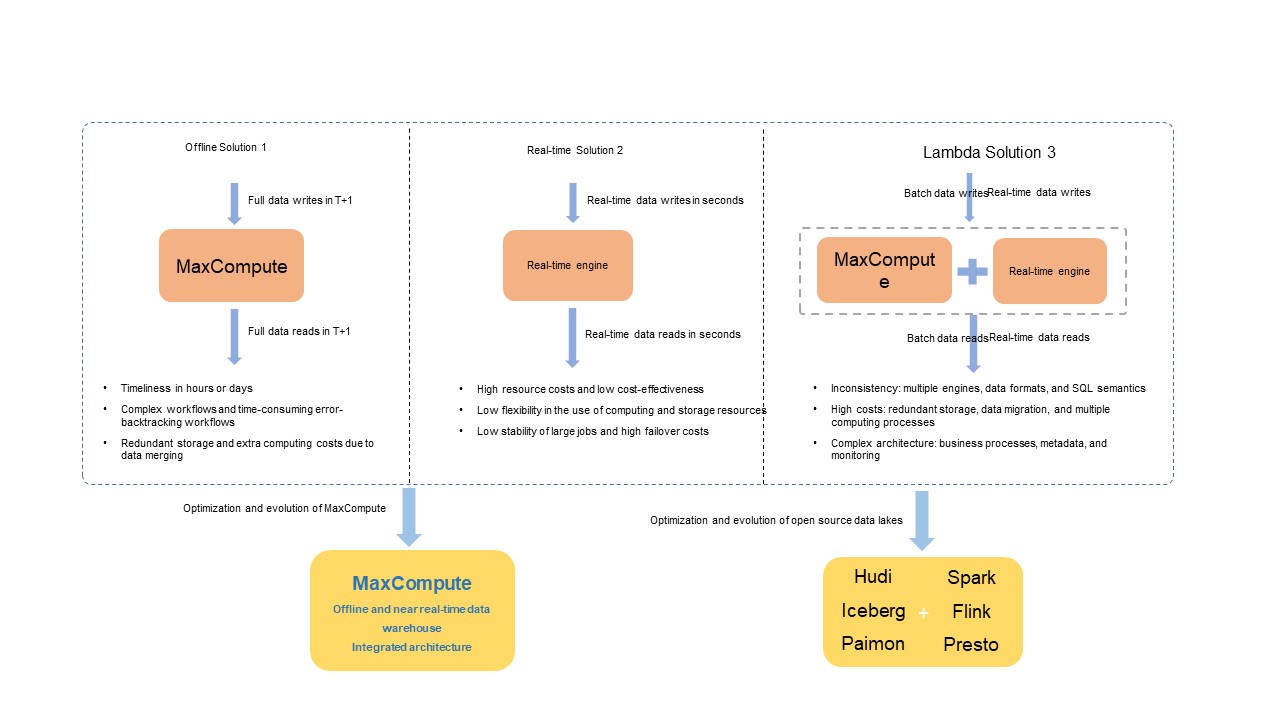
In the open-source ecosystem, engines such as Spark, Flink, and Trino—integrated with data lake formats like Apache Hudi, Delta Lake, Apache Iceberg, and Apache Paimon—resolve similar issues in the Lambda architecture by combining open compute engines with unified data stores.
Integrated architecture for near real-time full and incremental data storage and processing
MaxCompute's integrated architecture supports a wide range of data sources. You can import full and incremental data into a dedicated storage service using custom development tools. A backend data management service automatically optimizes and orchestrates the data storage structure. Unified compute engines handle both near real-time incremental and batch data processing. A unified metadata service manages transaction and file metadata.
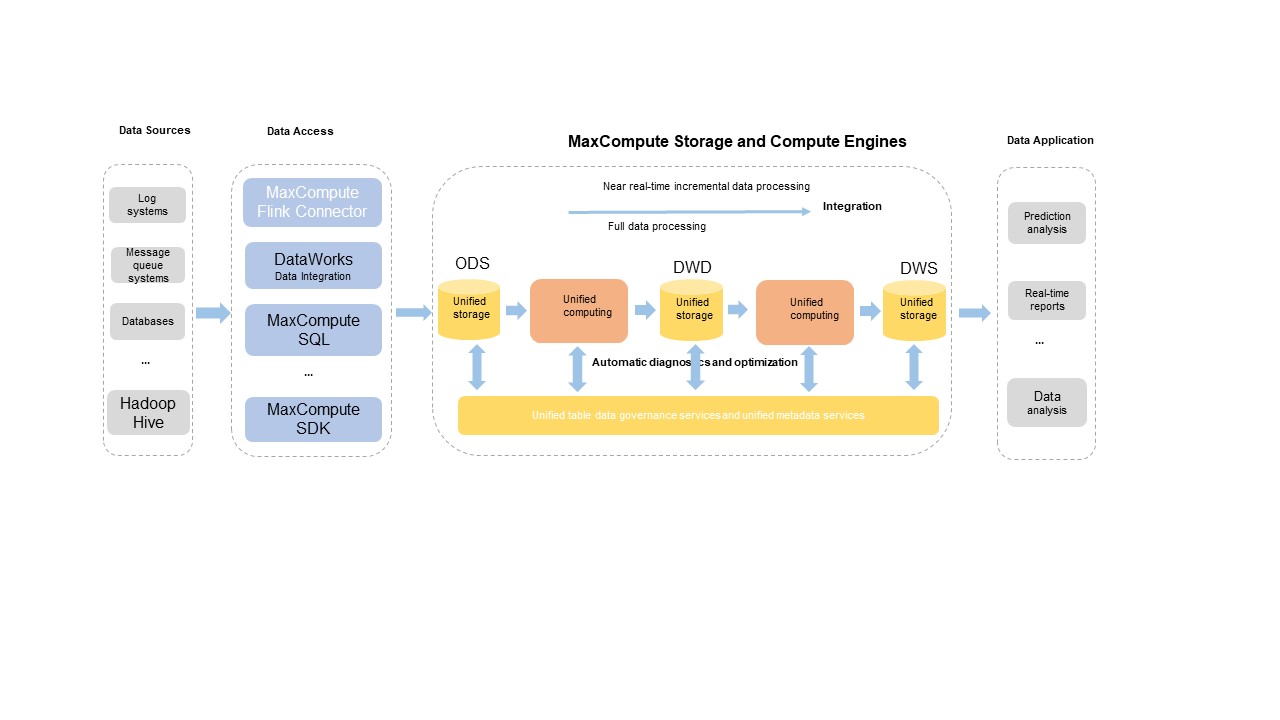
The architecture supports the following core capabilities:
-
Primary key tables
-
Real-time upserts
-
Time travel queries
-
Incremental queries
-
SQL data manipulation language (DML) operations
-
Automatic governance and optimization of table data
For details on how the architecture works and related operations, see Delta Table overview and Basic operations.
Architecture benefits
The integrated architecture supports the main common features of open-source data lake formats such as Apache Hudi and Apache Iceberg to ease migration between business processes. As a platform-native architecture developed by Alibaba Cloud, it also provides the following advantages:
| Advantage | Description |
|---|---|
| Unified integration | Uses unified storage services, metadata services, and compute engines for deep and efficient integration—delivering cost-effective storage, efficient file management, high query efficiency, and time travel queries on incremental data. |
| Complete SQL syntax | Provides a general-purpose SQL syntax system designed to support all core features. |
| Optimized data import tools | Provides deeply customized tools for data import in complex business scenarios. |
| Seamless compatibility | Integrates with existing MaxCompute business scenarios without requiring data migration or additional storage and compute costs. |
| Automated file management | Achieves fully automated file management for higher stability and performance of read and write operations, with automatic storage efficiency optimization. |
| Fully managed, zero setup | Based on MaxCompute's fully managed service—available out of the box with no additional access costs. Create a Delta table and the architecture takes effect immediately. |
| Autonomous development schedule | Maintains an autonomous and controllable development schedule. |
Business scenarios
Table formats and data governance
Table creation
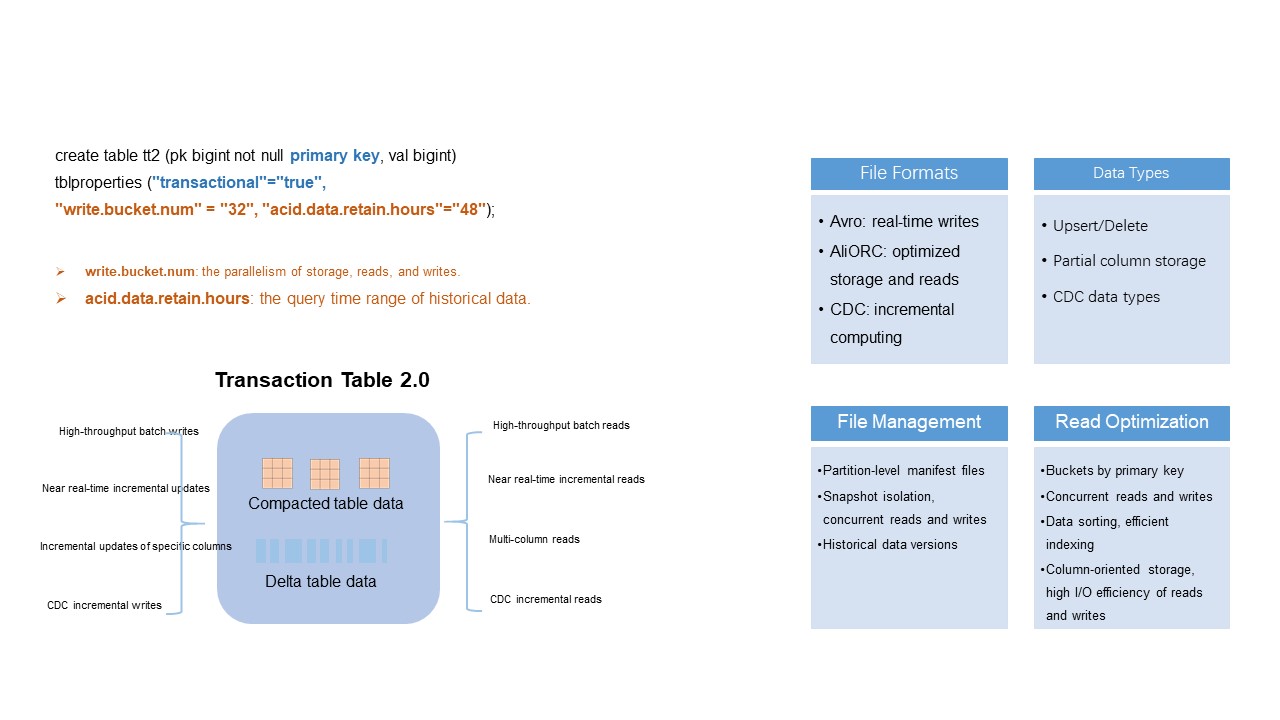
MaxCompute introduces Delta tables with a unified table data format to support the integrated architecture. Delta tables support all features of existing batch processing workflows and new workflows such as near real-time incremental data storage and processing.
To create a Delta table, specify primary keys and set "transactional"="true" in the CREATE TABLE statement:
CREATE TABLE tt2 (pk BIGINT NOT NULL PRIMARY KEY, val STRING) tblproperties ("transactional"="true");
CREATE TABLE par_tt2 (pk BIGINT NOT NULL PRIMARY KEY, val STRING)  PARTITIONED BY (pt STRING) tblproperties ("transactional"="true");
Primary keys ensure row uniqueness. The transactional property enables the ACID (atomicity, consistency, isolation, and durability) transaction mechanism with snapshot isolation for read and write operations. For more details, see Table operations.
Key parameters for Delta tables
For the full parameter reference, see the "Parameters for Delta tables" section in Table operations.
write.bucket.num
Specifies the number of buckets per partitioned or non-partitioned table, and the number of concurrent write nodes. The default value is 16. Valid values: (0, 4096].
-
For partitioned tables: the value can be changed and automatically applies to new partitions.
-
For non-partitioned tables: the value cannot be changed after creation.
More buckets increase write and query parallelism, but also generate more small files—increasing storage costs and reducing read efficiency. Follow these guidelines when sizing buckets:
| Scenario | Recommendation |
|---|---|
| Data < 1 GB (non-partitioned or partitioned) | 4–16 buckets |
| Data > 1 GB | Keep each bucket between 128 MB–256 MB |
| Data > 1 TB | Keep each bucket between 500 MB–1 GB |
| Partitioned table with > 500 partitions, each holding a few dozen MB | 1–2 buckets per partition to avoid small-file bloat |
acid.data.retain.hours
Specifies the time range of historical data available for time travel queries. The default value is 24. Valid values: [0, 168] (unit: hours).
-
Set to
0to disable time travel queries and significantly reduce historical data storage costs. -
For historical data older than 168 hours (7 days), contact MaxCompute technical support.
Set a retention period that matches your business requirements. Longer retention periods increase storage costs and can slow queries. After the retention period elapses, the system automatically reclaims and clears the historical data, including operation logs and data files—after which you can no longer query that data via time travel. To forcefully clear historical data before the period elapses, run the purge command.
Schema evolution
Delta tables support complete schema evolution, including adding and deleting columns. When querying historical data with time travel, the system reads data based on the schema at that historical version.
Primary keys cannot be modified.
The following example adds a column:
ALTER TABLE tt2 ADD columns (val2 string);For the full DDL syntax, see Table operations.
Table data formats
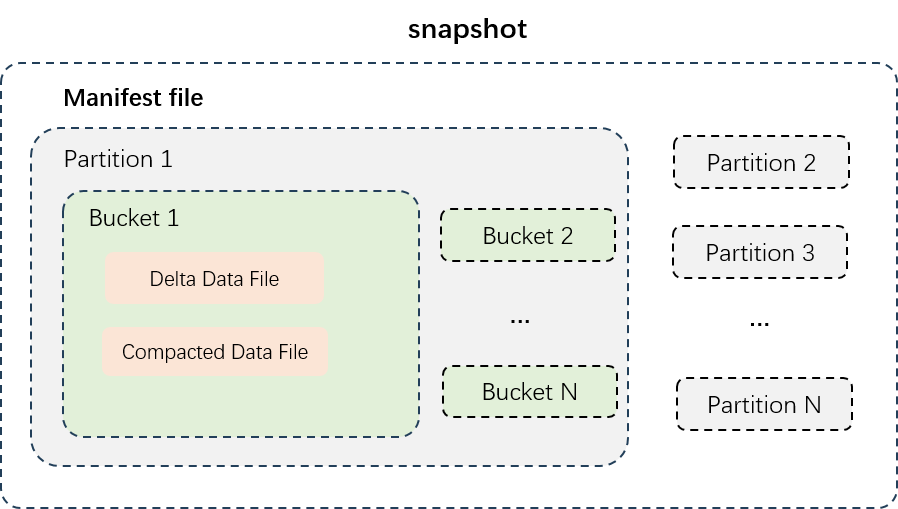
The figure above shows the data structure of a partitioned table. Data files are physically isolated by partition (stored in separate directories), and each partition's data is split into buckets. Delta tables use two types of data files:
| File type | Description | Storage format | Best for |
|---|---|---|---|
| Delta data files | Incremental data generated after each transaction write or small-file merge. Stores intermediate historical data of all rows to support near real-time reads and writes. | Row-oriented (Avro) | Near real-time ingestion; time travel across recent versions |
| Compacted data files | Generated after delta files are compacted. Retains only the latest record per primary key—no intermediate history. Optimized for fast queries. | Column-oriented (AliORC) | Analytical queries; high-throughput batch reads |
Automatic data governance and optimization
Problem: small-file bloat
Delta tables support near real-time incremental data import in minutes. In high-traffic write scenarios with many buckets, the number of small incremental data files can grow quickly, leading to excessive access requests, high costs, and low I/O efficiency. Heavy UPDATE and DELETE operations further compound this by generating large numbers of redundant intermediate historical records.
Solution: four automated governance services
The MaxCompute storage engine automatically governs and optimizes stored data without manual configuration. The storage engine intelligently identifies data characteristics across multiple dimensions and applies policies automatically.
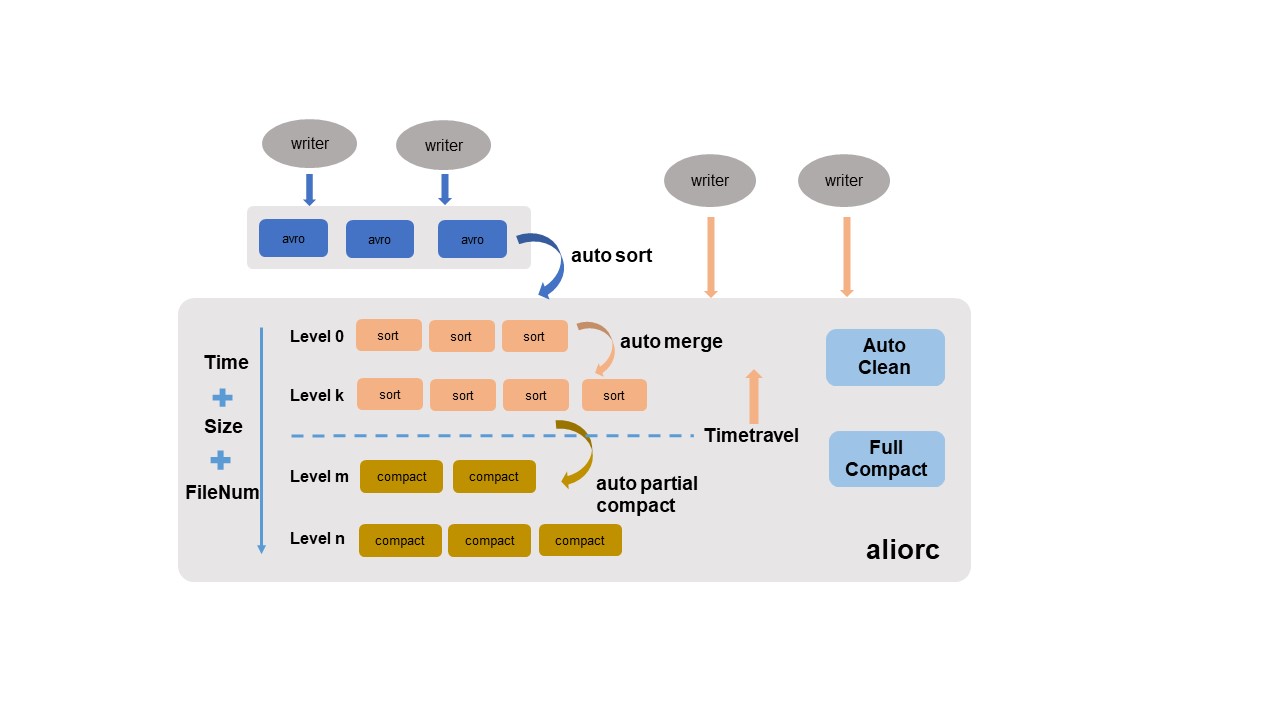
| Service | What it does |
|---|---|
| Auto sort | Converts row-oriented Avro files written in real time into column-oriented AliORC files. Reduces storage costs and improves read performance. |
| Auto merge | Merges small files periodically, analyzing file size, quantity, and write time series, then merging by level. Intermediate historical data is preserved to maintain time travel integrity. |
| Auto partial compact | Merges files and clears historical records that fall outside the time travel retention window. Reduces storage costs from heavy UPDATE/DELETE workloads and improves read efficiency. |
| Auto clean | Deletes original files after auto sort, auto merge, or auto partial compact generates new replacement files. Frees storage space in real time. |
Auto partial compact only clears historical records whose creation time is beyond the time travel retention window.
For scenarios requiring peak query performance, trigger a major compaction manually:
SET odps.merge.task.mode=service;
ALTER TABLE tt2 compact major;Major compaction consolidates all data in each bucket, clears all historical data, and generates column-oriented AliORC files. This incurs additional execution overhead and increases the storage costs of new files. Use it only when necessary.
For more information, see COMPACTION.
Data writes
Near real-time upserts in minutes
Why Delta tables: Traditional batch processing imports incremental data to a new table or partition over hours or days, then triggers an offline ETL process to join and merge that incremental data with existing table data. This has long latency and high resource and storage costs.
With Delta tables, the upsert pipeline maintains a latency of 5 to 10 minutes from data write to query. No complex ETL merge process is required, which reduces both compute and storage costs.
A variety of data sources are common in production—databases, log systems, message queues. MaxCompute provides an open-source Flink connector plug-in that works with DataWorks Data Integration and other data import tools. It supports custom design and development optimization for high concurrency, fault tolerance, and transaction submission scenarios.
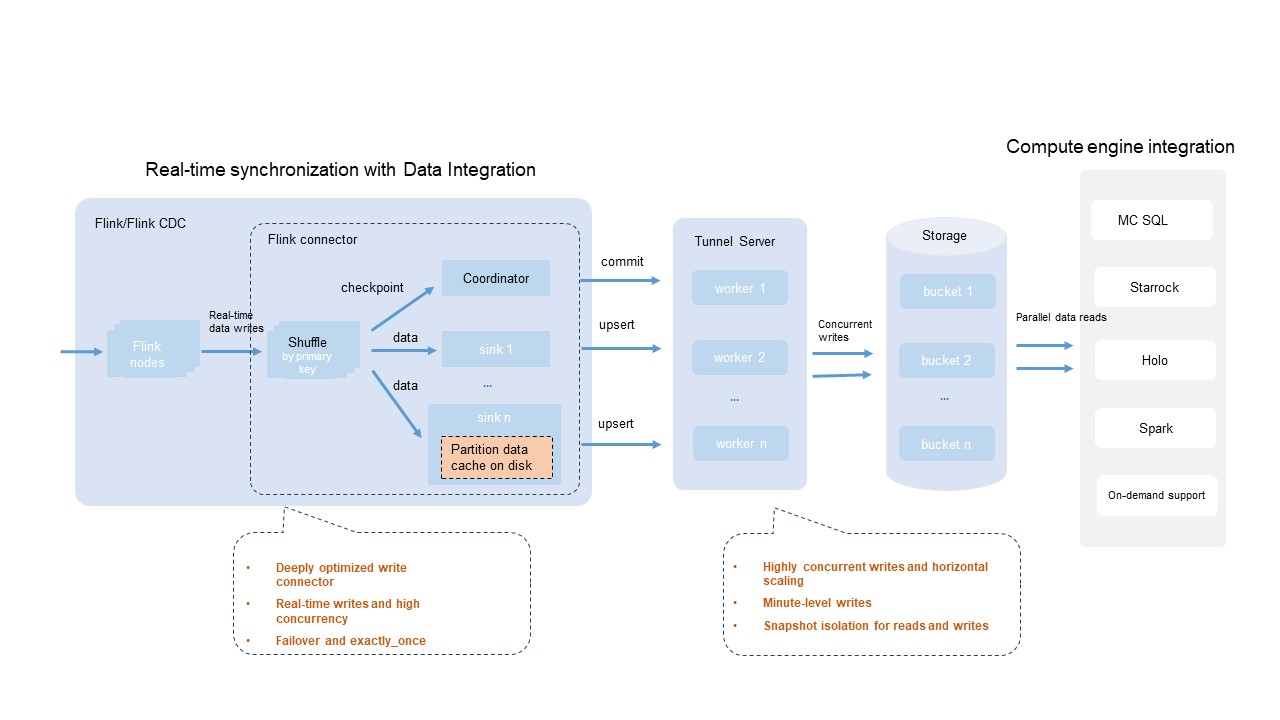
Key capabilities of the Flink connector integration:
| Capability | Description |
|---|---|
| Broad engine compatibility | Most compute engines and tools compatible with the Flink ecosystem support Flink deployments that use the MaxCompute Flink connector to write data to Delta tables in real time. |
| Configurable write parallelism | Adjust the write.bucket.num parameter to tune write parallelism. For best write performance, set write.bucket.num to an integer multiple of the Flink sink parallelism. |
| Exactly-once semantics | Uses the built-in Flink checkpoint mechanism for fault tolerance, ensuring data processing follows exactly-once semantics. |
| Large-scale partition writes | Supports writing to thousands of partitions simultaneously. |
| Near real-time visibility | Data is visible in minutes, with snapshot isolation for read and write operations. |
Traffic throughput varies by environment and configuration. Estimate maximum throughput based on the processing capacity of a single bucket (1 MB/s). The shared Tunnel resource group is used by default for MaxCompute Tunnel, which may cause unstable throughput under heavy resource contention. Limits are also imposed on resource consumption.
Real-time data synchronization from databases using DataWorks Data Integration
Many production systems combine online transaction processing (OLTP), online analytical processing (OLAP), and offline analysis engines. A common workflow is to synchronize new records from a single table or an entire database to MaxCompute in real time for analysis.
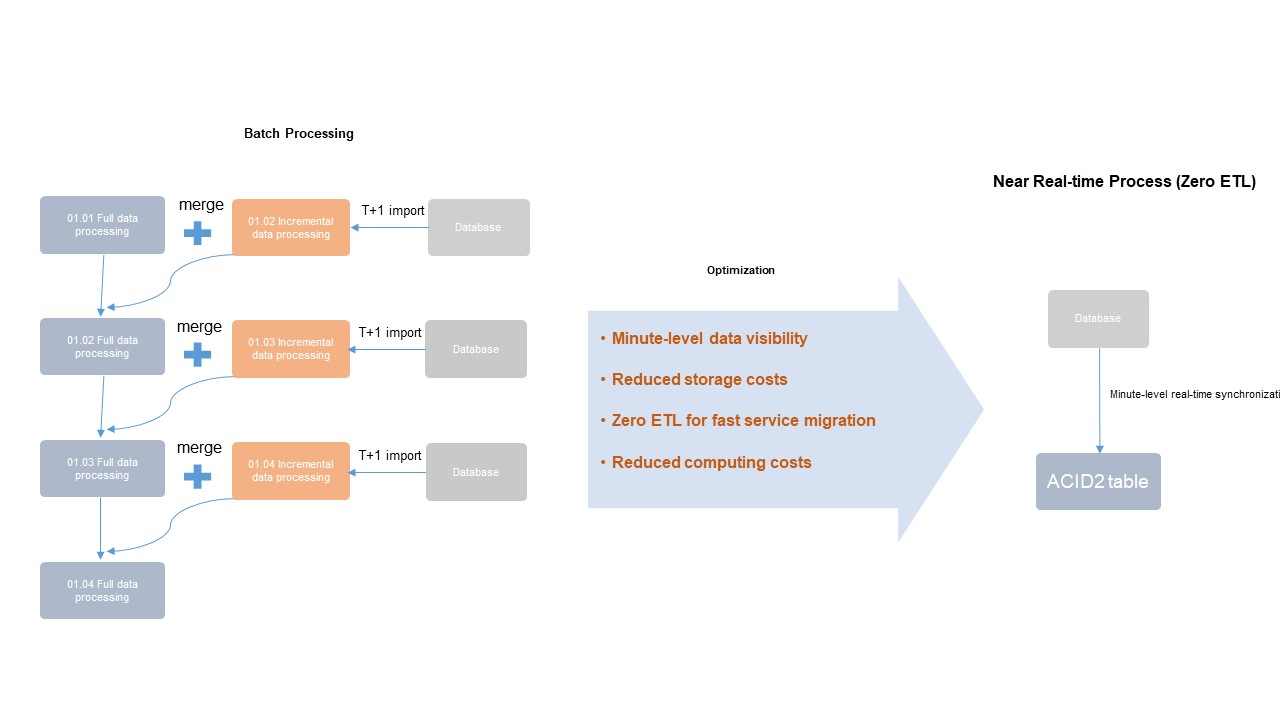
The figure above contrasts two approaches:
-
Left (batch processing): Incremental data is imported to a new table or partition over hours or days. An offline ETL process then joins and merges the incremental data with existing table data. This has high latency and high resource and storage costs.
-
Right (integrated architecture): New records are read from databases in minutes. No periodic data extraction or merging is needed—Delta tables handle updates directly, minimizing compute and storage costs.
Batch processing using SQL DML statements and upserts
The SQL engine's Compiler, Optimizer, and Runtime modules are modified and optimized for Delta table operations. This includes syntax parsing, optimization plans, primary key-based deduplication logic, and runtime upserts to provide full SQL syntax support.
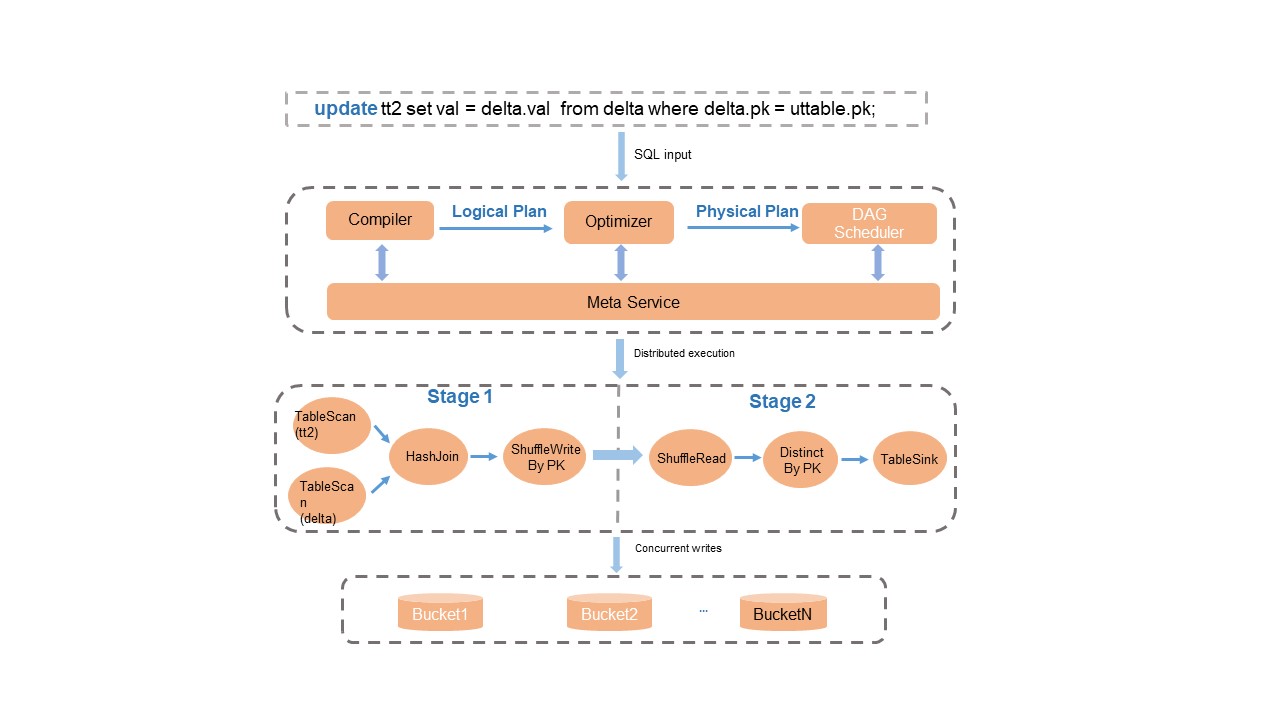
Key behaviors:
-
Transaction consistency: After data processing completes, the metadata service performs transaction conflict detection and atomic metadata updates, ensuring read/write isolation and transaction consistency.
-
Simplified upserts: The system automatically merges records based on primary keys during queries on Delta tables. For scenarios that mix INSERT and UPDATE operations, use
INSERT INTOinstead of complexUPDATEorMERGE INTOsyntax—this reduces read I/O and saves compute resources.
For the full SQL DML syntax, see DML operations.
Data queries
Time travel queries
Time travel queries let you query historical versions of a Delta table. Common use cases include:
-
Data recovery: Restore data to a specified historical version after accidental modification or deletion.
-
Historical backtracking: Audit or reanalyze business data from a past point in time.
Example queries:
-- Query historical data at a specific timestamp.
SELECT * FROM tt2 TIMESTAMP AS OF '2024-04-01 01:00:00';
-- Query historical data from 5 minutes before the current time.
SELECT * FROM tt2 TIMESTAMP AS OF CURRENT_TIMESTAMP() - 300;
-- Query historical data from the second-to-last commit.
SELECT * FROM tt2 TIMESTAMP AS OF GET_LATEST_TIMESTAMP('tt2', 2);
The following figure shows how a time travel query works:
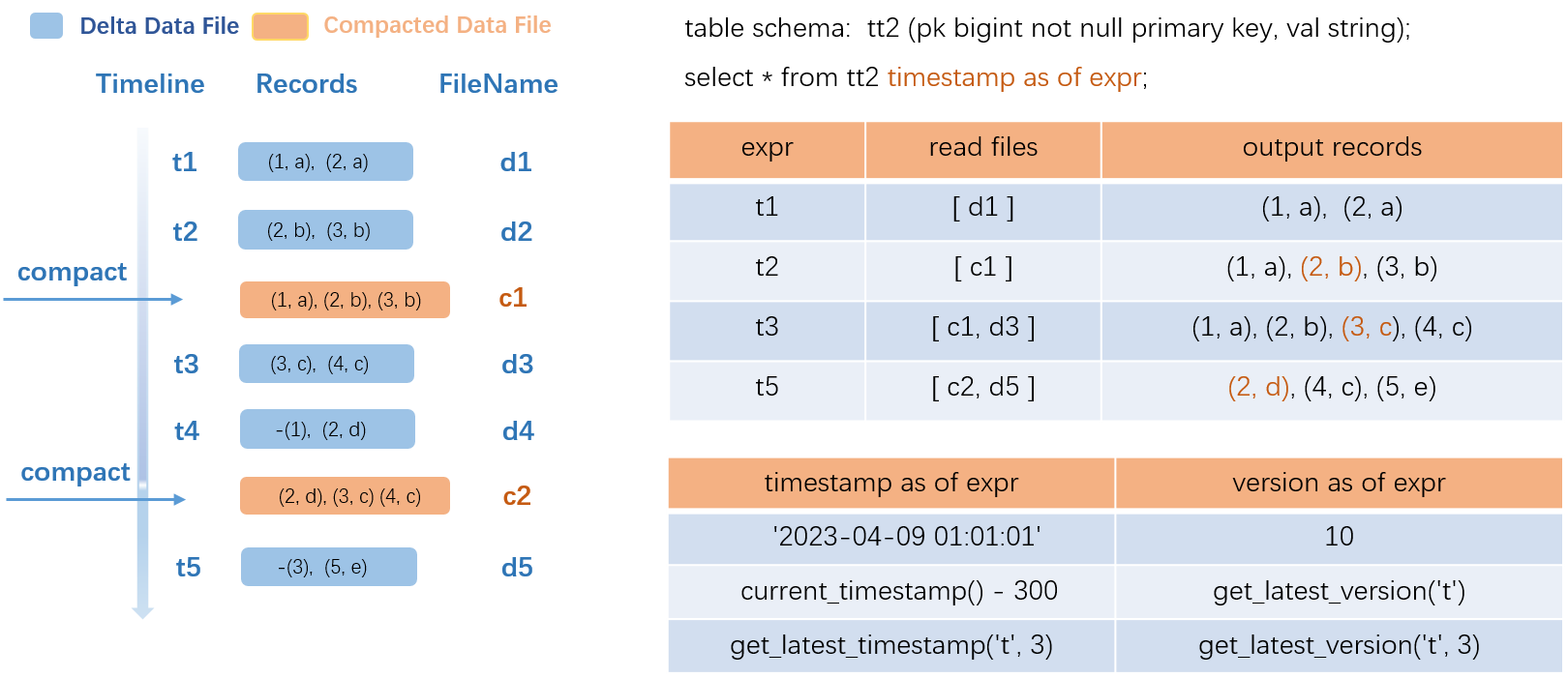
The example uses a transactional table named src:
-
Left side (data update process): Transactions t1 through t5 each generate a delta data file. COMPACTION runs at t2 and t4, producing compacted files c1 and c2. In c1, the intermediate historical record
(2,a)is deleted and the latest record(2,b)is retained. -
Query resolution: To query historical data at t1, the system reads only delta file d1. To query at t2, it reads compacted file c1 and returns three records. To query at t3, it reads c1 and delta file d3, merging them for output. More frequent COMPACTION accelerates queries but increases operational overhead—choose a trigger policy based on your requirements.
The SQL syntax supports constants, common functions, and the TIMESTAMP AS OF expr and VERSION AS OF expr clauses for precise historical queries. For details, see Time travel queries.
Incremental queries
MaxCompute designs and develops a new SQL incremental query syntax to optimize incremental queries and incremental computing for Delta tables. After you submit a SQL incremental query statement, the MaxCompute engine parses the historical incremental data versions to query, retrieves the relevant compacted data files, merges the file data, and returns the output.
The following figure shows the incremental query process:
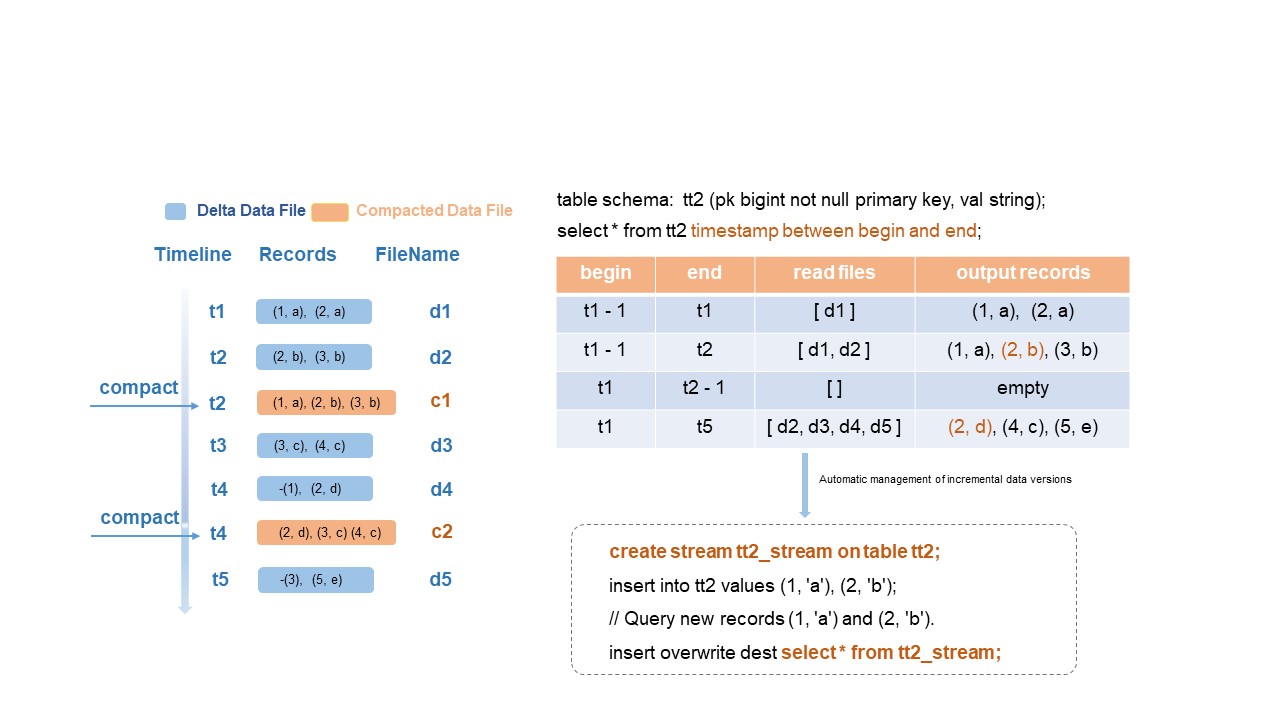
The example uses the same transactional table src with transactions t1 through t5 and compacted files c1 (at t2) and c2 (at t4):
-
If
beginis t1-1 andendis t1, the system reads only delta file d1 at t1. -
If
endis t2, the system reads delta files d1 and d2. -
If
beginis t1 andendis t2-1, the query range spans t1 to t2. No incremental data exists in this range, so empty rows are returned.
Data in compacted files c1 and c2 generated by COMPACTION is not considered new data for incremental query output.
For the incremental query syntax and parameter limits, see the "Parameters and limits of incremental queries" section in Time travel queries and incremental queries.
Optimized primary key-based data skipping
Delta table data distribution and indexes are built on primary key column values. When you query by primary key, the system filters at multiple levels to significantly reduce the data read—improving query efficiency by hundreds to thousands of times.
Example: A Delta table contains 100 million records. Filtering by a single primary key value may require reading only 10,000 records.
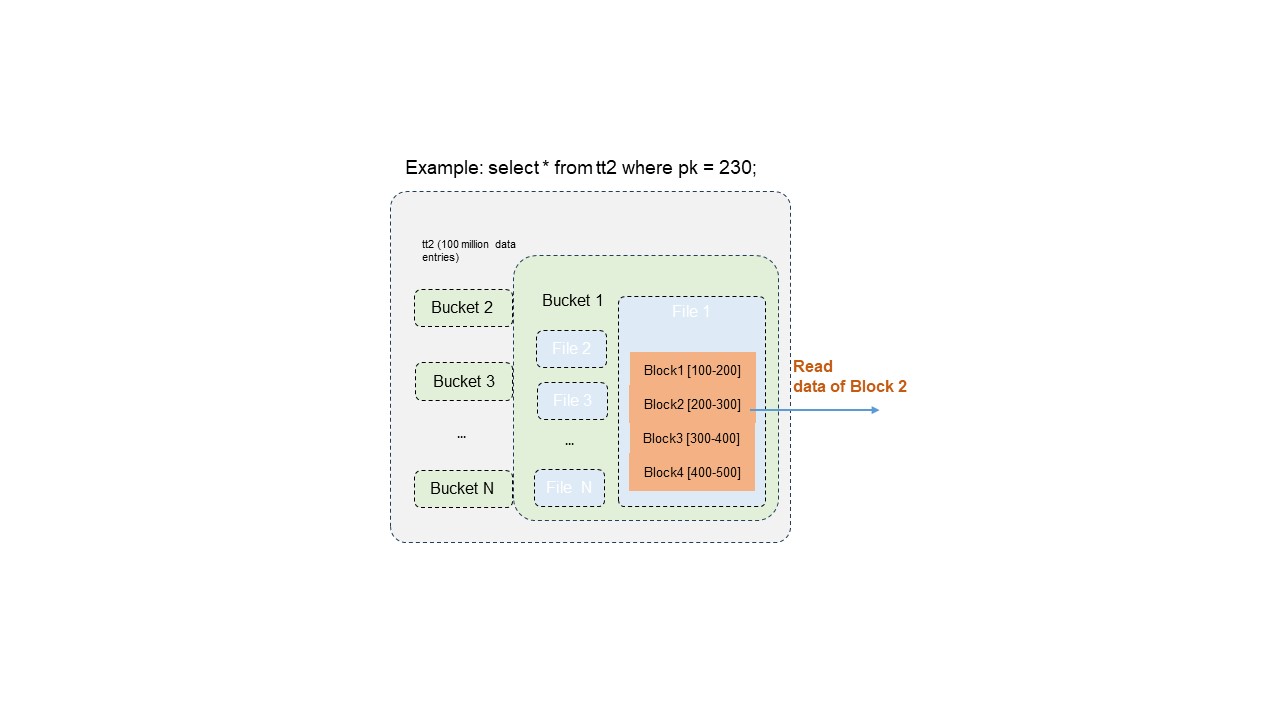
The three-level filtering process:
-
Bucket pruning: Locates the bucket containing the target primary key, eliminating scans of all other buckets.
-
Data file pruning: Within the target bucket, identifies only the data files that contain the primary key value.
-
Block-level range filtering: Applies accurate filtering based on primary key value distribution within file blocks, extracting only the blocks that contain the target value.
Optimized SQL query and analysis plans
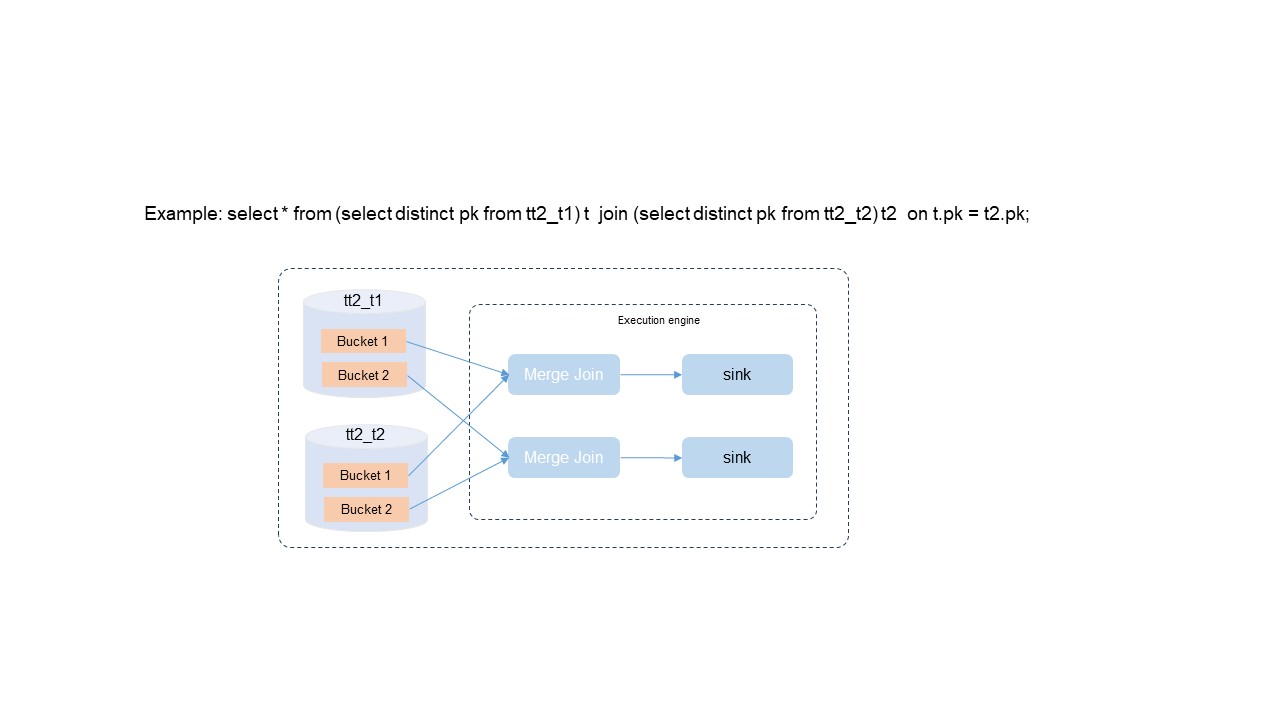
Each bucket in a Delta table stores data that is unique and sorted by primary key value. The SQL Optimizer exploits these properties to eliminate expensive operations:
| Optimization | How it works | Benefit |
|---|---|---|
| DISTINCT elimination | Primary key uniqueness guarantees no duplicates, so the optimizer skips the DISTINCT operation entirely. | Removes unnecessary compute overhead. |
| Bucket local join | When the join key matches the primary key, the optimizer selects a bucket-local join policy instead of a global shuffle. | Reduces large-scale data exchange between nodes, lowering resource consumption and improving throughput. |
| Merge join without sorting | Data in each bucket is already ordered by primary key. The optimizer uses a merge join algorithm instead of pre-sorting. | Simplifies computation and saves compute resources. |
After eliminating DISTINCT, sorting, and global shuffling, query performance improves by 100%.