The global visual search market is expected to grow from $35.51 billion to $150.43 billion by 2032. That's a big sign that more people have started searching by images, and the numbers are increasing at a crazy rate with time. That's why many advanced picture search tools have been developed to meet the needs of a growing number of searchers.
However, the reality is, not all of them are created equal. Yes, you heard that right. Just like physical products, the digital ones also differ in quality, functionality, and features. That's why it's necessary to get hands on the best available reverse image search tools to perform better visual searches. But how would you find them?
Well, there is no need to go anywhere, as we have listed 4 of the most efficient photo search options in this article. However, before exploring them, let's have a quick intro to image search and the technologies behind it.
Knowing what exactly reverse image search is and what makes it work can help you make the most out of it. So, let's look at its basics.
Reverse image search is simply a modern way to discover things on the internet. In this method, a picture serves as a search query instead of text. That's the main difference between traditional and visual search. However, it works in the same way as text-based searches. You enter an image query, the system analyzes it, and gives you highly relevant results.
But unlike textual searches, the relevancy of results depends solely on the extracted visual characteristics of the picture under observation. That's why you always get the same collection of identical visuals, no matter if you search by a photo once or multiple times.
Picture searches work using innovative computer vision technologies that help them match visuals based on how they look. Here are the main technologies behind it.
● CBIR: Content-based image retrieval technology helps search models to look at the content inside a picture. It recognizes shapes, colors, textures, styles, angles, and other details in a photo.
● Machine Learning: Machine learning lets computers learn from many image examples. Over time, it helps them get better at finding pictures that match or look similar.
● Deep Learning: Deep learning uses layered systems to look at images in a more detailed way. It helps match faces or objects with very high accuracy.
Alibaba Cloud provides SDKs for multiple languages. Below are sample code snippets in Python and PHP to demonstrate how easy it is to add image search capabilities to your application.
Install the SDK:
pip install alibabacloud_imagesearch20201214Search for similar images by uploading a file:
from alibabacloud_imagesearch20201214.client import Client
from alibabacloud_imagesearch20201214.models
import SearchImageByPicAdvanceRequest
from alibabacloud_tea_openapi.models import Config

def search_image_by_pic():
    config = Config(
        access_key_id='<YourAccessKeyId>',
        access_key_secret='<YourAccessKeySecret>',
        endpoint='imagesearch.cn-hangzhou.aliyuncs.com'
    )
    client = Client(config)
    request = SearchImageByPicAdvanceRequest()
    request.instance_name = '<instanceName>'
    with open('<filePath>', 'rb') as f:
        request.pic_content_object = f
    response = client.search_image_by_pic_advance(request)
print(response.body)Install via Composer:
composer require alibabacloud/imagesearch-20201214Search by image name:
$client = new ImageSearch($config);
$request = new SearchImageByNameRequest();
$request->instanceName = "your_instance_name";
$request->productId = "testPhp";
$request->picName = "testPhp";
$response = $client->searchImageByName($request);
var_dump($response->toMap());● Log in to the Alibaba Cloud Image Search console.
● Select your instance and use the Search by Image tab.
● Upload an image (PNG, JPG, JPEG, BMP, GIF, WEBP, TIFF, or PPM, up to 4MB).
● E-Commerce: Ideal for businesses seeking a Shopify alternative with smarter visual product discovery and large-scale image matching.
● Copyright Protection: Track unauthorized image usage across the web.
● Social Media: Authenticate user profiles and monitor brand usage.
● Digital Asset Management: Organize and retrieve images efficiently at scale
Suppose you want to create a web platform where users can upload an image to find similar products. With Alibaba Cloud Image Search, the process is streamlined:
from alibabacloud_imagesearch20201214.client import Client
from alibabacloud_imagesearch20201214.models import SearchImageByPicAdvanceRequest
from alibabacloud_tea_openapi.models import Config

def search_image_by_pic():
    config = Config(
        access_key_id='<YourAccessKeyId>',
        access_key_secret='<YourAccessKeySecret>',
        endpoint='imagesearch.cn-hangzhou.aliyuncs.com'
    )
    client = Client(config)
    request = SearchImageByPicAdvanceRequest()
    request.instance_name = '<instanceName>'
    with open('<filePath>', 'rb') as f:
        request.pic_content_object = f
    response = client.search_image_by_pic_advance(request)
    print(response.body)
Visual Workflow: Alibaba Cloud Image Search
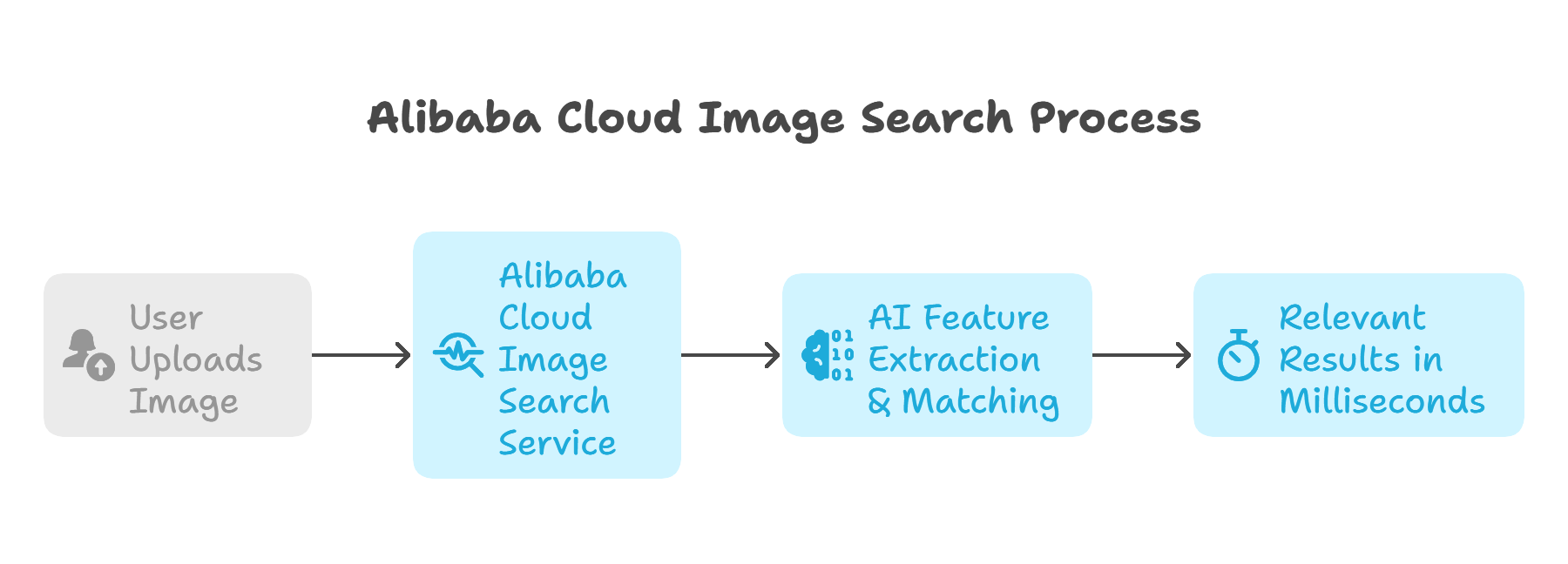
While Alibaba Cloud Image Search is the market leader, several other tools serve different user needs. Here’s a curated list.
| Tool Name | Key Features & Use Cases |
|---|---|
| Alibaba Cloud Image Search | Enterprise-grade, AI-powered, scalable, real-time search for e-commerce, copyright, and digital asset management. |
| DupliChecker | AI-powered image search; supports Google, Bing, and Yandex; ideal for locating duplicate images, verifying image sources, and detecting content misuse. |
| Reversely.ai | AI-driven, advanced pattern/object matching, drag-and-drop interface; ideal for designers, content creators, and authenticity checks. |
| Google Images | General-purpose, broad search, integrates with Google Search. |
Alibaba Cloud Image Search is more than just a tool to find the same picture. It's made for big online stores and image-hosting sites with personally managed image libraries. It works well, looks through many photos, and gives smart matches. Along with that, here are some solid reasons why you should prefer it over others.
● It's a scalable solution that can increase its image-handling capacity while maintaining competitive cloud CPU pricing.
● Easy to integrate with apps and sites through an API and SDK.
● This reverse image search tool can adapt to different scenarios.
● It has the capability to handle a database of 10 billion pictures.
● It specializes in catering to the needs of different industries.
● Alibaba Cloud shows identical images in under a second.
Together, all these factors make it a picture search resource that is worth relying on.
To activate Image Search, log in to your Alibaba Cloud account, complete real-name verification, go to the Image Search, select your region and service type, and complete the purchase. Note: You cannot change the region or service type after purchase.
Log in to the Alibaba Cloud console, navigate to the AccessKey Management page, and create or view your AccessKey ID and AccessKey Secret. These credentials are required to access the Image Search API.
No, the region cannot be changed after the instance is purchased. Choose your region carefully during setup.
Alibaba Cloud Image Search offers two main service types:
● Product Search: For finding or recommending similar products based on product images (ideal for e-commerce).
● Generic Search: For searching or protecting image copyrights, or finding similar images based on general content
Real-name verification must be completed before activating Image Search. Submit valid personal or enterprise information as required. Alibaba Cloud reviews the information according to regulatory standards, and activation proceeds after successful verification
Reverse image search is now a cornerstone of digital interaction, powering everything from e-commerce to copyright enforcement. Alibaba Cloud Image Search leads the industry with unmatched scalability, speed, and AI-driven accuracy. Whether you’re a developer, business, or content creator, Alibaba Cloud empowers you to unlock the full potential of visual search.
Ready to experience world-class image search? Get started with Alibaba Cloud Image
● Alibaba Cloud Image Search Product Page
Disclaimer: The views expressed herein are for reference only and don't necessarily represent the official views of Alibaba Cloud.
Building Scalable Mobile Backends with Go and Alibaba Cloud's Serverless Setup
From Silos to Synergy: Why DevOps Is Essential for Digital Transformation
Alibaba Clouder - July 6, 2018
PM - C2C_Yuan - April 18, 2024
Alibaba Clouder - March 12, 2019
Maya Enda - June 16, 2023
Nick Patrocky - March 8, 2024
Alibaba Cloud Native Community - March 6, 2025
 Platform For AI
A platform that provides enterprise-level data modeling services based on machine learning algorithms to quickly meet your needs for data-driven operations.
Learn More Epidemic Prediction Solution
This technology can be used to predict the spread of COVID-19 and help decision makers evaluate the impact of various prevention and control measures on the development of the epidemic.
Learn More Online Education Solution
This solution enables you to rapidly build cost-effective platforms to bring the best education to the world anytime and anywhere.
Learn More Qwen
Qwen
Full-range, open-source, multimodal, and multi-functional
Learn MoreMore Posts by Neel_Shah


