根据埋点方案,选择正确的埋点API。
1 如何查看埋点方案
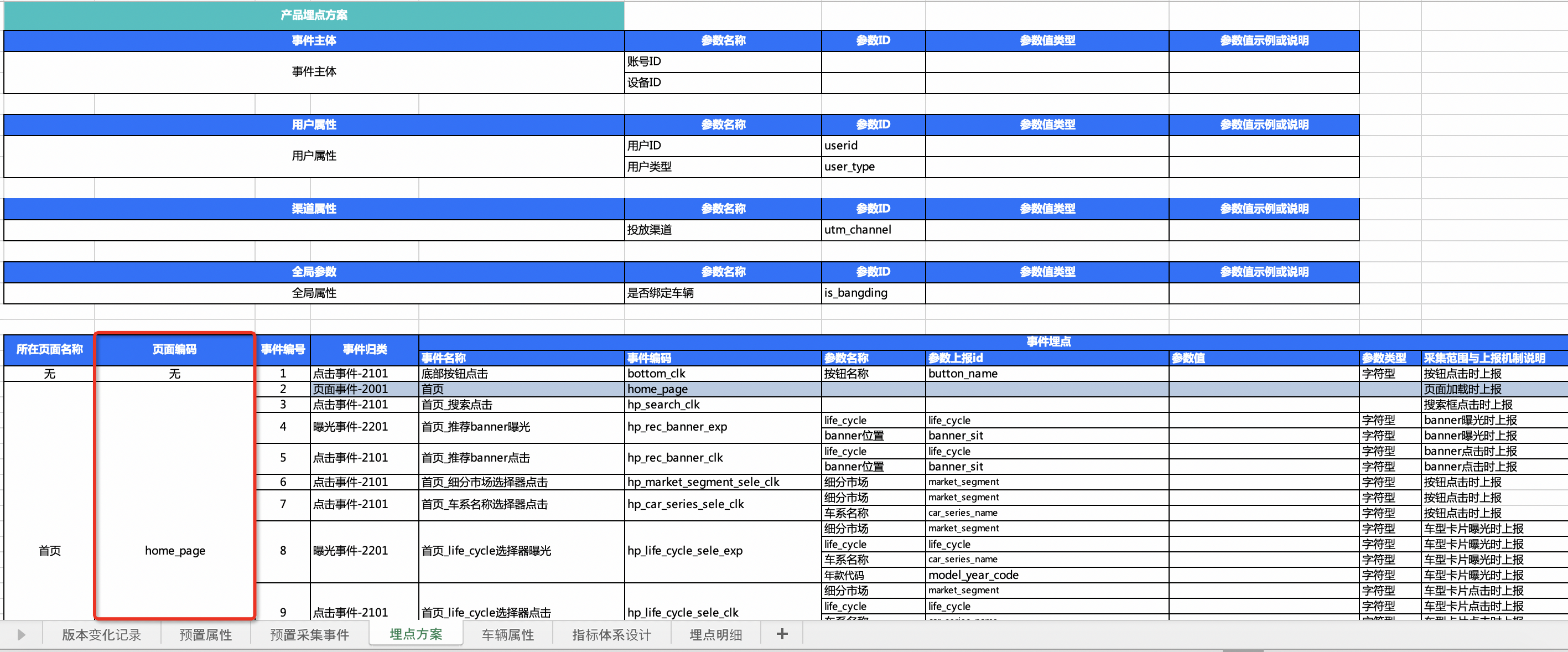
在进行埋点前,需要确定在哪里埋点、埋哪些点等,即需要梳理清楚明确的埋点需求。在QuickTracking平台中将明确的埋点需求称为埋点方案,并为埋点方案设计了规范模板。如下:
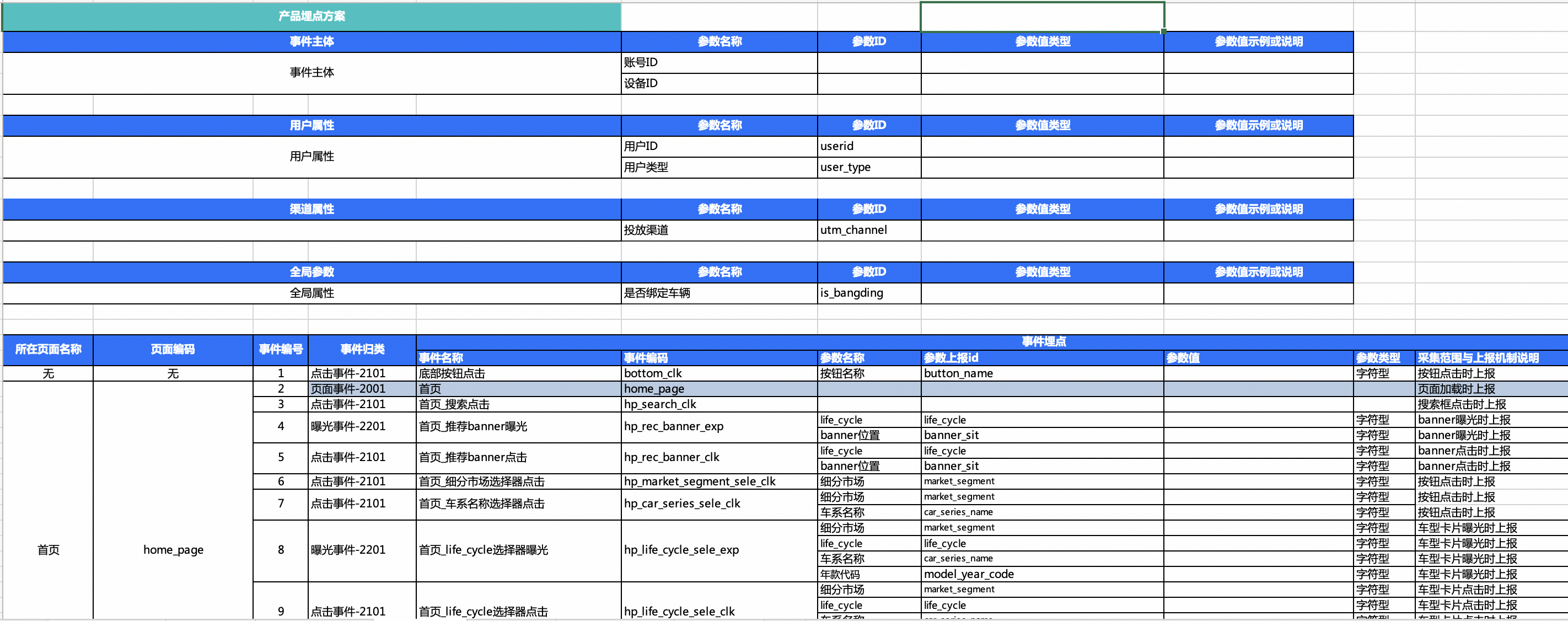
在埋点方案中,明确的所需埋点内容有:
1、事件主体:指“谁”触发了这个事件,分为设备ID和账号ID,上报的事件务必具备其中之一。
设备ID:在H5中一般为aplus自动生成,若H5页面嵌入在小程序中,则设备ID需要设置为小程序的设备ID。
账号ID:客户端用户登录后账号标识,当一个用户在不同的设备进行登录时,设备ID会发生变化,但是账号ID不会发生变化。例如一个用户使用手机和pad分别登录。
2、用户属性:针对账号ID的属性,例如账号ID为“testdemo@111”的用户,“生日”为“1999-02-13”,“会员等级”为“铂金”等。“生日”和“会员”等级就为用户属性。
3、渠道属性:广告投放的属性,例如投放渠道、投放方式、投放内容等。
4、全局属性:在全局设置一次后,每一个事件都会携带的属性
5、页面浏览事件:页面加载时上报的事件(埋点方案中页面编码和事件编码相等,也是标记为蓝色的事件)
6、点击、曝光、自定义事件:客户端用户与客户端发生任意交互时上报的事件。
2 设置设备ID&账号ID
2.1 设备ID设置
Web设备ID有Quicktracking自动生成和开发者手动上传两种方式,默认为Quicktracking自动生成:
自动生成:默认逻辑,网站的设备ID只有浏览器发生变化或用户主动清除cookie和缓存时,设备ID会重新生成,用户的浏览器和IP地址不变的情况下,重新生成的设备ID不会发生变化。
手动上传:上传方式为赋值给"_dev_id",上传的长度要在24-36字符。
qt
// 如采集用户ID是异步行为,需要先阻止SDK上报,设置BLOCK埋点
qt_queue.push({
  action: 'qt.setMetaInfo',
  arguments: ['_hold', 'BLOCK'],
});

// 设置 _dev_id
qt_queue.push({
  action: 'qt.setMetaInfo',
  arguments: ['_dev_id', '自定义设备ID'],
});

// 因为采集用户ID是异步行为,故需要先设置BLOCK,再设置START
// 设置_hold=START后,事先被block住的日志会携带上用户信息逐条发出
qt_queue.push({
  action: 'qt.setMetaInfo',
  arguments: ['_hold', 'START'],
});
aplus(待废弃)
// 如采集用户ID是异步行为,需要先阻止SDK上报,设置BLOCK埋点
aplus_queue.push({
  action: 'aplus.setMetaInfo',
  arguments: ['_hold', 'BLOCK'],
});

// 设置 _dev_id
aplus_queue.push({
  action: 'aplus.setMetaInfo',
  arguments: ['_dev_id', '自定义设备ID'],
});

// 因为采集用户ID是异步行为,故需要先设置BLOCK,再设置START
// 设置_hold=START后,事先被block住的日志会携带上用户信息逐条发出
aplus_queue.push({
  action: 'aplus.setMetaInfo',
  arguments: ['_hold', 'START'],
});
2.2 账号ID设置
在用户登录时,以及登录态进入H5时,都需要设置账号ID。因为设置后的每一条日志都将携带账号ID,但退出H5再进入后触发的事件不会携带账号ID。所以需要在用户登录时,以及登录态进入H5时设置账号ID。
qt
// 用户登录时,获取到用户登录账号信息 or 用户已登录,通过cookie或者localstorage获取用户登录账号
function demoLogin() {
  // 如果同步场景
  qt_queue.push({
    action: 'qt.setMetaInfo',
    arguments: ['_user_id', '用户的账号id'],
  });

  // 如果是异步场景,并且日志必须依赖用户账号
  // 先通过设置_hold=BLOCK阻塞采集上报
  qt_queue.push({
    action: 'qt.setMetaInfo',
    arguments: ['_hold', 'BLOCK'],
  });

  function callback() {
    // 获取异步回调结果中的用户账号id
    qt_queue.push({
      action: 'qt.setMetaInfo',
      arguments: ['_user_id', '用户的账号id'],
    });
    // 再通过设置_hold=START允许采集上报
    qt_queue.push({
      action: 'qt.setMetaInfo',
      arguments: ['_hold', 'START'],
    });
  }
}
// 用户登出时,重置用户账号id
function demoLogOff() {
  qt_queue.push({
    action: 'qt.setMetaInfo',
    arguments: ['_user_id', ''],
  });
}
aplus(待废弃)
// 用户登录时,获取到用户登录账号信息 or 用户已登录,通过cookie或者localstorage获取用户登录账号
function demoLogin() {
  // 如果同步场景
  aplus_queue.push({
    action: 'aplus.setMetaInfo',
    arguments: ['_user_id', '用户的账号id'],
  });

  // 如果是异步场景,并且日志必须依赖用户账号
  // 先通过设置_hold=BLOCK阻塞采集上报
  aplus_queue.push({
    action: 'aplus.setMetaInfo',
    arguments: ['_hold', 'BLOCK'],
  });

  function callback() {
    // 获取异步回调结果中的用户账号id
    aplus_queue.push({
      action: 'aplus.setMetaInfo',
      arguments: ['_user_id', '用户的账号id'],
    });
    // 再通过设置_hold=START允许采集上报
    aplus_queue.push({
      action: 'aplus.setMetaInfo',
      arguments: ['_hold', 'START'],
    });
  }
}
// 用户登出时,重置用户账号id
function demoLogOff() {
  aplus_queue.push({
    action: 'aplus.setMetaInfo',
    arguments: ['_user_id', ''],
  });
}
2.3 设备ID和账号ID获取
设备ID的获取
SDK自动生成的设备ID获取方式如下:
在当前域名的cookie下存储名为cna的字段,可以通过解析document.cookie获取。也可以通过getMetaInfo读取设备ID
qt
qt.getMetaInfo('_dev_id')aplus(待废弃)
aplus.getMetaInfo('_dev_id')账号ID的获取
开发者通过getMetaInfo读取设置的自定义账号ID
qt
qt.getMetaInfo('_user_id')aplus(待废弃)
aplus.getMetaInfo('_user_id')3 设置用户属性
通过预置事件编码 $$_user_profile 上报用户属性,事件类型为其他事件。
在上报用户属性之前,需要先设置_user_id上报用户账号,否则QuickTracking流量分析对用户属性不会进行关联计算。确认上报用户的账号ID后,上报用户属性示例如下:
qt
// 示例
qt_queue.push({
  action: 'qt.record',
  arguments: ['$$_user_profile', 'OTHER', {
    name: 'sss', // 用户属性1
    gender: 'male', // 用户属性2
    class: '3', // 用户属性3
  }],
});
aplus(待废弃)
// 示例
aplus_queue.push({
  action: 'aplus.record',
  arguments: ['$$_user_profile', 'OTHER', {
    name: 'sss', // 用户属性1
    gender: 'male', // 用户属性2
    class: '3', // 用户属性3
  }],
});
上述内容中,2、3、4、8、9行不能发生任何变化,仅可自定义5、6、7行。
4 渠道属性
渠道属性的生命周期默认和浏览器tab页面的SessionStorage 会话的存储生命周期相同,支持按天为单位自定义utm参数过期时间(v2.0.7及以上),结果保存在cookie中,最大时间设置以各浏览器支持的cookie实际最大过期时间说明为准。
设置方式:
qt
qt_queue.push({
  action: 'qt.setMetaInfo',
  arguments: ['aplus-utm-expire-days', '1'],
});
aplus(待废弃)
aplus_queue.push({
  action: 'aplus.setMetaInfo',
  arguments: ['aplus-utm-expire-days', '1'],
});
H5渠道参数场景分别为:
4.1 H5链接唤起App、小程序和H5页面
渠道属性无需进行任何埋点,但是需要唤起小程序或App的URL中携带这些渠道属性,且属性key务必以“utm_”开头,因为SDK识别的关键字为“utm_”。例如:
qaplus/product?utm_channel=gzh
PS:如果渠道属性已经与市面上渠道投放公司进行了合作,无法使用utm_开头,可以使用全局属性API将渠道属性进行埋点上报(属性key依然需要以“utm_”开头)。
4.2 H5链接唤起应用市场下载并启动App
该场景下,如果仅是H5链接中携带“utm_”参数,已经无法做到下载App后的启动事件携带“utm_”参数。所以需要进行“H5唤起事件”与“App启动事件”做关于“IP地址和浏览器UserAgent”的模糊匹配。
当用户在H5中点击「唤起/下载App」的按钮时,上报“应用唤起事件
$$_app_link”,在事件中需要携带唤起App的appkey和渠道属性。
qt
// 示例
qt_queue.push({
  action: 'qt.recordAppLink',
  arguments: [{
    targetAppKey: '要唤起的应用appKey', // 必填,要唤起的应用appKey
    custom1: 'custom1', // 选填,自定义参数
    ...
  }],
});
aplus(待废弃)
// 示例
aplus_queue.push({
  action: 'aplus.recordAppLink',
  arguments: [{
    targetAppKey: '要唤起的应用appKey', // 必填,要唤起的应用appKey
    custom1: 'custom1', // 选填,自定义参数
  }],
});
App下载后的第一次启动事件“应用激活事件($$_app_install)”由QuickTracking App SDK自动采集上报。
系统进行应用唤起事件
$$_app_link和应用激活事件$$_app_install关于“IP地址和浏览器UserAgent”的模糊匹配。您使用时,可以直接在app应用中分析“应用激活(预置)”的渠道属性即可。
5 全局属性
全局属性的生命周期为从首次调用全局属性API开始,到浏览器tab页面关闭、或者浏览器关闭、或者多页应用浏览器URL发生变化。
5.1 设置追加全局属性(aplus.appendMetaInfo)
使用aplus.appendMetaInfo进行全局属性上报时,如果和已经存在的全局属性key重复,则更新已有值;如果和已经存在的全局属性key不一致,则插入新的全局属性。
接口:
qt
qt_queue.push({
  action: 'qt.appendMetaInfo', // 追加全局属性
  arguments: ['globalproperty', {
    xxx: "xxx",
  }],
});
aplus(待废弃)
aplus_queue.push({
  action: 'aplus.appendMetaInfo', // 追加全局属性
  arguments: ['globalproperty', {
    xxx: "xxx",
  }],
});
示例:
qt
qt_queue.push({
  action: 'qt.appendMetaInfo', // 追加全局属性
  arguments: ['globalproperty', {
    a: 3,
    b: 4,
  }],
});
// 当前globalproperty为a:3和b:4

qt_queue.push({
  action: 'qt.appendMetaInfo', // 追加全局属性
  arguments: ['globalproperty', {
    b: 2,
    d: 4,
  }],
});
// 当前globalproperty为a:3、b:2和d:4
aplus(待废弃)
aplus_queue.push({
  action: 'aplus.appendMetaInfo', // 追加全局属性
  arguments: ['globalproperty', {
    a: 3,
    b: 4,
  }],
});
// 当前globalproperty为a:3和b:4

aplus_queue.push({
  action: 'aplus.appendMetaInfo', // 追加全局属性
  arguments: ['globalproperty', {
    b: 2,
    d: 4,
  }],
});
// 当前globalproperty为a:3、b:2和d:4
全局属性设置后,将跟随之后触发的每一条事件日志上报。生命周期仅为API调用开始到H5页面关闭。
5.2 设置覆盖全局属性(aplus.setMetaInfo)
使用aplus.setMetaInfo进行全局属性上报时,仅会以最后一次上报为准。即先清空已有全部全局属性,再将本次setMetaInfo()设置的全局属性放入。
请确认该方式符合业务逻辑再使用,常见使用场景为「清空」全局属性,请慎用该方式。
注意,使用该方法也会覆盖掉渠道属性!!!
接口:
qt
qt_queue.push({
  action: 'qt.setMetaInfo', // 覆盖全局属性
  arguments: ['globalproperty', {
    xxx: "xxx",
  }],
});
aplus(待废弃)
aplus_queue.push({
  action: 'aplus.setMetaInfo', // 覆盖全局属性
  arguments: ['globalproperty', {
    xxx: "xxx",
  }],
});
示例:
qt
qt_queue.push({
  action: 'qt.setMetaInfo',
  arguments: ['globalproperty', {
      a: 1,
      b: 2
  }],
});
// 当前globalproperty为a:1和b:2

qt_queue.push({
  action: 'qt.setMetaInfo',
  arguments: ['globalproperty', {
      c: 1,
      d: 2
  }],
});
// 当前globalproperty为c:1和d:2,“a:1和b:2不再存在”
aplus(待废弃)
aplus_queue.push({
  action: 'aplus.setMetaInfo',
  arguments: ['globalproperty', {
    a: 1,
    b: 2,
  }],
});
// 当前globalproperty为a:1和b:2

aplus_queue.push({
  action: 'aplus.setMetaInfo',
  arguments: ['globalproperty', {
    c: 1,
    d: 2,
  }],
});
// 当前globalproperty为c:1和d:2,“a:1和b:2不再存在”
5.3 获取全局属性
使用 getMetaInfo可以获取当前所有的全局属性和渠道属性。
qt
qt.getMetaInfo('globalproperty');aplus(待废弃)
aplus.getMetaInfo('globalproperty');请注意:获取全局属性需要在sdk初始化完成之后调用
6 页面浏览事件API
1、页面浏览事件分为SDK自动埋点(全埋点)和代码埋点两种方式,默认页面浏览事件的全埋点是开启的。
2、页面浏览事件需要埋点的内容为:
事件编码:也就是页面编码,在页面浏览事件中事件编码即为页面编码。
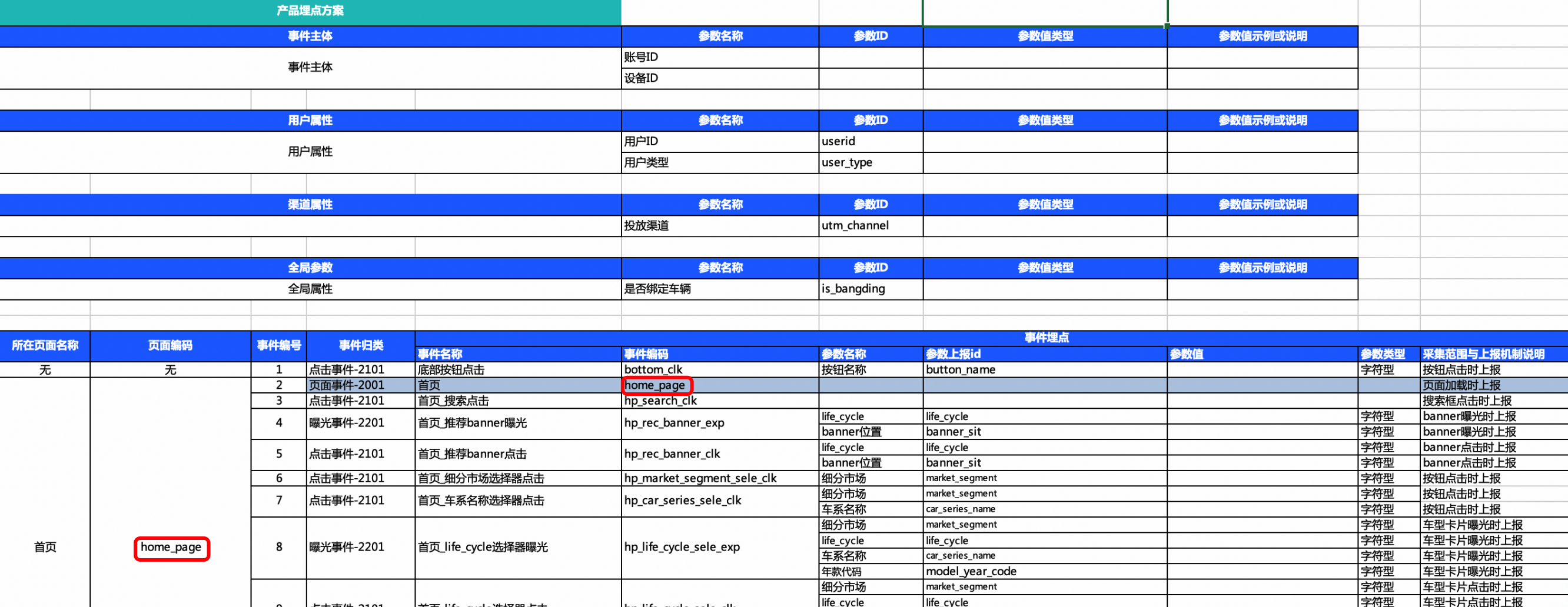
页面浏览事件的事件属性:具体属性见埋点方案
6.1 pageConfig
pageConfig为全局设置页面的页面编码的方式,具体示例如下:
qt
<!DOCTYPE html>
<html lang="en">
<head>
  <script>

  //...sdk集成代码部分

  //设置页面编码和页面标题
  //设置pageConfig 【SDK v1.7.7以上】生效
  //若未设置pageConfig
  //页面编码默认为当前页面url,不带参数
  //页面标题默认为document.title
  qt_queue.push({
    action: 'qt.setMetaInfo',
    arguments: ['pageConfig', {
      hashMode: false, //默认为false 为History模式;开启哈希模式为true
      //仅在hashMode=true条件下生效,默认值为false,如果为true,hash模式下自动pv支持全url相等判断
      hashAutoPVSupportFullURL: false,
      '/': {
        pageName: 'home_page_test',
        pageTitle: '首页',
        skipMe: true //忽略自动上报该页面的页面浏览事件, 默认为undefined
      },
      '/search': {    //基于location.pathname匹配
        pageName: 'search_page_test',
        pageTitle: '搜索页',
        regRule: /\/search/  //(可选校验动态路由
      },
      '#/hash_page': {  //基于location.hash匹配
        pageName: 'hash_page_test',
        pageTitle: 'hash模式页面',
        regRule: 一段能匹配当前hash路由的正则表达式 //(可选)校验动态路由
      },
      '/demo.html': {
        pageName: 'demo_test',
        pageTitle: 'Demo测试页面'
      }
    }]
  });
</script>
</head>
</html>
aplus(待废弃)
<!DOCTYPE html>
<html lang="en">
<head>
  ...
  <script>

  //...sdk集成代码部分

  //设置页面编码和页面标题
  //设置pageConfig 【SDK v1.7.7以上】生效
  //若未设置pageConfig
  //页面编码默认为当前页面url,不带参数
  //页面标题默认为document.title
  aplus_queue.push({
    action: 'aplus.setMetaInfo',
    arguments: ['pageConfig', {
      hashMode: false, //默认为false 为History模式;开启哈希模式为true
      //仅在hashMode=true条件下生效,默认值为false,如果为true,hash模式下自动pv支持全url相等判断
      hashAutoPVSupportFullURL: false,
      '/': {
        pageName: 'home_page_test',
        pageTitle: '首页',
        skipMe: true //忽略自动上报该页面的页面浏览事件, 默认为undefined
      },
      '/search': {    //基于location.pathname匹配
        pageName: 'search_page_test',
        pageTitle: '搜索页',
        regRule: /\/search/  //(可选校验动态路由
      },
      '#/hash_page': {  //基于location.hash匹配
        pageName: 'hash_page_test',
        pageTitle: 'hash模式页面',
        regRule: 一段能匹配当前hash路由的正则表达式 //(可选)校验动态路由
      },
      '/demo.html': {
        pageName: 'demo_test',
        pageTitle: 'Demo测试页面'
      }
    }]
  });
</script>
</head>
</html>
字段 | 字段说明 | 生效版本 |
pageName | 页面编码 | v2.0.0版本及以上 |
pageTitle | 页面标题 | v2.0.0版本及以上 |
skipMe | 是否关闭该页面的自动采集
| v2.0.0版本及以上 |
hashMode | 自动pv页面url判断是否基于hash模式,默认为false | v2.0.0版本及以上 |
hashAutoPVSupportFullURL | hash模式下,当url包括参数发生变化时,是否发送自动pv
| v2.4.3版本及以上 |
6.2 页面自动埋点(全埋点)
SDK识别到页面中SDK的代码加载完成时,上报页面浏览事件,上报的内容为:
当前客户端时间
页面path
页面编码(默认为页面path,如果设置了pageconfig,则取值为映射的page_name)
页面标题(默认为页面title,如果设置了pageconfig,则取值为映射的page_title)
页面停留时长:SDK不采集!
6.2.1 页面自动埋点开关
页面自动上报默认是开启的,如果需要关闭自动页面上报,API如下:
qt
qt_queue.push({
  action: 'qt.setMetaInfo',
  arguments: ['aplus-disable-apv', true],
});
aplus(待废弃)
aplus_queue.push({
  action: 'aplus.setMetaInfo',
  arguments: ['aplus-disable-apv', true],
});
如果仅需关闭某一页面的自动页面上报,可以在pageconfig中调用skipMe为true关闭。
6.2.2 自定义页面上报属性
页面自动埋点模式下支持页面的自定义上报属性,上报的自定义属性需要放在pageConfig对应页面配置下的extData里,当前extData支持设置为函数,或者extData里某一个字段设置为函数。
注:支持版本在 v.2.0.17版本及以上
使用示例:
qt
<!DOCTYPE html>
<html lang="en">
<head>
<script>
  // ...sdk集成代码部分
  qt_queue.push({
    action: 'qt.setMetaInfo',
    arguments: ['pageConfig', {
      '/page1': {
        pageTitle: '',
        pageName: '',
        skipMe: true,
        extData: {
          customData1: 1,
          customData2: 1,
        },
      },
      '/page2': {
        extData: {
          customData1: 1,
          customData2: function () {
            return 1342;
          }
        }
      },
      '/page3': {
        extData: function () {
          return {
            customData1: 1,
            customData2: 1342
          }
        }
      }
    }]
  });
</script>
</head>
</html>
aplus(待废弃)
<!DOCTYPE html>
<html lang="en">
<head>
<script>
  // ...sdk集成代码部分
  aplus_queue.push({
    action: 'aplus.setMetaInfo',
    arguments: ['pageConfig', {
      '/page1': {
        pageTitle: '',
        pageName: '',
        skipMe: true,
        extData: {
          customData1: 1,
          customData2: 1,
        },
      },
      '/page2': {
        extData: {
          customData1: 1,
          customData2: function () {
            return 1342;
          }
        }
      },
      '/page3': {
        extData: function () {
          return {
            customData1: 1,
            customData2: 1342
          }
        }
      }
    }]
  });
</script>
</head>
</html>
6.3 页面手动采集
接口
sendPV 方法将发送一条页面 PV 日志,其 API 定义如下:
qt
qt_queue.push({
  action: 'qt.sendPV',
  arguments: [pageEventConfig, userData],
});
aplus(待废弃)
aplus_queue.push({
  action: 'aplus.sendPV',
  arguments: [pageEventConfig, userData],
});
其中
pageEventConfig 为页面事件的配置,只需要写死{ is_auto: false } 即可
userdata 为本次页面事件的扩展参数,其取值为一个 JSON 对象(平铺的简单对象,不能多层嵌套),若无可传空对象'{}'
示例:
qt
// 一个简单的demo
qt_queue.push({
  action: 'qt.sendPV',
  arguments: [{ is_auto: false }, {
    page_title: "首页", // 默认为pageConfig中的值,如果这里设置了,则为这里设置的值 (非必传)
    page_name: "页面编码", // 默认为pageConfig中的值,如果这里设置了,则为这里设置的值 (非必传)
    duration: 1111111, // 如果您设置了duration参数(单位须为毫秒),QuickTracking会做为分析时的「事件属性-时长(s)」处理
    number_val: 111, // 自定义事件属性
    string_val: "111", // 自定义事件属性
  }],
});
aplus(待废弃)
// 一个简单的demo
aplus_queue.push({
  action: 'aplus.sendPV',
  arguments: [{ is_auto: false }, {
    page_title: "首页", // 默认为pageConfig中的值,如果这里设置了,则为这里设置的值 (非必传)
    page_name: "页面编码", // 默认为pageConfig中的值,如果这里设置了,则为这里设置的值 (非必传)
    duration: 1111111, // 如果您设置了duration参数(单位须为毫秒),QuickTracking会做为分析时的「事件属性-时长(s)」处理
    number_val: 111, // 自定义事件属性
    string_val: "111", // 自定义事件属性
  }],
});
页面标题(page_title)默认为pageConfig中的值,如果这里设置了,则为这里设置的值;
页面编码(page_name)默认为pageConfig中的值,如果这里设置了,则为这里设置的值;
7 事件埋点
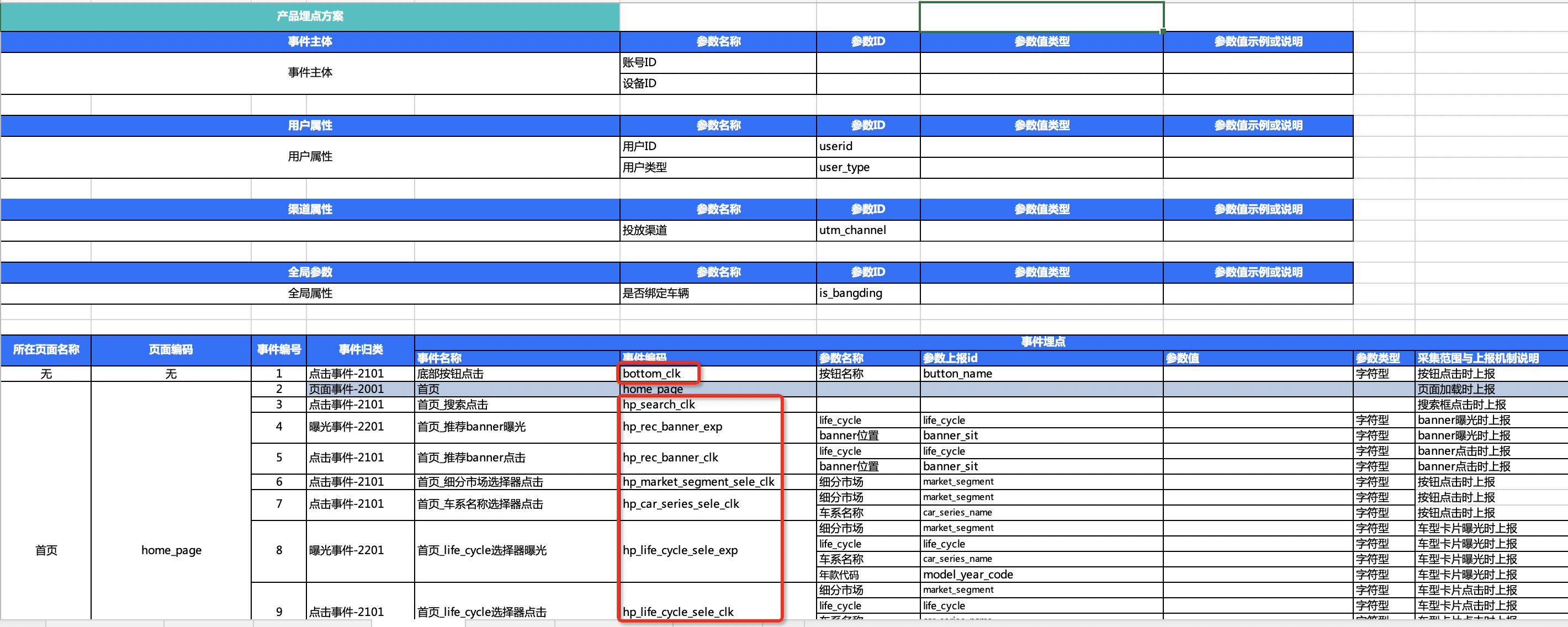
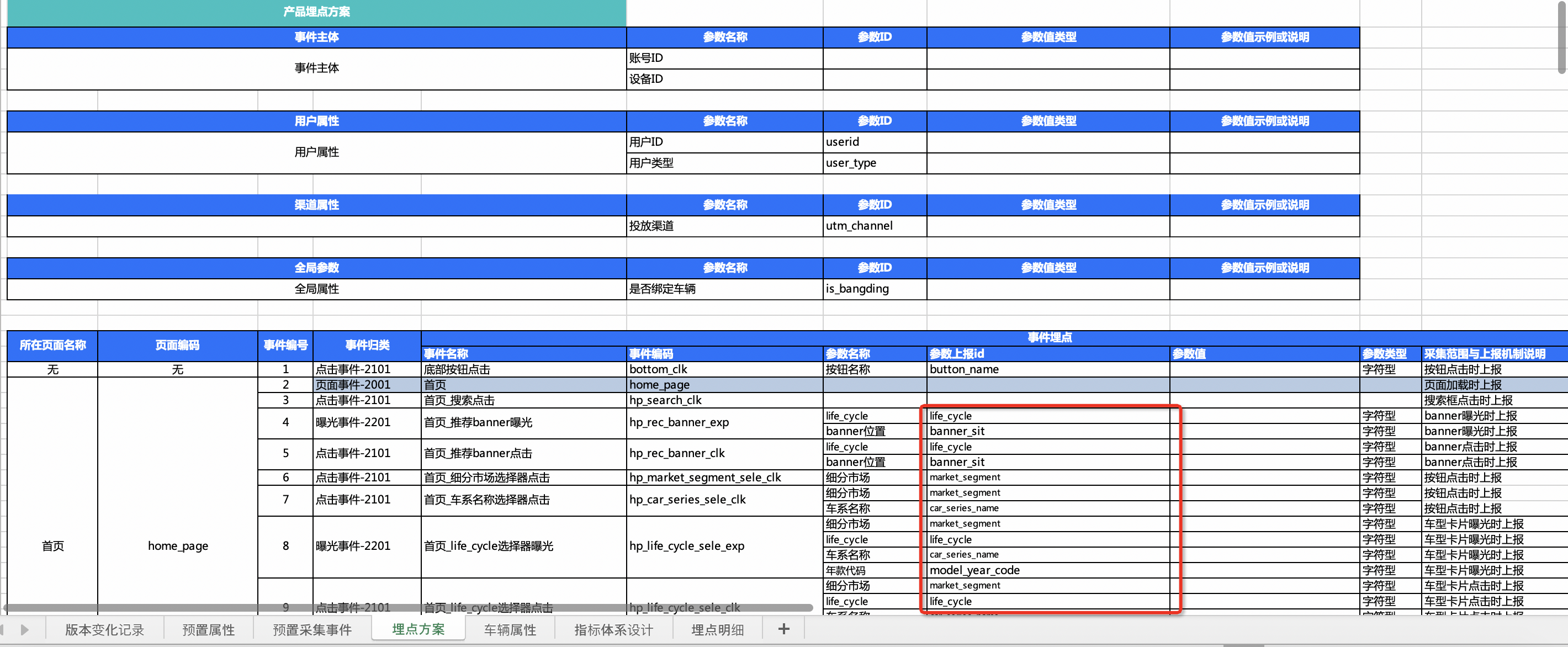
除了页面浏览事件外的事件都使用'action':'aplus.record'进行埋点,事件需要埋点的内容有:
事件编码:
事件属性:
页面编码(可选):SDK默认采集页面path,如果页面path在pageConfig中进行了映射,并设置了page_name,则取值为pageConfig中的page_name。如果在事件埋点时,在事件属性中设置了page_name,则取值为事件属性中的page_name。也就是取值优先级为
事件属性中的page_name > pageConfig中的page_name > 页面path
页面标题(可选):SDK默认采集页面title,如果页面path在pageConfig中进行了映射,并设置了page_title,则取值为pageConfig中的page_title。如果在事件埋点时,在事件属性中设置了page_title,则取值为事件属性中的page_title。也就是取值优先级为
事件属性中的page_title > pageConfig中的page_title > 页面title
事件埋点分为SDK自动埋点(全埋点)和代码埋点两种方式,默认点击和曝光的全埋点是关闭的。
请注意:
在 App 中,数据类型是强类型的,必需保证数据类型的正确性。但是在 H5 中,数据类型是弱类型的,可以使用任何数据类型。因此当H5嵌入App时,如果 H5 中的数据类型与 App 中的数据类型不一致,比如 null 类型,可能会导致报错,所以建议您在 H5 中使用合适的类型来传递数据,例如:number\string\字符串数组等。
事件属性可以是如下几种类型之一:String、 Number、 字符串数组。
7.1 曝光事件
EXP特指曝光事件
qt
qt_queue.push({
  action: 'qt.record',
  arguments: ['埋点方案中的事件编码', 'EXP', {
    string_val: '111',
    number_val: 222,
    page_name: "页面编码", // 您当前页面的自定义页面编码(非必传)
  }],
});
aplus(待废弃)
aplus_queue.push({
  action: 'aplus.record',
  arguments: ['埋点方案中的事件编码', 'EXP', {
    string_val: '111',
    number_val: 222,
    page_name: "页面编码", // 您当前页面的自定义页面编码(非必传)
  }],
});
7.2 点击事件
CLK特指点击事件
qt
qt_queue.push({
  action: 'qt.record',
  arguments: ['埋点方案中的事件编码', 'CLK', {
    string_val: '111',
    number_val: 222,
    page_name: "页面编码", // 您当前页面的自定义页面编码(非必传)
  }],
});
aplus(待废弃)
aplus_queue.push({
  action: 'aplus.record',
  arguments: ['埋点方案中的事件编码', 'CLK', {
    string_val: '111',
    number_val: 222,
    page_name: "页面编码", // 您当前页面的自定义页面编码(非必传)
  }],
});
7.3 OTHER 其他事件埋点
OTHER指除点击和曝光事件外的其他自定义事件
qt
qt_queue.push({
  action: 'qt.record',
  arguments: ['埋点方案中的事件编码', 'OTHER', {
    string_val: '111',
    number_val: 222,
    page_name: "页面编码", // 您当前页面的自定义页面编码(非必传)
  }],
});
aplus(待废弃)
aplus_queue.push({
  action: 'aplus.record',
  arguments: ['埋点方案中的事件编码', 'OTHER', {
    string_val: '111',
    number_val: 222,
    page_name: "页面编码", // 您当前页面的自定义页面编码(非必传)
  }],
});
数据类型说明:
数据类型 | 示例值 | 导入后系统识别的数据类型 | 该类型在系统中的相关限制 |
number | 12 或 12.0 | <数值 Integer,Long,Float,Short,Double> | 无 |
boolean | true 或 false | <布尔 boolean> | 无 |
string | "This is test Text" | <字符串 boolean> | 使用 UTF-8 编码后最大长度 1024 字节,超出后系统会抛弃当前字段 |
string[] | ["ABC","123"] | <集合 string> | 默认是字符串元素的数组(传入的字符串不会去重),最大元素个数为 100,其中每个元素使用 UTF-8 编码后最大长度 255 字节。 |
date,string |
| <日期时间 Datetime> | 建议使用第一种,其中 SSS 为毫秒
|
7.4 自动曝光(全埋点)
由SDK内部帮助开发者处理曝光时机,并自动采集元素曝光行为。触发时机为控件展示在可视区域内面积超过50%,时间超过300ms。
<!DOCTYPE html>
<html lang="en">
<body>
<div id="root">
  <h1 class="title">demo</h1>
  <!-- 如果需要传递参数,通过html的数据属性传递 data-*的方式,请使用小写字母组合定义参数 -->
  <button class="autoexp-component-css"
      data-pagename="自定义当前事件的页面编码"
      data-page_title="自定义当前事件的页面标题">测试曝光</button>
  <List>
      <List.Item class="autoexp-list-item" data-name={"a"}>a</List.Item>
      <List.Item class="autoexp-list-item" data-name={"b"}>b</List.Item>
      <List.Item class="autoexp-list-item" data-name={"c"}>c</List.Item>
      <List.Item
          class='autotrack_exp_web'
          data-itemname={'读书'}
          data-itemzoon={'abc'}
          data-itemid={'a_product_id'}
          data-promotioninformation={'abc'}
          data-pagename={'首页'}>全埋点-自动曝光</List.Item>

  </List>
</div>
</body>
</html>
SDK 配置部分:
qt
qt_queue.push({
  action: 'qt.setMetaInfo',
  arguments: ['aplus-auto-exp', [
    // 采集button元素的曝光行为
    {
      cssSelector: '.autoexp-component-css', // 你要曝光的元素class
      logkey: 'auto-exp-id', // 埋点方案中对应的事件编码
      props: ['data-pagename', 'data-page_title'], // 你要曝光的元素身上自定义属性
    },
    // 采集列表元素的曝光行为
    {
      cssSelector: '.autoexp-list-item',
      logkey: 'auto-exp-item', // 埋点方案中对应的事件编码
      props: ['data-name'], // 自动曝光会携带item的name字段
    },
  ]],
});

// 自动曝光的前置回调函数,用于支持定制化参数上报,如驼峰写法等(html数据属性默认只支持小写)
// 1.9.25版本及以上支持
qt_queue.push({
  action: 'qt.setMetaInfo',
  arguments: ['aplus-auto-exp-userfn', function (e) {
    if (e.className.indexOf('autotrack_exp_web') !== -1) {
      const { dataset } = e;
      const obj = {};
      obj.itemID = dataset.itemid;
      obj.itemName = dataset.itemname;
      obj.itemZoon = dataset.itemzoon;
      obj.promotionInformation = dataset.promotioninformation;
      obj.pageName = dataset.pagename;
      return {
        userdata: obj,
      };
    }
  }],
});
aplus(待废弃)
aplus_queue.push({
  action: 'aplus.setMetaInfo',
  arguments: ['aplus-auto-exp', [
    // 采集button元素的曝光行为
    {
      cssSelector: '.autoexp-component-css', // 你要曝光的元素class
      logkey: 'auto-exp-id', // 埋点方案中对应的事件编码
      props: ['data-pagename', 'data-page_title'], // 你要曝光的元素身上自定义属性
    },
    // 采集列表元素的曝光行为
    {
      cssSelector: '.autoexp-list-item',
      logkey: 'auto-exp-item', // 埋点方案中对应的事件编码
      props: ['data-name'], // 自动曝光会携带item的name字段
    },
  ]],
});

// 自动曝光的前置回调函数,用于支持定制化参数上报,如驼峰写法等(html数据属性默认只支持小写)
// 1.9.25版本及以上支持
aplus_queue.push({
  action: 'aplus.setMetaInfo',
  arguments: ['aplus-auto-exp-userfn', function (e) {
    if (e.className.indexOf('autotrack_exp_web') !== -1) {
      const { dataset } = e;
      const obj = {};
      obj.itemID = dataset.itemid;
      obj.itemName = dataset.itemname;
      obj.itemZoon = dataset.itemzoon;
      obj.promotionInformation = dataset.promotioninformation;
      obj.pageName = dataset.pagename;
      return {
        userdata: obj,
      };
    }
  }],
});
如果是元素内滚动(某个区块内有滚动条)则需要增加positionSelector配置,参考以下代码
qt
qt_queue.push({
  action: 'qt.setMetaInfo',
  arguments: ['aplus-auto-exp', [{
    positionSelector: '.content-wrap', // 你的滚动条元素class
    cssSelector: '.autoclk-app-option', // 你要曝光的元素class
    logkey: 'auto-exp-id', // 埋点方案中对应的事件编码
    props: ['data-name'], // 元素身上自定义属性
  }]],
});
aplus(待废弃)
aplus_queue.push({
  action: 'aplus.setMetaInfo',
  arguments: ['aplus-auto-exp', [{
    positionSelector: '.content-wrap', // 你的滚动条元素class
    cssSelector: '.autoclk-app-option', // 你要曝光的元素class
    logkey: 'auto-exp-id', // 埋点方案中对应的事件编码
    props: ['data-name'], // 元素身上自定义属性
  }]],
});
SDK在单页应用中,当存在页面离开后又返回的场景时,会再次重复上报曝光事件,如果需要关闭此默认行为,可以通过设置:
qt
qt_queue.push({
  action: 'qt.setMetaInfo',
  arguments: ['aplus-exposure-event-can-repeat', false],
});
aplus(待废弃)
aplus_queue.push({
  action: 'aplus.setMetaInfo',
  arguments: ['aplus-exposure-event-can-repeat', false],
});
aplus-exposure-event-can-repeat 的默认值是true,即支持重复上报曝光事件.
备注:aplus-exposure-event-can-repeat API仅在v1.10.2版本及以上生效,该版本以下自动曝光事件的默认行为仍然是单页应用只要页面不被重新加载,页面已曝光的元素,再次回到当前页面时不会再次曝光。
7.5 自动点击(全埋点)
从1.7.0开始,为减少开发者埋点工作量,SDK也支持通过配置部分信息,让SDK自动采集页面内的点击事件。
<!DOCTYPE html>
<html lang="en">
<body>
<div id="root">
  <h1 class="title">Demo</h1>
  <!-- 1.首先定位待上报事件的html元素的class -->
  <!-- 2.如果需要传递参数,通过html的数据属性传递 data-*的方式,请使用小写字母组合定义参数 -->
  <button
      class='autoclk-component-css'
      data-aparam="1"
      data-pagename="自定义当前事件的页面编码"
      data-page_title="自定义当前事件的页面标题">
      测试点击
  </button>
  <li
      className='autotrack_clk_web'
      data-itemname='读书'
      data-itemzoon='abc'
      data-itemid='a_product_id'
      data-promotioninformation='abc'
      data-pagename='首页'>自动点击</li>
</div>
</body>
</html>
SDK 配置部分:
qt
qt_queue.push({
  action: 'qt.setMetaInfo',
  arguments: ['aplus-auto-clk', [{
    cssSelector: '.autoclk-component-css', // 元素的class
    logkey: 'auto-clk-id', // 埋点方案中对应的事件编码
    props: ['data-aparam', 'data-pagename', 'data-page_title'], // 元素身上自定义属性
  }]],
});

// 自动点击的前置回调函数,用于支持定制化参数上报,如驼峰写法等(html数据属性默认只支持小写)
// 1.9.25版本及以上支持
qt_queue.push({
  action: 'qt.setMetaInfo',
  arguments: ['aplus-auto-clk-userfn', function (e) {
    if (e.className.indexOf('autotrack_clk_web') !== -1) {
      const { dataset } = e;
      const obj = {};
      obj.itemID = dataset.itemid;
      obj.itemName = dataset.itemname;
      obj.itemZoon = dataset.itemzoon;
      obj.promotionInformation = dataset.promotioninformation;
      obj.pageName = dataset.pagename;
      return {
        userdata: obj,
      };
    }
  }],
});
aplus(待废弃)
aplus_queue.push({
  action: 'aplus.setMetaInfo',
  arguments: ['aplus-auto-clk', [{
    cssSelector: '.autoclk-component-css', // 元素的class
    logkey: 'auto-clk-id', // 埋点方案中对应的事件编码
    props: ['data-aparam', 'data-pagename', 'data-page_title'], // 元素身上自定义属性
  }]],
});

// 自动点击的前置回调函数,用于支持定制化参数上报,如驼峰写法等(html数据属性默认只支持小写)
// 1.9.25版本及以上支持
aplus_queue.push({
  action: 'aplus.setMetaInfo',
  arguments: ['aplus-auto-clk-userfn', function (e) {
    if (e.className.indexOf('autotrack_clk_web') !== -1) {
      const { dataset } = e;
      const obj = {};
      obj.itemID = dataset.itemid;
      obj.itemName = dataset.itemname;
      obj.itemZoon = dataset.itemzoon;
      obj.promotionInformation = dataset.promotioninformation;
      obj.pageName = dataset.pagename;
      return {
        userdata: obj,
      };
    }
  }],
});
7.6 任意控件点击自动捕获(全埋点)
7.6.1 全埋点开关
参数 aplus-autotrack-enabled 用于控制任意控件点击自动捕获功能的开关,默认值为 true(即功能默认开启)。如需关闭任意控件点击自动捕获功能,可将该参数设置为 false
qt
qt_queue.push({
  action: 'qt.setMetaInfo',
  arguments: ['aplus-autotrack-enabled', true],
});
aplus(待废弃)
aplus_queue.push({
  action: 'aplus.setMetaInfo',
  arguments: ['aplus-autotrack-enabled', true],
});
7.6.2 全埋点控件配置
web sdk 默认只采集 a、button、textarea、input 这4个html控件的点击事件,如若需要额外采集其他类型控件,可通过额外配置aplus-autotrack-config进行配置
qt
qt_queue.push({
  action: 'qt.setMetaInfo',
  arguments: ['aplus-autotrack-config', {
    collect_tags: {
      li: true, // 采集<li/>控件
      img: true, // 采集<img/>控件
      svg: true, // 采集<svg/>控件
      div: true, // 采集<div/>控件
      span: true, // 采集<span/>控件
      path: true, // 采集<path/>控件
      p: true, // 采集<p/>控件
    },
    collect_input: true, // 采集input框输入的内容,默认不采集,
    element_capture_enable: true, // 全埋点控件点击支持事件捕获模式,默认为冒泡模式,值为false
  }],
});
aplus(待废弃)
aplus_queue.push({
  action: 'aplus.setMetaInfo',
  arguments: ['aplus-autotrack-config', {
    collect_tags: {
      li: true, // 采集<li/>控件
      img: true, // 采集<img/>控件
      svg: true, // 采集<svg/>控件
      div: true, // 采集<div/>控件
      span: true, // 采集<span/>控件
      path: true, // 采集<path/>控件
      p: true, // 采集<p/>控件
    },
    collect_input: true, // 采集input框输入的内容,默认不采集,
    element_capture_enable: true, // 全埋点控件点击支持事件捕获模式,默认为冒泡模式,值为false
  }],
});
7.6.3 全埋点事件的属性上报
同自动事件的属性上报,借助html数据属性上报
<!DOCTYPE html>
<html lang="en">
<body>
<div id="root">
  <!-- 如果需要传递参数,通过html的数据属性传递 data-*的方式 -->
  <button data-aparam="1">测试点击</button>
</div>
</body>
</html>
7.6.4 单个控件关闭全埋点事件上报
如果期望关闭某个控件的事件上报,通过添加控件属性aplus-autotrack-off为true关闭上报
<!DOCTYPE html>
<html lang="en">
<body>
<div id="root">
  <!-- 如果需要传递参数,通过html的数据属性传递 data-*的方式 -->
  <button data-aparam="1" aplus-autotrack-off="true">
      配置了aplus-autotrack-off的组件不上报
  </button>
</div>
</body>
</html>
7.6.5 单个控件自定义事件编码
通过data-clk-logkey自定义事件编码
<!DOCTYPE html>
<html lang="en">
<body>
<button data-clk-logkey="demoEventCode">通过data-clk-logkey自定义事件编码</button>
</body>
</html>
8 热力图
8.1 热力图能力开关
SDK默认关闭热力图能力,如需打开,请通过如下配置:
qt
qt_queue.push({
  action: 'qt.setMetaInfo',
  arguments: ['aplus-heatmap-enabled', true],
});
aplus(待废弃)
aplus_queue.push({
  action: 'aplus.setMetaInfo',
  arguments: ['aplus-heatmap-enabled', true],
});
或者
<!DOCTYPE html>
<html lang="en">
<head>
<meta name="aplus-heatmap-enabled" content="1">
</head>
</html>
8.2热力图事件采样率
热力图事件采样率最小支持千分位小数
qt
qt_queue.push({
  action: 'qt.setMetaInfo',
  arguments: ['aplus-rate-ahot', 0.001], // 热力图事件采样率,最小支持千分位小数
});
aplus(待废弃)
aplus_queue.push({
  action: 'aplus.setMetaInfo',
  arguments: ['aplus-rate-ahot', 0.001], // 热力图事件采样率,最小支持千分位小数
});
或者
<!DOCTYPE html>
<html lang="en">
<head>
<meta name="aplus-rate-ahot" content="0.001">
</head>
</html>
9 分享裂变
分享裂变是增长黑客策略的一个关键概念,它依靠用户之间的社交联系来实现信息的相互传递,从而促进新用户的获取。
完成分享裂变的SDK功能集成,您将可以使用QuickTracking平台分享趋势模型,通过分享回流相关指标衡量营销活动的拉新效益。
支持查看TOP分享用户和不同分享回流层级的分享回流效果指标。
支持回流指标灵活组合配置,查看最具裂变拉新能力和分享回流转化能力的TOP用户,追踪用户分享裂变链路与分享回流关系,快速定位关键意见消费者。
9.1 获取来源分享参数
qt
window.qt.getRefShareParams();aplus(待废弃)
window.aplus.getRefShareParams();版本要求
H5 sdk v2.2.0版本及以上
功能
当被分享人打开分享人的 H5时,用于获取来源分享id 和来源分享 url 的 API
请求参数
无
返回参数
Object 参数
参数 | 类型 | 默认值 | 含义 | 备注 |
$$_ref_share_url | String | "" | 不包含分享 id 的来源分享 url | 无 |
$$_ref_share_id | String | "" | 来源分享 id | 无 |
调用示例
基于 promise 返回值场景
qt
// promise 返回值场景
function onShare(options) {
  const { $$_ref_share_id } = window.aplus.getRefShareParams();
  window.qt.requestShareParams({
    title: '分享活动页',
    path: 'https://www.taobao.com/productId?utm_test=test',
    campaign: '这是一个分享活动',
    shareId: $$_ref_share_id,
  }).then((res) => {
    const { $sid } = res;
    if ($sid) {
      window.qt.record("$$_share", "CLK", {
        $$_share_title: "这是一个分享标题",
        $$_share_id: $sid,
        $$_share_campaign_id: "这是一个自定义分享活动",
        $$_share_type: "用户自定义分享平台",
        $$_share_url: "这是一个分享url",
      });
    } else {
      console.log("分享参数获取失败"); // 具体报错原因,DEBUG 模式下,console控制台会打印
    }
  });
}
aplus(待废弃)
// promise 返回值场景
function onShare(options) {
  const { $$_ref_share_id } = window.aplus.getRefShareParams();
  window.aplus.requestShareParams({
    title: '分享活动页',
    path: 'https://www.taobao.com/productId?utm_test=test',
    campaign: '这是一个分享活动',
    shareId: $$_ref_share_id,
  }).then((res) => {
    const { $sid } = res;
    if ($sid) {
      window.aplus.record("$$_share", "CLK", {
        $$_share_title: "这是一个分享标题",
        $$_share_id: $sid,
        $$_share_campaign_id: "这是一个自定义分享活动",
        $$_share_type: "用户自定义分享平台",
        $$_share_url: "这是一个分享url",
      });
    } else {
      console.log("分享参数获取失败"); // 具体报错原因,DEBUG 模式下,console控制台会打印
    }
  });
}
基于 callback 返回值场景
qt
// callback 返回值场景
function onShare() {
  const { $$_ref_share_id } = window.qt.getRefShareParams();
  window.qt.requestShareParams({
    title: '分享活动页',
    path: '/pages/share/shareCampaign?utm_test=test',
    campaign: '这是一个分享活动',
    shareId: $$_ref_share_id,
  }, (res) => {
    const { $sid } = res;
    if ($sid) {
      window.qt.record("$$_share", "CLK", {
        $$_share_title: "这是一个分享标题",
        $$_share_id: $sid,
        $$_share_campaign_id: "这是一个自定义分享活动",
        $$_share_type: "用户自定义分享目标平台",
        $$_share_url: "这是一个分享url",
      });
    } else {
      console.log("分享参数获取失败"); // 具体报错原因,DEBUG 模式下,console控制台会打印
    }
  });
}
aplus(待废弃)
// callback 返回值场景
function onShare() {
  const { $$_ref_share_id } = window.aplus.getRefShareParams();
  window.aplus.requestShareParams({
    title: '分享活动页',
    path: '/pages/share/shareCampaign?utm_test=test',
    campaign: '这是一个分享活动',
    shareId: $$_ref_share_id,
  }, (res) => {
    const { $sid } = res;
    if ($sid) {
      window.aplus.record("$$_share", "CLK", {
        $$_share_title: "这是一个分享标题",
        $$_share_id: $sid,
        $$_share_campaign_id: "这是一个自定义分享活动",
        $$_share_type: "用户自定义分享目标平台",
        $$_share_url: "这是一个分享url",
      });
    } else {
      console.log("分享参数获取失败"); // 具体报错原因,DEBUG 模式下,console控制台会打印
    }
  });
}
9.2 请求分享参数
qt
window.qt.requestShareParams(Object params, Function callback);aplus(待废弃)
window.aplus.requestShareParams(Object params, Function callback);版本
H5 sdk v2.2.0版本及以上
功能
请求用于构建分享链需要的分享 id
请求参数
参数 | 类型 | 默认值 | 含义 | 备注 |
params | Object | 无 | 分享参数获取 API |
url:分享页面路径。String 类型,默认值为location.href
campaign:分享活动标识。String 类型,默认值为 undefined,最大长度为 4*1024 个字符 title:分享标题。String类型,默认值为 undefined,最大长度为 4*1024个长度 shareId:来源分享Id。String 类型,默认值为 undefined |
callback | Function | undefined | 针对不支持 promise API返回的回调函数 | 如果 callback 参数不传,分享参数获取 API 默认以 promise 形式返回 result. 如果 callback 参数有值,并且是一个回调参数,则通过回调函数返回分享参数获取 API 的请求结果 |
返回参数
如果请求参数不包含 callback,则返回 Promise.resolve(Object result);
参数 | 类型 | 默认值 | 含义 | 备注 |
$sid | String | undefined | 分享Id,代表分享主体分享行为的唯一标识 | 无 |
如果请求参数含有 callback, 返回 Object result
参数 | 类型 | 默认值 | 含义 | 备注 |
$sid | String | undefined | 分享Id,代表当前分享主体分享行为的唯一标识 | 无 |
调用示例
基于 promise 返回值场景
qt
// promise 返回值场景
function onShare(options) {
  window.qt.requestShareParams({
    title: '分享活动页',
    path: 'https://www.taobao.com/productId?utm_test=test',
    campaign: '这是一个分享活动',
    shareId: "这是一个来源分享id",
  }).then((res) => {
    const { $sid } = res;
    if ($sid) {
      window.qt.record("$$_share", "CLK", {
        $$_share_title: "这是一个分享标题",
        $$_share_id: $sid,
        $$_share_campaign_id: "这是一个自定义分享活动",
        $$_share_type: "用户自定义分享目标平台",
        $$_share_url: "这是一个分享url",
      });
    } else {
      console.log("分享参数获取失败"); // 具体报错原因,DEBUG 模式下,console控制台会打印
    }
  });
}
aplus(待废弃)
// promise 返回值场景
function onShare(options) {
  window.aplus.requestShareParams({
    title: '分享活动页',
    path: 'https://www.taobao.com/productId?utm_test=test',
    campaign: '这是一个分享活动',
    shareId: "这是一个来源分享id",
  }).then((res) => {
    const { $sid } = res;
    if ($sid) {
      window.aplus.record("$$_share", "CLK", {
        $$_share_title: "这是一个分享标题",
        $$_share_id: $sid,
        $$_share_campaign_id: "这是一个自定义分享活动",
        $$_share_type: "用户自定义分享目标平台",
        $$_share_url: "这是一个分享url",
      });
    } else {
      console.log("分享参数获取失败"); // 具体报错原因,DEBUG 模式下,console控制台会打印
    }
  });
}
基于 callback 返回值场景
qt
function onShare() {
  window.qt.requestShareParams({
    title: '分享活动页',
    path: '/pages/share/shareCampaign?utm_test=test',
    campaign: '这是一个分享活动',
    shareId: "这是一个来源分享id",
  }, (res) => {
    const { $sid } = res;
    if ($sid) {
      window.qt.record("$$_share", "CLK", {
        $$_share_title: "这是一个分享标题",
        $$_share_id: $sid,
        $$_share_campaign_id: "这是一个自定义分享活动",
        $$_share_type: "用户自定义分享目标平台",
        $$_share_url: "这是一个分享url",
      });
    } else {
      console.log("分享参数获取失败"); // 具体报错原因,DEBUG 模式下,console控制台会打印
    }
  });
}
aplus(待废弃)
function onShare() {
  window.aplus.requestShareParams({
    title: '分享活动页',
    path: '/pages/share/shareCampaign?utm_test=test',
    campaign: '这是一个分享活动',
    shareId: "这是一个来源分享id",
  }, (res) => {
    const { $sid } = res;
    if ($sid) {
      window.aplus.record("$$_share", "CLK", {
        $$_share_title: "这是一个分享标题",
        $$_share_id: $sid,
        $$_share_campaign_id: "这是一个自定义分享活动",
        $$_share_type: "用户自定义分享目标平台",
        $$_share_url: "这是一个分享url",
      });
    } else {
      console.log("分享参数获取失败"); // 具体报错原因,DEBUG 模式下,console控制台会打印
    }
  });
}
9.3 上报分享事件
通过预置事件编码 $$_share 上报分享事件,事件类型为点击事件(CLK)
示例:
qt
window.qt.record("$$_share", "CLK", {
  $$_share_title: "这是一个分享标题",
  $$_share_id: "通过请求分享参数API获取到的分享ID",
  $$_share_campaign_id: "这是一个自定义分享活动",
  $$_share_type: "用户自定义分享目标平台",
  $$_share_url: "这是一个分享url",
});
aplus(待废弃)
window.aplus.record("$$_share", "CLK", {
  $$_share_title: "这是一个分享标题",
  $$_share_id: "通过请求分享参数API获取到的分享ID",
  $$_share_campaign_id: "这是一个自定义分享活动",
  $$_share_type: "用户自定义分享目标平台",
  $$_share_url: "这是一个分享url",
});
请注意:唤起的链接需要携带key为"$sid",value为分享Id的参数,如:https://example.aliyun.com/path/to/content?$sid=123456"
H5链接唤起其他应用示例:
qt
const { $$_ref_share_id } = window.qt.getRefShareParams();

window.qt.requestShareParams({
  title: '分享活动页',
  path: '/pages/share/shareCampaign?utm_test=test',
  campaign: '这是一个分享活动',
  shareId: $$_ref_share_id,
}, (res) => {
  const { $sid } = res;
  if ($sid) {
    window.qt.record("$$_share", "CLK", {
      $$_share_title: "这是一个分享标题",
      $$_share_id: $sid,
      $$_share_campaign_id: "这是一个自定义分享活动",
      $$_share_type: "用户自定义分享目标平台",
      $$_share_url: "这是一个分享url",
    });

    setTimeout(() => {
      const urlScheme = `https://example.aliyun.com/path/to/content?utm_source=utm_test&$sid=${$sid}`;
      window.location.href = urlScheme;
    }, 1000);
  } else {
    console.log("分享参数获取失败"); // 具体报错原因,DEBUG 模式下,console控制台会打印
  }
});
aplus(待废弃)
const { $$_ref_share_id } = window.aplus.getRefShareParams();

window.aplus.requestShareParams({
  title: '分享活动页',
  path: '/pages/share/shareCampaign?utm_test=test',
  campaign: '这是一个分享活动',
  shareId: $$_ref_share_id,
}, (res) => {
  const { $sid } = res;
  if ($sid) {
    window.aplus.record("$$_share", "CLK", {
      $$_share_title: "这是一个分享标题",
      $$_share_id: $sid,
      $$_share_campaign_id: "这是一个自定义分享活动",
      $$_share_type: "用户自定义分享目标平台",
      $$_share_url: "这是一个分享url",
    });

    setTimeout(() => {
      const urlScheme = `https://example.aliyun.com/path/to/content?utm_source=utm_test&$sid=${$sid}`;
      window.location.href = urlScheme;
    }, 1000);
  } else {
    console.log("分享参数获取失败"); // 具体报错原因,DEBUG 模式下,console控制台会打印
  }
});