当您需要构建基于文本内容的语义搜索、智能问答或推荐系统等AI应用时,通常需要将数据库中的业务数据(如商品描述、用户评论)转换为向量(Embedding),并存储到专门的向量数据库中。PolarDB MySQL版提供的AutoETL功能,结合PolarSearch的数据接入管道(ingestion pipeline),可以自动化完成数据提取-向量化-存入索引的全过程,无需您手动搭建和维护复杂的数据同步链路。本文将指导您如何配置这一自动化流程,实现将PolarDB MySQL版表中的文本数据,通过调用外部Embedding模型进行向量化,并最终将原始文本和生成的向量一并同步至PolarSearch索引中。
工作原理
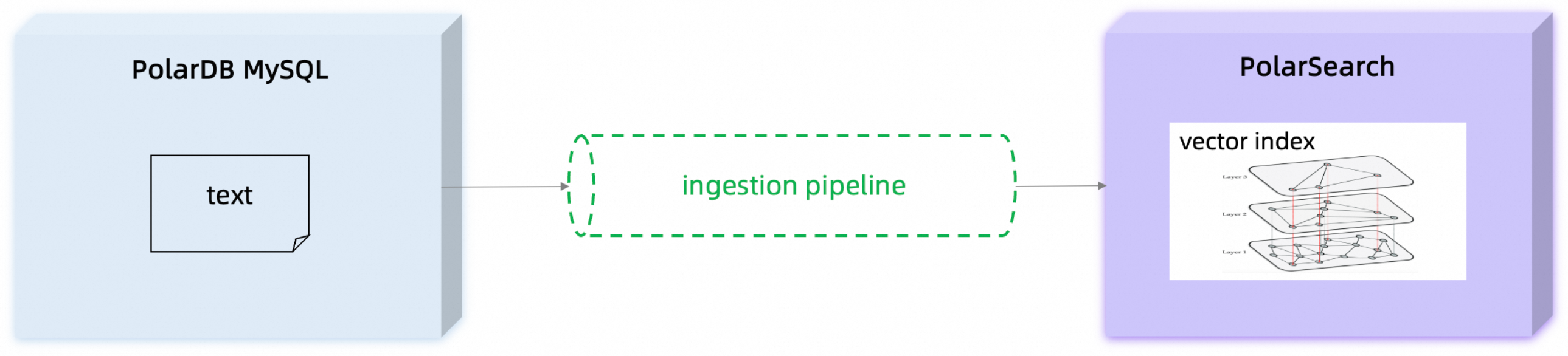
整个自动化数据流程涉及PolarDB MySQL版、PolarSearch以及Embedding模型服务,其核心工作流如下:
数据源:您的原始文本数据存储在PolarDB MySQL版的表中。
触发同步:您通过在PolarDB MySQL版中调用搜索视图(Search View),创建并启动一个从MySQL到PolarSearch的数据同步任务(AutoETL)。
数据写入:AutoETL任务将表中的数据变更(增、删、改)实时同步到PolarSearch的指定索引中。
管道处理:在数据写入PolarSearch索引之前,会触发预设的数据接入管道(Ingestion Pipeline)。
调用模型:管道中的
text_embedding处理器会读取指定文本字段的内容,通过连接器(Connector)调用外部Embedding模型服务,将文本转换为向量。向量存储:模型返回的向量会与原始数据一同写入PolarSearch索引的相应字段中,完成向量索引的构建。
适用范围
在使用此功能前,请确保您的环境满足以下条件:
集群版本:
MySQL 8.0.1,且修订版本需为8.0.1.1.52或以上。
MySQL 8.0.2,且修订版本需为8.0.2.2.33或以上。
网络环境:用于文本向量化的Embedding模型服务需部署在与PolarDB MySQL版集群相同的专有网络内。PolarSearch节点将作为客户端主动访问该模型服务。
注意事项
通过数据接入管道(ingestion pipeline)处理文本数据自动向量化时,在更新场景中,搜索视图默认使用写入更新模式(Update)来修改PolarSearch数据,即仅更新变更的字段,不会自动更新对应的向量字段。
如果您需要在更新源表文本字段后,自动重新生成对应的向量,可以将搜索视图配置为替换写入模式(Index)。在创建搜索视图前执行以下命令:
SET esl_sink_options = "'sink.force-index-request' = 'true'";开启替换写入模式后,每次同步都会替换PolarSearch索引中的整个文档,而非仅更新变更的字段。
替换写入模式(Index)会覆盖索引中的全部数据。如果有其他非AutoETL链路同时向同一PolarSearch索引写入数据,开启此模式可能导致这些数据被AutoETL链路覆盖。
关于替换写入模式(Index)的更多信息,请参见AutoETL参数配置和实践案例。
准备Embedding模型服务
在开始配置PolarDB MySQL版之前,您需要一个可以通过HTTP访问的Embedding模型服务,并将其部署在PolarSearch中。该服务接收文本输入,并返回对应的向量。详细部署说明,请参见集成外部模型服务指南。
配置访问凭证和环境变量
在开始操作前,请先准备好以下信息,并设置为环境变量。这将有效简化后续的curl命令,避免重复修改。统一管理所有配置和凭证,方便后续命令的复制和执行。
变量名 | 说明 | 示例值 |
| PolarSearch节点的获取连接地址。 |
|
| PolarSearch节点的管理员账号。 |
|
| 外部模型服务的API Key。 说明
|
|
操作步骤: 在您的终端中执行以下命令,将示例值替换为您的真实信息。
# 设置 PolarSearch 访问地址和端口
export POLARSEARCH_HOST_PORT="pc-xxx.polardbsearch.rds.aliyuncs.com:3001"

# 设置 PolarSearch 管理员密码
export USER_PASSWORD="polarsearch_user:your_password"

# 设置您的阿里云大模型服务平台百炼 API Key
export YOUR_API_KEY="sk-xxxxxxxxxxxxxxxxxxxxxxxx"
创建数据接入管道
创建一个数据接入管道(ingestion pipeline),它会在数据写入索引前自动执行向量化操作。定义一个名为text_to_vec_pipeline的管道,并在其中使用text_embedding处理器。
参数说明
model_id:为您在集成外部模型服务中部署的Embedding模型ID。field_map:定义了输入和输出字段的映射关系。以下示例表示:读取my_text字段的文本内容,调用模型生成向量,然后将向量结果存入my_vector字段。
命令行
curl -XPUT "http://${POLARSEARCH_HOST_PORT}/_ingest/pipeline/text_to_vec_pipeline" \
--user "${USER_PASSWORD}" \
-H 'Content-Type: application/json' \
-d '{
  "description": "A text embedding pipeline",
  "processors": [
    {
      "text_embedding": {
        "model_id": "<部署的Embedding模型ID>",
        "field_map": {
          "my_text": "my_vector"
        }
      }
    }
  ]
}'
Dashboard
PUT _ingest/pipeline/text_to_vec_pipeline
{
  "description": "A text embedding pipeline",
  "processors": [
    {
      "text_embedding": {
        "model_id": "<部署的Embedding模型ID>",
        "field_map": {
          "my_text": "my_vector"
        }
      }
    }
  ]
}
创建数据同步链路
准备测试数据:登录PolarDB MySQL版集群,创建一个数据库和表,并插入一些测试数据。
CREATE DATABASE IF NOT EXISTS db; CREATE TABLE IF NOT EXISTS db.test_table ( id INT PRIMARY KEY, t1 INT, t2 TEXT ); INSERT INTO db.test_table(id, t1, t2) VALUES (1, 11, 'aaa'), (2, 22, 'bbb'), (3, 33, 'ccc');创建索引:创建一个用于存储原始数据和向量的PolarSearch索引。
default_pipeline:将此索引的默认管道设置为上一步创建的text_to_vec_pipeline。这样,任何写入该索引的数据都会自动经过向量化处理。my_vector.type:向量字段的数据类型需为knn_vector。my_vector.dimension:向量维度需与模型实际输出的维度(1024)完全一致。
命令行
curl -XPUT "http://${POLARSEARCH_HOST_PORT}/test_index" \
--user "${USER_PASSWORD}" \
-H 'Content-Type: application/json' \
-d '{
  "settings": {
    "index": {
      "knn": true,
      "default_pipeline": "text_to_vec_pipeline"
    }
  },
  "mappings": {
    "properties": {
      "id": {
        "type": "integer"
      },
      "my_text": {
        "type": "text"
      },
      "my_vector": {
        "type": "knn_vector",
        "dimension": 1024,
        "method": {
          "engine": "faiss",
          "name": "hnsw"
        }
      }
    }
  }
}'
Dashboard
PUT /test_index { "settings": { "index": { "knn": true, "default_pipeline": "text_to_vec_pipeline" } }, "mappings": { "properties": { "id": { "type": "integer" }, "my_text": { "type": "text" }, "my_vector": { "type": "knn_vector", "dimension": 1024, "method": { "engine": "faiss", "name": "hnsw" } } } } }创建并启动AutoETL同步链路:在PolarDB MySQL版集群中,调用搜索视图(Search View)。
该命令会建立一个从
db.test_table到test_index的映射关系。当db.test_table中的数据发生变化时,AutoETL会将id和t2字段的值分别同步到test_index的id和my_text字段。由于test_index设置了默认管道,数据在写入时会自动触发向量化流程,最终将生成的向量存入my_vector字段。CREATE SEARCH VIEW test_index(id, my_text) AS SELECT id, t2 FROM db.test_table;
验证数据同步
在PolarSearch中查询test_index,确认数据已写入,并且my_vector字段包含了向量数据。
命令行
curl -XPUT "http://${POLARSEARCH_HOST_PORT}/test_index/_search" \
--user "${USER_PASSWORD}" \
-H 'Content-Type: application/json' \
-d '{
  "query": {
    "match": {
      "my_text": "aaa"
    }
  }
}'
Dashboard
POST /test_index/_search
{
  "query": {
    "match": {
      "my_text": "aaa"
    }
  }
}
预期返回结果如下所示(部分展示):
"hits": [
      {
        "_index": "test_index",
        "_id": "1",
        "_score": 0.44583148,
        "_source": {
          "my_text": "aaa",
          "id": 1,
          "my_vector": [
            -0.013453668,
            0.009771001,
            -0.00977745,
            ...
          ]
        }
      }
    ]