本文介绍如何远程获取PolarDB MySQL版Binlog日志,并通过mysqlbinlog工具查看并解析Binlog日志。
Binlog获取策略
连接方式 | Binlog获取策略 |
| 均从主节点获取。 说明 如何设置集群连接地址,请参见配置数据库代理。 |
仅包含只读节点的自定义集群地址 | 从任意只读节点获取。 说明 集群版本需为以下版本之一:
否则,将返回 关于如何查看集群版本和升级集群版本,请参见版本管理。 |
远程获取Binlog日志
为PolarDB MySQL版集群开启Binlog,详细操作步骤,请参见开启Binlog。
说明您需要先为集群开启Binlog才能查看并获取Binlog日志,否则将出现
You are not using binary logging错误提示。在本地服务器上安装MySQL。
通过MySQL客户端连接PolarDB集群,详细操作步骤,请参见连接数据库集群本文以Linux系统为例。
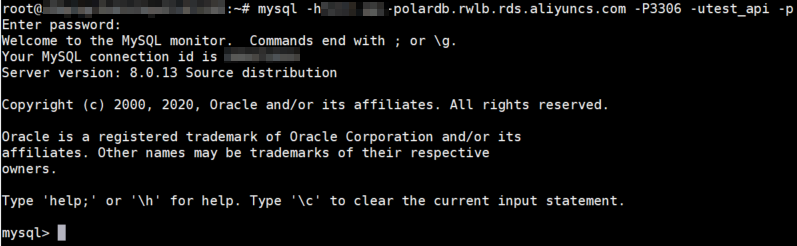
在已连接PolarDB集群的客户端中执行如下命令查看目标集群的Binlog文件列表:
show binary logs;返回结果如下:
+------------------+-----------+
| Log_name         | File_size |
+------------------+-----------+
| mysql-bin.000005 |      2639 |
+------------------+-----------+
1 row in set (0.00 sec)
在客户端执行如下命令,远程获取Binlog日志并保存至本地。
本文中以Linux系统为例,在执行如下语句前,需先执行exit退出MySQL后,才能远程获取Binlog日志并保存至本地。

mysqlbinlog -u<用户名> -p<密码> -h<连接地址> --read-from-remote-server --raw mysql-bin.******示例:
mysqlbinlog -utest_api -p -htest-polardb.rwlb.rds.aliyuncs.com --read-from-remote-server --raw mysql-bin.000005参数
说明
示例值
-uPolarDB MySQL版集群中的账号名称。如何创建账号,请参见创建和管理数据库账号。
test_api-p以上账号的密码。如果此处留空,则在执行此命令后会被要求输入。
TestPwd123-hPolarDB MySQL版的私网地址或公网地址。
说明若您的PolarDB MySQL版集群连接地址使用的是默认的端口号,端口号可省略不写,否则需要在连接地址后加上端口号。
若您访问的PolarDB MySQL版集群位于相同的地域且使用相同的网络类型,请选择私有网络地址进行连接。例如,所有位于华东1(杭州)的专有网络集群均建议使用私有网络地址,这样可以确保安全高效的访问体验。
其他情况只能使用公网地址。如何申请公网连接地址,请参见管理连接地址。
test-polardb.rwlb.rds.aliyuncs.com--raw表示将获取到的Binlog文件按数据原有格式打印,而不会展示解析后的数据。
--rawmysql-bin.******通过
show binary logs;命令获取的目标Binlog文件的名字,即Log_name。mysql-bin.000005
使用mysqlbinlog工具查看、解析Binlog日志
执行如下命令,通过mysqlbinlog工具查看Binlog日志文件内容:
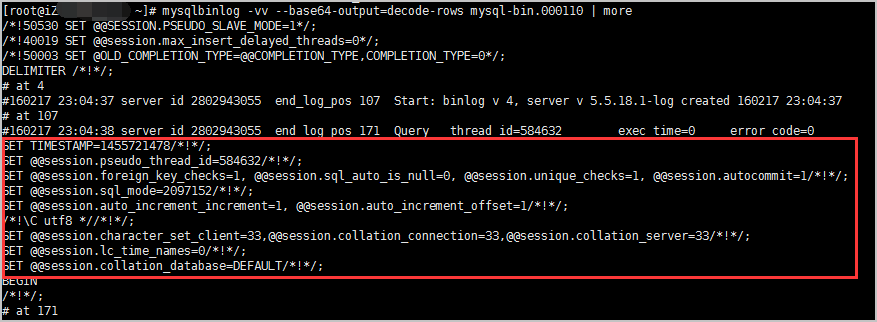
mysqlbinlog -vv --base64-output=decode-rows mysql-bin.****** | more说明-vv:查看具体SQL语句及备注。--base64-output=decode-rows:解析Binlog日志文件。建议使用与PolarDB MySQL版本数据库引擎一致的MySQL版本,以避免出现解析Binlog日志失败等问题。
具体的Binlog日志内容如下图中红框所示部分:
解析Binlog日志
关于如何解析Binlog日志,请参见解析Binlong日志。
常见问题
Q:执行
show binary logs;后,为什么会提示You are not using binary logging错误信息?A:PolarDB集群默认关闭Binlog参数,请确保您已开启Binlog。
说明开启或关闭Binlog后,集群会自动重启使参数新配置生效。建议您在业务低谷期进行操作并确保应用程序具备重连机制。
Q:为什么远程获取Binlog日志失败,并出现如下错误提示?
ERROR: Error in Log_event::read_log_event(): 'Sanity check failed', data_len: 151, event_type: 35
ERROR: Could not read entry at offset 120: Error in log format or read error.
ERROR: Goterrorreadingpacketfromserver: 'Slave can not handle replication events with the checksum that master is configured to log;
A:当您使用的mysqlbinlog工具版本过低时,可能会出现以上错误提示中的任意一种。请检查您使用的mysqlbinlog工具版本,建议您升级到较高版本的mysqlbinlog工具再尝试远程获取Binlog日志。例如使用Ver 3.3版本出现如上错误提示,您可以将mysqlbinlog工具升级至Ver 3.4版本进行查看。
Q:为什么远程获取Binlog日志失败,并出现如下错误提示?
ERROR: Failed on connect: Lost connection to MySQL server at 'reading initial communication packet', system error: 104A:这个错误通常指示无法与MySQL服务器建立连接。您可以从以下几个方面排查问题:
网络问题:建议您检查网络连接是否正常,确保可以访问PolarDB集群。
集群白名单设置:建议您检查是否将本地IP已添加到白名单,如何查看是否已添加到白名单,请参见设置白名单。
数据库配置:建议您检查本地MySQL能否正常连接数据库,确保可以正常访问数据库。
Q:为什么我看到的Binlog日志内容未经过解析?
A:若在查看Binlog日志时,未使用
--base64-output=decode-rows参数,导出的Binlog日志将会显示未经解析的日志(如下图所示)。请确保在使用mysqlbinlog工具查看Binlog日志时,已使用--base64-output=decode-rows参数。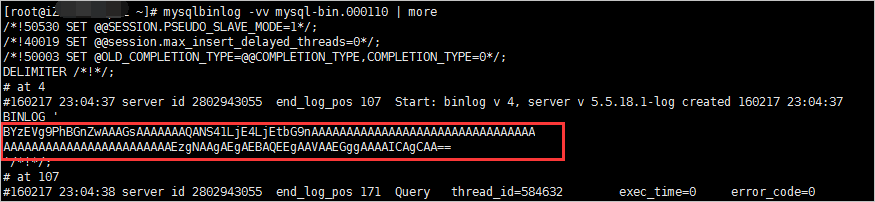
Q:从只读节点获取Binlog时,为什么出现
Only allow to dump binary log on primary instance错误提示?A:当集群版本为以下版本之一时:
PolarDB MySQL版8.0版本且Revision version为8.0.1.1.12或以上。
PolarDB MySQL版5.7版本且Revision version为5.7.1.0.12或以上。
支持从只读节点获取Binlog。如何查看集群版本和升级集群版本,请参见版本管理。
Q:从只读节点获取的Binlog时,为什么有时候结果会与从主节点上获取的不一致?
A:PolarDB支持在主节点和只读节点间共享Binlog,当主节点上的Binlog源信息同步到只读节点后,才能从只读节点获取Binlog。当出现同步延迟(源信息数据量很小,延迟一般不会很大)时,只读节点可能会读不到主节点上新写入的Binlog。
Q:为什么在超出保存时长参数(binlog_expire_logs_seconds)设置的时间后,Binlog并没有被删除?
A:若只读节点上有线程正在获取Binlog,该Binlog不会被立即删除。当主节点写入新的Binlog后,会再次检查是否有超时的Binlog,若此时该Binlog未参与任何只读节点上的线程,即被删除。