Simple Message Queue (eski adıyla MNS) üzerinden SMS teslimat raporlarını alın.
Ön Koşullar
Bir Alibaba Cloud hesabı ve bir AccessKey çifti oluşturun. Daha fazla bilgi için bkz. AccessKey çifti oluşturma.
MNS kuyruğu aşağıdaki etki alanlarına erişebilmelidir: dybaseapi.ap-southeast-1.aliyuncs.com ve 1493622401794734.mns.ap-southeast-1.aliyuncs.com.
Teslimat raporlarının yinelenebilir olması garanti edilmez. Verilerin doğruluğunu ve tutarlılığını sağlamak için uygun önlemler alın.
İstek parametreleri
Parametre | Tür | Örnek | Açıklama |
To | String | 8521234**** | Alıcı telefon numarası. |
Status | String | 1 | Mesaj teslimat durumu. Geçerli değerler:
|
MessageId | String | 123456789**** | Teslimat raporu kimliği. |
SmsSize | String | 1 | Mesaj sayısı. Uzun mesajlar birden çok parçaya bölünür. |
SendDate | String | Thu, 25 Nov 2021 10:27:00 +0800 | Mesajın operatöre gönderildiği zaman. |
ReceiveDate | String | Thu, 25 Nov 2021 10:27:33 +0800 | Raporun operatörden alındığı zaman. |
ErrorCode | String | success | Hata kodu. |
ErrorDescription | String | success | Hata açıklaması. |
Örnek
{
    "To" : "8521234****",
    "SendDate" : "Thu, 25 Nov 2021 10:27:00 +0800",
    "ReceiveDate" : "Thu, 25 Nov 2021 10:27:33 +0800",
    "Status" : "1",
    "SmsSize":"1",
    "ErrorCode" : "success",
    "ErrorDescription" : "success",
    "MessageId" : "123456789****"
  }
Demoyu indirin
Tercih ettiğiniz dil için demo ve SDK'yı Simple Message Queue tüketici demosu adresinden indirin. Aşağıdaki örnekte Java kullanılmıştır.
İndirme işleminden sonra
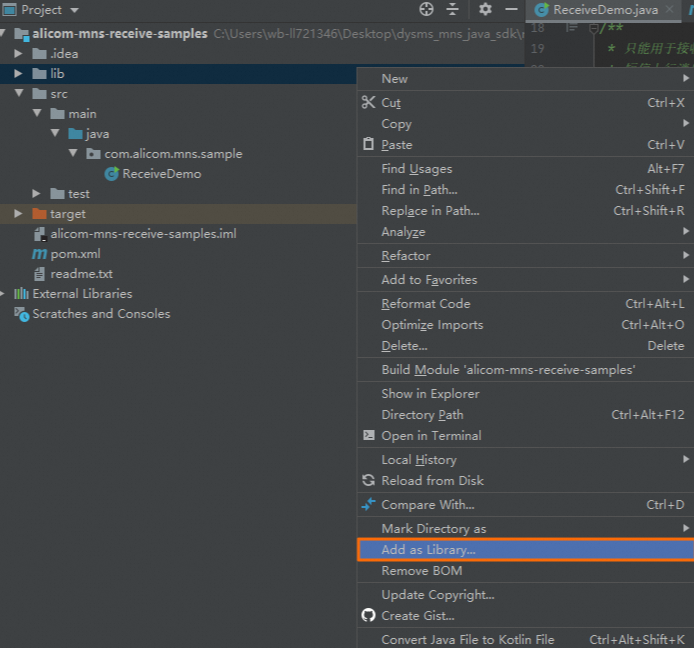
libdizinindeki JAR dosyalarını kitaplık olarak ekleyin: sağ tıklayın ve Add as Library seçeneğini seçin.Maven bağımlılıkları
pom.xmldosyasında listelenmiştir.
Parametre yapılandırması
Örnek kodu çalıştırmadan önce bu parametreleri yapılandırın.
AccessKey çiftini yapılandırma
Mesaj türünü yapılandırma
Kuyruk adını yapılandırma
queueName parametresini kuyruk adınıza ayarlayın. Bu adı SMS konsolunda yolunu izleyerek bulabilirsiniz.
String queueName="<QUEUE_NAME>";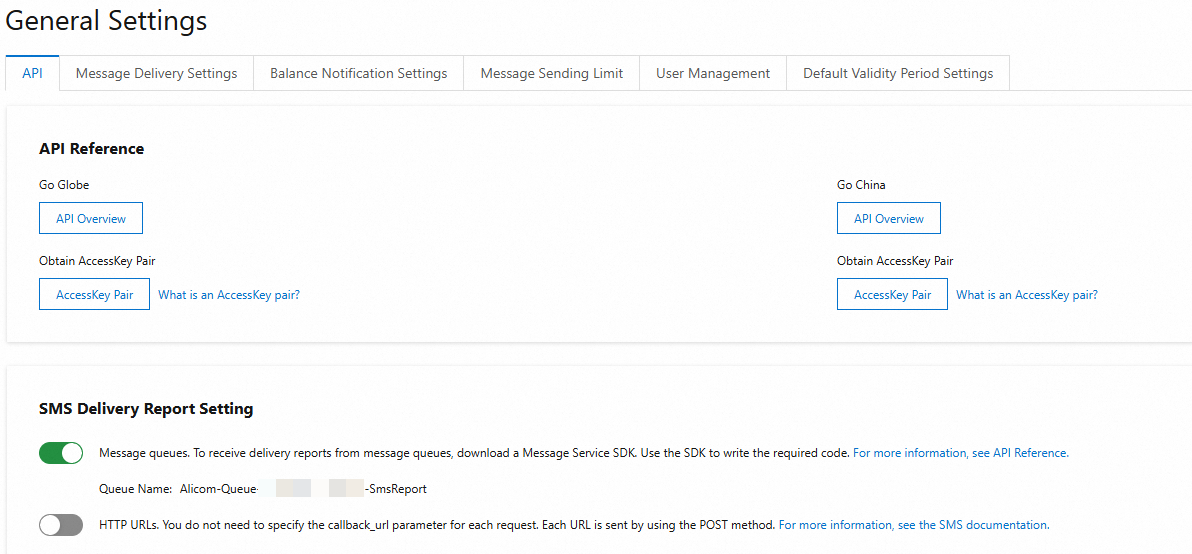
Örnek kod
Teslimat raporları dealMessage yöntemi tarafından işlenir. İş mantığınızı bu yöntemde ekleyin.
// Parse the message body according to the specific format in the documentation
String arg = (String) contentMap.get("arg");
// Add your business logic herearg, geri arama mesaj gövdesindeki bir alandır. Olası değerler: To, Status, MessageId, SmsSize, SendDate, ReceiveDate, ErrorCode, ErrorDescription.
package com.alicom.mns.sample;
import java.text.ParseException;
import java.text.SimpleDateFormat;
import java.util.Date;
import java.util.HashMap;
import java.util.Map;
import org.apache.commons.logging.Log;
import org.apache.commons.logging.LogFactory;
import com.alicom.mns.tools.DefaultAlicomMessagePuller;
import com.alicom.mns.tools.MessageListener;
import com.aliyun.mns.model.Message;
import com.google.gson.Gson;
/**
* This is for receiving messages from Alibaba Cloud Communications services only and cannot be used for other services
*/
public class ReceiveDemo {
private static Log logger=LogFactory.getLog(ReceiveDemo.class);
static class MyMessageListener implements MessageListener{
private Gson gson=new Gson();
@Override
public boolean dealMessage(Message message) {
SimpleDateFormat format = new SimpleDateFormat("yyyy-MM-dd HH:mm:ss");
// Key values from the message
System.out.println("message receiver time from mns:" + format.format(new Date()));
System.out.println("message handle: " + message.getReceiptHandle());
System.out.println("message body: " + message.getMessageBodyAsString());
System.out.println("message id: " + message.getMessageId());
System.out.println("message dequeue count:" + message.getDequeueCount());
System.out.println("Thread:" + Thread.currentThread().getName());
try{
Map<String,Object> contentMap=gson.fromJson(message.getMessageBodyAsString(), HashMap.class);
// Parse the message body according to the specific format in the documentation
String arg = (String) contentMap.get("arg");
// Add your business logic here
}catch(com.google.gson.JsonSyntaxException e){
logger.error("error_json_format:"+message.getMessageBodyAsString(),e);
// In theory, format errors should not occur. If you encounter a malformed message, delete it to prevent it from being redelivered and causing repeated errors.
return true;
} catch (Throwable e) {
// If an exception is caused by your own code, you should return false. This prevents the message from being deleted and allows it to be redelivered according to the retry policy.
return false;
}
// If the message is processed successfully, return true. The SDK will then call the MNS delete method to remove the message from the queue.
return true;
}
}
public static void main(String[] args) throws Exception, ParseException {
DefaultAlicomMessagePuller puller=new DefaultAlicomMessagePuller();
// Set the size of the async thread pool, task queue, and the sleep time for threads when there is no data.
puller.setConsumeMinThreadSize(6);
puller.setConsumeMaxThreadSize(16);
puller.setThreadQueueSize(200);
puller.setPullMsgThreadSize(1);
// Enable this for server-side debugging. It should be disabled during normal operation as it impacts performance.
puller.openDebugLog(false);
// Obtain the AccessKey ID and AccessKey Secret from local environment variables.
String accessKeyId = System.getenv("ALIBABA_CLOUD_ACCESS_KEY_ID");
String accessKeySecret = System.getenv("ALIBABA_CLOUD_ACCESS_KEY_SECRET");
/*
* Replace messageType and queueName with the required message type and corresponding queue name.
* Supported callback message types:
* 1: SmsReport: SMS delivery receipts
* 2: SmsUp: Mobile Originated messages
* 3: GlobeSmsReport: International SMS delivery receipts
*/
String messageType="<MESSAGE_TYPE>"; // Replace this with the message type. SmsReport is supported.
String queueName="<QUEUE_NAME>"; // After enabling the feature in the console, you can find the corresponding queueName on the page. For example: Alicom-Queue-******-SmsReport.
puller.startReceiveMsg(accessKeyId,accessKeySecret,messageType,queueName,new MyMessageListener());
}
}Örnek çıktı:
