Tüm Ürünler
Search
Belge Merkezi

Object Storage Service:Convert object storage classes

Son Güncelleme:Oct 01, 2026

Object Storage Service (OSS), Standard, Seyrek Erişim (IA), Arşiv, Soğuk Arşiv ve Derin Soğuk Arşiv olmak üzere birden fazla depolama sınıfını destekler. Bir nesnenin depolama sınıfını otomatik olarak dönüştürmek için yaşam döngüsü kurallarını kullanabilirsiniz. Ayrıca CopyObject işlemi çağrılarak bir nesnenin depolama sınıfını manuel olarak da dönüştürebilirsiniz.

Uyarı
  • OSS-HDFS etkinleştirilmiş paketler için, .dlsdata/ veri depolama dizinindeki herhangi bir nesnenin depolama sınıfını değiştirmeyin.

  • .dlsdata/ dizinindeki bir nesnenin depolama sınıfını IA olarak değiştirirseniz, nesne OSS-HDFS üzerinden erişilebilir kalır. Depolama sınıfını Arşiv, Soğuk Arşiv veya Derin Soğuk Arşiv olarak değiştirirseniz, nesne OSS-HDFS üzerinden erişilemez hale gelir. Nesneye erişmek için öncelikle onu geri yüklemeniz gerekir.

Yaşam döngüsü kuralları kullanarak nesne depolama sınıflarını otomatik olarak dönüştürme

Son değiştirilme zamanına göre depolama sınıflarını dönüştürme

  • Yerel Yedekli Depolama (LRS)本地冗余

    LRS nesneleri için dönüşüm kuralları aşağıdaki gibidir:

    • Standard LRS nesneleri, IA LRS, Arşiv LRS, Soğuk Arşiv LRS veya Derin Soğuk Arşiv LRS'ye dönüştürülebilir.

    • IA LRS nesneleri, Arşiv LRS, Soğuk Arşiv LRS veya Derin Soğuk Arşiv LRS'ye dönüştürülebilir.

    • Arşiv LRS nesneleri, Soğuk Arşiv LRS veya Derin Soğuk Arşiv LRS'ye dönüştürülebilir.

    • Soğuk Arşiv LRS nesneleri, Derin Soğuk Arşiv LRS'ye dönüştürülebilir.

    Aynı paket için nesneleri IA, Arşiv, Soğuk Arşiv ve Derin Soğuk Arşiv'e dönüştürecek yaşam döngüsü kuralları yapılandırırsanız, belirtilen geçiş süreleri aşağıdaki koşulu karşılamalıdır:

    IA'ya geçiş süresi < Arşive geçiş süresi < Soğuk Arşive geçiş süresi < Derin Soğuk Arşive geçiş süresi

  • Bölge Yedekli Depolama (ZRS)同城

    Bölge yedekli depolamadaki dosyalar için dönüşüm kuralları aşağıdaki gibidir:

    • Standard ZRS nesneleri, IA ZRS, Arşiv ZRS, Soğuk Arşiv LRS veya Derin Soğuk Arşiv LRS'ye dönüştürülebilir.

    • IA ZRS nesneleri, Arşiv ZRS, Soğuk Arşiv LRS veya Derin Soğuk Arşiv LRS'ye dönüştürülebilir.

    • Arşiv ZRS nesneleri, Soğuk Arşiv LRS veya Derin Soğuk Arşiv LRS'ye dönüştürülebilir.

    • Soğuk Arşiv LRS nesneleri, Derin Soğuk Arşiv LRS'ye dönüştürülebilir.

Daha fazla bilgi için bkz. Son değiştirilme zamanına göre yaşam döngüsü kuralları.

Son erişim zamanına göre depolama sınıflarını dönüştürme

Önemli
  • Nesneleri Standard veya IA depolama sınıfından Arşiv, Soğuk Arşiv veya Derin Soğuk Arşiv depolama sınıfına dönüştürmek için gerekli izinleri almak amacıyla destek talebi oluşturun. Başvurunuz onaylandıktan sonra hedef depolama sınıfını belirtebilirsiniz.

  • Başvurunuz onaylandıktan sonra, son erişim zamanına dayalı bir yaşam döngüsü kuralı kullanarak bir nesneyi Standard veya IA'dan Arşiv, Soğuk Arşiv veya Derin Soğuk Arşiv'e dönüştürürseniz, nesnenin son erişim zamanı, paket için erişim izlemesinin etkinleştirildiği zaman olarak kabul edilir.

  • Yerel Yedekli Depolama (LRS)

    1.jpg

    LRS nesneleri için dönüşüm kuralları aşağıdaki gibidir:

    • Standard LRS nesneleri, IA LRS, Arşiv LRS, Soğuk Arşiv LRS veya Derin Soğuk Arşiv LRS'ye dönüştürülebilir.

    • Bir nesne Standard LRS'den IA LRS'ye dönüştürüldükten sonra, erişildikten sonra otomatik olarak tekrar Standard LRS'ye dönüştürülüp dönüştürülmeyeceğini de belirtebilirsiniz.

    • IA LRS nesneleri, Arşiv LRS, Soğuk Arşiv LRS veya Derin Soğuk Arşiv LRS'ye dönüştürülebilir.

    • Arşiv LRS nesneleri, Soğuk Arşiv LRS veya Derin Soğuk Arşiv LRS'ye dönüştürülebilir.

    • Soğuk Arşiv LRS nesneleri, Derin Soğuk Arşiv LRS'ye dönüştürülebilir.

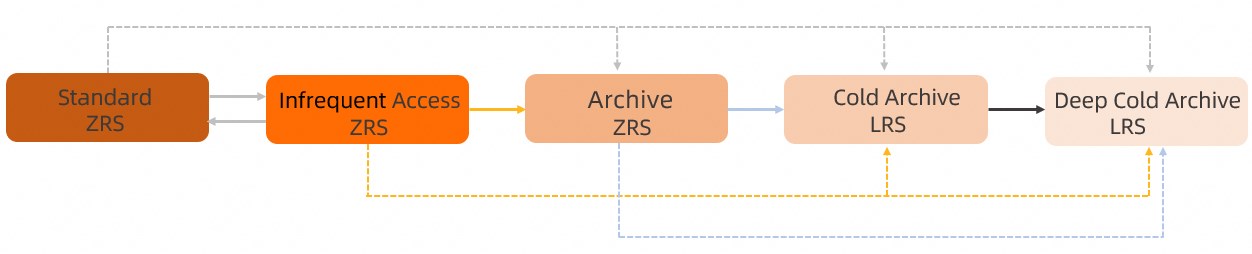
  • ZRS

    2.jpg

    Bölge yedekli depolamadaki dosyalar için dönüşüm kuralları aşağıdaki gibidir:

    • Standard ZRS nesneleri, IA ZRS, Arşiv ZRS, Soğuk Arşiv LRS veya Derin Soğuk Arşiv LRS'ye dönüştürülebilir.

    • Bir nesne Standard ZRS'den IA ZRS'ye dönüştürüldükten sonra, erişildikten sonra otomatik olarak tekrar Standard ZRS'ye dönüştürülüp dönüştürülmeyeceğini de belirtebilirsiniz.

    • IA ZRS nesneleri, Arşiv ZRS, Soğuk Arşiv LRS veya Derin Soğuk Arşiv LRS'ye dönüştürülebilir.

    • Arşiv ZRS nesneleri, Soğuk Arşiv LRS veya Derin Soğuk Arşiv LRS'ye dönüştürülebilir.

    • Soğuk Arşiv LRS nesneleri, Derin Soğuk Arşiv LRS'ye dönüştürülebilir.

Daha fazla bilgi için bkz. Son erişim zamanına göre yaşam döngüsü kuralları.

Yaşam döngüsü kuralları kullanarak depolama sınıflarını dönüştürme yöntemleri

Yaşam döngüsü kurallarını yapılandırmak için birkaç yöntem kullanabilirsiniz. Yaşam döngüsü kuralları, nesneleri belirli bir süreden sonra belirtilen bir depolama sınıfına geçirebilir veya süresi dolmuş nesneleri ve parçaları silebilir. Aşağıdaki adımlarda, nesneleri belirtilen bir depolama sınıfına geçirmek için yaşam döngüsü kuralının nasıl kullanılacağı açıklanmaktadır.

OSS konsolunu kullanma

  1. OSS konsolunda oturum açın.

  2. Sol gezinme bölmesinde, Buckets seçeneğine tıklayın. Paketler sayfasında istediğiniz paketi bulun ve üzerine tıklayın.

  3. Soldaki gezinme bölmesinde, Data Management > Lifecycle seçeneğini belirleyin.

  4. İsteğe bağlı: Son erişim zamanına dayalı bir yaşam döngüsü kuralı oluşturmak için, Lifecycle sayfasındaki Enable Access Tracking anahtarını açın.

  5. Lifecycle sayfasında, Create Rule seçeneğine tıklayın.

  6. Create Lifecycle Rule panelinde, kural parametrelerini aşağıdaki tablolarda açıklandığı gibi ayarlayın.

    • Paket için sürüm oluşturma devre dışı bırakılmışsa:

      Bölüm

      Parametre

      Açıklama

      Basic Settings

      Status

      Kuralın durumu. Geçerli değerler: Start ve Disable.

      • Etkinleştirilirse, OSS nesneleri kurala göre geçirir veya siler.

      • Devre dışı bırakılırsa, yaşam döngüsü görevi askıya alınır.

      Applied To

      Kural kapsamı. Object Prefix veya Whole Bucket seçeneğini belirleyin.

      Not

      Öneke Göre seçeneğini belirlerseniz, tam öneki girmeniz gerekir. Örneğin, kuralı src/dir1/ dizinindeki tüm nesnelere uygulamak için öneki src/dir1/ olarak ayarlayın. dir1 öneki bu nesnelerle beklendiği gibi eşleşmez. Önek eğik çizgi (/) veya ters eğik çizgi (\) ile başlayamaz. Örneğin, /prod ve /prod/ geçersiz öneklerdir. Bunun yerine prod/ veya prod kullanın.

      Allow Overlapped Prefixes

      Varsayılan olarak, OSS yaşam döngüsü kurallarının öneklerinin çakışıp çakışmadığını kontrol eder. Örneğin, çakışan öneklere sahip aşağıdaki iki kuralı yapılandırırsınız:

      • Kural 1

        dir1/ önekine sahip tüm nesneleri, son değiştirilme zamanlarından 180 gün sonra siler.

      • Kural 2

        dir1/dir2/ önekine sahip tüm nesneleri, son değiştirilme zamanlarından 30 gün sonra Seyrek Erişim depolama sınıfına geçirir ve son değiştirilme zamanlarından 60 gün sonra siler.

      Kural 2'yi yapılandırırken bu seçeneği belirtmezseniz, OSS dir1/dir2/ dizinindeki nesnelerin iki silme kuralıyla eşleştiğini algılar. Sonuç olarak, OSS Kural 2'yi reddeder ve Overlap for same action type Expiration. hatası bildirir.

      Kural 2'yi yapılandırırken bu seçeneği belirtirseniz, dir1/dir2/ dizinindeki nesneler son değiştirilme zamanlarından 30 gün sonra Seyrek Erişim depolama sınıfına geçirilir ve son değiştirilme zamanlarından 60 gün sonra silinir. dir1/ dizinindeki diğer nesneler ise son değiştirilme zamanlarından 180 gün sonra silinir.

      Not

      Birden çok kural yapılandırırsanız ve bunlardan biri tüm pakete uygulanıyorsa, bu durum çakışan önekler olarak kabul edilir.

      Prefix

      Kuralın uygulandığı nesne öneki.

      • Öneki img olarak ayarlarsanız, kural adları img ile başlayan tüm nesnelere uygulanır; örneğin imgtest.png ve img/example.jpg.

      • Öneki img/ olarak ayarlarsanız, kural adları img/ ile başlayan tüm nesnelere uygulanır; örneğin img/example.jpg ve img/test.jpg.

      Önek yalnızca tam dize eşleştirmeyi destekler ve dinamik değişkenleri desteklemez; ayrıntılar için Allow Overlapped Prefixes seçeneğinin açıklamasındaki En uzun önek eşleşmesi ve Önekler dinamik değişkenleri desteklemez bölümlerine bakın.

      Tag

      Kuralı yalnızca belirtilen etikete sahip nesnelere uygular.

      • Bir önek ayarlamazsanız ancak anahtarı=a ve değeri=1 olan bir etiket belirtirseniz, kural paketteki a=1 etiketine sahip tüm nesnelere uygulanır.

      • Öneki img olarak ayarlarsanız ve anahtarı=a ile değeri=1 olan bir etiket belirtirseniz, kural paketteki adı img ile başlayan ve a=1 etiketine sahip tüm nesnelere uygulanır.

      Nesne etiketleme.

      NOT

      NOT seçeneği, belirli bir öneke ve etikete sahip nesneleri yaşam döngüsü kuralından hariç tutar.

      Önemli
      • NOT seçeneğini etkinleştirdiğinizde, en az bir önek veya etiket belirtmeniz gerekir.

      • NOT koşulunda belirtilen bir etiketin anahtarı, Tag koşulunda tanımlanan bir anahtarla aynı olamaz.

      • NOT seçeneği etkinleştirildiğinde parça sona erme ilkesi yapılandırılamaz.

      Object Size

      Kuralı belirtilen boyut aralığındaki nesnelere uygular.

      • Minimum Size: Yaşam döngüsü kuralı bu değerden büyük nesnelere uygulanır. Değer 0 B'den büyük ve 5 TB'den küçük olmalıdır.

      • Maximum Size: Yaşam döngüsü kuralı bu değerden küçük nesnelere uygulanır. Değer 0 B'den büyük ve 5 TB'ye eşit veya küçük olmalıdır.

      Önemli

      Aynı yaşam döngüsü kuralında hem minimum hem de maksimum nesne boyutu belirtirseniz:

      • Maksimum boyutun minimum boyuttan büyük olduğundan emin olun.

      • Parça sona erme ilkesi yapılandırılamaz.

      • Silme işaretlerini temizlemek için bir ilke yapılandırılamaz.

      Policy for Objects

      Object Lifecycle

      Nesneler için bir sona erme ilkesi seçin. By Days, By Date veya Disabled seçeneklerinden birini belirleyin. Disabled seçeneğini belirlerseniz, nesne sona erme ilkesi etkili olmaz.

      Lifecycle-based Rules

      Nesnelerin depolama sınıfını geçirmek veya süresi dolmuş nesneleri silmek için kurallar yapılandırın. Infrequent Access, Archive, Cold Archive, Deep Cold Archive veya Data Deletion seçeneklerinden birini seçin.

      Örneğin, Object Lifecycle seçeneğini By Date olarak ayarlayıp 24 Eylül 2023 tarihini belirtirseniz, bu tarihten önce son kez değiştirilen nesneler otomatik olarak silinir ve kurtarılamaz.

      Policy for Parts

      Part Lifecycle

      Parçalar için bir sona erme ilkesi yapılandırın. Tag seçeneğini belirttiyseniz bu seçenek kullanılamaz. Parça sona erme ilkesini By Days veya By Date olarak ayarlayın veya Disabled seçeneğini belirleyin. Disabled seçeneğini belirlerseniz, parça sona erme ilkesi etkili olmaz.

      Önemli

      Bir yaşam döngüsü kuralı, en az bir nesne sona erme ilkesi veya parça sona erme ilkesi içermelidir.

      Rules for Parts

      Parça sona erme ilkesinde seçilen gün sayısı veya tarihe göre parçaların ne zaman sona ereceğini belirtir. Süresi dolmuş parçalar otomatik olarak silinir ve kurtarılamaz.

    • Paket için sürüm oluşturma etkinleştirilmişse:

      Basic Settings ve Policy for Parts bölümlerindeki parametreler, sürüm oluşturmanın devre dışı olduğu paketlerle aynı şekilde yapılandırılır. Aşağıdaki tabloda yalnızca farklı olan parametreler açıklanmaktadır.

      Önemli

      Bir yaşam döngüsü kuralı yapılandırmadan önce, bölgesel çoğaltma hedefi olarak hizmet veren bir pakette sürüm oluşturma etkinleştirilmişse, kaynak paketten senkronize edilen silme işaretlerinin hedef paketteki aynı ada sahip nesnelerin geçerli sürümlerini geçerli olmayan sürümlere dönüştürdüğünü unutmayın. Bu nedenle, istenmeyen veri silmeyi önlemek için geçerli olmayan sürümlerin temizleme kurallarını dikkatlice yapılandırın.

      Bölüm

      Parametre

      Açıklama

      Policy for Current Versions

      Clean up expired object delete marker

      Sürüm oluşturma etkinleştirilmişse, sona erme ilkesine Clean Up Expired Object Delete Marker seçeneği eklenir. Diğer seçenekler, sürüm oluşturmanın devre dışı olduğu paketler için olanlarla aynıdır.

      Bu seçeneği belirlerseniz, OSS süresi dolmuş bir nesnenin tek sürümü silme işareti ise bu silme işaretini siler. Nesnenin birden çok sürümü varsa ve en son sürüm bir silme işareti ise, OSS silme işaretini korur. Silme işaretleri.

      Önemli

      Geçerli olmayan sürümler varsa, bu kural silme işaretlerini temizlemez. Silme işaretlerini ve gereksiz geçerli olmayan sürümleri derhal temizlemenizi öneririz. Aksi takdirde, aşırı sayıda silme işareti liste performansını düşürebilir.

      Policy for Previous Versions

      Object Lifecycle

      Geçerli olmayan sürümler için sona erme ilkesini ayarlayın. By Days veya Disabled seçeneklerinden birini belirleyin. Disabled seçeneğini belirlerseniz, sona erme ilkesi etkili olmaz.

      Lifecycle-based Rules

      Bir gün sayısı (N) belirtin. Geçerli olmayan bir sürüm, geçerli olmayan hale geldikten N gün sonra sona erer ve belirtilen eylem sona ermeden sonraki gün gerçekleştirilir. Örneğin, değeri 30 olarak ayarlarsanız, 1 Eylül 2023 tarihinde geçerli olmayan sürüm haline gelen bir nesne, 1 Ekim 2023 tarihinde belirtilen depolama sınıfına geçirilir veya silinir.

      Önemli

      Bir nesnenin ne zaman geçerli olmayan sürüm haline geldiğini, nesnenin sonraki sürümünün son değiştirilme zamanını kontrol ederek belirleyebilirsiniz.

  7. OK seçeneğine tıklayın.

    Yaşam döngüsü kuralı kaydedildikten sonra, yapılandırılan yaşam döngüsü kuralını kurallar listesinde görüntüleyebilirsiniz.

Alibaba Cloud SDK'larını kullanma

Aşağıdaki kod, yaygın SDK'lar kullanılarak yaşam döngüsü kurallarının nasıl yapılandırılacağına ilişkin örnekler sağlar. Diğer SDK'ları kullanarak yaşam döngüsü kurallarının nasıl yapılandırılacağı hakkında bilgi için bkz. Genel Bakış.

Java

import com.aliyun.oss.*;
import com.aliyun.oss.common.auth.*;
import com.aliyun.oss.common.comm.SignVersion;
import com.aliyun.oss.common.utils.DateUtil;
import com.aliyun.oss.model.LifecycleRule;
import com.aliyun.oss.model.SetBucketLifecycleRequest;
import com.aliyun.oss.model.StorageClass;
import java.util.ArrayList;
import java.util.HashMap;
import java.util.List;
import java.util.Map;

public class Demo {

    public static void main(String[] args) throws Exception {
        // In this example, the endpoint of the China (Hangzhou) region is used. Specify your actual endpoint. 
        String endpoint = "https://oss-cn-hangzhou.aliyuncs.com";
        // Obtain access credentials from environment variables. Before you run the sample code, make sure that the OSS_ACCESS_KEY_ID and OSS_ACCESS_KEY_SECRET environment variables are configured. 
        EnvironmentVariableCredentialsProvider credentialsProvider = CredentialsProviderFactory.newEnvironmentVariableCredentialsProvider();
        // Specify the name of the bucket. Example: examplebucket. 
        String bucketName = "examplebucket";
        // Specify the region in which the bucket is located. For example, if the bucket is located in the China (Hangzhou) region, set the region to cn-hangzhou.
        String region = "cn-hangzhou";

        // Create an OSSClient instance. 
        // Call the shutdown method to release resources when the OSSClient is no longer in use.
        ClientBuilderConfiguration clientBuilderConfiguration = new ClientBuilderConfiguration();
        clientBuilderConfiguration.setSignatureVersion(SignVersion.V4);        
        OSS ossClient = OSSClientBuilder.create()
        .endpoint(endpoint)
        .credentialsProvider(credentialsProvider)
        .clientConfiguration(clientBuilderConfiguration)
        .region(region)               
        .build();

        try {
            // Create a request by using SetBucketLifecycleRequest. 
            SetBucketLifecycleRequest request = new SetBucketLifecycleRequest(bucketName);

            // Specify the ID of the lifecycle rule. 
            String ruleId0 = "rule0";
            // Specify the prefix that you want the lifecycle rule to match. 
            String matchPrefix0 = "A0/";
            // Specify the tag that you want the lifecycle rule to match. 
            Map<String, String> matchTags0 = new HashMap<String, String>();
            // Specify the key and value of the tag. In the example, the key is set to owner and the value is set to John. 
            matchTags0.put("owner", "John");

            String ruleId1 = "rule1";
            String matchPrefix1 = "A1/";
            Map<String, String> matchTags1 = new HashMap<String, String>();
            matchTags1.put("type", "document");

            String ruleId2 = "rule2";
            String matchPrefix2 = "A2/";

            String ruleId3 = "rule3";
            String matchPrefix3 = "A3/";

            String ruleId4 = "rule4";
            String matchPrefix4 = "A4/";

            String ruleId5 = "rule5";
            String matchPrefix5 = "A5/";

            String ruleId6 = "rule6";
            String matchPrefix6 = "A6/";

            // Set the expiration time to three days after the last modified time. 
            LifecycleRule rule = new LifecycleRule(ruleId0, matchPrefix0, LifecycleRule.RuleStatus.Enabled, 3);
            rule.setTags(matchTags0);
            request.AddLifecycleRule(rule);

            // Specify that objects that are created before the specified date expire. 
            rule = new LifecycleRule(ruleId1, matchPrefix1, LifecycleRule.RuleStatus.Enabled);
            rule.setCreatedBeforeDate(DateUtil.parseIso8601Date("2022-10-12T00:00:00.000Z"));
            rule.setTags(matchTags1);
            request.AddLifecycleRule(rule);

            // Specify that parts expire three days after they are last modified. 
            rule = new LifecycleRule(ruleId2, matchPrefix2, LifecycleRule.RuleStatus.Enabled);
            LifecycleRule.AbortMultipartUpload abortMultipartUpload = new LifecycleRule.AbortMultipartUpload();
            abortMultipartUpload.setExpirationDays(3);
            rule.setAbortMultipartUpload(abortMultipartUpload);
            request.AddLifecycleRule(rule);

            // Specify that parts that are created before the specific date expire. 
            rule = new LifecycleRule(ruleId3, matchPrefix3, LifecycleRule.RuleStatus.Enabled);
            abortMultipartUpload = new LifecycleRule.AbortMultipartUpload();
            abortMultipartUpload.setCreatedBeforeDate(DateUtil.parseIso8601Date("2022-10-12T00:00:00.000Z"));
            rule.setAbortMultipartUpload(abortMultipartUpload);
            request.AddLifecycleRule(rule);

            // Specify that the storage classes of objects are changed to IA 10 days after they are last modified, and to Archive 30 days after they are last modified. 
            rule = new LifecycleRule(ruleId4, matchPrefix4, LifecycleRule.RuleStatus.Enabled);
            List<LifecycleRule.StorageTransition> storageTransitions = new ArrayList<LifecycleRule.StorageTransition>();
            LifecycleRule.StorageTransition storageTransition = new LifecycleRule.StorageTransition();
            storageTransition.setStorageClass(StorageClass.IA);
            storageTransition.setExpirationDays(10);
            storageTransitions.add(storageTransition);
            storageTransition = new LifecycleRule.StorageTransition();
            storageTransition.setStorageClass(StorageClass.Archive);
            storageTransition.setExpirationDays(30);
            storageTransitions.add(storageTransition);
            rule.setStorageTransition(storageTransitions);
            request.AddLifecycleRule(rule);

            // Specify that the storage classes of objects that are last modified before October 12, 2022 are changed to Archive. 
            rule = new LifecycleRule(ruleId5, matchPrefix5, LifecycleRule.RuleStatus.Enabled);
            storageTransitions = new ArrayList<LifecycleRule.StorageTransition>();
            storageTransition = new LifecycleRule.StorageTransition();

            storageTransition.setCreatedBeforeDate(DateUtil.parseIso8601Date("2022-10-12T00:00:00.000Z"));

            storageTransition.setStorageClass(StorageClass.Archive);
            storageTransitions.add(storageTransition);
            rule.setStorageTransition(storageTransitions);
            request.AddLifecycleRule(rule);

            // Specify that rule6 is configured for versioning-enabled buckets. 
            rule = new LifecycleRule(ruleId6, matchPrefix6, LifecycleRule.RuleStatus.Enabled);
            // Specify that the storage classes of objects are changed to Archive 365 days after the objects are last modified. 
            storageTransitions = new ArrayList<LifecycleRule.StorageTransition>();
            storageTransition = new LifecycleRule.StorageTransition();
            storageTransition.setStorageClass(StorageClass.Archive);
            storageTransition.setExpirationDays(365);
            storageTransitions.add(storageTransition);
            rule.setStorageTransition(storageTransitions);
            // Configure the lifecycle rule to automatically delete expired delete markers. 
            rule.setExpiredDeleteMarker(true);
            // Specify that the storage classes of the previous versions of objects are changed to IA 10 days after the objects are last modified. 
            LifecycleRule.NoncurrentVersionStorageTransition noncurrentVersionStorageTransition =
                    new LifecycleRule.NoncurrentVersionStorageTransition().withNoncurrentDays(10).withStrorageClass(StorageClass.IA);
            // Specify that the storage classes of the previous versions of objects are changed to Archive 20 days after the objects are last modified. 
            LifecycleRule.NoncurrentVersionStorageTransition noncurrentVersionStorageTransition2 =
                    new LifecycleRule.NoncurrentVersionStorageTransition().withNoncurrentDays(20).withStrorageClass(StorageClass.Archive);
            // Specify that the previous versions of objects are deleted 30 days after the objects are last modified. 
            LifecycleRule.NoncurrentVersionExpiration noncurrentVersionExpiration = new LifecycleRule.NoncurrentVersionExpiration().withNoncurrentDays(30);
            List<LifecycleRule.NoncurrentVersionStorageTransition> noncurrentVersionStorageTransitions = new ArrayList<LifecycleRule.NoncurrentVersionStorageTransition>();
            noncurrentVersionStorageTransitions.add(noncurrentVersionStorageTransition2);
            rule.setStorageTransition(storageTransitions);
            rule.setNoncurrentVersionExpiration(noncurrentVersionExpiration);
            rule.setNoncurrentVersionStorageTransitions(noncurrentVersionStorageTransitions);
            request.AddLifecycleRule(rule);

            // Initiate a request to configure lifecycle rules. 
            ossClient.setBucketLifecycle(request);

            // Query the lifecycle rules that are configured for the bucket. 
            List<LifecycleRule> listRules = ossClient.getBucketLifecycle(bucketName);
            for(LifecycleRule rules : listRules){
                System.out.println("ruleId="+rules.getId()+", matchPrefix="+rules.getPrefix());
            }
        } catch (OSSException oe) {
            System.out.println("Caught an OSSException, which means your request made it to OSS, "
                    + "but was rejected with an error response for some reason.");
            System.out.println("Error Message:" + oe.getErrorMessage());
            System.out.println("Error Code:" + oe.getErrorCode());
            System.out.println("Request ID:" + oe.getRequestId());
            System.out.println("Host ID:" + oe.getHostId());
        } catch (ClientException ce) {
            System.out.println("Caught an ClientException, which means the client encountered "
                    + "a serious internal problem while trying to communicate with OSS, "
                    + "such as not being able to access the network.");
            System.out.println("Error Message:" + ce.getMessage());
        } finally {
            if (ossClient != null) {
                ossClient.shutdown();
            }
        }
    }
}

PHP

<?php
if (is_file(__DIR__ . '/../autoload.php')) {
    require_once __DIR__ . '/../autoload.php';
}
if (is_file(__DIR__ . '/../vendor/autoload.php')) {
    require_once __DIR__ . '/../vendor/autoload.php';
}

use OSS\Credentials\EnvironmentVariableCredentialsProvider;
use OSS\OssClient;
use OSS\CoreOssException;
use OSS\Model\LifecycleConfig;
use OSS\Model\LifecycleRule;
use OSS\Model\LifecycleAction;

// Obtain access credentials from environment variables. Before you run this code, make sure that the OSS_ACCESS_KEY_ID and OSS_ACCESS_KEY_SECRET environment variables are set.
$provider = new EnvironmentVariableCredentialsProvider();
// The China (Hangzhou) endpoint is used as an example. Replace it with the actual endpoint for your region.
$endpoint = "https://oss-cn-hangzhou.aliyuncs.com";
// Enter the bucket name.
$bucket= "examplebucket";

// Set the rule ID and file prefix.
$ruleId0 = "rule0";
$matchPrefix0 = "A0/";
$ruleId1 = "rule1";
$matchPrefix1 = "A1/";

$lifecycleConfig = new LifecycleConfig();
$actions = array();
// Expire objects 3 days after their last modification time.
$actions[] = new LifecycleAction(OssClient::OSS_LIFECYCLE_EXPIRATION, OssClient::OSS_LIFECYCLE_TIMING_DAYS, 3);
$lifecycleRule = new LifecycleRule($ruleId0, $matchPrefix0, "Enabled", $actions);
$lifecycleConfig->addRule($lifecycleRule);
$actions = array();
// Expire objects created before the specified date.
$actions[] = new LifecycleAction(OssClient::OSS_LIFECYCLE_EXPIRATION, OssClient::OSS_LIFECYCLE_TIMING_DATE, '2022-10-12T00:00:00.000Z');
$lifecycleRule = new LifecycleRule($ruleId1, $matchPrefix1, "Enabled", $actions);
$lifecycleConfig->addRule($lifecycleRule);
try {
    $config = array(
        "provider" => $provider,
        "endpoint" => $endpoint,
        "signatureVersion" => OssClient::OSS_SIGNATURE_VERSION_V4,
        "region"=> "cn-hangzhou"
    );
    $ossClient = new OssClient($config);

    $ossClient->putBucketLifecycle($bucket, $lifecycleConfig);
} catch (OssException $e) {
    printf(__FUNCTION__ . ": FAILED\n");
    printf($e->getMessage() . "\n");
    return;
}
print(__FUNCTION__ . ": OK" . "\n");

Node.js

const OSS = require('ali-oss')

const client = new OSS({
  // Specify the region in which the bucket is located. For example, if the bucket is located in the China (Hangzhou) region, set the region to oss-cn-hangzhou. 
  region: 'yourregion',
  // Obtain access credentials from environment variables. Before you run the sample code, make sure that the OSS_ACCESS_KEY_ID and OSS_ACCESS_KEY_SECRET environment variables are configured. 
  accessKeyId: process.env.OSS_ACCESS_KEY_ID,
  accessKeySecret: process.env.OSS_ACCESS_KEY_SECRET,
  authorizationV4: true,
  // Specify the name of the bucket. 
  bucket: 'yourbucketname'
});

async function getBucketLifecycle () {
  try {
    const result = await client.getBucketLifecycle('Yourbucketname');
    console.log(result.rules); // Query the lifecycle rules. 

    result.rules.forEach(rule => {
      console.log(rule.id) // Query the rule IDs.  
      console.log(rule.status) // Query the status of the rules. 
      console.log(rule.tags) // Query the tags configured in the lifecycle rules. 
      console.log(rule.expiration.days) // Query the validity period configurations. 
      console.log(rule.expiration.createdBeforeDate) // Query the expiration date configurations. 
      // Query the rule for expired parts. 
      console.log(rule.abortMultipartUpload.days || rule.abortMultipartUpload.createdBeforeDate)
      // Query the rule of storage class conversion. 
      console.log(rule.transition.days || rule.transition.createdBeforeDate) // Query the conversion date configurations. 
      console.log(rule.transition.storageClass) // Query the configurations used to convert storage classes. 
      // Query the lifecycle rule to check whether expired delete markers are automatically deleted. 
      console.log(rule.transition.expiredObjectDeleteMarker)
      // Query the configurations used to convert the storage class of previous versions of the objects. 
      console.log(rule.noncurrentVersionTransition.noncurrentDays) // Query the conversion date configurations for objects of previous versions. 
      console.log(rule.noncurrentVersionTransition.storageClass) // Query the configurations used to convert the storage classes of previous versions of objects. 
    })
  } catch (e) {
    console.log(e);
  }
}
getBucketLifecycle();

Python

# -*- coding: utf-8 -*-
import oss2
from oss2.credentials import EnvironmentVariableCredentialsProvider
import datetime
from oss2.models import (LifecycleExpiration, LifecycleRule, 
                        BucketLifecycle,AbortMultipartUpload, 
                        TaggingRule, Tagging, StorageTransition,
                        NoncurrentVersionStorageTransition,
                        NoncurrentVersionExpiration)

# Obtain access credentials from environment variables. Before you run the sample code, make sure that the OSS_ACCESS_KEY_ID and OSS_ACCESS_KEY_SECRET environment variables are configured. 
auth = oss2.ProviderAuthV4(EnvironmentVariableCredentialsProvider())

# Specify the endpoint of the region in which the bucket is located. For example, if the bucket is located in the China (Hangzhou) region, set the endpoint to https://oss-cn-hangzhou.aliyuncs.com. 
endpoint = "https://oss-cn-hangzhou.aliyuncs.com"
# Specify the ID of the region that maps to the endpoint. Example: cn-hangzhou. This parameter is required if you use the signature algorithm V4.
region = "cn-hangzhou"

# Specify the name of the bucket.
bucket = oss2.Bucket(auth, endpoint, "examplebucket", region=region)

# Specify that objects expire three days after they are last modified. 
rule1 = LifecycleRule('rule1', 'tests/',
                      status=LifecycleRule.ENABLED,
                      expiration=LifecycleExpiration(days=3))

# Specify that objects created before the specified date expire. 
rule2 = LifecycleRule('rule2', 'tests2/',
                      status=LifecycleRule.ENABLED,
expiration = LifecycleExpiration(created_before_date=datetime.date(2023, 12, 12)))

# Specify that the parts expire three days after they are last modified. 
rule3 = LifecycleRule('rule3', 'tests3/',
                      status=LifecycleRule.ENABLED,
            abort_multipart_upload=AbortMultipartUpload(days=3))

# Specify that parts created before the specified date expire. 
rule4 = LifecycleRule('rule4', 'tests4/',
                      status=LifecycleRule.ENABLED,
                      abort_multipart_upload = AbortMultipartUpload(created_before_date=datetime.date(2022, 12, 12)))

# Specify that the storage classes of objects are changed to Infrequent Access (IA) 20 days after they are last modified, and to Archive 30 days after they are last modified. 
rule5 = LifecycleRule('rule5', 'tests5/',
                      status=LifecycleRule.ENABLED,
                      storage_transitions=[StorageTransition(days=20,storage_class=oss2.BUCKET_STORAGE_CLASS_IA),
                            StorageTransition(days=30,storage_class=oss2.BUCKET_STORAGE_CLASS_ARCHIVE)])

# Specify the tag that you want the lifecycle rule to match. 
tagging_rule = TaggingRule()
tagging_rule.add('key1', 'value1')
tagging_rule.add('key2', 'value2')
tagging = Tagging(tagging_rule)

# Specify that the storage classes of objects are changed to Archive 365 days after they are last modified.  
# Compared with the preceding rules, rule6 includes the tag condition to match objects. The rule takes effect for objects whose tagging configurations are key1=value1 and key2=value2. 
rule6 = LifecycleRule('rule6', 'tests6/',
                      status=LifecycleRule.ENABLED,
                      storage_transitions=[StorageTransition(created_before_date=datetime.date(2022, 12, 12),storage_class=oss2.BUCKET_STORAGE_CLASS_IA)],
                      tagging = tagging)

# rule7 is a lifecycle rule that applies to a versioning-enabled bucket. 
# Specify that the storage classes of objects are changed to Archive 365 days after they are last modified. 
# Specify that delete markers are automatically removed when they expire. 
# Specify that the storage classes of objects are changed to IA 12 days after they become previous versions. 
# Specify that the storage classes of objects are changed to Archive 20 days after they become previous versions. 
# Specify that objects are deleted 30 days after they become previous versions. 
rule7 = LifecycleRule('rule7', 'tests7/',
              status=LifecycleRule.ENABLED,
              storage_transitions=[StorageTransition(days=365, storage_class=oss2.BUCKET_STORAGE_CLASS_ARCHIVE)], 
              expiration=LifecycleExpiration(expired_detete_marker=True),
              noncurrent_version_sotrage_transitions = 
                    [NoncurrentVersionStorageTransition(12, oss2.BUCKET_STORAGE_CLASS_IA),
                     NoncurrentVersionStorageTransition(20, oss2.BUCKET_STORAGE_CLASS_ARCHIVE)],
              noncurrent_version_expiration = NoncurrentVersionExpiration(30))

lifecycle = BucketLifecycle([rule1, rule2, rule3, rule4, rule5, rule6, rule7])

bucket.put_bucket_lifecycle(lifecycle)

C#

using Aliyun.OSS;
using Aliyun.OSS.Common;
// Specify the endpoint of the region in which the bucket is located. For example, if the bucket is located in the China (Hangzhou) region, set the endpoint to https://oss-cn-hangzhou.aliyuncs.com. 
var endpoint = "https://oss-cn-hangzhou.aliyuncs.com";
// Obtain access credentials from environment variables. Before you run the sample code, make sure that the OSS_ACCESS_KEY_ID and OSS_ACCESS_KEY_SECRET environment variables are configured. 
var accessKeyId = Environment.GetEnvironmentVariable("OSS_ACCESS_KEY_ID");
var accessKeySecret = Environment.GetEnvironmentVariable("OSS_ACCESS_KEY_SECRET");
// Specify the bucket name. Example: examplebucket. 
var bucketName = "examplebucket";
// Specify the region in which the bucket is located. For example, if the bucket is located in the China (Hangzhou) region, set the region to cn-hangzhou.
const string region = "cn-hangzhou";

// Create a ClientConfiguration instance and modify the default parameters based on your requirements.
var conf = new ClientConfiguration();

// Use the signature algorithm V4.
conf.SignatureVersion = SignatureVersion.V4;

// Create an OSSClient instance.
var client = new OssClient(endpoint, accessKeyId, accessKeySecret, conf);
client.SetRegion(region);
try
{
    var setBucketLifecycleRequest = new SetBucketLifecycleRequest(bucketName);
    // Create the first lifecycle rule. 
    LifecycleRule lcr1 = new LifecycleRule()
    {
        ID = "delete obsoleted files",
        Prefix = "obsoleted/",
        Status = RuleStatus.Enabled,
        ExpriationDays = 3,
        Tags = new Tag[1]
    };
    // Specify a tag for the rule. 
    var tag1 = new Tag
    {
        Key = "project",
        Value = "projectone"
    };

    lcr1.Tags[0] = tag1;

    // Create the second lifecycle rule. 
    LifecycleRule lcr2 = new LifecycleRule()
    {
        ID = "delete temporary files",
        Prefix = "temporary/",
        Status = RuleStatus.Enabled,
        ExpriationDays = 20,
        Tags = new Tag[1]         
    };
    // Specify a tag for the rule. 
    var tag2 = new Tag
    {
        Key = "user",
        Value = "jsmith"
    };
    lcr2.Tags[0] = tag2;

    // Specify that parts expire 30 days after they are last modified. 
    lcr2.AbortMultipartUpload = new LifecycleRule.LifeCycleExpiration()
    {
        Days = 30
    };

    LifecycleRule lcr3 = new LifecycleRule();
    lcr3.ID = "only NoncurrentVersionTransition";
    lcr3.Prefix = "test1";
    lcr3.Status = RuleStatus.Enabled;
    lcr3.NoncurrentVersionTransitions = new LifecycleRule.LifeCycleNoncurrentVersionTransition[2]
    {
        // Specify that the storage classes of the previous versions of objects are converted to IA 90 days after they are last modified. 
        new LifecycleRule.LifeCycleNoncurrentVersionTransition(){
            StorageClass = StorageClass.IA,
            NoncurrentDays = 90
        },
        // Specify that the storage classes of the previous versions of objects are converted to Archive 180 days after they are last modified. 
        new LifecycleRule.LifeCycleNoncurrentVersionTransition(){
            StorageClass = StorageClass.Archive,
            NoncurrentDays = 180
        }
    };
    setBucketLifecycleRequest.AddLifecycleRule(lcr1);
    setBucketLifecycleRequest.AddLifecycleRule(lcr2);
    setBucketLifecycleRequest.AddLifecycleRule(lcr3);

    // Configure lifecycle rules. 
    client.SetBucketLifecycle(setBucketLifecycleRequest);
    Console.WriteLine("Set bucket:{0} Lifecycle succeeded ", bucketName);
}
catch (OssException ex)
{
    Console.WriteLine("Failed with error code: {0}; Error info: {1}. \nRequestID:{2}\tHostID:{3}",
        ex.ErrorCode, ex.Message, ex.RequestId, ex.HostId);
}
catch (Exception ex)
{
    Console.WriteLine("Failed with error info: {0}", ex.Message);
}

Android-Java

PutBucketLifecycleRequest request = new PutBucketLifecycleRequest();
request.setBucketName("examplebucket");

BucketLifecycleRule rule1 = new BucketLifecycleRule();
// Set the rule ID and file prefix.
rule1.setIdentifier("1");
rule1.setPrefix("A");
// Specify whether to execute the lifecycle rule. If the value is true, OSS periodically executes the rule. If the value is false, OSS ignores the rule.
rule1.setStatus(true);
// Expire objects 200 days after the last modified time.
rule1.setDays("200");
// Transition objects to the Archive storage class after 30 days.
rule1.setArchiveDays("30");
// Expire incomplete multipart uploads after 3 days.
rule1.setMultipartDays("3");
// Transition objects to the Infrequent Access (IA) storage class after 15 days.
rule1.setIADays("15");

BucketLifecycleRule rule2 = new BucketLifecycleRule();
rule2.setIdentifier("2");
rule2.setPrefix("B");
rule2.setStatus(true);
rule2.setDays("300");
rule2.setArchiveDays("30");
rule2.setMultipartDays("3");
rule2.setIADays("15");

ArrayList<BucketLifecycleRule> lifecycleRules = new ArrayList<BucketLifecycleRule>();
lifecycleRules.add(rule1);
lifecycleRules.add(rule2);
request.setLifecycleRules(lifecycleRules);
OSSAsyncTask task = oss.asyncPutBucketLifecycle(request, new OSSCompletedCallback<PutBucketLifecycleRequest, PutBucketLifecycleResult>() {
    @Override
    public void onSuccess(PutBucketLifecycleRequest request, PutBucketLifecycleResult result) {
        OSSLog.logInfo("code::"+result.getStatusCode());

    }

    @Override
    public void onFailure(PutBucketLifecycleRequest request, ClientException clientException, ServiceException serviceException) {
        OSSLog.logError("error: "+serviceException.getRawMessage());

    }
});

task.waitUntilFinished();

Go

package main

import (
	"fmt"
	"os"

	"github.com/aliyun/aliyun-oss-go-sdk/oss"
)

func main() {
	// Obtain access credentials from environment variables. Before you run the sample code, make sure that the OSS_ACCESS_KEY_ID and OSS_ACCESS_KEY_SECRET environment variables are set.
	provider, err := oss.NewEnvironmentVariableCredentialsProvider()
	if err != nil {
		fmt.Println("Error:", err)
		os.Exit(-1)
	}
	// Create an OSSClient instance.
	// Set yourEndpoint to the Endpoint of the bucket. For example, for the China (Hangzhou) region, set the Endpoint to https://oss-cn-hangzhou.aliyuncs.com. For other regions, use the actual Endpoint.
	// Set yourRegion to the region where the bucket is located. For example, for the China (Hangzhou) region, set the region to cn-hangzhou. For other regions, use the actual region.
	clientOptions := []oss.ClientOption{oss.SetCredentialsProvider(&provider)}
	clientOptions = append(clientOptions, oss.Region("yourRegion"))
	// Set the signature version.
	clientOptions = append(clientOptions, oss.AuthVersion(oss.AuthV4))
	client, err := oss.New("yourEndpoint", "", "", clientOptions...)
	if err != nil {
		fmt.Println("Error:", err)
		os.Exit(-1)
	}
	// Specify the bucket name.
	bucketName := "examplebucket"
	// Specify lifecycle rule 1. This rule specifies that files with the prefix "foo/" expire 3 days after they are last modified.
	rule1 := oss.BuildLifecycleRuleByDays("rule1", "foo/", true, 3)

	// Automatically delete delete markers for objects in a versioning-enabled bucket when the objects have only delete markers.
	deleteMark := true
	expiration := oss.LifecycleExpiration{
		ExpiredObjectDeleteMarker: &deleteMark,
	}

	// Delete noncurrent versions of objects 30 days after they become noncurrent.
	versionExpiration := oss.LifecycleVersionExpiration{
		NoncurrentDays: 30,
	}

	// Transition noncurrent versions of objects to the Infrequent Access (IA) storage class 10 days after they become noncurrent.
	versionTransition := oss.LifecycleVersionTransition{
		NoncurrentDays: 10,
		StorageClass:   "IA",
	}

	// Specify lifecycle rule 2.
	rule2 := oss.LifecycleRule{
		ID:                   "rule2",
		Prefix:               "yourObjectPrefix",
		Status:               "Enabled",
		Expiration:           &expiration,
		NonVersionExpiration: &versionExpiration,
		NonVersionTransitions: []oss.LifecycleVersionTransition{
			versionTransition,
		},
	}

	// Specify lifecycle rule 3. This rule specifies that files with the tag key "tag1" and tag value "value1" expire 3 days after they are last modified.
	rule3 := oss.LifecycleRule{
		ID:     "rule3",
		Prefix: "",
		Status: "Enabled",
		Tags: []oss.Tag{
			{
				Key:   "tag1",
				Value: "value1",
			},
		},
		Expiration: &oss.LifecycleExpiration{Days: 3},
	}

	// Set the lifecycle rules.
	rules := []oss.LifecycleRule{rule1, rule2, rule3}
	err = client.SetBucketLifecycle(bucketName, rules)
	if err != nil {
		fmt.Println("Error:", err)
		os.Exit(-1)
	}
}

C++

#include <alibabacloud/oss/OssClient.h>
using namespace AlibabaCloud::OSS;

int main(void)
{
    /* Initialize the OSS account information. */
    
    /* Set yourEndpoint to the Endpoint of the region where the bucket is located. For example, if the bucket is in the China (Hangzhou) region, set the Endpoint to https://oss-cn-hangzhou.aliyuncs.com. */
    std::string Endpoint = "yourEndpoint";
    /* Set yourRegion to the region where the bucket is located. For example, if the bucket is in the China (Hangzhou) region, set the Region to cn-hangzhou. */
    std::string Region = "yourRegion";
    /* Specify the bucket name. For example, examplebucket. */
    std::string BucketName = "examplebucket";

    /* Initialize network resources. */
    InitializeSdk();

    ClientConfiguration conf;
    conf.signatureVersion = SignatureVersionType::V4;
    /* Obtain access credentials from environment variables. Before you run this code, make sure that the OSS_ACCESS_KEY_ID and OSS_ACCESS_KEY_SECRET environment variables are set. */
    auto credentialsProvider = std::make_shared<EnvironmentVariableCredentialsProvider>();
    OssClient client(Endpoint, credentialsProvider, conf);
    client.SetRegion(Region);

    SetBucketLifecycleRequest request(BucketName);
    std::string date("2022-10-12T00:00:00.000Z");

    /* Set tags. */
    Tagging tagging;
    tagging.addTag(Tag("key1", "value1"));
    tagging.addTag(Tag("key2", "value2"));

    /* Specify a lifecycle rule. */
    auto rule1 = LifecycleRule();
    rule1.setID("rule1");
    rule1.setPrefix("test1/");
    rule1.setStatus(RuleStatus::Enabled);
    rule1.setExpiration(3);
    rule1.setTags(tagging.Tags());

    /* Specify the expiration time. */
    auto rule2 = LifecycleRule();
    rule2.setID("rule2");
    rule2.setPrefix("test2/");
    rule2.setStatus(RuleStatus::Disabled);
    rule2.setExpiration(date);

    /* rule3 is a lifecycle rule for a bucket with versioning enabled. */
    auto rule3 = LifecycleRule();
    rule3.setID("rule3");
    rule3.setPrefix("test3/");
    rule3.setStatus(RuleStatus::Disabled);

    /* Transition objects to the Archive storage class 365 days after they are last modified. */  
    auto transition = LifeCycleTransition();  
    transition.Expiration().setDays(365);
    transition.setStorageClass(StorageClass::Archive);
    rule3.addTransition(transition);

    /* Automatically remove expired delete markers. */
    rule3.setExpiredObjectDeleteMarker(true);

    /* Transition noncurrent versions of objects to the Infrequent Access storage class 10 days after they become noncurrent. */
    auto transition1 = LifeCycleTransition();  
    transition1.Expiration().setDays(10);
    transition1.setStorageClass(StorageClass::IA);

    /* Transition noncurrent versions of objects to the Archive storage class 20 days after they become noncurrent. */
    auto transition2 = LifeCycleTransition();  
    transition2.Expiration().setDays(20);
    transition2.setStorageClass(StorageClass::Archive);

    /* Delete objects 30 days after they become noncurrent versions. */
    auto expiration  = LifeCycleExpiration(30);
    rule3.setNoncurrentVersionExpiration(expiration);

    LifeCycleTransitionList noncurrentVersionStorageTransitions{transition1, transition2};
    rule3.setNoncurrentVersionTransitionList(noncurrentVersionStorageTransitions);

    /* Set the lifecycle rules. */
    LifecycleRuleList list{rule1, rule2, rule3};
    request.setLifecycleRules(list);
    auto outcome = client.SetBucketLifecycle(request);

    if (!outcome.isSuccess()) {
        /* Handle exceptions. */
        std::cout << "SetBucketLifecycle fail" <<
        ",code:" << outcome.error().Code() <<
        ",message:" << outcome.error().Message() <<
        ",requestId:" << outcome.error().RequestId() << std::endl;
        return -1;
    }

    /* Release network resources. */
    ShutdownSdk();
    return 0;
}

C

#include "oss_api.h"
#include "aos_http_io.h"
/* Replace yourEndpoint with the Endpoint of the region where your bucket is located. For example, for the China (Hangzhou) region, the Endpoint is https://oss-cn-hangzhou.aliyuncs.com. */
const char *endpoint = "yourEndpoint";
/* Replace with your bucket name. For example, examplebucket. */
const char *bucket_name = "examplebucket";
/* Replace yourRegion with the ID of the region where your bucket is located. For example, for the China (Hangzhou) region, the region ID is cn-hangzhou. */
const char *region = "yourRegion";
void init_options(oss_request_options_t *options)
{
    options->config = oss_config_create(options->pool);
    /* Initialize an aos_string_t variable with a char* string. */
    aos_str_set(&options->config->endpoint, endpoint);
    /* Obtain access credentials from environment variables. Before you run this sample code, make sure the OSS_ACCESS_KEY_ID and OSS_ACCESS_KEY_SECRET environment variables are set. */
    aos_str_set(&options->config->access_key_id, getenv("OSS_ACCESS_KEY_ID"));
    aos_str_set(&options->config->access_key_secret, getenv("OSS_ACCESS_KEY_SECRET"));
    // You must also configure the following two parameters.
    aos_str_set(&options->config->region, region);
    options->config->signature_version = 4;
    /* Specify whether to use a CNAME to access OSS. A value of 0 means that a CNAME is not used. */
    options->config->is_cname = 0;
    /* Set network parameters, such as the timeout period. */
    options->ctl = aos_http_controller_create(options->pool, 0);
}
int main(int argc, char *argv[])
{
    /* Call the aos_http_io_initialize method at the program entry point to initialize global resources, such as the network and memory. */
    if (aos_http_io_initialize(NULL, 0) != AOSE_OK) {
        exit(1);
    }
    /* The memory pool (pool) for memory management is equivalent to apr_pool_t. The implementation is in the apr library. */
    aos_pool_t *pool;
    /* Create a memory pool. The second parameter is NULL, which indicates that the new memory pool does not inherit from another memory pool. */
    aos_pool_create(&pool, NULL);
    /* Create and initialize options. This parameter includes global configurations, such as endpoint, access_key_id, access_key_secret, is_cname, and curl. */
    oss_request_options_t *oss_client_options;
    /* Allocate memory for options in the memory pool. */
    oss_client_options = oss_request_options_create(pool);
    /* Initialize the client options, oss_client_options. */
    init_options(oss_client_options);
    /* Initialize parameters. */
    aos_string_t bucket;
    aos_table_t *resp_headers = NULL; 
    aos_status_t *resp_status = NULL; 
    aos_str_set(&bucket, bucket_name);
    aos_list_t lifecycle_rule_list;   
    aos_str_set(&bucket, bucket_name);
    aos_list_init(&lifecycle_rule_list);
    /* Specify the expiration in days. */
    oss_lifecycle_rule_content_t *rule_content_days = oss_create_lifecycle_rule_content(pool);
    aos_str_set(&rule_content_days->id, "rule-1");
    /* Set the object prefix. */
    aos_str_set(&rule_content_days->prefix, "dir1");
    aos_str_set(&rule_content_days->status, "Enabled");
    rule_content_days->days = 3;
    aos_list_add_tail(&rule_content_days->node, &lifecycle_rule_list);
    /* Specify the expiration date. */
    oss_lifecycle_rule_content_t *rule_content_date = oss_create_lifecycle_rule_content(pool);
    aos_str_set(&rule_content_date->id, "rule-2");
    aos_str_set(&rule_content_date->prefix, "dir2");
    aos_str_set(&rule_content_date->status, "Enabled");
    /* The expiration date must be in UTC format.
    aos_str_set(&rule_content_date->date, "2023-10-11T00:00:00.000Z");
    aos_list_add_tail(&rule_content_date->node, &lifecycle_rule_list);
    /* Set the lifecycle rule. */
    resp_status = oss_put_bucket_lifecycle(oss_client_options, &bucket, &lifecycle_rule_list, &resp_headers);
    if (aos_status_is_ok(resp_status)) {
        printf("put bucket lifecycle succeeded\n");
    } else {
        printf("put bucket lifecycle failed, code:%d, error_code:%s, error_msg:%s, request_id:%s\n",
            resp_status->code, resp_status->error_code, resp_status->error_msg, resp_status->req_id);
    }
    /* Release the memory pool. This releases the memory allocated to resources during the request. */
    aos_pool_destroy(pool);
    /* Release the previously allocated global resources. */
    aos_http_io_deinitialize();
    return 0;
}

Ruby

require 'aliyun/oss'

client = Aliyun::OSS::Client.new(
  # The China (Hangzhou) Endpoint is used as an example. Replace it with the actual Endpoint.
  endpoint: 'https://oss-cn-hangzhou.aliyuncs.com',
  # Obtain access credentials from environment variables. Before you run the sample code, make sure that the OSS_ACCESS_KEY_ID and OSS_ACCESS_KEY_SECRET environment variables are set.
  access_key_id: ENV['OSS_ACCESS_KEY_ID'],
  access_key_secret: ENV['OSS_ACCESS_KEY_SECRET']
)
# Specify the bucket name.
bucket = client.get_bucket('examplebucket')
# Set the lifecycle rules.
bucket.lifecycle = [
  Aliyun::OSS::LifeCycleRule.new(
    :id => 'rule1', :enable => true, :prefix => 'foo/', :expiry => 3),
  Aliyun::OSS::LifeCycleRule.new(
    :id => 'rule2', :enable => false, :prefix => 'bar/', :expiry => Date.new(2016, 1, 1))
]

ossutil kullanma

ossutil kullanarak yaşam döngüsü kurallarının nasıl ayarlanacağı hakkında daha fazla bilgi için bkz. put-bucket-lifecycle.

REST API kullanma

Uygulamanızın özel gereksinimleri varsa, doğrudan REST API istekleri gönderebilirsiniz. Bunu yapmak için imzayı hesaplamak üzere manuel olarak kod yazmanız gerekir. Daha fazla bilgi için bkz. PutBucketLifecycle.

CopyObject işlemi kullanarak nesne depolama sınıflarını manuel olarak dönüştürme

Nesneyi üzerine yazarak bir nesnenin depolama sınıfını dönüştürmek için CopyObject işlemi çağrılabilir.

  • Bir nesnenin depolama sınıfını IA, Arşiv, Soğuk Arşiv veya Derin Soğuk Arşiv'e dönüştürürseniz, minimum faturalandırılabilir boyut olan 64 KB, minimum depolama süresi ve veri alma ücretleri uygulanabilir. Daha fazla bilgi için bkz. Kullanım notları.

  • Arşiv, Soğuk Arşiv ve Derin Soğuk Arşiv nesnelerinin depolama sınıfları değiştirilmeden önce geri yüklenmesi gerekir. Nesnelerin nasıl geri yükleneceği hakkında bilgi için bkz. Nesneleri geri yükleme. Arşiv nesneleri için gerçek zamanlı erişim etkinleştirilmişse, Arşiv nesnelerini geri yüklemeden depolama sınıflarını değiştirebilirsiniz. Gerçek zamanlı erişim için doğrudan okuma işlemleri veri alma ücretlerine neden olur. Daha fazla bilgi için bkz. Arşiv nesneleri için gerçek zamanlı erişim.

Not
  • Sürüm oluşturma özelliği etkinleştirilmiş bir pakette, bir nesnenin depolama sınıfını dönüştürmek için CopyObject işlemi çağırdığınızda, OSS yeni nesne sürümü için otomatik olarak benzersiz bir sürüm kimliği oluşturur. Bu sürüm kimliği, x-oss-version-id yanıt üstbilgisinde döndürülür.

  • Sürüm oluşturma özelliği devre dışı bırakılmış veya askıya alınmış bir pakette, bir nesnenin depolama sınıfını dönüştürmek için CopyObject işlemi çağırdığınızda, OSS yeni nesne için null sürüm kimliğine sahip bir sürüm otomatik olarak oluşturur ve mevcut null sürüm kimliğine sahip sürümün üzerine yazar. Üzerine yazılan nesne IA, Arşiv, Soğuk Arşiv veya Derin Soğuk Arşiv depolama sınıfındaysa, nesneyi minimum depolama süresinden daha kısa süreyle depolama için ücretlendirilebilirsiniz. Daha fazla bilgi için bkz. Nesneler minimum depolama süresinden daha kısa süreyle depolandığında nasıl ücretlendiriliriz?.

CopyObject kullanarak depolama sınıflarını dönüştürme kuralları

  • LRS

    Bir LRS nesnesini aşağıdaki depolama sınıfları arasında dönüştürebilirsiniz: Standard LRS, IA LRS, Arşiv LRS, Soğuk Arşiv LRS ve Derin Soğuk Arşiv LRS.

  • Bölge Yedekli Depolama (ZRS)

    Bir ZRS nesnesini aşağıdaki depolama sınıfları arasında dönüştürebilirsiniz: Standard ZRS, IA ZRS ve Arşiv ZRS.

    Bir Arşiv ZRS nesnesini Standard ZRS veya IA ZRS nesnesine dönüştürürken, paketin ayarlarına bağlı olarak farklı işlemler gerekir:

    • Paket için Arşiv nesneleri için gerçek zamanlı erişim etkinleştirilmişse, Arşiv nesnesini geri yüklemeden doğrudan depolama sınıfını dönüştürebilirsiniz.

    • Paket için Arşiv nesneleri için gerçek zamanlı erişim etkinleştirilmemişse, Arşiv nesnesinin depolama sınıfını dönüştürmeden önce onu geri yüklemeniz gerekir.

CopyObject kullanarak depolama sınıflarını dönüştürme yöntemleri

Nesne Üzerine Yazmayı Önleme özelliğini etkinleştirdikten sonra, OSS konsolu, SDK'lar veya ossutil gibi istemciler kullanarak CopyObject işlemi aracılığıyla nesne depolama sınıflarını dönüştüremezsiniz. Depolama sınıflarını dönüştürmek için otomatik dönüştürme amacıyla yaşam döngüsü kurallarını kullanmanız gerekir.

OSS konsolunu kullanma

Konsolda bir nesnenin depolama sınıfını değiştirirken, nesne boyutu 1 GB'ı aşamaz. 1 GB'tan büyük nesneler için bir SDK veya ossutil kullanmanızı öneririz.

  1. OSS konsolunda oturum açın.

  2. Buckets seçeneğine tıklayın ve ardından hedef paketin adına tıklayın.

  3. Sol gezinme bölmesinde, Object Management > Objects seçeneğini belirleyin.

  4. Objects sayfasında, hedef nesneyi bulun ve more > Change Storage Class seçeneğini belirleyin.

  5. Depolama sınıfını değiştirirken nesnenin özel meta verilerini korumak için Retain User Metadata anahtarını açmanızı öneririz.

  6. Yeni bir depolama sınıfı seçin ve ardından OK seçeneğine tıklayın.

Alibaba Cloud SDK'larını kullanma

import com.aliyun.oss.*;
import com.aliyun.oss.common.auth.*;
import com.aliyun.oss.common.comm.SignVersion;
import com.aliyun.oss.model.CopyObjectRequest;
import com.aliyun.oss.model.CopyObjectResult;
import com.aliyun.oss.model.ObjectMetadata;
import com.aliyun.oss.model.StorageClass;

public class Demo {
    public static void main(String[] args) throws Exception {
        // In this example, the endpoint of the China (Hangzhou) region is used. Specify your actual endpoint. 
        String endpoint = "https://oss-cn-hangzhou.aliyuncs.com";
        // Obtain access credentials from environment variables. Before you run the sample code, make sure that the OSS_ACCESS_KEY_ID and OSS_ACCESS_KEY_SECRET environment variables are configured. 
        EnvironmentVariableCredentialsProvider credentialsProvider = CredentialsProviderFactory.newEnvironmentVariableCredentialsProvider();
        // In this example, a bucket and a Standard or IA object are created. 
        // Specify the name of the bucket. Example: examplebucket. 
        String bucketName = "examplebucket";
        // Specify the full path of the object. Do not include the bucket name in the full path. Example: exampleobject.txt. 
        String objectName = "exampleobject.txt";
        // Specify the region in which the bucket is located. For example, if the bucket is located in the China (Hangzhou) region, set the region to cn-hangzhou.
        String region = "cn-hangzhou";

        // Create an OSSClient instance.
        // Call the shutdown method to release resources when the OSSClient is no longer in use. 
        ClientBuilderConfiguration clientBuilderConfiguration = new ClientBuilderConfiguration();
        clientBuilderConfiguration.setSignatureVersion(SignVersion.V4);        
        OSS ossClient = OSSClientBuilder.create()
        .endpoint(endpoint)
        .credentialsProvider(credentialsProvider)
        .clientConfiguration(clientBuilderConfiguration)
        .region(region)               
        .build();

        try {
            // Create a CopyObjectRequest object. 
            CopyObjectRequest request = new CopyObjectRequest(bucketName, objectName, bucketName, objectName) ;

            // Create an ObjectMetadata object. 
            ObjectMetadata objectMetadata = new ObjectMetadata();

            // Convert the storage class of the object to Archive. 
            objectMetadata.setHeader("x-oss-storage-class", StorageClass.Archive);
            // Convert the storage class of the object to Cold Archive. 
            // objectMetadata.setHeader("x-oss-storage-class", StorageClass.ColdArchive);
            // Convert the storage class of the object to Deep Cold Archive. 
            // objectMetadata.setHeader("x-oss-storage-class", StorageClass.DeepColdArchive);
            request.setNewObjectMetadata(objectMetadata);

            // Convert the storage class of the object. 
            CopyObjectResult result = ossClient.copyObject(request);
        } catch (OSSException oe) {
            System.out.println("Caught an OSSException, which means your request made it to OSS, "
                    + "but was rejected with an error response for some reason.");
            System.out.println("Error Message:" + oe.getErrorMessage());
            System.out.println("Error Code:" + oe.getErrorCode());
            System.out.println("Request ID:" + oe.getRequestId());
            System.out.println("Host ID:" + oe.getHostId());
        } catch (ClientException ce) {
            System.out.println("Caught an ClientException, which means the client encountered "
                    + "a serious internal problem while trying to communicate with OSS, "
                    + "such as not being able to access the network.");
            System.out.println("Error Message:" + ce.getMessage());
        } finally {
            if (ossClient != null) {
                ossClient.shutdown();
            }
        }
    }
}
<?php
if (is_file(__DIR__ . '/../autoload.php')) {
    require_once __DIR__ . '/../autoload.php';
}
if (is_file(__DIR__ . '/../vendor/autoload.php')) {
    require_once __DIR__ . '/../vendor/autoload.php';
}

use OSS\Credentials\EnvironmentVariableCredentialsProvider;
use OSS\OssClient;
use OSS\CoreOssException;

// Obtain access credentials from environment variables. Before you run this sample code, make sure that the OSS_ACCESS_KEY_ID and OSS_ACCESS_KEY_SECRET environment variables are set.
$provider = new EnvironmentVariableCredentialsProvider();
// The endpoint of the China (Hangzhou) region is used in this example. Specify the actual endpoint.
$endpoint = "https://oss-cn-hangzhou.aliyuncs.com";
// Specify the bucket name.
$bucket= "<yourBucketName>";
// Specify the full path of the object. Do not include the bucket name. Example: destfolder/exampleobject.txt.
$object = "<yourObjectName>";

$config = array(
        "provider" => $provider,
        "endpoint" => $endpoint,
        "signatureVersion" => OssClient::OSS_SIGNATURE_VERSION_V4,
        "region"=> "cn-hangzhou"
    );
    $ossClient = new OssClient($config);

try {

    // Specify the storage class for the object after the change. For example, set the storage class to Archive.
    $copyOptions = array(
        OssClient::OSS_HEADERS => array(            
            'x-oss-storage-class' => 'Archive',
            'x-oss-metadata-directive' => 'REPLACE',
        ),
    );
    
    $ossClient->copyObject($bucket, $object, $bucket, $object, $copyOptions);

} catch (OssException $e) {
    printf(__FUNCTION__ . ": FAILED\n");
    printf($e->getMessage() . "\n");
    return;
}

print(__FUNCTION__ . ": OK" . "\n");
const OSS = require('ali-oss');

const client = new OSS({
  // Set region to the region where the bucket is located. For example, if the bucket is in the China (Hangzhou) region, set region to oss-cn-hangzhou.
  region: 'yourregion',
  // Obtain access credentials from environment variables. Before you run this sample code, make sure that the OSS_ACCESS_KEY_ID and OSS_ACCESS_KEY_SECRET environment variables are set.
  accessKeyId: process.env.OSS_ACCESS_KEY_ID,
  accessKeySecret: process.env.OSS_ACCESS_KEY_SECRET,
  authorizationV4: true,
  // Set bucket to the name of your bucket.
  bucket: 'yourbucketname'
})
const options = {
    headers:{'x-oss-storage-class':'Archive'}
}
client.copy('Objectname','Objectname',options).then((res) => {
    console.log(res);
}).catch(err => {
    console.log(err)
})
# -*- coding: utf-8 -*-
import oss2
from oss2.credentials import EnvironmentVariableCredentialsProvider
import os
# Obtain access credentials from environment variables. Before you run the sample code, make sure that the OSS_ACCESS_KEY_ID and OSS_ACCESS_KEY_SECRET environment variables are configured. 
auth = oss2.ProviderAuthV4(EnvironmentVariableCredentialsProvider())

# Specify the endpoint of the bucket region (for example: https://oss-cn-hangzhou.aliyuncs.com). 
endpoint = "https://oss-cn-hangzhou.aliyuncs.com"

# Specify the ID of the region that maps to the endpoint. Example: cn-hangzhou. This parameter is required if you use the signature algorithm V4.
region = "cn-hangzhou"

# Specify the name of your bucket.
bucket = oss2.Bucket(auth, endpoint, "yourBucketName", region=region)

# Specify the full path of the object. Do not include the bucket name in the full path. Example: exampledir/exampleobject.txt. 
# Make sure that the storage class of the object is Standard or IA. 
object_name = 'exampledir/exampleobject.txt'

# Convert the storage class of the object to Archive by setting the x-oss-storage-class header to oss2.BUCKET_STORAGE_CLASS_ARCHIVE. 
headers = {'x-oss-storage-class': oss2.BUCKET_STORAGE_CLASS_ARCHIVE}
# Convert the storage class of the object to Cold Archive by setting the x-oss-storage-class header to oss2.BUCKET_STORAGE_CLASS_COLD_ARCHIVE. 
# headers = {'x-oss-storage-class': oss2.BUCKET_STORAGE_CLASS_COLD_ARCHIVE}
# Convert the storage class of the object to Deep Cold Archive by setting the x-oss-storage-class header to BUCKET_STORAGE_CLASS_DEEP_COLD_ARCHIVE 
# headers = {'x-oss-storage-class': oss2.models.BUCKET_STORAGE_CLASS_DEEP_COLD_ARCHIVE}
# Convert the storage class of the object. 
bucket.copy_object(bucket.bucket_name, object_name, object_name, headers)                    
package main

import (
	"log"

	"github.com/aliyun/aliyun-oss-go-sdk/oss"
)

func main() {
	// Obtain access credentials from environment variables. Before you run the sample code, make sure that the OSS_ACCESS_KEY_ID and OSS_ACCESS_KEY_SECRET environment variables are configured. 
	provider, err := oss.NewEnvironmentVariableCredentialsProvider()
	if err != nil {
		log.Fatalf("Failed to create credentials provider: %v", err)
	}

	// Create an OSSClient instance. 
	// Specify the endpoint of the region in which the bucket is located. For example, if the bucket is located in the China (Hangzhou) region, set the endpoint to https://oss-cn-hangzhou.aliyuncs.com. Specify your actual endpoint. 
	// Specify the region in which the bucket is located. For example, if your bucket is located in the China (Hangzhou) region, set the region to cn-hangzhou.  
	clientOptions := []oss.ClientOption{oss.SetCredentialsProvider(&provider)}
	clientOptions = append(clientOptions, oss.Region("yourRegion"))
	// Specify the signature version.
	clientOptions = append(clientOptions, oss.AuthVersion(oss.AuthV4))
	client, err := oss.New("yourEndpoint", "", "", clientOptions...)
	if err != nil {
		log.Fatalf("Failed to create OSS client: %v", err)
	}

	// Specify the name of the bucket. 
	bucketName := "yourBucketName" // Replace yourBucketName with the actual bucket name.
	// Specify the full path of the object. Do not include the bucket name in the full path. 
	objectName := "yourObjectName" // Replace yourObjectName with the actual object path.

	bucket, err := client.Bucket(bucketName)
	if err != nil {
		log.Fatalf("Failed to get bucket: %v", err)
	}

	// Convert the storage class of the object to Archive. 
	_, err = bucket.CopyObject(objectName, objectName, oss.ObjectStorageClass(oss.StorageArchive))
	if err != nil {
		log.Fatalf("Failed to change storage class of object: %v", err)
	}

	log.Println("Storage class changed successfully.")
}
OSSCopyObjectRequest * copy = [OSSCopyObjectRequest new];
copy.sourceBucketName = @"examplebucket";
copy.sourceObjectKey = @"exampleobject.txt";
copy.bucketName = @"examplebucket";
copy.objectKey = @"exampleobject.txt";
// Set the storage class of the exampleobject.txt object to Archive. 
copy.objectMeta = @{@"x-oss-storage-class" : @"Archive"};

OSSTask * task = [client copyObject:copy];
[task continueWithBlock:^id(OSSTask *task) {
    if (!task.error) {
        NSLog(@"copy object success!");
    } else {
        NSLog(@"copy object failed, error: %@" , task.error);
    }
    return nil;
}];
// Implement synchronous blocking to wait for the task to complete. 
// [task waitUntilFinished];  
#include <iostream>
#include <alibabacloud/oss/OssClient.h>

using namespace AlibabaCloud::OSS;

int main(void)
{  
            
    /* Set yourEndpoint to the Endpoint of the region where the bucket is located. For example, if the bucket is in the China (Hangzhou) region, set the Endpoint to https://oss-cn-hangzhou.aliyuncs.com. */
    std::string Endpoint = "yourEndpoint";
    /* Set yourRegion to the region where the bucket is located. For example, if the bucket is in the China (Hangzhou) region, set the Region to cn-hangzhou. */
    std::string Region = "yourRegion";
    /* Specify the bucket name. Example: examplebucket. */
    std::string BucketName = "examplebucket";
    /* Specify the full path of the object. The full path cannot contain the bucket name. Example: exampledir/exampleobject.txt. */
    std::string ObjectName = "exampledir/exampleobject.txt";
  
    /* Initialize network resources. */
    InitializeSdk();
    ClientConfiguration conf;
    conf.signatureVersion = SignatureVersionType::V4;
    /* Obtain access credentials from environment variables. Before you run this sample code, make sure that the OSS_ACCESS_KEY_ID and OSS_ACCESS_KEY_SECRET environment variables are set. */
    auto credentialsProvider = std::make_shared<EnvironmentVariableCredentialsProvider>();
    OssClient client(Endpoint, credentialsProvider, conf);
    client.SetRegion(Region);
    
    /* Set the storage class for the object. For example, set the storage class to Archive. */
    ObjectMetaData objectMeta;
    objectMeta.addHeader("x-oss-storage-class", "Archive");
    
    std::string SourceBucketName = BucketName;
    std::string SourceObjectName = ObjectName;
    
    CopyObjectRequest request(SourceBucketName, ObjectName, objectMeta);
    request.setCopySource(SourceBucketName, SourceObjectName);
    
    /* Change the storage class to the specified one. */
    auto outcome = client.CopyObject(request);
    if (!outcome.isSuccess()) {
        /* Handle exceptions. */
        std::cout << "CopyObject fail" <<
        ",code:" << outcome.error().Code() <<
        ",message:" << outcome.error().Message() <<
        ",requestId:" << outcome.error().RequestId() << std::endl;
        return -1;
    }
    
    /* Release network resources. */
    ShutdownSdk();
    return 0;
}

ossutil kullanma

ossutil kullanarak bir nesnenin depolama sınıfının nasıl dönüştürüleceği hakkında daha fazla bilgi için bkz. copy-object.

REST API kullanma

Uygulamanızın özel gereksinimleri varsa, doğrudan REST API istekleri gönderebilirsiniz. Bunu yapmak için imzayı hesaplamak üzere manuel olarak kod yazmanız gerekir. Daha fazla bilgi için bkz. CopyObject.

Kullanım notları

Bir nesnenin depolama sınıfını IA, Arşiv, Soğuk Arşiv veya Derin Soğuk Arşiv'e dönüştürürken aşağıdaki hususlara dikkat edin:

Minimum faturalandırılabilir boyut

Bir nesnenin minimum faturalandırılabilir boyutu 64 KB'tır. Bir nesne 64 KB'tan küçükse, 64 KB depolama için ücretlendirilirsiniz.

Minimum depolama süresi

IA nesneleri için minimum depolama süresi 30 gün, Arşiv nesneleri için 60 gün, Soğuk Arşiv nesneleri için 180 gün ve Derin Soğuk Arşiv nesneleri için 180 gündür. Bir nesne minimum depolama süresinden daha kısa bir süre depolanırsa, nesneyi minimum depolama süresinden daha kısa süreyle depolama için ücretlendirilirsiniz. Daha fazla bilgi için bkz. Depolama ücretleri.

  • Yaşam döngüsü kuralları kullanarak nesne depolama sınıflarını otomatik olarak dönüştürme

    • Bir nesnenin depolama sınıfını IA veya Arşiv'e dönüştürdüğünüzde, nesnenin depolama süresi yeniden hesaplanmaz.

      Örneğin, a.txt adlı bir nesne OSS'te Standard nesne olarak 10 gün depolanır. Depolama sınıfı bir yaşam döngüsü kuralı tarafından IA'ya dönüştürüldükten sonra, 30 günlük minimum depolama süresi gereksinimini karşılamak için yalnızca 20 gün daha depolanması gerekir.

    • Bir nesnenin depolama sınıfını Soğuk Arşiv veya Derin Soğuk Arşiv'e dönüştürdüğünüzde, nesnenin depolama süresi yeniden hesaplanır.

      • Örnek 1: a.txt adlı bir nesne OSS'te Standard veya IA nesne olarak 10 gün depolanır. Depolama sınıfı bir yaşam döngüsü kuralı tarafından Soğuk Arşiv veya Derin Soğuk Arşiv'e dönüştürüldükten sonra, 180 günlük minimum depolama süresi gereksinimini karşılamak için 180 gün daha depolanması gerekir.

      • Örnek 2: a.txt adlı bir nesne OSS'te Soğuk Arşiv nesnesi olarak 30 gün depolanır. Depolama sınıfı bir yaşam döngüsü kuralı tarafından Derin Soğuk Arşiv'e dönüştürüldüğünde, Soğuk Arşiv nesnesini 180 günlük minimum depolama süresinden daha kısa süreyle depolama için ücretlendirilirsiniz. Ayrıca, Derin Soğuk Arşiv'e dönüştürüldükten sonra, 180 günlük minimum depolama süresi gereksinimini karşılamak için 180 gün daha depolanması gerekir.

  • CopyObject işlemi kullanarak nesne depolama sınıflarını manuel olarak dönüştürme

    CopyObject işlemi kullanarak bir nesneyi herhangi bir depolama sınıfına manuel olarak dönüştürdüğünüzde, nesnenin depolama süresi yeniden hesaplanır.

    Örneğin, a.txt adlı bir nesne OSS'te Standard nesne olarak 10 gün depolanır. Nesneyi CopyObject işlemi kullanarak manuel olarak IA depolama sınıfına dönüştürdükten sonra, 30 günlük minimum depolama süresi gereksinimini karşılamak için 30 gün daha depolanması gerekir.

Not

Minimum depolama süresi dolmadan önce bir IA, Arşiv, Soğuk Arşiv veya Derin Soğuk Arşiv nesnesini yeniden adlandırırsanız veya aynı ada sahip bir nesne yükleyerek üzerine yazarsanız, nesneyi minimum depolama süresinden daha kısa süreyle depolama için ücretlendirilirsiniz. Örneğin, bir IA nesnesini 29 gün depoladıktan sonra yeniden adlandırırsanız, OSS yeniden adlandırılan nesneyi yeni bir nesne olarak değerlendirir ve depolama süresini sıfırlar. Bu, nesnenin IA depolama sınıfı için minimum depolama süresi gereksinimini karşılamak üzere 30 gün daha depolanması gerektiği anlamına gelir.

Geri yükleme süresi

Bir Arşiv, Soğuk Arşiv veya Derin Soğuk Arşiv nesnesini geri yüklemek zaman alır. İş senaryonuz nesnelere gerçek zamanlı erişim gerektiriyorsa, nesnelerin depolama sınıfını Arşiv, Soğuk Arşiv veya Derin Soğuk Arşiv'e dönüştürmemenizi öneririz.

İstek ücretleri

Dönüştürme yöntemi

Nesnenin kaynak depolama sınıfı

İstek ücretleri

Yaşam döngüsü kuralı

Standard, IA, Arşiv, Soğuk Arşiv

Nesnenin kaynak depolama sınıfına göre PUT istekleri için ücretlendirilirsiniz. Ücretler geçerli pakete faturalandırılır.

CopyObject

Arşiv Depolama

  • ①Arşiv nesneleri için gerçek zamanlı erişim etkin

    • Nesnenin kaynak depolama sınıfına göre GET istekleri için ücretlendirilirsiniz. Ücretler kaynak pakete faturalandırılır.

    • Nesnenin hedef depolama sınıfına göre PUT istekleri için ücretlendirilirsiniz. Ücretler hedef pakete faturalandırılır.

  • ②Arşiv nesneleri için gerçek zamanlı erişim etkin değil

    Nesnenin kaynak depolama sınıfına göre PUT istekleri için ücretlendirilirsiniz. Ücretler hedef pakete faturalandırılır.

Standard, IA, Soğuk Arşiv, Derin Soğuk Arşiv

Nesnenin kaynak depolama sınıfına göre PUT istekleri için ücretlendirilirsiniz. Ücretler hedef pakete faturalandırılır.

①Arşiv nesneleri için gerçek zamanlı erişim etkinleştirilmişse, kaynak bir Arşiv nesnesinin depolama sınıfını dönüştürmek için CopyObject işlemi kullandığınızda önceden geri yüklemeniz gerekmez. Arşiv Depolamadan veri geri yükleme için ücretlendirilmezsiniz, ancak gerçek zamanlı erişim için veri alma ücretlerinden ücretlendirilirsiniz.

②Arşiv nesneleri için gerçek zamanlı erişim etkinleştirilmemişse, kaynak bir Arşiv nesnesinin depolama sınıfını dönüştürmek için CopyObject işlemi kullandığınızda önceden geri yüklemeniz gerekir. Arşiv Depolamadan veri geri yükleme için ücretlendirilirsiniz, ancak gerçek zamanlı erişim için veri alma ücretlerinden ücretlendirilmezsiniz.

Daha fazla bilgi için bkz. Veri işleme ücretleri.

Veri alma ücretleri

IA nesnelerine eriştiğinizde, erişilen gerçek veri miktarına göre ek veri alma ücretlerinden ücretlendirilirsiniz. Arşiv, Soğuk Arşiv ve Derin Soğuk Arşiv nesnelerini geri yüklediğinizde, ek veri geri yükleme ücretlerinden ücretlendirilirsiniz. Arşiv nesneleri için gerçek zamanlı erişimi etkinleştirdikten sonra, Arşiv nesnelerine doğrudan eriştiğinizde gerçek zamanlı erişim için ek ücretlerden ücretlendirilirsiniz. Bu ücretler, giden trafik ücretlerinden ayrı olarak faturalandırılır. Bir nesneye ayda ortalama birden fazla kez erişilirse, IA, Arşiv, Soğuk Arşiv veya Derin Soğuk Arşiv depolama sınıfını kullanmanın maliyeti Standard depolama sınıfından daha yüksek olabilir.

Geçici depolama ücretleri

Bir Soğuk Arşiv veya Derin Soğuk Arşiv nesnesi geri yüklendiğinde, erişim için nesnenin bir Standard kopyası oluşturulur. Geri yükleme süresi boyunca bu kopya için Standard depolama sınıfının depolama oranında geçici depolama ücretlerinden ücretlendirilirsiniz.

SSS

Seyrek Erişim'den Standard'a bir nesnenin depolama sınıfını dönüştürmek için son değiştirilme zamanına dayalı bir yaşam döngüsü kuralı kullanabilir miyim?

Hayır, kullanamazsınız. Bir nesnenin depolama sınıfını IA'dan Standard'a dönüştürmek için aşağıdaki yöntemlerden birini kullanabilirsiniz: