OSS'te depolanan görüntülere filigran ekleyerek sahipliği koruyun ve yetkisiz kullanımı önleyin.
Senaryolar
Telif hakkı koruması: Görüntülerinize eklenen filigran, telif hakkı sahipliğini belirtir ve yetkisiz kullanımı engeller.
Marka tanıtımı: Görüntü, video veya belgelerde marka logonuzu veya adınızı içeren bir filigran kullanmak marka bilinirliğini artırır.
Değişiklikleri önleme: Resmi belgelere, sertifikalara veya raporlara filigran eklemek sahtecilik riskini azaltır ve değişiklik yapma cesaretini kırar.
Görüntü hırsızlığını önleme: Çevrimiçi görüntüler kolayca kopyalanıp yeniden yayımlandığından, filigran eklemek görüntü hırsızlığını caydırıcı bir şekilde engeller.
Yasal uyumluluk: Bazı yasalar veya sözleşmeler, belirli içerikleri yayınlamadan önce filigran eklemenizi gerektirebilir.
Sınırlamalar
Nesne URL'lerini, OSS SDK'larını veya API işlemlerini kullanarak görüntüleri işlemek için IMG parametrelerini yapılandırabilirsiniz. Bu örnekte nesne URL'leri kullanılmaktadır. Nesne URL'lerini yalnızca genel okuma izinli görüntüler için IMG parametrelerini yapılandırmak amacıyla kullanabilirsiniz. Özel görüntüler için IMG parametrelerini yapılandırmak istiyorsanız OSS SDK'larını veya API işlemlerini kullanın. Daha fazla bilgi için bkz. Görüntü işleme yöntemleri.
Filigran görüntüleri aynı paket içinde depolanmalıdır. Önce çevrimiçi veya yerel görüntüleri pakete yükleyin.
Desteklenen resim filigranı formatları: JPG, PNG, BMP, WebP ve TIFF.
Bir görüntüye en fazla üç resim filigranı eklenebilir. Filigranlar tamamen üst üste binemez.
Metin filigranları Geleneksel Çince karakterleri desteklemez.
Parametreler
action: watermark
Parametreler aşağıdaki tablolarda türlere göre gruplandırılmıştır.
-
Temel parametreler
Parameter
Required
Description
Value
t
No
Watermark opacity.
[0, 100]
Default: 100 (fully opaque).
g
No
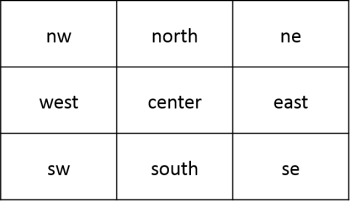
Watermark position on the image.
-
nw: top-left
-
north: top-center
-
ne: top-right
-
west: middle-left
-
center: center
-
east: middle-right
-
sw: bottom-left
-
south: bottom-center
-
se (default): bottom-right
Positions are illustrated in the diagram below.
x
No
Horizontal offset from the image edge. Applies only when
gis set tonw,west,sw,ne,east, orse.[0, 4096]
Default: 10
Unit: pixels (px)
y
No
Vertical offset from the image edge. Applies only when
gis set tonw,north,ne,sw,south, orse.[0, 4096]
Default: 10
Unit: pixels (px)
voffset
No
Vertical offset when
gis set towest,center, oreast.[-1000, 1000]
Default: 0
Unit: pixels (px)
fill
No
Whether to tile the watermark across the source image.
NotTo use the tiled watermark feature for image watermarks, submit a request in Quota Center.
-
1: Tiles the image or text watermark across the source image.
-
0 (default): Does not tile the watermark across the source image.
padx
No
Horizontal spacing between tiled watermarks. Applies only when
fillis set to 1.[0, 4096]
Default: 0
Unit: pixels (px)
pady
No
Vertical spacing between tiled watermarks. Applies only when
fillis set to 1.[0, 4096]
Default: 0
Unit: pixels (px)
Bu ofsetler hem tek filigran konumunu hem de döşeli filigran düzenini kontrol eder.
Aşağıdaki diyagram referans konumlarını ve karşılık gelen değerlerini göstermektedir.
-
-
Resim filigranı parametreleri
Parameter
Required
Description
Value
image
Yes
Full path of the watermark image object, URL-safe Base64-encoded (URL-safe Base64 encoding). For example, encode the path
image/panda.pngto getaW1hZ2UvcGFuZGEucG5n.NotWatermark images must be objects stored in the same bucket.
A URL-safe Base64-encoded string.
-
Filigran görüntüsü ön işleme parametreleri
resize, custom crop, indexed slice, rounded corners ve rotate eylemlerinin tüm parametrelerini kullanarak filigran görüntüsünü ön işleyebilirsiniz. Buna ek olarak, filigran görüntüsü ön işleme ölçeklendirme parametresi P öğesini destekler:
Parameter
Description
Value
P
Scales the watermark image as a percentage of the source image dimensions. For example, setting this to 10 on a 100 × 100 px source image scales the watermark to 10 × 10 px. If the source image changes to 200 × 200 px, the watermark scales to 20 × 20 px.
[1, 100] -
Metin filigranı parametreleri
Parameter
Required
Description
Value
text
Yes
Text content of the watermark, URL-safe Base64-encoded (URL-safe Base64 encoding).
The text string must not exceed 64 bytes before Base64 encoding.
type
No
Font of the text watermark. The font name must be URL-safe Base64-encoded.
For supported fonts and their encoded values, see the font type and encoding table.
Default: wqy-zenhei (encoded as d3F5LXplbmhlaQ)
color
No
Color of the text watermark.
An RGB hexadecimal color value. For example, 000000 for black and FFFFFF for white.
Default: 000000 (black)
size
No
Font size of the text watermark.
(0, 1000]
Default: 40
Unit: pixels (px)
shadow
No
Shadow opacity of the text watermark.
[0, 100]
Default: 0 (no shadow).
rotate
No
Clockwise rotation angle of the text.
[0, 360]
Default: 0 (no rotation).
Aşağıdaki tabloda type parametresi için kullanılabilir yazı tipleri ve kodlanmış değerleri listelenmiştir.
Parameter value
Description
Encoded value
wqy-zenhei
WenQuanYi Zen Hei
d3F5LXplbmhlaQ
wqy-microhei
WenQuanYi Micro Hei
d3F5LW1pY3JvaGVp
fangzhengshusong
Fangzheng Shusong
ZmFuZ3poZW5nc2h1c29uZw
fangzhengkaiti
Fangzheng Kaiti
ZmFuZ3poZW5na2FpdGk
fangzhengheiti
Fangzheng Heiti
ZmFuZ3poZW5naGVpdGk
fangzhengfangsong
Fangzheng Fangsong
ZmFuZ3poZW5nZmFuZ3Nvbmc
droidsansfallback
DroidSansFallback
ZHJvaWRzYW5zZmFsbGJhY2s -
Metin ve resim filigranı parametreleri
Parameter
Required
Description
Value
order
No
Display order of the text and image watermarks.
0 or 1
-
0 (default): The image watermark is in front.
-
1: The text watermark is in front.
align
No
Alignment of the text and image watermarks.
0, 1, or 2
-
0: The watermarks are top-aligned.
-
1: The watermarks are center-aligned.
-
2 (default): The watermarks are bottom-aligned.
interval
No
Spacing between the text and image watermarks.
[0, 1000]
Default: 0
Unit: pixels (px)
-
Filigran kodlama
Metin içeriği, yazı tipi ve resim adı gibi parametreler URL güvenli Base64 ile kodlanmalıdır:
İçeriği Base64 olarak kodlayın.
-
Elde edilen dizedeki aşağıdaki karakterleri değiştirin:
Her artı işaretini (+) kısa çizgi (-) ile değiştirin.
Her eğik çizgiyi (/) alt çizgi (_) ile değiştirin.
Tüm sondaki eşittir işaretlerini (=) kaldırın.
Metin içeriği, metin rengi, yazı tipi ve filigran resmi adı gibi parametreleri kodlamak için bir base64url encoder kullanın.
Bu kodlanmış içerik yalnızca filigran işleminin belirli parametreleri içindir. Bu kodlanmış içeriği imza dizesinde (Signature) kullanmayın.
Yöntemler
Genel görüntüler
Genel okuma veya genel okuma-yazma izni olan bir görüntüye filigran eklemek için görüntü URL'sine IMG parametrelerini ekleyin.
Örnek 1: Metin filigranı ekleme
Bu örnekte Çin (Hangzhou) bölgesindeki oss-console-img-demo-cn-hangzhou-3az paketinden example.jpg görüntüsü kullanılmaktadır. Görüntüye erişim URL'si şöyledir: https://oss-console-img-demo-cn-hangzhou-3az.oss-cn-hangzhou.aliyuncs.com/example.jpg
Aşağıdaki örneklerde example.jpg görüntüsüne nasıl metin filigranı ekleneceği gösterilmektedir:
-
"Hello World" metin filigranı ekleme
"Hello World" metnini URL güvenli Base64 ile kodlayın (Filigran parametrelerini kodlama). Kodlanmış sonuç
SGVsbG8gV29ybGQolur ve görüntü işleme URL'si şöyledir: https://oss-console-img-demo-cn-hangzhou-3az.oss-cn-hangzhou.aliyuncs.com/example.jpg?x-oss-process=image/watermark,text_SGVsbG8gV29ybGQ.
-
Birden çok görüntü işleme parametresi içeren metin filigranı ekleme
example.jpg görüntüsüne "Hello World" metin filigranı eklemek için hem kaynak görüntü hem de filigran için aşağıdaki işleme parametrelerini yapılandırabilirsiniz:
example.jpg dosyasını 300 × 300 piksele yeniden boyutlandırın:
resize,w_300,h_300Yazı tipini WenQuanYi Zen Hei olarak ayarlayın:
type_d3F5LXplbmhlaQ(d3F5LXplbmhlaQ, WenQuanYi Zen Hei için Base64 ile kodlanmış değerdir)Filigran içeriğini "Hello World" olarak ayarlayın:
text_SGVsbG8gV29ybGQMetin rengini beyaz ve yazı tipi boyutunu 30 piksel olarak ayarlayın:
color_FFFFFF,size_30Metin gölgesi şeffaflığını %50 olarak ayarlayın:
shadow_50Filigran konumunu sağ alt köşe olarak, yatay ofseti 10 piksel ve dikey ofseti 10 piksel olarak ayarlayın:
g_se,x_10,y_10
Görüntü işleme URL'si şöyledir: https://oss-console-img-demo-cn-hangzhou-3az.oss-cn-hangzhou.aliyuncs.com/example.jpg?x-oss-process=image/resize,w_300,h_300/watermark,type_d3F5LXplbmhlaQ,size_30,text_SGVsbG8gV29ybGQ,color_FFFFFF,shadow_50,t_100,g_se,x_10,y_10

Örnek 2: Resim filigranı ekleme
Aşağıdaki örneklerde example.jpg görüntüsüne nasıl resim filigranı ekleneceği gösterilmektedir:
-
panda.png resmini filigran olarak ekleme
Filigran resmi adı olan panda.png dosyasını URL güvenli Base64 ile kodlayın. Kodlanmış sonuç
cGFuZGEucG5nolur. Görüntü işleme URL'si şöyledir: https://oss-console-img-demo-cn-hangzhou-3az.oss-cn-hangzhou.aliyuncs.com/example.jpg?x-oss-process=image/watermark,image_cGFuZGEucG5n.URL'de doğru şekilde iletilmesini sağlamak için filigran resminin tam yolu URL güvenli Base64 ile kodlanmalıdır. Örneğin, filigran resmi
panda.pngolarak adlandırılıyorsa veimagedizininde bulunuyorsa,image/panda.pngtam yolunu URL güvenli Base64 ile kodlamanız gerekir. Kodlanmış dizeaW1hZ2UvcGFuZGEucG5nşeklindedir.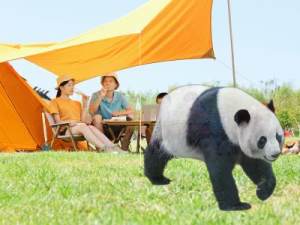
-
Birden çok görüntü işleme parametresi içeren resim filigranı ekleme
example.jpg görüntüsüne panda.png resim filigranını eklemek için hem kaynak görüntü hem de filigran için aşağıdaki işleme parametrelerini yapılandırabilirsiniz:
example.jpg dosyasını 300 × 300 piksele yeniden boyutlandırın:
resize,w_300,h_300example.jpg kalitesini %90 olarak ayarlayın:
quality,q_90panda.png resim filigranını ekleyin:
watermark,image_cGFuZGEucG5n(cGFuZGEucG5n, panda.png için Base64 ile kodlanmış değerdir)Resim filigranının şeffaflığını %90 olarak ayarlayın:
t_90Resim filigranı konumunu sağ alt köşe olarak, yatay ofseti 10 piksel ve dikey ofseti 10 piksel olarak ayarlayın:
g_se,x_10,y_10
Görüntü işleme URL'si şöyledir: https://oss-console-img-demo-cn-hangzhou-3az.oss-cn-hangzhou.aliyuncs.com/example.jpg?x-oss-process=image/resize,w_300,h_300/quality,q_90/watermark,image_cGFuZGEucG5n,t_90,g_se,x_10,y_10

-
Resim filigranını ön işleme ve birden çok görüntü işleme parametresi yapılandırma
example.jpg görüntüsüne panda.png resim filigranını eklemek için hem kaynak görüntü hem de filigran için aşağıdaki işleme parametrelerini yapılandırabilirsiniz:
example.jpg genişliğini 300 piksele yeniden boyutlandırın:
resize,w_300panda.png filigran resmini özgün boyutunun %30'u olacak şekilde ölçeklendirerek ön işleyin:
image_cGFuZGEucG5nP3gtb3NzLXByb2Nlc3M9aW1hZ2UvcmVzaXplLFBfMzA(cGFuZGEucG5nP3gtb3NzLXByb2Nlc3M9aW1hZ2UvcmVzaXplLFBfMzAdeğeri,panda.png?x-oss-process=image/resize,P_30için Base64 ile kodlanmış dizedir)Filigran şeffaflığını %90, konumunu sağ alt köşe ve yatay/dikey ofsetlerini 10 piksel olarak ayarlayın:
t_90,g_se,x_10,y_10
Görüntü işleme URL'si şöyledir: https://oss-console-img-demo-cn-hangzhou-3az.oss-cn-hangzhou.aliyuncs.com/example.jpg?x-oss-process=image/resize,w_300/watermark,image_cGFuZGEucG5nP3gtb3NzLXByb2Nlc3M9aW1hZ2UvcmVzaXplLFBfMzA,t_90,g_se,x_10,y_10

-
Birden çok resim filigranı ekleme
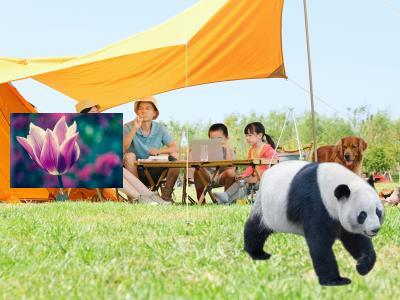
Bu örnekte example.jpg dosyasına panda.png ve Tulips.jpg olmak üzere iki resim filigranı eklenmektedir.
Filigran resmi adı olan panda.png dosyasını URL güvenli Base64 ile kodlayın. Kodlanmış sonuç
cGFuZGEucG5nolur. Görüntü işleme parametresiwatermark,image_cGFuZGEucG5nşeklindedir.Filigran resmi adı olan Tulips.jpg dosyasını URL güvenli Base64 ile kodlayın. Kodlanmış sonuç
VHVsaXBzLmpwZwolur. Resim filigranını kaynak resmin sol orta kısmına konumlandırmak ve yatay/dikey ofsetleri 10 piksel olarak ayarlamak için görüntü işleme parametresiwatermark,image_VHVsaXBzLmpwZw,g_west,x_10,y_10şeklindedir.
Görüntü işleme URL'si şöyledir:
Örnek 3: Metin ve resim filigranı ekleme
Bu örnekte example.jpg görüntüsüne nasıl metin ve resim filigranı ekleneceği gösterilmektedir:
Önceki örneklerden alınan panda.png ve "Hello World" için kodlanmış değerleri birleştirerek aşağıdaki görüntü işleme URL'sini oluşturabilirsiniz: https://oss-console-img-demo-cn-hangzhou-3az.oss-cn-hangzhou.aliyuncs.com/example.jpg?x-oss-process=image/watermark,image_cGFuZGEucG5nP3gtb3NzLXByb2Nlc3M9aW1hZ2UvcmVzaXplLFBfMzA,text_SGVsbG8gV29ybGQ.
Özel görüntüler
Özel görüntülere filigran eklemek için Alibaba Cloud SDK'larını veya REST API'yi kullanın.
Alibaba Cloud SDK'ları
Aşağıdaki örnek kod, yaygın Alibaba Cloud SDK'ları kullanılarak filigran eklemeyi göstermektedir. Diğer diller için bkz. Genel Bakış.
Java
Alibaba Cloud SDK for Java 3.17.4 veya sonraki bir sürümü gereklidir.
import com.aliyun.oss.*;
import com.aliyun.oss.common.auth.*;
import com.aliyun.oss.common.comm.SignVersion;
import com.aliyun.oss.model.GetObjectRequest;
import java.io.File;

public class Demo {
    public static void main(String[] args) throws Throwable {
        // Specify the endpoint. In this example, the endpoint for the China (Hangzhou) region is used. Specify your actual endpoint.
        String endpoint = "https://oss-cn-hangzhou.aliyuncs.com";
        // Specify the region where your bucket is located, for example, cn-hangzhou.
        String region = "cn-hangzhou";
        // Obtain access credentials from environment variables. Before you run the sample code, make sure that the OSS_ACCESS_KEY_ID and OSS_ACCESS_KEY_SECRET environment variables are configured.
        EnvironmentVariableCredentialsProvider credentialsProvider = CredentialsProviderFactory.newEnvironmentVariableCredentialsProvider();
        // Specify the bucket name. Example: examplebucket.
        String bucketName = "examplebucket";
        // Specify the full path of the object. The full path cannot contain the bucket name.
        String objectName = "src.jpg";
        // Specify the destination path for the local file, such as D:\\localpath\\example-new.jpg. The file is created or overwritten.
        String pathName = "D:\\dest.jpg";

        // Create an OSSClient instance.
        // Call the shutdown method to release resources when the OSSClient instance is no longer needed.
        ClientBuilderConfiguration clientBuilderConfiguration = new ClientBuilderConfiguration();
        clientBuilderConfiguration.setSignatureVersion(SignVersion.V4);
        OSS ossClient = OSSClientBuilder.create()
                .endpoint(endpoint)
                .credentialsProvider(credentialsProvider)
                .clientConfiguration(clientBuilderConfiguration)
                .region(region)
                .build();

        try {
            // Add a "Hello World" text watermark to the image.
            String image = "image/watermark,text_SGVsbG8gV29ybGQ";
            GetObjectRequest request = new GetObjectRequest(bucketName, objectName);
            request.setProcess(image);
            // Save the processed image to your local machine as example-new.jpg.
            // If you specify only the filename (for example, example-new.jpg) without a full path, the file is saved to the local directory of the project.
            ossClient.getObject(request, new File("D:\\dest.jpg"));
        } catch (OSSException oe) {
            System.out.println("Caught an OSSException, which means your request made it to OSS, "
                    + "but was rejected with an error response for some reason.");
            System.out.println("Error Message:" + oe.getErrorMessage());
            System.out.println("Error Code:" + oe.getErrorCode());
            System.out.println("Request ID:" + oe.getRequestId());
            System.out.println("Host ID:" + oe.getHostId());
        } catch (ClientException ce) {
            System.out.println("Caught an ClientException, which means the client encountered "
                    + "a serious internal problem while trying to communicate with OSS, "
                    + "such as not being able to access the network.");
            System.out.println("Error Message:" + ce.getMessage());
        } finally {
            if (ossClient != null) {
                ossClient.shutdown();
            }
        }
    }
}
PHP
Alibaba Cloud SDK for PHP 2.7.0 veya sonraki bir sürümü gereklidir.
<?php
if (is_file(__DIR__ . '/../autoload.php')) {
    require_once __DIR__ . '/../autoload.php';
}
if (is_file(__DIR__ . '/../vendor/autoload.php')) {
    require_once __DIR__ . '/../vendor/autoload.php';
}
use OSS\Credentials\EnvironmentVariableCredentialsProvider;
use OSS\OssClient;

// Obtain access credentials from environment variables. Before you run the sample code, make sure that the OSS_ACCESS_KEY_ID and OSS_ACCESS_KEY_SECRET environment variables are configured.
$provider = new EnvironmentVariableCredentialsProvider();
// Specify the endpoint of the region where the bucket is located. For example, if the bucket is in the China (Hangzhou) region, set the endpoint to https://oss-cn-hangzhou.aliyuncs.com.
$endpoint = "https://oss-cn-hangzhou.aliyuncs.com";
// Specify the bucket name. Example: examplebucket.
$bucket= "examplebucket";
// Specify the full path of the object, for example, exampledir/exampleobject.jpg. The full path cannot contain the bucket name.
$object = "src.jpg";
// Specify the destination path for the local file, such as D:\\localpath\\example-new.jpg. The file is created or overwritten.
// If you specify only the filename (for example, example-new.jpg) without a full path, the file is saved to the local directory of the project.
$download_file = "D:\\dest.jpg";

$config = array(
        "provider" => $provider,
        "endpoint" => $endpoint,
        "signatureVersion" => OssClient::OSS_SIGNATURE_VERSION_V4,
        // Specify the general-purpose region ID.
        "region" => "cn-hangzhou"
    );
$ossClient = new OssClient($config);

// Add a "Hello World" text watermark to the image.
$image = "image/watermark,text_SGVsbG8gV29ybGQ";

$options = array(
    OssClient::OSS_FILE_DOWNLOAD => $download_file,
    OssClient::OSS_PROCESS => $image);

// Save the processed image to your local machine.
$ossClient->getObject($bucket, $object, $options);
Python
Alibaba Cloud SDK for Python 2.18.4 veya sonraki bir sürümü gereklidir.
# -*- coding: utf-8 -*-
import oss2
from oss2.credentials import EnvironmentVariableCredentialsProvider

# Obtain access credentials from environment variables. Before you run the sample code, make sure that the OSS_ACCESS_KEY_ID and OSS_ACCESS_KEY_SECRET environment variables are configured.
auth = oss2.ProviderAuthV4(EnvironmentVariableCredentialsProvider())
# Specify the endpoint of the region where the bucket is located. For example, if the bucket is in the China (Hangzhou) region, set the endpoint to https://oss-cn-hangzhou.aliyuncs.com.
endpoint = 'https://oss-cn-hangzhou.aliyuncs.com'
# Specify the general-purpose region ID.
region = 'cn-hangzhou'
bucket = oss2.Bucket(auth, endpoint, 'examplebucket', region=region)
# Specify the name of the source image. If the image is not in the root directory of the bucket, you must specify the full path, for example, exampledir/example.jpg.
key = 'src.jpg'
# Specify the name for the processed image.
new_pic = 'D:\\dest.jpg'

# Add a "Hello World" text watermark to the image.
image = 'image/watermark,text_SGVsbG8gV29ybGQ'
bucket.get_object_to_file(key, new_pic, process=image)
Go
Alibaba Cloud SDK for Go 3.0.2 veya sonraki bir sürümü gereklidir.
package main

import (
	"fmt"
	"os"

	"github.com/aliyun/aliyun-oss-go-sdk/oss"
)

func HandleError(err error) {
	fmt.Println("Error:", err)
	os.Exit(-1)
}

func main() {
	// Obtain access credentials from environment variables. Before you run the sample code, make sure that the OSS_ACCESS_KEY_ID and OSS_ACCESS_KEY_SECRET environment variables are configured.
	provider, err := oss.NewEnvironmentVariableCredentialsProvider()
	if err != nil {
		fmt.Println("Error:", err)
		os.Exit(-1)
	}

	// Create an OSSClient instance.
	// Specify the endpoint for your bucket. In this example, the endpoint for the China (Hangzhou) region is used. Specify your actual endpoint.
	client, err := oss.New("https://oss-cn-hangzhou.aliyuncs.com", "", "", oss.SetCredentialsProvider(&provider), oss.AuthVersion(oss.AuthV4), oss.Region("cn-hangzhou"))
	if err != nil {
		HandleError(err)
	}

	// Specify the name of the bucket where the source image is stored. Example: examplebucket.
	bucketName := "examplebucket"
	bucket, err := client.Bucket(bucketName)
	if err != nil {
		HandleError(err)
	}

	// Specify the name of the source image. If the image is not in the root directory of the bucket, you must specify the full path, for example, exampledir/example.jpg.
	sourceImageName := "src.jpg"
	// Specify a name for the processed image.
	targetImageName := "D://dest.jpg"
	// Add a "Hello World" text watermark to the image.
	image := "image/watermark,text_SGVsbG8gV29ybGQ"
	err = bucket.GetObjectToFile(sourceImageName, targetImageName, oss.Process(image))
	if err != nil {
		HandleError(err)
	}
}
REST API
Son derece özelleştirilmiş uygulamalar için doğrudan REST API'yi çağırın. Bu, kodunuzda manuel imza hesaplaması gerektirir. Imza V4 (Önerilen).
GetObject işlemine filigran parametreleri ekleyerek görüntülere filigran ekleyebilirsiniz.
GET /oss.jpg?x-oss-process=image/watermark,w_100 HTTP/1.1
Host: oss-example.oss-cn-hangzhou.aliyuncs.com
Date: Fri, 28 Oct 2022 06:40:10 GMT
Authorization: OSS4-HMAC-SHA256 Credential=LTAI********************/20250417/cn-hangzhou/oss/aliyun_v4_request,Signature=a7c3554c729d71929e0b84489addee6b2e8d5cb48595adfc51868c299c0c218e
SSS
Filigran olarak çevrimiçi veya yerel resimleri kullanma
Filigran resmi, kaynak resimle aynı paket içinde olmalıdır. Önce çevrimiçi veya yerel resimleri pakete yükleyin.
"Yazı tipi içeriği çok büyük" hatası
Metin filigranları 64 karakterle sınırlıdır (her Çince karakter üç olarak sayılır). "Yazı tipi içeriği çok büyük" hatasını alırsanız metni kısaltın. Örnek 1: Metin filigranı ekleme.
Özel nesnelerde resim filigranı başarısızlığı
Özel nesneler imzalı bir URL gerektirir. IMG parametrelerini sonradan eklemek yerine imzayı oluştururken dahil edin. IMG parametreleri içeren imzalı bir nesne URL'si oluşturma.
Resim filigranları için arka plan rengi
Hayır.
İmzalı URL ile resimlere erişme
Özel nesneler imzalı bir URL gerektirir. IMG parametrelerini sonradan eklemek yerine imzayı oluştururken dahil edin. Görüntü İşleme (Java SDK V1).
Filigranları dikey olarak düzenleme
Evet. Filigranları dikey olarak düzenlemek için birden çok watermark eylemi kullanın.

Filigranları dinamik olarak yeniden boyutlandırma
IMG, dinamik filigran yeniden boyutlandırmayı desteklemez. Kaynak resim boyutlarını algılamak ve OSS API'sini çağırmadan önce filigran boyutunu hesaplamak için istemcinizde veya sunucunuzda özel mantık uygulayın.
Maksimum filigran sayısı
En fazla üç filigran. Daha fazlasını eklemek için bir destek talebi gönderin.