OSS SDK for Go V1 ile çalışmaya başlayın. SDK'yı yükleyin, erişim kimlik bilgilerini yapılandırın ve paket oluşturma, nesne yükleme, indirme, listeleme ve silme gibi temel işlemleri gerçekleştirin.
Ön Koşullar
Başlamadan önce aşağıdakilere sahip olduğunuzdan emin olun:
-
OSS etkinleştirilmiş bir Alibaba Cloud hesabı
-
Bir AccessKey çiftine sahip bir Resource Access Management (RAM) kullanıcısı. Ayrıntılar için bakın: CreateAccessKey
-
Go yüklü
Go kurulumunuzu doğrulayın:
go versionOrtam değişkenlerini yapılandırın
-
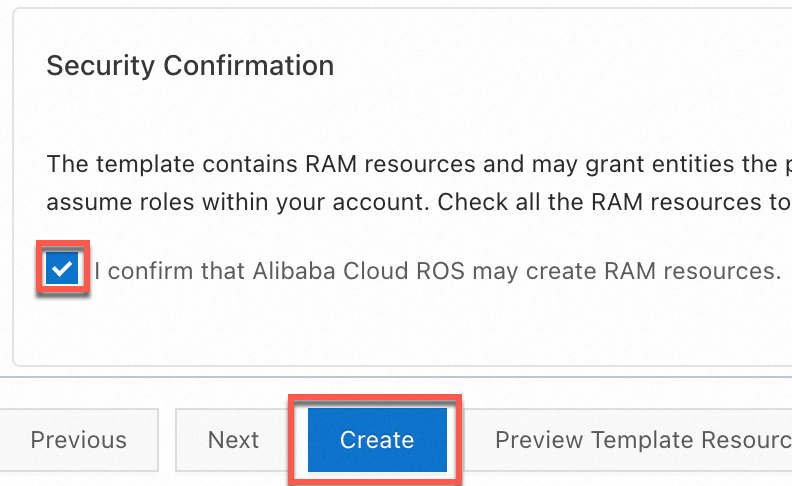
Tam OSS erişim iznine sahip bir RAM kullanıcısı için bir AccessKey çiftini Resource Orchestration Service (ROS) betiği kullanarak hızlıca oluşturabilirsiniz. Bunun için şablona dayalı yığın oluşturma sihirbazına gidin, Security Confirmation bölümünde I confirm that Alibaba Cloud ROS may create RAM resources seçeneğini işaretleyin ve Create düğmesine tıklayın.
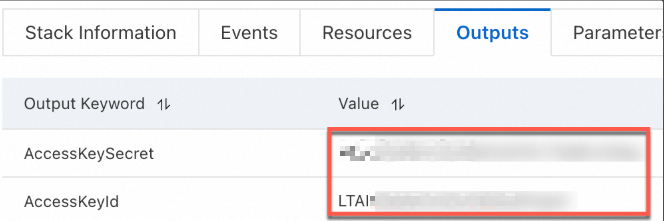
AccessKey çifti oluşturulduktan sonra Outputs sekmesindeki AccessKey bilgilerini kopyalayın.
-
AccessKey çifti için ortam değişkenlerini yapılandırın.
Linux
-
Ortam değişkeni yapılandırmalarını
~/.bashrcdosyasına eklemek için CLI'da aşağıdaki komutları çalıştırın:echo "export OSS_ACCESS_KEY_ID='YOUR_ACCESS_KEY_ID'" >> ~/.bashrc echo "export OSS_ACCESS_KEY_SECRET='YOUR_ACCESS_KEY_SECRET'" >> ~/.bashrc-
Değişiklikleri uygulayın.
source ~/.bashrc -
Ortam değişkenlerinin etkili olup olmadığını kontrol edin:
echo $OSS_ACCESS_KEY_ID
echo $OSS_ACCESS_KEY_SECRET
-
macOS
-
Varsayılan kabuk türünü görüntülemek için terminalde aşağıdaki komutu çalıştırın:
echo $SHELL-
Varsayılan kabuk türüne göre ortam değişkenlerini yapılandırın.
Zsh
-
Ortam değişkeni yapılandırmalarını
~/.zshrcdosyasına eklemek için aşağıdaki komutları çalıştırın:echo "export OSS_ACCESS_KEY_ID='YOUR_ACCESS_KEY_ID'" >> ~/.zshrc echo "export OSS_ACCESS_KEY_SECRET='YOUR_ACCESS_KEY_SECRET'" >> ~/.zshrc -
Değişiklikleri uygulayın.
source ~/.zshrc -
Ortam değişkenlerinin etkili olup olmadığını kontrol edin:
echo $OSS_ACCESS_KEY_ID
echo $OSS_ACCESS_KEY_SECRET
Bash
-
Ortam değişkeni yapılandırmalarını
~/.bash_profiledosyasına eklemek için aşağıdaki komutları çalıştırın:echo "export OSS_ACCESS_KEY_ID='YOUR_ACCESS_KEY_ID'" >> ~/.bash_profile echo "export OSS_ACCESS_KEY_SECRET='YOUR_ACCESS_KEY_SECRET'" >> ~/.bash_profile -
Değişiklikleri uygulayın.
source ~/.bash_profile -
Ortam değişkenlerinin etkili olup olmadığını kontrol edin:
echo $OSS_ACCESS_KEY_ID
echo $OSS_ACCESS_KEY_SECRET
-
-
Windows
CMD
-
CMD'de aşağıdaki komutları çalıştırın:
setx OSS_ACCESS_KEY_ID "YOUR_ACCESS_KEY_ID" setx OSS_ACCESS_KEY_SECRET "YOUR_ACCESS_KEY_SECRET"-
Ortam değişkenlerinin etkili olup olmadığını kontrol edin:
echo %OSS_ACCESS_KEY_ID%
echo %OSS_ACCESS_KEY_SECRET%
-
PowerShell
-
PowerShell'de aşağıdaki komutları çalıştırın:
[Environment]::SetEnvironmentVariable("OSS_ACCESS_KEY_ID", "YOUR_ACCESS_KEY_ID", [EnvironmentVariableTarget]::User) [Environment]::SetEnvironmentVariable("OSS_ACCESS_KEY_SECRET", "YOUR_ACCESS_KEY_SECRET", [EnvironmentVariableTarget]::User)-
Ortam değişkeninin etkili olup olmadığını kontrol edin:
[Environment]::GetEnvironmentVariable("OSS_ACCESS_KEY_ID", [EnvironmentVariableTarget]::User)
[Environment]::GetEnvironmentVariable("OSS_ACCESS_KEY_SECRET", [EnvironmentVariableTarget]::User)
-
-
-
Ortam değişkenlerini ayarladıktan sonra değişikliklerin etkili olması için açık olan tüm terminal oturumlarını veya IDE'leri yeniden başlatmanız gerekir.
OSS SDK for Go'yu yükleyin
-
Go 1.13 veya sonraki bir sürümün yüklü olduğunu doğrulayın.
Go sürümünüzü kontrol edin:
go versionGo yüklü değilse Golang kurulum kılavuzunu izleyin.
-
Bir proje dizini oluşturun ve bir Go modülünü başlatın.
mkdir oss-go-example && cd oss-go-example && go mod init oss-go-example -
SDK'yı yükleyin:
go get github.com/aliyun/aliyun-oss-go-sdk/oss
Hızlı Başlangıç
Aşağıdaki örnekler bir paket oluşturma, nesne yükleme, indirme, listeleme ve silme işlemlerini gösterir.
Paket oluşturun
package main

import (
	"fmt"
	"os"

	"github.com/aliyun/aliyun-oss-go-sdk/oss"
)

func main() {
	/// Obtain a credential from the environment variables. Before you execute the sample code, make sure that the OSS_ACCESS_KEY_ID and OSS_ACCESS_KEY_SECRET environment variables are configured.
	provider, err := oss.NewEnvironmentVariableCredentialsProvider()
	if err != nil {
		fmt.Println("Error:", err)
		os.Exit(-1)
	}

	// Create an OSSClient instance.
	// Set yourEndpoint to the endpoint of the region in which the bucket is located. For example, if the bucket is located in the China (Hangzhou) region, set the endpoint to https://oss-cn-hangzhou.aliyuncs.com. Specify the actual endpoint.
	// Specify the region in which the bucket is located. For example, if your bucket is located in the China (Hangzhou) region, set the region to cn-hangzhou. Specify the actual endpoint.
	clientOptions := []oss.ClientOption{oss.SetCredentialsProvider(&provider)}
	clientOptions = append(clientOptions, oss.Region("yourRegion"))
	// Specify the signature version
	clientOptions = append(clientOptions, oss.AuthVersion(oss.AuthV4))
	client, err := oss.New("yourEndpoint", "", "", clientOptions...)
	if err != nil {
		fmt.Println("Error:", err)
		os.Exit(-1)
	}

	// Create a bucket named examplebucket. Set the storage class to IA (oss.StorageIA), the ACL to public-read (oss.ACLPublicRead), and the redundancy type to ZRS (oss.RedundancyZRS).
	err = client.CreateBucket("examplebucket", oss.StorageClass(oss.StorageIA), oss.ACL(oss.ACLPublicRead), oss.RedundancyType(oss.RedundancyZRS))
	if err != nil {
		fmt.Println("Error:", err)
		os.Exit(-1)
	}
}
Nesne yükleyin
package main

import (
	"log"
	"strings"

	"github.com/aliyun/aliyun-oss-go-sdk/oss"
)

func main() {
	// Obtain a credential from the environment variables. Before you execute the sample code, make sure that the OSS_ACCESS_KEY_ID and OSS_ACCESS_KEY_SECRET environment variables are configured.
	provider, err := oss.NewEnvironmentVariableCredentialsProvider()
	if err != nil {
		log.Fatalf("Failed to create credentials provider: %v", err)
	}

	// Create an OSSClient instance.
	// Set yourEndpoint to the endpoint of the region in which the bucket is located. For example, if the bucket is located in the China (Hangzhou) region, set the endpoint to https://oss-cn-hangzhou.aliyuncs.com. Specify the actual endpoint.
	// Specify the region in which the bucket is located. For example, if your bucket is located in the China (Hangzhou) region, set the region to cn-hangzhou. Specify the actual endpoint.
	clientOptions := []oss.ClientOption{oss.SetCredentialsProvider(&provider)}
	clientOptions = append(clientOptions, oss.Region("yourRegion"))
	// Specify the signature version
	clientOptions = append(clientOptions, oss.AuthVersion(oss.AuthV4))
	client, err := oss.New("yourEndpoint", "", "", clientOptions...)
	if err != nil {
		log.Fatalf("Failed to create OSS client: %v", err)
	}

	// Specify the name of the bucket. Example: examplebucket.
	bucketName := "examplebucket" // Replace examplebucket with the actual bucket name.
	bucket, err := client.Bucket(bucketName)
	if err != nil {
		log.Fatalf("Failed to get bucket: %v", err)
	}

	objectKey := "exampledir/exampleobject.txt" // Replace exampledir/exampleobject.txt with the actual object key.
	content := "Hello OSS"
	err = bucket.PutObject(objectKey, strings.NewReader(content))
	if err != nil {
		log.Fatalf("Failed to put object: %v", err)
	}

	log.Println("File uploaded successfully.")
}
Nesne indirin
package main

import (
	"io"
	"log"

	"github.com/aliyun/aliyun-oss-go-sdk/oss"
)

func main() {
	// Obtain a credential from the environment variables. Before you execute the sample code, make sure that the OSS_ACCESS_KEY_ID and OSS_ACCESS_KEY_SECRET environment variables are configured.
	provider, err := oss.NewEnvironmentVariableCredentialsProvider()
	if err != nil {
		log.Fatalf("Failed to create credentials provider: %v", err)
	}

	// Create an OSSClient instance.
	// Set yourEndpoint to the endpoint of the region in which the bucket is located. For example, if the bucket is located in the China (Hangzhou) region, set the endpoint to https://oss-cn-hangzhou.aliyuncs.com. Specify the actual endpoint.
	// Specify the region in which the bucket is located. For example, if your bucket is located in the China (Hangzhou) region, set the region to cn-hangzhou. Specify the actual endpoint.
	clientOptions := []oss.ClientOption{oss.SetCredentialsProvider(&provider)}
	clientOptions = append(clientOptions, oss.Region("yourRegion"))
	// Specify the signature version
	clientOptions = append(clientOptions, oss.AuthVersion(oss.AuthV4))
	client, err := oss.New("yourEndpoint", "", "", clientOptions...)
	if err != nil {
		log.Fatalf("Failed to create OSS client: %v", err)
	}

	// Specify the name of the bucket.
	bucket, err := client.Bucket("yourBucketName")
	if err != nil {
		log.Fatalf("Failed to get bucket: %v", err)
	}

	// Download the object to a stream.
	body, err := bucket.GetObject("yourObjectName")
	if err != nil {
		log.Fatalf("Failed to get object: %v", err)
	}
	// You must close the stream after the data is read. Otherwise, connection leaks may occur. Consequently, no connections are available and your application cannot work.
	defer body.Close()

	data, err := io.ReadAll(body)
	if err != nil {
		log.Fatalf("Failed to read all data from object: %v", err)
	}
	log.Println("Data:", string(data))
}
Nesneleri listeleyin
package main

import (
	"log"
	"time"

	"github.com/aliyun/aliyun-oss-go-sdk/oss"
)

func main() {
	// Obtain a credential from the environment variables. Before you execute the sample code, make sure that the OSS_ACCESS_KEY_ID and OSS_ACCESS_KEY_SECRET environment variables are configured.
	provider, err := oss.NewEnvironmentVariableCredentialsProvider()
	if err != nil {
		log.Fatalf("Failed to create credentials provider: %v", err)
	}

	// Create an OSSClient instance.
	// Set yourEndpoint to the endpoint of the region in which the bucket is located. For example, if the bucket is located in the China (Hangzhou) region, set the endpoint to https://oss-cn-hangzhou.aliyuncs.com. Specify the actual endpoint.
	// Specify the region in which the bucket is located. For example, if your bucket is located in the China (Hangzhou) region, set the region to cn-hangzhou. Specify the actual endpoint.
	client, err := oss.New("yourEndpoint", "", "", oss.SetCredentialsProvider(&provider), oss.Region("yourRegion"), oss.AuthVersion(oss.AuthV4))
	if err != nil {
		log.Fatalf("Failed to create OSS client: %v", err)
	}

	// Specify the name of the bucket.
	bucketName := "yourBucketName" // Replace yourBucketName with the actual bucket name.
	bucket, err := client.Bucket(bucketName)
	if err != nil {
		log.Fatalf("Failed to get bucket: %v", err)
	}

	// Specify the position from which the list starts.
	continueToken := ""

	for {
		// List all objects by page.
		lsRes, err := bucket.ListObjectsV2(oss.ContinuationToken(continueToken))
		if err != nil {
			log.Fatalf("Failed to list objects: %v", err)
		}

		// Display the listed objects. By default, up to 100 objects are returned at a time.
		for _, object := range lsRes.Objects {
			log.Printf("Object Key: %s, Type: %s, Size: %d, ETag: %s, LastModified: %s, StorageClass: %s\n",
				object.Key, object.Type, object.Size, object.ETag, object.LastModified.Format(time.RFC3339), object.StorageClass)
		}

		// If you want to list more objects, update the value of the continueToken parameter.
		if lsRes.IsTruncated {
			continueToken = lsRes.NextContinuationToken
		} else {
			break
		}
	}

	log.Println("All objects have been listed.")
}
Nesne silin
package main

import (
	"log"

	"github.com/aliyun/aliyun-oss-go-sdk/oss"
)

func main() {
	// Obtain a credential from the environment variables. Before you execute the sample code, make sure that the OSS_ACCESS_KEY_ID and OSS_ACCESS_KEY_SECRET environment variables are configured.
	provider, err := oss.NewEnvironmentVariableCredentialsProvider()
	if err != nil {
		log.Fatalf("Failed to create credentials provider: %v", err)
	}

	// Create an OSSClient instance.
	// Set yourEndpoint to the endpoint of the region in which the bucket is located. For example, if the bucket is located in the China (Hangzhou) region, set the endpoint to https://oss-cn-hangzhou.aliyuncs.com. Specify the actual endpoint.
	// Specify the region in which the bucket is located. For example, if your bucket is located in the China (Hangzhou) region, set the region to cn-hangzhou. Specify the actual endpoint.
	clientOptions := []oss.ClientOption{oss.SetCredentialsProvider(&provider)}
	clientOptions = append(clientOptions, oss.Region("yourRegion"))
	// Specify the signature version
	clientOptions = append(clientOptions, oss.AuthVersion(oss.AuthV4))
	client, err := oss.New("yourEndpoint", "", "", clientOptions...)
	if err != nil {
		log.Fatalf("Failed to create OSS client: %v", err)
	}

	// Specify the bucket name. Example: examplebucket.
	bucketName := "examplebucket"
	// Set objectName to the full path of the object that you want to delete. The full path must contain the extension of the object name and cannot contain the bucket name. Example: exampledir/exampleobject.txt.
	// If you want to delete a directory, set objectName to the directory name. If the directory is not empty, you must delete all objects in the directory before you can delete the directory.
	objectName := "exampledir/exampleobject.txt"

	// Get a bucket instance.
	bucket, err := client.Bucket(bucketName)
	if err != nil {
		log.Fatalf("Failed to get bucket '%s': %v", bucketName, err)
	}

	// Delete a single object.
	err = bucket.DeleteObject(objectName)
	if err != nil {
		log.Fatalf("Failed to delete object '%s': %v", objectName, err)
	}

	log.Printf("Successfully deleted object: %s\n", objectName)
}
Örnekleri çalıştırın
-
Bir nesne yüklemek için proje dizininizde bir main.go dosyası oluşturun ve yükleme kodunu yapıştırın.
-
main.go dosyasındaki yourRegion, yourEndpoint, bucketName ve objectName değerlerini güncelleyin.
-
Aşağıdaki komutu çalıştırın:
go run main.go
SSS
OSS SDK'ları kullanılırken AccessDenied hatası bildirilirse ne yapmalıyım?
Kaynaklar
-
GitHub'daki Kod örnekleri