Cloud-native gateway ve arka uç hizmetleri genellikle farklı güvenlik gruplarında bulunan düğümlerde çalışır. Gateway'in arka uç hizmetlerine erişmesine izin vermek için güvenlik grubu kurallarını yapılandırabilirsiniz.
Genel Bilgiler
Güvenlik grubu; ECS örnekleri ve esnek ağ arayüzleri (ENI) gibi kaynakların gelen ve giden trafiğini kontrol eden sanal bir güvenlik duvarı işlevi görür. Durum denetimli inceleme ve paket filtreleme sağlayarak güvenliği artırır. Bulutta güvenlik alanlarını tanımlamak için güvenlik gruplarını ve güvenlik grubu kurallarını kullanabilirsiniz. Daha fazla bilgi için bkz. Güvenlik grubuna genel bakış.
Cloud-native gateway satın alırken bir VPC ve bir güvenlik grubu türü seçmeniz gerekir. Arka uç hizmetinizle aynı güvenlik grubu türünü kullanmanızı öneririz. Seçiminize göre cloud-native gateway, gateway örnek düğümlerini yönetmek için ilgili yönetilen güvenlik grubunu oluşturur. Gateway ve arka uç hizmetleri farklı güvenlik gruplarında bulunan düğümlerde barındığından, gateway'in arka uç hizmetinin güvenlik grubundaki gerekli bağlantı noktası aralığına erişim izni vermeniz gerekir.
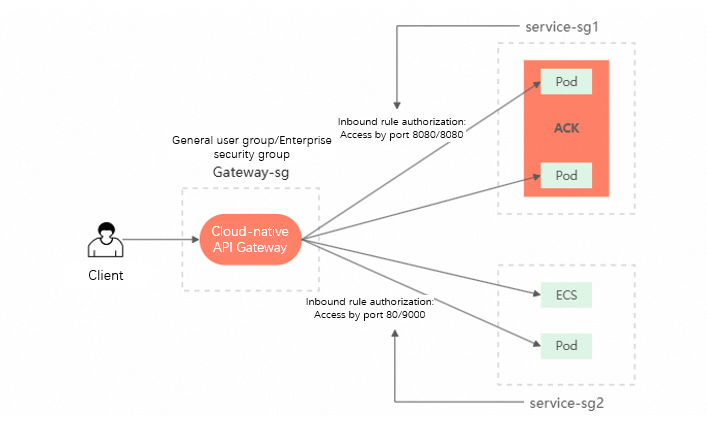
Adım 1: Arka uç hizmeti güvenlik grubunu alın
Cloud-native gateway ile ilişkili yukarı akış hizmetleri genellikle konteynerlerde veya ECS örneklerinde dağıtılır. Dağıtım türüne bağlı olarak güvenlik grubu kimliğini alabilirsiniz.
Managed ACK cluster
Log on to the ACK konsolu. In the left navigation pane, click Clusters.
On the Clusters page, click the name of your cluster. In the left navigation pane, click .
On the Node Pools page, click the target node pool, and then click the Basic Information tab to find the security group ID.
ACK Serverless cluster
Log on to the ACK konsolu. In the left navigation pane, click Clusters.
-
On the Clusters page, click the name of the target cluster. On the Basic Information tab, find the security group ID.
The security group ID is in the Control Plane Security Group field of the Network section.
ECS instance
Log on to the ECS konsolu.
In the left-side navigation pane, choose .
On the Instance page, click the ECS instance where the backend service is deployed, and then click the Security Group tab to find the security group ID.
Adım 2: Güvenlik grubu kuralı ekleyin
Log on to the MSE konsolu.
In the left-side navigation pane, choose Cloud-native Gateway > Gateways. In the top navigation bar, select a region.
On the Gateways page, click the name of the target gateway. In the left-side navigation pane, click Overview, and then click the Security Group Authorization tab.
-
Click Add Security Group Rule. In the text box under the Security Group ID column, paste the security group ID that you obtained in Step 1 and select the corresponding security group.
After selecting the security group, set the Protocol Type (such as tcp), enter the port range to open in Port Range and press Enter to generate it, fill in the Description as needed, and then click Save.
-
Enter the Port Range for authorization, using the
start value/end valueformat.You can enter multiple port ranges. Press Enter after each entry.
For example, enter
1/65535and8080/8080. You can add multiple port ranges at the same time. -
Click Save.
The cloud-native gateway generates the corresponding rule.
After saving, you can view the list of authorized security group rules on the Security Group Authorization tab, which contains two TCP protocol rules with port ranges
1/65535(all ports) and8080/8080.This new rule also appears in the backend service node's security group.
Güvenlik grubu kuralını silin
Log on to the MSE konsolu.
In the left-side navigation pane, choose Cloud-native Gateway > Gateways. In the top navigation bar, select a region.
On the Gateways page, click the ID of the gateway.
In the left-side navigation pane, click Overview, and then click the Add Security Group Rule tab. In the Actions column for the rule you want to remove, click Delete, and then click OK.
By default, this action only deletes the authorization rule from the cloud-native gateway. To also delete the corresponding rule from the backend service's security group, you must select the Cascade Delete The Preceding Inbound Rules In This Security Group checkbox.
SSS
Yetkilendirmeden sonra hizmete erişilemiyor
You can troubleshoot the issue by following these steps:
-
Verify that you have authorized the correct security group for the node where your backend service is deployed.
For example, you might have authorized the security group for Node B, but the service is actually running on Node A.
-
Check if the target node belongs to multiple security groups.
If it does, we recommend authorizing each security group.
Ani hizmet erişim hatası
You can troubleshoot the issue by following these steps:
-
Confirm that the service itself is running correctly.
You can use the
curlcommand from another node within the same security group to check if the service is reachable. -
Confirm whether the port exposed by your service has changed.
For example, if you authorized port 8080 for the cloud-native gateway but the service later changed to use port 8081, you must update the port in the security group authorization rule. To avoid this issue, consider specifying a wider port range, such as 1/65535, when you configure the authorization.