Bir Java işlevini Function Compute üzerinde dağıtmak için kodunuzu ve bağımlılıklarınızı ZIP veya JAR dosyasına paketleyin, ardından paketi Function Compute konsolu veya Serverless Devs aracılığıyla yükleyin.
Bu konu aşağıdaki iki dağıtım yolunu kapsar:
Maven ile dağıtma — konsol üzerinden manuel olarak derleme ve yükleme
Serverless Devs ile dağıtma — tek bir CLI komutuyla derleme ve dağıtma
Bağımlılık kütüphaneleri
Function Compute iki Java kütüphanesi sağlar:
| Kütüphane | Artifact ID | Sürüm | Açıklama |
|---|---|---|---|
com.aliyun:fc-java-core |
fc-java-core |
1.4.1 | İşleyici arayüzünü ve bağlam nesnesini tanımlar |
com.aliyun:fc-java-events |
fc-java-event |
1.2.0 | Yaygın olay kaynakları için olay türlerini sağlar |
Her iki kütüphaneyi de Maven merkezi deposundan edinin ve pom.xml dosyanıza ekleyin:
<!-- fc-java-core: required -->
<dependency>
    <groupId>com.aliyun.fc.runtime</groupId>
    <artifactId>fc-java-core</artifactId>
    <version>1.4.1</version>
</dependency>

<!-- fc-java-events: optional, add if your function handles events from Alibaba Cloud services -->
<dependency>
    <groupId>com.aliyun.fc.runtime</groupId>
    <artifactId>fc-java-event</artifactId>
    <version>1.2.0</version>
</dependency>
Bağımlılık paketiniz çok büyükse, kod paketini küçük tutmak için bağımlılıkları bir katmana paketleyin. Ayrıntılar için bkz. Özel katman oluşturma .
Maven ile dağıtma
Ön koşullar
Başlamadan önce şunlara sahip olduğunuzdan emin olun:
Java yüklü (Java resmi web sitesi)
Maven yüklü (Apache Maven Yükleme)
Adımlar
-
Bir Java projesi oluşturun. İşleyicinizi
src/main/java/example/App.javakonumuna yerleştirin:package example; import com.aliyun.fc.runtime.Context; import com.aliyun.fc.runtime.StreamRequestHandler; import java.io.IOException; import java.io.InputStream; import java.io.OutputStream; public class App implements StreamRequestHandler { @Override public void handleRequest(InputStream inputStream, OutputStream outputStream, Context context) throws IOException { outputStream.write(new String("hello world").getBytes()); } }Daha fazla işleyici örneği için bkz. İşleyiciler ve Bağlam.
-
pom.xmldosyasında,maven-shade-pluginöğesini<build>bölümüne ekleyin. Bu eklenti, bağımlılıklarınızı dağıtıma uygun tek bir JAR dosyasında birleştirir.Apache Maven Assembly eklentisini Apache Maven Shade yerine de kullanabilirsiniz.
<build>
    <plugins>
        <plugin>
            <groupId>org.apache.maven.plugins</groupId>
            <artifactId>maven-shade-plugin</artifactId>
            <version>3.2.1</version>
            <executions>
                <execution>
                    <phase>package</phase>
                    <goals>
                        <goal>shade</goal>
                    </goals>
                    <configuration>
                        <filters>
                            <filter>
                                <artifact>*:*</artifact>
                                <excludes>
                                    <exclude>META-INF/*.SF</exclude>
                                    <exclude>META-INF/*.DSA</exclude>
                                    <exclude>META-INF/*.RSA</exclude>
                                </excludes>
                            </filter>
                        </filters>
                    </configuration>
                </execution>
            </executions>
        </plugin>
    </plugins>
</build>
<details> <summary>Tam örnek pom.xml</summary>
<project xmlns="http://maven.apache.org/POM/4.0.0"
  xmlns:xsi="http://www.w3.org/2001/XMLSchema-instance" xsi:schemaLocation="http://maven.apache.org/POM/4.0.0 http://maven.apache.org/maven-v4_0_0.xsd">
  <modelVersion>4.0.0</modelVersion>
  <groupId>example</groupId>
  <artifactId>HelloFCJava</artifactId>
  <packaging>jar</packaging>
  <version>1.0-SNAPSHOT</version>
  <name>HelloFCJava</name>

  <dependencies>
    <dependency>
      <groupId>junit</groupId>
      <artifactId>junit</artifactId>
      <version>3.8.1</version>
      <scope>test</scope>
    </dependency>
    <dependency>
      <groupId>com.aliyun.fc.runtime</groupId>
      <artifactId>fc-java-core</artifactId>
      <version>1.4.1</version>
    </dependency>
  </dependencies>

  <build>
    <plugins>
        <plugin>
          <groupId>org.apache.maven.plugins</groupId>
          <artifactId>maven-shade-plugin</artifactId>
          <version>3.2.1</version>
          <executions>
            <execution>
              <phase>package</phase>
              <goals>
                <goal>shade</goal>
              </goals>
              <configuration>
                <filters>
                  <filter>
                    <artifact>*:*</artifact>
                    <excludes>
                      <exclude>META-INF/*.SF</exclude>
                      <exclude>META-INF/*.DSA</exclude>
                      <exclude>META-INF/*.RSA</exclude>
                    </excludes>
                  </filter>
                </filters>
              </configuration>
            </execution>
          </executions>
        </plugin>
    </plugins>
  </build>

  <properties>
    <maven.compiler.target>1.8</maven.compiler.target>
    <maven.compiler.source>1.8</maven.compiler.source>
    <maven.test.skip>true</maven.test.skip>
  </properties>
</project>
</details>
-
Proje kök dizininden şu komutu çalıştırın:
ÖnemlimacOS ve Linux'ta, sıkıştırmadan önce kod dosyasının okunabilir ve yürütülebilir olduğundan emin olun.
mvn clean packageBaşarılı bir derleme şu şekilde sonlanır:
[INFO] BUILD SUCCESS
[INFO] ------------------------------------------------------------------------
[INFO] Total time:  11.681 s
[INFO] Finished at: 2020-03-26T15:55:05+08:00
[INFO] ------------------------------------------------------------------------
Çıktı JAR dosyasının adı,
pom.xmldosyasındakiartifactIdveversionalanlarına göre belirlenir. Yukarıdaki örnek için dosya adıtarget/HelloFCJava-1.0-SNAPSHOT.jarolur. Derleme başarısız olursa hata mesajını kontrol edin, kodu düzeltin ve yeniden deneyin. -
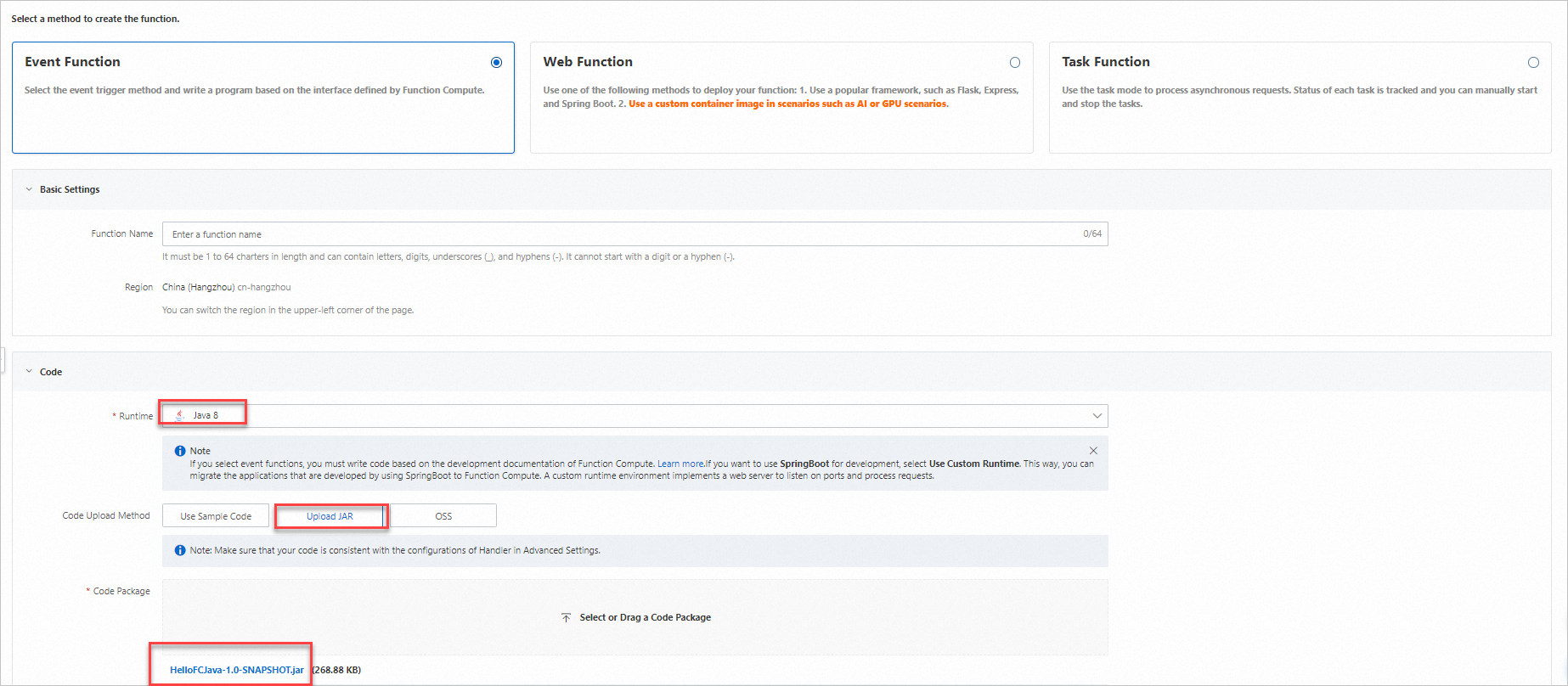
Function Compute konsolunda oturum açın ve JAR dosyasını yükleyin.
-
Function Details sayfasında Configuration sekmesine gidin ve Handler değerini doğrulayın. İşleyici
[Paket adı].[Sınıf adı]::[Yöntem adı]biçimini izlemelidir. Yukarıdaki örnek için işleyiciexample.App::handleRequestşeklindedir. Gerekirse Basic Configurations bölümünde Modify seçeneğine tıklayarak güncelleyin.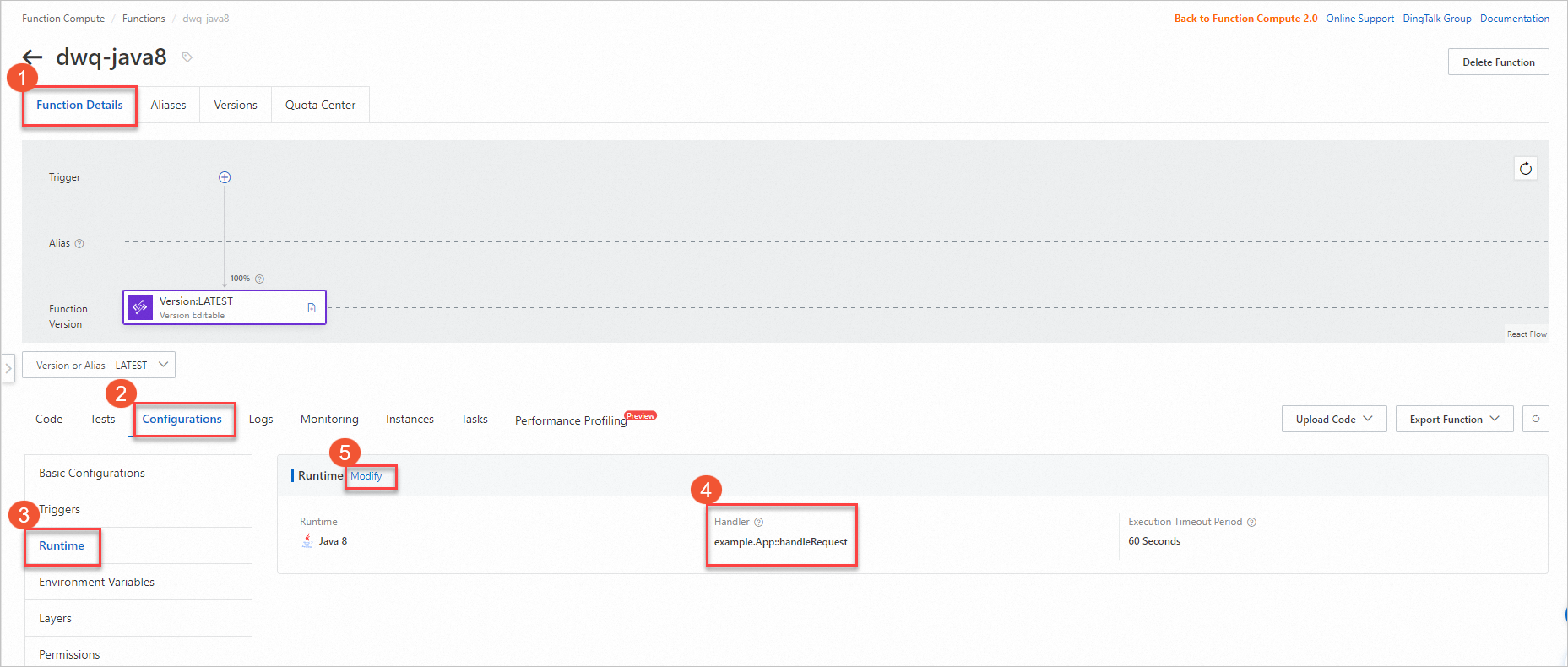
-
Code sekmesinde Test Function seçeneğine tıklayarak dağıtımı doğrulayın.

Serverless Devs ile dağıtma
Serverless Devs, derleme ve dağıtımı tek bir komutla yönetir. s deploy komutu, kodunuzu yüklemeden önce mvn package komutunu otomatik olarak çalıştırır.
Ön koşullar
Başlamadan önce şunlara sahip olduğunuzdan emin olun:
Serverless Devs ve bağımlılıkları yüklü. Bkz. Serverless Devs ve bağımlılıkları yükleme.
Serverless Devs yapılandırıldı. Bkz. Serverless Devs'i yapılandırma.
Java Development Kit (JDK) yüklü. Java İndirmeleri sayfasından indirin.
Maven yüklü. Apache Maven İndirmeleri sayfasından indirin.
Adımlar
-
Bir proje başlatın:
s initİstendiğinde tedarikçi olarak Alibaba Cloud'u seçin ve bir Java şablonu, çalışma zamanı, bölge ile işlev adı belirleyin.
-
Proje dizinine gidin:
cd start-fc-event-java8Proje yapısı aşağıdaki gibidir:
start-fc-event-java8 ├── src │ └── main │ └── java │ └── example │ └── App.java ├── pom.xml ├── readme └── s.yaml -
Projeyi dağıtın:
s deployServerless Devs önce
mvn packagekomutunu çalıştırır (pre-deploykancası), ardından JAR dosyasını yükler ve dağıtır. Başarılı bir dağıtım şu benzeri bir çıktı ile sonlanır:[2022-04-07 12:00:09] [INFO] [S-CORE] - Start the pre-action [2022-04-07 12:00:09] [INFO] [S-CORE] - Action: mvn package [INFO] Scanning for projects... [INFO] ------------------------< example:HelloFCJava >------------------------- [INFO] Building HelloFCJava 1.0-SNAPSHOT [INFO] --------------------------------[ jar ]--------------------------------- ...... [INFO] BUILD SUCCESS [INFO] ------------------------------------------------------------------------ [INFO] Total time: 3.617 s [INFO] Finished at: 2022-04-07T20:00:14+08:00 [INFO] ------------------------------------------------------------------------ [2022-04-07 12:00:14] [INFO] [S-CORE] - End the pre-action Checking Service, Function (0.64s) Creating Service, Function (0.71s) Tips for next step ====================== * Display information of the deployed resource: s info * Display metrics: s metrics * Display logs: s logs * Invoke remote function: s invoke * Remove Service: s remove service * Remove Function: s remove function * Remove Trigger: s remove trigger * Remove CustomDomain: s remove domain helloworld: region: cn-hangzhou service: name: hello-world-service function: name: start-fc-event-java8 runtime: java8 handler: example.App::handleRequest memorySize: 128 timeout: 60 -
İşlevin doğru çalıştığını doğrulamak için çağırın:
s invokeBeklenen çıktı:
========= FC invoke Logs begin =========
FC Initialize Start RequestId: b246c3bf-06bc-49e5-92b8-xxxxxxxx
FC Initialize End RequestId: b246c3bf-06bc-49e5-92b8-xxxxxxxx
FC Invoke Start RequestId: b246c3bf-06bc-49e5-92b8-xxxxxxxx
FC Invoke End RequestId: b246c3bf-06bc-49e5-92b8-xxxxxxxx

Duration: 7.27 ms, Billed Duration: 8 ms, Memory Size: 128 MB, Max Memory Used: 65.75 MB
========= FC invoke Logs end =========

FC Invoke Result:
hello world