ApsaraMQ for RocketMQ, işlem tutarlılığını sağlamak için eXtended Architecture (X/Open XA) benzeri dağıtık işlem işleme özelliği sunar. Bu konuda, Java için TCP istemci SDK'sını kullanarak işlemsel mesajların nasıl gönderileceği ve alınacağı açıklanmaktadır.
ApsaraMQ for RocketMQ konusunda yeniyseniz, mesaj gönderip almadan önce çalışan bir proje kurmak için Demo projesi bölümüne bakın.
İşlemsel mesajların çalışma şekli
Aşağıdaki diyagram, işlemsel mesaj teslimi sırasında üretici, broker ve yerel işlemin nasıl etkileşime girdiğini gösterir.
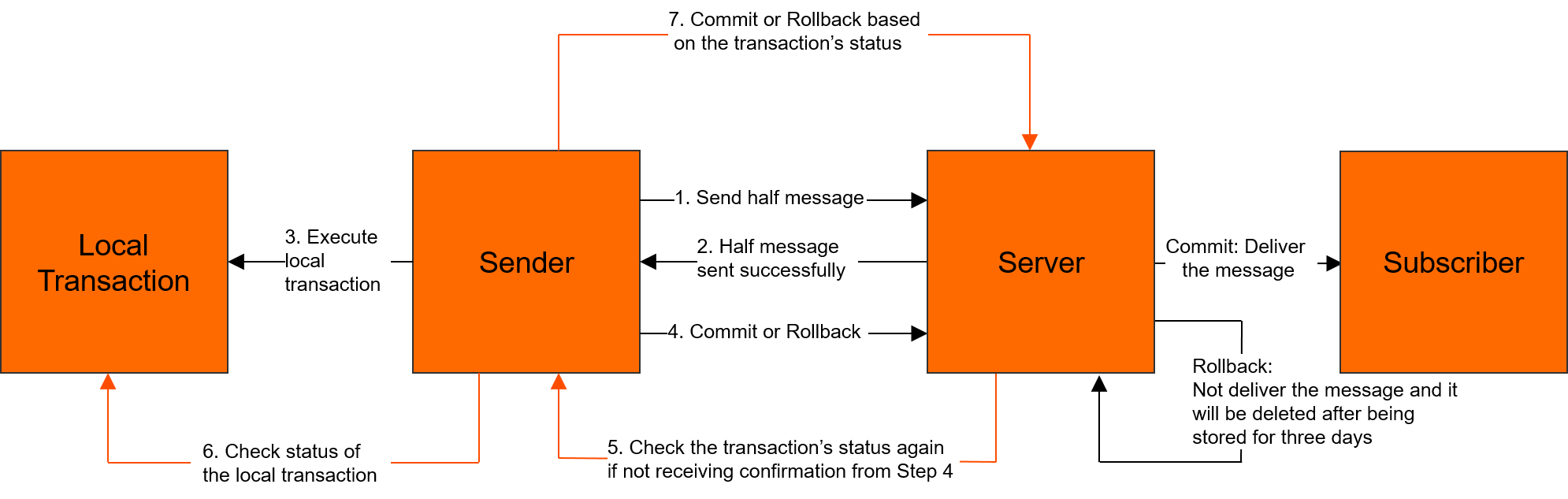
İşlemsel mesaj modeli hakkında daha fazla bilgi için bkz. İşlemsel mesajlar.
Önkoşullar
Başlamadan önce aşağıdakileri yaptığınızdan emin olun:
Java SDK'sını indirin. Sürüm bilgileri için bkz. Sürüm notları
Geliştirme ortamınızı hazırlayın. Daha fazla bilgi için bkz. Ortamı hazırlama
(İsteğe bağlı) Günlük kaydı yapılandırmasını ayarlayın. Daha fazla bilgi için bkz. Günlük kaydı ayarları
İşlemsel mesaj gönderme
Bir işlemsel mesaj göndermek için üç bileşen gerekir:
Mesajı göndermek için bir
TransactionProducer.Yarı mesaj gönderildiğinde yerel işleminizi çalıştırmak için bir
LocalTransactionExecuter.Çözülmemiş işlemleri doğrulamak amacıyla broker tarafından çağrılan bir
LocalTransactionChecker.
Tam kaynak kodu için ApsaraMQ for RocketMQ kod kitaplığına bakın.
package com.aliyun.openservices.tcp.example.producer;

import com.aliyun.openservices.ons.api.Message;
import com.aliyun.openservices.ons.api.ONSFactory;
import com.aliyun.openservices.ons.api.PropertyKeyConst;
import com.aliyun.openservices.ons.api.SendResult;
import com.aliyun.openservices.ons.api.exception.ONSClientException;
import com.aliyun.openservices.ons.api.transaction.LocalTransactionChecker;
import com.aliyun.openservices.ons.api.transaction.LocalTransactionExecuter;
import com.aliyun.openservices.ons.api.transaction.TransactionProducer;
import com.aliyun.openservices.ons.api.transaction.TransactionStatus;

import java.util.Date;
import java.util.Properties;

public class SimpleTransactionProducer {

    public static void main(String[] args) {

        Properties properties = new Properties();
        // The consumer group ID created in the ApsaraMQ for RocketMQ console.
        // The consumer group ID for transactional messages cannot be the same
        // as the ID used for other message types.
        properties.put(PropertyKeyConst.GROUP_ID, "<your-group-id>");
        // Get AccessKey credentials from environment variables
        // to avoid hardcoding sensitive information.
        properties.put(PropertyKeyConst.AccessKey, System.getenv("ALIBABA_CLOUD_ACCESS_KEY_ID"));
        properties.put(PropertyKeyConst.SecretKey, System.getenv("ALIBABA_CLOUD_ACCESS_KEY_SECRET"));
        // The TCP endpoint. You can find this value in the TCP Endpoint section
        // of the Instance Details page in the ApsaraMQ for RocketMQ console.
        properties.put(PropertyKeyConst.NAMESRV_ADDR, "<your-tcp-endpoint>");

        // Register a transaction checker before you create the producer.
        // The broker calls this checker to verify unresolved transactions.
        LocalTransactionCheckerImpl localTransactionChecker = new LocalTransactionCheckerImpl();
        TransactionProducer transactionProducer = ONSFactory.createTransactionProducer(properties, localTransactionChecker);
        transactionProducer.start();

        Message msg = new Message("<your-topic>", "TagA", "Hello MQ transaction===".getBytes());

        for (int i = 0; i < 3; i++) {
            try {
                SendResult sendResult = transactionProducer.send(msg, new LocalTransactionExecuter() {
                    @Override
                    public TransactionStatus execute(Message msg, Object arg) {
                        // Run your local transaction logic here.
                        System.out.println("Execute the local transaction and commit the transaction status.");
                        return TransactionStatus.CommitTransaction;
                    }
                }, null);
                assert sendResult != null;
            } catch (ONSClientException e) {
                // Handle the failure: retry sending or persist the message for later processing.
                System.out.println(new Date() + " Send mq message failed! Topic is:" + msg.getTopic());
                e.printStackTrace();
            }
        }

        System.out.println("Send transaction message success.");
    }
}
Aşağıdaki yer tutucuları kendi değerlerinizle değiştirin:
| Yer Tutucu | Açıklama | Nereden Bulunur |
|---|---|---|
<your-group-id> |
İşlemsel mesajlar için tüketici grubu kimliği | ApsaraMQ for RocketMQ konsolu |
<your-tcp-endpoint> |
Örneğinizin TCP uç noktası | Instance Details sayfası > TCP Endpoint bölümü |
<your-topic> |
Konu adı | ApsaraMQ for RocketMQ konsolu |
İşlem denetleyicisini uygulama
Broker, bir yarı mesajın durumunu belirleyemediğinde işlem denetleyicisini çağırır. Bu durum şu durumlarda oluşur:
LocalTransactionExecuteröğesiTransactionStatus.Unknowdöndürür.Üretici, bir işlem durumu onaylamadan önce çıkış yapar.
Her iki durumda da broker, düzenli aralıklarla üretici kümesindeki bir üreticiye durum denetleme isteği gönderir. Üretici yerel işlemi denetler ve nihai durumu bildirir.
// Transaction checker implementation
class LocalTransactionCheckerImpl implements LocalTransactionChecker {

    @Override
    public TransactionStatus check(Message msg) {
        System.out.println("Received transaction status check request. MsgId: " + msg.getMsgID());
        // Query the local transaction status and return the result.
        // Return CommitTransaction, RollbackTransaction, or Unknow.
        return TransactionStatus.CommitTransaction;
    }
}
check yönteminiz şunları yapmalıdır:
Yarı mesaja karşılık gelen yerel işlemin durumunu (onaylanmış veya geri alınmış) kontrol edin.
İşlem durumunu broker'a bildirin:
TransactionStatus.CommitTransaction,TransactionStatus.RollbackTransactionveyaTransactionStatus.Unknow.
İşlemsel mesajlara abone olma
İşlemsel mesajlara abone olmak, normal mesajlara abone olmakla aynıdır. Daha fazla bilgi için bkz. Mesajlara abone olma.