Arena kullanarak DeepSpeed dağıtık eğitim işleri çalıştırın ve sonuçları TensorBoard ile görselleştirin.
Ön koşullar
Başlamadan önce aşağıdakilere sahip olduğunuzdan emin olun:
GPU hızlandırmalı düğümlere sahip bir ACK kümesi. Bkz. GPU hızlandırmalı düğümler içeren bir ACK kümesi oluşturun.
Cloud-native AI paketi yüklü olmalı ve
ack-arenaCLI sürümü 0.9.10 veya üzeri olmalıdır. Bkz. Cloud-native AI paketini dağıtın.Arena istemcisi sürüm 0.9.10 veya üzeri yüklü olmalıdır. Bkz. Arena istemcisini yapılandırın.
Kümede kalıcı birim talepleri (PVC'ler) oluşturulmuş olmalıdır. Bkz. Paylaşılan bir NAS birimini yapılandırın.
Nasıl çalışır
ACK'deki bir DeepSpeed işi, başlatıcı-işçi topolojisiyle çalışır:
Başlatıcı düğüm, dağıtık eğitim çalışmasını koordine eder. Başlatıcı düğüm GPU kullanmaz.
İşçi düğümler, gerçek eğitimi yürütür. Her işçi bir veya daha fazla GPU alır ve DeepSpeed eğitim betiğini çalıştırır.
Düğümler arası iletişim SSH kullandığından tüm görüntülerde OpenSSH kurulu olmalıdır.
Eğitim işlerine yalnızca parolasız SSH üzerinden erişilir. Üretim ortamlarında Kubernetes Secret'larını koruyun.
Örnek kurulum
Bu kılavuz, maskelenmiş dil modeli eğiten bir örnek kullanır. microsoft/DeepSpeedExamples deposundaki örnek kod ve veri kümesi, registry.cn-beijing.aliyuncs.com/acs/deepspeed:hello-deepspeed görüntüsünde önceden paketlenmiştir. Örnek, eğitim sonuçlarını depolamak için training-data adlı bir PVC (paylaşılan bir NAS birimi tarafından desteklenen) kullanır.
Özel bir görüntü kullanma
Kendi eğitim kodunuzu getirmek için aşağıdaki yaklaşımlardan birini seçin:
-
ACK DeepSpeed temel görüntüsünden oluşturun:
registry.cn-beijing.aliyuncs.com/acs/deepspeed:v072_base Kendi temel görüntünüzden oluşturun: Dockerfile dosyasını izleyin ve görüntüye OpenSSH yükleyin.
Kodu özel bir Git deposundan senkronize etme
Eğitim kodunu çalışma zamanında çekmek için --sync-mode=git ve --sync-source parametrelerini iletin. Arena, depoyu senkronize etmek için git-sync kullanır. Kimlik bilgilerini GIT_SYNC_USERNAME ve GIT_SYNC_PASSWORD ortam değişkenlerini kullanarak ayarlayın.
DeepSpeed işi gönderme ve izleme
Adım 1: Mevcut GPU kaynaklarını kontrol edin
arena top nodeBeklenen çıktı:
NAME                       IPADDRESS      ROLE    STATUS  GPU(Total)  GPU(Allocated)
cn-beijing.192.1xx.x.xx   192.1xx.x.xx   <none>  Ready   0           0
cn-beijing.192.1xx.x.xx   192.1xx.x.xx   <none>  Ready   0           0
cn-beijing.192.1xx.x.xx   192.1xx.x.xx   <none>  Ready   1           0
cn-beijing.192.1xx.x.xx   192.1xx.x.xx   <none>  Ready   1           0
cn-beijing.192.1xx.x.xx   192.1xx.x.xx   <none>  Ready   1           0
---------------------------------------------------------------------------------------------------
Allocated/Total GPUs In Cluster:
0/3 (0.0%)
Üç GPU hızlandırmalı düğüm kullanılabilir durumdadır.
Adım 2: DeepSpeed işini gönderin
Aşağıdaki komut, her biri bir GPU kullanan üç işçi düğümü ve bir Başlatıcı düğümü ile deepspeed-helloworld adlı bir iş gönderir:
arena submit deepspeedjob \
    --name=deepspeed-helloworld \
    --gpus=1 \
    --workers=3 \
    --image=registry.cn-beijing.aliyuncs.com/acs/deepspeed:hello-deepspeed \
    --data=training-data:/data \
    --tensorboard \
    --logdir=/data/deepspeed_data \
    "deepspeed /workspace/DeepSpeedExamples/HelloDeepSpeed/train_bert_ds.py --checkpoint_dir /data/deepspeed_data"
Parametreler
| Parametre | Zorunlu | Açıklama | Varsayılan |
|---|---|---|---|
--name |
Evet | Genel olarak benzersiz iş adı | — |
--image |
Evet | Çalışma zamanı için konteyner görüntüsü | — |
--gpus |
Hayır | Her işçi düğüme ayrılan GPU sayısı | 0 |
--workers |
Hayır | İşçi düğüm sayısı | 1 |
--data |
Hayır | Bir PVC'yi çalışma zamanına bağlar. Format: <pvc-name>:<mount-path>. Kullanılabilir PVC'leri görüntülemek için arena data list komutunu çalıştırın. |
— |
--tensorboard |
Hayır | Bir TensorBoard hizmetini etkinleştirir. --logdir ile birlikte kullanılmalıdır. |
— |
--logdir |
Hayır | TensorBoard'un olay dosyalarını okuduğu yol. --tensorboard ile birlikte kullanılmalıdır. |
/training_logs |
Kodu görüntüye paketlemek yerine özel bir Git deposundan senkronize etmek için şu bayrakları ekleyin:
arena submit deepspeedjob \
    ...
    --sync-mode=git \
    --sync-source=<private-git-repo-url> \
    --env=GIT_SYNC_USERNAME=<username> \
    --env=GIT_SYNC_PASSWORD=<password> \
    "deepspeed /workspace/DeepSpeedExamples/HelloDeepSpeed/train_bert_ds.py --checkpoint_dir /data/deepspeed_data"
Gönderim sonrası beklenen çıktı:
trainingjob.kai.alibabacloud.com/deepspeed-helloworld created
INFO[0007] The Job deepspeed-helloworld has been submitted successfully
INFO[0007] You can run `arena get deepspeed-helloworld --type deepspeedjob` to check the job status
Adım 3: İşin çalıştığını doğrulayın
Tüm Arena eğitim işlerini listeleyin:
arena listBeklenen çıktı:
NAME                  STATUS   TRAINER         DURATION  GPU(Requested)  GPU(Allocated)  NODE
deepspeed-helloworld  RUNNING  DEEPSPEEDJOB    3m        3               3               192.168.9.69
İşe göre GPU kullanımını kontrol edin:
arena top jobBeklenen çıktı:
NAME                  STATUS   TRAINER         AGE  GPU(Requested)  GPU(Allocated)  NODE
deepspeed-helloworld  RUNNING  DEEPSPEEDJOB    4m   3               3               192.168.9.69

Total Allocated/Requested GPUs of Training Jobs: 3/3
Küme genelinde GPU kullanımını kontrol edin:
arena top nodeBeklenen çıktı:
NAME                       IPADDRESS      ROLE    STATUS  GPU(Total)  GPU(Allocated)
cn-beijing.192.1xx.x.xx   192.1xx.x.xx   <none>  Ready   0           0
cn-beijing.192.1xx.x.xx   192.1xx.x.xx   <none>  Ready   0           0
cn-beijing.192.1xx.x.xx   192.1xx.x.xx   <none>  Ready   1           1
cn-beijing.192.1xx.x.xx   192.1xx.x.xx   <none>  Ready   1           1
cn-beijing.192.1xx.x.xx   192.1xx.x.xx   <none>  Ready   1           1
---------------------------------------------------------------------------------------------------
Allocated/Total GPUs In Cluster:
3/3 (100%)
Adım 4: İş ayrıntılarını ve TensorBoard URL'sini alın
arena get deepspeed-helloworldBeklenen çıktı:
Name:      deepspeed-helloworld
Status:    RUNNING
Namespace: default
Priority:  N/A
Trainer:   DEEPSPEEDJOB
Duration:  6m

Instances:
  NAME                           STATUS   AGE  IS_CHIEF  GPU(Requested)  NODE
  ----                           ------   ---  --------  --------------  ----
  deepspeed-helloworld-launcher  Running  6m   true      0               cn-beijing.192.1xx.x.x
  deepspeed-helloworld-worker-0  Running  6m   false     1               cn-beijing.192.1xx.x.x
  deepspeed-helloworld-worker-1  Running  6m   false     1               cn-beijing.192.1xx.x.x
  deepspeed-helloworld-worker-2  Running  6m   false     1               cn-beijing.192.1xx.x.x

Your tensorboard will be available on:
http://192.1xx.x.xx:31870
Son iki satır yalnızca TensorBoard etkinleştirildiğinde görünür.
Adım 5: Eğitim sonuçlarını TensorBoard'da görüntüleyin
-
TensorBoard hizmetini yerel bir bağlantı noktasına yönlendirin:
kubectl port-forward svc/deepspeed-helloworld-tensorboard 9090:6006 -
Tarayıcıda
localhost:9090adresini açın.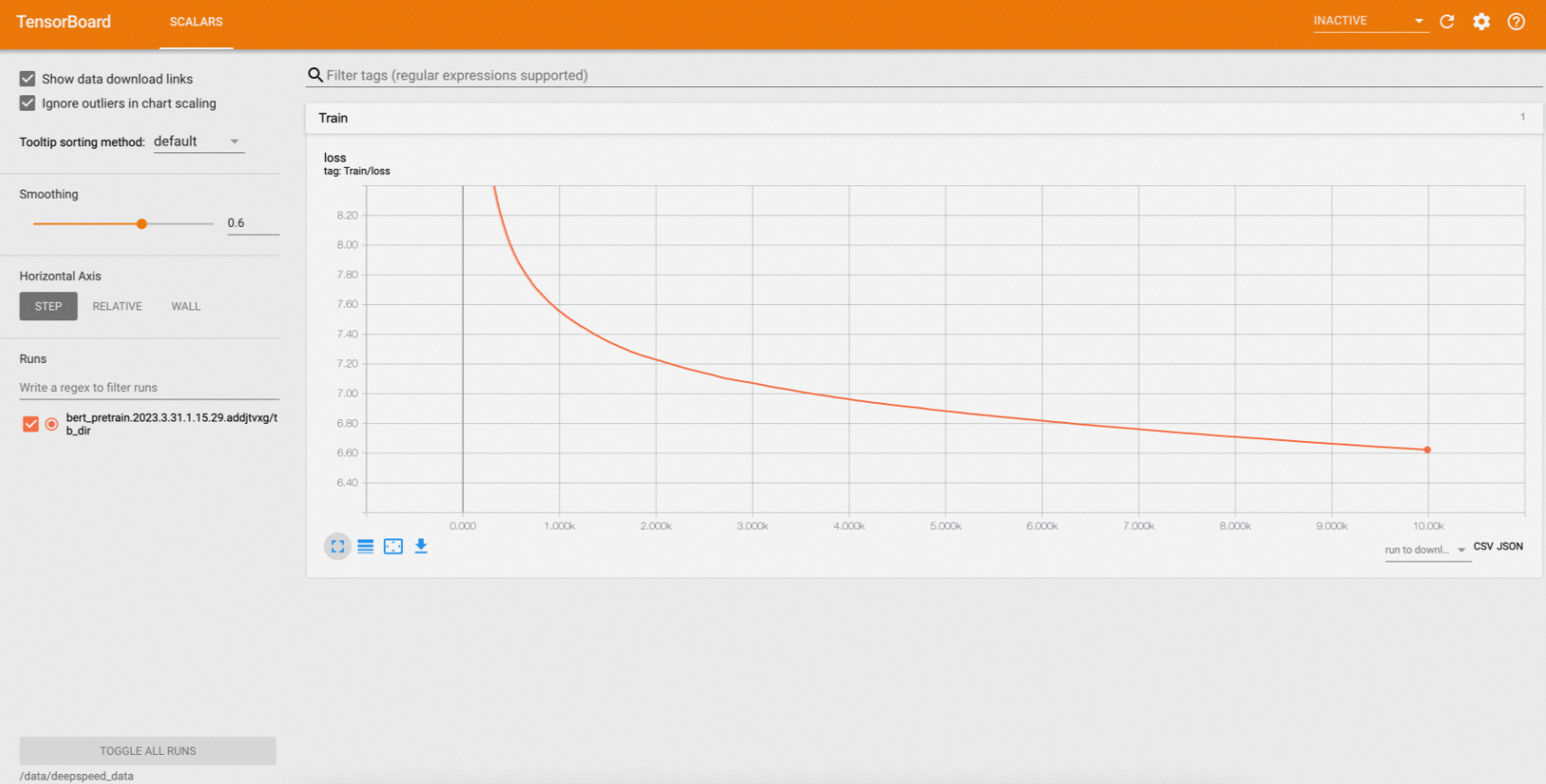
Adım 6: Eğitim günlüklerini görüntüleyin
İşten tüm günlükleri yazdırın:
arena logs deepspeed-helloworldBeklenen çıktı:
deepspeed-helloworld-worker-0: [2023-03-31 08:38:11,201] [INFO] [logging.py:68:log_dist] [Rank 0] step=7050, skipped=24, lr=[0.0001], mom=[(0.9, 0.999)]
deepspeed-helloworld-worker-0: [2023-03-31 08:38:11,254] [INFO] [timer.py:198:stop] 0/7050, RunningAvgSamplesPerSec=142.69733028759384, CurrSamplesPerSec=136.08094834473613, MemAllocated=0.06GB, MaxMemAllocated=1.68GB
deepspeed-helloworld-worker-0: 2023-03-31 08:38:11.255 | INFO     | __main__:log_dist:53 - [Rank 0] Loss: 6.7574
deepspeed-helloworld-worker-0: [2023-03-31 08:38:13,103] [INFO] [logging.py:68:log_dist] [Rank 0] step=7060, skipped=24, lr=[0.0001], mom=[(0.9, 0.999)]
deepspeed-helloworld-worker-0: [2023-03-31 08:38:13,134] [INFO] [timer.py:198:stop] 0/7060, RunningAvgSamplesPerSec=142.69095076844823, CurrSamplesPerSec=151.8552037291255, MemAllocated=0.06GB, MaxMemAllocated=1.68GB
deepspeed-helloworld-worker-0: 2023-03-31 08:38:13.136 | INFO     | __main__:log_dist:53 - [Rank 0] Loss: 6.7570
deepspeed-helloworld-worker-0: [2023-03-31 08:38:14,924] [INFO] [logging.py:68:log_dist] [Rank 0] step=7070, skipped=24, lr=[0.0001], mom=[(0.9, 0.999)]
deepspeed-helloworld-worker-0: [2023-03-31 08:38:14,962] [INFO] [timer.py:198:stop] 0/7070, RunningAvgSamplesPerSec=142.69048436022115, CurrSamplesPerSec=152.91029839772997, MemAllocated=0.06GB, MaxMemAllocated=1.68GB
deepspeed-helloworld-worker-0: 2023-03-31 08:38:14.963 | INFO     | __main__:log_dist:53 - [Rank 0] Loss: 6.7565
Günlükleri gerçek zamanlı olarak akışlamak için -f kullanın. Yalnızca son N satırı yazdırmak için -t N kullanın:
# Stream logs in real time
arena logs deepspeed-helloworld -f

# Print the last 5 lines
arena logs deepspeed-helloworld -t 5
-t 5 için beklenen çıktı:
deepspeed-helloworld-worker-0: [2023-03-31 08:47:08,694] [INFO] [launch.py:318:main] Process 80 exits successfully.
deepspeed-helloworld-worker-2: [2023-03-31 08:47:08,731] [INFO] [launch.py:318:main] Process 44 exits successfully.
deepspeed-helloworld-worker-1: [2023-03-31 08:47:08,946] [INFO] [launch.py:318:main] Process 44 exits successfully.
/opt/conda/lib/python3.8/site-packages/apex/pyprof/__init__.py:5: FutureWarning: pyprof will be removed by the end of June, 2022
  warnings.warn("pyprof will be removed by the end of June, 2022", FutureWarning)
Mevcut tüm günlük seçeneklerini görmek için arena logs --help komutunu çalıştırın.