本文提供一個以Shibboleth與阿里雲進行角色SSO的樣本,協助您理解企業IdP與阿里雲進行角色SSO的端到端配置流程。
準備工作
-
安裝Shibboleth、Tomcat和LDAP Server。
-
配置LDAP Server。
為了更好地示範樣本,在LDAP中添加一個管理員帳號,DN為
uid=admin,ou=system,密碼為secret。在LDAP中添加一個測試帳號,DN為
cn=Test User,ou=users,dc=wimpi,dc=net,密碼為secret,具體資訊如下圖所示。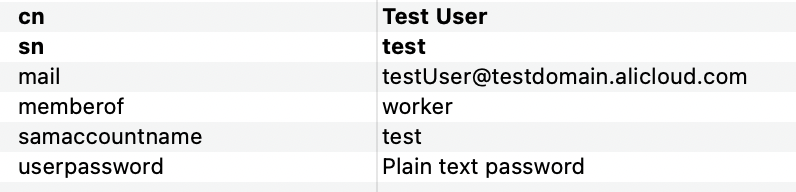
使用者資訊欄位:
-
mail:對應阿里雲的RAM使用者登入名稱稱。
-
memberof:對應於阿里雲的RAM角色名稱。
-
samaccountname:用於配置登入Shibboleth的使用者名稱。
-
userpassword:登入的密碼。
-
-
配置Shibboleth串連LDAP Server。
修改
/opt/shibboleth-idp/conf/ldap.properties檔案的以下資料:# LDAP認證模式 idp.authn.LDAP.authenticator = bindSearchAuthenticator # LDAP的地址 idp.authn.LDAP.ldapURL = ldaps://[LDAP服務地址]:389 # 禁用TSL和SSL idp.authn.LDAP.useStartTLS = false idp.authn.LDAP.useSSL = false # 基本搜尋目錄 idp.authn.LDAP.baseDN = dc=wimpi,dc=net idp.authn.LDAP.subtreeSearch = true # 登入匹配規則,samaccountname是使用者資料中的欄位,用於登入LDAP。 idp.authn.LDAP.userFilter= (samaccountname={user}) # admin賬戶和密碼 idp.authn.LDAP.bindDN = uid=admin,ou=system idp.authn.LDAP.bindDNCredential = secret idp.attribute.resolver.LDAP.searchFilter =(samaccountname=$resolutionContext.principal)
本文中涉及的Shibboleth配置部分屬於建議,僅用於協助理解阿里雲SSO登入的端到端配置流程,阿里雲不提供Shibboleth配置的諮詢服務。
步驟一:在阿里雲擷取SAML服務提供者中繼資料
使用Resource Access Management員登入RAM控制台。
在左側導覽列,選擇。
在角色 SSO頁簽,單擊SAML頁簽,複製阿里雲SAML服務提供者中繼資料URL。
在新的瀏覽器視窗中開啟複製的連結,將中繼資料XML檔案另存到
/opt/shibboleth-idp/metadata/aliyun-ram-role-metadata.xml。說明中繼資料XML檔案儲存了阿里雲作為一個SAML服務提供者的訪問資訊。您需要記錄XML檔案中
EntityDescriptor元素的entityID屬性值,以便後續在Shibboleth的配置中使用。
步驟二:將阿里雲註冊到Shibboleth
配置/opt/shibboleth-idp/conf/metadata-providers.xml,指定步驟一:在阿里雲擷取SAML服務提供者中繼資料擷取的中繼資料檔案,將阿里雲註冊到Shibboleth。
<!--
    <MetadataProvider id="LocalMetadata"  xsi:type="FilesystemMetadataProvider" metadataFile="PATH_TO_YOUR_METADATA"/>
-->

<!-- 找到上方注釋代碼,替換為下方代碼 -->

<MetadataProvider id="AliyunMetadata" xsi:type="FilesystemMetadataProvider" metadataFile="%{idp.home}/metadata/aliyun-ram-role-metadata.xml"/>步驟三:在Shibboleth擷取SAML IdP中繼資料
重啟Tomcat,使前面的配置生效。
訪問
https:///<您的伺服器位址>/idp/shibboleth,將中繼資料檔案儲存到本地。
步驟四:在阿里雲建立SAML身份供應商
使用阿里雲帳號登入RAM控制台。
在左側導覽列,選擇集成管理>SSO 管理。
在角色 SSO頁簽,單擊SAML頁簽,然後單擊创建身份提供商。
在创建身份提供商頁面,輸入身份提供商名称(shibboleth-provider)和备注。
在元数据文档地區,單擊上傳元數據,上傳從步驟三:在Shibboleth擷取SAML IdP中繼資料擷取的IdP中繼資料。
單擊创建身份提供商。
查看新建立的身份供應商詳情,記錄其ARN,方便您後續使用。
步驟五:在阿里雲建立RAM角色
在RAM控制台的左側導覽列,選擇。
在角色頁面,單擊創建角色。
在創建角色頁面的右上方,單擊切換編輯器。
在編輯器中指定具體的SAML身份供應商。
編輯器支援可視化編輯和指令碼編輯兩種模式,您可以任選其一。以可視化編輯模式為例,您需要在主體中指定從步驟四:在阿里雲建立SAML身份供應商中建立的身份供應商(shibboleth-provider),身份提供商类型選擇SAML。
在編輯器中設定限制條件
saml:recipient,取值為https://signin.alibabacloud.com/saml-role/sso。在創建角色對話方塊,輸入角色名称(worker),然後單擊确定。
查看新建立的RAM角色詳情,記錄其ARN,方便您後續使用。
步驟六:配置Shibboleth返回的使用者屬性
修改
/opt/shibboleth/conf/services.xml。原版使用的是
attribute-resolver.xml設定檔,包含的配置資訊不夠,需要啟動完整版的配置,將其替換為attribute-resolver-full.xml。<value>%{idp.home}/conf/attribute-resolver.xml</value> <!-- 找到上方代碼,替換為下方代碼 --> <value>%{idp.home}/conf/attribute-resolver-full.xml</value>修改
/opt/shibboleth/conf/attribute-resolver-full.xml。在該檔案中配置使用者資訊中返回的屬性。本樣本中選擇
mail欄位和memberof作為返回屬性。其中,
memberof屬性的id為role,代表使用者的角色。ReturnValue標籤的值為<角色ARN除了角色名稱(worker)的部分+'$1'>,<服務提供者ARN>。<服務提供者ARN>從步驟四:在阿里雲建立SAML身份供應商中擷取,角色ARN從步驟五:在阿里雲建立RAM角色中擷取。說明角色名稱使用
$1代替是為了適配多個角色身份,可以通過調整使用者資訊中的memberof欄位調整使用者的角色。注意該
memberof屬性是自行添加的使用者屬性,非內部屬性。您也可以修改為其他能表明使用者角色的屬性值。<!-- ========================================== --> <!-- Attribute Definitions --> <!-- ========================================== --> <!-- Schema: Core schema attributes--> <!-- 找到上方注釋代碼,在後面加入下方代碼 --> <AttributeDefinition xsi:type="Simple" id="mail"> <InputDataConnector ref="myLDAP" attributeNames="mail" /> <AttributeEncoder xsi:type="SAML1String" name="urn:mace:dir:attribute-def:mail" encodeType="false" /> <AttributeEncoder xsi:type="SAML2String" name="https://www.aliyun.com/SAML-Role/Attributes/RoleSessionName" friendlyName="mail" encodeType="false" /> </AttributeDefinition> <AttributeDefinition xsi:type="Mapped" id="role"> <InputDataConnector ref="myLDAP" attributeNames="memberof" /> <AttributeEncoder xsi:type="SAML1String" name="urn:mace:dir:attribute-def:role" encodeType="false" /> <AttributeEncoder xsi:type="SAML2String" name="https://www.aliyun.com/SAML-Role/Attributes/Role" friendlyName="role" encodeType="false" /> <ValueMap> <ReturnValue>acs:ram::114*******71701:role/$1,acs:ram::114*******71701:saml-provider/shibboleth-provider</ReturnValue> <SourceValue>(.+)</SourceValue> </ValueMap> </AttributeDefinition>在該檔案中讀取
/opt/shibboleth/conf/ldap.properties中配置的資訊,進行LDAP串連的建立。<!-- Example LDAP Connector --> <!-- <DataConnector id="myLDAP" xsi:type="LDAPDirectory" ldapURL="%{idp.attribute.resolver.LDAP.ldapURL}" baseDN="%{idp.attribute.resolver.LDAP.baseDN}" principal="%{idp.attribute.resolver.LDAP.bindDN}" principalCredential="%{idp.attribute.resolver.LDAP.bindDNCredential}" useStartTLS="%{idp.attribute.resolver.LDAP.useStartTLS:true}" ...省略... </DataConnector> --> <!-- 找到上方範例程式碼,將其替換為下方代碼 --> <DataConnector id="myLDAP" xsi:type="LDAPDirectory" ldapURL="%{idp.attribute.resolver.LDAP.ldapURL}" baseDN="%{idp.attribute.resolver.LDAP.baseDN}" principal="%{idp.attribute.resolver.LDAP.bindDN}" principalCredential="%{idp.attribute.resolver.LDAP.bindDNCredential}" useStartTLS="%{idp.attribute.resolver.LDAP.useStartTLS}" connectTimeout="%{idp.attribute.resolver.LDAP.connectTimeout}" responseTimeout="%{idp.attribute.resolver.LDAP.responseTimeout}"> <FilterTemplate> <![CDATA[ %{idp.attribute.resolver.LDAP.searchFilter} ]]> </FilterTemplate> </DataConnector>
修改
/opt/shibboleth/conf/attribute-filter.xml,添加屬性過濾器。將
PolicyRequirementRule標籤中的value屬性替換為步驟一:在阿里雲擷取SAML服務提供者中繼資料中的阿里雲entityID。<AttributeFilterPolicyGroup id="ShibbolethFilterPolicy" xmlns="urn:mace:shibboleth:2.0:afp" xmlns:xsi="http://www.w3.org/2001/XMLSchema-instance" xsi:schemaLocation="urn:mace:shibboleth:2.0:afp http://shibboleth.net/schema/idp/shibboleth-afp.xsd"> <!-- 找到上方代碼,在後面加入下方代碼 --> <AttributeFilterPolicy id="aliyun"> <PolicyRequirementRule xsi:type="Requester" value="[entityID]" /> <AttributeRule attributeID="mail"> <PermitValueRule xsi:type="ANY" /> </AttributeRule> <AttributeRule attributeID="role"> <PermitValueRule xsi:type="ANY" /> </AttributeRule> </AttributeFilterPolicy>
步驟七:配置SAML響應的NameID
修改
/opt/shibboleth/conf/relying-party.xml,為阿里雲建立NameID的配置。將
bean標籤中的relyingPartyIds屬性替換為步驟一:在阿里雲擷取SAML服務提供者中繼資料中的阿里雲entityID。<!-- Override example that identifies a single RP by name and configures it for SAML 2 SSO without encryption. This is a common "vendor" scenario. --> <!-- <bean parent="RelyingPartyByName" c:relyingPartyIds="https://sp.example.org"> <property name="profileConfigurations"> <list> <bean parent="SAML2.SSO" p:encryptAssertions="false" /> </list> </property> </bean> --> <!-- 找到上方注釋代碼,替換為下方代碼 --> <bean parent="RelyingPartyByName" c:relyingPartyIds="[entityID]"> <property name="profileConfigurations"> <list> <bean parent="SAML2.SSO" p:encryptAssertions="false" p:nameIDFormatPrecedence="urn:oasis:names:tc:SAML:1.1:nameid-format:emailAddress" /> </list> </property> </bean>修改
/opt/shibboleth/conf/saml-nameid.xml,配置NameID的產生方式。<!-- 找到下方兩處代碼,將其注釋取消,使之生效 --> <bean parent="shibboleth.SAML2AttributeSourcedGenerator" p:omitQualifiers="true" p:format="urn:oasis:names:tc:SAML:1.1:nameid-format:emailAddress" p:attributeSourceIds="#{ {'mail'} }" /> <bean parent="shibboleth.SAML1AttributeSourcedGenerator" p:omitQualifiers="true" p:format="urn:oasis:names:tc:SAML:1.1:nameid-format:emailAddress" p:attributeSourceIds="#{ {'mail'} }" />修改
/opt/shibboleth/conf/saml-nameid.properties,配置NameID的相關屬性。idp.nameid.saml2.default = urn:oasis:names:tc:SAML:1.1:nameid-format:emailAddress idp.persistentId.useUnfilteredAttributes = true idp.persistentId.encoding = BASE32
步驟八:啟動Shibboleth
重啟Tomcat,使前面的配置生效。
結果驗證
完成上述配置後,您可以從Shibboleth發起SSO登入。
訪問
https://<您的伺服器位址>/idp/profile/SAML2/Unsolicited/SSO?providerId=<entityID>。連結中的
<entityID>為步驟一:在阿里雲擷取SAML服務提供者中繼資料中的阿里雲entityID。在Shibboleth的登入介面,輸入使用者名稱和密碼,單擊登入。
系統將自動進行SSO登入,以角色(worker)身份登入到阿里雲控制台首頁。
常見問題
結果驗證時如果遇到問題,您可以查看/opt/shibboleth-idp/logs/idp-process.log,通過日誌分析問題原因。常見問題如下:
Shibboleth使用者名稱密碼正確,但是登入後提示異常。
查看/opt/shibboleth-idp/logs/idp-process.log中的報錯資訊,如果是與ValidateUsernamePassword錯誤有關,則重點檢查IDAP的串連配置和部署情況,重點查看是否將注釋去除,且不能輸入多餘空格。
登入後無響應,提示unable to connect to the ldap。
檢查ldap.properties和attribute-resolver-full.xml檔案中LDAP串連的相關配置。
登入後轉跳阿里雲,提示The NameID is missing。
檢查步驟六:配置Shibboleth返回的使用者屬性中是否正確將使用者資訊中的mail映射為屬性,檢查步驟七:配置SAML響應的NameID中NameID配置是否正確。
訪問https://<您的伺服器位址>/idp/profile/SAML2/Unsolicited/SSO?providerId=<entityID>時提示Unsupported Request。
檢查entityId是否配置正確。metadata檔案夾下的中繼資料、attribute-filter.xml和relying-party.xml三處中的entityId必須保持一致。
登入後轉跳阿里雲,提示Can not find SAML role attribute which is required。
檢查步驟六:配置Shibboleth返回的使用者屬性中是否正確將使用者資訊中的memberof映射成role,仔細校對ReturnValue標籤中的值。
登入後轉跳阿里雲,提示Can not find SAML role session name attribute which is required。
檢查步驟六:配置Shibboleth返回的使用者屬性中mail屬性的name是否為https://www.aliyun.com/SAML-Role/Attributes/RoleSessionName。部分使用者可能在嘗試使用者SSO後直接在原配置上修改為角色SSO,容易忘記修改name的值。
登入後轉跳阿里雲,提示The response signature is invalid。
重新將Shibboleth的中繼資料檔案上傳到阿里雲。