PolarDB PostgreSQL版支援分區串連(Partition-Wise Join)功能,可以減少分區之間的無效串連,提升串連查詢的效能。
概述
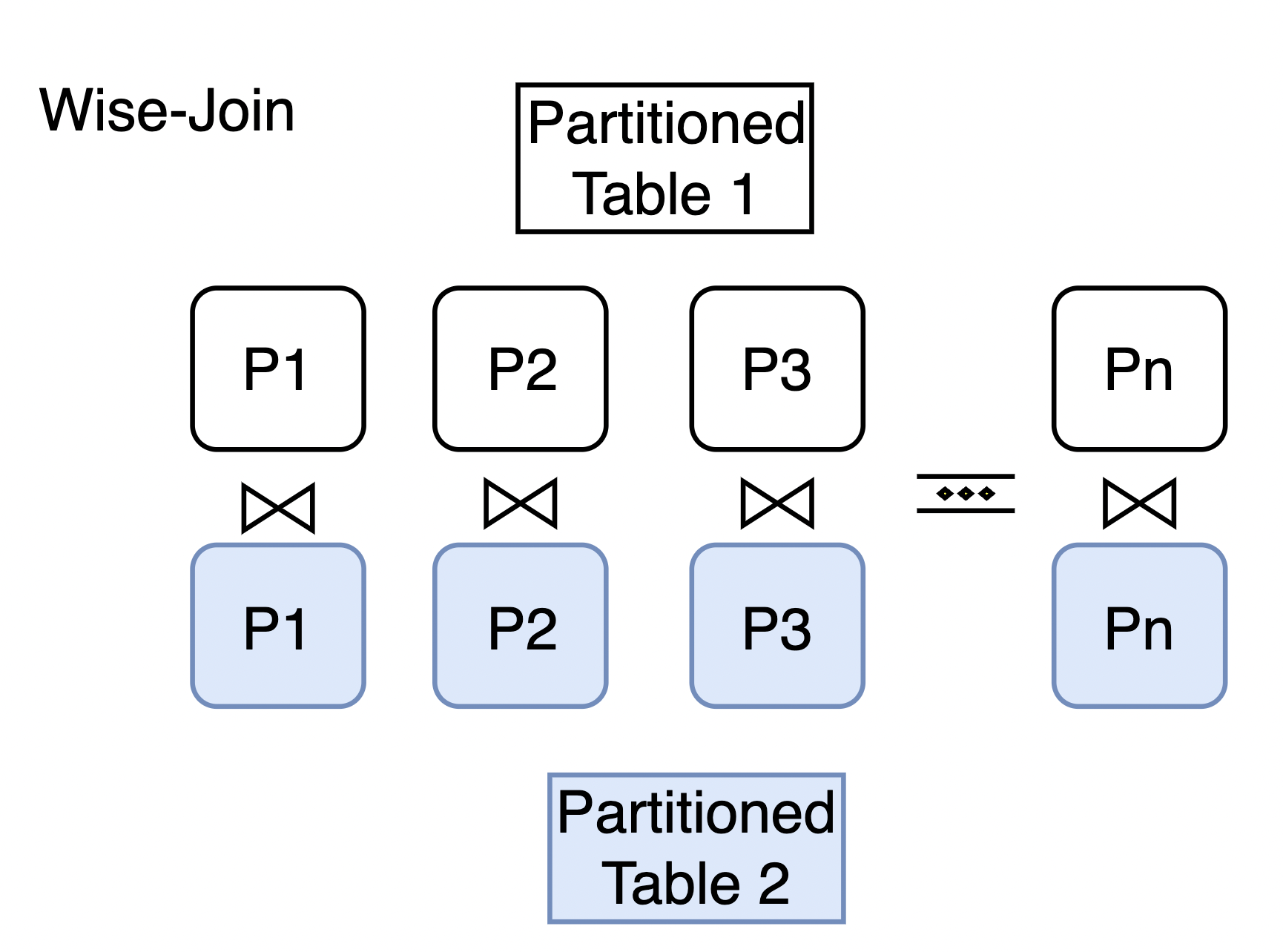
分區串連用於兩個分區表之間Join最佳化。當分區表之間使用分區鍵進行Join時,可以通過分區串連減少分區之間無效的串連,提升串連查詢的效能。
使用說明
可通過如下語句開啟分區串連功能:
set enable_partitionwise_join to on;樣本
下文通過兩個簡單易理解的樣本來詳細介紹分區串連。
樣本中包含兩個表measurement和sales,具體如下:
CREATE TABLE measurement(
    city_id         int not null,
    logdate         date not null,
    peaktemp        int,
    unitsales       int
) PARTITION BY RANGE (logdate);
CREATE TABLE measurement_y2023q1 PARTITION OF measurement
    FOR VALUES FROM ('2023-01-01') TO ('2023-04-01');
CREATE TABLE measurement_y2023q2 PARTITION OF measurement
    FOR VALUES FROM ('2023-04-01') TO ('2023-07-01');
CREATE TABLE measurement_y2023q3 PARTITION OF measurement
    FOR VALUES FROM ('2023-07-01') TO ('2023-10-01');
CREATE TABLE measurement_y2023q4 PARTITION OF measurement
    FOR VALUES FROM ('2023-10-01') TO ('2024-04-01');

CREATE TABLE sales (
    dept_no     integer,
    part_no     varchar(2),
    country     varchar(20),
    date        date,
    amount      decimal
) PARTITION BY RANGE (date);
CREATE TABLE sales_y2023q1 PARTITION OF sales
    FOR VALUES FROM ('2023-01-01') TO ('2023-04-01');
CREATE TABLE sales_y2023q2 PARTITION OF sales
    FOR VALUES FROM ('2023-04-01') TO ('2023-07-01');
CREATE TABLE sales_y2023q3 PARTITION OF sales
    FOR VALUES FROM ('2023-07-01') TO ('2023-10-01');
CREATE TABLE sales_y2023q4 PARTITION OF sales
    FOR VALUES FROM ('2023-10-01') TO ('2024-04-01');
從以上建表語句可以看到:
表
measurement有四個分區,即measurement_y2023q1,measurement_y2023q2,measurement_y2023q3,measurement_y2023q4,分別對應了2023年的四個季度。表
sales也有四個分區,即sales_y2023q1,sales_y2023q2,sales_y2023q3,sales_y2023q4,分別對應了2023年的四個季度。
此時,執行表measurement和表sales的串連查詢SQL語句,並查看其查詢計劃:
explain select a.* from sales a join measurement b on a.date = b.logdate where b.unitsales > 10;當未開啟分區串連功能時,表measurement 和表sales 全串連,查詢計劃如下:
                                            QUERY PLAN
--------------------------------------------------------------------------------------------------
 Aggregate  (cost=871.75..871.76 rows=1 width=8)
   ->  Merge Join  (cost=448.58..812.79 rows=23587 width=32)
         Merge Cond: (a.date = b.logdate)
         ->  Sort  (cost=185.83..191.03 rows=2080 width=40)
               Sort Key: a.date
               ->  Append  (cost=0.00..71.20 rows=2080 width=40)
                     ->  Seq Scan on sales_y2023q1 a  (cost=0.00..15.20 rows=520 width=40)
                     ->  Seq Scan on sales_y2023q2 a_1  (cost=0.00..15.20 rows=520 width=40)
                     ->  Seq Scan on sales_y2023q3 a_2  (cost=0.00..15.20 rows=520 width=40)
                     ->  Seq Scan on sales_y2023q4 a_3  (cost=0.00..15.20 rows=520 width=40)
         ->  Sort  (cost=262.75..268.42 rows=2268 width=8)
               Sort Key: b.logdate
               ->  Append  (cost=0.00..136.34 rows=2268 width=8)
                     ->  Seq Scan on measurement_y2023q1 b  (cost=0.00..31.25 rows=567 width=8)
                           Filter: (unitsales > 10)
                     ->  Seq Scan on measurement_y2023q2 b_1  (cost=0.00..31.25 rows=567 width=8)
                           Filter: (unitsales > 10)
                     ->  Seq Scan on measurement_y2023q3 b_2  (cost=0.00..31.25 rows=567 width=8)
                           Filter: (unitsales > 10)
                     ->  Seq Scan on measurement_y2023q4 b_3  (cost=0.00..31.25 rows=567 width=8)
                           Filter: (unitsales > 10)
(21 rows)可以看到,該查詢計劃是使用表measurement的所有資料和表sales的所有資料進行全串連。但此時是存在無效串連的,比如sales_y2023q1和measurement_y2023q3他們之間的Join一定是空的,因為串連條件是分區鍵相等,而sales_y2023q1和measurement_y2023q3的分區鍵是不相等的。只有比如當sales_y2023q1和measurement_y2023q1串連後分區鍵相等才會有結果。
此時如果開啟分區串連功能:
set enable_partitionwise_join to on;然後再執行同樣的表measurement和表sales的串連查詢SQL語句,其查詢計劃如下:
explain select a.* from sales a join measurement b on a.date = b.logdate where b.unitsales > 10;
                                       QUERY PLAN
----------------------------------------------------------------------------------------
 Append  (cost=21.70..453.33 rows=5896 width=128)
   ->  Hash Join  (cost=21.70..105.96 rows=1474 width=128)
         Hash Cond: (b.logdate = a.date)
         ->  Seq Scan on measurement_y2023q1 b  (cost=0.00..31.25 rows=567 width=8)
               Filter: (unitsales > 10)
         ->  Hash  (cost=15.20..15.20 rows=520 width=128)
               ->  Seq Scan on sales_y2023q1 a  (cost=0.00..15.20 rows=520 width=128)
   ->  Hash Join  (cost=21.70..105.96 rows=1474 width=128)
         Hash Cond: (b_1.logdate = a_1.date)
         ->  Seq Scan on measurement_y2023q2 b_1  (cost=0.00..31.25 rows=567 width=8)
               Filter: (unitsales > 10)
         ->  Hash  (cost=15.20..15.20 rows=520 width=128)
               ->  Seq Scan on sales_y2023q2 a_1  (cost=0.00..15.20 rows=520 width=128)
   ->  Hash Join  (cost=21.70..105.96 rows=1474 width=128)
         Hash Cond: (b_2.logdate = a_2.date)
         ->  Seq Scan on measurement_y2023q3 b_2  (cost=0.00..31.25 rows=567 width=8)
               Filter: (unitsales > 10)
         ->  Hash  (cost=15.20..15.20 rows=520 width=128)
               ->  Seq Scan on sales_y2023q3 a_2  (cost=0.00..15.20 rows=520 width=128)
   ->  Hash Join  (cost=21.70..105.96 rows=1474 width=128)
         Hash Cond: (b_3.logdate = a_3.date)
         ->  Seq Scan on measurement_y2023q4 b_3  (cost=0.00..31.25 rows=567 width=8)
               Filter: (unitsales > 10)
         ->  Hash  (cost=15.20..15.20 rows=520 width=128)
               ->  Seq Scan on sales_y2023q4 a_3  (cost=0.00..15.20 rows=520 width=128)
(25 rows)可以看到,當開啟分區串連後,分布串連最佳化的效果很明顯:sales_y2023q2只需要和measurement_y2023q2串連,sales_y2023q3只需要和measurement_y2023q3串連,sales_y2023q4只需要和measurement_y2023q4串連。分區之間無效的串連被大大減少,從而顯著提升串連查詢的效能。