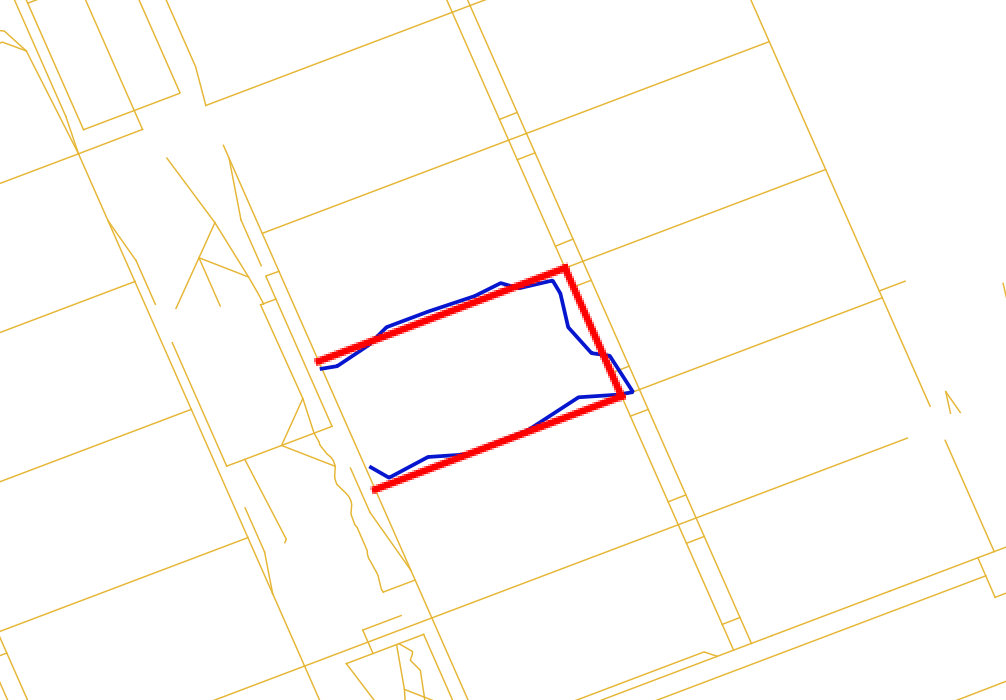
本文協助您快速理解GanosBase MapMatching引擎的基本用法,包括擴充建立、建立路網資料、構建拓撲網狀圖、執行軌跡匹配等部分。
基本概念
路網(Road Network):指描述道路交通網路結構和特性的數字化資訊集合,包括了道路的位置、類型、等級、串連關係、幾何形狀、交通規則等多方面的資訊。
節點(Node):在路網資料中,節點通常代表道路的交叉點或端點,是道路網路中串連各邊的點。
邊(Edge):在路網資料的上下文中,邊是路網中串連兩個節點的抽象概念。邊主要用來表示兩個地點之間的串連關係,而不涉及具體的道路物理特徵。在無向圖中,邊沒有方向;在有向圖中,邊則可以表示行駛方向。邊通常會攜帶一些屬性資訊,比如長度、是否可通行等,但其核心作用是構建路網的結構架構。
路段(Segment):路段是道路的一部分,具有實際的物理屬性和地理位置資訊,它是路網中連續的一段道路,可能從一個路口開始到下一個路口結束,或者是道路中具有相同特徵(如車道數、限速等)的一段。路段資料比邊更為詳細,通常包含路面材質、寬度、坡度、車道配置、交通標誌資訊、路權(如是否允許轉彎、直行等)等。路段是實現導航、交通分析、道路維護規劃等應用的基礎單位。
案例參考
建立外掛程式
使用MapMatching函數需要您在資料庫中建立ganos_mapmatching外掛程式。
CREATE EXTENSION ganos_mapmatching CASCADE;
CREATE EXTENSION ganos_fdw CASCADE;建立
ganos_mapmatching外掛程式時,將同步安裝ganos_geometry、ganos_spatialref和ganos_trajectory外掛程式,如遇到類似ERROR: invalid extension name: "ganos_trajectory"報錯,請聯絡我們處理。為避免許可權問題,建議您將擴充安裝在public模式下。
CREATE EXTENSION ganos_mapmatching WITH SCHEMA PUBLIC CASCADE;
CREATE EXTENSION ganos_fdw WITH SCHEMA PUBLIC CASCADE;
樣本一:利用自有路網資料實現道路匹配。
匯入路網資料。
CREATE TABLE network (fid bigint,   -- 路段的唯一標識
                         source bigint,  -- 路段的開始節點標識
                         target bigint,  -- 路段的結束節點標識
                         cost double precision, -- 道路權重值(目前未使用)
                         geom public.geometry(LineString,4326) --路段的幾何對象
);

INSERT INTO network(fid, source, target, cost, geom)
VALUES(1, 1, 2,1, st_geomfromtext('LINESTRING(2 1,2 0)'));
INSERT INTO network(fid, source, target, cost, geom)
VALUES(2, 2, 1,1, st_geomfromtext('LINESTRING(2 0,2 1)'));
INSERT INTO network(fid, source, target, cost, geom)
VALUES(3, 3, 1,1, st_geomfromtext('LINESTRING(3 1,2 1)'));
INSERT INTO network(fid, source, target, cost, geom)
VALUES(4, 4, 3,1, st_geomfromtext('LINESTRING(4 1,3 1)'));
INSERT INTO network(fid, source, target, cost, geom)
VALUES(5, 1, 5,1, st_geomfromtext('LINESTRING(2 1,2 2)'));
INSERT INTO network(fid, source, target, cost, geom)
VALUES(6, 5, 1,1, st_geomfromtext('LINESTRING(2 2,2 1)'));
INSERT INTO network(fid, source, target, cost, geom)
VALUES(7, 3, 6,1, st_geomfromtext('LINESTRING(3 1,3 2)'));
INSERT INTO network(fid, source, target, cost, geom)
VALUES(8, 7, 8,1, st_geomfromtext('LINESTRING(0 2,1 2)'));
INSERT INTO network(fid, source, target, cost, geom)
VALUES(9, 8, 7,1, st_geomfromtext('LINESTRING(1 2,0 2)'));
INSERT INTO network(fid, source, target, cost, geom)
VALUES(10,5, 8,3, st_geomfromtext('LINESTRING(2 2,1 2)'));
INSERT INTO network(fid, source, target, cost, geom)
VALUES(11,8, 5,3, st_geomfromtext('LINESTRING(1 2,2 2)'));
INSERT INTO network(fid, source, target, cost, geom)
VALUES(12,6, 5,1, st_geomfromtext('LINESTRING(3 2,2 2)'));
INSERT INTO network(fid, source, target, cost, geom)
VALUES(13,5, 6,1, st_geomfromtext('LINESTRING(2 2,3 2)'));
INSERT INTO network(fid, source, target, cost, geom)
VALUES(14,6, 9,1, st_geomfromtext('LINESTRING(3 2,4 2)'));
INSERT INTO network(fid, source, target, cost, geom)
VALUES(15,9, 6,1, st_geomfromtext('LINESTRING(4 2,3 2)'));
INSERT INTO network(fid, source, target, cost, geom)
VALUES(16,10,5,1, st_geomfromtext('LINESTRING(2 3,2 2)'));
INSERT INTO network(fid, source, target, cost, geom)
VALUES(17,5, 10,1, st_geomfromtext('LINESTRING(2 2,2 3)'));
INSERT INTO network(fid, source, target, cost, geom)
VALUES(18,6, 11,1, st_geomfromtext('LINESTRING(3 2,3 3)'));
INSERT INTO network(fid, source, target, cost, geom)
VALUES(19,10,11,1, st_geomfromtext('LINESTRING(2 3,3 3)'));
INSERT INTO network(fid, source, target, cost, geom)
VALUES(20,11,12,1, st_geomfromtext('LINESTRING(3 3,4 3)'));
INSERT INTO network(fid, source, target, cost, geom)
VALUES(21,13,10,1, st_geomfromtext('LINESTRING(2 4,2 3)'));
INSERT INTO network(fid, source, target, cost, geom)
VALUES(22,10,13,1, st_geomfromtext('LINESTRING(2 3,2 4)'));
INSERT INTO network(fid, source, target, cost, geom)
VALUES(23,9, 12,1, st_geomfromtext('LINESTRING(4 2,4 3)'));
INSERT INTO network(fid, source, target, cost, geom)
VALUES(24,12,9,1, st_geomfromtext('LINESTRING(4 3,4 2)'));
INSERT INTO network(fid, source, target, cost, geom)
VALUES(25,9, 4,1, st_geomfromtext('LINESTRING(4 2,4 1)'));
INSERT INTO network(fid, source, target, cost, geom)
VALUES(26,4, 9,1, st_geomfromtext('LINESTRING(4 1,4 2)'));
INSERT INTO network(fid, source, target, cost, geom)
VALUES(27,14,15,1, st_geomfromtext('LINESTRING(0.5 3.5,2 3.5)'));
INSERT INTO network(fid, source, target, cost, geom)
VALUES(28,15,14,1, st_geomfromtext('LINESTRING(2 3.5,0.5 3.5)'));
INSERT INTO network(fid, source, target, cost, geom)
VALUES(29,16,17,1, st_geomfromtext('LINESTRING(3.5 4,3.5 2.3)'));
INSERT INTO network(fid, source, target, cost, geom)
VALUES(30,17,16,1, st_geomfromtext('LINESTRING(3.5 2.3,3.5 4)'));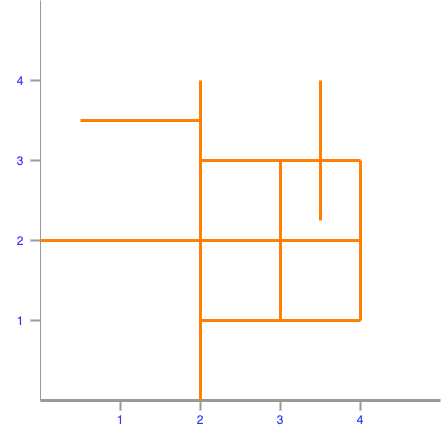
構建地圖匹配工作空間。
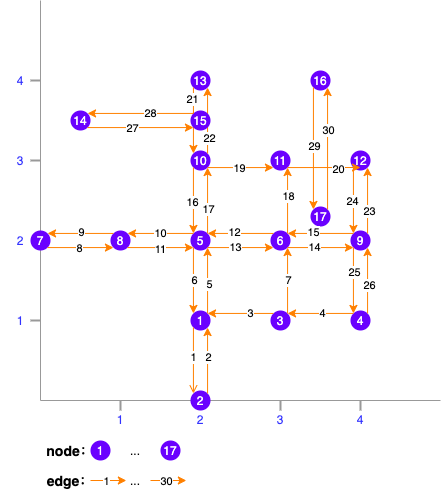
SELECT st_createworkspace('mm_ws_test1', 'select fid, source, target, geom from network');工作空間中產生的路網結構如下:
建立待匹配的軌跡線資料。
CREATE TABLE traj(id int, geom geometry(linestring, 4326));
INSERT INTO traj(id, geom)
VALUES(1,st_geomfromtext('LINESTRING(4.15 1.6,3.47 0.92,2.4 0.92,2.14 1.53,2.14 2.57,2.49 2.98)'));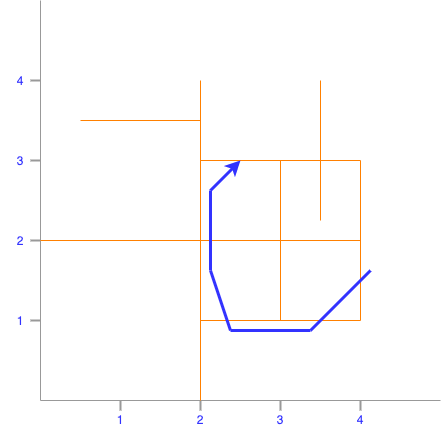
執行道路匹配。
SELECT st_astext(st_mapmatching('mm_ws_test1', geom, '{"algorithm":"stmatch","k":4,"r":0.25,"e":0.5}'::text)) AS geom
FROM traj;
返回結果如下:
                     geom
----------------------------------------------
 LINESTRING(4 1.6,4 1,3 1,2 1,2 2,2 3,2.49 3)
(1 row)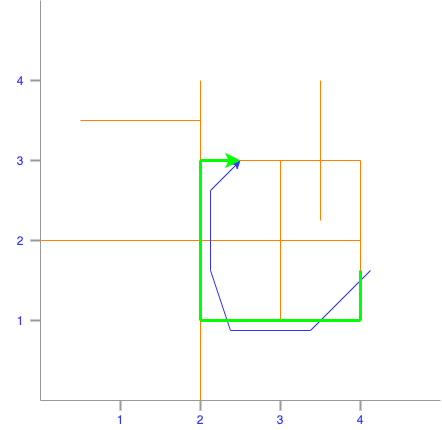
樣本二:利用OSM資料實現道路匹配。
匯入OSM資料。
-- 匯入OSS上的OSM路網資料,目前只支援匯入OSS上的源檔案
-- accesskeyid,accesskeysecret為OSS的存取金鑰
-- directory指檔案夾,如果在根目錄下可不填
SELECT st_regforeigntables('OSS://{accesskeyid}:{accesskeysecret}@{endpoint}/{bucket}/{directory}/macau-latest.osm.pbf' , 'osmserver', 'OSMNT');
SELECT st_setcplconfig('OSS_ENDPOINT', '{endpoint}');

-- 提取路網節點資料
CREATE TABLE macau_network_nodes
(
    id     BIGSERIAL,
    fid    BIGINT,
    eout   INTEGER,
    lon    DOUBLE PRECISION ,
    lat    DOUBLE PRECISION,
    cnt    INTEGER,
    chk    INTEGER,
    ein    INTEGER,
    name   text,
    tags   text,
    point  GEOMETRY(point, 4326)
);

INSERT INTO macau_network_nodes(fid, lon, lat, name, tags, point)
SELECT osm_id::bigint, ST_X(geom), ST_Y(geom), name, to_json(other_tags)::jsonb, geom
FROM points;

-- 提取路網邊資料
CREATE TABLE macau_network_ways
(
    gid               BIGSERIAL,
    fid            BIGINT,
    length            DOUBLE PRECISION,
    length_m          DOUBLE PRECISION,
    p                 TEXT,
    source            BIGINT,
    target            BIGINT,
    source_osm        BIGINT,
    target_osm        BIGINT,
    cost              DOUBLE PRECISION,
    reverse_cost      DOUBLE PRECISION DEFAULT -1,
    cost_s            DOUBLE PRECISION,
    reverse_cost_s    DOUBLE PRECISION DEFAULT -1,
    rule              TEXT,
    one_way           INT,
    oneway            TEXT,
    x1                DOUBLE PRECISION,
    y1                DOUBLE PRECISION,
    x2                DOUBLE PRECISION,
    y2                DOUBLE PRECISION,
    maxspeed_forward  DOUBLE PRECISION,
    maxspeed_backward DOUBLE PRECISION DEFAULT -1,
    priority          DOUBLE PRECISION DEFAULT 1,
    name              TEXT,
    tags              JSONB,
    linestring        GEOMETRY(LINESTRING, 4326)
);

INSERT INTO macau_network_ways(fid, source_osm, target_osm, name, tags, linestring)
SELECT osm_id::bigint, source_osm, target_osm, name, to_json(other_tags)::jsonb, geom
FROM lines;
構造路網資料。
-- 更新路網起止節點ID
UPDATE macau_network_ways
SET source = macau_network_nodes.id
FROM macau_network_nodes
WHERE macau_network_ways.source_osm = macau_network_nodes.fid;

UPDATE macau_network_ways
SET target = macau_network_nodes.id
FROM macau_network_nodes
WHERE macau_network_ways.target_osm = macau_network_nodes.fid;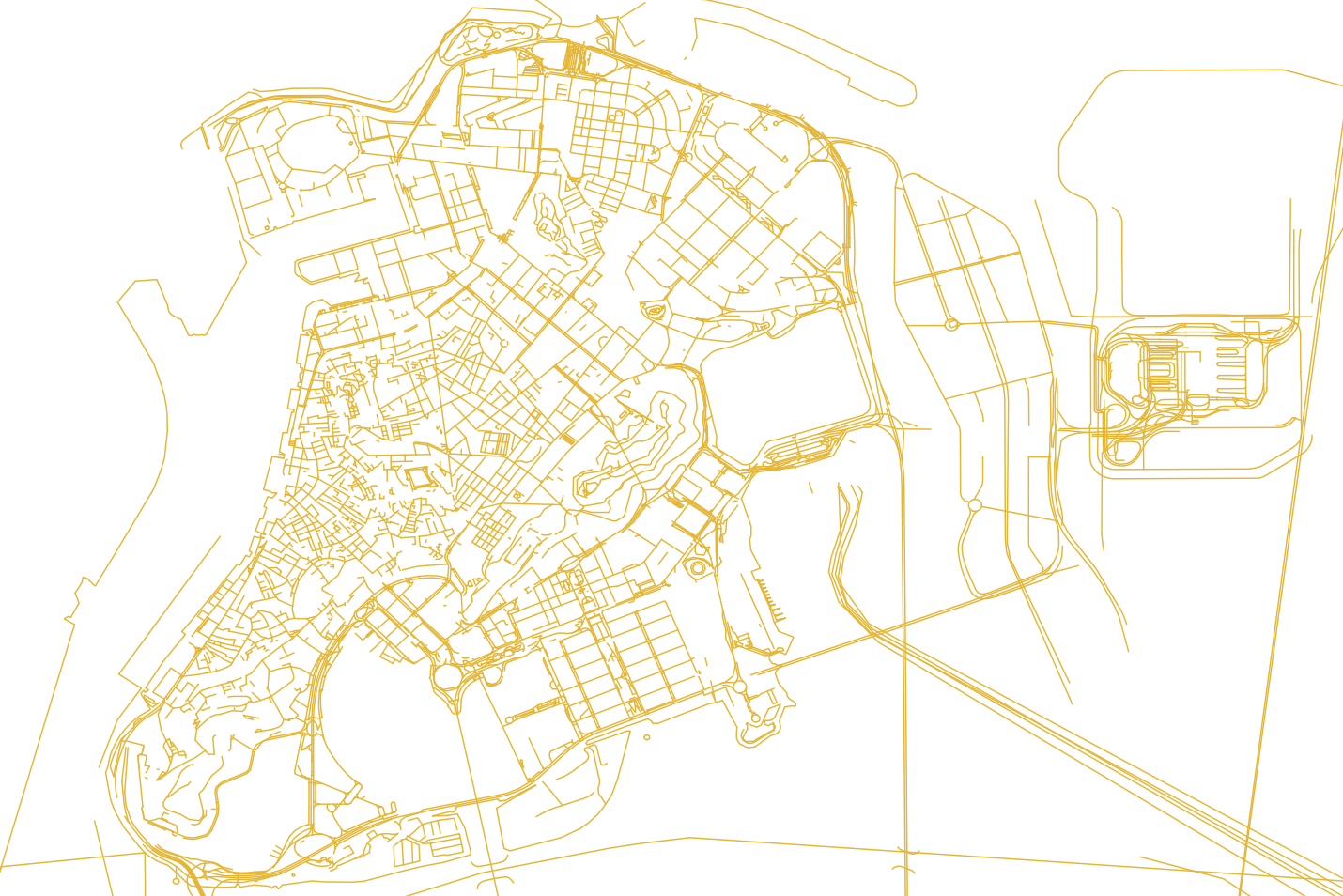
構建地圖匹配工作空間。
SELECT st_createworkspace('mm_ws_test2', 'select fid, source, target, linestring from macau_network_ways');執行道路匹配。
SELECT st_astext(st_mapmatching('mm_ws_test2', 'LINESTRING(113.5492 22.1881,113.5493 22.1881,113.5504 22.1885,113.5505 22.1886,113.5502 22.189,113.5501 22.1891,113.5491 22.1887,113.5489 22.1887)', '{"algorithm":"stmatch","k":4,"r":0.25,"e":0.5,"tolerance":0.5,"vmax":1.0,"factor":0.5}'::text));返回結果如下:
LINESTRING(113.5492633 22.1880942,113.5493491 22.1881266,113.5504129 22.1885289,113.5505378 22.1885762,113.5502504 22.1892274,113.5505378 22.1885762,113.5502504 22.1892274,113.5501282 22.1891812,113.5490843 22.1887864,113.5489761 22.1887455)