購買OpenSearch召回引擎版執行個體
購買執行個體可參考購買OpenSearch召回引擎版執行個體。
配置表
新購買的執行個體,在其詳情頁中,執行個體狀態為“待配置”,並且會自動部署一個與購買的查詢節點和資料節點的個數及規格一致的空叢集,之後需要為該叢集配置表基礎資訊>資料同步>索引結構>索引重建,之後才可正常搜尋。

表基礎資訊配置,需要自訂表名稱,設定分區數,設定資料更新資源數:
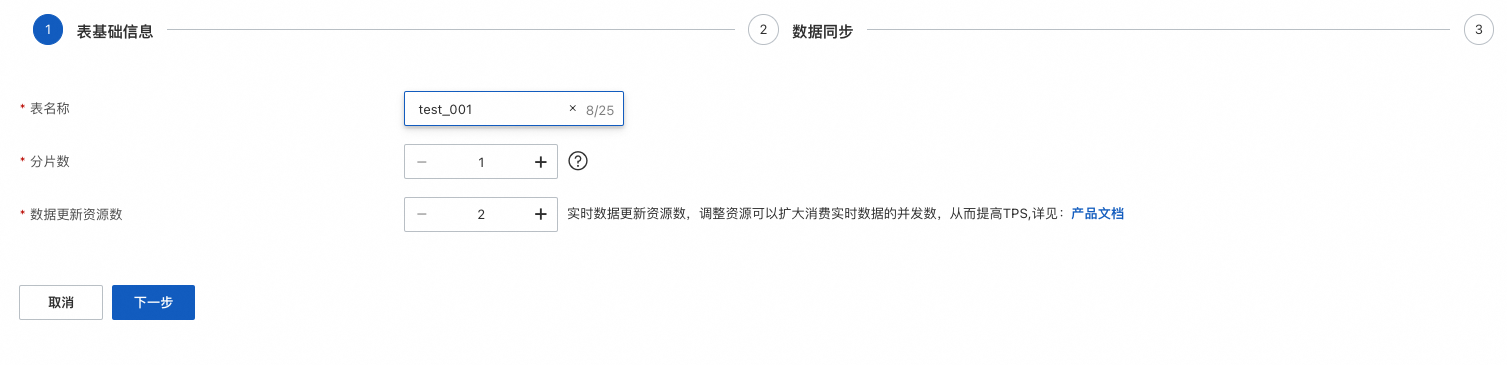
資料更新資源數預設有2個免費資源,資料量超過2,按n-2 計費,n是單表的資料更新資源總數
資料同步,配置全量資料來源(目前支援的資料來源有“MaxCompute資料來源”和“API推送資料來源”、“Object Storage Service”)這裡以MaxCompute資料來源為例:點擊“添加資料來源”,資料來源類型選擇“MaxCompute”,設定project、accesskeyID、accesskeyId、accesskeySecret、Table、分組鍵partition,可按需選擇是否開啟“自動索引重建”:
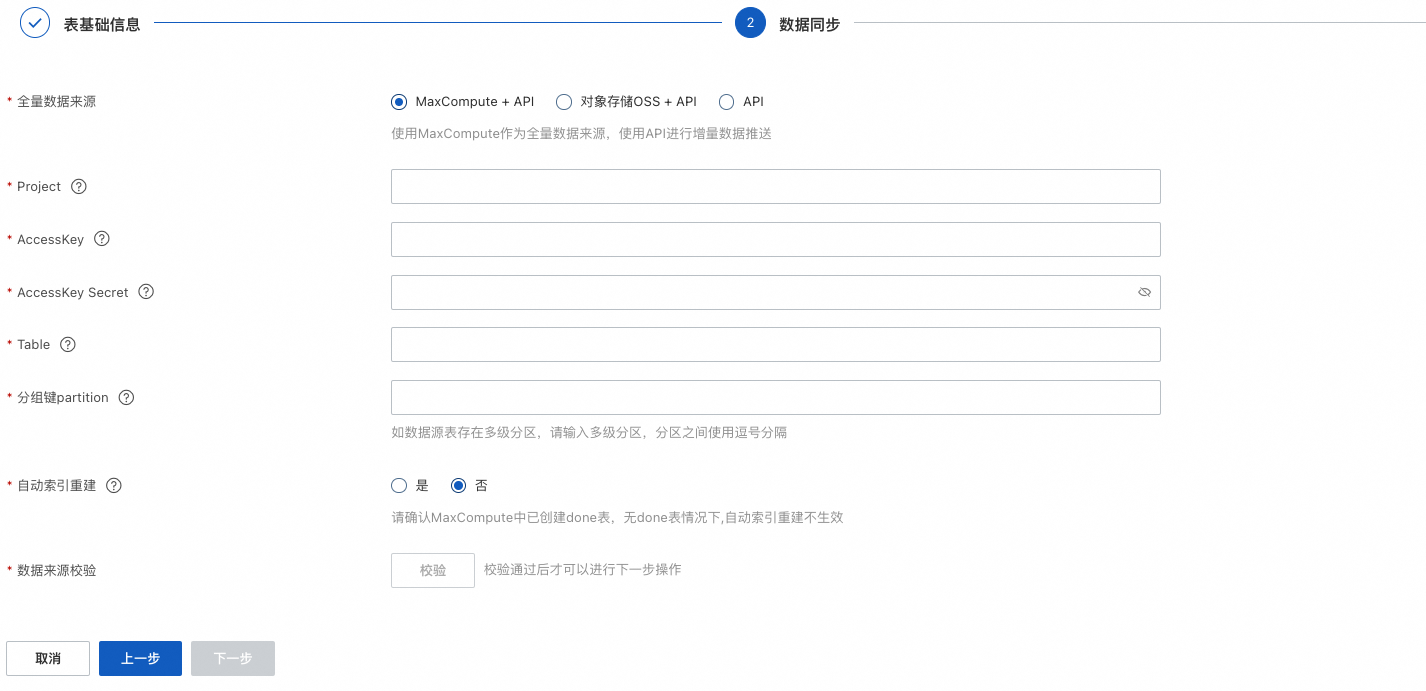
資料來源配置成功後,下一步配置索引結構:
設定了MaxCompute資料來源,會自動對應資料來源欄位:
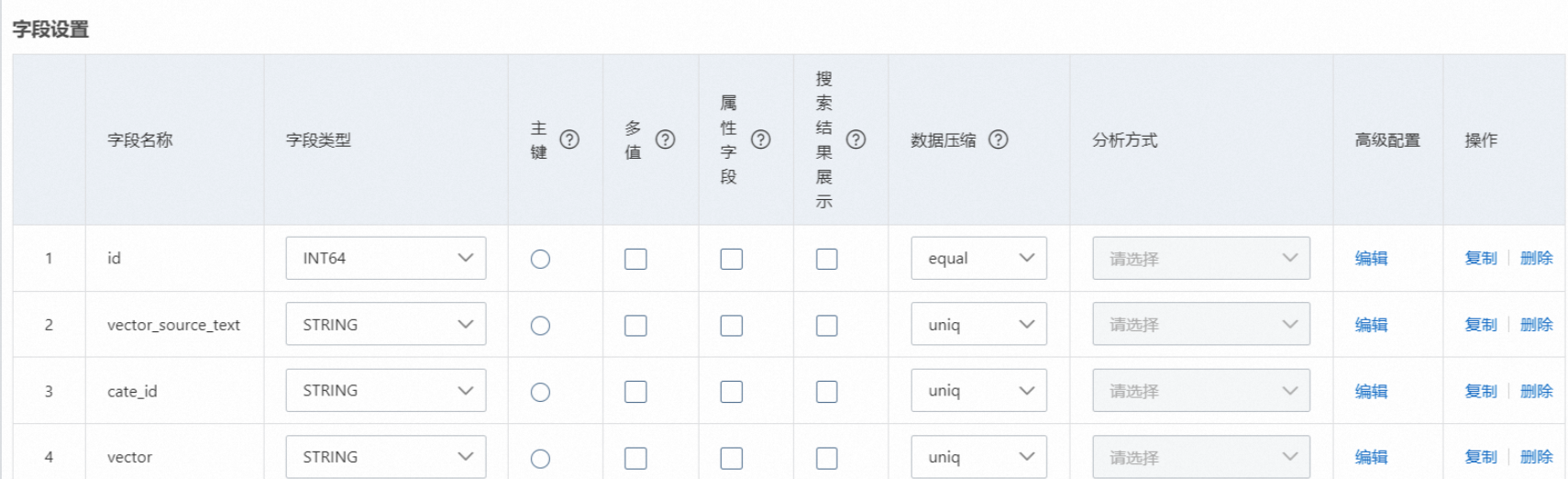
3.1. 欄位設定,文本向量化是通過系統將文本轉換成向量,然後通過向量進行檢索資料,因此此處需要配置3個必須欄位,如上圖(名稱均可以自訂):
3.1.1 主鍵欄位id:類型可以為STRING或者整數類型,需要勾選主鍵
3.1.2 vector_source_text:儲存常值內容:
3.1.3 vector欄位,該欄位的配置保持為空白即可,平台轉化向量需要進階配置如下:
{
  "vector_model": "ops-text-embedding-000",
  "vector_modal": "text",
  "vector_source_field": "vector_source_text"
}配置說明:
vector_model:向量模型,目前支援中英文多種模型(維度固定為768)
ops-text-embedding-000,短文本轉向量模型。
ops-text-embedding-en-000:英文短文本轉向量模。
ops-text-embedding-1024-000-20231001:增強版中文轉向量 1024
ops-text-embedding-512-000-20231001:增強版中文轉向量 512
ops-text-embedding-128-000-20231001:增強版中文轉向量 128
ops-text-embedding-512-en-000-20231001:增強版英文轉向量 512
ops-text-embedding-128-en-000-20231001:增強版英文轉向量 128
vector_modal:向量類型,文本向量
vector_source_field:需要文本向量化的欄位,本文中為vector_source_text
重要
屬性和欄位內容壓縮:
屬性欄位可以選擇是否壓縮,預設為不壓縮,選擇file_compressor表示開啟壓縮
欄位內容可以選擇是否壓縮,預設為不壓縮,預設多值和STRING類型選擇uniq,單值數實值型別是equal。
如果是MaxCompute資料來源或OSS資料來源,從資料來源同步欄位後,展示在預置欄位下方。
主鍵欄位不支援壓縮。
欄位壓縮、屬性壓縮開啟後將節省儲存空間,但查詢效能可能有所下降。
索引設定,必要設定的索引為主鍵索引和向量索引:

主鍵索引:名稱自訂,索引類型選擇PRIMARYKEY64,包含欄位選擇欄位設定中設定為主鍵的欄位,此處為id。
向量索引:名稱自訂,索引類型選擇CUSTOMIZED,包含欄位可選擇3個,如果沒有標籤可以不填,但是主鍵欄位和向量欄位必選: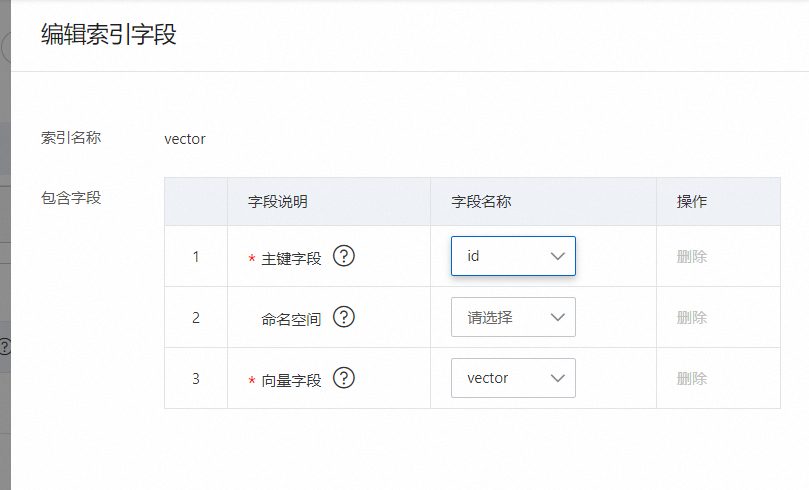 向量索引的進階配置中需要將dimension改成768維,固定768維不可修改為其他維度,其他參數建議保持預設: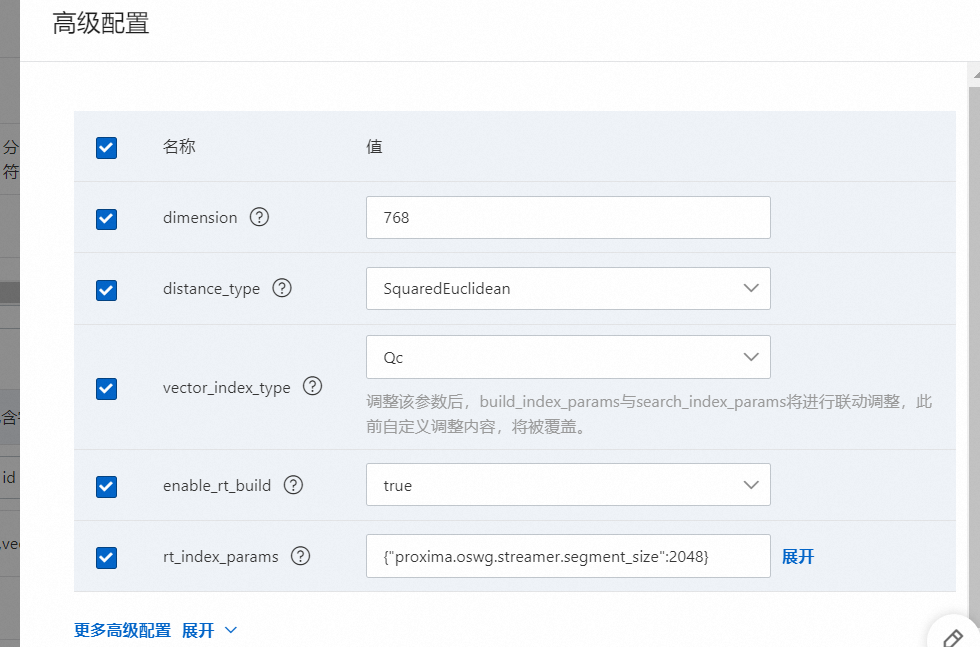
schema樣本:
{
  "file_compress": [
    {
      "name": "file_compressor",
      "type": "zstd"
    },
    {
      "name": "no_compressor",
      "type": ""
    }
  ],
  "table_name": "xiaoming001",
  "summarys": {
    "summary_fields": [
      "id",
      "vector_source_text",
      "cate_id",
      "vector"
    ],
    "parameter": {
      "file_compressor": "zstd"
    }
  },
  "indexs": [
    {
      "index_name": "id",
      "index_type": "PRIMARYKEY64",
      "index_fields": "id",
      "has_primary_key_attribute": true,
      "is_primary_key_sorted": false
    },
    {
      "index_name": "vector",
      "index_type": "CUSTOMIZED",
      "index_fields": [
        {
          "boost": 1,
          "field_name": "id"
        },
        {
          "boost": 1,
          "field_name": "vector"
        }
      ],
      "indexer": "aitheta2_indexer",
      "parameters": {
        "enable_rt_build": "true",
        "min_scan_doc_cnt": "20000",
        "vector_index_type": "Qc",
        "major_order": "col",
        "builder_name": "QcBuilder",
        "distance_type": "SquaredEuclidean",
        "embedding_delimiter": ",",
        "enable_recall_report": "true",
        "ignore_invalid_doc": "true",
        "is_embedding_saved": "false",
        "linear_build_threshold": "5000",
        "dimension": "768",
        "rt_index_params": "{\"proxima.oswg.streamer.segment_size\":2048}",
        "search_index_params": "{\"proxima.qc.searcher.scan_ratio\":0.01}",
        "searcher_name": "QcSearcher",
        "build_index_params": "{\"proxima.qc.builder.quantizer_class\":\"Int8QuantizerConverter\",\"proxima.qc.builder.quantize_by_centroid\":true,\"proxima.qc.builder.optimizer_class\":\"BruteForceBuilder\",\"proxima.qc.builder.thread_count\":10,\"proxima.qc.builder.optimizer_params\":{\"proxima.linear.builder.column_major_order\":true},\"proxima.qc.builder.store_original_features\":false,\"proxima.qc.builder.train_sample_count\":3000000,\"proxima.qc.builder.train_sample_ratio\":0.5}"
      }
    }
  ],
  "attributes": [
    {
      "field_name": "id",
      "file_compress": "no_compressor"
    },
    {
      "field_name": "vector_source_text",
      "file_compress": "no_compressor"
    },
    {
      "field_name": "cate_id",
      "file_compress": "no_compressor"
    },
    {
      "field_name": "vector",
      "file_compress": "no_compressor"
    }
  ],
  "fields": [
    {
      "user_defined_param": {},
      "field_name": "id",
      "field_type": "INT64",
      "compress_type": "equal"
    },
    {
      "field_name": "vector_source_text",
      "field_type": "STRING",
      "compress_type": "uniq"
    },
    {
      "field_name": "cate_id",
      "field_type": "STRING",
      "compress_type": "uniq"
    },
    {
      "user_defined_param": {
        "vector_model": "ops-text-embedding-000",
        "vector_modal": "text",
        "vector_source_field": "vector_source_text"
      },
      "field_name": "vector",
      "field_type": "FLOAT",
      "compress_type": "uniq",
      "multi_value": true
    }
  ]
}
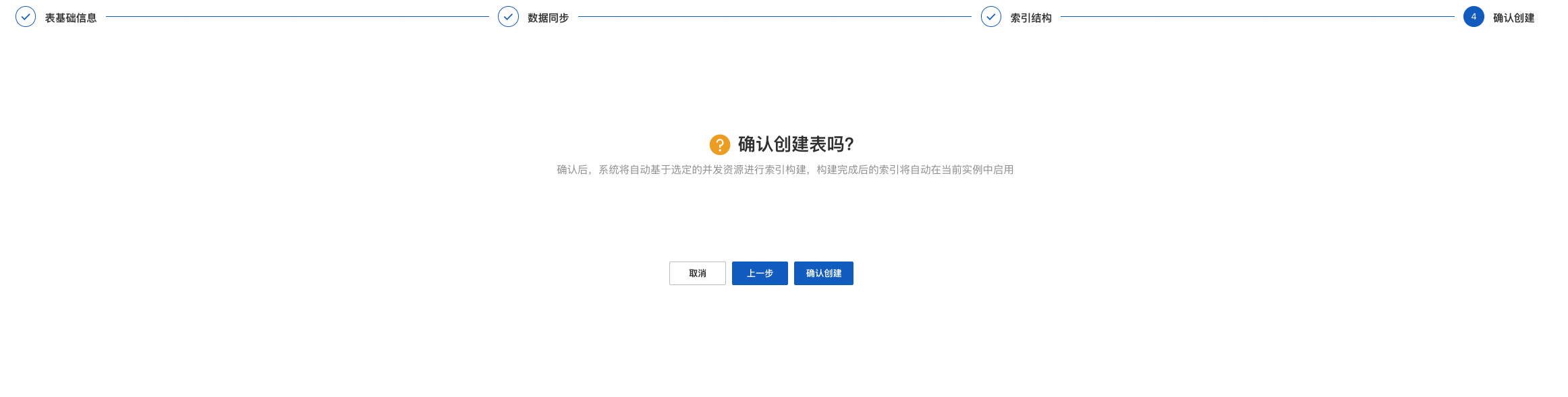
配置完成後,點擊確認建立:
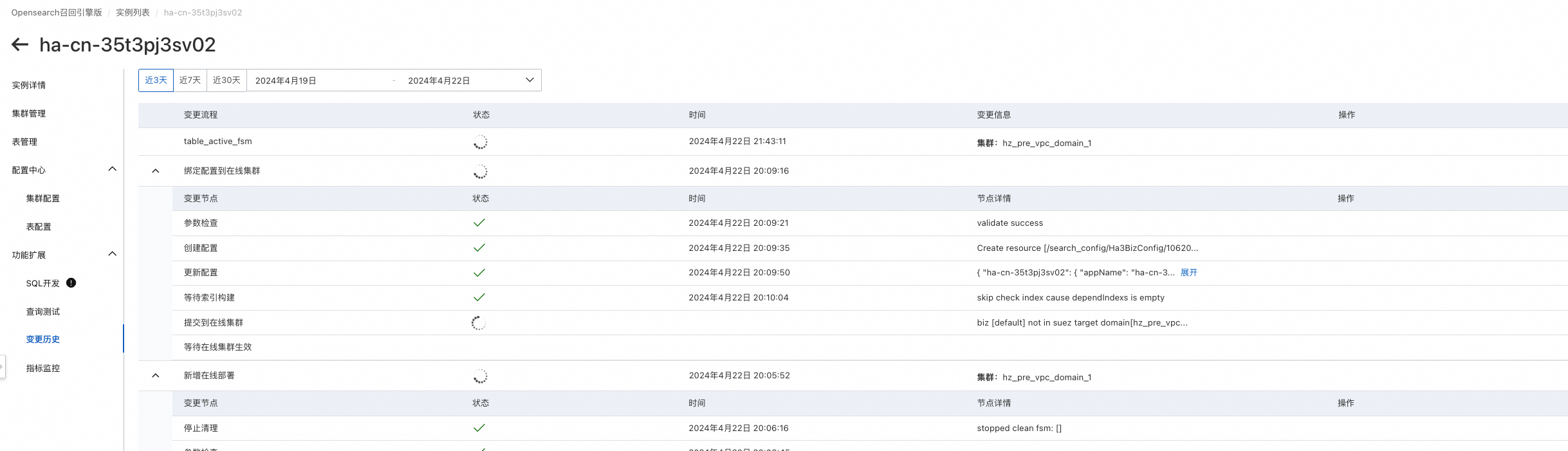
可在功能擴充>變更歷史中查看建立進度,進度完成後即可進行查詢測試:
效果測試
文法介紹
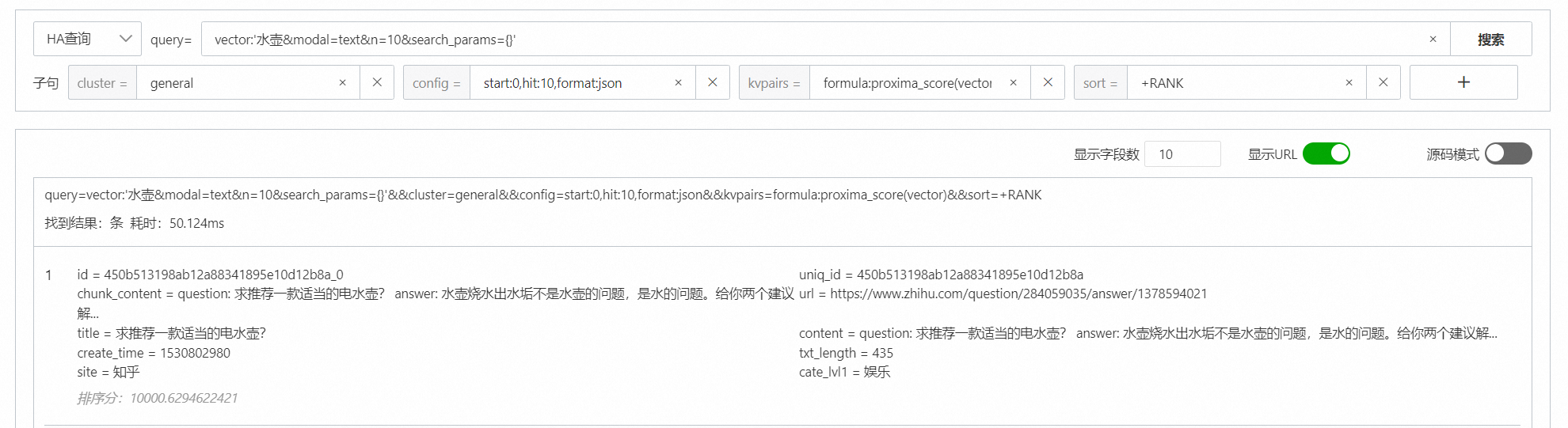
vector:'水壺&modal=text&n=10&search_params={}'&&config=start:0,hit:10,format:json&&kvpairs=formula:proxima_score(vector)&&sort=+RANKmodal表示模態類型,modal設定為text
n表示指定向量檢索返回的top結果數
常值內容若有特殊不可見字元需要經過base64編碼
通過控制台進行查詢測試:
SDK中檢索資料
添加依賴:
pip install alibabacloud-ha3engine搜尋 demo:
# -*- coding: utf-8 -*-


from alibabacloud_ha3engine import models, client
from alibabacloud_tea_util import models as util_models
from Tea.exceptions import TeaException, RetryError
def search():
    Config = models.Config(
        endpoint="參考執行個體詳情頁>API入口下的API網域名稱",
        instance_id="",
        protocol="http",
        access_user_name="購買執行個體時設定的使用者名稱",
        access_pass_word="購買執行個體時設定的密碼"

    )

    # 如使用者請求時間較長. 可通過此配置增加請求等待時間. 單位 ms
    # 此參數可在 search_with_options 方法中使用
    runtime = util_models.RuntimeOptions(
        connect_timeout=5000,
        read_timeout=10000,
        autoretry=False,
        ignore_ssl=False,
        max_idle_conns=50
    )

    # 初始化 Ha3Engine Client
    ha3EngineClient = client.Client(Config)

    optionsHeaders = {}

    try:
        # 樣本1: 直接使用 ha 查詢串進行搜尋.
        # =====================================================
        query_str = "config=hit:4,format:json,fetch_summary_type:pk,qrs_chain:search&&query=text_index:'常值內容&modal=text&n=10&search_params={}'&&cluster=general"
        haSearchQuery = models.SearchQuery(query=query_str)
        haSearchRequestModel = models.SearchRequestModel(optionsHeaders, haSearchQuery)
        hastrSearchResponseModel = ha3EngineClient.search(haSearchRequestModel)
        print(hastrSearchResponseModel)
    except TeaException as e:
        print(f"send request with TeaException : {e}")
    except RetryError as e:
print(f"send request with Connection Exception : {e}")其他SDK demo可參考開發指南(ha3_3.10.0)
注意事項
如果對向量檢索耗時有較嚴格的要求,建議mmap策略樣本。
儲存文字欄位需要設定為STRING。
向量索引需要設定為CUSTOMIZED類型。
該情境支援HA文法、RESTFUL API,不支援SQL。