使用介紹
詞權重又稱term weight,通過建立詞權重幹預詞典,並在查詢分析中生效該幹預詞典,就可以起到詞權重的幹預效果。目前支援對系統內建的詞權重詞典進行人工幹預。使用者實現幹預操作的過程有以下四步:
建立詞權重幹預詞典。使用者通過
搜尋演算法中心--->召回配置``--->詞典管理,進入查詢分析幹預詞典頁後,點擊頁面右上方的“建立”。選擇了詞典類型後,為詞典命名,幹預詞典建立完成,詞典會出現在頁面的詞典列表中。新增幹預詞典內的幹預詞條。詞典建立完成後,在列表中點擊詞典名稱或點擊詞典對應的“詞條管理”,即可進入幹預詞典的詳情頁。使用者可在詳情頁內進行幹預詞條的新增和管理。使用者可選擇對應的分析器(目前包括:通用分析器、電商分析器、IT-內容分析器和基於這三個分析器的自訂分析器)對query進行分詞,之後對分詞後的term進行詞權重幹預(可設定為:高、中、低三種權重)
使用幹預詞典。建立並填充完成停用詞幹預詞典後,可在任意應用的查詢規則內選擇使用。
幹預詞典效果測試和上線。查詢分析規則使用了幹預詞典後,應用到線上之前建議先進行搜尋效果測試,評估效果是否符合幹預預期。
生效規則
幹預資料的生效規則為:
全query精確匹配優先;
位置優先:
相同位置,長度優先:長度是以分詞後的term為粒度,一個term的長度為1。匹配的時候有最大的長度限制,當前的限制為5。例:MySQL資料庫 -> 分詞為:MySQL 和 資料庫,有兩個term,長度為2。
配置查詢分析-詞權重幹預詞典時,可以選擇query是否忽略空格。
樣本
幹預資料如下:
資料庫許可權管理 -> 資料庫:7 | 許可權:4 | 管理:1
MySQL資料庫 -> MySQL:7 | 資料庫:1
資料庫許可權 -> 資料庫:4 | 許可權:1
linux環境中的MySQL資料庫許可權管理 -> linux:7 | 環境:1 | 中:1 | 的:1 | MySQL:7 | 資料庫:4 | 許可權:1 | 管理:1(檢索單元長度超過5)
查詢query:
MySQL資料庫許可權管理=>會生效b這條幹預資料(位置優先)
sqlserver資料庫許可權管理=>會生效a這條幹預資料(相同位置,長度優先)
資料庫許可權如何設定=>會生效c這條幹預資料(位置優先)
資料庫設定許可權=>不會有任何的幹預資料生效(無匹配的幹預資料)
linux環境中的MySQL資料庫系統管理權限設定=>會生效d這條規則(全query精確匹配)
linux環境中的MySQL資料庫系統管理權限設定攻略=> 會生效b任何規則(儘管規則d是本query的部分,但因為包含分詞後的term個數超過了5個,因此不會按部分匹配到d這個規則)
MySQL資料庫的資料庫使用權限設定=>會生效b和c兩條規則
錯誤碼
在查詢改寫的時候,可能會改寫出來兩個查詢query,其中第一個query會保留權重7和4的term參與召回,第二個query是用於重查(系統預設是當第一個query查詢無結果才會進行重查),為了擴大召回,僅保留權重為7的term去召回。
錯誤碼6612,表示term_weight makeup data fail. 錯誤含義:幹預資料沒有生效。
目前新增詞權重幹預詞條僅支援獨享型配置定製模型分析器
實戰演練
業務情境:某內容行業業務在OpenSearch的應用執行個體中配置使用了查詢分析規則,規則包含詞權重功能,但是線上上發現了badcase,於是決定使用幹預功能。
badcase:使用者搜尋Query資料許可權管理,改寫的query為:default:'許可權' RANK default:'資料' RANK default:'管理',但使用者實際想命中“資料”而非“許可權”。
問題診斷:內建詞權重幹預badcase,需要進行詞權重幹預。
解決方案:建立詞權重幹預詞典,再將該幹預詞典應用線上上使用的查詢分析規則中。
操作步驟:
在控制台,功能擴充,詞典管理,建立詞權重詞典:
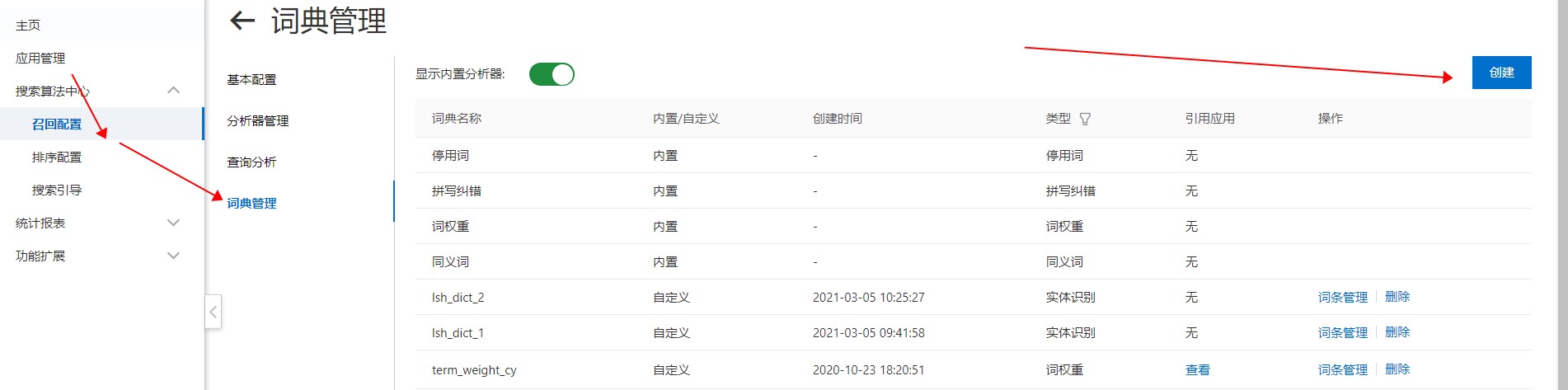
填寫“名稱”,詞典類型選擇“詞權重”,點擊”儲存”。
在建立的詞權重幹預詞典裡新增幹預詞條,輸入query,分析器類型選擇系統內建分析器/自定分析器(根據查詢分析中配置的分析器類型選擇),設定分詞後term的權重:
單擊擷取按鈕後,系統以中文分析器對 Query 進行分詞,預設詞權重結果為:資料-中、許可權-高、管理-中,可通過下拉框將各 term 的權重調整為高、中、低。若查詢分析中配置的索引為定製模型分析器,則分析器類型選擇定製模型分析器,執行個體選擇Ha3引擎,並選擇對應的應用程式名稱,關聯分析器與查詢分析中配置的分析器保持一致。
在查詢分析介面把剛剛建立的“詞權重幹預詞典”先應用在一個未上線的查詢分析規則中,以便進行搜尋效果測試。
是否忽略空格功能指當在使用詞權重幹預時是否忽略query中的空格(預設不開啟),例:輸入Query:“sql 資料庫” ,幹預詞條:“sql資料庫”,選擇“是”則按幹預詞典中的詞權重進行幹預,選擇“否”則不進行幹預。
在搜尋測試頁面驗證幹預效果:選擇應用 os_test 和線上應用,輸入 query 為
default:資料許可權管理,參數 qp 填寫qp_1,執行搜尋後,實際查詢詞變為(default:資料 RANK default:許可權 RANK default:管理),表明幹預生效後”資料”已獲得最高權重排在首位。
SDK 建立詞權重幹預詞典
Java SDK:maven依賴:
<dependency>
    <groupId>com.aliyun</groupId>
    <artifactId>aliyun-java-sdk-opensearch</artifactId>
    <version>0.7.0</version>
</dependency>
<dependency>
    <groupId>com.aliyun</groupId>
    <artifactId>aliyun-java-sdk-core</artifactId>
    <version>4.5.0</version>
</dependency>
Java SDK Demo:
public class TestTermWeightingInQueryProcessor {
    private static DefaultAcsClient client;
    public static void main(String[] args) throws Exception {
        String regionId = "cn-hangzhou"; // region Id
        IClientProfile profile = DefaultProfile.getProfile(regionId, "{ak}", "{secret}");
        DefaultProfile.addEndpoint(regionId, regionId, "Opensearch", "opensearch." + regionId + ".aliyuncs.com");
        DefaultAcsClient client = new DefaultAcsClient(profile);
        String dictionaryName = "詞典、qp名稱"; // 要建立的詞典qp名稱
        String appName = "應用程式名稱"; // 要使用的應用程式名稱
        int versionId = 1234;  // 應用版本id
//        System.out.println("List intervention dictionaries");
//        listInterventionDictionaries();
        Thread.sleep(10000);
        System.out.println("Create intervention dictionary: " + dictionaryName);
        createDictionary(dictionaryName);
//
//        Thread.sleep(10000);
//        System.out.println("Describe intervention dictionary");
//        describeInterventionDictionary(dictionaryName);
//
//        Thread.sleep(10000);
//        System.out.println("List intervention dictionary entries before");
//        listEntries(dictionaryName);
        Thread.sleep(10000);
        System.out.println("Post dictionary entries added");
        postEntries(dictionaryName, "add");
        Thread.sleep(10000);
        System.out.println("List intervention dictionary entries after add");
        listEntries(dictionaryName);
        Thread.sleep(10000);
        System.out.print("Set intervention dictionary to qp");
        setQueryProcessor(appName, versionId, dictionaryName);
        // 謹慎操作,確定在搜尋測試頁中測試當前qp 滿足預期了以後才設定為預設qp
        Thread.sleep(10000);
        System.out.println("Set default query processor");
        setDefaultQueryProcessor(appName, versionId, dictionaryName);
//        Thread.sleep(10000);
//        System.out.println("Delete dictionary");
//        deleteDictionary(dictionaryName);
    }
    public static void listInterventionDictionaries() throws ClientException {
        ListInterventionDictionariesRequest listInterventionDictionariesRequest = new ListInterventionDictionariesRequest();
        listInterventionDictionariesRequest.setPageSize(50);
        HttpResponse response = client.doAction(listInterventionDictionariesRequest);
        System.out.println(response.getHttpContentString());
    }
    public static void createDictionary(String dictionaryName) throws UnsupportedEncodingException, ClientException {
        CreateInterventionDictionaryRequest request = new CreateInterventionDictionaryRequest();
        String body = "{\"name\": \"" + dictionaryName + "\", \"type\": \"term_weighting\"}";
        request.setHttpContent(body.getBytes("UTF-8"), "UTF-8", FormatType.JSON);
        HttpResponse response = client.doAction(request);
        System.out.println(response.getHttpContentString());
    }
    public static void describeInterventionDictionary(String dictionaryName) throws ClientException {
        DescribeInterventionDictionaryRequest request = new DescribeInterventionDictionaryRequest();
        request.setName(dictionaryName);
        HttpResponse response = client.doAction(request);
        System.out.println(response.getHttpContentString());
    }
    public static void listEntries(String dictionaryName) throws ClientException {
        ListInterventionDictionaryEntriesRequest request = new ListInterventionDictionaryEntriesRequest();
        request.setName(dictionaryName);
        HttpResponse response = client.doAction(request);
        System.out.println(response.getHttpContentString());
    }
    public static void postEntries(String dictionaryName, String cmd) throws UnsupportedEncodingException, ClientException {
        PushInterventionDictionaryEntriesRequest request = new PushInterventionDictionaryEntriesRequest();
        request.setName(dictionaryName);
        // 修改為要幹預的詞條資料,權重高中低為 7 4 1
        String body = "[{\n" +
                "  \"word\": \"資料許可權管理\",\n" +
                "  \"cmd\": \"" + cmd + "\",\n" +
                "  \"tokens\": [\n" +
                "    {\n" +
                "      \"token\": \"資料\",\n" +
                "      \"weight\": 7\n" +
                "    },\n" +
                "    {\n" +
                "      \"token\": \"許可權\",\n" +
                "      \"weight\": 4\n" +
                "    },\n" +
                "    {\n" +
                "      \"token\": \"管理\",\n" +
                "      \"weight\": 1\n" +
                "    }\n" +
                "  ]\n" +
                "}]";
        request.setHttpContent(body.getBytes("UTF-8"), "UTF-8", FormatType.JSON);
        HttpResponse response = client.doAction(request);
        System.out.println(response.getHttpContentString());
    }
    public static void deleteDictionary(String dictionaryName) throws ClientException {
        RemoveInterventionDictionaryRequest request = new RemoveInterventionDictionaryRequest();
        request.setName(dictionaryName);
        HttpResponse response = client.doAction(request);
        System.out.println(response.getHttpContentString());
    }
    public static void setQueryProcessor(String appName, int versionId, String dictionaryName) throws UnsupportedEncodingException, ClientException {
        CreateQueryProcessorRequest request = new CreateQueryProcessorRequest();
        request.setAppGroupIdentity(appName);
        request.setAppId(versionId);

        String body = "{\"name\":\""+  dictionaryName +"\",\"domain\":\"GENERAL\",\"indexes\":[\"default\"],\"processors\":[{\"name\":\"term_weighting\",\"useSystemDictionary\":true, \"interventionDictionary\":\""+dictionaryName+"\"}]}";
        request.setHttpContent(body.getBytes("UTF-8"), "UTF-8", FormatType.JSON);
        HttpResponse response = client.doAction(request);
        System.out.println(response.getHttpContentString());
    }
    public static void setDefaultQueryProcessor(String appName, int versionId, String dictionaryName) throws UnsupportedEncodingException, ClientException {
        ModifyQueryProcessorRequest request = new ModifyQueryProcessorRequest();
        request.setAppGroupIdentity(appName);
        request.setAppId(versionId);
        request.setName(dictionaryName);
        String body = "{\"active\":true}";
        request.setHttpContent(body.getBytes("UTF-8"), "UTF-8", FormatType.JSON);
        HttpResponse response = client.doAction(request);
        System.out.println(response.getHttpContentString());
    }
    public static void deleteQueryProcessor(String appName, int versionId, String dictionaryName) throws ClientException {
        RemoveQueryProcessorRequest request = new RemoveQueryProcessorRequest();
        request.setAppGroupIdentity(appName);
        request.setAppId(versionId);
        request.setName(dictionaryName);
        HttpResponse response = client.doAction(request);
        System.out.println(response.getHttpContentString());
    }
    public static void listQueryProcessors(String appName, int versionId) throws ClientException {
        ListQueryProcessorsRequest request = new ListQueryProcessorsRequest();
        request.setAppGroupIdentity(appName);
        request.setAppId(versionId);
        HttpResponse response = client.doAction(request);
        System.out.println(response.getHttpContentString());
    }
}資料結構參考:InterventionDictionaryEntry
QueryProcessor body參考:QueryProcessor
功能限制
詞權重幹預詞典一共能建立20個。
每個詞權重幹預詞典最多建立500個幹預詞條。
query中若包含英文,請使用全小寫英文。
每個幹預詞條下query最大分詞term為30個。