Lua是一種輕量級、高效的指令碼語言,在網關開發中,Lua可以用於編寫和執行各種網關程式,例如API Gateway、訊息網關、反向 Proxy等。通過Lua指令碼,開發人員可以實現請求的路由、過濾、鑒權等功能,並進行定製化的處理。在一些代理中,比如Nginx和Envoy,Lua可以被嵌入用於處理請求和響應,並進行日誌輸出和其他定製化操作。本文中的Lua指令碼用於在Envoy代理中處理請求和響應,並將請求和響應的頭部和本文資訊以日誌的形式輸出。
使用限制
MSE雲原生網關版本為1.2.11及以上。
出於安全考慮,MSE雲原生網關預設禁用以下Lua庫和函數。
debug.debug
debug.getfenv
debug.getregistry
dofile
io
loadfile
os.execute
os.getenv
os.remove
os.rename
os.tmpname
配置路由規則
登入MSE管理主控台,並在頂部功能表列選擇地區。
在左側導覽列,選擇云原生网关 > 网关列表,單擊目標網關執行個體ID。
在網關詳情頁面,在左側導覽列,選擇插件市场。
在全部插件頁簽,選擇自定义頁簽,然後單擊lua資源卡片。
在外掛程式配置頁簽,選擇規則作用層級,並進行如下配置。
說明所有進入網關的請求,會按路由級→網域名稱級→執行個體級 的方向依次匹配外掛程式規則。
路由級外掛程式規則
單擊建立規則,在建立規則頁面,開啟生效開關,並選擇生效目標路由,然後在配置規則編輯框中輸入Lua指令碼。
配置完成後單擊確定。
網域名稱級外掛程式規則
單擊建立規則,在建立規則頁面,開啟生效開關,並選擇生效目標網域名稱,然後在配置規則編輯框中輸入Lua指令碼。
重要LUA外掛程式規則不支援配置帶"*"的網域名稱。
配置完成後單擊確定。
執行個體級外掛程式規則
lua外掛程式預設已配置執行個體級外掛程式規則,如需編輯,請關閉鎖定編輯開關。
開啟生效開關,然後在配置規則編輯框中輸入Lua指令碼。
完成後單擊儲存。
API參考
關於網關提供的Lua API詳細資料,請參見Lua。
如果在序列化或還原序列化時出現錯誤,Lua將調用error函數拋出錯誤,並終止當前處理。
常見用例
列印完整的請求應答資訊到外掛程式日誌
配置路由規則時,使用以下Lua代碼規則。
根據此代碼配置,只會列印以下
content-type類型的請求Body和應答Body,且Body不能超過1024位元組(1 KB)。application/x-www-form-urlencoded
application/json
text/plain
local maxBodySize = 1024

function check_content_readable(type)
  if type == nil then
    return false
  end
  if string.find(type, "application/x-www-form-urlencoded",1,true) or string.find(type, "application/json",1,true) or string.find(type, "text/plain",1,true) then
     return true
  end
  return false
end

function envoy_on_request(request_handle)
  local headers = request_handle:headers()
  local headersStr = ""
  local contentType
  for key, value in pairs(headers) do
    if key == "content-type" then
       contentType = value
    end
    headersStr = headersStr  .. key .. "=" .. value .. ", "
  end
  request_handle:streamInfo():dynamicMetadata():set("envoy.lua","request_headers",headersStr)
  local requestBody = ""
  if check_content_readable(contentType) then
    for chunk in request_handle:bodyChunks() do
      if (chunk:length() > 0) then
        requestBody = requestBody .. chunk:getBytes(0, chunk:length())
      end
      if (#requestBody > maxBodySize) then
         requestBody = requestBody .. "<truncated>"
         break
      end
    end
  end
  request_handle:streamInfo():dynamicMetadata():set("envoy.lua","request_body",string.gsub(requestBody,"\n","\\n"))
end

function envoy_on_response(response_handle)
  local headers = response_handle:headers()
  local headersStr = ""
  local contentType
  local contentEncoding = false
  for key, value in pairs(headers) do
    if key == "content-type" then
       contentType = value
    elseif key == "content-encoding" then
       contentEncoding = true
    end
    headersStr = headersStr .. key .. "=" .. value .. ", "
  end
  local responseBody = ""
  if check_content_readable(contentType) and not contentEncoding then
    for chunk in response_handle:bodyChunks() do
      if (chunk:length() > 0) then
        responseBody = responseBody .. chunk:getBytes(0, chunk:length())
      end
      if (#responseBody > maxBodySize) then
         responseBody = responseBody .. "<truncated>"
         break
      end
    end
  end
  local reqHeaders = ""
  local reqBody = ""
  local metadata = response_handle:streamInfo():dynamicMetadata():get("envoy.lua")
  if metadata ~= nil then
    local headers = response_handle:streamInfo():dynamicMetadata():get("envoy.lua")["request_headers"]
    if headers ~= nil then
      reqHeaders = headers
    end
    local body = response_handle:streamInfo():dynamicMetadata():get("envoy.lua")["request_body"]
    if body ~= nil then
      reqBody = body
    end
  end
  response_handle:logInfo("request Headers: [" .. reqHeaders .. "] request Body: [" .. string.gsub(reqBody,"\n","\\n") .. "] response Headers: [" .. headersStr .. "] response Body: [" .. string.gsub(responseBody,"\n","\\n") .. "]")
end
查看外掛程式日誌。
此功能要求開啟網關外掛程式日誌投遞,如果還未開啟,請單擊立即開啟日誌投遞功能。開啟日誌投遞配置後,外掛程式日誌將投遞到SLS並可在頁面中查看。如下所示,可以使用訪問日誌中的
request-id,在Lua外掛程式日誌中找到完整的請求和響應資訊。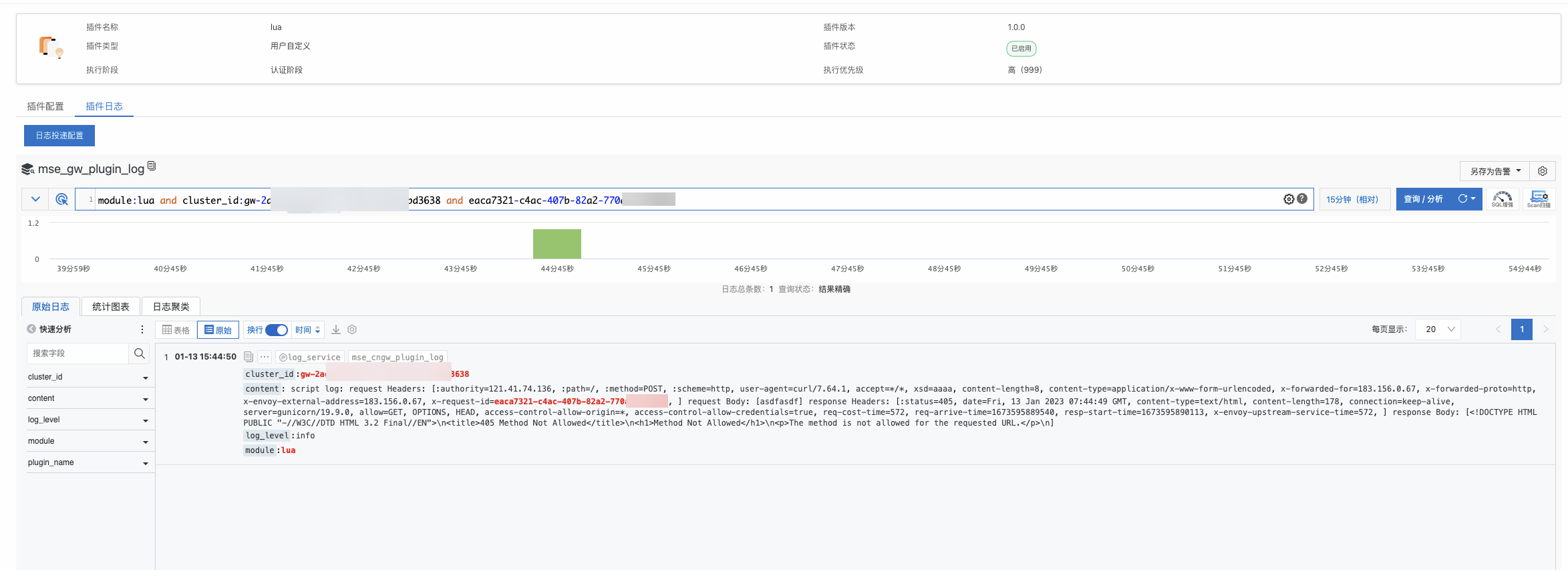
將完整的請求應答資訊添加到訪問日誌
配置路由規則時,使用以下Lua代碼規則。
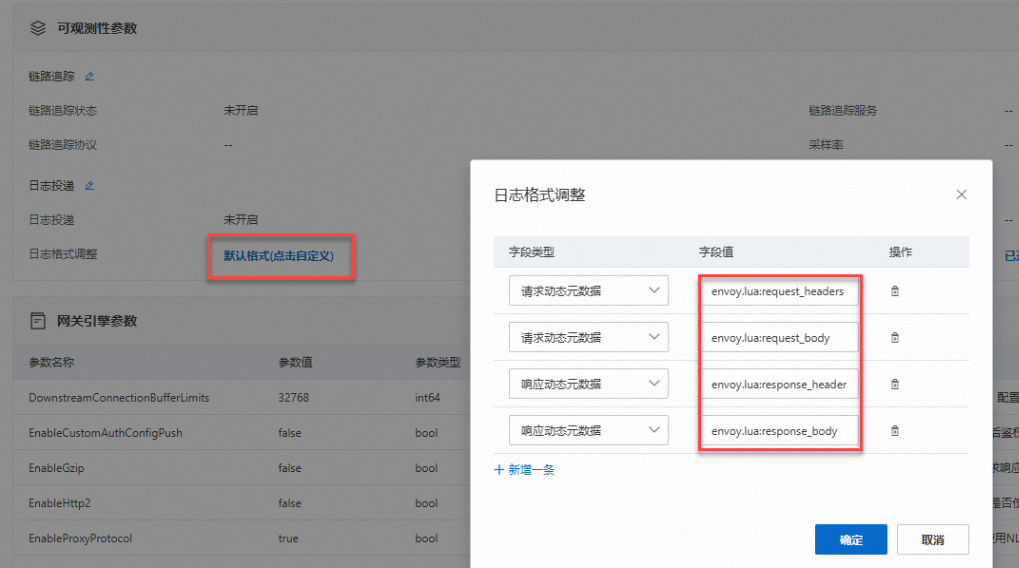
網關的訪問日誌參數支援配置自訂動態中繼資料,首先需要在外掛程式中定義中繼資料。以下代碼一共定義了四個中繼資料資訊,分別對應要求標頭、請求Body、回應標頭、響應Body:
envoy.lua:request_headers
envoy.lua:request_body
envoy.lua:response_headers
envoy.lua:response_body
local maxBodySize = 1024

function check_content_readable(type)
  if type == nil then
    return false
  end
  if string.find(type, "application/x-www-form-urlencoded",1,true) or string.find(type, "application/json",1,true) or string.find(type, "text/plain",1,true) then
     return true
  end
  return false
end

function envoy_on_request(request_handle)
  local headers = request_handle:headers()
  local headersStr = ""
  local contentType
  for key, value in pairs(headers) do
    if key == "content-type" then
       contentType = value
    end
    headersStr = headersStr  .. key .. "=" .. value .. ", "
  end
  request_handle:streamInfo():dynamicMetadata():set("envoy.lua","request_headers",headersStr)
  local requestBody = ""
  if check_content_readable(contentType) then
    for chunk in request_handle:bodyChunks() do
      if (chunk:length() > 0) then
        requestBody = requestBody .. chunk:getBytes(0, chunk:length())
      end
      if (#requestBody > maxBodySize) then
         requestBody = requestBody .. "<truncated>"
         break
      end
    end
  end
  request_handle:streamInfo():dynamicMetadata():set("envoy.lua","request_body",string.gsub(requestBody,"\n","\\n"))
end

function envoy_on_response(response_handle)
  local headers = response_handle:headers()
  local headersStr = ""
  local contentType
  local contentEncoding = false
  for key, value in pairs(headers) do
    if key == "content-type" then
       contentType = value
    elseif key == "content-encoding" then
       contentEncoding = true
    end
    headersStr = headersStr .. key .. "=" .. value .. ", "
  end
  response_handle:streamInfo():dynamicMetadata():set("envoy.lua","response_headers",headersStr)
  local responseBody = ""
  if check_content_readable(contentType) and not contentEncoding then
    for chunk in response_handle:bodyChunks() do
      if (chunk:length() > 0) then
        responseBody = responseBody .. chunk:getBytes(0, chunk:length())
      end
      if (#responseBody > maxBodySize) then
         responseBody = responseBody .. "<truncated>"
         break
      end
    end
  end
  response_handle:streamInfo():dynamicMetadata():set("envoy.lua","response_body",string.gsub(responseBody,"\n","\\n"))
end
調整日誌格式。
在該網關執行個體的左側導覽列,單擊參數配置,然後單擊預設格式(點擊自訂)。在自訂日誌欄位裡添加對應的中繼資料資訊,就可以在訪問日誌中看到對應的資訊。