萬相-參考生視頻模型支援 多模態輸入 (文本/映像/視頻/音頻),可將人物或物體作為主角,根據提示詞產生自然生動的表演視頻。
快速開始
輸入提示詞:Video 1 walks in from the deep left side of the frame. Then the shot cuts to a close-up of Image 1. Video 1 is leaning against the rusty wall on the right side from Image 2. Hearing the footsteps, she slowly turns her head. After seeing Image 1, Video 1 says, “Why did you still come?” Image 1 replies, “Let’s talk.” | |||
輸入視頻(視頻1)
| 輸入映像(圖1)
| 輸入映像(圖2)
| 輸出視頻(多鏡頭,有聲視頻) |
輸入參考音色: |  輸入參考音色: |  | |
在調用前,先擷取與配置 API Key,再配置API Key到環境變數。通過SDK進行調用,請安裝DashScope SDK。
Python SDK
重要請確保 DashScope Python SDK 版本不低於1.25.16,再運行以下代碼。
若版本過低,可能會觸發 "url error, please check url!" 等錯誤。請參考安裝SDK進行更新。
# -*- coding: utf-8 -*-
from http import HTTPStatus
from dashscope import VideoSynthesis
import dashscope
import os

# 以下為新加坡地區URL,調用時請將{WorkspaceId}替換為真實的業務空間ID。各地區的URL不同,擷取URL:https://www.alibabacloud.com/help/en/model-studio/video-reference-api-reference
dashscope.base_http_api_url = 'https://{WorkspaceId}.ap-southeast-1.maas.aliyuncs.com/api/v1'

# 若沒有配置環境變數,請用百鍊API Key將下行替換為:api_key="sk-xxx"
# 各地區的API Key不同。擷取API Key:https://www.alibabacloud.com/help/en/model-studio/get-api-key
api_key = os.getenv("DASHSCOPE_API_KEY")

media = [
    {
        "type": "reference_video",
        "url": "https://help-static-aliyun-doc.aliyuncs.com/file-manage-files/zh-CN/20260416/pfgcuv/wan-r2v-girl-en.mp4",
        "reference_voice": "https://help-static-aliyun-doc.aliyuncs.com/file-manage-files/zh-CN/20260416/exiikq/wan-r2v-girl-demo-voice-en.mp3"
    },
    {
        "type": "reference_image",
        "url": "https://help-static-aliyun-doc.aliyuncs.com/file-manage-files/zh-CN/20260416/skhalj/wan-r2v-boy-en.jpg",
        "reference_voice": "https://help-static-aliyun-doc.aliyuncs.com/file-manage-files/zh-CN/20260416/pqxdoi/wan-r2v-boy-voice-en.mp3"
    },
    {
        "type": "reference_image",
        "url": "https://help-static-aliyun-doc.aliyuncs.com/file-manage-files/zh-CN/20260416/vyqjxd/wan-r2v-bg-en.jpg"
    }
]

print('please wait...')
rsp = VideoSynthesis.call(
    api_key=api_key,
    model="wan2.7-r2v-2026-06-12",
    media=media,
    resolution="720P",
    ratio="16:9",
    duration=10,
    prompt_extend=False,
    watermark=True,
    prompt="Video 1 walks in from the deep left side of the frame. Then the shot cuts to a close-up of Image 1. Video 1 is leaning against the rusty wall on the right side from Image 2. Hearing the footsteps, she slowly turns her head. After seeing Image 1, Video 1 says, “Why did you still come?” Image 1 replies, “Let’s talk.”",
)
print(rsp)
if rsp.status_code == HTTPStatus.OK:
    print("video_url:", rsp.output.video_url)
else:
    print('Failed, status_code: %s, code: %s, message: %s' % (rsp.status_code, rsp.code, rsp.message))
Java SDK
重要請確保 DashScope Java SDK 版本不低於2.22.14,再運行以下代碼。
若版本過低,可能會觸發 "url error, please check url!" 等錯誤。請參考安裝SDK進行更新。
// Copyright (c) Alibaba, Inc. and its affiliates.

import com.alibaba.dashscope.aigc.videosynthesis.VideoSynthesis;
import com.alibaba.dashscope.aigc.videosynthesis.VideoSynthesisParam;
import com.alibaba.dashscope.aigc.videosynthesis.VideoSynthesisResult;
import com.alibaba.dashscope.exception.ApiException;
import com.alibaba.dashscope.exception.InputRequiredException;
import com.alibaba.dashscope.exception.NoApiKeyException;
import com.alibaba.dashscope.utils.Constants;
import com.alibaba.dashscope.utils.JsonUtils;

import java.util.ArrayList;
import java.util.List;

public class Ref2Video {

    static {
        // 以下為新加坡地區url,調用時請將{WorkspaceId}替換為真實的業務空間ID。各地區的URL不同,擷取URL:https://www.alibabacloud.com/help/en/model-studio/video-reference-api-reference
        Constants.baseHttpApiUrl = "https://{WorkspaceId}.ap-southeast-1.maas.aliyuncs.com/api/v1";
    }

    // 若沒有配置環境變數,請用百鍊API Key將下行替換為:apiKey="sk-xxx"
    // 各地區的API Key不同。擷取API Key:https://www.alibabacloud.com/help/en/model-studio/get-api-key
    static String apiKey = System.getenv("DASHSCOPE_API_KEY");

    public static void ref2video() throws ApiException, NoApiKeyException, InputRequiredException {
        VideoSynthesis vs = new VideoSynthesis();
        final String prompt = "Video 1 walks in from the deep left side of the frame. Then the shot cuts to a close-up of Image 1. Video 1 is leaning against the rusty wall on the right side from Image 2. Hearing the footsteps, she slowly turns her head. After seeing Image 1, Video 1 says, \"Why did you still come?\" Image 1 replies, \"Let's talk.\"";
        List<VideoSynthesisParam.Media> media = new ArrayList<>();
        media.add(VideoSynthesisParam.Media.builder()
                .url("https://help-static-aliyun-doc.aliyuncs.com/file-manage-files/zh-CN/20260416/pfgcuv/wan-r2v-girl-en.mp4")
                .type("reference_video")
                .referenceVoice("https://help-static-aliyun-doc.aliyuncs.com/file-manage-files/zh-CN/20260416/exiikq/wan-r2v-girl-demo-voice-en.mp3")
                .build());
        media.add(VideoSynthesisParam.Media.builder()
                .url("https://help-static-aliyun-doc.aliyuncs.com/file-manage-files/zh-CN/20260416/skhalj/wan-r2v-boy-en.jpg")
                .type("reference_image")
                .referenceVoice("https://help-static-aliyun-doc.aliyuncs.com/file-manage-files/zh-CN/20260416/pqxdoi/wan-r2v-boy-voice-en.mp3")
                .build());
        media.add(VideoSynthesisParam.Media.builder()
                .url("https://help-static-aliyun-doc.aliyuncs.com/file-manage-files/zh-CN/20260416/vyqjxd/wan-r2v-bg-en.jpg")
                .type("reference_image")
                .build());
        VideoSynthesisParam param =
                VideoSynthesisParam.builder()
                        .apiKey(apiKey)
                        .model("wan2.7-r2v-2026-06-12")
                        .prompt(prompt)
                        .media(media)
                        .watermark(true)
                        .duration(10)
                        .resolution("720P")
                        .ratio("16:9")
                        .promptExtend(false)
                        .build();
        System.out.println("please wait...");
        VideoSynthesisResult result = vs.call(param);
        System.out.println(JsonUtils.toJson(result));
    }

    public static void main(String[] args) {
        try {
            ref2video();
        } catch (ApiException | NoApiKeyException | InputRequiredException e) {
            System.out.println(e.getMessage());
        }
        System.exit(0);
    }
}
curl
步驟1:建立任務擷取任務IDcurl --location 'https://{WorkspaceId}.ap-southeast-1.maas.aliyuncs.com/api/v1/services/aigc/video-generation/video-synthesis' \
-H 'X-DashScope-Async: enable' \
-H "Authorization: Bearer $DASHSCOPE_API_KEY" \
-H 'Content-Type: application/json' \
-d '{
"model": "wan2.7-r2v-2026-06-12",
"input": {
"prompt": "Video 1 walks in from the deep left side of the frame. Then the shot cuts to a close-up of Image 1. Video 1 is leaning against the rusty wall on the right side from Image 2. Hearing the footsteps, she slowly turns her head. After seeing Image 1, Video 1 says, “Why did you still come?” Image 1 replies, “Let’s talk.” ",
"media": [
{
"type": "reference_video",
"url": "https://help-static-aliyun-doc.aliyuncs.com/file-manage-files/zh-CN/20260416/pfgcuv/wan-r2v-girl-en.mp4",
"reference_voice": "https://help-static-aliyun-doc.aliyuncs.com/file-manage-files/zh-CN/20260416/exiikq/wan-r2v-girl-demo-voice-en.mp3"
},
{
"type": "reference_image",
"url": "https://help-static-aliyun-doc.aliyuncs.com/file-manage-files/zh-CN/20260416/skhalj/wan-r2v-boy-en.jpg",
"reference_voice": "https://help-static-aliyun-doc.aliyuncs.com/file-manage-files/zh-CN/20260416/pqxdoi/wan-r2v-boy-voice-en.mp3"
},
{
"type": "reference_image",
"url": "https://help-static-aliyun-doc.aliyuncs.com/file-manage-files/zh-CN/20260416/vyqjxd/wan-r2v-bg-en.jpg"
}
]
},
"parameters": {
"resolution": "720P",
"ratio": "16:9",
"duration": 10,
"prompt_extend": false,
"watermark": true
}
}'
將{task_id}完整替換為上一步介面返回的task_id的值。task_id查詢有效期間為24小時,並請將{WorkspaceId}替換為真實的業務空間ID。
curl -X GET https://{WorkspaceId}.ap-southeast-1.maas.aliyuncs.com/api/v1/tasks/{task_id} \
--header "Authorization: Bearer $DASHSCOPE_API_KEY"
適用範圍
- 各地區支援的模型有所差異,且資源相互獨立。各地區支援的模型請參見百鍊控制台。
- 調用時,確保模型、Endpoint URL 和 API Key 均屬於同一地區,跨地區調用將會失敗。
說明本文的範例程式碼適用於新加坡地區。如使用其他地區,請參見API參考。
核心能力(wan2.7模型)
單圖參考(多宮格圖)
支援模型:wan2.7系列模型。
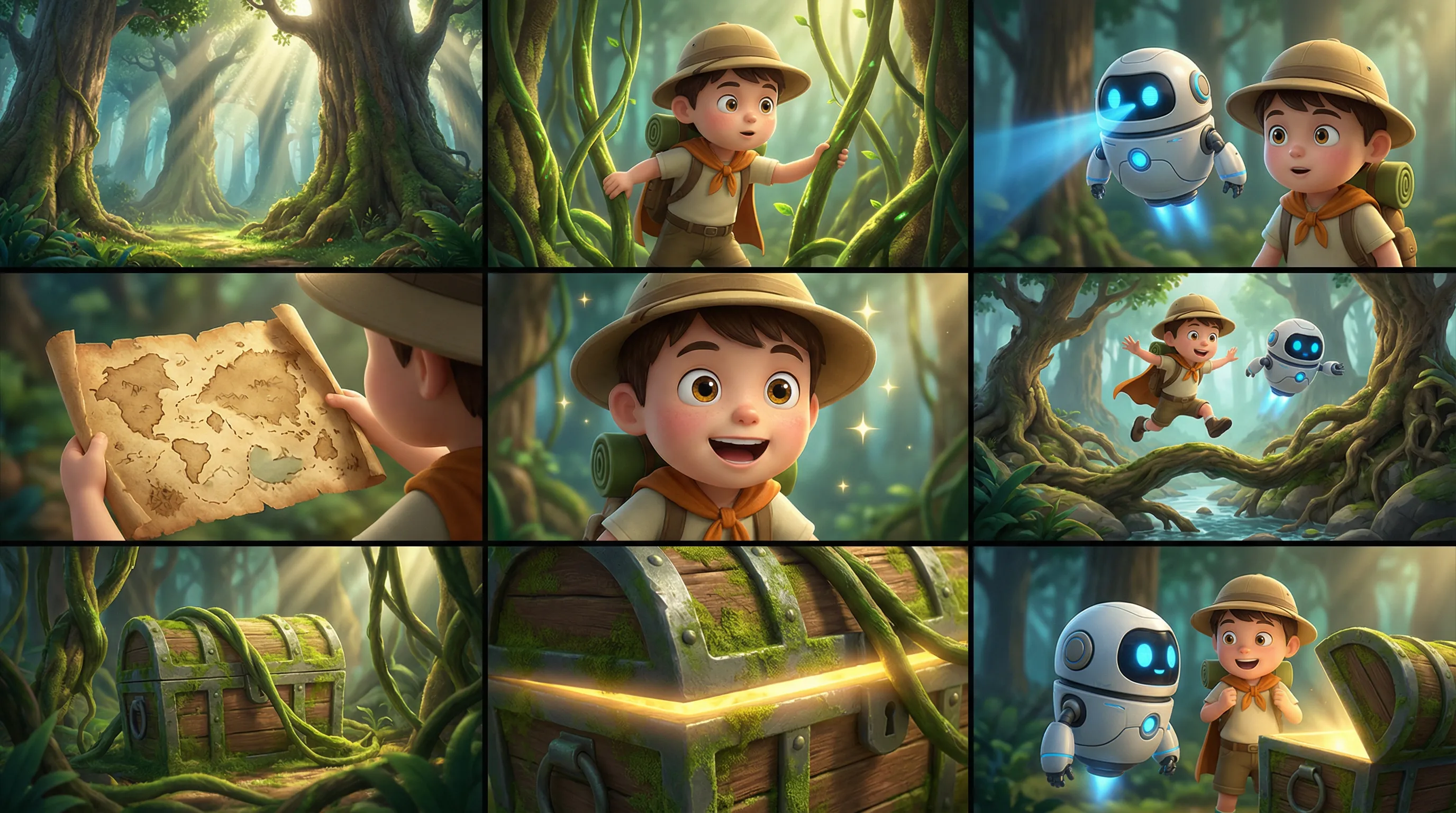
功能介紹:輸入一張多宮格圖(故事板),模型自動識別多宮格布局,產生角色、情境和鏡頭一致的視頻。建議單次僅傳入一張多宮格圖。
參數設定:
media.type:設定為reference_image(參考映像)。media.url:多宮格映像的 URL 或 base64 編碼字串。prompt:當參考素材有且僅有一張圖片或一個視頻,則可表述為“參考圖片”或“參考視頻”。
輸入提示詞:參考圖片 ,3D卡通冒險電影風,角色Q版但材質細膩,動作流暢,色彩鮮明,保持角色與森林情境一致,不要加入文字。氛圍: 冒險、輕快、神秘、童趣。角色: 小男孩探險家:圓帽、背包、短鬥篷。小夥伴:會飛的小機器人,圓形身體,藍色發光眼。情境: 奇幻森林,巨大樹根、蘑菇、藤蔓、藏寶洞口、陽光光束。分鏡指令碼: 1. 全景:奇幻森林裡高大樹木與光束交錯,環境神秘明亮。 2. 中景:小男孩撥開藤蔓向前探路。 3. 中景:小機器人飛在他身邊,用藍光掃描前方。 4. 特寫:一張舊藏寶圖在男孩手裡展開。 5. 近景:他露出興奮表情,眼睛亮起來。 6. 動作鏡頭:兩人跳過樹根和小溪,繼續深入森林。 7. 中景:藤蔓後方露出一個被苔蘚覆蓋的寶箱。 8. 特寫:寶箱邊緣閃出金色光芒。 9. 收束鏡頭:男孩和小機器人站在寶箱前驚喜對望,冒險感拉滿。 | |
| 輸入多宮格映像 | 輸出視頻 |
 | |
Python SDK
請確保 DashScope Python SDK 版本不低於
1.25.16,可參考安裝SDK進行更新。
# -*- coding: utf-8 -*-
from http import HTTPStatus
from dashscope import VideoSynthesis
import dashscope
import os

# 以下為新加坡地區URL,調用時請將{WorkspaceId}替換為真實的業務空間ID。各地區的URL不同,擷取URL:https://www.alibabacloud.com/help/en/model-studio/video-reference-api-reference
dashscope.base_http_api_url = 'https://{WorkspaceId}.ap-southeast-1.maas.aliyuncs.com/api/v1'

# 若沒有配置環境變數,請用百鍊API Key將下行替換為:api_key="sk-xxx"
# 各地區的API Key不同。擷取API Key:https://www.alibabacloud.com/help/en/model-studio/get-api-key
api_key = os.getenv("DASHSCOPE_API_KEY")

media = [
    {
        "type": "reference_image",
        "url": "https://help-static-aliyun-doc.aliyuncs.com/file-manage-files/zh-CN/20260403/wgjaxy/banana_storyboard_00000020.png"
    }
]

def sample_sync_call():
    print('----sync call, please wait a moment----')
    rsp = VideoSynthesis.call(
        api_key=api_key,
        model="wan2.7-r2v-2026-06-12",
        media=media,
        resolution="720P",
        ratio="16:9",
        duration=10,
        prompt_extend=False,
        watermark=True,
        prompt="參考圖片,3D卡通冒險電影風,角色Q版但材質細膩,動作流暢,色彩鮮明,保持角色與森林情境一致,不要加入文字。氛圍: 冒險、輕快、神秘、童趣。角色: 小男孩探險家:圓帽、背包、短鬥篷。小夥伴:會飛的小機器人,圓形身體,藍色發光眼。情境: 奇幻森林,巨大樹根、蘑菇、藤蔓、藏寶洞口、陽光光束。分鏡指令碼: 1. 全景:奇幻森林裡高大樹木與光束交錯,環境神秘明亮。 2. 中景:小男孩撥開藤蔓向前探路。 3. 中景:小機器人飛在他身邊,用藍光掃描前方。 4. 特寫:一張舊藏寶圖在男孩手裡展開。 5. 近景:他露出興奮表情,眼睛亮起來。 6. 動作鏡頭:兩人跳過樹根和小溪,繼續深入森林。 7. 中景:藤蔓後方露出一個被苔蘚覆蓋的寶箱。 8. 特寫:寶箱邊緣閃出金色光芒。 9. 收束鏡頭:男孩和小機器人站在寶箱前驚喜對望,冒險感拉滿。",
    )
    if rsp.status_code == HTTPStatus.OK:
        print(rsp.output.video_url)
    else:
        print('Failed, status_code: %s, code: %s, message: %s' %
              (rsp.status_code, rsp.code, rsp.message))

if __name__ == '__main__':
    sample_sync_call()
Java SDK
請確保 DashScope Java SDK 版本不低於
2.22.14,可參考安裝SDK進行更新。
// Copyright (c) Alibaba, Inc. and its affiliates.

import com.alibaba.dashscope.aigc.videosynthesis.VideoSynthesis;
import com.alibaba.dashscope.aigc.videosynthesis.VideoSynthesisParam;
import com.alibaba.dashscope.aigc.videosynthesis.VideoSynthesisResult;
import com.alibaba.dashscope.exception.ApiException;
import com.alibaba.dashscope.exception.InputRequiredException;
import com.alibaba.dashscope.exception.NoApiKeyException;
import com.alibaba.dashscope.utils.Constants;
import com.alibaba.dashscope.utils.JsonUtils;

import java.util.ArrayList;
import java.util.List;

public class Ref2Video {

    static {
        // 以下為新加坡地區url,調用時請將{WorkspaceId}替換為真實的業務空間ID。各地區的URL不同,擷取URL:https://www.alibabacloud.com/help/en/model-studio/video-reference-api-reference
        Constants.baseHttpApiUrl = "https://{WorkspaceId}.ap-southeast-1.maas.aliyuncs.com/api/v1";
    }

    // 若沒有配置環境變數,請用百鍊API Key將下行替換為:apiKey="sk-xxx"
    // 各地區的API Key不同。擷取API Key:https://www.alibabacloud.com/help/en/model-studio/get-api-key
    static String apiKey = System.getenv("DASHSCOPE_API_KEY");

    public static void syncCall() {
        VideoSynthesis videoSynthesis = new VideoSynthesis();
        final String prompt = "參考圖片,3D卡通冒險電影風,角色Q版但材質細膩,動作流暢,色彩鮮明,保持角色與森林情境一致,不要加入文字。氛圍: 冒險、輕快、神秘、童趣。角色: 小男孩探險家:圓帽、背包、短鬥篷。小夥伴:會飛的小機器人,圓形身體,藍色發光眼。情境: 奇幻森林,巨大樹根、蘑菇、藤蔓、藏寶洞口、陽光光束。分鏡指令碼: 1. 全景:奇幻森林裡高大樹木與光束交錯,環境神秘明亮。 2. 中景:小男孩撥開藤蔓向前探路。 3. 中景:小機器人飛在他身邊,用藍光掃描前方。 4. 特寫:一張舊藏寶圖在男孩手裡展開。 5. 近景:他露出興奮表情,眼睛亮起來。 6. 動作鏡頭:兩人跳過樹根和小溪,繼續深入森林。 7. 中景:藤蔓後方露出一個被苔蘚覆蓋的寶箱。 8. 特寫:寶箱邊緣閃出金色光芒。 9. 收束鏡頭:男孩和小機器人站在寶箱前驚喜對望,冒險感拉滿。";
        List<VideoSynthesisParam.Media> media = new ArrayList<>();
        media.add(VideoSynthesisParam.Media.builder()
                .url("https://help-static-aliyun-doc.aliyuncs.com/file-manage-files/zh-CN/20260403/wgjaxy/banana_storyboard_00000020.png")
                .type("reference_image")
                .build());
        VideoSynthesisParam param =
                VideoSynthesisParam.builder()
                        .apiKey(apiKey)
                        .model("wan2.7-r2v-2026-06-12")
                        .prompt(prompt)
                        .media(media)
                        .watermark(true)
                        .duration(10)
                        .resolution("720P")
                        .ratio("16:9")
                        .promptExtend(false)
                        .build();
        VideoSynthesisResult result = null;
        try {
            System.out.println("---sync call, please wait a moment----");
            result = videoSynthesis.call(param);
        } catch (ApiException | NoApiKeyException e){
            throw new RuntimeException(e.getMessage());
        } catch (InputRequiredException e) {
            throw new RuntimeException(e);
        }
        System.out.println(JsonUtils.toJson(result));
    }

    public static void main(String[] args) {
        syncCall();
    }
}
curl
步驟1:建立任務擷取任務IDcurl --location 'https://{WorkspaceId}.ap-southeast-1.maas.aliyuncs.com/api/v1/services/aigc/video-generation/video-synthesis' \
-H 'X-DashScope-Async: enable' \
-H "Authorization: Bearer $DASHSCOPE_API_KEY" \
-H 'Content-Type: application/json' \
-d '{
"model": "wan2.7-r2v-2026-06-12",
"input": {
"prompt": "參考圖片,3D卡通冒險電影風,角色Q版但材質細膩,動作流暢,色彩鮮明,保持角色與森林情境一致,不要加入文字。氛圍: 冒險、輕快、神秘、童趣。角色: 小男孩探險家:圓帽、背包、短鬥篷。小夥伴:會飛的小機器人,圓形身體,藍色發光眼。情境: 奇幻森林,巨大樹根、蘑菇、藤蔓、藏寶洞口、陽光光束。分鏡指令碼: 1. 全景:奇幻森林裡高大樹木與光束交錯,環境神秘明亮。 2. 中景:小男孩撥開藤蔓向前探路。 3. 中景:小機器人飛在他身邊,用藍光掃描前方。 4. 特寫:一張舊藏寶圖在男孩手裡展開。 5. 近景:他露出興奮表情,眼睛亮起來。 6. 動作鏡頭:兩人跳過樹根和小溪,繼續深入森林。 7. 中景:藤蔓後方露出一個被苔蘚覆蓋的寶箱。 8. 特寫:寶箱邊緣閃出金色光芒。 9. 收束鏡頭:男孩和小機器人站在寶箱前驚喜對望,冒險感拉滿。",
"media": [
{
"type": "reference_image",
"url": "https://help-static-aliyun-doc.aliyuncs.com/file-manage-files/zh-CN/20260403/wgjaxy/banana_storyboard_00000020.png"
}
]
},
"parameters": {
"resolution": "720P",
"ratio": "16:9",
"duration": 10,
"prompt_extend": false,
"watermark": true
}
}'
將{task_id}完整替換為上一步介面返回的task_id的值。task_id查詢有效期間為24小時,並請將{WorkspaceId}替換為真實的業務空間ID。
curl -X GET https://{WorkspaceId}.ap-southeast-1.maas.aliyuncs.com/api/v1/tasks/{task_id} \
--header "Authorization: Bearer $DASHSCOPE_API_KEY"
多主體參考+音色定製
支援模型:wan2.7系列模型。
功能介紹:支援傳入多個參考映像和參考視頻作為主體素材,並可為每個主體獨立指定音色,實現多角色同框互動與音色區分。
參數設定:
-
media:參考素材數組。-
media.type:支援reference_image(參考映像)和reference_video(參考視頻)。參考映像 + 參考視頻 ≤ 5。 -
media.url:素材的 URL;映像還支援 base64 編碼字串。 -
media.reference_voice(可選):為主體指定音色的音頻 URL,推薦與reference_image或reference_video搭配使用。音頻生效邏輯:若
reference_video本身包含音頻且未指定reference_voice,預設使用視頻原聲;若同時傳入,reference_voice將覆蓋視頻原聲。
-
-
prompt:在提示詞中指代參考素材,規則如下:- 使用“圖1、圖2”指代
reference_image素材,使用“視頻1、視頻2”指代reference_video素材,英文提示詞則寫為“Image 1”、"Video 1”這類標識。 - 按照
media數組定義參考素材的引用順序,圖和視頻分別計數。
- 使用“圖1、圖2”指代
輸入提示詞:Video 1 walks in from the deep left side of the frame. Then the shot cuts to a close-up of Image 1. Video 1 is leaning against the rusty wall on the right side from Image 2. Hearing the footsteps, she slowly turns her head. After seeing Image 1, Video 1 says, “Why did you still come?” Image 1 replies, “Let’s talk.” | |||
輸入視頻(視頻1)
| 輸入映像(圖1)
| 輸入映像(圖2)
| 輸出視頻(多鏡頭,有聲視頻) |
輸入參考音色: | 輸入參考音色: | | |
Python SDK
請確保 DashScope Python SDK 版本不低於
1.25.16,可參考安裝SDK進行更新。
# -*- coding: utf-8 -*-
from http import HTTPStatus
from dashscope import VideoSynthesis
import dashscope
import os

# 以下為新加坡地區URL,調用時請將{WorkspaceId}替換為真實的業務空間ID。各地區的URL不同,擷取URL:https://www.alibabacloud.com/help/en/model-studio/video-reference-api-reference
dashscope.base_http_api_url = 'https://{WorkspaceId}.ap-southeast-1.maas.aliyuncs.com/api/v1'

# 若沒有配置環境變數,請用百鍊API Key將下行替換為:api_key="sk-xxx"
# 各地區的API Key不同。擷取API Key:https://www.alibabacloud.com/help/en/model-studio/get-api-key
api_key = os.getenv("DASHSCOPE_API_KEY")

media = [
    {
        "type": "reference_video",
        "url": "https://help-static-aliyun-doc.aliyuncs.com/file-manage-files/zh-CN/20260416/pfgcuv/wan-r2v-girl-en.mp4",
        "reference_voice": "https://help-static-aliyun-doc.aliyuncs.com/file-manage-files/zh-CN/20260416/exiikq/wan-r2v-girl-demo-voice-en.mp3"
    },
    {
        "type": "reference_image",
        "url": "https://help-static-aliyun-doc.aliyuncs.com/file-manage-files/zh-CN/20260416/skhalj/wan-r2v-boy-en.jpg",
        "reference_voice": "https://help-static-aliyun-doc.aliyuncs.com/file-manage-files/zh-CN/20260416/pqxdoi/wan-r2v-boy-voice-en.mp3"
    },
    {
        "type": "reference_image",
        "url": "https://help-static-aliyun-doc.aliyuncs.com/file-manage-files/zh-CN/20260416/vyqjxd/wan-r2v-bg-en.jpg"
    }
]

def sample_sync_call():
    print('----sync call, please wait a moment----')
    rsp = VideoSynthesis.call(
        api_key=api_key,
        model="wan2.7-r2v-2026-06-12",
        media=media,
        resolution="720P",
        ratio="16:9",
        duration=10,
        prompt_extend=False,
        watermark=True,
        prompt="Video 1 walks in from the deep left side of the frame. Then the shot cuts to a close-up of Image 1. Video 1 is leaning against the rusty wall on the right side from Image 2. Hearing the footsteps, she slowly turns her head. After seeing Image 1, Video 1 says, “Why did you still come?” Image 1 replies, “Let’s talk.”",
    )
    if rsp.status_code == HTTPStatus.OK:
        print(rsp.output.video_url)
    else:
        print('Failed, status_code: %s, code: %s, message: %s' %
              (rsp.status_code, rsp.code, rsp.message))

if __name__ == '__main__':
    sample_sync_call()
Java SDK
請確保 DashScope Java SDK 版本不低於
2.22.14,可參考安裝SDK進行更新。
// Copyright (c) Alibaba, Inc. and its affiliates.

import com.alibaba.dashscope.aigc.videosynthesis.VideoSynthesis;
import com.alibaba.dashscope.aigc.videosynthesis.VideoSynthesisParam;
import com.alibaba.dashscope.aigc.videosynthesis.VideoSynthesisResult;
import com.alibaba.dashscope.exception.ApiException;
import com.alibaba.dashscope.exception.InputRequiredException;
import com.alibaba.dashscope.exception.NoApiKeyException;
import com.alibaba.dashscope.utils.Constants;
import com.alibaba.dashscope.utils.JsonUtils;

import java.util.ArrayList;
import java.util.List;

public class Ref2Video {

    static {
        // 以下為新加坡地區url,調用時請將{WorkspaceId}替換為真實的業務空間ID。各地區的URL不同,擷取URL:https://www.alibabacloud.com/help/en/model-studio/video-reference-api-reference
        Constants.baseHttpApiUrl = "https://{WorkspaceId}.ap-southeast-1.maas.aliyuncs.com/api/v1";
    }

    // 若沒有配置環境變數,請用百鍊API Key將下行替換為:apiKey="sk-xxx"
    // 各地區的API Key不同。擷取API Key:https://www.alibabacloud.com/help/en/model-studio/get-api-key
    static String apiKey = System.getenv("DASHSCOPE_API_KEY");

    public static void syncCall() {
        VideoSynthesis videoSynthesis = new VideoSynthesis();
        final String prompt = "Video 1 walks in from the deep left side of the frame. Then the shot cuts to a close-up of Image 1. Video 1 is leaning against the rusty wall on the right side from Image 2. Hearing the footsteps, she slowly turns her head. After seeing Image 1, Video 1 says, \"Why did you still come?\" Image 1 replies, \"Let's talk.\"";
        List<VideoSynthesisParam.Media> media = new ArrayList<>();
        media.add(VideoSynthesisParam.Media.builder()
                .url("https://help-static-aliyun-doc.aliyuncs.com/file-manage-files/zh-CN/20260416/pfgcuv/wan-r2v-girl-en.mp4")
                .type("reference_video")
                .referenceVoice("https://help-static-aliyun-doc.aliyuncs.com/file-manage-files/zh-CN/20260416/exiikq/wan-r2v-girl-demo-voice-en.mp3")
                .build());
        media.add(VideoSynthesisParam.Media.builder()
                .url("https://help-static-aliyun-doc.aliyuncs.com/file-manage-files/zh-CN/20260416/skhalj/wan-r2v-boy-en.jpg")
                .type("reference_image")
                .referenceVoice("https://help-static-aliyun-doc.aliyuncs.com/file-manage-files/zh-CN/20260416/pqxdoi/wan-r2v-boy-voice-en.mp3")
                .build());
        media.add(VideoSynthesisParam.Media.builder()
                .url("https://help-static-aliyun-doc.aliyuncs.com/file-manage-files/zh-CN/20260416/vyqjxd/wan-r2v-bg-en.jpg")
                .type("reference_image")
                .build());
        VideoSynthesisParam param =
                VideoSynthesisParam.builder()
                        .apiKey(apiKey)
                        .model("wan2.7-r2v-2026-06-12")
                        .prompt(prompt)
                        .media(media)
                        .watermark(true)
                        .duration(10)
                        .resolution("720P")
                        .ratio("16:9")
                        .promptExtend(false)
                        .build();
        VideoSynthesisResult result = null;
        try {
            System.out.println("---sync call, please wait a moment----");
            result = videoSynthesis.call(param);
        } catch (ApiException | NoApiKeyException e){
            throw new RuntimeException(e.getMessage());
        } catch (InputRequiredException e) {
            throw new RuntimeException(e);
        }
        System.out.println(JsonUtils.toJson(result));
    }

    public static void main(String[] args) {
        syncCall();
    }
}
curl
步驟1:建立任務擷取任務IDcurl --location 'https://{WorkspaceId}.ap-southeast-1.maas.aliyuncs.com/api/v1/services/aigc/video-generation/video-synthesis' \
-H 'X-DashScope-Async: enable' \
-H "Authorization: Bearer $DASHSCOPE_API_KEY" \
-H 'Content-Type: application/json' \
-d '{
"model": "wan2.7-r2v-2026-06-12",
"input": {
"prompt": "Video 1 walks in from the deep left side of the frame. Then the shot cuts to a close-up of Image 1. Video 1 is leaning against the rusty wall on the right side from Image 2. Hearing the footsteps, she slowly turns her head. After seeing Image 1, Video 1 says, “Why did you still come?” Image 1 replies, “Let’s talk.” ",
"media": [
{
"type": "reference_video",
"url": "https://help-static-aliyun-doc.aliyuncs.com/file-manage-files/zh-CN/20260416/pfgcuv/wan-r2v-girl-en.mp4",
"reference_voice": "https://help-static-aliyun-doc.aliyuncs.com/file-manage-files/zh-CN/20260416/exiikq/wan-r2v-girl-demo-voice-en.mp3"
},
{
"type": "reference_image",
"url": "https://help-static-aliyun-doc.aliyuncs.com/file-manage-files/zh-CN/20260416/skhalj/wan-r2v-boy-en.jpg",
"reference_voice": "https://help-static-aliyun-doc.aliyuncs.com/file-manage-files/zh-CN/20260416/pqxdoi/wan-r2v-boy-voice-en.mp3"
},
{
"type": "reference_image",
"url": "https://help-static-aliyun-doc.aliyuncs.com/file-manage-files/zh-CN/20260416/vyqjxd/wan-r2v-bg-en.jpg"
}
]
},
"parameters": {
"resolution": "720P",
"ratio": "16:9",
"duration": 10,
"prompt_extend": false,
"watermark": true
}
}'
將{task_id}完整替換為上一步介面返回的task_id的值。task_id查詢有效期間為24小時,並請將{WorkspaceId}替換為真實的業務空間ID。
curl -X GET https://{WorkspaceId}.ap-southeast-1.maas.aliyuncs.com/api/v1/tasks/{task_id} \
--header "Authorization: Bearer $DASHSCOPE_API_KEY"
多主體參考+首幀控制
支援模型:wan2.7系列模型。
功能介紹:在主體參考基礎上加入首幀控制,讓畫面構圖和內容走向更加可控。
參數設定:
-
media:參考素材數組。-
media.type:支援first_frame、reference_image(參考映像)和reference_video(參考視頻)。首幀映像最多1張,參考映像和參考視頻至少傳入1個,參考映像 + 參考視頻 ≤ 5。
-
media.url:素材的 URL;映像還支援 base64 編碼字串。
-
-
prompt:在提示詞中指代參考素材,規則如下:- 使用“圖1、圖2”指代
reference_image素材,使用“視頻1、視頻2”指代reference_video素材,英文提示詞則寫為“Image 1”、"Video 1”這類標識。 - 按照
media數組定義參考素材的引用順序,圖和視頻分別計數。 - 首幀無需在提示詞中引用。
- 使用“圖1、圖2”指代
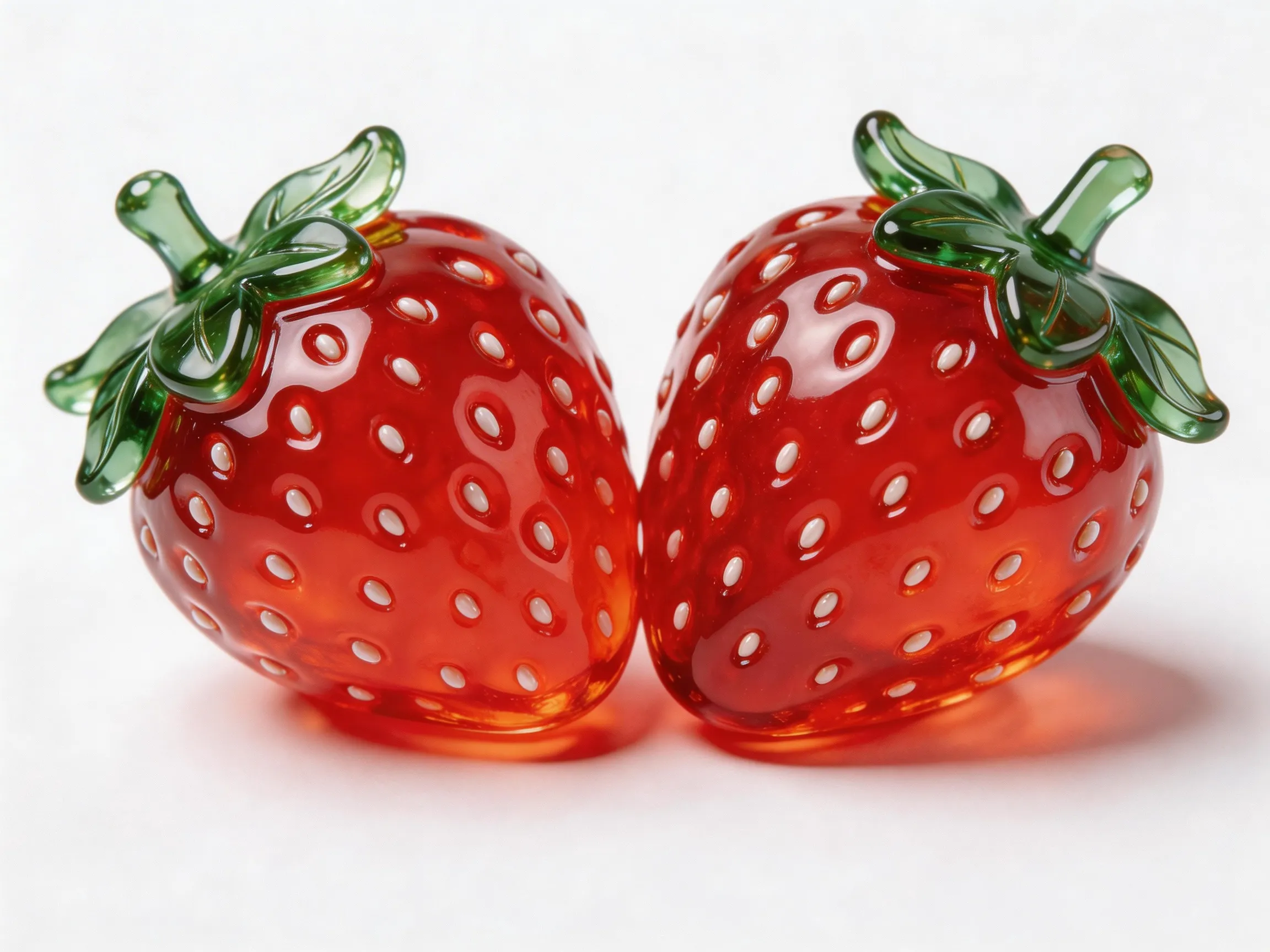
輸入提示詞:俯拍在一個藍色的星球上,鏡頭逐漸推進到星球上面給到圖1特寫,他拿著圖2,一邊吃著圖2,一邊說:“怎麼沒人找我來玩呀?” | |||
輸入首幀
| 輸入映像(圖1)
| 輸入映像(圖2)
| 輸出視頻
|
 |  |  | |
Python SDK
請確保 DashScope Python SDK 版本不低於
1.25.16,可參考安裝SDK進行更新。
# -*- coding: utf-8 -*-
from http import HTTPStatus
from dashscope import VideoSynthesis
import dashscope
import os

# 以下為新加坡地區URL,調用時請將{WorkspaceId}替換為真實的業務空間ID。各地區的URL不同,擷取URL:https://www.alibabacloud.com/help/en/model-studio/video-reference-api-reference
dashscope.base_http_api_url = 'https://{WorkspaceId}.ap-southeast-1.maas.aliyuncs.com/api/v1'

# 若沒有配置環境變數,請用百鍊API Key將下行替換為:api_key="sk-xxx"
# 各地區的API Key不同。擷取API Key:https://www.alibabacloud.com/help/en/model-studio/get-api-key
api_key = os.getenv("DASHSCOPE_API_KEY")

media = [
    {
        "type": "first_frame",
        "url": "https://help-static-aliyun-doc.aliyuncs.com/file-manage-files/zh-CN/20260414/ixwovg/wan2.7-r2v-first-frame.webp"
    },
    {
        "type": "reference_image",
        "url": "https://help-static-aliyun-doc.aliyuncs.com/file-manage-files/zh-CN/20260414/fkltfw/wan2.7-r2v-image-qq.webp"
    },
    {
        "type": "reference_image",
        "url": "https://help-static-aliyun-doc.aliyuncs.com/file-manage-files/zh-CN/20260414/kxkbsv/wan2.7-r2v-image-ob.webp"
    }
]

def sample_sync_call():
    print('----sync call, please wait a moment----')
    rsp = VideoSynthesis.call(
        api_key=api_key,
        model="wan2.7-r2v-2026-06-12",
        media=media,
        resolution="720P",
        duration=10,
        prompt_extend=False,
        watermark=True,
        prompt="An overhead shot captures a blue planet. The camera gradually zooms in toward the surface and cuts to a close-up of Image 1, who is holding Image 2 and eating it while saying: Why is not anyone coming to hang out with me?",
    )
    if rsp.status_code == HTTPStatus.OK:
        print(rsp.output.video_url)
    else:
        print('Failed, status_code: %s, code: %s, message: %s' %
              (rsp.status_code, rsp.code, rsp.message))

if __name__ == '__main__':
    sample_sync_call()
Java SDK
請確保 DashScope Java SDK 版本不低於
2.22.14,可參考安裝SDK進行更新。
// Copyright (c) Alibaba, Inc. and its affiliates.

import com.alibaba.dashscope.aigc.videosynthesis.VideoSynthesis;
import com.alibaba.dashscope.aigc.videosynthesis.VideoSynthesisParam;
import com.alibaba.dashscope.aigc.videosynthesis.VideoSynthesisResult;
import com.alibaba.dashscope.exception.ApiException;
import com.alibaba.dashscope.exception.InputRequiredException;
import com.alibaba.dashscope.exception.NoApiKeyException;
import com.alibaba.dashscope.utils.Constants;
import com.alibaba.dashscope.utils.JsonUtils;

import java.util.ArrayList;
import java.util.List;

public class Ref2Video {

    static {
        // 以下為新加坡地區url,調用時請將{WorkspaceId}替換為真實的業務空間ID。各地區的URL不同,擷取URL:https://www.alibabacloud.com/help/en/model-studio/video-reference-api-reference
        Constants.baseHttpApiUrl = "https://{WorkspaceId}.ap-southeast-1.maas.aliyuncs.com/api/v1";
    }

    // 若沒有配置環境變數,請用百鍊API Key將下行替換為:apiKey="sk-xxx"
    // 各地區的API Key不同。擷取API Key:https://www.alibabacloud.com/help/en/model-studio/get-api-key
    static String apiKey = System.getenv("DASHSCOPE_API_KEY");

    public static void syncCall() {
        VideoSynthesis videoSynthesis = new VideoSynthesis();
        final String prompt = "An overhead shot captures a blue planet. The camera gradually zooms in toward the surface and cuts to a close-up of Image 1, who is holding Image 2 and eating it while saying: Why is not anyone coming to hang out with me?";
        List<VideoSynthesisParam.Media> media = new ArrayList<>();
        media.add(VideoSynthesisParam.Media.builder()
                .url("https://help-static-aliyun-doc.aliyuncs.com/file-manage-files/zh-CN/20260414/ixwovg/wan2.7-r2v-first-frame.webp")
                .type("first_frame")
                .build());
        media.add(VideoSynthesisParam.Media.builder()
                .url("https://help-static-aliyun-doc.aliyuncs.com/file-manage-files/zh-CN/20260414/fkltfw/wan2.7-r2v-image-qq.webp")
                .type("reference_image")
                .build());
        media.add(VideoSynthesisParam.Media.builder()
                .url("https://help-static-aliyun-doc.aliyuncs.com/file-manage-files/zh-CN/20260414/kxkbsv/wan2.7-r2v-image-ob.webp")
                .type("reference_image")
                .build());
        VideoSynthesisParam param =
                VideoSynthesisParam.builder()
                        .apiKey(apiKey)
                        .model("wan2.7-r2v-2026-06-12")
                        .prompt(prompt)
                        .media(media)
                        .watermark(true)
                        .duration(10)
                        .resolution("720P")
                        .promptExtend(false)
                        .build();
        VideoSynthesisResult result = null;
        try {
            System.out.println("---sync call, please wait a moment----");
            result = videoSynthesis.call(param);
        } catch (ApiException | NoApiKeyException e){
            throw new RuntimeException(e.getMessage());
        } catch (InputRequiredException e) {
            throw new RuntimeException(e);
        }
        System.out.println(JsonUtils.toJson(result));
    }

    public static void main(String[] args) {
        syncCall();
    }
}
curl
步驟1:建立任務擷取任務IDcurl --location 'https://{WorkspaceId}.ap-southeast-1.maas.aliyuncs.com/api/v1/services/aigc/video-generation/video-synthesis' \
-H 'X-DashScope-Async: enable' \
-H "Authorization: Bearer $DASHSCOPE_API_KEY" \
-H 'Content-Type: application/json' \
-d '{
"model": "wan2.7-r2v-2026-06-12",
"input": {
"prompt": "An overhead shot captures a blue planet. The camera gradually zooms in toward the surface and cuts to a close-up of Image 1, who is holding Image 2 and eating it while saying: Why is not anyone coming to hang out with me?",
"media": [
{
"type": "first_frame",
"url": "https://help-static-aliyun-doc.aliyuncs.com/file-manage-files/zh-CN/20260414/ixwovg/wan2.7-r2v-first-frame.webp"
},
{
"type": "reference_image",
"url": "https://help-static-aliyun-doc.aliyuncs.com/file-manage-files/zh-CN/20260414/fkltfw/wan2.7-r2v-image-qq.webp"
},
{
"type": "reference_image",
"url": "https://help-static-aliyun-doc.aliyuncs.com/file-manage-files/zh-CN/20260414/kxkbsv/wan2.7-r2v-image-ob.webp"
}
]
},
"parameters": {
"resolution": "720P",
"duration": 10,
"prompt_extend": false,
"watermark": true
}
}'
將{task_id}完整替換為上一步介面返回的task_id的值。task_id查詢有效期間為24小時,並請將{WorkspaceId}替換為真實的業務空間ID。
curl -X GET https://{WorkspaceId}.ap-southeast-1.maas.aliyuncs.com/api/v1/tasks/{task_id} \
--header "Authorization: Bearer $DASHSCOPE_API_KEY"
如何輸入參考素材
wan2.7系列模型
參考映像、視頻和音頻均傳入media數組。
輸入映像
-
首幀數量:首幀(
media.type=first_frame)最多1張。 -
參考映像數量:參考映像(
media.type=reference_image)最多5張,同時滿足參考映像 + 參考視頻 ≤ 5。 -
輸入方式:
-
公網URL:支援 HTTP 或 HTTPS 協議。樣本:https://xxxx/xxx.png。
-
Base 64 編碼字串:遵循
data:{MIME_type};base64,{base64_data}的格式,其中:-
{base64_data}:影像檔經過 Base 64 編碼後的字串。
-
{MIME_type}:映像的媒體類型,需與檔案格式對應。
映像格式
MIME Type
JPEG
image/jpeg
JPG
image/jpeg
PNG
image/png
BMP
image/bmp
WEBP
image/webp
-
-

輸入視頻
-
參考視頻數量:參考視頻(
media.type=reference_video)最多5個,同時滿足參考映像 + 參考視頻 ≤ 5。 -
輸入方式:
- 公網URL:支援 HTTP 或 HTTPS 協議。樣本:https://xxxx/xxx.mp4。
輸入音頻
-
使用限制:參考音色(
media.reference_voice)只能與reference_image或reference_video搭配使用,為對應主體角色指定音色。 -
輸入方式:
- 公網URL:支援 HTTP 或 HTTPS 協議。樣本:https://xxxx/xxx.mp3。
輸出視頻
-
視頻個數:1個。
-
視頻規格:格式為MP4。詳細規格請參見支援的模型。
-
視頻URL有效期間:24小時。
-
視頻尺寸:
-
wan2.7系列模型:通過
resolution控制解析度檔位(720P/1080P),通過ratio控制寬高比(16:9、9:16、1:1、4:3、3:4)。- 傳入首幀映像時:
ratio參數被忽略,輸出視頻的寬高比與首幀映像近似。 - 未傳入首幀映像時:由
ratio參數指定寬高比,預設為 16:9。
- 傳入首幀映像時:
-
計費與限流
-
模型免費額度和計費單價請參見萬相-參考生視頻。
-
模型限流請參見萬相系列。
-
計費說明:
- 輸入映像不計費,輸入視頻和輸出視頻按 視頻秒數計費。
- 模型調用失敗或處理錯誤不產生任何費用,也不消耗新人免費額度。
-
計費公式:
總計費時間長度(秒) = 輸入視頻計費時間長度(秒) + 輸出視頻時間長度(秒)。wan2.7系列模型
輸入視頻計費時間長度:上限 5 秒。
單個視頻截斷上限 = 5秒 ÷ 輸入參考視頻數量(參考映像和首幀映像均不計入),每個視頻按min(實際時間長度, 截斷上限)計費,多個視頻累加。- 1 個參考視頻:單個視頻截斷上限 5秒。
- 2 個參考視頻:單個視頻截斷上限 2.5秒。
- 3 個參考視頻:單個視頻截斷上限 1.65秒。
- 4 個參考視頻:單個視頻截斷上限 1.25秒。
- 5 個參考視頻:單個視頻截斷上限 1秒。
- 樣本:若輸入2個參考視頻+1張映像,映像不計入,按2個參考視頻計算截斷上限為2.5秒,
輸入計費時間長度=min(視頻1時間長度,2.5s)+ min(視頻2時間長度,2.5s)。
輸出視頻計費時間長度:模型成功產生的視頻秒數。
wan2.6系列模型
輸入視頻計費時間長度:上限 5 秒。
單個視頻截斷上限 = 5秒 ÷ 參考素材總數(參考映像 + 參考視頻,首幀映像不計入),每個視頻按min(實際時間長度, 截斷上限)計費,多個視頻累加。- 1 個參考素材:單個視頻截斷上限 5秒。
- 2 個參考素材:單個視頻截斷上限 2.5秒。
- 3 個參考素材:單個視頻截斷上限 1.65秒。
- 4 個參考素材:單個視頻截斷上限 1.25秒。
- 5 個參考素材:單個視頻截斷上限 1秒。
更多樣本:輸入視頻計費時間長度計算
-
輸入1個參考素材:單視頻截斷上限為5秒。
- 若為視頻:
輸入計費時間長度=min(視頻時間長度,5s)。 - 若為映像:免費。
- 若為視頻:
-
輸入2個參考素材:單視頻截斷上限為2.5秒。
- 若1個視頻+1張映像:
輸入計費時間長度=min(視頻1時間長度,2.5s)。 - 若2個參考視頻:
輸入計費時間長度=min(視頻1時間長度,2.5s)+ min(視頻2時間長度,2.5s)。
- 若1個視頻+1張映像:
-
輸入3個參考素材:單視頻截斷上限為1.65秒。
- 若1個視頻+2張映像:
輸入計費時間長度=min(視頻1時間長度,1.65s)。 - 若3個參考視頻:
輸入計費時間長度=min(視頻1時間長度,1.65s)+ min(視頻2時間長度,1.65s)+min(視頻3時間長度,1.65s)。
- 若1個視頻+2張映像:
-
輸入4個參考素材:單視頻截斷上限為1.25秒。
- 若2個視頻+2張映像:
輸入計費時間長度=min(視頻1時間長度,1.25s)+ min(視頻2時間長度,1.25s)。 - 若3個視頻+1張映像:
輸入計費時間長度=min(視頻1時間長度,1.25s)+ min(視頻2時間長度,1.25s)+min(視頻3時間長度,1.25s)。
- 若2個視頻+2張映像:
-
輸入5個參考素材:單視頻截斷上限為1秒。
- 若1個視頻+4張映像:
輸入計費時間長度=min(視頻1時間長度,1s)。 - 若3個視頻+2張映像:
輸入計費時間長度=min(視頻1時間長度,1s)+ min(視頻2時間長度,1s)+min(視頻3時間長度,1s)。
- 若1個視頻+4張映像:
輸出視頻計費時間長度:模型成功產生的視頻秒數。
API文檔
常見問題
Q:如何在提示詞中引用參考素材?
A:引用方式取決於所使用的模型和功能:
wan2.7系列模型
- 參考映像通過“圖1、圖2”這類標識指代,參考視頻通過“視頻1、視頻2”這類標識指代。英文提示詞則寫為“Image 1”、"Video 1”這類標識。
- 圖和視頻分別計數。順序與
media數組中同類型素材的順序一致。 - 若參考素材有且僅有一張圖片或一個視頻,可簡化為“參考圖片”或“參考視頻”。
- 首幀映像通常無需在提示詞中引用。
{
    "input": {
        "prompt": "視頻1在彈吉他,圖1手中拿著一束花,路過視頻1",
        "media": [
            {
                "type": "first_frame",
                "url":  "https://example.com/scene.jpg"
            },
            {
                "type": "reference_video",
                "url":  "https://example.com/girl.mp4"           // 視頻1
            },
            {
                "type": "reference_image",
                "url": "https://example.com/boy.png"             // 圖1
            }
        ]
    }
}
Q:reference_voice 可以與首幀映像搭配使用嗎?
A:不推薦。media.reference_voice 推薦與 reference_image(參考映像)或 reference_video(參考視頻)搭配使用,用於為對應主體指定音色。