萬相圖生視頻模型支援基於首幀映像、尾幀映像與文本提示詞,產生平滑過渡的視頻。
- 視頻規格:固定視頻時間長度(5秒),指定視頻解析度(480P/720P/1080P)。
- 其他能力:還支援智能改寫prompt、添加浮水印。
快速開始
| 輸入提示詞 | 輸入首幀映像 | 輸入尾幀映像 | 輸出視頻(無聲視頻) |
一個可愛且表情有些憂傷的藍色小怪物站在雨中。鏡頭緩慢拉近,定格在小怪物抬頭仰望天空的瞬間。 |  |  |
在調用前,先擷取API Key,再配置API Key到環境變數。通過SDK進行調用,請安裝DashScope SDK。
Python SDK
重要請確保 DashScope Python SDK 版本不低於1.25.8,再運行以下代碼。
若版本過低,可能會觸發 “url error, please check url!” 等錯誤。請參考安裝SDK進行更新。
import os
from http import HTTPStatus
from dashscope import VideoSynthesis
import dashscope

# 以下為新加坡地區URL,調用時請將{WorkspaceId}替換為真實的業務空間ID,各地區的URL不同,擷取URL:https://www.alibabacloud.com/help/en/model-studio/image-to-video-by-first-and-last-frame-api-reference
dashscope.base_http_api_url = 'https://{WorkspaceId}.ap-southeast-1.maas.aliyuncs.com/api/v1'
# 各地區的API Key不同。擷取API Key:https://www.alibabacloud.com/help/en/model-studio/get-api-key
api_key = os.getenv("DASHSCOPE_API_KEY", "YOUR_API_KEY")

print('please wait...')
rsp = VideoSynthesis.call(api_key=api_key,
                          model="wan2.2-kf2v-flash",
                          prompt="一個可愛且表情有些憂傷的藍色小怪物站在雨中。鏡頭緩慢拉近,定格在小怪物抬頭仰望天空的瞬間。",
                          first_frame_url="https://help-static-aliyun-doc.aliyuncs.com/file-manage-files/zh-CN/20260126/ixdxvt/wan-kf2v-blue-1.png",
                          last_frame_url="https://help-static-aliyun-doc.aliyuncs.com/file-manage-files/zh-CN/20260126/nhtdrc/wan-kf2v-blue-2.png",
                          duration=5,  # 固定為5,不可修改
                          prompt_extend=True,
                          watermark=True)
print(rsp)
if rsp.status_code == HTTPStatus.OK:
    print("video_url:", rsp.output.video_url)
else:
    print('Failed, status_code: %s, code: %s, message: %s' % (rsp.status_code, rsp.code, rsp.message))
Java SDK
重要請確保 DashScope Java SDK 版本不低於2.22.6,再運行以下代碼。
若版本過低,可能會觸發 “url error, please check url!” 等錯誤。請參考安裝SDK進行更新。
import com.alibaba.dashscope.aigc.videosynthesis.VideoSynthesis;
import com.alibaba.dashscope.aigc.videosynthesis.VideoSynthesisParam;
import com.alibaba.dashscope.aigc.videosynthesis.VideoSynthesisResult;
import com.alibaba.dashscope.exception.ApiException;
import com.alibaba.dashscope.exception.InputRequiredException;
import com.alibaba.dashscope.exception.NoApiKeyException;
import com.alibaba.dashscope.utils.JsonUtils;
import com.alibaba.dashscope.utils.Constants;

public class Image2Video {

    static {
        // 以下為新加坡地區URL,調用時請將{WorkspaceId}替換為真實的業務空間ID,各地區的URL不同,擷取URL:https://www.alibabacloud.com/help/en/model-studio/image-to-video-by-first-and-last-frame-api-reference
        Constants.baseHttpApiUrl = "https://{WorkspaceId}.ap-southeast-1.maas.aliyuncs.com/api/v1";
    }

    // 若沒有配置環境變數,請用百鍊API Key將下行替換為:apiKey="sk-xxx"
    // 各地區的API Key不同。擷取API Key:https://www.alibabacloud.com/help/en/model-studio/get-api-key
    static String apiKey = System.getenv("DASHSCOPE_API_KEY");

    public static void image2video() throws ApiException, NoApiKeyException, InputRequiredException {
        VideoSynthesis vs = new VideoSynthesis();
        VideoSynthesisParam param =
                VideoSynthesisParam.builder()
                        .apiKey(apiKey)
                        .model("wan2.2-kf2v-flash")
                        .prompt("一個可愛且表情有些憂傷的藍色小怪物站在雨中。鏡頭緩慢拉近,定格在小怪物抬頭仰望天空的瞬間。")
                        .firstFrameUrl("https://help-static-aliyun-doc.aliyuncs.com/file-manage-files/zh-CN/20260126/ixdxvt/wan-kf2v-blue-1.png")
                        .lastFrameUrl("https://help-static-aliyun-doc.aliyuncs.com/file-manage-files/zh-CN/20260126/nhtdrc/wan-kf2v-blue-2.png")
                        .resolution("720P")
                        .promptExtend(true)
                        .watermark(true)
                        .build();
        System.out.println("please wait...");
        VideoSynthesisResult result = vs.call(param);
        System.out.println(JsonUtils.toJson(result));
    }

    public static void main(String[] args) {
        try {
            image2video();
        } catch (ApiException | NoApiKeyException | InputRequiredException e) {
            System.out.println(e.getMessage());
        }
        System.exit(0);
    }
}
curl
步驟1:建立任務擷取任務IDcurl --location 'https://{WorkspaceId}.ap-southeast-1.maas.aliyuncs.com/api/v1/services/aigc/image2video/video-synthesis' \
-H 'X-DashScope-Async: enable' \
-H "Authorization: Bearer $DASHSCOPE_API_KEY" \
-H 'Content-Type: application/json' \
-d '{
"model": "wan2.2-kf2v-flash",
"input": {
"first_frame_url": "https://help-static-aliyun-doc.aliyuncs.com/file-manage-files/zh-CN/20260126/ixdxvt/wan-kf2v-blue-1.png",
"last_frame_url": "https://help-static-aliyun-doc.aliyuncs.com/file-manage-files/zh-CN/20260126/nhtdrc/wan-kf2v-blue-2.png",
"prompt": "一個可愛且表情有些憂傷的藍色小怪物站在雨中。鏡頭緩慢拉近,定格在小怪物抬頭仰望天空的瞬間。"
},
"parameters": {
"resolution": "720P",
"prompt_extend": true,
"watermark": true
}
}'
將{task_id}完整替換為上一步介面返回的task_id的值。task_id查詢有效期間為24小時。
curl -X GET https://{WorkspaceId}.ap-southeast-1.maas.aliyuncs.com/api/v1/tasks/{task_id} \
--header "Authorization: Bearer $DASHSCOPE_API_KEY"
video_url有效期間24小時,請及時下載視頻。
{
    "request_id": "c1209113-8437-424f-a386-xxxxxx",
    "output": {
        "task_id": "966cebcd-dedc-4962-af88-xxxxxx",
        "task_status": "SUCCEEDED",
        "video_url": "https://dashscope-result-sh.oss-accelerate.aliyuncs.com/xxx.mp4?Expires=xxx",
         ...
    },
    ...
}
適用範圍
- 各地區支援的模型有所差異,且資源相互獨立。各地區支援的模型請參見百鍊控制台。
- 調用時,確保模型、Endpoint URL 和 API Key 均屬於同一地區,跨地區調用將會失敗。
說明本文的範例程式碼適用於新加坡地區。
核心能力
首尾幀生視頻
支援模型:所有模型。
功能介紹:根據首幀和尾幀,產生平滑過渡的視頻(無聲視頻)。
參數設定:first_frame_url:必填,必須傳入首幀映像。last_frame_url:必填,必須傳入尾幀映像。prompt:可選,推薦填寫,控制視頻畫面的變化。
| 輸入提示詞 | 輸入首幀映像 | 輸入尾幀映像 | 輸出視頻(無聲視頻) |
寫實風格,一隻小黑貓好奇地仰望天空,鏡頭從平視角度逐漸升高,最後以俯視角度捕捉到它好奇的眼神。 |  | 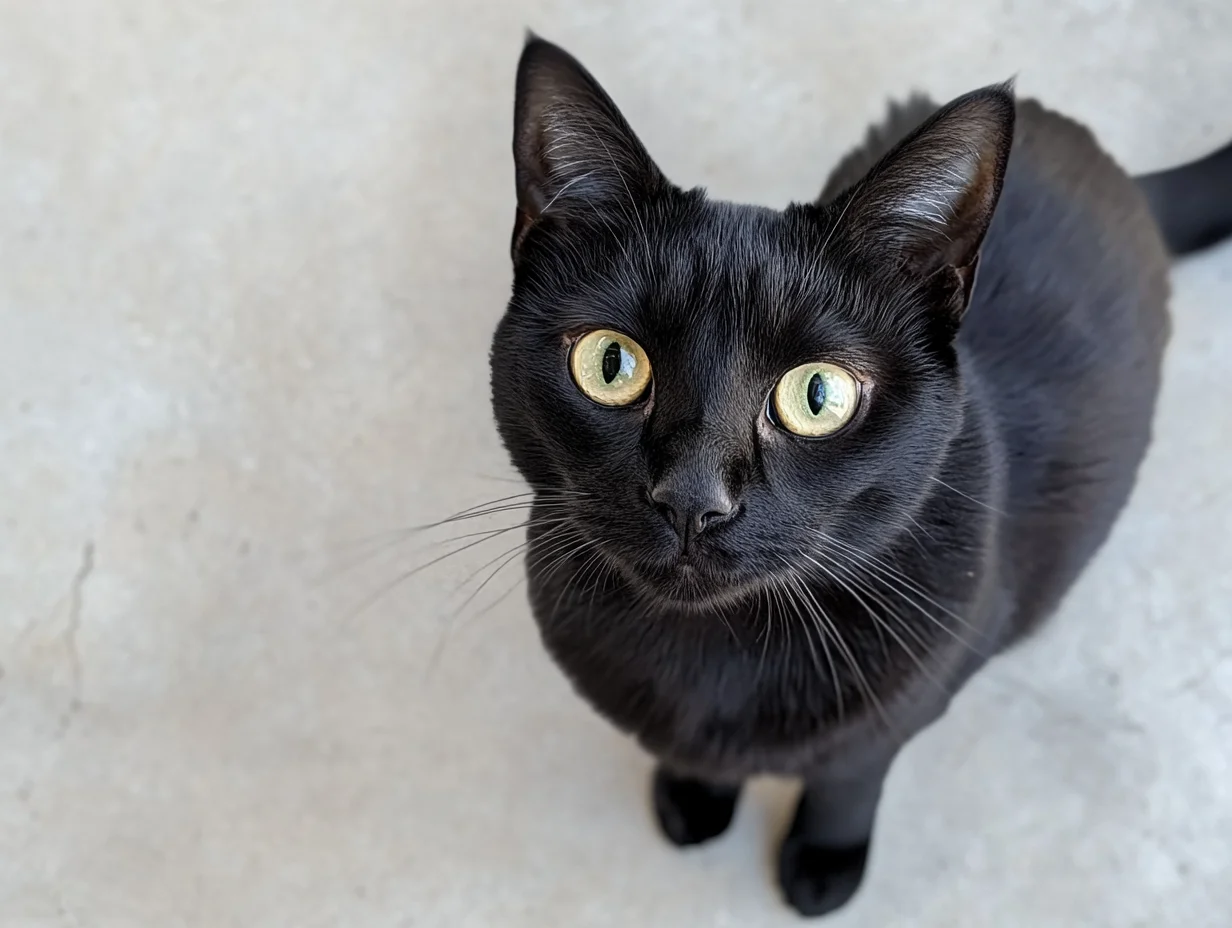 |
Python SDK
請確保 DashScope Python SDK 版本不低於
1.25.8,可參考安裝SDK進行更新。
import os
from http import HTTPStatus
from dashscope import VideoSynthesis
import dashscope

# 以下為新加坡地區URL,調用時請將{WorkspaceId}替換為真實的業務空間ID,各地區的URL不同,擷取URL:https://www.alibabacloud.com/help/en/model-studio/image-to-video-by-first-and-last-frame-api-reference
dashscope.base_http_api_url = 'https://{WorkspaceId}.ap-southeast-1.maas.aliyuncs.com/api/v1'
# 各地區的API Key不同。擷取API Key:https://www.alibabacloud.com/help/en/model-studio/get-api-key
api_key = os.getenv("DASHSCOPE_API_KEY", "YOUR_API_KEY")

def sample_async_call_kf2v():
    # 非同步呼叫,返回一個task_id
    rsp = VideoSynthesis.async_call(api_key=api_key,
                                    model="wan2.2-kf2v-flash",
                                    prompt="寫實風格,一隻黑色小貓好奇地看向天空,鏡頭從平視逐漸上升,最後俯拍它的好奇的眼神。",
                                    first_frame_url="https://wanx.alicdn.com/material/20250318/first_frame.png",
                                    last_frame_url="https://wanx.alicdn.com/material/20250318/last_frame.png",
                                    duration=5,  # 固定為5,不可修改
                                    prompt_extend=True,
                                    watermark=True)
    print(rsp)
    if rsp.status_code == HTTPStatus.OK:
        print("task_id: %s" % rsp.output.task_id)
    else:
        print('Failed, status_code: %s, code: %s, message: %s' % (rsp.status_code, rsp.code, rsp.message))

    # 等待非同步任務結束
    rsp = VideoSynthesis.wait(task=rsp, api_key=api_key)
    print(rsp)
    if rsp.status_code == HTTPStatus.OK:
        print(rsp.output.video_url)
    else:
        print('Failed, status_code: %s, code: %s, message: %s' % (rsp.status_code, rsp.code, rsp.message))

if __name__ == '__main__':
    sample_async_call_kf2v()
Java SDK
請確保 DashScope Java SDK 版本不低於
2.22.6,可參考安裝SDK進行更新。
import com.alibaba.dashscope.aigc.videosynthesis.VideoSynthesis;
import com.alibaba.dashscope.aigc.videosynthesis.VideoSynthesisParam;
import com.alibaba.dashscope.aigc.videosynthesis.VideoSynthesisResult;
import com.alibaba.dashscope.exception.ApiException;
import com.alibaba.dashscope.exception.InputRequiredException;
import com.alibaba.dashscope.exception.NoApiKeyException;
import com.alibaba.dashscope.utils.JsonUtils;
import com.alibaba.dashscope.utils.Constants;

public class Image2Video {

    static {
        // 以下為新加坡地區URL,調用時請將{WorkspaceId}替換為真實的業務空間ID,各地區的URL不同,擷取URL:https://www.alibabacloud.com/help/en/model-studio/image-to-video-by-first-and-last-frame-api-reference
        Constants.baseHttpApiUrl = "https://{WorkspaceId}.ap-southeast-1.maas.aliyuncs.com/api/v1";
    }

    // 若沒有配置環境變數,請用百鍊API Key將下行替換為:apiKey="sk-xxx"
    // 各地區的API Key不同。擷取API Key:https://www.alibabacloud.com/help/en/model-studio/get-api-key
    static String apiKey = System.getenv("DASHSCOPE_API_KEY");

    public static void image2video() throws ApiException, NoApiKeyException, InputRequiredException {
        VideoSynthesis vs = new VideoSynthesis();
        VideoSynthesisParam param =
                VideoSynthesisParam.builder()
                        .apiKey(apiKey)
                        .model("wan2.2-kf2v-flash")
                        .prompt("寫實風格,一隻黑色小貓好奇地看向天空,鏡頭從平視逐漸上升,最後俯拍它的好奇的眼神。")
                        .firstFrameUrl("https://wanx.alicdn.com/material/20250318/first_frame.png")
                        .lastFrameUrl("https://wanx.alicdn.com/material/20250318/last_frame.png")
                        .resolution("720P")
                        .promptExtend(true)
                        .watermark(true)
                        .build();
        // 非同步呼叫
        VideoSynthesisResult task = vs.asyncCall(param);
        System.out.println(JsonUtils.toJson(task));
        System.out.println("please wait...");

        //擷取結果
        VideoSynthesisResult result = vs.wait(task, apiKey);
        System.out.println(JsonUtils.toJson(result));
    }

    public static void main(String[] args) {
        try {
            image2video();
        } catch (ApiException | NoApiKeyException | InputRequiredException e) {
            System.out.println(e.getMessage());
        }
        System.exit(0);
    }
}
curl
步驟1:建立任務擷取任務IDcurl --location 'https://{WorkspaceId}.ap-southeast-1.maas.aliyuncs.com/api/v1/services/aigc/image2video/video-synthesis' \
-H 'X-DashScope-Async: enable' \
-H "Authorization: Bearer $DASHSCOPE_API_KEY" \
-H 'Content-Type: application/json' \
-d '{
"model": "wan2.2-kf2v-flash",
"input": {
"first_frame_url": "https://wanx.alicdn.com/material/20250318/first_frame.png",
"last_frame_url": "https://wanx.alicdn.com/material/20250318/last_frame.png",
"prompt": "寫實風格,一隻黑色小貓好奇地看向天空,鏡頭從平視逐漸上升,最後俯拍它的好奇的眼神。"
},
"parameters": {
"resolution": "720P",
"prompt_extend": true,
"watermark": true
}
}'
將{task_id}完整替換為上一步介面返回的task_id的值。task_id查詢有效期間為24小時。
curl -X GET https://{WorkspaceId}.ap-southeast-1.maas.aliyuncs.com/api/v1/tasks/{task_id} \
--header "Authorization: Bearer $DASHSCOPE_API_KEY"
如何輸入映像
- 映像數量:1張首幀映像,1張尾幀映像。
- 輸入方式:映像URL、本地檔案路徑。

方式二:本地檔案路徑(僅限SDK)
不同程式設計語言(Python/Java)對檔案路徑的要求略有不同,請嚴格參照下方規則拼字。
Python SDK:支援絕對路徑和相對路徑。檔案路徑規則如下:
作業系統 | 傳入的檔案路徑 | 樣本(絕對路徑) | 樣本(相對路徑) |
|---|---|---|---|
Linux / macOS | file://{檔案的絕對路徑或相對路徑} | file:///home/images/test.png | file://./images/test.png |
Windows | file://D:/images/test.png | file://./images/test.png |
Java SDK:僅支援絕對路徑。檔案路徑規則如下:
作業系統 | 傳入的檔案路徑 | 樣本(絕對路徑) |
|---|---|---|
Linux / macOS | file://{檔案的絕對路徑} | file:///home/images/test.png |
Windows | file:///{檔案的絕對路徑} | file:///D:/images/test.png |
範例程式碼:映像的多種輸入方式
import os
from http import HTTPStatus
# dashscope sdk >= 1.23.4
from dashscope import VideoSynthesis
import dashscope

dashscope.base_http_api_url = 'https://{WorkspaceId}.ap-southeast-1.maas.aliyuncs.com/api/v1'

# 從環境變數中擷取 DashScope API Key(即阿里雲百鍊平台 API key)
api_key = os.getenv("DASHSCOPE_API_KEY")

# ========== 映像輸入方式(二選一)==========
# 【方式一】使用公網圖片 URL
first_frame_url = "https://wanx.alicdn.com/material/20250318/first_frame.png"
last_frame_url = "https://wanx.alicdn.com/material/20250318/last_frame.png"

# 【方式二】使用本地檔案路徑(file://+檔案路徑)
# 使用絕對路徑
# first_frame_url = "file://" + "/path/to/your/first_frame.png"  # Linux/macOS
# last_frame_url = "file://" + "C:/path/to/your/last_frame.png"  # Windows
# 或使用相對路徑
# first_frame_url = "file://" + "./first_frame.png"              # 以實際路徑為準
# last_frame_url = "file://" + "./last_frame.png"                # 以實際路徑為準

def sample_sync_call_kf2v():
    print('please wait...')
    rsp = VideoSynthesis.call(api_key=api_key,
                              model="wan2.2-kf2v-flash",
                              prompt="寫實風格,一隻黑色小貓好奇地看向天空,鏡頭從平視逐漸上升,最後俯拍它的好奇的眼神。",
                              first_frame_url=first_frame_url,
                              last_frame_url=last_frame_url,
                              resolution="720P",
                              prompt_extend=True)
    print(rsp)
    if rsp.status_code == HTTPStatus.OK:
        print(rsp.output.video_url)
    else:
        print('Failed, status_code: %s, code: %s, message: %s' %
              (rsp.status_code, rsp.code, rsp.message))

if __name__ == '__main__':
    sample_sync_call_kf2v()
// Copyright (c) Alibaba, Inc. and its affiliates.

// dashscope sdk >= 2.20.1
import com.alibaba.dashscope.aigc.videosynthesis.VideoSynthesis;
import com.alibaba.dashscope.aigc.videosynthesis.VideoSynthesisParam;
import com.alibaba.dashscope.aigc.videosynthesis.VideoSynthesisResult;
import com.alibaba.dashscope.exception.ApiException;
import com.alibaba.dashscope.exception.InputRequiredException;
import com.alibaba.dashscope.exception.NoApiKeyException;
import com.alibaba.dashscope.utils.Constants;
import com.alibaba.dashscope.utils.JsonUtils;

import java.util.HashMap;
import java.util.Map;

public class Kf2vSyncIntl {

    static {
        Constants.baseHttpApiUrl = "https://{WorkspaceId}.ap-southeast-1.maas.aliyuncs.com/api/v1";
    }

    // 從環境變數中擷取 DashScope API Key(即阿里雲百鍊平台 API Key)
    static String apiKey = System.getenv("DASHSCOPE_API_KEY");

    /**
     * 映像輸入方式(二選一):
     *
     * 【方式一】公網URL
     */
    static String firstFrameUrl = "https://wanx.alicdn.com/material/20250318/first_frame.png";
    static String lastFrameUrl = "https://wanx.alicdn.com/material/20250318/last_frame.png";

     /**
     * 【方式二】本地檔案路徑(file://+絕對路徑 or file:///+絕對路徑)
     */
    // static String firstFrameUrl = "file://" + "/your/path/to/first_frame.png";  // Linux/macOS
    // static String lastFrameUrl = "file:///" + "C:/path/to/your/img.png";        // Windows

    public static void syncCall() {

        Map<String, Object> parameters = new HashMap<>();
        parameters.put("prompt_extend", true);
        parameters.put("resolution", "720P");

        VideoSynthesis videoSynthesis = new VideoSynthesis();
        VideoSynthesisParam param =
                VideoSynthesisParam.builder()
                        .apiKey(apiKey)
                        .model("wan2.2-kf2v-flash")
                        .prompt("寫實風格,一隻黑色小貓好奇地看向天空,鏡頭從平視逐漸上升,最後俯拍它的好奇的眼神。")
                        .firstFrameUrl(firstFrameUrl)
                        .lastFrameUrl(lastFrameUrl)
                        .parameters(parameters)
                        .build();
        VideoSynthesisResult result = null;
        try {
            System.out.println("---sync call, please wait a moment----");
            result = videoSynthesis.call(param);
        } catch (ApiException | NoApiKeyException e){
            throw new RuntimeException(e.getMessage());
        } catch (InputRequiredException e) {
            throw new RuntimeException(e);
        }
        System.out.println(JsonUtils.toJson(result));
    }

    public static void main(String[] args) {
        syncCall();
    }
}
輸出視頻
-
視頻數量:1個。
-
視頻規格:各模型的輸出規格有所差異,具體請參見視頻規格。
-
視頻URL有效期間:24小時。
-
視頻尺寸:由輸入首幀映像和設定的解析度
resolution決定。- 模型將盡量保持輸入首幀映像的寬高比不變,縮放總像素數接近目標值。因編碼規範,輸出視頻的寬高必須被16整除,模型會自動微調尺寸。
- 例如:輸入映像750×1000(寬高比 3:4 = 0.75),設定 resolution = "720P"(目標總像素約 92 萬)。最終輸出可能為 816 × 1104(寬高比 ≈ 0.739,總像素 ≈ 90 萬),且寬高均為 16 的倍數。
計費與限流
API文檔
常見問題
Q:如何產生特定寬高比(如3:4)的視頻?
A:當前 API 不支援直接指定視頻寬高比。您只能通過 resolution 參數設定視頻的解析度。
resolution 控制的是視頻的總像素數量,而非嚴格固定寬高比。模型會優先保留首幀映像(first_frame_url)的原始寬高比,並在此基礎上進行微調,以滿足視頻編碼要求(即寬度和高度均需為 16 的整數倍)。因此,若希望輸出接近 3:4 的視頻,建議上傳寬高比為 3:4 的首幀映像,模型將儘可能保持該比例。
例如:輸入映像750×1000(寬高比 3:4 = 0.75),設定 resolution = "720P"(目標總像素約 92 萬)。最終輸出可能為 816 × 1104(寬高比 ≈ 0.739,總像素 ≈ 90 萬),且寬高均為 16 的倍數。
Q:為什麼運行SDK代碼時出現 “url error, please check url!” 錯誤?
A:請確保:
- DashScope Python SDK 版本不低於
1.25.8。 - DashScope Java SDK 版本不低於
2.22.6。
若版本過低,可能會觸發 “url error, please check url!” 的錯誤。請參考升級SDK進行更新。