RPC 相關模組為 APMobileNetwork.framework、MPMgsAdapter,推薦使用 MPMgsAdapter 中的介面。
本文引導您通過以下步驟使用移動網關 SDK:
初始化網關服務
調用以下方法初始化網關服務:
[MPRpcInterface initRpc];舊版本升級注意事項
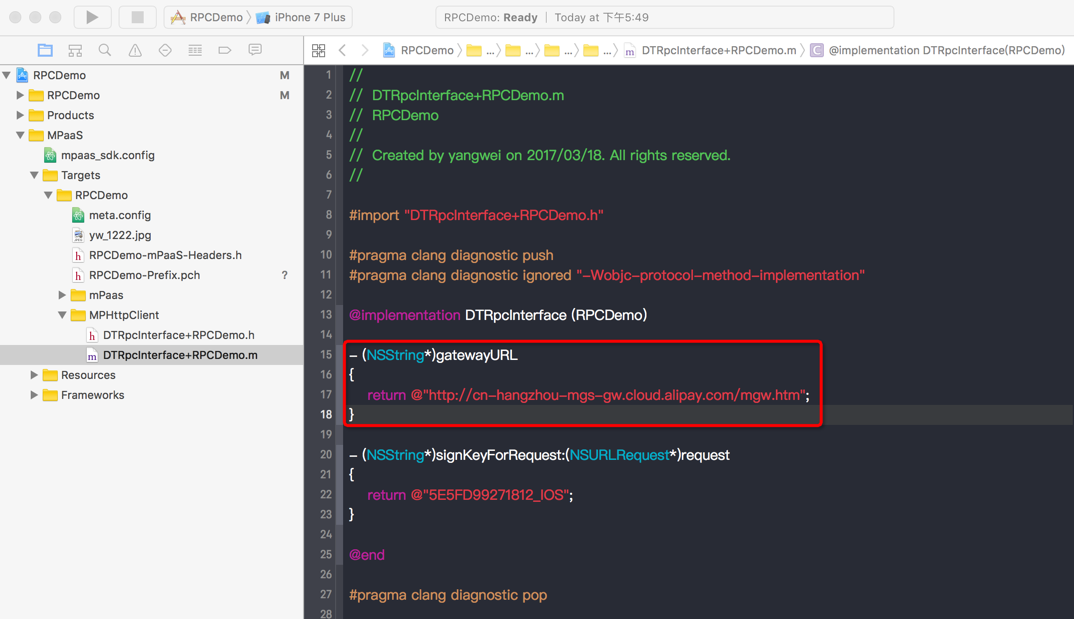
10.1.32 版本之後不再需要添加 DTRpcInterface類的 Category檔案,中介層會實現封裝從 meta.config中讀取,升級版本後請檢查工程中是否存在舊版本配置,如果有請移除。下面為新版本應移除的 DTRpcInterface類的 Category檔案。
產生 RPC 代碼
當 App 在移動網關控制台接入後台服務後,即可下載用戶端的 RPC 代碼。更多資訊請參考 產生代碼。
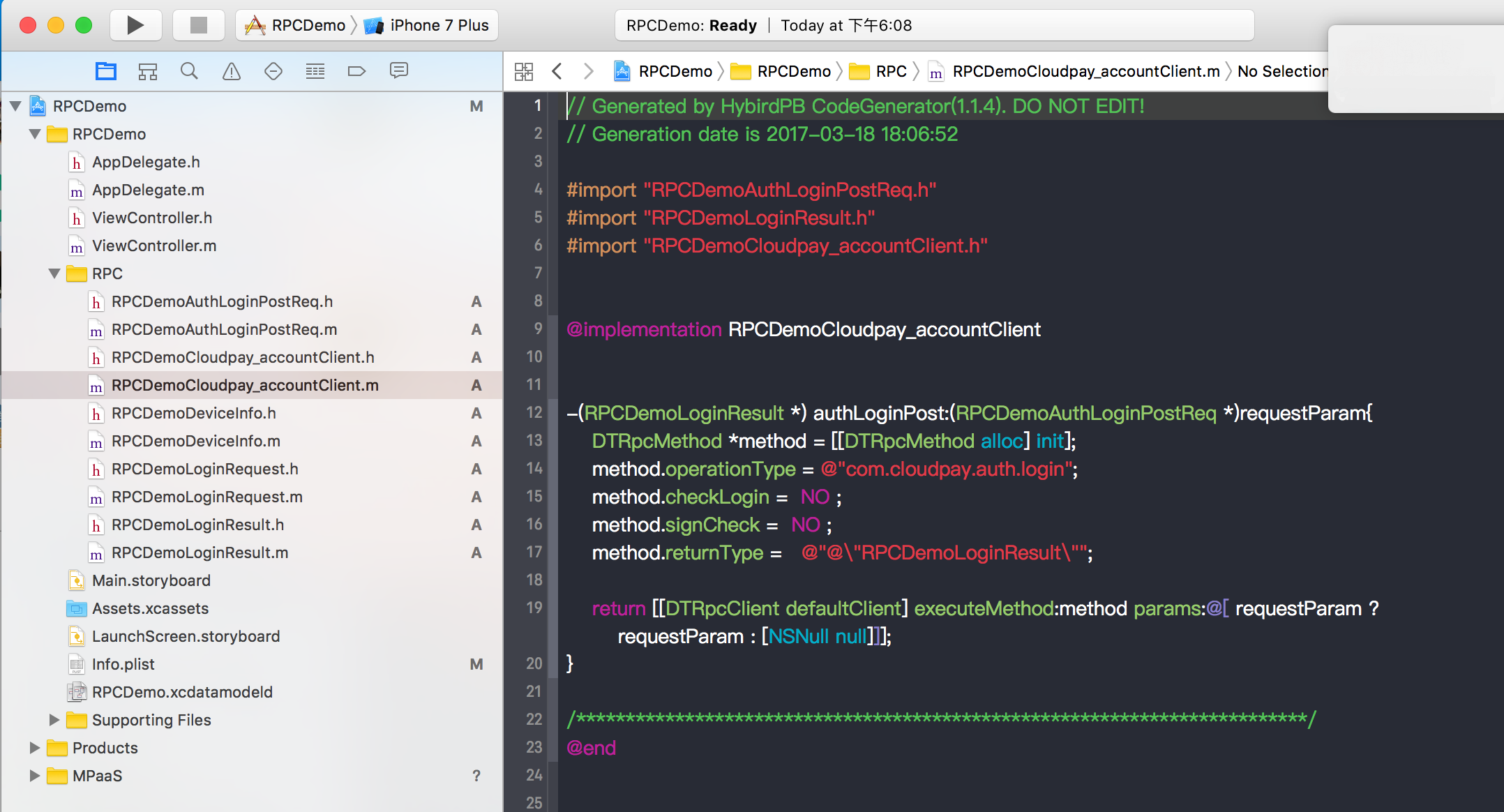
下載的 RPC 代碼結構如下:
其中:
RPCDemoCloudpay_accountClient為 RPC 配置。RPCDemoAuthLoginPostReq為 request 模型。RPCDemoLoginResult為 response 模型。
發送請求
RPC 請求必須在子線程調用,可使用中介層中 MPRpcInterface封裝的子線程調用介面,回調方法預設為主線程。範例程式碼如下:
- (void)sendRpc
{
    __block RPCDemoLoginResult *result = nil;
    [MPRpcInterface callAsyncBlock:^{
        @try
        {
            RPCDemoLoginRequest *req = [[RPCDemoLoginRequest alloc] init];
            req.loginId = @"alipayAdmin";
            req.loginPassword = @"123456";
            RPCDemoAuthLoginPostReq *loginPostReq = [[RPCDemoAuthLoginPostReq alloc] init];
            loginPostReq._requestBody = req;
            RPCDemoCloudpay_accountClient *service = [[RPCDemoCloudpay_accountClient alloc] init];
            result = [service authLoginPost:loginPostReq];
        }
        @catch (NSException *exception) {
            NSLog(@"%@", exception);
            NSError *error = [userInfo objectForKey:@"kDTRpcErrorCauseError"];        // 擷取異常詳細資料
            NSInteger code = error.code;        // 擷取異常詳細資料錯誤碼
        }
    } completion:^{
        NSString *str = @"";
        if (result && result.success) {
            str = @"登入成功";
        } else {
            str = @"登入失敗";
        }

        UIAlertView *alert = [[UIAlertView alloc] initWithTitle:str message:nil delegate:nil
                                              cancelButtonTitle:nil otherButtonTitles:@"ok", nil];
        [alert show];
    }];
}使用
try catch捕獲異常;當網關異常時會拋出,根據 網關結果碼說明 查詢原因。RPC Swift 不能使用
try catch進行問題修複,詳情請參考 在 Swift 下安全處理 Objective-C 異常。
在 Swift 下安全處理 Objective-C 異常
背景
Swift 的錯誤處理機制(do-catch)與 Objective-C 的異常處理機制(@try-@catch)在底層是不同的。因此,Swift 代碼無法直接捕獲由 Objective-C 代碼拋出的 NSException,這在混合編程中可能導致應用閃退。
解決方案
為瞭解決這個問題並確保應用的穩定性,我們提供了 APRpcExceptionCatch 工具。它的 safeExecuteTry 方法封裝了 Objective-C 的 @try-@catch 邏輯,允許您在 Swift 環境中安全地執行 RPC 調用。
如果 Objective-C 代碼在執行期間拋出了異常,safeExecuteTry 會捕獲它,並將其作為 DTRpcException 對象返回。如果代碼執行正常,則返回 nil。
版本
在 10.2.3.66 及以上基準版本中提供支援。
範例程式碼
import MBProgressHUD
import APMobileNetwork

private func performGetIdRpcCall() {

    // 1. 顯示載入指標 (原 executeRpc 的開頭部分)
    MBProgressHUD.showAdded(to: self.view, animated: true)

    // 2. 定義用於接收結果和錯誤的變數
    var response: MPDemoUserInfo? // 將泛型 T 替換為具體的類型 MPDemoUserInfo
    var rpcError: DTRpcException?

    // 3. 非同步執行 RPC 調用 (原 DTRpcAsyncCaller.callAsyncBlock)
    DTRpcAsyncCaller.callAsyncBlock({

        // 3.1. 在後台線程中安全地執行實際的 RPC 調用
        rpcError = APRpcExceptionCatch.safeExecuteTry {
            // 這裡是原 'call' 閉包的內容
            let client = MPDemoRpcDemoClient()
            // 將結果賦值給 response 變數
            response = client.getIdGet(self.getRequest())
        }

    }, completion: {

        // 4. 在主線程中處理完成後的邏輯
        DispatchQueue.main.async {

            // 4.1. 隱藏載入指標
            MBProgressHUD.hide(for: self.view, animated: true)

            // 4.2. 檢查 RPC 調用是否出錯
            if let exception = rpcError {
                // 如果有錯誤,構造並顯示錯誤資訊
                var errorMsg: String
                if exception.code.rawValue == 0 {
                    if let realError = exception.userInfo?["kDTRpcErrorCauseError"] as? NSError {
                        let errorString = "Error: [Domain: \(realError.domain), Code: \(realError.code), Description: \(realError.localizedDescription)]"
                        errorMsg = "Rpc Exception: \(errorString)"
                    } else {
                        let cause = exception.userInfo?["kDTRpcErrorCauseError"]
                        errorMsg = "Rpc Exception code: \(exception.code), no real error: \(cause ?? "nil")"
                    }
                } else {
                    errorMsg = "Rpc Exception code: \(exception.code)"
                }

                // 顯示錯誤提示
                self.showErrorToast(message: errorMsg)

            } else {
                // 4.3. 如果調用成功,處理返回的資料
                // 這裡是原 'success' 閉包的內容
                self.showAlert(title: "返回資料", message: response?.description)
            }
        }
    })
}
請求自訂配置
DTRpcMethod為 RPC 要求方法描述,記錄 RPC 請求的方法名、參數、傳回型別等資訊。
如果發送請求時,不需要加簽,可以將
DTRpcMethod的signCheck屬性設定為 NO。-(MPDemoUserInfo *) dataPostSetTimeout:(MPDemoPostPostReq *)requestParam { DTRpcMethod *method = [[DTRpcMethod alloc] init]; method.operationType = @"com.antcloud.request.post"; method.checkLogin = NO ; method.signCheck = NO ; method.returnType = @"@\"MPDemoUserInfo\""; return [[DTRpcClient defaultClient] executeMethod:method params:@[ ]]; }如果需要設定逾時時間,可以配置
DTRpcMethod的timeoutInterval屬性。-(MPDemoUserInfo *) dataPostSetTimeout:(MPDemoPostPostReq *)requestParam { DTRpcMethod *method = [[DTRpcMethod alloc] init]; method.operationType = @"com.antcloud.request.post"; method.checkLogin = NO ; method.signCheck = YES ; method.timeoutInterval = 1; // 這個逾時時間是用戶端收到網關返回的時間,服務端配置的逾時時間是後端業務系統的返回時間;預設 20s,設定小於 1 時無效即為預設值 method.returnType = @"@\"MPDemoUserInfo\""; return [[DTRpcClient defaultClient] executeMethod:method params:@[ ]]; }如果需要為介面添加 Header,可以使用下面
DTRpcClient的擴充方法。-(MPDemoUserInfo *) dataPostAddHeader:(MPDemoPostPostReq *)requestParam { DTRpcMethod *method = [[DTRpcMethod alloc] init]; method.operationType = @"com.antcloud.request.postAddHeader"; method.checkLogin = NO ; method.signCheck = YES ; method.returnType = @"@\"MPDemoUserInfo\""; // 針對介面添加 header NSDictionary *customHeader = @{@"testKey": @"testValue"}; return [[DTRpcClient defaultClient] executeMethod:method params:@[ ] requestHeaderField:customHeader responseHeaderFields:nil]; }如果需要為所有介面添加 Header,可以參考下方攔截器的使用,採用攔截器的方式實現。具體實現方法請參考移動網關 程式碼範例。
checkLogin屬性為介面session校正使用,需要配合網關控制台完成,預設設定為 NO 即可。
自訂 RPC 攔截器
基於業務需求,可能需要在 RPC 發送前,或 RPC 處理完成後進行相關邏輯處理,RPC 模組提供攔截器機制處理此類需求。
自訂攔截器
建立攔截器,並實現 <DTRpcInterceptor>協議的方法,用來處理 RPC 請求前後的相關操作。
@interface HXRpcInterceptor : NSObject<DTRpcInterceptor>

@end

@implementation HXRpcInterceptor

- (DTRpcOperation *)beforeRpcOperation:(DTRpcOperation *)operation{
    // TODO
    return operation;
}

- (DTRpcOperation *)afterRpcOperation:(DTRpcOperation *)operation{
   // TODO
   return operation;
}
@end
註冊攔截器
您可通過調用中介層的擴充介面,在攔截器容器中註冊自訂的子攔截器。
    HXRpcInterceptor *mpTestIntercaptor = [[HXRpcInterceptor alloc] init];    // 自訂子攔截器
    [MPRpcInterface addRpcInterceptor:mpTestIntercaptor];
資料加密
RPC 提供多種資料加密配置功能,詳情參考 資料加密。