背景
監管部門要求在使用者點擊隱私協議彈框中“同意” 按鈕之前,App 不可以調用相關敏感 API。為應對此監管要求,mPaaS iOS 10.1.60.27 以上(60 版本) 和 10.1.32.18 以上(32 版本)的基準提供了支援,請您根據實際情況參考本文對工程進行改造。
使用方法
根據是否讓 mPaaS iOS 架構託管 App 的生命週期,需要採用不同的使用方法。通過查看工程 main.m 檔案中是否啟用了架構的 DFApplication 和 DFClientDelegate,可以判斷是否讓 mPaaS iOS 架構託管了 App 的生命週期;啟用了架構的 DFApplication 和 DFClientDelegate即表示進行了託管。
return UIApplicationMain(argc, argv, @"DFApplication", @"DFClientDelegate"); // NOW USE MPAAS FRAMEWORK架構託管 App 生命週期
1. 允許隱私彈框提示
在 MPaaSInterface category中重寫以下 enablePrivacyAuth 介面方法,並返回 YES。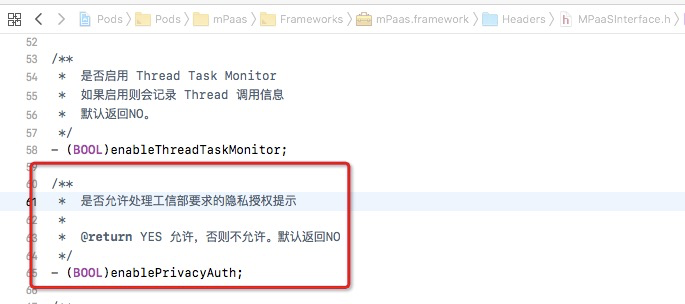
**程式碼範例**

```objectivec
@implementation MPaaSInterface (Portal)

- (BOOL)enablePrivacyAuth
{
    return YES;
}

@end
```
2. 實現許可權彈框
重寫架構提供的- (DTFrameworkCallbackResult)application:(UIApplication *)application privacyAuthDidFinishLaunchingWithOptions:(NSDictionary *)launchOptions completionHandler:(**void** (^)(**void**))completionHandler;方法。 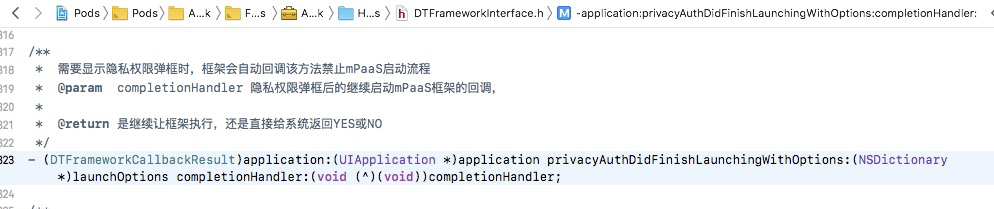
程式碼範例
```objectivec
- (DTFrameworkCallbackResult)application:(UIApplication *)application privacyAuthDidFinishLaunchingWithOptions:(NSDictionary *)launchOptions completionHandler:(void (^)(void))completionHandler
{
    UIWindow *authWindow = [[UIWindow alloc] initWithFrame:[[UIScreen mainScreen] bounds]];
    authWindow.backgroundColor = [UIColor redColor];
    authWindow.windowLevel = UIWindowLevelStatusBar+5;
    AuthViewController *vc = [[AuthViewController alloc] init];
    vc.completionHandler = completionHandler;
    vc.window = authWindow;
    authWindow.rootViewController = vc;
    [authWindow makeKeyAndVisible];

    return DTFrameworkCallbackResultContinue;
}
```
3. 啟動 mPaaS 架構
在使用者點擊 同意 授權後,回調 completionHandler,繼續啟動 mPaaS 架構。範例程式碼如下所示:
#import <UIKit/UIKit.h>

NS_ASSUME_NONNULL_BEGIN

@interface AuthViewController : UIViewController

@property (nonatomic, copy) void (^completionHandler)(void);
@property (nonatomic, strong) UIWindow *window;

@end

NS_ASSUME_NONNULL_END
#import "AuthViewController.h"
@interface AuthViewController ()<UIAlertViewDelegate>
@end
@implementation AuthViewController
- (void)viewDidLoad {
[super viewDidLoad];
// Do any additional setup after loading the view.
[self showAlertWithTitle:@"隱私許可權"];
}
- (void)showAlertWithTitle:(NSString *)title
{
if ([title length] > 0) {
UIAlertView *alert = [[UIAlertView alloc] initWithTitle:title
message:nil
delegate:self
cancelButtonTitle:@"取消"
otherButtonTitles:@"確定", nil];
[self.window makeKeyWindow];
[alert show];
}
}
- (void)alertView:(UIAlertView *)alertView clickedButtonAtIndex:(NSInteger)buttonIndex
{
if (buttonIndex == 1) {
if (self.completionHandler) {
self.completionHandler();
self.window.rootViewController = nil;
self.window = nil;
}
}else {
exit(0);
}
}
@end4. 手動初始化容器 Context
如果您整合了 H5 容器和離線包、小程式組件,則需要在 - (void)application:(UIApplication *)application afterDidFinishLaunchingWithOptions:(NSDictionary *)launchOptions 方法中手動初始化容器 Context。程式碼範例如下。
- (void)application:(UIApplication *)application afterDidFinishLaunchingWithOptions:(NSDictionary *)launchOptions
{
  ...
  // 初始化容器Context
  [MPNebulaAdapterInterface setNBContextWhenEnablePrivacyAuth];

  ...
}
非架構託管 App 生命週期
1. 支援隱私彈框
在 MPaaSInterface category 中重寫 enableUserOverWriteAuthAlert 介面方法,並返回相關隱私許可權狀態。 
程式碼範例
    @implementation MPaaSInterface (mPaaSdemo)

    - (BOOL)enableUserOverWriteAuthAlert {
        // 如果隱私條款使用者已經點過 “同意”,這裡返回 “NO”,表示 mPaaS 組件可以正常調用相關 API。
        // 反之,返回 “Yes”,mPaaS 組件會 hold 住相關 API 呼叫。
        return ![[NSUserDefaults standardUserDefaults] boolForKey:@"xx_pr"];
    }

    @end
2. 阻止提前上報日誌埋點
如果接入過埋點相關組件,需要在啟動流程中額外調用 MPAnalysisHelper holdUploadLogUntilAgreed 方法,來阻止提前上報日誌埋點。
可通過是否有 APRemoteLogging.framework 來判斷是否接入過埋點相關組件。
程式碼範例
推薦在盡量早的時機調用。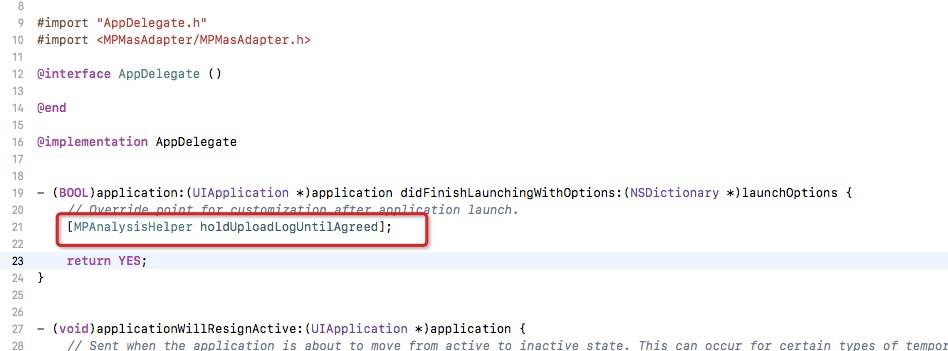
3. 手動初始化容器 Context
如果您整合了 H5 容器和離線包、小程式組件,則需要在 - (void)application:(UIApplication *)application afterDidFinishLaunchingWithOptions:(NSDictionary *)launchOptions 方法中手動初始化容器 Context。程式碼範例如下。
- (void)application:(UIApplication *)application afterDidFinishLaunchingWithOptions:(NSDictionary *)launchOptions
{
  ...
  // 初始化容器 Context
  [MPNebulaAdapterInterface setNBContextWhenEnablePrivacyAuth];

  ...
}