本文將介紹如何將錨定外掛程式接入到 iOS 用戶端。定位 SDK 是一套簡單的 LBS (Location-based services) 定位介面,您可以使用這套定位 API 擷取定位結果。
您可以 基於已有工程使用 CocoaPods 接入 定位 SDK 到 iOS 用戶端。
前置條件
您已接入工程到 mPaaS。更多資訊,請參見 基於已有工程且使用 CocoaPods 接入。
添加 SDK
使用 cocoapods-mPaaS 外掛程式添加移動定位組件 SDK。操作步驟如下:
在 Podfile 檔案中,使用
mPaaS_pod "mPaaS_LBS"添加移動定位組件依賴。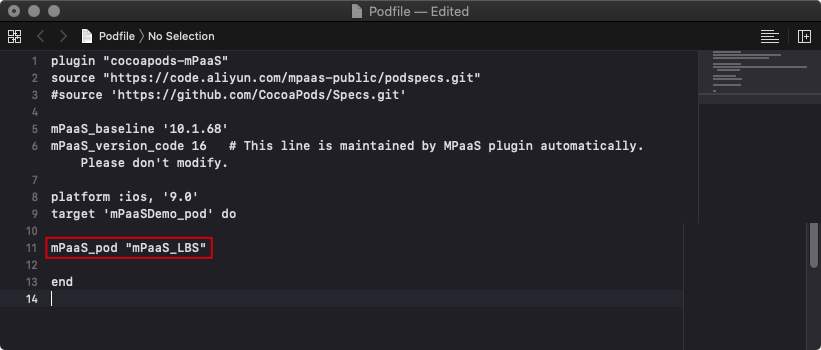
在命令列中執行
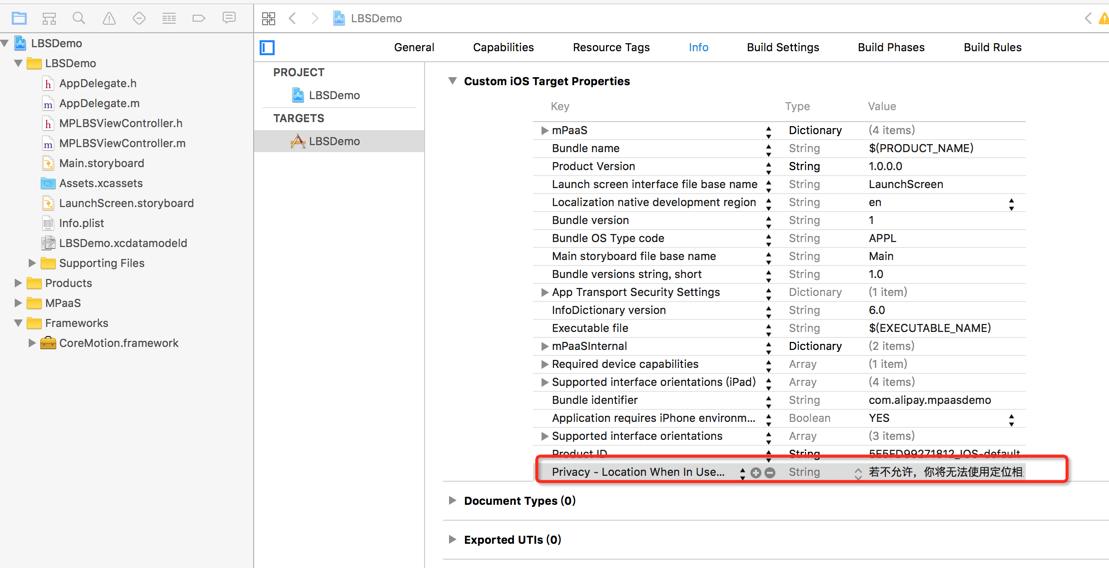
pod install即可完成接入。開啟定位提醒。
使用 SDK
本文將結合 定位 官方 Demo 介紹如何在 10.1.32 及以上版本的基準中使用定位 SDK。
目前,在 APMobileLBS 模組中,提供了擷取當前位置的經緯度資訊方法。
說明
定位服務目前暫不支援逆地理查詢功能,您可調用高德介面進行逆地理查詢。
API 說明
參見以下代碼,瞭解定位服務相關介面,通過注釋擷取介面和相關參數說明。
使用 MPLBSConfiguration 配置參數
/**
 定位服務的配置
 */
@interface MPLBSConfiguration : NSObject

/** 單次定位期望精度,單位米,建議結合業務情境傳入一個可接受正數,如 500,即 500m 以內的範圍 */
@property (nonatomic, assign) CLLocationAccuracy desiredAccuracy;

/** 單次定位接受的緩衝時間,從目前時間往前推,多長時間內的緩衝是有效,推薦設定 30s 以上的緩衝時間 */
@property (nonatomic, assign) APCoreLocationCacheAvaliable cacheTimeInterval;

/** 單次定位或逆地理查詢的逾時時間,單位秒,預設和最小設定為 2s */
@property (nonatomic, assign) NSTimeInterval timeOut;

/** 逆地理查詢的資訊層級,預設 APCoreLocationReGeoLevelDistrict */
@property (nonatomic, assign) LBSLocationReGeoLevel reGeoLevel;

/** 逆地理查詢的位置資訊,在其中指定經緯度座標 */
@property (nonatomic, strong) CLLocation *reGeoLocation;

/** 逆地理查詢位置資訊是否為高德座標系,預設 YES(使用 reGeoLocation 參數時生效) */
@property (nonatomic, assign) BOOL reGeoCoordinateConverted;

/** 是否開啟簽到功能,預設 NO(按需設定開啟) */
@property (nonatomic, assign) BOOL needCheckIn;

/**
 *  是否需要高精度定位,iOS 14 以下不區分精度,iOS 14 及以上預設 NO (低精度),需要業務指定是否需要高精度定位。
 */
@property (nonatomic,assign) BOOL highAccuracyRequired;

@end
使用 MPLBSLocationManager 發起定位請求
/**
 定位結果的回調 block

 @param success 是否成功
 @param locationInfo 位置資訊
 @param error 定位失敗的錯誤資訊
 */
typedef void(^MPLBSLocationCompletionBlock)(BOOL success,
                                            MPLBSLocationInfo *locationInfo,
                                            NSError *error);

/**
 定位服務
 */
@interface MPLBSLocationManager : NSObject

/**
 初始化

 @param configuration 參數配置
 @return 執行個體
 */
- (instancetype)initWithConfiguration:(MPLBSConfiguration *)configuration;

/**
 發起單次定位

 @param needReGeocode 是否需要逆地理資訊。由於定位服務目前暫不支援逆地理查詢功能,此處需傳入 NO。
 @param block 定位結束的回調 block
 */
- (void)requestLocationNeedReGeocode:(BOOL)needReGeocode
                   completionHandler:(MPLBSLocationCompletionBlock)block;
回調中 MPLBSLocationInfo 的說明
/**
 逆地理資訊
 */
@interface MPLBSReGeocodeInfo : NSObject

@property (nonatomic, strong) NSString* country;        // 國家
@property (nonatomic, strong) NSString* countryCode;    // 國家編碼
@property (nonatomic, strong) NSString* provience;      // 省
@property (nonatomic, strong) NSString* city;           // 城市
@property (nonatomic, strong) NSString* district;       // 區
@property (nonatomic, strong) NSString* street;         // 街道
@property (nonatomic, strong) NSString* streetCode;     // 街道編碼
@property (nonatomic, strong) NSString* cityCode;       // 城市編碼
@property (nonatomic, strong) NSString* adCode;         // 行政區劃編碼
@property (nonatomic, strong) NSArray* poiList;         // poi 資訊列表

@end

/**
 定位結果的位置資訊資料結構
 */
@interface MPLBSLocationInfo : NSObject

@property (nonatomic, strong) CLLocation* location;         // 位置資訊
@property (nonatomic, strong) MPLBSReGeocodeInfo* rgcInfo;  // 逆地理資訊

@end
程式碼範例
- (void)getLocation {
    MPLBSConfiguration *configuration = [[MPLBSConfiguration alloc] init];
    configuration.desiredAccuracy = kCLLocationAccuracyBest;

    self.locationManager = [[MPLBSLocationManager alloc] initWithConfiguration:configuration];
    [self.locationManager requestLocationNeedReGeocode:NO completionHandler:^(BOOL success, MPLBSLocationInfo * _Nonnull locationInfo, NSError * _Nonnull error) {
        NSString *message;
        if (success) {
            message = [NSString stringWithFormat:@"定位成功, 經度: %.5f, 維度: %.5f, 精確度: %.3f, 是否高精度 : %d", locationInfo.location.coordinate.longitude, locationInfo.location.coordinate.latitude, locationInfo.location.horizontalAccuracy, !locationInfo.location.ap_lbs_is_high_accuracy_close];
        } else {
            message = [NSString stringWithFormat:@"%@", error];
        }
        dispatch_async(dispatch_get_main_queue(), ^{
            AUNoticeDialog *alert = [[AUNoticeDialog alloc] initWithTitle:@"定位結果" message:message delegate:nil cancelButtonTitle:@"OK" otherButtonTitles:nil];
            [alert show];
        });
    }];
}
iOS 14 適配
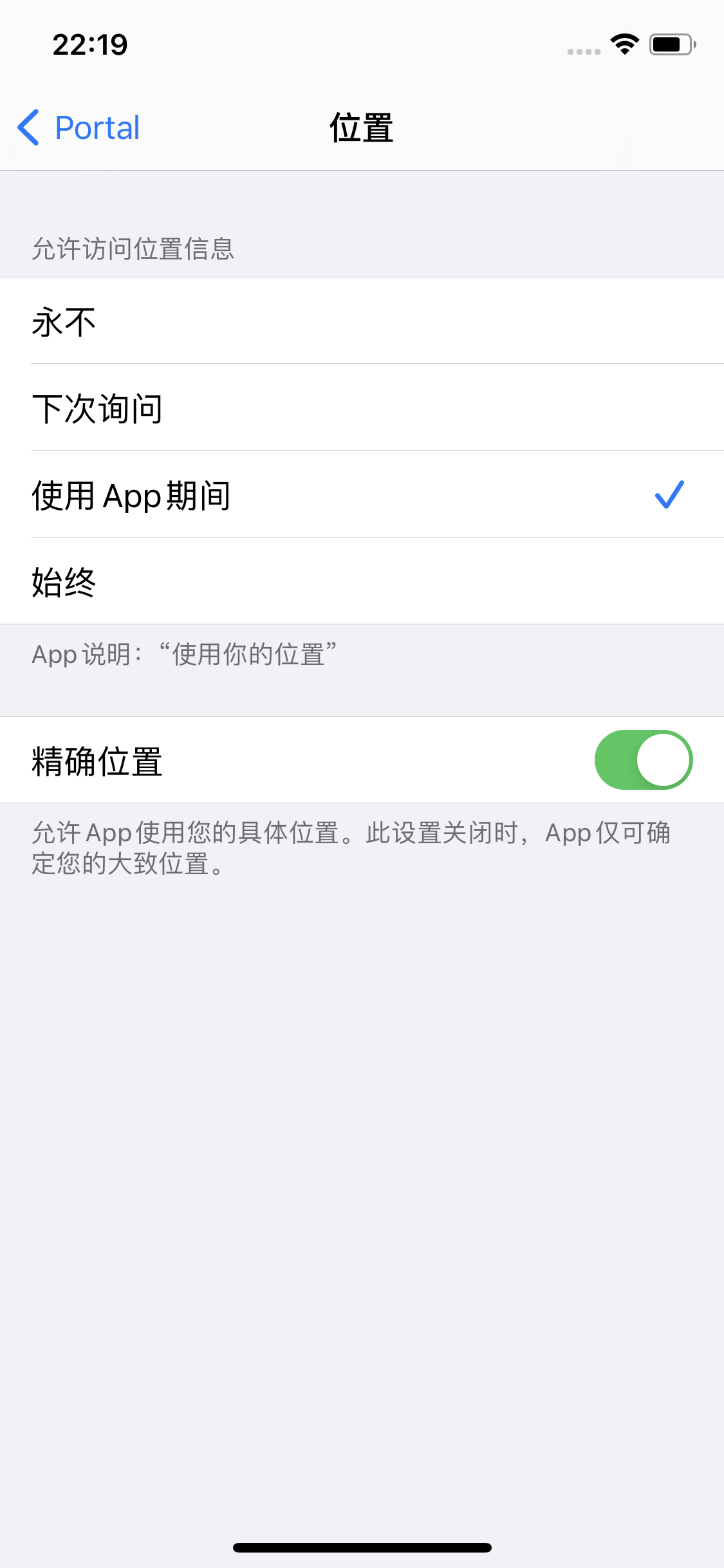
在 iOS 14 中,精確位置作為一個許可權選項,在申請定位許可權時供使用者主動選擇,並且在定位使用權限設定頁面可供使用者調整。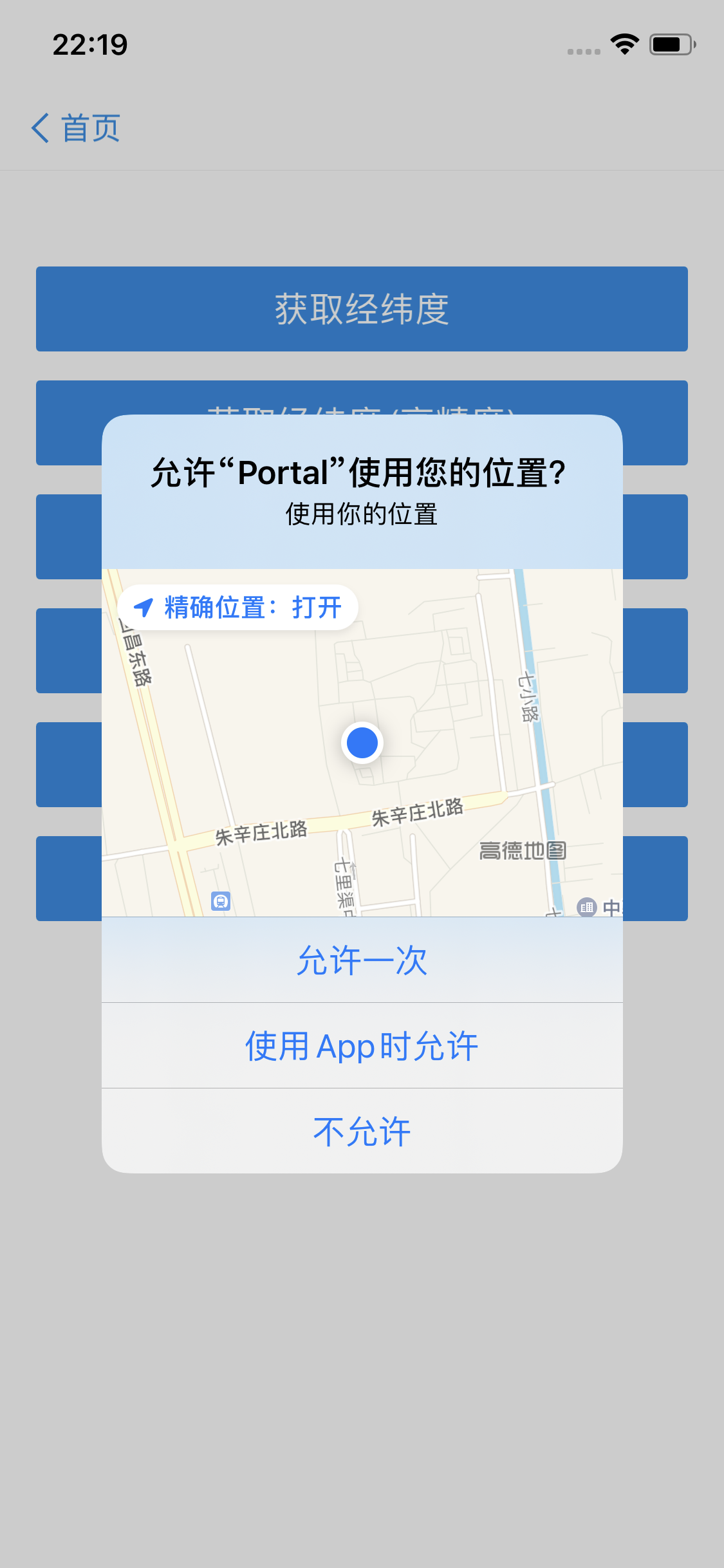
入參適配
在 MPLBSConfiguration 中,增加了 highAccuracyRequired 設定,如果入參 highAccuracyRequired = YES,使用者關閉高精度定位許可權,則回調錯誤。
/**
 定位服務的配置
 */
@interface MPLBSConfiguration : NSObject

/**
 *  是否需要高精度定位,iOS 14 以下不區分精度,iOS 14 及以上預設 NO(低精度),需要業務指定是否需要高精度定位。
 */
@property (nonatomic,assign) BOOL highAccuracyRequired;

@end
//如果入參 highAccuracyRequired = YES,且無高精度定位許可權則回調錯誤
Errorcode:APCoreLocationErrorCodeHighAccuracyAuthorization回調適配
如果入參 highAccuracyRequired = NO 或者未設定,則回調的 CLLocation 對象裡面會增加欄位ap_lbs_is_high_accuracy_close 以標識是否關閉高精度定位。
// 出參改造
@interface CLLocation (APMobileLBS)
/*
 *  是否關閉精準定位,預設為 NO
 */
@property(nonatomic,assign)BOOL ap_lbs_is_high_accuracy_close;
@end
程式碼範例
- (void)getLocationWithHighAccuracy {
    MPLBSConfiguration *configuration = [[MPLBSConfiguration alloc] init];
    configuration.desiredAccuracy = kCLLocationAccuracyBest;
    configuration.highAccuracyRequired = YES;

    self.locationManager = [[MPLBSLocationManager alloc] initWithConfiguration:configuration];
    [self.locationManager requestLocationNeedReGeocode:NO completionHandler:^(BOOL success, MPLBSLocationInfo * _Nonnull locationInfo, NSError * _Nonnull error) {
        NSString *message;
        if (success) {
            message = [NSString stringWithFormat:@"定位成功, 經度: %.5f, 維度: %.5f, 精確度: %.3f, 是否高精度 : %d", locationInfo.location.coordinate.longitude, locationInfo.location.coordinate.latitude, locationInfo.location.horizontalAccuracy, !locationInfo.location.ap_lbs_is_high_accuracy_close];
        } else {
            message = [NSString stringWithFormat:@"%@", error];
        }
        dispatch_async(dispatch_get_main_queue(), ^{
            AUNoticeDialog *alert = [[AUNoticeDialog alloc] initWithTitle:@"定位結果" message:message delegate:nil cancelButtonTitle:@"OK" otherButtonTitles:nil];
            [alert show];
        });
    }];
}