本文介紹如何利用 Milvus 2.5 版本實現快速的全文檢索索引、關鍵詞匹配,以及混合檢索(Hybrid Search)。通過增強向量相似性檢索和資料分析的靈活性,提升了檢索精度,並示範了在 RAG 應用的 Retrieve 階段如何使用混合檢索提供更精確的上下文以產生回答。
背景資訊
Milvus 2.5 整合了高效能搜尋引擎庫 Tantivy,並內建 Sparse-BM25 演算法,首次實現了原生全文檢索索引功能。這一能力與現有的語義搜尋功能完美互補,為使用者提供更強大的檢索體驗。
內建分詞器:無需額外預先處理,通過內建分詞器(Analyzer)與稀疏向量提取能力,Milvus 可直接接受文本輸入,自動完成分詞、停用詞過濾與稀疏向量提取。
即時 BM25 統計:資料插入時動態更新詞頻(TF)與逆文檔頻率(IDF),確保搜尋結果的即時性與準確性。
混合搜尋效能增強:基於近似最近鄰(ANN)演算法的稀疏向量檢索,效能遠超傳統關鍵詞系統,支援億級資料毫秒級響應,同時相容與稠密向量的混合查詢。
前提條件
已建立内核版本為2.5的Milvus執行個體。具體操作,請參見快速建立Milvus執行個體。
已開通服務並獲得API-KEY。
使用限制
適用於内核版本為2.5及之後版本的Milvus執行個體。
適用於
pymilvus的 Python SDK 版本為 2.5 及之後版本。您可以執行以下命令來檢查當前安裝的版本。
pip3 show pymilvus如果版本低於2.5,請使用以下命令更新。
pip3 install --upgrade pymilvus
操作流程
步驟一:安裝依賴庫
pip3 install pymilvus langchain dashscope步驟二:資料準備
本文以 Milvus 官方文檔作為樣本,通過 LangChain SDK 切分文本,作為 Embedding 模型 text-embedding-v2 的輸入,並將 Embedding 的結果和原始文本一起插入到 Milvus 中。
from langchain_community.document_loaders import WebBaseLoader
from langchain.text_splitter import RecursiveCharacterTextSplitter
from langchain_community.embeddings import DashScopeEmbeddings
from pymilvus import MilvusClient, DataType, Function, FunctionType

dashscope_api_key = "<YOUR_DASHSCOPE_API_KEY>"
milvus_url = "<YOUR_MMILVUS_URL>"
user_name = "root"
password = "<YOUR_PASSWORD>"
collection_name = "milvus_overview"
dense_dim = 1536

loader = WebBaseLoader([
    'https://raw.githubusercontent.com/milvus-io/milvus-docs/refs/heads/v2.5.x/site/en/about/overview.md'
])

docs = loader.load()

text_splitter = RecursiveCharacterTextSplitter(chunk_size=1024, chunk_overlap=256)

# 使用LangChain將輸入文檔安照chunk_size切分
all_splits = text_splitter.split_documents(docs)

embeddings = DashScopeEmbeddings(
    model="text-embedding-v2", dashscope_api_key=dashscope_api_key
)

text_contents = [doc.page_content for doc in all_splits]

vectors = embeddings.embed_documents(text_contents)


client = MilvusClient(
    uri=f"http://{milvus_url}:19530",
    token=f"{user_name}:{password}",
)

schema = MilvusClient.create_schema(
    enable_dynamic_field=True,
)

analyzer_params = {
    "type": "english"
}

# Add fields to schema
schema.add_field(field_name="id", datatype=DataType.INT64, is_primary=True, auto_id=True)
schema.add_field(field_name="text", datatype=DataType.VARCHAR, max_length=65535, enable_analyzer=True, analyzer_params=analyzer_params, enable_match=True)
schema.add_field(field_name="sparse_bm25", datatype=DataType.SPARSE_FLOAT_VECTOR)
schema.add_field(field_name="dense", datatype=DataType.FLOAT_VECTOR, dim=dense_dim)

bm25_function = Function(
   name="bm25",
   function_type=FunctionType.BM25,
   input_field_names=["text"],
   output_field_names="sparse_bm25",
)
schema.add_function(bm25_function)

index_params = client.prepare_index_params()

# Add indexes
index_params.add_index(
    field_name="dense",
    index_name="dense_index",
    index_type="IVF_FLAT",
    metric_type="IP",
    params={"nlist": 128},
)

index_params.add_index(
    field_name="sparse_bm25",
    index_name="sparse_bm25_index",
    index_type="SPARSE_WAND",
    metric_type="BM25"
)

# Create collection
client.create_collection(
    collection_name=collection_name,
    schema=schema,
    index_params=index_params
)

data = [
    {"dense": vectors[idx], "text": doc}
    for idx, doc in enumerate(text_contents)
]

# Insert data
res = client.insert(
    collection_name=collection_name,
    data=data
)

print(f"產生 {len(vectors)} 個向量,維度:{len(vectors[0])}")
本文樣本涉及以下參數,請您根據實際環境替換。
參數 | 說明 |
| 阿里雲百鍊的API-KEY。 |
| Milvus執行個體的内网地址或公网地址。您可以在Milvus執行個體的实例详情頁面查看。
|
| 建立Milvus執行個體時,您自訂的使用者名稱和密碼。 |
| |
| Collection的名稱。您可以自訂。本文樣本均以milvus_overview為例。 |
| 稠密向量維度。鑒於text-embedding-v2模型產生的向量維度為1536維,因此將dense_dim設定為1536。 |
該樣本使用了Milvus 2.5最新的能力,通過建立 bm25_function 對象,Milvus就可以自動地將文本列轉換為稀疏向量。
同樣,在處理中文文檔時,Milvus 2.5版本也支援指定相應的中文分析器。
在Schema中完成Analyzer的設定後,該設定將對該Collections永久生效。如需設定新的Analyzer,則必須重新建立Collection。
# 定義分詞器參數
analyzer_params = {
    "type": "chinese"  # 指定分詞器類型為中文
}

# 添加文字欄位到 Schema,並啟用分詞器
schema.add_field(
    field_name="text",                      # 欄位名稱
    datatype=DataType.VARCHAR,              # 資料類型:字串(VARCHAR)
    max_length=65535,                       # 最大長度:65535 字元
    enable_analyzer=True,                   # 啟用分詞器
    analyzer_params=analyzer_params         # 分詞器參數
)
步驟三:全文檢索索引
在 Milvus 2.5 版本中,您可以很方便地通過相關 API 使用最新的全文檢索索引能力。程式碼範例如下所示。
from pymilvus import MilvusClient
# 建立Milvus Client。
client = MilvusClient(
uri="http://c-xxxx.milvus.aliyuncs.com:19530", # Milvus執行個體的公網地址。
token="<yourUsername>:<yourPassword>", # 登入Milvus執行個體的使用者名稱和密碼。
db_name="default" # 待串連的資料庫名稱,本文樣本為預設的default。
)
search_params = {
'params': {'drop_ratio_search': 0.2},
}
full_text_search_res = client.search(
collection_name='milvus_overview',
data=['what makes milvus so fast?'],
anns_field='sparse_bm25',
limit=3,
search_params=search_params,
output_fields=["text"],
)
for hits in full_text_search_res:
for hit in hits:
print(hit)
print("\n")
"""
{'id': 456165042536597485, 'distance': 6.128782272338867, 'entity': {'text': '## What Makes Milvus so Fast?\n\nMilvus was designed from day one to be a highly efficient vector database system. In most cases, Milvus outperforms other vector databases by 2-5x (see the VectorDBBench results). This high performance is the result of several key design decisions:\n\n**Hardware-aware Optimization**: To accommodate Milvus in various hardware environments, we have optimized its performance specifically for many hardware architectures and platforms, including AVX512, SIMD, GPUs, and NVMe SSD.\n\n**Advanced Search Algorithms**: Milvus supports a wide range of in-memory and on-disk indexing/search algorithms, including IVF, HNSW, DiskANN, and more, all of which have been deeply optimized. Compared to popular implementations like FAISS and HNSWLib, Milvus delivers 30%-70% better performance.'}}
{'id': 456165042536597487, 'distance': 4.760214805603027, 'entity': {'text': "## What Makes Milvus so Scalable\n\nIn 2022, Milvus supported billion-scale vectors, and in 2023, it scaled up to tens of billions with consistent stability, powering large-scale scenarios for over 300 major enterprises, including Salesforce, PayPal, Shopee, Airbnb, eBay, NVIDIA, IBM, AT&T, LINE, ROBLOX, Inflection, etc.\n\nMilvus's cloud-native and highly decoupled system architecture ensures that the system can continuously expand as data grows:\n\n"}}
"""步驟四:關鍵詞匹配
關鍵詞匹配是Milvus 2.5所提供的一項全新功能,該功能可以與向量相似性搜尋相結合,從而縮小搜尋範圍並提高搜尋效能。如果您希望使用關鍵詞檢索功能,則在定義模式時需要將enable_analyzer和enable_match同時設定為True。
開啟enable_match會為該欄位建立倒排索引,這將消耗額外的儲存資源。
樣本1:結合向量搜尋的關鍵詞匹配
在此程式碼範例片段中,我們使用過濾運算式限制搜尋結果僅包含與指定詞語 “query” 和 “node” 匹配的文檔。之後,向量相似性搜尋會在已過濾的文檔子集上進行。
filter = "TEXT_MATCH(text, 'query') and TEXT_MATCH(text, 'node')"

text_match_res = client.search(
    collection_name="milvus_overview",
    anns_field="dense",
    data=query_embeddings,
    filter=filter,
    search_params={"params": {"nprobe": 10}},
    limit=2,
    output_fields=["text"]
)
樣本2:標量過濾查詢
關鍵詞匹配還可以用於查詢操作中的標量過濾。通過在 query() 中指定 TEXT_MATCH 運算式,您可以檢索與給定詞語匹配的文檔。在這個程式碼範例片段中,過濾運算式將搜尋結果限制為僅包含與 “scalable” 或 “fast” 匹配的文檔。
filter = "TEXT_MATCH(text, 'scalable fast')"

text_match_res = client.query(
    collection_name="milvus_overview",
    filter=filter,
    output_fields=["text"]
)
步驟五:混合檢索與RAG
結合向量搜尋和全文檢索索引,通過 RRF(Reciprocal Rank Fusion) 演算法融合向量和文本檢索結果,重新最佳化排序和權重分配,提升資料召回率和精確性。
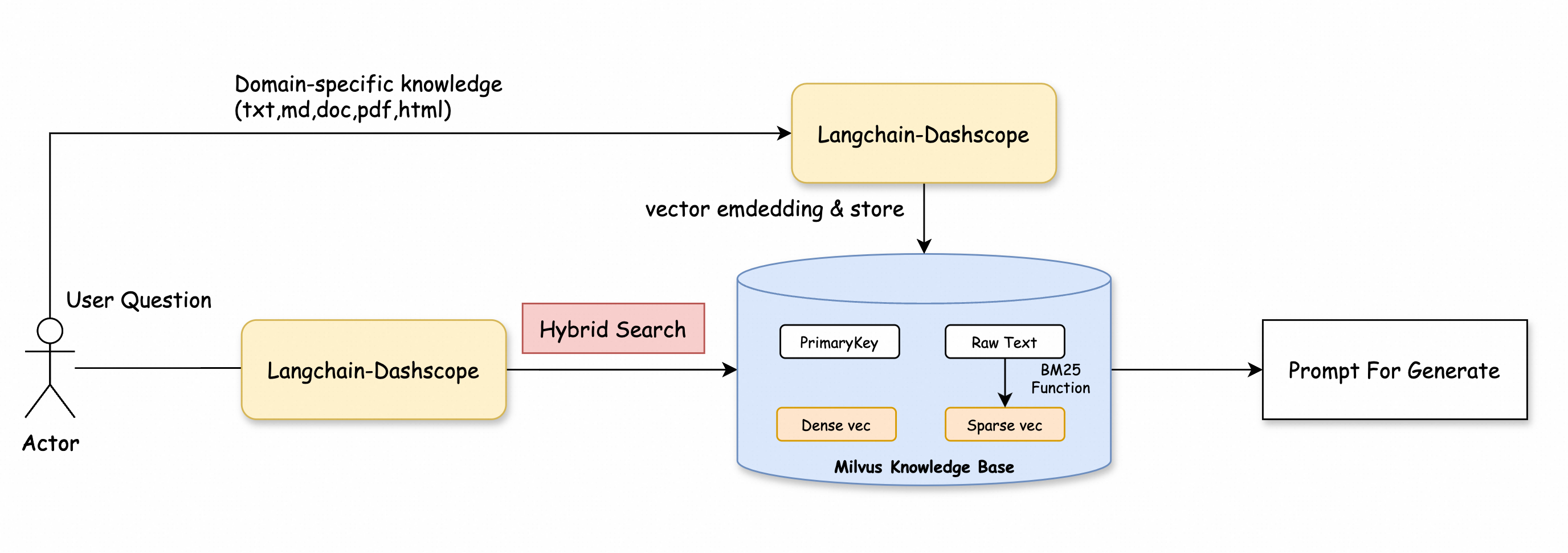
程式碼範例如下所示。
from pymilvus import MilvusClient
from pymilvus import AnnSearchRequest, RRFRanker
from langchain_community.embeddings import DashScopeEmbeddings
from dashscope import Generation

# 建立Milvus Client。
client = MilvusClient(
    uri="http://c-xxxx.milvus.aliyuncs.com:19530",  # Milvus執行個體的公網地址。
    token="<yourUsername>:<yourPassword>",  # 登入Milvus執行個體的使用者名稱和密碼。
    db_name="default"  # 待串連的資料庫名稱,本文樣本為預設的default。
)

collection_name = "milvus_overview"

# 替換為您的 DashScope API-KEY
dashscope_api_key = "<YOUR_DASHSCOPE_API_KEY>"

# 初始化 Embedding 模型
embeddings = DashScopeEmbeddings(
    model="text-embedding-v2",  # 使用text-embedding-v2模型。
    dashscope_api_key=dashscope_api_key
)

# Define the query
query = "Why does Milvus run so scalable?"

# Embed the query and generate the corresponding vector representation
query_embeddings = embeddings.embed_documents([query])

# Set the top K result count
top_k = 5  # Get the top 5 docs related to the query

# Define the parameters for the dense vector search
search_params_dense = {
    "metric_type": "IP",
    "params": {"nprobe": 2}
}

# Create a dense vector search request
request_dense = AnnSearchRequest([query_embeddings[0]], "dense", search_params_dense, limit=top_k)

# Define the parameters for the BM25 text search
search_params_bm25 = {
    "metric_type": "BM25"
}

# Create a BM25 text search request
request_bm25 = AnnSearchRequest([query], "sparse_bm25", search_params_bm25, limit=top_k)

# Combine the two requests
reqs = [request_dense, request_bm25]

# Initialize the RRF ranking algorithm
ranker = RRFRanker(100)

# Perform the hybrid search
hybrid_search_res = client.hybrid_search(
    collection_name=collection_name,
    reqs=reqs,
    ranker=ranker,
    limit=top_k,
    output_fields=["text"]
)

# Extract the context from hybrid search results
context = []
print("Top K Results:")
for hits in hybrid_search_res:  # Use the correct variable here
    for hit in hits:
        context.append(hit['entity']['text'])  # Extract text content to the context list
        print(hit['entity']['text'])  # Output each retrieved document


# Define a function to get an answer based on the query and context
def getAnswer(query, context):
    prompt = f'''Please answer my question based on the content within:
    ```
    {context}
    ```
    My question is: {query}.
    '''
    # Call the generation module to get an answer
    rsp = Generation.call(model='qwen-turbo', prompt=prompt)
    return rsp.output.text

# Get the answer
answer = getAnswer(query, context)

print(answer)


# Expected output excerpt
"""
Milvus is highly scalable due to its cloud-native and highly decoupled system architecture. This architecture allows the system to continuously expand as data grows. Additionally, Milvus supports three deployment modes that cover a wide...
"""