本文為您介紹Python SDK中DataFrame相關的典型情境操作樣本。
DataFrame
PyODPS提供了DataFrame API,它提供了類似Pandas的介面,但是能充分利用MaxCompute的計算能力。完整的DataFrame文檔請參見DataFrame。
假設已經存在三張表,分別是pyodps_ml_100k_movies(電影相關的資料)、pyodps_ml_100k_users(使用者相關的資料)和pyodps_ml_100k_ratings(評分有關的資料)。
首先建立MaxCompute的入口對象。
import os
from odps import ODPS
# 確保 ALIBABA_CLOUD_ACCESS_KEY_ID 環境變數設定為使用者 Access Key ID,
# ALIBABA_CLOUD_ACCESS_KEY_SECRET 環境變數設定為使用者 Access Key Secret,
# 不建議直接使用 Access Key ID / Access Key Secret 字串
o = ODPS(
    os.getenv('ALIBABA_CLOUD_ACCESS_KEY_ID'),
    os.getenv('ALIBABA_CLOUD_ACCESS_KEY_SECRET'),
    project='your-default-project',
    endpoint='your-end-point',
)
傳入Table對象,建立DataFrame對象users。
from odps.df import DataFrame
users = DataFrame(o.get_table('pyodps_ml_100k_users'))
對DataFrame對象可以執行如下操作:
通過dtypes屬性可以查看DataFrame的欄位和類型,如下所示。
users.dtypes通過head方法,可以擷取前N條資料,方便快速預覽資料。
users.head(10)返回結果如下。
-
user_id
age
sex
occupation
zip_code
0
1
24
M
technician
85711
1
2
53
F
other
94043
2
3
23
M
writer
32067
3
4
24
M
technician
43537
4
5
33
F
other
15213
5
6
42
M
executive
98101
6
7
57
M
administrator
91344
7
8
36
M
administrator
05201
8
9
29
M
student
01002
9
10
53
M
lawyer
90703
對欄位進行篩選。
篩選部分欄位。
users[['user_id', 'age']].head(5)返回結果如下。
-
user_id
age
0
1
24
1
2
53
2
3
23
3
4
24
4
5
33
排除個別欄位,如下所示。
>>> users.exclude('zip_code', 'age').head(5)返回結果如下。
-
user_id
sex
occupation
0
1
M
technician
1
2
F
other
2
3
M
writer
3
4
M
technician
4
5
F
other
排除掉一些欄位的同時,通過計算得到一些新的列。例如,將sex為M設定為True,否則設定為False,並將此列取名為sex_bool。如下所示。
>>> users.select(users.exclude('zip_code', 'sex'), sex_bool=users.sex == 'M').head(5)返回結果如下。
-
user_id
age
occupation
sex_bool
0
1
24
technician
True
1
2
53
other
False
2
3
23
writer
True
3
4
24
technician
True
4
5
33
other
False
查詢年齡在20~25歲之間的人數,如下所示。
>>> users.age.between(20, 25).count().rename('count')
943
查詢男女使用者的數量。
>>> users.groupby(users.sex).count()返回結果如下。
-
sex
count
0
F
273
1
M
670
將使用者按職業劃分,從高到底,擷取人數最多的前10個職業。
>>> df = users.groupby('occupation').agg(count=users['occupation'].count())
>>> df.sort(df['count'], ascending=False)[:10]
返回結果如下。
-
occupation
count
0
student
196
1
other
105
2
educator
95
3
administrator
79
4
engineer
67
5
programmer
66
6
librarian
51
7
writer
45
8
executive
32
9
scientist
31
DataFrame API提供了value_counts方法來快速達到同樣的目的。
>>> users.occupation.value_counts()[:10]返回結果如下。
-
occupation
count
0
student
196
1
other
105
2
educator
95
3
administrator
79
4
engineer
67
5
programmer
66
6
librarian
51
7
writer
45
8
executive
32
9
scientist
31
使用更直觀的圖來查看這份資料。
%matplotlib inline使用橫向的柱狀圖來可視化。
users['occupation'].value_counts().plot(kind='barh', x='occupation', ylabel='prefession')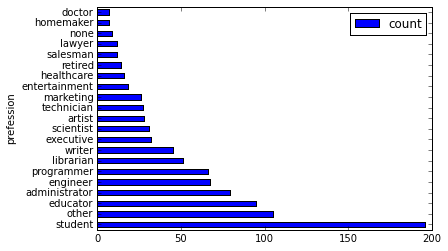
使用長條圖來可視化。將年齡分成30組,查看各年齡分布的長條圖,如下所示。
>>> users.age.hist(bins=30, title="Distribution of users' ages", xlabel='age', ylabel='count of users')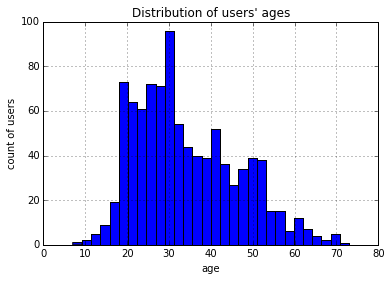
使用JOIN將三張表進行聯合後,儲存成一張新的表。
movies = DataFrame(o.get_table('pyodps_ml_100k_movies'))
ratings = DataFrame(o.get_table('pyodps_ml_100k_ratings'))
o.delete_table('pyodps_ml_100k_lens', if_exists=True)
lens = movies.join(ratings).join(users).persist('pyodps_ml_100k_lens')
lens.dtypes
結果如下。
odps.Schema {
  movie_id                            int64
  title                               string
  release_date                        string
  video_release_date                  string
  imdb_url                            string
  user_id                             int64
  rating                              int64
  unix_timestamp                      int64
  age                                 int64
  sex                                 string
  occupation                          string
  zip_code                            string
}
把0~79歲的年齡,分成8個年齡段。
labels = ['0-9', '10-19', '20-29', '30-39', '40-49', '50-59', '60-69', '70-79']
cut_lens = lens[lens, lens.age.cut(range(0, 80, 10), right=False, labels=labels).rename('年齡分組')]
取分組和年齡唯一的前10條資料來進行查看。
>>> cut_lens['年齡分組', 'age'].distinct()[:10]結果如下。
-
年齡分組
age
0
0-9
7
1
10-19
10
2
10-19
11
3
10-19
13
4
10-19
14
5
10-19
15
6
10-19
16
7
10-19
17
8
10-19
18
9
10-19
19
對各個年齡分組下,使用者的評分總數和評分均值進行查看,如下所示。
cut_lens.groupby('年齡分組').agg(cut_lens.rating.count().rename('評分總數'), cut_lens.rating.mean().rename('評分均值'))結果如下。
-
年齡分組
評分均值
評分總數
0
0-9
3.767442
43
1
10-19
3.486126
8181
2
20-29
3.467333
39535
3
30-39
3.554444
25696
4
40-49
3.591772
15021
5
50-59
3.635800
8704
6
60-69
3.648875
2623
7
70-79
3.649746
197