本文介紹K歌房單人演唱模式iOS SDK整合的程式碼範例及整合說明。
功能時序圖
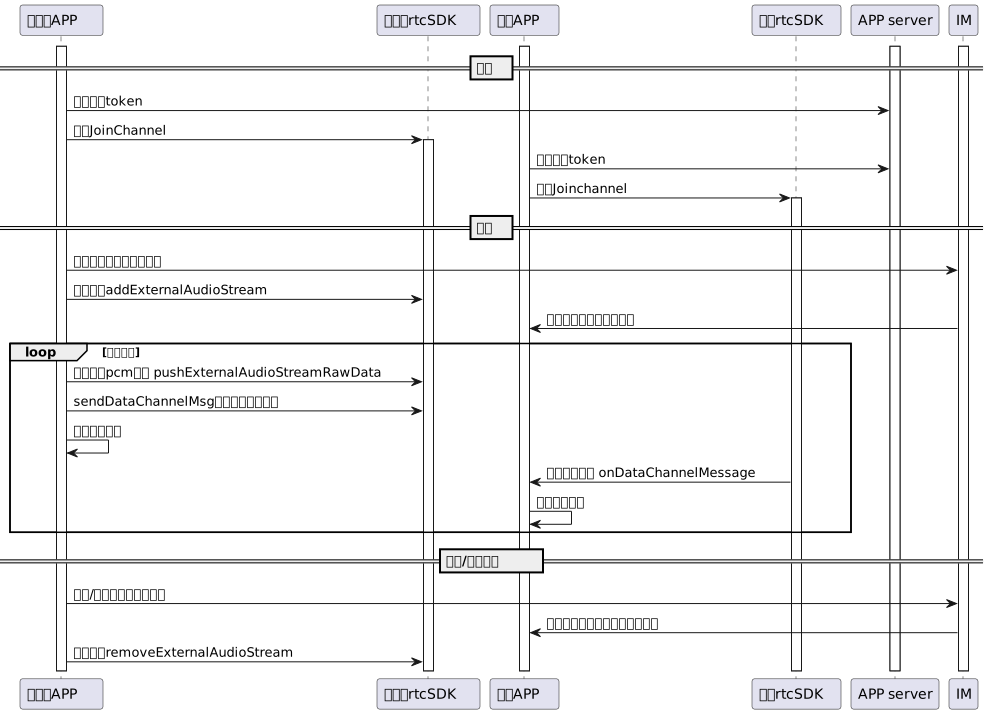
主播建立房間
/* 實現AliRtcEngineDelegate 監聽回調 */
_engine = [AliRtcEngine sharedInstance:self extras:extras];

//設定頻道模式
[self.engine setChannelProfile:AliRtcInteractivelive];
//設定使用者角色
[self.engine setClientRole:AliRtcClientRoleInteractive];
/* 使用高音質和ktv情境 */
[self.engine setAudioProfile:AliRtcEngineHighQualityMode audio_scene:AliRtcSceneKtvMode];

//拉流設定
[self.engine setDefaultSubscribeAllRemoteAudioStreams:YES];
[self.engine subscribeAllRemoteAudioStreams:YES];
[self.engine publishLocalAudioStream:YES];
[self.engine setAudioOnlyMode:YES];

/* 是否耳機播放 */
[self.engine enableSpeakerphone:ctrl.useSpeaker];

NSMutableDictionary *raw_token = [[NSMutableDictionary alloc] init];
[raw_token setValue:info.appId forKey:@"appid"];
[raw_token setValue:info.channelId forKey:@"channelid"];
[raw_token setValue:info.userId forKey:@"userid"];
[raw_token setValue:info.nonce forKey:@"nonce"];
[raw_token setValue:@(info.timestamp) forKey:@"timestamp"];
[raw_token setValue:info.gslb forKey:@"gslb"];
[raw_token setValue:info.token forKey:@"token"];
NSData *token_data = [NSJSONSerialization dataWithJSONObject:raw_token options:NSJSONWritingPrettyPrinted error:nil];
NSString *token_str = [token_data base64EncodedStringWithOptions:0];

[self.engine joinChannel:token_str channelId:nil userId:nil name:nil onResultWithUserId:^(NSInteger errCode, NSString * _Nonnull channel, NSString * _Nonnull userId, NSInteger elapsed) {
    NSString *sting = [NSString stringWithFormat:@"joinRst: %d", (int)errCode];
    [weakSelf log:sting];
    if(errCode != 0 && ![weakSelf.engine isInCall]){
        weakSelf.callState = YES; // restore gui
    }else{
        weakSelf.callState = NO; //入會成功
        dispatch_async(dispatch_get_main_queue(), ^{
            [weakSelf addTableView]; //渲染遠端視圖
        });
    }
}];
觀眾加入房間
和主播建立房間調用介面相同,根據是否上麥,設定角色資訊,以觀眾為樣本:
/* 實現AliRtcEngineDelegate 監聽回調 */
_engine = [AliRtcEngine sharedInstance:self extras:extras];

//設定頻道模式
[self.engine setChannelProfile:AliRtcInteractivelive];
//設定使用者角色
[self.engine setClientRole:AliRtcClientRoleInteractive];
/* 使用高音質和ktv情境 */
[self.engine setAudioProfile:AliRtcEngineHighQualityMode audio_scene:AliRtcSceneKtvMode];
//拉流設定
[self.engine setDefaultSubscribeAllRemoteAudioStreams:YES];
[self.engine subscribeAllRemoteAudioStreams:YES];
[self.engine publishLocalAudioStream:YES];
[self.engine setAudioOnlyMode:YES];

/* 是否耳機播放 */
[self.engine enableSpeakerphone:ctrl.useSpeaker];

NSMutableDictionary *raw_token = [[NSMutableDictionary alloc] init];
[raw_token setValue:info.appId forKey:@"appid"];
[raw_token setValue:info.channelId forKey:@"channelid"];
[raw_token setValue:info.userId forKey:@"userid"];
[raw_token setValue:info.nonce forKey:@"nonce"];
[raw_token setValue:@(info.timestamp) forKey:@"timestamp"];
[raw_token setValue:info.gslb forKey:@"gslb"];
[raw_token setValue:info.token forKey:@"token"];
NSData *token_data = [NSJSONSerialization dataWithJSONObject:raw_token options:NSJSONWritingPrettyPrinted error:nil];
NSString *token_str = [token_data base64EncodedStringWithOptions:0];

[self.engine joinChannel:token_str channelId:nil userId:nil name:nil onResultWithUserId:^(NSInteger errCode, NSString * _Nonnull channel, NSString * _Nonnull userId, NSInteger elapsed) {
    NSString *sting = [NSString stringWithFormat:@"joinRst: %d", (int)errCode];
    [weakSelf log:sting];
    if(errCode != 0 && ![weakSelf.engine isInCall]){
        weakSelf.callState = YES; // restore gui
    }else{
        weakSelf.callState = NO; //入會成功
        dispatch_async(dispatch_get_main_queue(), ^{
            [weakSelf addTableView]; //渲染遠端視圖
        });
    }
}];
演唱者點歌開始演唱
AliRtcExternalAudioStreamConfig *config = [AliRtcExternalAudioStreamConfig new];
config.channels = _pcmLocalChannels;
config.sampleRate = _pcmLocalSampleRate;
/* 如果需要外放出來聲音,設定外放音量 */
config.publishVolume = 60;
config.playoutVolume = 100;
/* 該stream id需要存下來,用於添加pcm資料和刪除流 */
_externalPlayoutStreamId = [self.engine addExternalAudioStream:config];
演唱者發送歌曲進度和播放伴奏
/* 送入pcm資料 */
AliRtcAudioFrame *sample = [AliRtcAudioFrame new];
sample.dataPtr = _pcmLocalData;
sample.samplesPerSec = _pcmLocalSampleRate;
sample.bytesPerSample = sizeof(int16_t);
sample.numOfChannels = _pcmLocalChannels;
sample.numOfSamples = numOfSamples;
int rc = [self.engine pushExternalAudioStream:_externalPlayoutStreamId rawData:sample];
/* 發送datachannel 進度資訊 */
AliRtcDataChannelMsg* msg = [[AliRtcDataChannelMsg alloc] init];
msg.type = AliRtcDataMsgCustom;
msg.networkTime = [self.engine getNetworkTime];
msg.data =  [NSData dataWithBytes:&progress length:8];
[self.engine sendDataChannelMessage:msg];
觀眾側接受歌曲進度
- (void)onDataChannelMessage:(NSString *_Nonnull)uid controlMsg:(AliRtcDataChannelMsg*_Nonnull)controlMsg {
    long long progress = 0;
    [controlMsg.data getBytes:&progress length:sizeof(time)];
}
主播停止歌曲
[self.engine removeExternalAudioStream:_externalPlayoutStreamId];
/* 停止歌曲解碼、IM通知其他人 */