ARMS使用者體驗監控提供了React Native外掛程式用於監控通過React Native開發的iOS和Android應用。本文介紹如何整合React Native外掛程式並將應用接入使用者體驗監控。
版本要求
React Native:RUM目前僅支援收集0.70.49以下版本的React Native錯誤資訊。
Android、iOS:和原生SDK版本一致。
步驟一:整合原生SDK
iOS和Android原生SDK支援通過本地整合和自動整合,您可以根據需求選擇對應的接入方式:
iOS應用
Android應用
步驟二:本地整合OpenRUM外掛程式
下載SDK並解壓。
解壓後的
@OpenRUM需要先載入依賴庫檔案。進入
@OpenRUM目錄執行npm i或者yarn install命令。將
@OpenRUM移動至React Native專案的node_modules目錄下。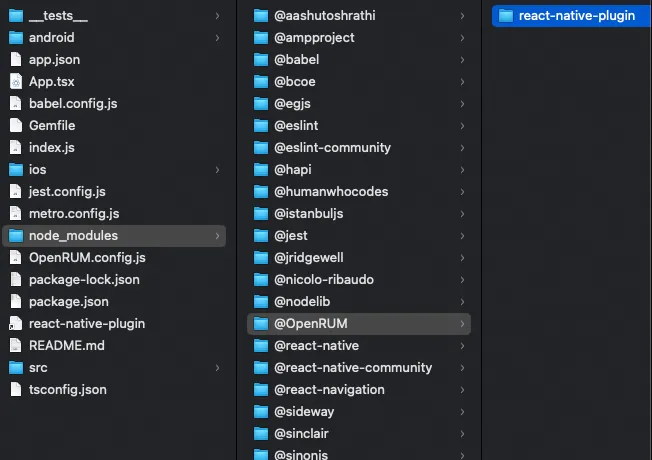
iOS應用程式更新Pod環境。
若iOS應用使用的是React Native專案下的ios工程,請在ios目錄下執行
pod install整合iOS採集SDK。若iOS應用是單獨嵌入了移動端的SDK,則需要將React Native外掛程式目錄下
react-native-plugin/ios內的OpenRUMRNBridge.h和OpenRUMRNBridge.m移入工程內,並在.m檔案中修正SDK標頭檔的引用。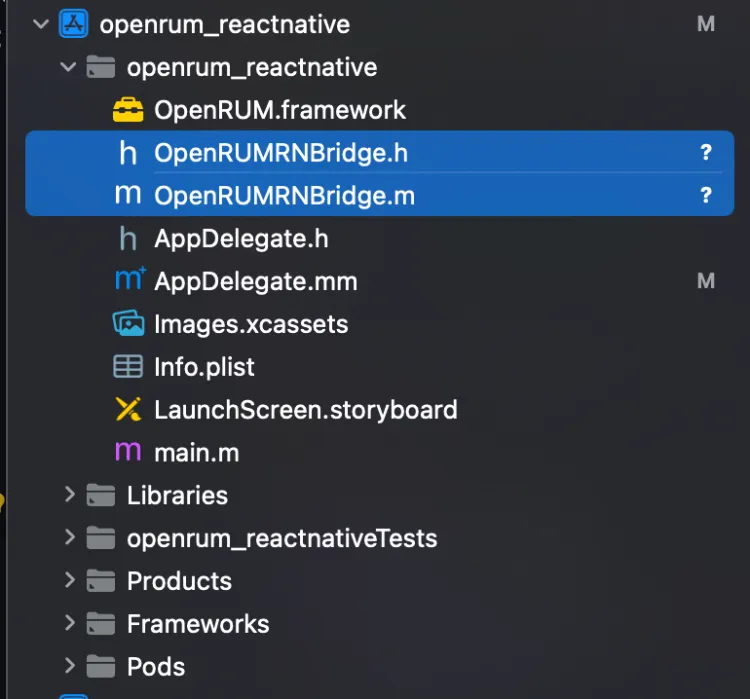
步驟三:配置外掛程式
在系統檔案中配置Transformer
若
React Native版本大於等於0.59,在根目錄的metro.config.js的transformer中添加transformer.babelTransformerPath。若
React Native版本等於0.57或0.58,在根目錄的rn-cli.config.js的transformer中添加transformer.babelTransformerPath。樣本如下:
module.exports = {
  transformer: {
    babelTransformerPath: require.resolve(
      '@OpenRUM/react-native-plugin/lib/OpenRUM-transformer',
    ),
    getTransformOptions: async () => ({
      transform: {
        experimentalImportSupport: false,
        inlineRequires: false,
      },
    }),
  },
};
若
React Native版本小於0.57,在根目錄的rn-cli.config.js(如果沒有需手動建立)的transformer中添加getTransformModulePath。樣本如下:
module.exports = { getTransformModulePath() { return require.resolve('@OpenRUM/react-native-plugin/lib/OpenRUM-transformer'); }, getSourceExts() { return ['js']; } }說明若專案使用
react-native bundle打包且配置了-config參數,請在配置的JS檔案中添加getTransformModulePath或者transformer.babelTransformerPath配置資訊。
建立OpenRUM.config.js檔案
React Native外掛程式支援自訂的配置資訊,需要在專案的根目錄下建立檔案OpenRUM.config.js,內容範本如下:
module.exports = {
    react: {
        /**
         * Debug Logs
         */
        debug: false,

        /**
         * Allows you to filter the instrumentation for touch events, refresh events and picker events in certain files
         * True = Will be instrumented
         */
        instrument: (filename) => {
            return true;
        },


        lifecycle: {
            /**
             * Monitor the navigation service switch. The default value is false
             */
            listenNavigation: true,

            /**
             * The data collection rules of component life cycle can be set to specify the fuzzy matching of component name
             */
            componentName: null,
        },
    }
};
配置react-navigation庫
react-navigation@6.x版本
在導航配置裡為React Native外掛程式配置事件監聽:
onReady={() => {OpenRUM.reportRouterData(navigationRef) }}
onStateChange={() => {OpenRUM.reportRouterData(navigationRef)}}
樣本如下:
···
import { NavigationContainer ,useNavigationContainerRef } from '@react-navigation/native';
import { OpenRUM } from "@OpenRUM/react-native-plugin";
···
···
export default function App(){
    let navigationRef = useNavigationContainerRef()
    return (
        <NavigationContainer ref={navigationRef}
            onReady={() => {OpenRUM.reportRouterData(navigationRef) }}
            onStateChange={() => {OpenRUM.reportRouterData(navigationRef)}}
        >
            <Stack.Navigator initialRouteName="Home">
                <Stack.Screen name="Home" component={HomeScreen} />
                <Stack.Screen name="About" component={AboutScreen} />
            </Stack.Navigator>
        </NavigationContainer>
    );
}
react-navigation@5.x版本
在導航配置裡為React Native外掛程式配置事件監聽:
useEffect(()=>{
    OpenRUM.reportRouterDataV5(navigationRef)
},[]);
樣本如下:
import { OpenRUM } from "@OpenRUM/react-native-plugin";

export default function App(){
  const navigationRef = React.useRef(null);
  //下面代碼為擷取資料代碼,可以做適當調整
  useEffect(()=>{
      OpenRUM.reportRouterDataV5(navigationRef)
  },[]);
  return (<NavigationContainer ref={navigationRef}>
    <Stack.Navigator>
      <Stack.Screen name="Home" component={HomeScreen} />
      <Stack.Screen name="Details" component={DetailsScreen} />
    </Stack.Navigator>
  </NavigationContainer>)
}
react-navigation 2.10.x版本
樣本如下:
import {OpenRUM} from "@OpenRUM/react-native-plugin";
<AppContainer
    onNavigationStateChange={OpenRUM.reportRouterDataV2}
/>

//也可以利用 defaultProps
AppContainer.defaultProps={
    onNavigationStateChange:OpenRUM.reportRouterDataV2
}