概念介紹
點位服務
點位服務是提供將消費的點位儲存在服務端的功能,點位由sequence和timestamp組成,sequence是遞增的對應唯一記錄的序列,timestamp是記錄寫入datahub的單位為ms的時間戳記。
為Topic建立訂閱,並在完成消費一部分資料後,將點位提交至服務端。下次啟動任務時,可以從服務端擷取上次提交的點位,從指定點位的下一條記錄開始消費。將點位儲存在服務端才能夠實現shard重新分配後,能夠從上次提交的點位之後消費,是協同消費功能的前提。
在Consumer中不需要手動處理點位,在config中設定點位提交的間隔,在讀取記錄時,認為之前的記錄已經完成處理,若距離上次提交點位已經超過提交間隔,則嘗試提交。在提交失敗並且同時任務強制停止時,有一定可能造成點位提交不及時,重複消費一部分資料。
協同消費
協同消費是為瞭解決多個消費者同時消費一個topic時,自動分配shard的問題。能夠簡化消費的用戶端處理,多個消費者可能是在不同機器上,通過自己協調分配shard是困難的。使用同一個Sub Id的Consummer在同一個Consumer Group中,同一個shard在一個Consumer Group中只會被分配給1個Consumer。
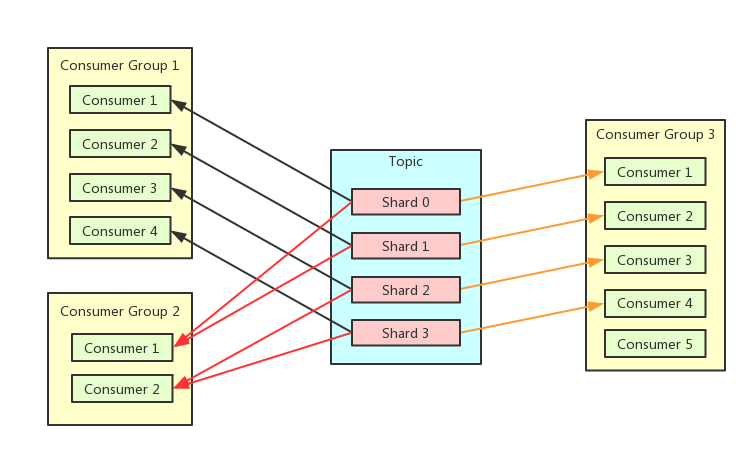
情境樣本
現有3個消費者執行個體A,B,C,Topic共有10個shard。
執行個體A啟動,分配10個shard。
執行個體B,C啟動,shard分配為4,3,3。
將1個shard進行split操作,在父節點消費完後,用戶端主動釋放,2個子節點加入後,shard分配為4,4,3。
執行個體C停止後,shard分配為6,5。
心跳
要實現協同消費的功能,需要通過心跳機制來通知讓服務端消費者執行個體的狀態,當前分配的shard和需要釋放的shard,超過時間間隔沒有收到心跳,則認為消費者執行個體已經停止。當消費者執行個體的狀態發生改變,服務端會重新分配shard,新的分配計劃也是通過心跳請求來返回,所以用戶端感知shard變化是有時間間隔的。
前置條件
協同消費開發代碼的Java版本需1.8及以上版本。
協同消費開發代碼的Maven需添加以下依賴:
<dependency>
    <groupId>com.aliyun.datahub</groupId>
    <artifactId>aliyun-sdk-datahub</artifactId>
    <version>2.25.1</version>
</dependency>
<dependency>
      <groupId>com.aliyun.datahub</groupId>
      <artifactId>datahub-client-library</artifactId>
      <version>1.4.3</version>
</dependency>
說明 datahub-client-library 1.4及以後版本 Producer / Consumer修改為安全執行緒,可以在多個線程中使用同一個Producer / Consumer。低於1.4版本,為非安全執行緒的consumer / producer ,多線程使用方式請參考下文 多線程讀寫樣本章節.
身分識別驗證
背景資訊
AccessKey(簡稱AK)是阿里雲提供給阿里雲使用者的存取金鑰,用於訪問阿里雲OpenAPI時的身分識別驗證。AccessKey包括AccessKey ID和AccessKey Secret,需妥善保管。AK如果泄露,會威脅該帳號下所有資源的安全。訪問阿里雲OpenAPI時,如果在代碼中寫入程式碼明文AK,容易因代碼倉庫許可權管理不當造成AK泄露。
Alibaba Cloud Credentials是阿里雲為阿里雲開發人員使用者提供的身份憑證管理工具。配置了Credentials預設憑據鏈後,訪問阿里雲OpenAPI時,您無需在代碼中寫入程式碼明文AK,可有效保證您帳號下雲資源的安全。
前提條件
已擷取RAM使用者帳號的AccessKey ID和AccessKey Secret。相關操作,請參見查看RAM使用者的AccessKey資訊。
重要 阿里雲帳號(即主帳號)的AccessKey泄露會威脅該帳號下所有資源的安全。為保證帳號安全,強烈建議您為RAM使用者建立AccessKey,非必要情況下請勿為阿里雲主帳號建立AccessKey。
RAM使用者的AccessKey Secret只能在建立AccessKey時顯示,建立完成後不支援查看。請在建立好AccessKey後,及時並妥善儲存AccessKey Secret。
已安裝阿里雲SDK Credentials工具。
Maven安裝方式(推薦使用Credentials最新版本):
<dependency>
 <groupId>com.aliyun</groupId>
 <artifactId>credentials-java</artifactId>
 <version>0.2.11</version>
</dependency>
JDK版本為1.7及以上。
配置方案
本文樣本的是通過配置環境變數方式,更多方式請訪問配置環境變數
說明 使用設定檔的方案時,請確保您系統中不存在環境變數ALIBABA_CLOUD_ACCESS_KEY_ID和ALIBABA_CLOUD_ACCESS_KEY_SECRET。否則,設定檔將不生效。
阿里雲SDK支援通過定義ALIBABA_CLOUD_ACCESS_KEY_ID和ALIBABA_CLOUD_ACCESS_KEY_SECRET環境變數來建立預設的訪問憑證。調用介面時,程式直接存取憑證,讀取您的存取金鑰(即AccessKey)並自動完成鑒權。
配置自動鑒權
配置環境變數ALIBABA_CLOUD_ACCESS_KEY_ID和ALIBABA_CLOUD_ACCESS_KEY_SECRET。
Linux和macOS系統配置方法
執行以下命令:
export ALIBABA_CLOUD_ACCESS_KEY_ID=AccessKey ID
export ALIBABA_CLOUD_ACCESS_KEY_SECRET=AccessKey Secret
<access_key_id>需替換為已準備好的AccessKey ID,<access_key_secret>替換為AccessKey Secret。
Windows系統配置方法
建立環境變數檔案,添加環境變數ALIBABA_CLOUD_ACCESS_KEY_ID和ALIBABA_CLOUD_ACCESS_KEY_SECRET,並寫入已準備好的AccessKey ID和AccessKey Secret。
重啟Windows系統。
範例程式碼
    Client credentialClient = new Client();
    String accessKeyId = credentialClient.getAccessKeyId();
    String accessKeySecret = credentialClient.getAccessKeySecret();
範例程式碼
Producer 程式碼範例
同步寫入
import com.aliyun.credentials.Client;
import com.aliyun.datahub.client.common.DatahubConfig;
import com.aliyun.datahub.client.exception.DatahubClientException;
import com.aliyun.datahub.client.http.HttpClient;
import com.aliyun.datahub.client.model.BlobRecordData;
import com.aliyun.datahub.client.model.RecordEntry;
import com.aliyun.datahub.clientlibrary.common.ExceptionChecker;
import com.aliyun.datahub.clientlibrary.config.ProducerConfig;
import com.aliyun.datahub.clientlibrary.producer.DatahubProducer;
import java.nio.charset.StandardCharsets;
import java.util.ArrayList;
import java.util.List;
import org.slf4j.Logger;
import org.slf4j.LoggerFactory;

public class SimpleProducer {

  private static final Logger LOGGER = LoggerFactory.getLogger(SimpleProducer.class);

  public static void main(String[] args) throws Exception {
    // 是否開啟記憶體Metric,開啟後,配置log4j日誌後,記憶體metric會列印到日誌中
    // ClientMetrics.startMetrics();

    //以杭州Region為例
    String endpoint = "https://dh-cn-hangzhou.aliyuncs.com";
    Client credentialClient = new Client();
    String accessKeyId = credentialClient.getAccessKeyId();
    String accessKeySecret = credentialClient.getAccessKeySecret();
    String projectName = "";
    String topicName = "";

    ////////////////////////////// STEP1. 建立DatahubProducer //////////////////////////
    ProducerConfig config = new ProducerConfig(endpoint, accessKeyId, accessKeySecret);
    DatahubProducer datahubProducer = new DatahubProducer(projectName, topicName, config);
    RecordSchema schema = datahubProducer.getTopicSchema();
    ///////////////////// STEP2. 根據Topic是BLOB還是TUPLE類型,選擇構建寫入Record ////////////
    List<RecordEntry> recordList = new ArrayList<>();
    // 構建BLOB非結構化資料寫入
    for (int i = 0; i < 10; ++i) {
      RecordEntry record = new RecordEntry();
      // 構建BLOB資料
      BlobRecordData data = new BlobRecordData("HelloWorld".getBytes(StandardCharsets.UTF_8));
      // 構建TUPLE資料
     //TupleRecordData data = new TupleRecordData(schema);
     //data.setField("f1", "f1_" + i);

      record.setRecordData(data);
      record.addAttribute("key1", "value1"); // 資料欄位,可選

      recordList.add(record);
    }

    ///////////////////////// STEP3:迴圈寫入資料 /////////////////////////
    try {
      for (int i = 0; i < 10000; ++i) {
        try {
          String shardId = datahubProducer.send(recordList);
          LOGGER.info("Write shard {} ok, record count:{}", shardId, recordList.size());
        } catch (DatahubClientException e) {
          if (!ExceptionChecker.isRetryableException(e)) {
            LOGGER.info("Write data fail", e);
            break;
          }
          // sleep重試
          Thread.sleep(1000);
        }
      }
    } finally {
      // 關閉producer相關資源
      datahubProducer.close();
    }

    // 進程退出時,調用全域清理函數
    HttpClient.close();

//        ClientMetrics.stopMetrics();
  }
}
非同步寫入
public class SimpleProducerAsync {
    private static final Logger LOGGER = LoggerFactory.getLogger(SimpleProducerAsync.class);

    public static void main(String[] args) throws Exception {
        // 是否開啟記憶體Metric,開啟後,配置log4j日誌後,記憶體metric會列印到日誌中
        // ClientMetrics.startMetrics();
        //以杭州Region為例
        String endpoint = "https://dh-cn-hangzhou.aliyuncs.com";
        Client credentialClient = new Client();
        String accessKeyId = credentialClient.getAccessKeyId();
        String accessKeySecret = credentialClient.getAccessKeySecret();
        String projectName = "";
        String topicName = "";

        ////////////////////////////// STEP1. 建立DatahubProducer //////////////////////////
        ProducerConfig config = new ProducerConfig(endpoint, accessKeyId, accessKeySecret);
        config.setMaxAsyncBufferTimeMs(30000); // 設定緩衝時間
        DatahubProducer datahubProducer = new DatahubProducer(projectName, topicName, config);

        RecordSchema schema = datahubProducer.getTopicSchema();

        // 非同步寫入可以註冊回呼函數
        WriteCallback callback  = new WriteCallback() {
            @Override
            public void onSuccess(String shardId, List<RecordEntry> records,
                                  long elapsedTimeMs, long sendTimeMs) {
                LOGGER.info("Message sent successfully");
            }

            @Override
            public void onFailure(String shardId, List<RecordEntry> records,
                                  long elapsedTimeMs, DatahubClientException e) {
                LOGGER.error("Message sent fail", e);
            }
        };

        // 可選,配置資料雜湊策略
        // partition優先順序: 依次按照RecordEntry的shardId, hashKey, partitionKey的順序計算最終寫入的shardId
        RecordPartitioner partitioner = new DefaultRecordPartitioner();

        ///////////////////////// STEP2:非同步迴圈寫入資料 /////////////////////////
        try {
            for (int i = 0; i < 1000; ++i) {
                try {
					//Tuple結構化資料寫入
                    RecordEntry record = new RecordEntry();
                    TupleRecordData data = new TupleRecordData(schema);
                    data.setField("f1", "f1_" + i);
					          //BLOB非結構化資料寫入
					          //BlobRecordData data = new BlobRecordData("HelloWorld".getBytes(StandardCharsets.UTF_8));
                    record.setRecordData(data);
                    record.addAttribute("key1", "value1"); // 資料欄位,可選
                    // 單條發送,發送資料時可以指定是否進行partition,
                    datahubProducer.sendAsync(record, callback, partitioner);
                } catch (DatahubClientException e) {
                    if (!ExceptionChecker.isRetryableException(e)) {
                        LOGGER.info("Write data fail", e);
                        break;
                    }
                    // sleep重試
                    Thread.sleep(1000);
                }
            }

            // 阻塞到資料發送成功
            datahubProducer.flush(true);
        } catch (Exception e) {
            LOGGER.warn("Write fail", e);
        } finally {
            // 關閉producer相關資源
            datahubProducer.close();
        }

        // 進程退出時,調用全域清理函數
        HttpClient.close();
//        ClientMetrics.stopMetrics();
    }
}
協同消費程式碼範例
配置參數說明
名稱 | 描述 |
autoCommit | 是否自動認可點位,預設為true。點位的提交會在後台線程按配置的時間間隔執行,自動認可的邏輯是當read介面被調用時,認為之前讀的資料已經處理完畢。如果設定為false,那麼每條record處理完必須ack,後台提交點位會保證該點位之前的record全部被ack。 |
offsetCommitTimeoutMs | 點位的提交間隔,單位毫秒,預設30000ms,範圍[3000, 300000] |
sessionTimeoutMs | 會話逾時時間,心跳間隔會設為改置的2/3,超過時間沒有心跳,認為用戶端已停止,服務端會重新分配被佔有shard,單位毫秒,預設60000ms,範圍[60000, 180000] |
fetchSize | 單個shard非同步讀取記錄的大小,會緩衝2倍於該值的記錄,少於2倍會觸發非同步任務去讀取,預設1000,必須大於0 |
import com.aliyun.credentials.Client;
import com.aliyun.datahub.client.common.DatahubConfig;
import com.aliyun.datahub.client.exception.DatahubClientException;
import com.aliyun.datahub.client.http.HttpClient;
import com.aliyun.datahub.client.model.*;
import com.aliyun.datahub.clientlibrary.common.ExceptionChecker;
import com.aliyun.datahub.clientlibrary.config.ConsumerConfig;
import com.aliyun.datahub.clientlibrary.consumer.DatahubConsumer;
import org.slf4j.Logger;
import org.slf4j.LoggerFactory;

public class SimpleConsumer {
    private static final Logger LOGGER = LoggerFactory.getLogger(SimpleConsumer.class);

    public static void main(String[] args) throws Exception {
        // 是否開啟記憶體Metric,開啟後,配置log4j日誌後,記憶體metric會列印到日誌中
        // ClientMetrics.startMetrics();


        //以杭州Region為例
        String endpoint = "https://dh-cn-hangzhou.aliyuncs.com";
        Client credentialClient = new Client();
        String accessKeyId = credentialClient.getAccessKeyId();
        String accessKeySecret = credentialClient.getAccessKeySecret();
        String projectName = "";
        String topicName = "";
        String subId = "";

        ////////////////////////////// STEP1. 建立DatahubConsumer //////////////////////////
        ConsumerConfig config = new ConsumerConfig(endpoint, accessKeyId, accessKeySecret);
        DatahubConsumer datahubConsumer = new DatahubConsumer(projectName, topicName, subId, config);
        ///////////////////////// STEP2:迴圈讀取資料 /////////////////////////
        try {
            while (true) {
                try {
                    RecordEntry record = datahubConsumer.read(3000);
                    if (record == null) {
                        continue; // 3s內未讀取到資料,(1). 無資料 (2). 內部狀態未Ready,比如協同消費暫時未分配到shard
                    }

                    RecordData recordData = record.getRecordData();
                    // 根據Topic為BLOB類型還是TUPLE類型進行不同的資料處理邏輯, 一種topic只有一種類型
                    if (recordData instanceof TupleRecordData) {
                        TupleRecordData data = (TupleRecordData) recordData;
                        RecordSchema schema = data.getRecordSchema();
                        // 樣本中僅做簡單的字串拼接
                        StringBuilder sb = new StringBuilder();
                        for (int i = 0; i < schema.getFields().size(); ++i) {
                            sb.append(data.getField(i)).append(",");
                        }
                        LOGGER.debug("Read record. shardId:{}, seq:{}, ts:{}, batchIndex:{}, batchSize:{}, data:{}",
                                record.getShardId(), record.getSequence(), record.getSystemTime(), record.getSegmentIndexForBatch(),
                                record.getSegmentSizeForBatch(), sb);
                    } else {
                        BlobRecordData data = (BlobRecordData) recordData;
                        LOGGER.debug("Read record. shardId:{}, seq:{}, ts:{}, batchIndex:{}, batchSize:{}, data:{}",
                                record.getShardId(), record.getSequence(), record.getSystemTime(), record.getSegmentIndexForBatch(),
                                record.getSegmentSizeForBatch(), new String(data.getData()));
                    }
                } catch (DatahubClientException e) {
                    if (!ExceptionChecker.isRetryableException(e)) {
                        LOGGER.info("Read data fail", e);
                        break;
                    }
                    // sleep重試
                    Thread.sleep(1000);
                }
            }
        }  catch (Exception e) {
            LOGGER.warn("Read data fail", e);
        } finally {
            // 關閉consumer相關資源
            datahubConsumer.close();
        }

        // 進程退出時,調用全域清理函數
        HttpClient.close();

//        ClientMetrics.stopMetrics();
    }
}
多線程讀寫樣本
多線程共用同一Consumer/Producer消費樣本(適用於1.4及以上版本)
package com.aliyun.datahub.clientlibrary.example;

import com.aliyun.credentials.Client;
import com.aliyun.datahub.client.common.DatahubConfig;
import com.aliyun.datahub.client.exception.DatahubClientException;
import com.aliyun.datahub.client.http.HttpClient;
import com.aliyun.datahub.client.model.BlobRecordData;
import com.aliyun.datahub.client.model.RecordEntry;
import com.aliyun.datahub.clientlibrary.common.ExceptionChecker;
import com.aliyun.datahub.clientlibrary.config.ConsumerConfig;
import com.aliyun.datahub.clientlibrary.config.ProducerConfig;
import com.aliyun.datahub.clientlibrary.consumer.DatahubConsumer;
import com.aliyun.datahub.clientlibrary.producer.DatahubProducer;
import org.slf4j.Logger;
import org.slf4j.LoggerFactory;

import java.util.ArrayList;
import java.util.List;
import java.util.Map;
import java.util.concurrent.ConcurrentHashMap;
import java.util.concurrent.atomic.AtomicInteger;

public class MultiThreadReadWrite {
    private static final Logger LOGGER = LoggerFactory.getLogger(MultiThreadReadWrite.class);

    public static void main(String[] args) throws Exception {
        try {
//            testProducer();
            testConsumer();
        } finally {
            // 進程退出時,調用全域清理函數
            HttpClient.close();
        }
    }

    private static void testProducer() throws Exception {
        List<RecordEntry> records = new ArrayList<>();
        String endpoint = "https://dh-cn-hangzhou.aliyuncs.com";
        Client credentialClient = new Client();
        String accessKeyId = credentialClient.getAccessKeyId();
        String accessKeySecret = credentialClient.getAccessKeySecret();
        String projectName = "";
        String topicName = "";
        for (int i = 0; i < 2; ++i) {
            RecordEntry record = new RecordEntry();
            BlobRecordData data = new BlobRecordData(("HelloWorld-" + i).getBytes());
            record.setRecordData(data);
            record.addAttribute("key1", "value1");

            records.add(record);
        }

        ProducerConfig config = new ProducerConfig(endpoint, accessKeyId, accessKeySecret);
        config.getDatahubConfig().setProtocol(DatahubConfig.Protocol.BATCH); // 是否開啟batch寫入,建議開啟

        Map<String, AtomicInteger> shardCountMap = new ConcurrentHashMap<>();

        DatahubProducer producer = new DatahubProducer(projectName, topicName,config);
        List<Thread> threads = new ArrayList<>();
        for (int i = 0; i < 10; ++i) {
            ProducerThread thread = new ProducerThread(producer, records, shardCountMap);
            thread.start();
            threads.add(thread);
        }

        for (int i = 0; i < 10; ++i) {
            threads.get(i).join();
        }

        producer.close();
        // print write count
        for (Map.Entry<String, AtomicInteger> entry : shardCountMap.entrySet()) {
            LOGGER.info("ShardId:{}, count:{}", entry.getKey(), entry.getValue());
        }
    }

    private static class ProducerThread extends Thread {
        private final DatahubProducer producer;
        private final List<RecordEntry> records;
        private final Map<String, AtomicInteger> shardCountMap;

        public ProducerThread(DatahubProducer producer,
多個Consumer/Producer線程消費樣本(適用於低於1.4的版本)
package com.aliyun.datahub.clientlibrary.example;

import com.aliyun.credentials.Client;
import com.aliyun.datahub.client.common.DatahubConfig;
import com.aliyun.datahub.client.exception.DatahubClientException;
import com.aliyun.datahub.client.http.HttpClient;
import com.aliyun.datahub.client.model.BlobRecordData;
import com.aliyun.datahub.client.model.RecordEntry;
import com.aliyun.datahub.clientlibrary.common.ExceptionChecker;
import com.aliyun.datahub.clientlibrary.config.ConsumerConfig;
import com.aliyun.datahub.clientlibrary.config.ProducerConfig;
import com.aliyun.datahub.clientlibrary.consumer.DatahubConsumer;
import com.aliyun.datahub.clientlibrary.producer.DatahubProducer;
import org.slf4j.Logger;
import org.slf4j.LoggerFactory;

import java.util.ArrayList;
import java.util.List;
import java.util.Map;
import java.util.concurrent.ConcurrentHashMap;
import java.util.concurrent.atomic.AtomicInteger;

public class MultiProducerAndConsumer {
    private static final Logger LOGGER = LoggerFactory.getLogger(MultiProducerAndConsumer.class);

    public static void main(String[] args) throws Exception {
        try {
//            testProducer();
            testConsumer();
        } finally {
            // 進程退出時,調用全域清理函數
            HttpClient.close();
        }
    }

    private static void testProducer() throws Exception {
        List<RecordEntry> records = new ArrayList<>();
        for (int i = 0; i < 2; ++i) {
            RecordEntry record = new RecordEntry();
            BlobRecordData data = new BlobRecordData(("HelloWorld-" + i).getBytes());
            record.setRecordData(data);
            record.addAttribute("key1", "value1");

            records.add(record);
        }
        String endpoint = "https://dh-cn-hangzhou.aliyuncs.com";
        Client credentialClient = new Client();
        String accessKeyId = credentialClient.getAccessKeyId();
        String accessKeySecret = credentialClient.getAccessKeySecret();
        ProducerConfig config = new ProducerConfig(endpoint,accessKeyId ,accessKeySecret);
        config.getDatahubConfig().setProtocol(DatahubConfig.Protocol.BATCH); // 是否開啟batch寫入,建議開啟

        Map<String, AtomicInteger> shardCountMap = new ConcurrentHashMap<>();


        List<Thread> threads = new ArrayList<>();
        for (int i = 0; i < 3; ++i) {
            ProducerThread thread = new ProducerThread(config, records, shardCountMap);
            thread.start();
            threads.add(thread);
        }

        for (int i = 0; i < 3; ++i) {
            threads.get(i).join();
        }

        // print write count
        for (Map.Entry<String, AtomicInteger> entry : shardCountMap.entrySet()) {
            LOGGER.info("ShardId:{}, count:{}", entry.getKey(), entry.getValue());
        }
    }

    private static class ProducerThread extends Thread {
        private final DatahubProducer producer;
        private final List<RecordEntry> records;
        private final Map<String, AtomicInteger> shardCountMap;
        String projectName = "";
        String topicName = "";
        public ProducerThread(ProducerConfig config,
                              List<RecordEntry> records,
                              Map<String, AtomicInteger> shardCountMap) {
            this.producer = new DatahubProducer(projectName, topicName, config);;
            this.records = records;
            this.shardCountMap = shardCountMap;
        }

        @Override
        public void run() {
            try {
                for (int i = 0; i < 100; ++i) {
                    try {
                        String shardId = producer.send(records);
                        shardCountMap.putIfAbsent(shardId, new AtomicInteger(0));
                        AtomicInteger cnt = shardCountMap.get(shardId);
                        cnt.incrementAndGet();
                    } catch (DatahubClientException e) {
                        LOGGER.info("Producer send fail", e);
                        if (!ExceptionChecker.isRetryableException(e)) {
                            break;
                        }
                        // sleep重試
                        try {
                            Thread.sleep(1000);
                        } catch (InterruptedException ex) {
                            // ignore
                        }
                    } catch (Exception e) {
                        LOGGER.info("Producer send fail", e);
                        break;
                    }
                }
            } finally {
                producer.close();
            }
        }
    }

    private static void testConsumer() throws Exception {

        ConsumerConfig config = new ConsumerConfig(ExampleConstants.ENDPOINT, ExampleConstants.ACCESS_ID, ExampleConstants.SUB_ACCESS_KEY);
        config.getDatahubConfig().setProtocol(DatahubConfig.Protocol.BATCH); // 是否開啟batch寫入,建議開啟

        Map<String, RecordEntry> firstMap = new ConcurrentHashMap<>();
        Map<String, RecordEntry> lastMap = new ConcurrentHashMap<>();
        Map<String, AtomicInteger> shardCountMap = new ConcurrentHashMap<>();

        List<Thread> threads = new ArrayList<>();
        for (int i = 0; i < 3; ++i) {
            ConsumerThread thread = new ConsumerThread(config, firstMap, lastMap, shardCountMap);
            thread.start();
            threads.add(thread);
        }

        for (int i = 0; i < 3; ++i) {
            threads.get(i).join();
        }

        // print start and end sequence
        for (RecordEntry first : firstMap.values()) {
            RecordEntry last = lastMap.get(first.getShardId());
            AtomicInteger cnt = shardCountMap.get(first.getShardId());
            LOGGER.info("ShardId:{}, startSeq:{}, endSeq:{}, cnt:{}",
                    first.getShardId(), first.getSequence(), last.getSequence(), cnt);
        }
    }

    private static class ConsumerThread extends Thread {
        private final DatahubConsumer consumer;
        private final Map<String, RecordEntry> firstMap;
        private final Map<String, RecordEntry> lastMap;
        private final Map<String, AtomicInteger> shardCountMap;

        public ConsumerThread(ConsumerConfig config,
                              Map<String, RecordEntry> firstMap,
                              Map<String, RecordEntry> lastMap,
                              Map<String, AtomicInteger> shardCountMap) {
            this.consumer = new DatahubConsumer(ExampleConstants.PROJECT_NAME, ExampleConstants.TOPIC_NAME, ExampleConstants.SUB_ID, config);;
            this.lastMap = lastMap;
            this.firstMap = firstMap;
            this.shardCountMap = shardCountMap;
        }

        @Override
        public void run() {
            try {
                while (true) {
                    try {
                        RecordEntry record = consumer.read(30000);
                        if (record == null) {
                            // 在demo中,這裡30秒讀取不到資料就退出測試
                            break;
                        }
                        String shardId = record.getShardId();
                        firstMap.putIfAbsent(shardId, record);
                        lastMap.put(shardId, record);
                        shardCountMap.putIfAbsent(shardId, new AtomicInteger(0));
                        AtomicInteger cnt = shardCountMap.get(shardId);
                        cnt.incrementAndGet();
                    } catch (DatahubClientException e) {
                        if (!ExceptionChecker.isRetryableException(e)) {
                            LOGGER.info("Read data fail", e);
                            break;
                        }
                        // sleep重試
                        try {
                            Thread.sleep(1000);
                        } catch (InterruptedException ex) {
                            // ignore
                        }
                    } catch (Exception e) {
                        LOGGER.warn("Read fail.", e);
                        break;
                    }
                }
            } finally {
                consumer.close();
            }

        }
    }
}