組件介紹
ack-pod-identity-webhook組件的架構圖如下所示。
使用樣本
本樣本部署的應用中,將使用RRSA特性扮演指定角色擷取當前帳號下叢集列表資訊。相關資訊如下。
當為Pod所在命名空間增加pod-identity.alibabacloud.com/injection: 'on'標籤後,ack-pod-identity-webhook組件將根據Pod使用的服務帳號的註解配置,自動為該Pod注入相關配置項。使用樣本的操作步驟如下。
為叢集開啟RRSA功能。
登入容器計算服務控制台,在左側導覽列選擇叢集列表。
在集群列表頁面,單擊目的地組群名稱,然後在左側導覽列,選擇集群信息。
在集群信息頁面,單擊基本信息頁簽,然後在安全與審計地區單擊RRSA OIDC後的開啟。
在彈出的啟用 RRSA對話方塊,單擊確定。
安裝ack-pod-identity-webhook組件。
在左側導覽列,選擇。
單擊安全頁簽,找到ack-pod-identity-webhook組件,單擊安装。
在提示對話方塊確認組件資訊後,單擊确认。
建立一個名為ack-pod-identity-webhook-demo的RAM角色。
使用阿里雲帳號登入RAM控制台。
在左側導覽列,選擇,然後在角色頁面,單擊建立角色。
在建立角色面板,單擊切換編輯器來建立角色。
以可視化編輯為例,參考如下角色資訊進行配置,然後單擊確定。
配置項 | 描述 |
效果 | 預設為允許。 |
主體 | 選擇身份提供者後,點擊編輯。 選擇身份提供者類型為OIDC,然後選擇對應叢集的身份提供者,如ack-rrsa-<cluster_id>。其中<cluster_id>為叢集ID。 |
操作 | 預設勾選sts:AssumeRole。 |
條件 | |
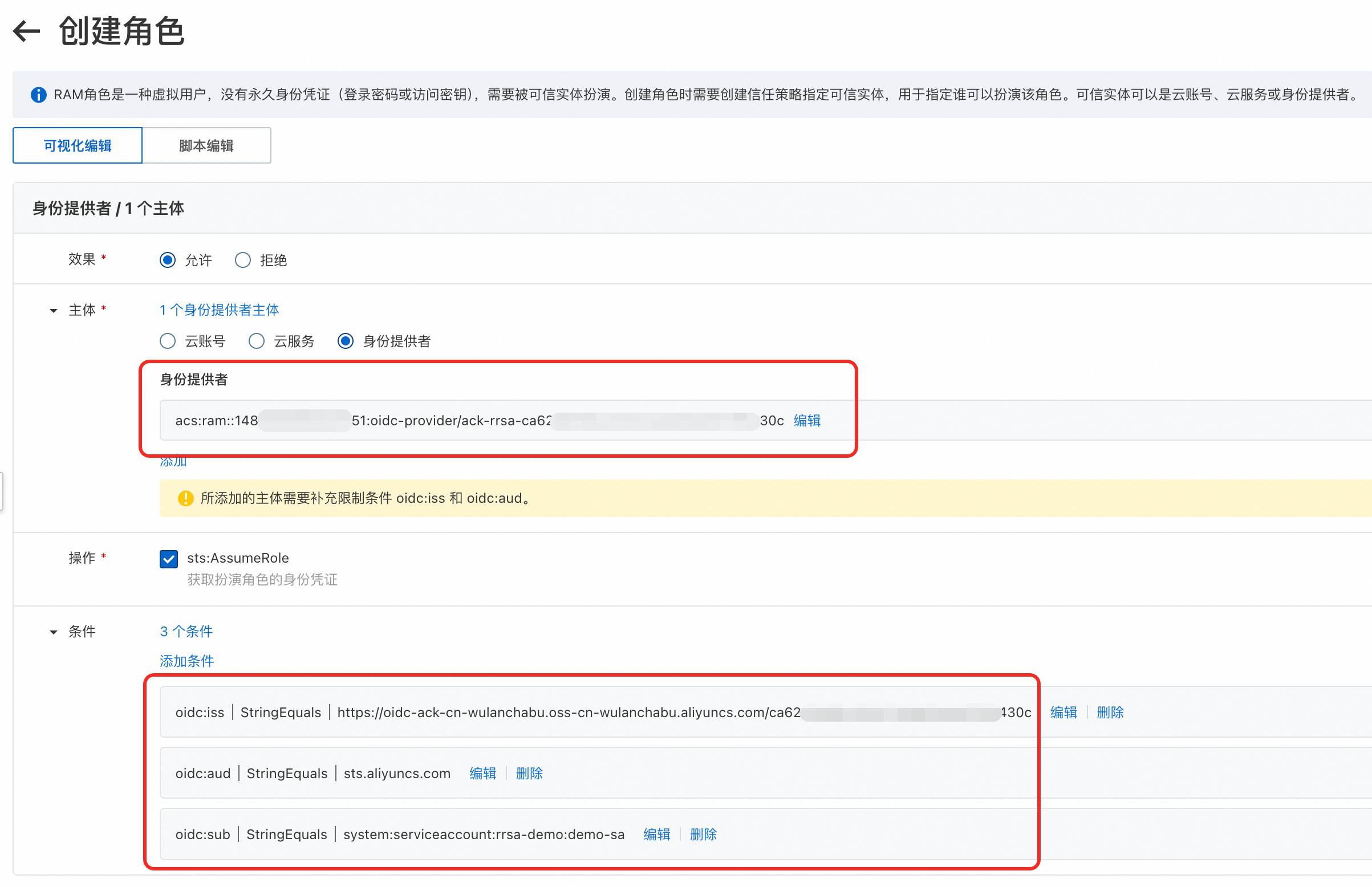
在彈窗頁面中,輸入角色名稱ack-pod-identity-webhook-demo,單擊確定。
為上一步建立的RAM角色授予測試應用所需的AliyunCSReadOnlyAccess系統策略許可權。具體操作,請參見為RAM角色授權。
部署測試應用。
串連叢集。具體操作,請參見串連叢集。
使用以下內容,建立demo.yaml檔案。
如下YAML樣本中,為命名空間rrsa-demo增加標籤pod-identity.alibabacloud.com/injection: 'on',並為服務帳號demo-sa增加註解pod-identity.alibabacloud.com/role-name: ack-pod-identity-webhook-demo,啟用ack-pod-identity-webhook組件的自動設定注入功能。關於RRSA Demo調用的具體實現,請參見代碼。
說明 以下樣本使用的registry.cn-hangzhou.aliyuncs.com/acs/ack-ram-tool:1.0.0需通過公網拉取,請確保叢集已開通公網訪問。具體操作,請參見為叢集開啟公網訪問能力。
---
apiVersion: v1
kind: Namespace
metadata:
  name: rrsa-demo
  labels:
    pod-identity.alibabacloud.com/injection: 'on'

---
apiVersion: v1
kind: ServiceAccount
metadata:
  name: demo-sa
  namespace: rrsa-demo
  annotations:
    pod-identity.alibabacloud.com/role-name: ack-pod-identity-webhook-demo

---
apiVersion: v1
kind: Pod
metadata:
  name: demo
  namespace: rrsa-demo
spec:
  serviceAccountName: demo-sa
  containers:
    - image: registry.cn-hangzhou.aliyuncs.com/acs/ack-ram-tool:1.0.0
      imagePullPolicy: "Always"
      args:
        - rrsa
        - demo
      name: demo
  restartPolicy: OnFailure
部署測試應用。
kubectl apply -f demo.yaml
查看測試應用Pod,確認ack-pod-identity-webhook組件已為Pod自動注入所需的配置。
kubectl -n rrsa-demo get pod demo -o yaml
展開查看預期輸出
apiVersion: v1
kind: Pod
metadata:
  annotations:
    ProviderCreate: done
    alibabacloud.com/client-token: 5e68e5bf-1726-4f5e-****-abe61d2c1cff
    alibabacloud.com/instance-id: acs-uf6008givz63ta2v****
    alibabacloud.com/pod-ephemeral-storage: 30Gi
    alibabacloud.com/pod-use-spec: 0.25-0.5Gi
    alibabacloud.com/request-id: 5914A73F-8B24-5B9B-****-400F6B632D44
    alibabacloud.com/schedule-result: finished
    alibabacloud.com/user-id: "1488999589******"
    kubectl.kubernetes.io/last-applied-configuration: |
      {"apiVersion":"v1","kind":"Pod","metadata":{"annotations":{},"name":"demo","namespace":"rrsa-demo"},"spec":{"containers":[{"args":["rrsa","demo"],"image":"registry.cn-hangzhou.aliyuncs.com/acs/ack-ram-tool:1.0.0","imagePullPolicy":"Always","name":"demo"}],"restartPolicy":"OnFailure","serviceAccountName":"demo-sa"}}
    kubernetes.io/pod-stream-port: "10250"
    kubernetes.io/preferred-scheduling-node: virtual-kubelet-cn-shanghai-g/1
    network.alibabacloud.com/allocated-eni-id: eni-uf6fhxwakz5b0d******
    network.alibabacloud.com/enable-dns-cache: "false"
    network.alibabacloud.com/security-group-id: sg-uf60h6mbwry22r******
    network.alibabacloud.com/security-group-ids: sg-uf60h6mbwry22r******
    network.alibabacloud.com/vpc-id: vpc-uf6ncu6tpunqchrrr****
    network.alibabacloud.com/vswitch-id: vsw-uf6g4yjk3kemgei******
    network.alibabacloud.com/vswitch-ids: vsw-uf6g4yjk3kemgei******
    topology.kubernetes.io/region: cn-shanghai
    topology.kubernetes.io/zone: cn-shanghai-g
  creationTimestamp: "2024-08-19T09:29:57Z"
  labels:
    alibabacloud.com/cluster-id: cbec9a1f7b433470ebe4c900552******
    alibabacloud.com/compute-class: general-purpose
    alibabacloud.com/compute-qos: default
    topology.kubernetes.io/region: cn-shanghai
  name: demo
  namespace: rrsa-demo
  resourceVersion: "6795900"
  uid: 57ab5f1d-32b7-4d9d-****-16a4f2c1a1fa
spec:
  containers:
  - args:
    - rrsa
    - demo
    env:
    - name: ALIBABA_CLOUD_ROLE_ARN
      value: acs:ram::1488999589******:role/ack-pod-identity-webhook-demo
    - name: ALIBABA_CLOUD_OIDC_PROVIDER_ARN
      value: acs:ram::1488999589******:oidc-provider/ack-rrsa-cbec9a1f7b433470ebe4c900552******
    - name: ALIBABA_CLOUD_OIDC_TOKEN_FILE
      value: /var/run/secrets/ack.alibabacloud.com/rrsa-tokens/token
    - name: KUBERNETES_SERVICE_HOST
      value: 192.168.1.215
    - name: KUBERNETES_SERVICE_PORT
      value: "6443"
    image: registry.cn-hangzhou.aliyuncs.com/acs/ack-ram-tool:1.0.0
    imagePullPolicy: Always
    name: demo
    resources:
      limits:
        cpu: 250m
        ephemeral-storage: 30Gi
        memory: 512Mi
      requests:
        cpu: 250m
        ephemeral-storage: 30Gi
        memory: 512Mi
    terminationMessagePath: /dev/termination-log
    terminationMessagePolicy: File
    volumeMounts:
    - mountPath: /var/run/secrets/kubernetes.io/serviceaccount
      name: kube-api-access-lrcfl
      readOnly: true
    - mountPath: /var/run/secrets/ack.alibabacloud.com/rrsa-tokens
      name: rrsa-oidc-token
      readOnly: true
  dnsPolicy: ClusterFirst
  enableServiceLinks: true
  nodeName: virtual-kubelet-cn-shanghai-g
  preemptionPolicy: PreemptLowerPriority
  priority: 0
  restartPolicy: OnFailure
  schedulerName: default-scheduler
  securityContext: {}
  serviceAccount: demo-sa
  serviceAccountName: demo-sa
  terminationGracePeriodSeconds: 30
  tolerations:
  - effect: NoExecute
    key: node.kubernetes.io/not-ready
    operator: Exists
  - effect: NoExecute
    key: node.kubernetes.io/unreachable
    operator: Exists
  volumes:
  - name: kube-api-access-lrcfl
    projected:
      defaultMode: 420
      sources:
      - serviceAccountToken:
          expirationSeconds: 3607
          path: token
      - configMap:
          items:
          - key: ca.crt
            path: ca.crt
          name: kube-root-ca.crt
      - downwardAPI:
          items:
          - fieldRef:
              apiVersion: v1
              fieldPath: metadata.namespace
            path: namespace
  - name: rrsa-oidc-token
    projected:
      defaultMode: 420
      sources:
      - serviceAccountToken:
          audience: sts.aliyuncs.com
          expirationSeconds: 3600
          path: token
status:
  conditions:
  - lastProbeTime: null
    lastTransitionTime: "2024-08-19T09:29:57Z"
    message: The container instance is creating.
    reason: Creating
    status: "False"
    type: ContainerInstanceScheduled
  - lastProbeTime: null
    lastTransitionTime: "2024-08-19T09:30:10Z"
    status: "True"
    type: Initialized
  - lastProbeTime: null
    lastTransitionTime: "2024-08-19T09:30:13Z"
    status: "True"
    type: Ready
  - lastProbeTime: null
    lastTransitionTime: "2024-08-19T09:30:13Z"
    status: "True"
    type: ContainersReady
  - lastProbeTime: null
    lastTransitionTime: "2024-08-19T09:30:10Z"
    status: "True"
    type: ContainerHasSufficientDisk
  - lastProbeTime: null
    lastTransitionTime: "2024-08-19T09:30:12Z"
    status: "True"
    type: ContainerInstanceCreated
  - lastProbeTime: null
    lastTransitionTime: "2024-08-19T09:30:13Z"
    status: "True"
    type: PodReadyToStartContainers
  - lastProbeTime: null
    lastTransitionTime: "2024-08-19T09:30:12Z"
    status: "True"
    type: PodScheduled
  containerStatuses:
  - containerID: containerd://5d4f205e068372f30a90715016465562b9988a981cb285e81c76b5b0dc******
    image: registry.cn-hangzhou.aliyuncs.com/acs/ack-ram-tool:1.0.0
    imageID: registry.cn-hangzhou.aliyuncs.com/acs/ack-ram-tool@sha256:ad4172d3ed3d6dab23f09218f9d478295e93c163915aac9e4e38a90c4d******
    lastState: {}
    name: demo
    ready: true
    restartCount: 0
    started: true
    state:
      running:
        startedAt: "2024-08-19T09:30:13Z"
  hostIP: 192.168.1.5
  phase: Running
  podIP: 192.168.1.5
  podIPs:
  - ip: 192.168.1.5
  qosClass: Guaranteed
預期輸出表明,ack-pod-identity-webhook組件已為Pod自動注入了如下配置。
欄位 | 配置項名稱 | 配置項說明 |
env
| ALIBABA_CLOUD_ROLE_ARN
| 需要扮演的RAM角色ARN。 |
ALIBABA_CLOUD_OIDC_PROVIDER_ARN
| OIDC身份供應商的ARN。 |
ALIBABA_CLOUD_OIDC_TOKEN_FILE
| 包含OIDC Token的檔案路徑。 |
VolumeMounts
| rrsa-oidc-token
| 掛載OIDC Token的配置。 |
Volumes
| rrsa-oidc-token
| 掛載OIDC Token的配置。 |
查看測試應用日誌。
kubectl -n rrsa-demo logs demo
預期輸出:
cluster id: c66e40b731ab24f96b36bec5b1a******, cluster name: test-****
cluster id: cbec9a1f7b433470ebe4c900552******, cluster name: test-****
自訂配置
ack-pod-identity-webhook組件的自訂配置包括命名空間配置、服務賬戶配置以及Pod配置。
命名空間配置
參數 | 類型 | 說明 | 程式碼範例 |
pod-identity.alibabacloud.com/injection | 標籤 | 是否為該命名空間下的Pod啟用配置自動注入功能。 當值為on時:表示啟用配置自動注入功能。 未配置或其他值時:表示禁用配置自動注入功能。
| apiVersion: v1
kind: Namespace
metadata:
name: test
labels:
pod-identity.alibabacloud.com/injection: 'on'
|
服務賬戶配置
參數 | 類型 | 說明 | 程式碼範例 |
pod-identity.alibabacloud.com/role-name | 註解 | 該服務賬戶關聯的RAM角色名稱。 如果未配置該配置項或配置的值不是一個合法的RAM角色名稱,使用該服務賬戶的Pod將不會被自動注入配置。 | apiVersion: v1
kind: ServiceAccount
metadata:
name: test-sa
namespace: test
annotations:
pod-identity.alibabacloud.com/role-name: test-role
|
pod-identity.alibabacloud.com/service-account-token-expiration | 註解 | 指定使用該服務賬戶的Pod掛載的OIDC Token的有效期間。 取值範圍為[600, 43200]。 單位為秒。 預設值為3600。 當配置值無效時,將使用3600作為此配置項的值。
說明 當服務賬戶和Pod上都存在該配置項時,優先使用Pod配置,服務賬戶上的配置將會被忽略。 | apiVersion: v1
kind: ServiceAccount
metadata:
name: test-sa
namespace: test
annotations:
pod-identity.alibabacloud.com/service-account-token-expiration: '3600'
|
Pod配置
參數 | 類型 | 說明 | 程式碼範例 |
pod-identity.alibabacloud.com/service-account-token-expiration | 註解 | 指定該Pod掛載的OIDC Token的有效期間。 取值範圍為[600, 43200]。 單位為秒。 預設值為3600。 當配置值無效時,將使用3600作為此配置項的值。
說明 當服務賬戶和Pod上都存在該配置項時,優先使用Pod配置,服務賬戶上的配置將會被忽略。 | apiVersion: v1
kind: Pod
metadata:
name: test-pod
namespace: test
annotations:
pod-identity.alibabacloud.com/service-account-token-expiration: '3600'
|
pod-identity.alibabacloud.com/only-containers | 註解 | 只為Pod內特定名稱的容器自動注入配置。使用英文半形逗號(,)分隔多個容器名稱。
說明 當pod-identity.alibabacloud.com/only-containers和pod-identity.alibabacloud.com/skip-containers中同時存在某個容器名稱時,pod-identity.alibabacloud.com/only-containers的配置將會被自動忽略。 | apiVersion: v1
kind: Pod
metadata:
name: test-pod
namespace: test
annotations:
pod-identity.alibabacloud.com/only-containers: 'controller,test'
|
pod-identity.alibabacloud.com/skip-containers | 註解 | 除特定名稱的容器外,為Pod內其他容器自動注入配置。使用英文半形逗號(,)分隔多個容器名稱。
說明 當pod-identity.alibabacloud.com/only-containers和pod-identity.alibabacloud.com/skip-containers中同時存在某個容器名稱時,pod-identity.alibabacloud.com/only-containers的配置將會被自動忽略。 | apiVersion: v1
kind: Pod
metadata:
name: test-pod
namespace: test
annotations:
pod-identity.alibabacloud.com/skip-containers: 'controller,test'
|
變更記錄
2024年06月
版本號碼 | 鏡像地址 | 變更內容 | 變更時間 | 變更影響 |
0.1.1 | registry.cn-hangzhou.aliyuncs.com/acs/ack-pod-identity-webhook:v0.1.1.0-gbddcb74-aliyun | | 2024年06月30日 | 組件升級異常可能會導致Pod建立失敗,建議在業務低穀期進行升級操作。 |
 按鈕手動重新整理。