大模型可觀測支援通過Python探針對LangChain/LangGraph應用進行可觀測,Python探針是阿里雲可觀測產品自研的Python語言的可觀測採集探針,其基於OpenTelemetry標準實現了自動化埋點能力。本文介紹如何將LangChain/LangGraph應用接入CloudMonitor2.0,以協助使用者即時瞭解 AI 應用運行狀態。
架構介紹
LangChain 是一個面向大語言模型應用開發的架構,提供了模型調用、Prompt 組織、工具接入、檢索增強產生(RAG)、Agent 構建等能力,協助開發人員快速搭建複雜的 LLM 應用。
LangGraph 是 LangChain 生態中的 Agent 編排架構,基於圖結構構建多步推理和多 Agent 協作的 LLM 應用,支援迴圈控制流程、狀態管理和工具調用。
接入後,以下能力將被自動監控:
LangChain Chain / Agent 的執行鏈路
LLM 調用(模型名稱、Token 用量、輸入/輸出內容)
工具調用(Tool name、參數、返回結果)
Retriever / RAG 相關調用鏈路
LangGraph 圖節點執行和狀態流轉
接入方式
Container Service ACK 和容器計算服務 ACS 接入
步驟一:探針接入助手(ack-onepilot)安裝
登入Container Service管理主控台,在叢集列表頁面單擊目的地組群名稱。
在左側導覽列單擊組件管理,然後在右上方通過關鍵字搜尋ack-onepilot。
在ack-onepilot卡片上單擊安裝。配置相關的參數,建議使用預設值,單擊確認。
說明需要保證ack-onepilot組件版本大於等於5.1.1版本,在上述步驟3中會展示當前安裝的ack-onepilot版本。如果已經安裝較低版本ack-onepilot,可重複上述步驟1、2,在步驟3中點擊升級即可
步驟二:修改配置以啟動 AI 應用監控
登入Container Service管理主控台,在左側導覽列選擇叢集列表。
在叢集列表頁面,單擊目的地組群名稱,然後在左側導覽列,選擇。
切換命名空間,找到待監控的工作負載,點擊最右側操作列的更多表徵圖
 後,在彈出的對話方塊中點擊YAML編輯。
在YAML檔案中將以下
labels添加到spec > template > metadata層級下。添加完成後點擊 更新。labels: aliyun.com/app-language: python # Python應用必填,標明此應用是Python應用。 armsPilotAutoEnable: 'on' armsPilotCreateAppName: "deployment-name" # 應用在ARMS中的展示名稱 armsPilotAppWorkspace: "workspace" # 替換為當前workspace名稱,如未指定則使用預設工作空間。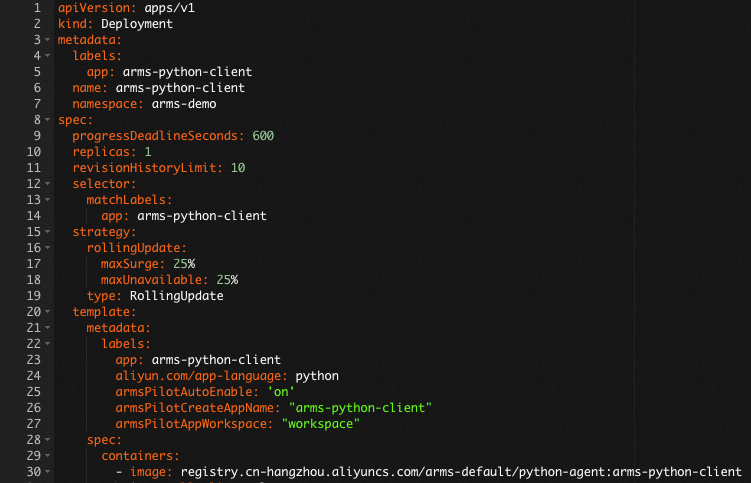
手動接入探針
步驟一:下載探針安裝器 aliyun-bootstrap
從PyPI倉庫下載探針安裝器。
pip3 install aliyun-bootstrap步驟二:配置環境變數
您需要手動為Python應用添加以下環境變數:
# 方式一:為本SHELL中所有進程添加環境變數
export ARMS_APP_NAME=xxx   # 應用程式名稱。
export ARMS_WORKSPACE=xxx   # 替換為當前Workspace名稱。
export ARMS_REGION_ID=xxx   # 對應的阿里雲帳號的RegionID。
export ARMS_LICENSE_KEY=xxx   # 阿里雲 LicenseKey。
# 方式二:為某個進程單獨添加環境變數
ARMS_APP_NAME=xxx ARMS_WORKSPACE=xxx ARMS_REGION_ID=xxx ARMS_LICENSE_KEY=xxx aliyun-instrument xxx.py其中LicenseKey可以通過OpenAPI擷取,具體參見擷取應用可觀測介面傳回值中的authToken欄位。
(可選)Docker環境安裝參考
對於Docker環境,可以參考以下Dockerfile樣本修改您的Dockerfile檔案。
# 添加環境變數
ENV ARMS_APP_NAME={AppName}
ENV ARMS_REGION_ID={regionId}
ENV ARMS_LICENSE_KEY={licenseKey}
ENV ARMS_WORKSPACE={worksapce}

## 原有環境
步驟三:使用aliyun-bootstrap安裝Python探針
為了加快安裝,建議您使用如下命令先配置鏡像倉庫。
pip config set global.index-url https://mirrors.aliyun.com/pypi/simple/ && pip config set install.trusted-host mirrors.aliyun.com安裝探針。
aliyun-bootstrap -a install
步驟四:啟動應用
通過ARMS Python探針啟動應用
aliyun-instrument python app.py範例程式碼
import os
from langchain_openai import ChatOpenAI
from langgraph.prebuilt import create_react_agent
from langchain_core.tools import tool

@tool
def get_weather(city: str) -> str:
    """Get weather information for a specified city"""
    weather_data = {"Beijing": "Sunny 25°C", "Shanghai": "Cloudy 22°C", "Hangzhou": "Light rain 20°C"}
    return weather_data.get(city, f"{city}: No weather data available")

@tool
def search_product(keyword: str) -> str:
    """Search product information by keyword"""
    products = {
        "ECS": "Elastic Compute Service, providing secure and reliable cloud servers",
        "RDS": "Relational Database Service, supports MySQL/PostgreSQL/SQL Server",
        "OSS": "Object Storage Service, massive, secure, and highly reliable cloud storage",
    }
    return products.get(keyword, f"No product found for '{keyword}'")

llm = ChatOpenAI(
    model="qwen-plus",
    base_url="https://dashscope.aliyuncs.com/compatible-mode/v1",
    api_key=os.environ.get("DASHSCOPE_API_KEY"),
    streaming=True,
    stream_usage=True,  # When enabled, streamed responses include token usage
)
agent = create_react_agent(llm, tools=[get_weather, search_product])
result = agent.invoke({"messages": [{"role": "user", "content": "What's the weather like in Beijing today? Also look up what ECS is as a product"}]})
for msg in result["messages"]:
    if msg.content:
        print(msg.content)
查看監控詳情
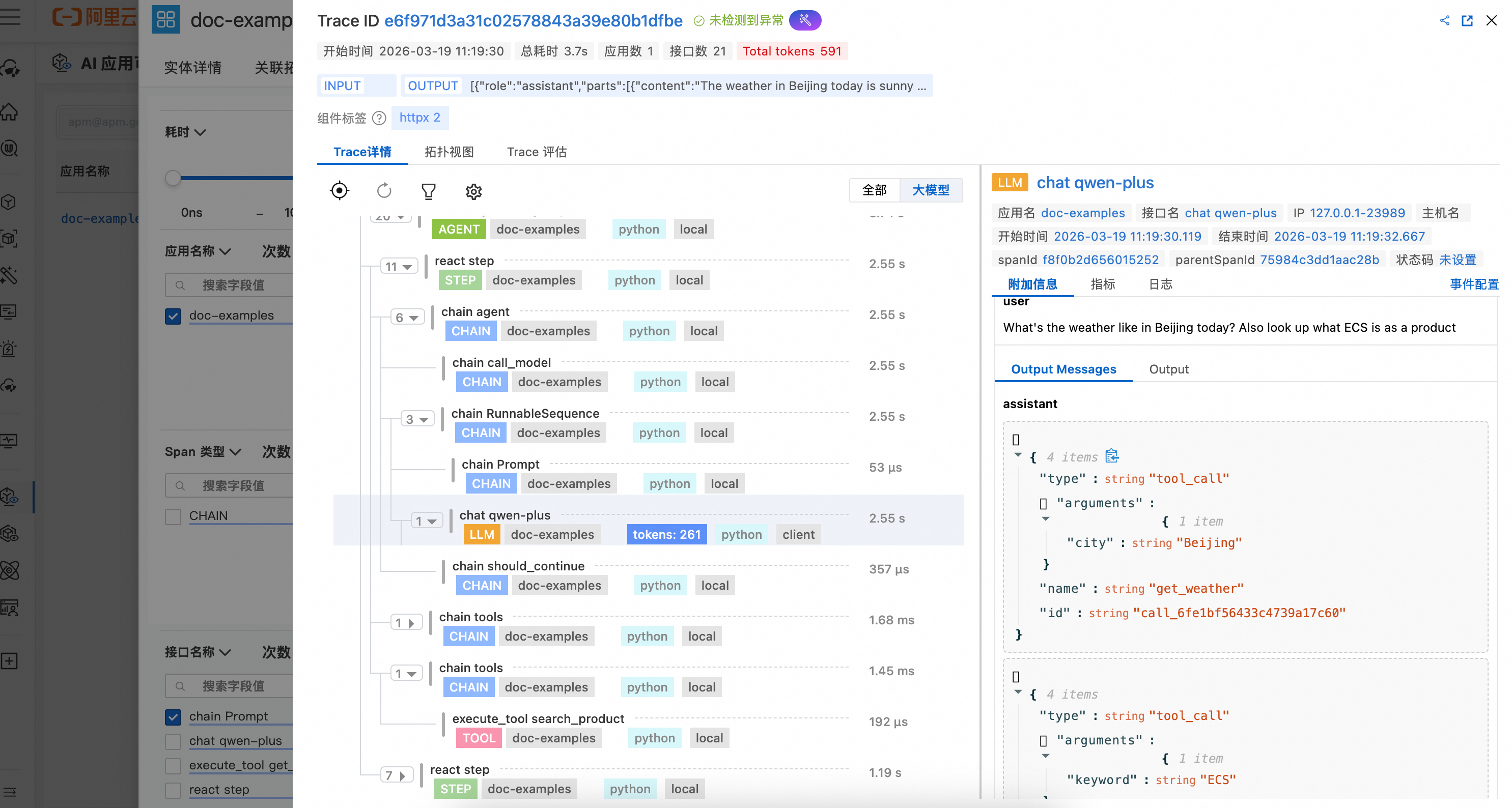
登入CloudMonitor2.0控制台,選擇目標工作空間,在左側導覽列選擇。
在AI應用列表頁面可以看到已接入的應用,單擊應用程式名稱可以查看詳細的應用監控資料。
更多參考
流式情境下採集 Token 用量
使用 ChatOpenAI 的流式調用時,需要開啟 stream_usage 才能採集到 Token 用量資訊:
llm = ChatOpenAI(
    model="qwen-plus",
    base_url="https://dashscope.aliyuncs.com/compatible-mode/v1",
    api_key=os.environ.get("DASHSCOPE_API_KEY"),
    streaming=True,
    stream_usage=True,  # 開啟後流式響應中會包含 token 用量
)
傳遞 session_id 與 user_id
在調用 agent.invoke 時,可通過 config 的 metadata 傳入 session_id 和 user_id,用於會話分析、使用者分析:
result = agent.invoke(
    {"messages": [{"role": "user", "content": "你好"}]},
    config={
        "metadata": {
            "session_id": "sess_abc123",
            "user_id": "user_456",
        },
    },
)
session_id:會話標識,用於關聯同一會話內的多輪調用
user_id:使用者標識,用於按使用者維度統計和過濾