Terraform支援管理Prometheus整合中心組件和Remote Write資源。本文介紹如何通過Terraform管理Remote Write配置。
前提條件
已建立Prometheus forContainer Service或for ECS執行個體。具體操作,請參見使用Terraform管理Prometheus執行個體。
安裝Terraform。
Cloud Shell預設安裝配置了Terraform和阿里雲帳號資訊,您無需執行任何額外配置。
如果您不使用Cloud Shell,關於安裝Terraform的具體操作,請參見在本地安裝和配置Terraform。
說明請確認Terraform版本不低於v0.12.28,可通過terraform --version命令查看Terraform版本。
Resource Orchestration Service服務為Terraform提供了託管的能力,您可以建立Terraform類型的模板,定義阿里雲、AWS或Azure資源,配置資源參數和資源間的依賴關係。更多資訊,請參見建立Terraform類型模板、建立Terraform類型資源棧。
配置阿里雲帳號資訊。有以下兩種方式:
方式一:建立環境變數,用於存放身份認證資訊。
export ALICLOUD_ACCESS_KEY="************" export ALICLOUD_SECRET_KEY="************" export ALICLOUD_REGION="cn-beijing"說明其中,
export ALICLOUD_REGION參數的值需要您根據實際情況進行替換。方式二:通過在設定檔的Provider代碼塊中指定身份認證資訊。
provider "alicloud" { access_key = "************" secret_key = "************" region = "cn-beijing" }說明其中,
export ALICLOUD_REGION參數的值需要您根據實際情況進行替換。
增加Prometheus執行個體的Remote Write
建立一個工作目錄,並在工作目錄中建立名為main.tf的設定檔。
provider "alicloud" {
}
執行以下命令,初始化Terraform運行環境。
terraform init預期輸出:
Initializing the backend...

Initializing provider plugins...
- Checking for available provider plugins...
- Downloading plugin for provider "alicloud" (hashicorp/alicloud) 1.90.1...
...

You may now begin working with Terraform. Try running "terraform plan" to see
any changes that are required for your infrastructure. All Terraform commands
should now work.

If you ever set or change modules or backend configuration for Terraform,
rerun this command to reinitialize your working directory. If you forget, other
commands will detect it and remind you to do so if necessary.
匯入Remote Write資源。
將Remote Write資源添加到main.tf檔案中。
# Prometheus執行個體的Remote Write配置。
resource "alicloud_arms_remote_write" "myRemoteWrite1" {
    cluster_id       = "c77e1106f429e4b46b0ee1720c*****"   #Prometheus執行個體Id
  remote_write_yaml = <<-EOT
            remote_write:
            - name: ArmsRemoteWrite1
              url: http://47.96.XX.XX:8080/prometheus/xxx/yyy/cn-hangzhou/api/v3/write
              basic_auth: {username: 666, password: '******'}
              write_relabel_configs:
              - source_labels: [instance_id]
                separator: ;
                regex: si-6e2ca86444db4e5*****
                replacement: $1
                action: keep
        EOT
執行以下命令,產生資源規劃。
terraform plan預期輸出:
Terraform used the selected providers to generate the following execution plan. Resource actions are indicated with the following symbols:
  + create

Terraform will perform the following actions:

  # alicloud_arms_remote_write.ack-rw1 will be created
  + resource "alicloud_arms_remote_write" "ack-rw1" {
      + cluster_id        = "c77e1106f429e4b46b0ee1720c*****"
      + id                = (known after apply)
      + remote_write_name = (known after apply)
      + remote_write_yaml = <<-EOT
            remote_write:
            - name: ArmsRemoteWrite1
              url: http://xx.xx.xx.xx:8080/prometheus/xxx/yyy/cn-hangzhou/api/v3/write
              basic_auth: {username: 666, password: '******'}
              write_relabel_configs:
              - source_labels: [instance_id]
                separator: ;
                regex: si-6e2ca86444db4e5*****
                replacement: $1
                action: keep
        EOT
    }

Plan: 1 to add, 0 to change, 0 to destroy.
執行以下命令,建立Remote Write。
terraform apply預期輸出:
Terraform used the selected providers to generate the following execution plan. Resource actions are indicated with the following symbols:
  + create

Terraform will perform the following actions:

  # alicloud_arms_remote_write.ack-rw1 will be created
  + resource "alicloud_arms_remote_write" "ack-rw1" {
      + cluster_id        = "c77e1106f429e4b46b0ee1720c9*****"
      + id                = (known after apply)
      + remote_write_name = (known after apply)
      + remote_write_yaml = <<-EOT
            remote_write:
            - name: ArmsRemoteWrite1
              url: http://xx.xx.xx.xx:8080/prometheus/xxx/yyy/cn-hangzhou/api/v3/write
              basic_auth: {username: 666, password: '******'}
              write_relabel_configs:
              - source_labels: [instance_id]
                separator: ;
                regex: si-6e2ca86444db4e5*****
                replacement: $1
                action: keep
        EOT
    }

Plan: 1 to add, 0 to change, 0 to destroy.

Do you want to perform these actions?
  Terraform will perform the actions described above.
  Only 'yes' will be accepted to approve.

  Enter a value: yes
若輸出結果出現
yes,表示當前Prometheus執行個體的Remote Write配置建立成功。
結果驗證
您可以登入可觀測監控 Prometheus 版控制台,然後在Prometheus執行個體的整合中心頁面,查看已成功建立的Remote Write配置。具體操作如下:
登入ARMS控制台。
在左側導覽列選擇,進入可觀測監控 Prometheus 版的執行個體列表頁面。
- 單擊目標Prometheus執行個體名稱,進入整合中心頁面。
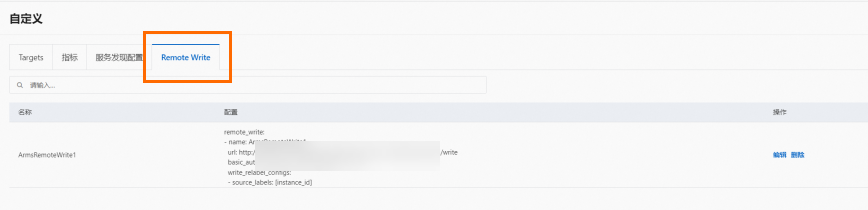
單擊已安裝地區的自訂組件卡片,然後在彈出的面板中單擊Remote Write頁簽,查看已成功建立的RemoteWrite配置。
刪除Prometheus執行個體Remote Write
操作步驟
您可以執行以下命令刪除通過Terraform建立的叢集。
terraform destroy預期輸出
...
Do you really want to destroy all resources?
  Terraform will destroy all your managed infrastructure, as shown above.
  There is no undo. Only 'yes' will be accepted to confirm.

  Enter a value: yes
...
Destroy complete! Resources: 1 destroyed.
結果驗證
您可以登入可觀測監控 Prometheus 版控制台,然後在Prometheus執行個體的整合中心頁面,查看Remote Write配置已被成功刪除。
登入ARMS控制台。
在左側導覽列選擇,進入可觀測監控 Prometheus 版的執行個體列表頁面。
- 單擊目標Prometheus執行個體名稱,進入整合中心頁面。
單擊已安裝地區的目標組件卡片,然後在彈出的面板中單擊Remote Write頁簽,您可以看到已不存在目標Remote Write配置資訊,表示該Remote Write配置已被成功刪除。