全部產品
Search
文件中心

Application Real-Time Monitoring Service:監控ACK叢集下的Python應用

更新時間:Jun 11, 2025

通過本教程,您將學習如何將ACK叢集下的Python應用接入ARMS應用監控,體驗應用效能分析和調用鏈分析等功能,並配置警示。

說明

如需將其他環境下的應用接入應用監控,請參見應用接入

使用流程

  1. 為應用安裝探針。

    1. 安裝ack-onepilot組件:ack-onepilot是阿里雲Container ServiceKubernetes提供的系統組件,可以讓部署在Container ServiceKubernetes中的Java、Golang或Python應用接入ARMS。

    2. 更新Dockerfile:下載aliyun-bootstrap探針安裝器,安裝探針後使用探針啟動Python應用。

    3. 更新YAML:通過在應用的YAML中添加labels,開啟監控並配置應用在ARMS中的展示名稱。

  2. 查看監控資料。

  3. 為監控資料配置警示。

準備環境和資源

  • ACK:

    • 建立Kubernetes叢集。具體操作,請參見建立ACK託管叢集

    • 建立Python應用。

      • Python版本要求,請參見ARMS 應用監控支援的 Python 組件和架構

      • Python應用需使用以下指令啟動:

        aliyun-instrument gunicorn -w 4 -k uvicorn.workers.UvicornWorker -b 0.0.0.0:8000 app:app
        說明

        aliyun-instrument指令負責ARMS Python探針初始化配置及無侵入埋點。

      • 如果有使用gevent協程,則需要設定環境變數GEVENT_ENABLE=true

      如果您沒有可以使用的Python應用,可以參考以下樣本YAML建立。具體操作,請參見建立無狀態工作負載Deployment

      說明

      樣本YAML建立了以下資源:

      • 空間名稱:arms-demo。以下所有資源均建立在arms-demo命名空間下。

      • 無狀態應用:arms-python-client和arms-python-server。

      • 服務:arms-python-client-svc和arms-python-server-svc。

      展開查看完整樣本YAML檔案(Python)

      apiVersion: apps/v1
      kind: Deployment
      metadata:
        labels:
          app: arms-python-client
        name: arms-python-client
        namespace: arms-demo
      spec:
        progressDeadlineSeconds: 600
        replicas: 1
        revisionHistoryLimit: 10
        selector:
          matchLabels:
            app: arms-python-client
        strategy:
          rollingUpdate:
            maxSurge: 25%
            maxUnavailable: 25%
          type: RollingUpdate
        template:
          metadata:
            labels:
              app: arms-python-client
          spec:
            containers:
              - image: registry.cn-hangzhou.aliyuncs.com/private-mesh/arms-python-demo:client
                imagePullPolicy: Always
                name: client
                resources:
                  requests:
                    cpu: 250m
                    memory: 300Mi
                terminationMessagePath: /dev/termination-log
                terminationMessagePolicy: File
            dnsPolicy: ClusterFirst
            restartPolicy: Always
            schedulerName: default-scheduler
            securityContext: {}
            terminationGracePeriodSeconds: 30
      
      ---
      
      apiVersion: apps/v1
      kind: Deployment
      metadata:
        labels:
          app: arms-python-server
        name: arms-python-server
        namespace: arms-demo
      spec:
        progressDeadlineSeconds: 600
        replicas: 1
        revisionHistoryLimit: 10
        selector:
          matchLabels:
            app: arms-python-server
        strategy:
          rollingUpdate:
            maxSurge: 25%
            maxUnavailable: 25%
          type: RollingUpdate
        template:
          metadata:
            labels:
              app: arms-python-server
          spec:
            containers:
              - env:
                - name: CLIENT_URL
                  value: 'http://arms-python-client-svc:8000'
              - image: registry.cn-hangzhou.aliyuncs.com/private-mesh/arms-python-demo:server
                imagePullPolicy: Always
                name: server
                resources:
                  requests:
                    cpu: 250m
                    memory: 300Mi
                terminationMessagePath: /dev/termination-log
                terminationMessagePolicy: File
            dnsPolicy: ClusterFirst
            restartPolicy: Always
            schedulerName: default-scheduler
            securityContext: {}
            terminationGracePeriodSeconds: 30
      
      ---
      
      apiVersion: v1
      kind: Service
      metadata:
        labels:
          app: arms-python-server
        name: arms-python-server-svc
        namespace: arms-demo
      spec:
        internalTrafficPolicy: Cluster
        ipFamilies:
          - IPv4
        ipFamilyPolicy: SingleStack
        ports:
          - name: http
            port: 8000
            protocol: TCP
            targetPort: 8000
        selector:
          app: arms-python-server
        sessionAffinity: None
        type: ClusterIP
      
      apiVersion: v1
      kind: Service
      metadata:
        name: arms-python-client-svc
        namespace: arms-demo
        uid: 91f94804-594e-495b-9f57-9def1fdc7c1d
      spec:
        internalTrafficPolicy: Cluster
        ipFamilies:
          - IPv4
        ipFamilyPolicy: SingleStack
        ports:
          - name: http
            port: 8000
            protocol: TCP
            targetPort: 8000
        selector:
          app: arms-python-client
        sessionAffinity: None
        type: ClusterIP
      

      其中,arms-python-server和arms-python-client的應用代碼分別為:

      arms-python-client

      from fastapi import FastAPI
      from langchain.llms.fake import FakeListLLM
      import uvicorn
      from langchain.chains import LLMChain
      from langchain.prompts import PromptTemplate
      
      app = FastAPI()
      llm = FakeListLLM(responses=["I'll callback later.", "You 'console' them!"])
      
      template = """Question: {question}
      
      Answer: Let's think step by step."""
      
      prompt = PromptTemplate(template=template, input_variables=["question"])
      
      llm_chain = LLMChain(prompt=prompt, llm=llm)
      
      question = "What NFL team won the Super Bowl in the year Justin Beiber was born?"
      
      @app.get("/")
      def call_langchain():
          res = llm_chain.run(question)
          return {"data": res}
      
      if __name__ == "__main__":
          uvicorn.run(app, host="0.0.0.0", port=8000)

      arms-python-server

      import uvicorn
      from fastapi import FastAPI, HTTPException
      from logging import getLogger
      _logger = getLogger(__name__)
      import requests
      import os
      app = FastAPI()
      
      def call_client():
          url = 'https://www.aliyun.com'  # 替換為你的實際地址
          call_url = os.environ.get("CLIENT_URL")
          if call_url is None or call_url == "":
              call_url = url
          response = requests.get(call_url)
          print(f"response code: {response.status_code} - {response.text}")
          return response.text
      
      @app.get("/")
      async def call():
          call_client()
          return {"data": f"call"}
      
      
      if __name__ == "__main__":
          uvicorn.run(app, host="0.0.0.0", port=8000)
      
  • ARMS:

    已開通應用監控計費版本。

    應用監控每月提供50 GB的免費額度,當月未使用完的試用額度不會結轉至次月,當月超出免費額度的部分,按照寫入的資料量進行收費。收費詳情,請參見計費說明

為應用安裝探針

1. 安裝ack-onepilot組件

  1. 登入Container Service管理主控台,在叢集列表頁面單擊目的地組群名稱。

  2. 在左側導覽列單擊組件管理,然後通過關鍵字搜尋ack-onepilot

  3. ack-onepilot卡片上單擊安裝,然後在彈出的對話方塊單擊確定

    說明

    確保ack-onepilot版本在3.2.4及以上。

    image

2. 更新Dockerfile

  1. 從PyPI倉庫下載探針安裝器。

    pip3 install aliyun-bootstrap
  2. 使用aliyun-bootstrap安裝探針。

    # 對應的阿里雲帳號的RegionID
    ARMS_REGION_ID=xxx aliyun-bootstrap -a install
  3. 通過ARMS Python探針啟動應用。

    aliyun-instrument python app.py
  4. 構建鏡像。

完整的Dockerfile樣本如下:

    修改前的Dockerfile

    # 使用Python 3.10基礎鏡像
    FROM docker.m.daocloud.io/python:3.10
    
    # 設定工作目錄
    WORKDIR /app
    
    # 複製requirements.txt檔案到工作目錄
    COPY requirements.txt .
    
    # 使用pip安裝依賴
    RUN pip install --no-cache-dir -r requirements.txt
    
    COPY ./app.py /app/app.py
    # 暴露容器的8000連接埠
    EXPOSE 8000
    CMD ["python","app.py"]

    修改後的Dockerfile

    # 使用官方的Python 3.10基礎鏡像
    FROM docker.m.daocloud.io/python:3.10
    
    # 設定工作目錄
    WORKDIR /app
    
    # 複製requirements.txt檔案到工作目錄
    COPY requirements.txt .
    
    # 使用pip安裝依賴
    RUN pip install --no-cache-dir -r requirements.txt
    #########################安裝aliyun python 探針###############################
    # 對應的阿里雲帳號的RegionID
    RUN pip3 install aliyun-bootstrap && ARMS_REGION_ID=xxx aliyun-bootstrap -a install 
    ##########################################################
    
    COPY ./app.py /app/app.py
    
    
    # 暴露容器的8000連接埠
    EXPOSE 8000
    #########################################################
    CMD ["aliyun-instrument","python","app.py"]

3. 更新YAML

  1. 工作負載 > 無狀態頁面選擇應用所在的命名空間,然後在目標應用右側選擇image > YAML 編輯

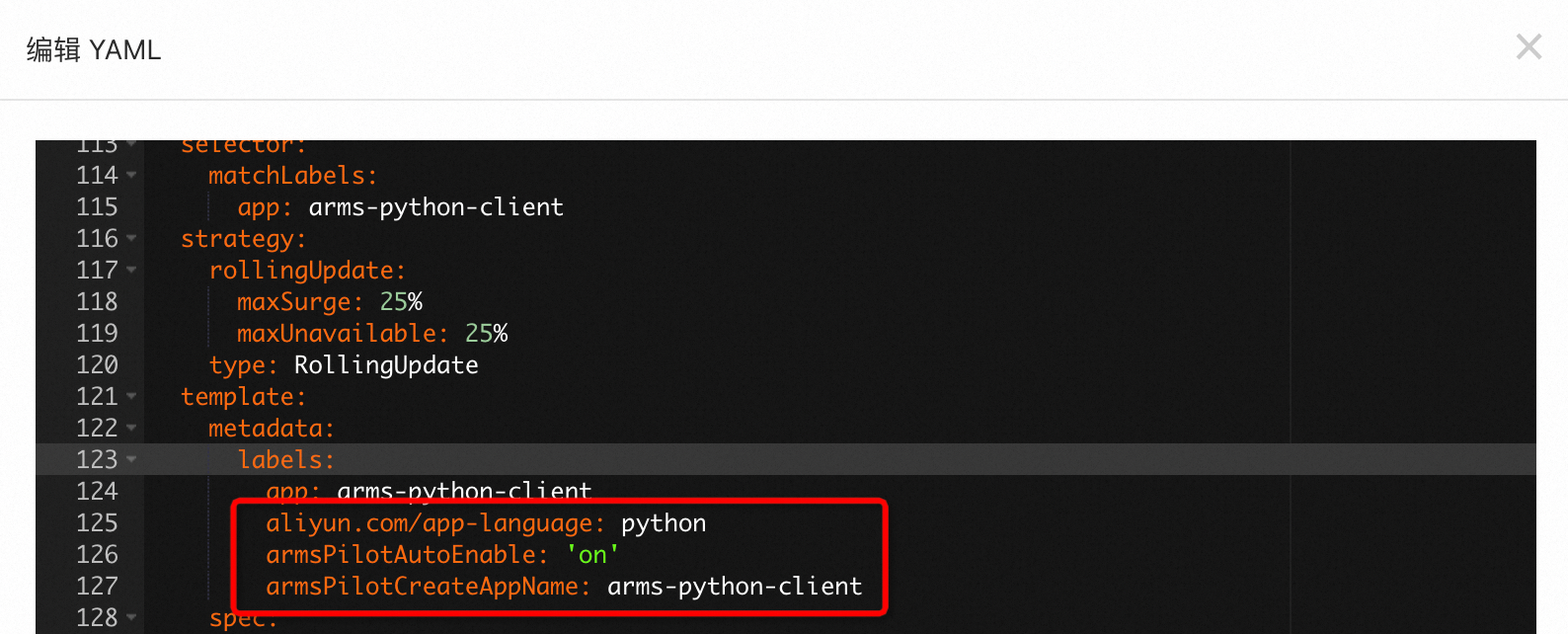
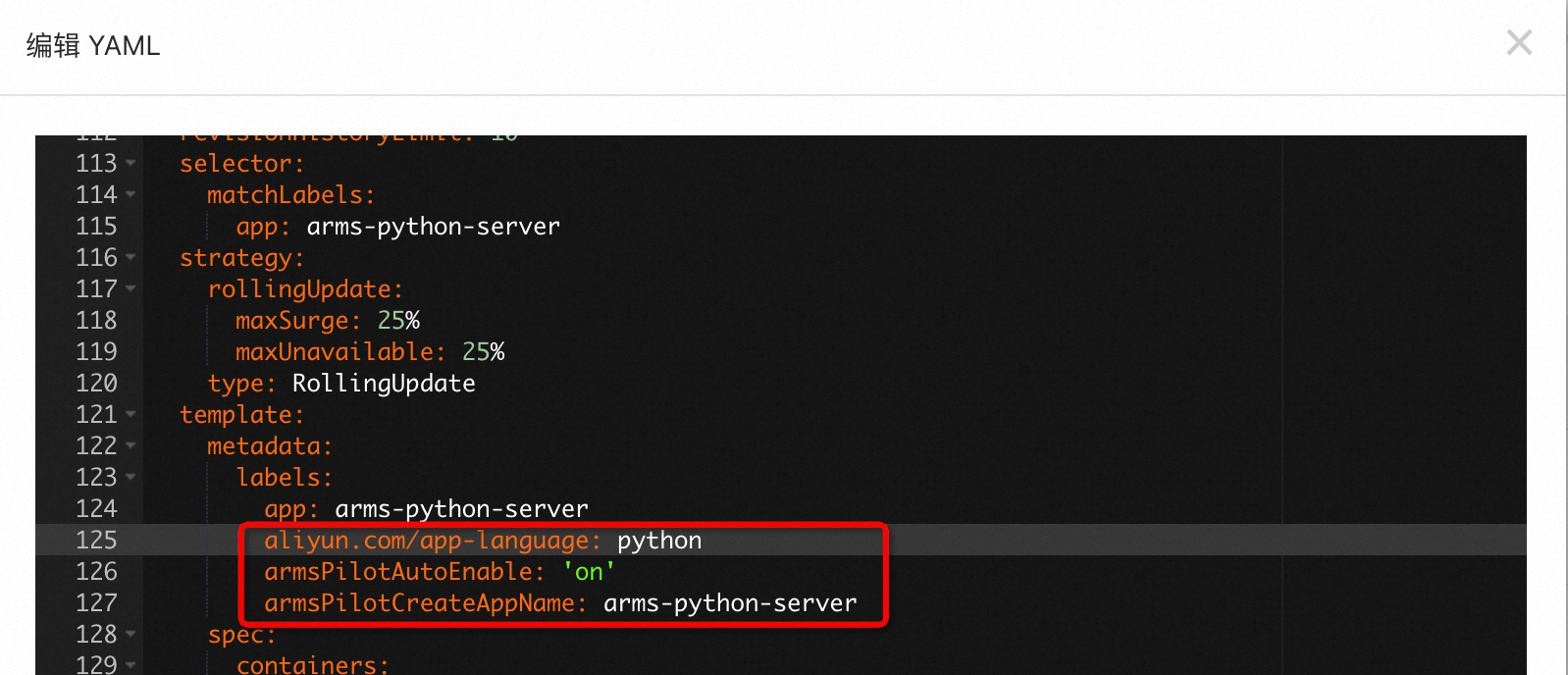
  2. 編輯YAML中將以下labels添加到spec.template.metadata層級下,然後單擊更新

    labels:
      aliyun.com/app-language: python # Python應用必填,標明此應用是Python應用。
      armsPilotAutoEnable: 'on'
      armsPilotCreateAppName: "<your-deployment-name>"    #應用在ARMS中的展示名稱。

    例如,在arms-python-clientarms-python-server應用的YAML中添加配置,開啟監控並配置在ARMS中的展示名稱分別為arms-python-clientarms-python-server

    arms-python-client應用

    image

    arms-python-server應用

    image

  3. 待容器完成自動重新部署後,等待1~2分鐘,在ARMS控制台應用監控 > 應用列表頁面單擊應用程式名稱,查看應用的監控指標。更多資訊,請參見查看監控詳情(新版)

    2024-09-25_10-36-51

查看監控詳情

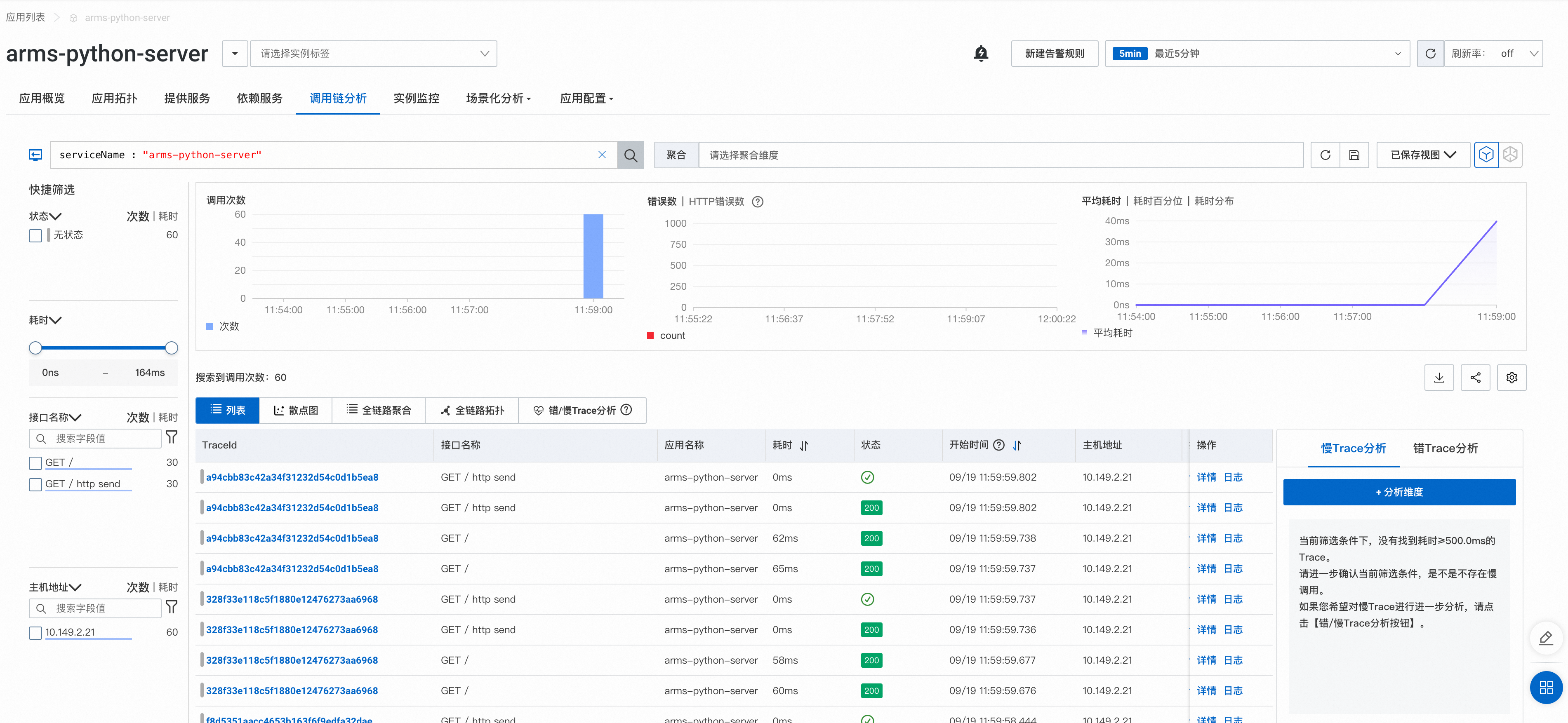
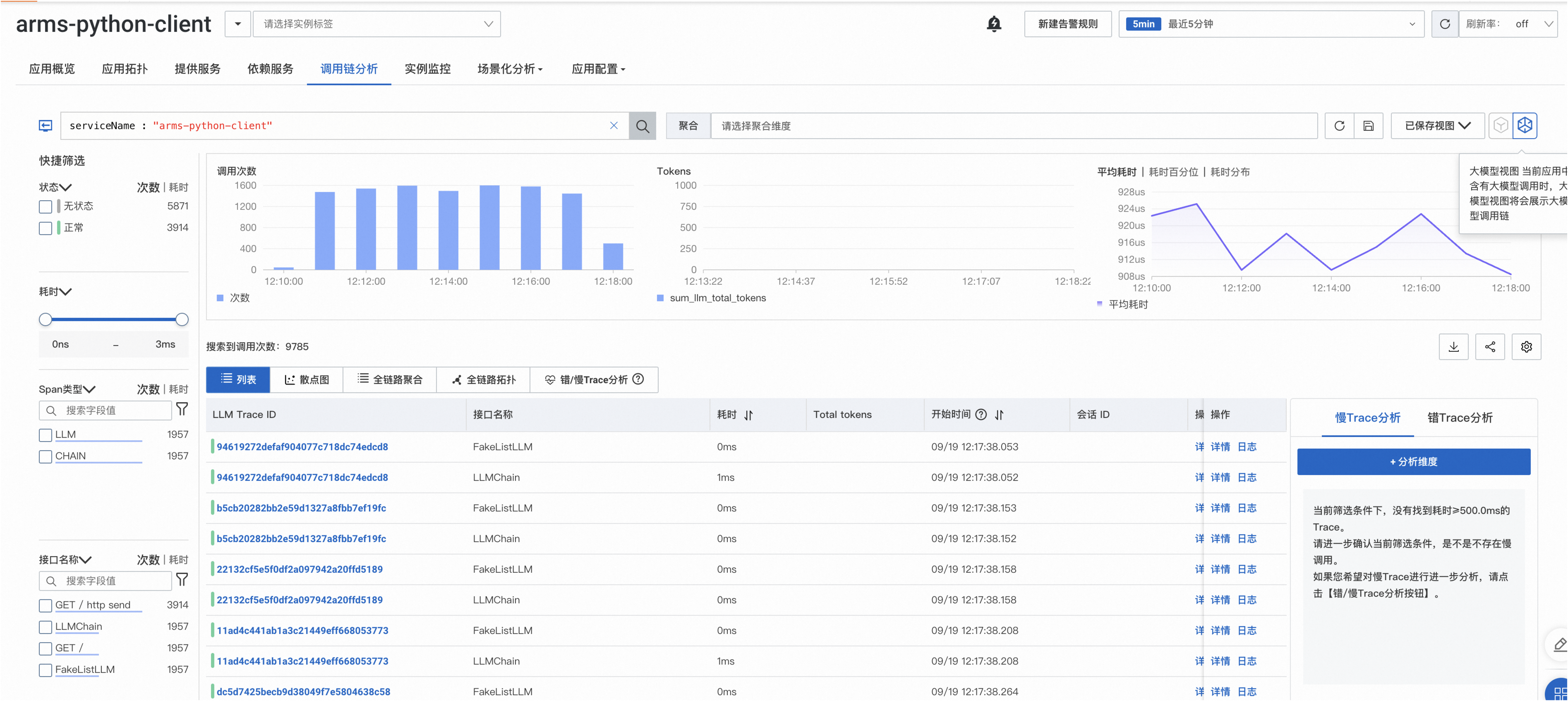
調用鏈分析

  • 微服務情境:

    調用鏈分析功能可以通過自由組合篩選條件與彙總維度進行即時分析,並支援通過錯/慢Trace分析功能,定位系統或應用產生錯、慢調用的原因。

    image

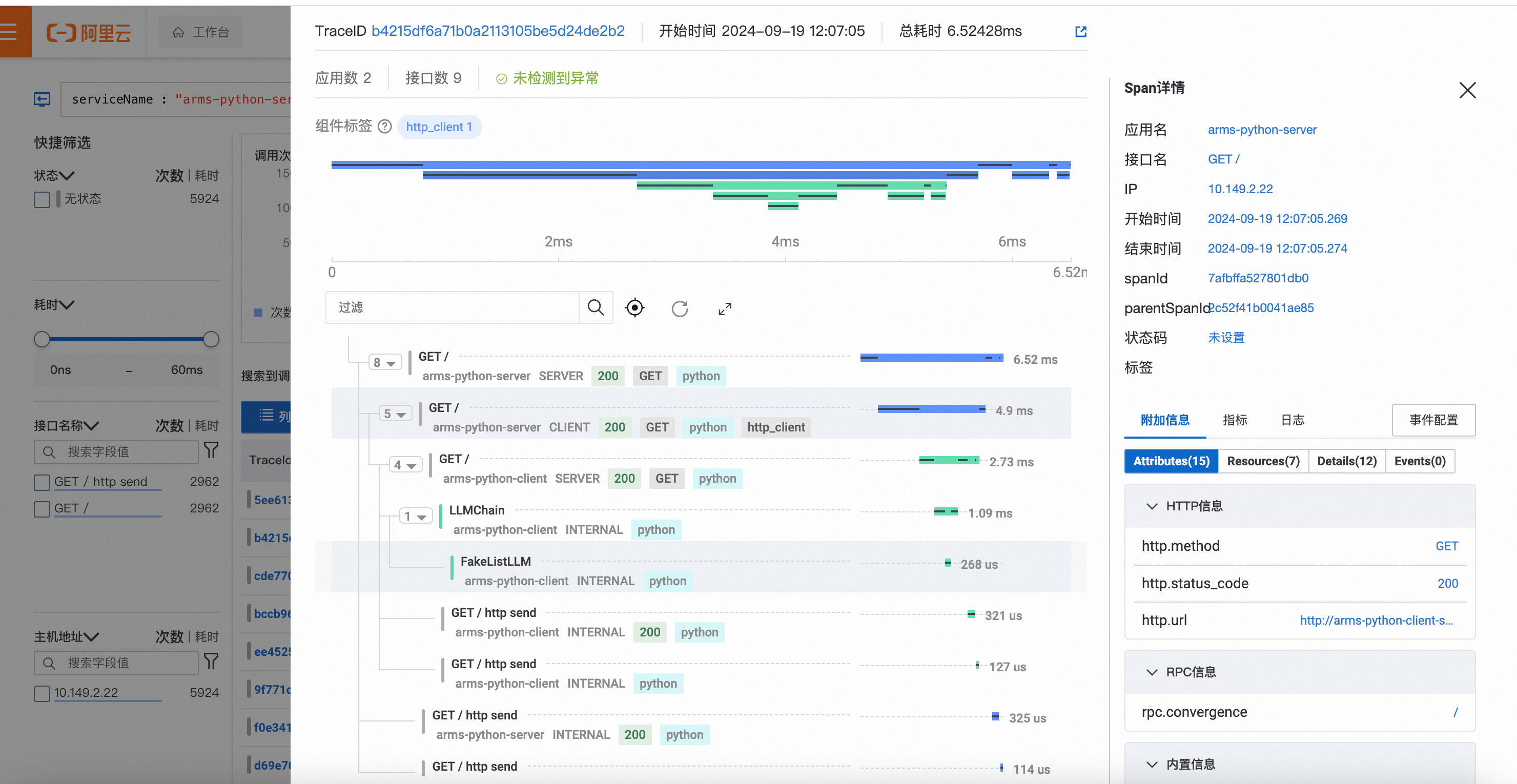
    調用鏈詳情:

    image

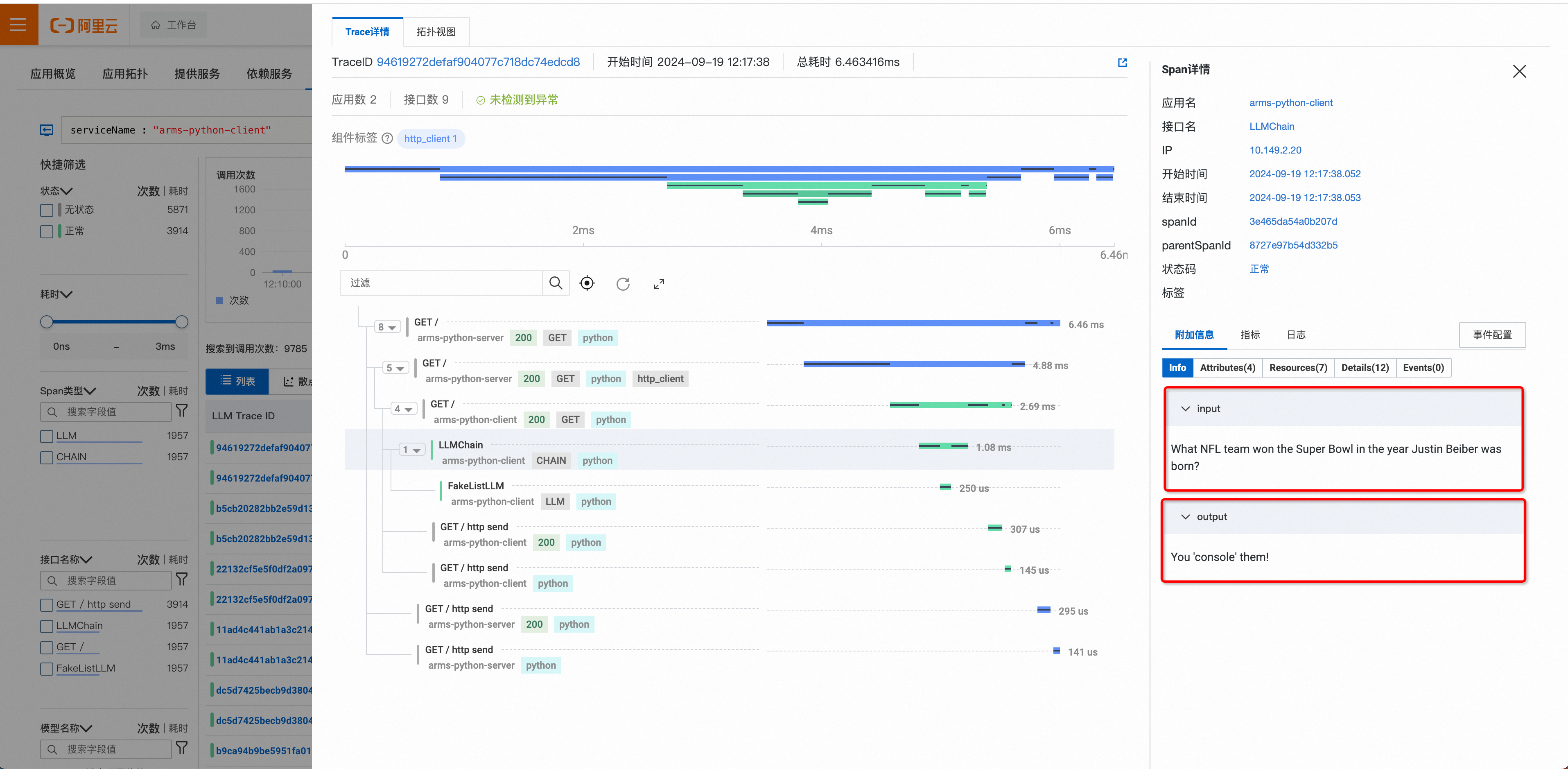
  • 大模型情境

    針對大模型情境,您可以查看LLM領域的新版TraceView,更直觀地分析不同操作類型的輸入輸出、Token消耗等資訊。

    切換為大模型視圖:

    image

    大模型調用資訊:

    image

監控指標

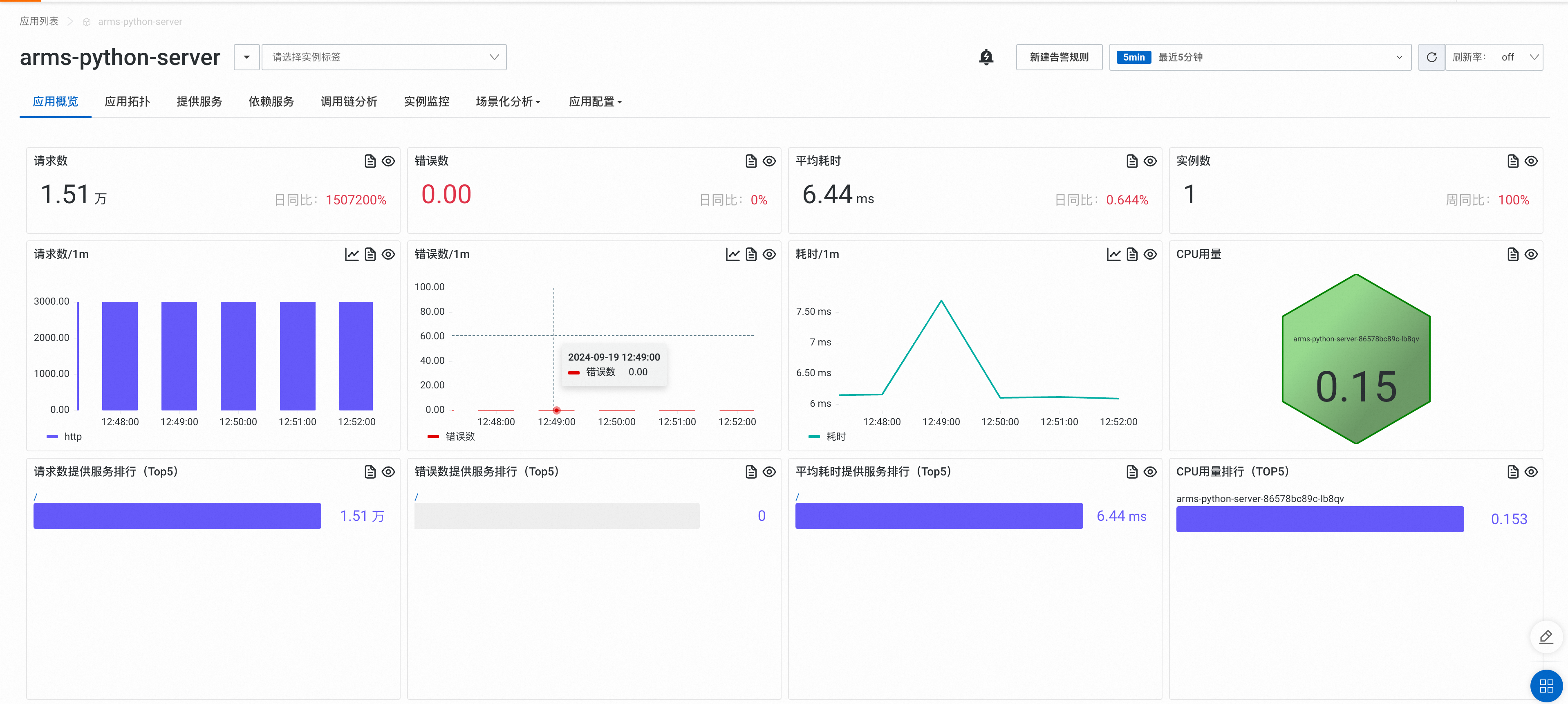
  • 應用概覽

    image

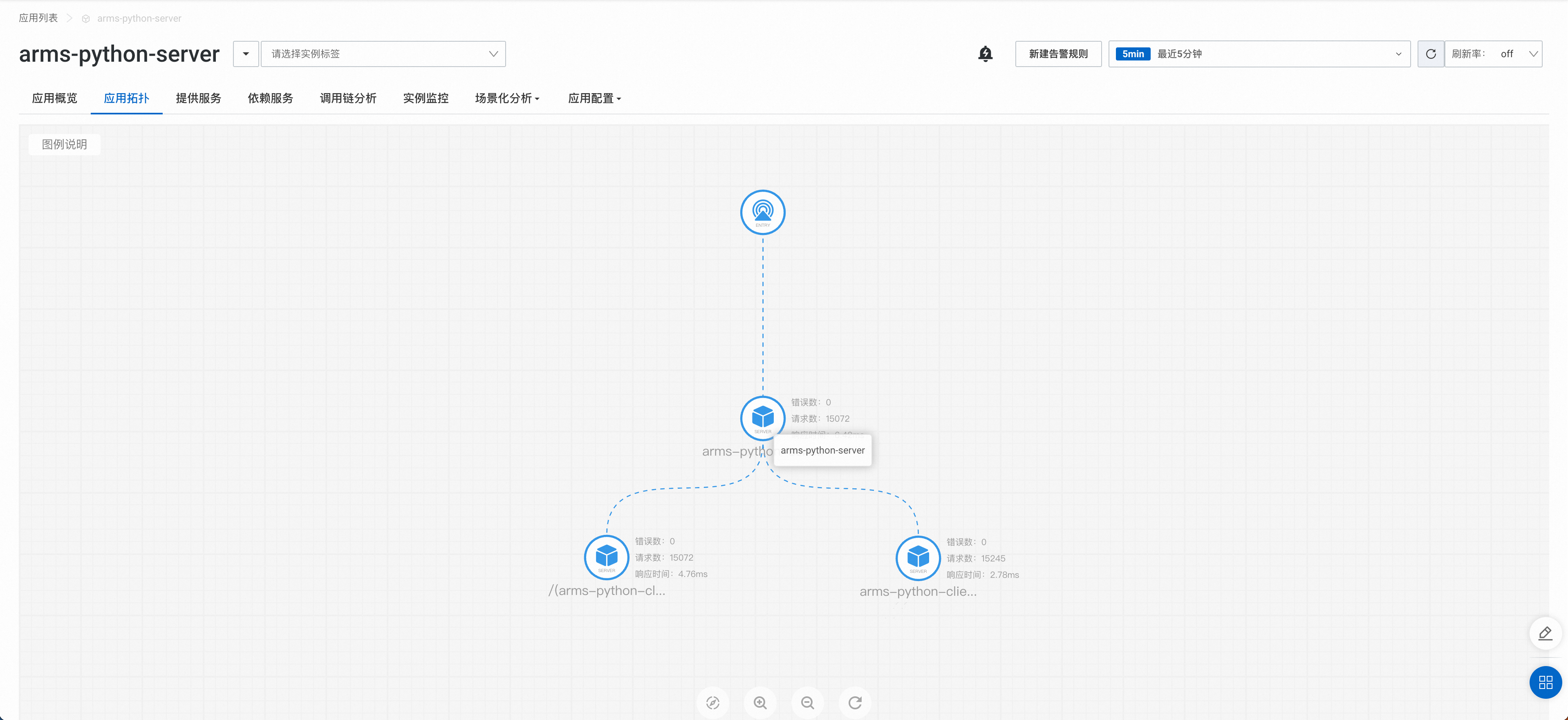
  • 應用拓撲

    image

配置警示

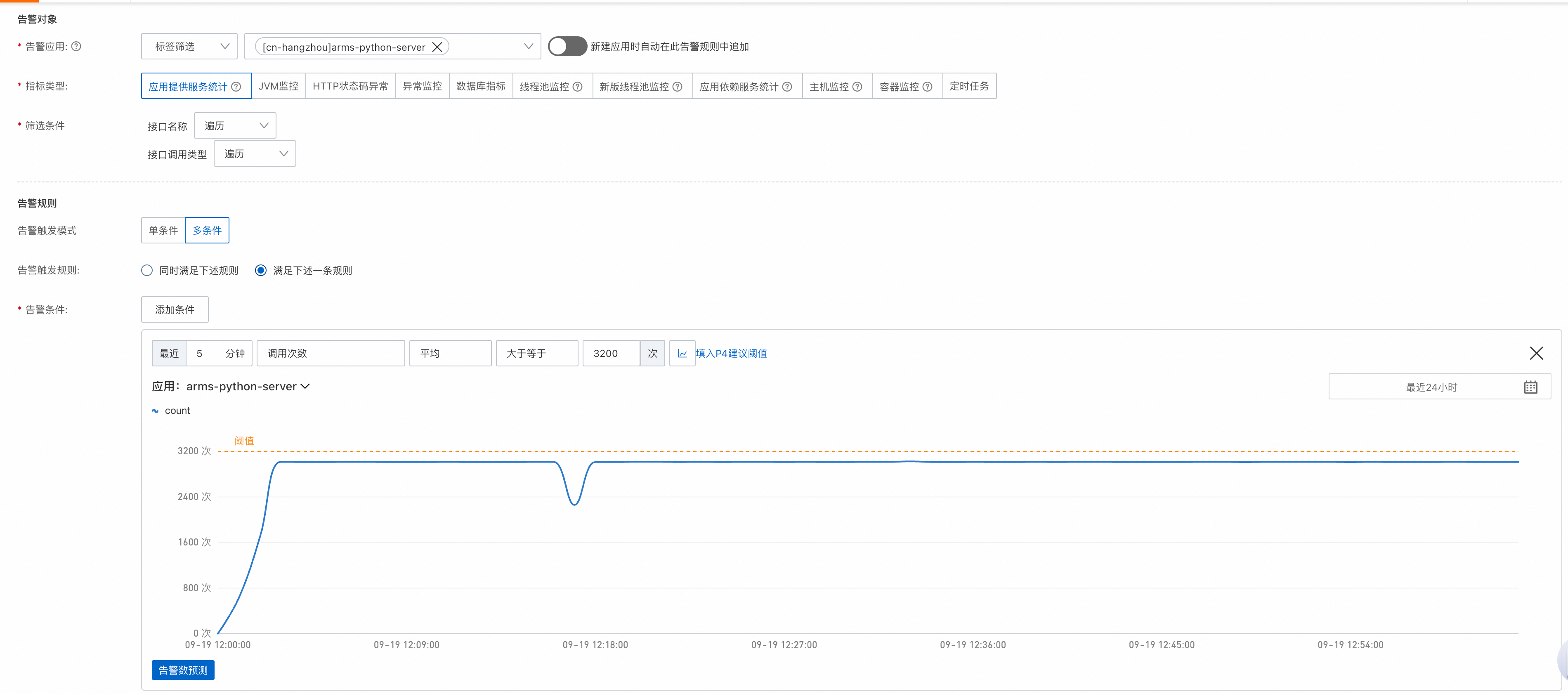
通過配置警示,您可以制定針對特定應用的警示規則。當警示規則被觸發時,系統會以您指定的通知方式向警示連絡人或釘群發送警示資訊,以提醒您採取必要的解決措施。具體操作,請參見應用監控警示規則

image

釋放資源

完成教程後:

  • 如果仍需要繼續監控當前應用,請確保賬戶不要欠費。

  • 如果無需繼續監控當前應用,請卸載探針。具體操作,請參見卸載Python探針

相關文檔

  • ARMS應用監控支援在應用的業務日誌中關聯調用鏈的TraceId資訊,從而在應用出現問題時,能夠通過調用鏈的TraceId快速關聯到業務日誌,及時定位、分析並解決問題。更多資訊,請參見Java應用業務日誌關聯調用鏈TraceId

  • 阿里雲可觀測監控 Prometheus 版預設整合了ARMS應用監控資料來源,您可以直接在可觀測監控 Prometheus 版下擷取應用監控相關資料、查看應用監控預置大盤,並根據需求進行二次開發。更多資訊,請參見通過Prometheus監控擷取ARMS應用監控資料