您可以通過Terraform購買並管理DDoS高防執行個體。本文以購買DDoS高防執行個體為例進行介紹。
當前範例程式碼支援一鍵運行,您可以直接運行代碼。一鍵運行
前提條件
由於阿里雲帳號(主帳號)具有資源的所有許可權,一旦發生泄露將面臨重大風險。建議您使用RAM使用者,並為該RAM使用者建立AccessKey,具體操作方式請參見建立RAM使用者和建立AccessKey。
為運行Terraform命令的RAM使用者綁定以下最小權限原則,以擷取管理本樣本所涉及資源的許可權。更多資訊,請參見管理RAM使用者的許可權。
該權限原則允許RAM使用者建立、查看和刪除RAM角色,並支援對RAM角色權限原則的管理。
{
  "Statement": [
    {
      "Action": [
        "ddosprotection:CreateInstance",
        "ddosprotection:DeleteInstance"
      ],
      "Effect": "Allow",
      "Resource": "*"
    }
  ],
  "Version": "1"
}
準備Terraform運行環境,您可以選擇以下任一方式來使用Terraform。
在Terraform Explorer中使用Terraform:阿里雲提供了Terraform的線上運行環境,您無需安裝Terraform,登入後即可線上使用和體驗Terraform。適用於零成本、快速、便捷地體驗和調試Terraform的情境。
使用Terraform快速建立資源:阿里雲Cloud Shell中預裝了Terraform的組件,並已配置好身份憑證,您可直接在Cloud Shell中運行Terraform的命令。適用於低成本、快速、便捷地訪問和使用Terraform的情境。
在本地安裝和配置Terraform:適用於網路連接較差或需要自訂開發環境的情境。
使用的資源
alicloud_ddoscoo_instance:建立一個DDoS防護執行個體。
操作步驟
建立一個工作目錄,並且在工作目錄中建立以下名為
main.tf的設定檔。main.tf:Terraform主檔案,定義了將要部署的資源。以購買DDoS高防(非中國內地)執行個體為例介紹。
重要使用Terraform定義和部署DDoS高防(非中國內地)執行個體時,請注意,建立的執行個體不支援通過Terraform進行銷毀。請謹慎管理執行個體的生命週期,避免不必要的費用。
# 地區
variable "region_id" {
  type    = string
  default = "ap-southeast-1"  # 修改為 新加坡
}

# DDoS CoO 執行個體名稱
variable "ddoscoo_instance_name" {
  description = "The name of the DDoS CoO instance"
  type        = string
  default     = "Ddoscoo-spm-fofo"  # 預設值
}
# 連接埠數量(必需)執行個體的連接埠重傳規則數量。至少為50。每次增加5,例如55、60、65。僅支援升級。
variable "port_count" {
  description = "Number of ports for the DDoS CoO instance"
  type        = string
  default     = "50"  # 預設值
}
#0:保險防護    #1:無限防護   #2:中國大陸加速線路。 #3:安全中國大陸加速(Sec-CMA)風險降低計畫。
variable "product_plan" {
  description = "Product plan of the DDoS CoO instance"
  type        = string
  default     = "0"
}

# 網域名稱數量(必需)執行個體的網域名稱重傳規則數量。至少為50。每次增加5,例如55、60、65。僅支援升級。
variable "domain_count" {
  description = "Number of domains for the DDoS CoO instance"
  type        = string
  default     = "50"  # 預設值
}

# 購買周期
variable "period" {
  description = "Purchase period of the DDoS CoO instance"
  type        = string
  default     = "1"  # 預設值
}

# 產品類型
variable "product_type" {
  description = "Product type of the DDoS CoO instance"
  type        = string
  default     = "ddosDip"  #  國際版 ddoscoo_intl
}

# 計費模式
variable "pricing_mode" {
  description = "Pricing mode of the DDoS CoO instance (Prepaid or Postpaid)"
  type        = string
  default     = "Postpaid"  # 預設值
}
# 清洗頻寬 執行個體提供的清洗頻寬
variable "normal_bandwidth" {
  description = "Clean bandwidth provided by the instance, valid only when product_type is ddosDip"
  type        = number
  default     = 100
}
# 每秒查詢數 執行個體提供的清洗QPS
variable "normal_qps" {
  description = "Normal QPS provided by the instance, valid only for security_acceleration"
  type        = number
  default     = 500
}
# 功能版本 標準功能計劃
variable "function_version" {
  description = "Function version of the instance, valid only for security_acceleration"
  type        = number
  default     = 0
}

provider "alicloud" {
  region = var.region_id
}

resource "alicloud_ddoscoo_instance" "newInstance" {
  name             = var.ddoscoo_instance_name
  port_count       = var.port_count
  domain_count     = var.domain_count
  period           = var.pricing_mode == "Prepaid" ? var.period : null
  product_type     = var.product_type
  product_plan     = var.product_plan
  function_version = var.function_version
  normal_bandwidth = var.normal_bandwidth

}

output "instance_id" {
  description = "The ID of the DDoS CoO instance"
  value       = alicloud_ddoscoo_instance.newInstance.id
}

output "instance_name" {
  description = "The name of the DDoS CoO instance"
  value       = var.ddoscoo_instance_name
}
執行
terraform init命令初始化Terraform。預期輸出:
Terraform has been successfully initialized!

You may now begin working with Terraform. Try running "terraform plan" to see
any changes that are required for your infrastructure. All Terraform commands
should now work.

If you ever set or change modules or backend configuration for Terraform,
rerun this command to reinitialize your working directory. If you forget, other
commands will detect it and remind you to do so if necessary.
執行
terraform plan命令產生資源規劃。
預期結果:
alicloud_ddoscoo_instance.newInstance: Refreshing state... [id=ddoscoo-cn-20s3zrc4k001]

Terraform used the selected providers to generate the following execution plan. Resource actions are indicated with the following symbols:
  ~ update in-place

Terraform will perform the following actions:

  # alicloud_ddoscoo_instance.newInstance will be updated in-place
  ~ resource "alicloud_ddoscoo_instance" "newInstance" {
        id                = "ddoscoo-cn-20**********""
      ~ name              = "yourDdoscooInstanceName" -> "Ddoscoo"
        # (7 unchanged attributes hidden)
    }

Plan: 0 to add, 1 to change, 0 to destroy.

Changes to Outputs:
  + instance_id   = "ddoscoo-cn-**********"
  + instance_name = "Ddoscoo"
執行
terraform apply命令。在執行過程中,根據提示輸入yes並按下Enter鍵,等待命令執行完成,若出現以下資訊,則表示授權完成。
預期結果:
alicloud_ddoscoo_instance.newInstance: Modifying... [id=ddoscoo-cn-*********]
alicloud_ddoscoo_instance.newInstance: Modifications complete after 1s [id=ddoscoo-cn-*********]

Apply complete! Resources: 0 added, 1 changed, 0 destroyed.

Outputs:

instance_id = "ddoscoo-cn-*********"
instance_name = "Ddoscoo"
操作驗證。
執行terraform show命令
您可以使用以下命令查詢Terraform已建立的資來源詳細資料:
terraform show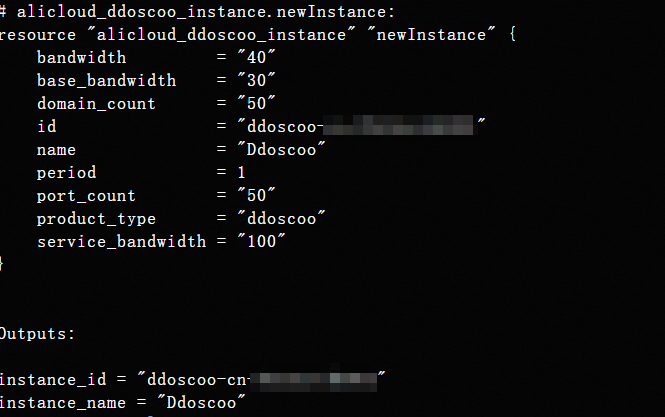
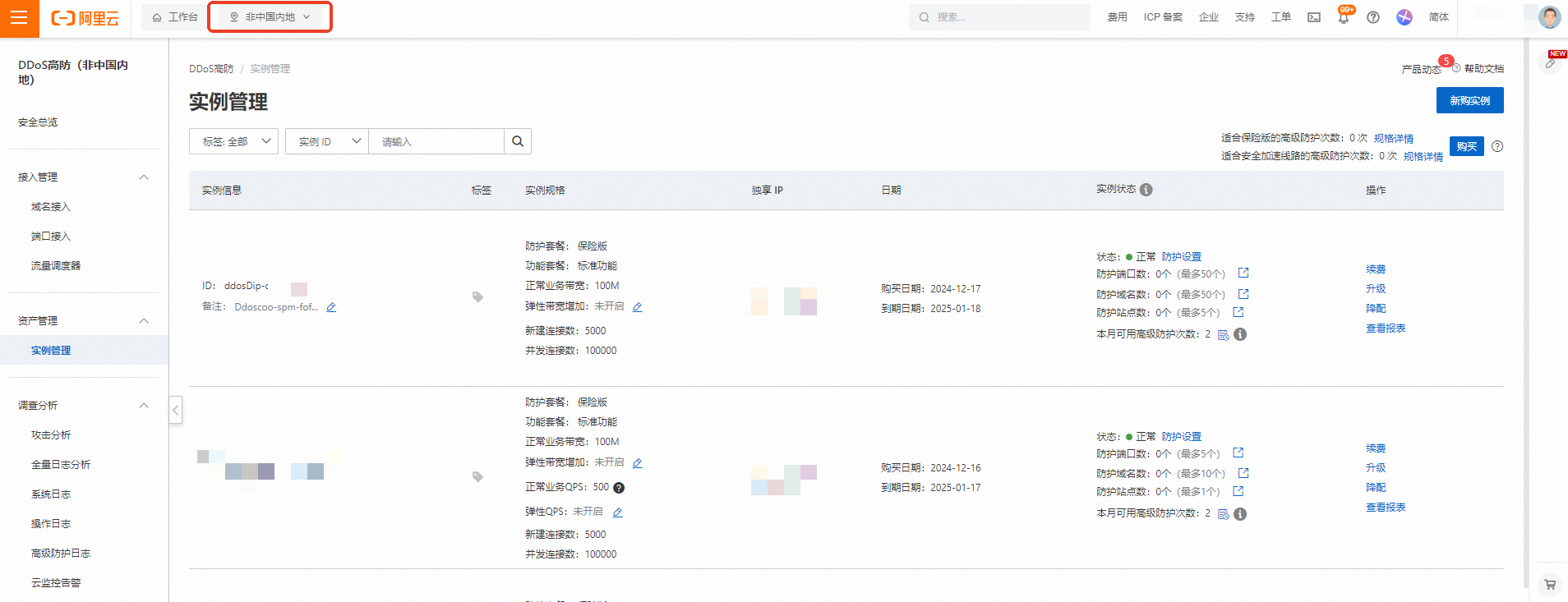
DDoS高防(中國內地)控制台
登入DDoS高防控制台,查看建立執行個體。
完整程式碼範例
當前範例程式碼支援一鍵運行,您可以直接運行代碼。一鍵運行
# 地區
variable "region_id" {
  type    = string
  default = "ap-southeast-1"  # 修改為 新加坡
}

# DDoS CoO 執行個體名稱
variable "ddoscoo_instance_name" {
  description = "The name of the DDoS CoO instance"
  type        = string
  default     = "Ddoscoo-spm-fofo"  # 預設值
}
# 連接埠數量(必需)執行個體的連接埠重傳規則數量。至少為50。每次增加5,例如55、60、65。僅支援升級。
variable "port_count" {
  description = "Number of ports for the DDoS CoO instance"
  type        = string
  default     = "50"  # 預設值
}
#0:保險防護    #1:無限防護   #2:中國大陸加速線路。 #3:安全中國大陸加速(Sec-CMA)風險降低計畫。
variable "product_plan" {
  description = "Product plan of the DDoS CoO instance"
  type        = string
  default     = "0"
}

# 網域名稱數量(必需)執行個體的網域名稱重傳規則數量。至少為50。每次增加5,例如55、60、65。僅支援升級。
variable "domain_count" {
  description = "Number of domains for the DDoS CoO instance"
  type        = string
  default     = "50"  # 預設值
}

# 購買周期
variable "period" {
  description = "Purchase period of the DDoS CoO instance"
  type        = string
  default     = "1"  # 預設值
}

# 產品類型
variable "product_type" {
  description = "Product type of the DDoS CoO instance"
  type        = string
  default     = "ddosDip"  #  國際版 ddoscoo_intl
}

# 計費模式
variable "pricing_mode" {
  description = "Pricing mode of the DDoS CoO instance (Prepaid or Postpaid)"
  type        = string
  default     = "Postpaid"  # 預設值
}
# 清洗頻寬 執行個體提供的清洗頻寬
variable "normal_bandwidth" {
  description = "Clean bandwidth provided by the instance, valid only when product_type is ddosDip"
  type        = number
  default     = 100
}
# 每秒查詢數 執行個體提供的清洗QPS
variable "normal_qps" {
  description = "Normal QPS provided by the instance, valid only for security_acceleration"
  type        = number
  default     = 500
}
# 功能版本 標準功能計劃
variable "function_version" {
  description = "Function version of the instance, valid only for security_acceleration"
  type        = number
  default     = 0
}

provider "alicloud" {
  region = var.region_id
}

resource "alicloud_ddoscoo_instance" "newInstance" {
  name             = var.ddoscoo_instance_name
  port_count       = var.port_count
  domain_count     = var.domain_count
  period           = var.pricing_mode == "Prepaid" ? var.period : null
  product_type     = var.product_type
  product_plan     = var.product_plan
  function_version = var.function_version
  normal_bandwidth = var.normal_bandwidth

}

output "instance_id" {
  description = "The ID of the DDoS CoO instance"
  value       = alicloud_ddoscoo_instance.newInstance.id
}

output "instance_name" {
  description = "The name of the DDoS CoO instance"
  value       = var.ddoscoo_instance_name
}
相關文檔
Terrafrom介紹,請參見瞭解阿里雲Terraform。